> ## Documentation Index
> Fetch the complete documentation index at: https://docs.ycloud.com/llms.txt
> Use this file to discover all available pages before exploring further.
# WhatsApp Messaging Examples
> Send template, media, interactive, commerce, Flow, and calling messages with annotated request examples.
## What it is
Send template, media, interactive, commerce, Flow, and calling messages with annotated request examples.
## Before you begin
* Store a YCloud API key in a server-side secret.
* Connect the WhatsApp Business Account and phone number used by the request.
* Create and approve any template referenced by a messaging request.
* Replace every placeholder with a value from your own account.
## How it works
Choose the scenario that matches the message or template you want to build. Compare its fields with the API Reference, replace the placeholders, and test with a controlled recipient before using the request in production.
## Request
Each scenario includes a complete message request. The examples use direct sending for fast feedback, but the same message objects can also be queued.
## Response
A successful send response confirms that YCloud accepted the message request; use message retrieval or `whatsapp.message.updated` webhooks to determine the final delivery state.
Use the [WhatsApp messaging guide](/en/api-reference/guides/whatsapp-platform/send-whatsapp-message) for lifecycle guidance and the API Reference for the complete schema.
## Choose an example
Send approved templates for authentication, marketing, utility, and commerce use cases.
Send text, media, location, contact, and reaction messages inside an open customer service window.
Add lists, buttons, Flows, products, calling, and carousel interactions.
Send product, order details, order status, and checkout experiences.
The examples below apply to both the [Send a WhatsApp message directly](/api-reference/whatsapp-messages/send-a-message-directly) API and the [Enqueue a WhatsApp message](/api-reference/whatsapp-messages/enqueue-a-message) API.
Starting with template messages is an easy way to initiate a [conversation](https://developers.facebook.com/docs/whatsapp/pricing#opening-conversations). **Once the customer replies to the business's template message, the business can begin sending any type of message to the customer in 24 hours.**
## Template message examples
The examples below are WhatsApp template message examples. Each template must be created and approved before it can be used to send messages.
### Authentication template message with one-time password buttons
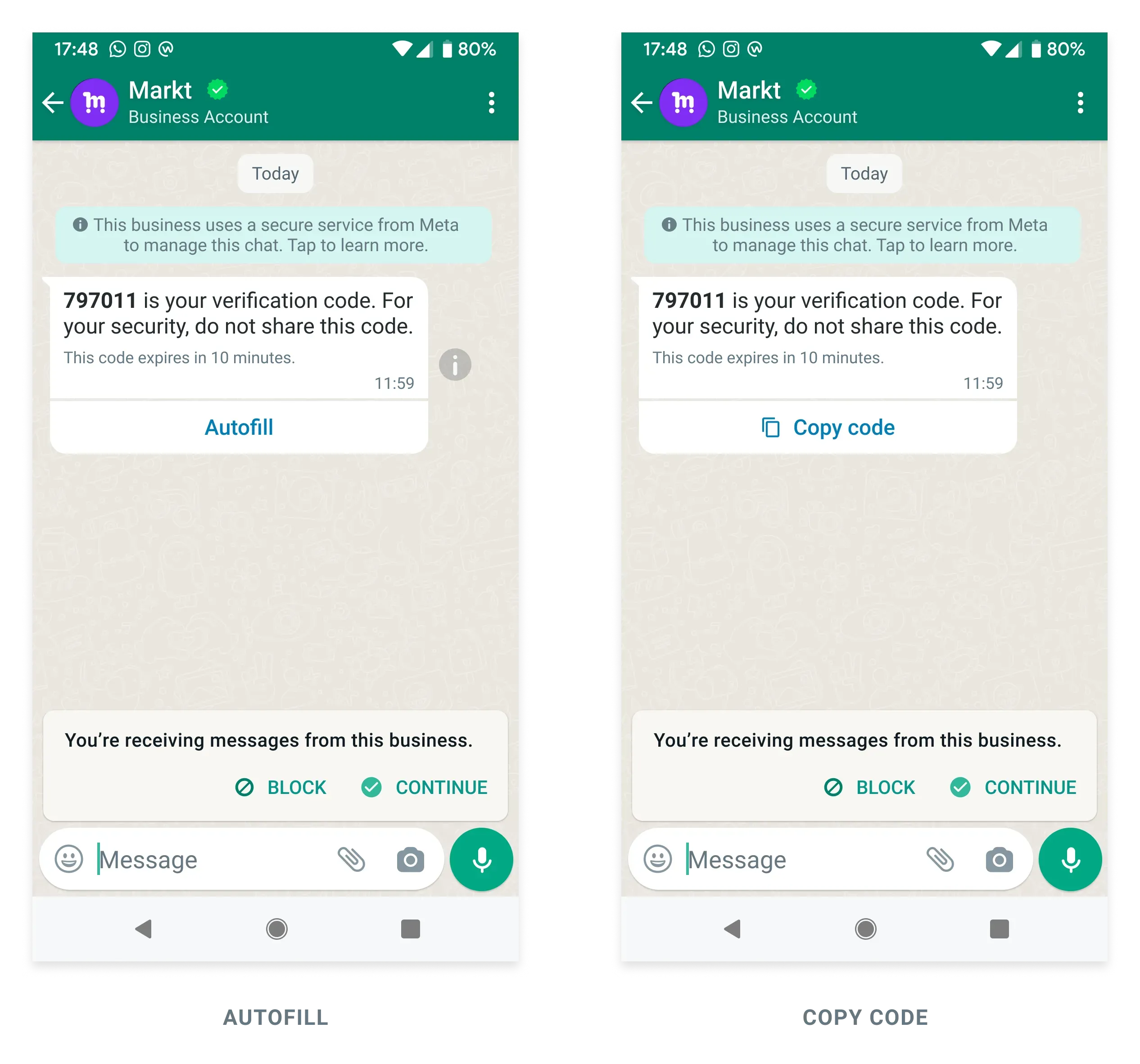
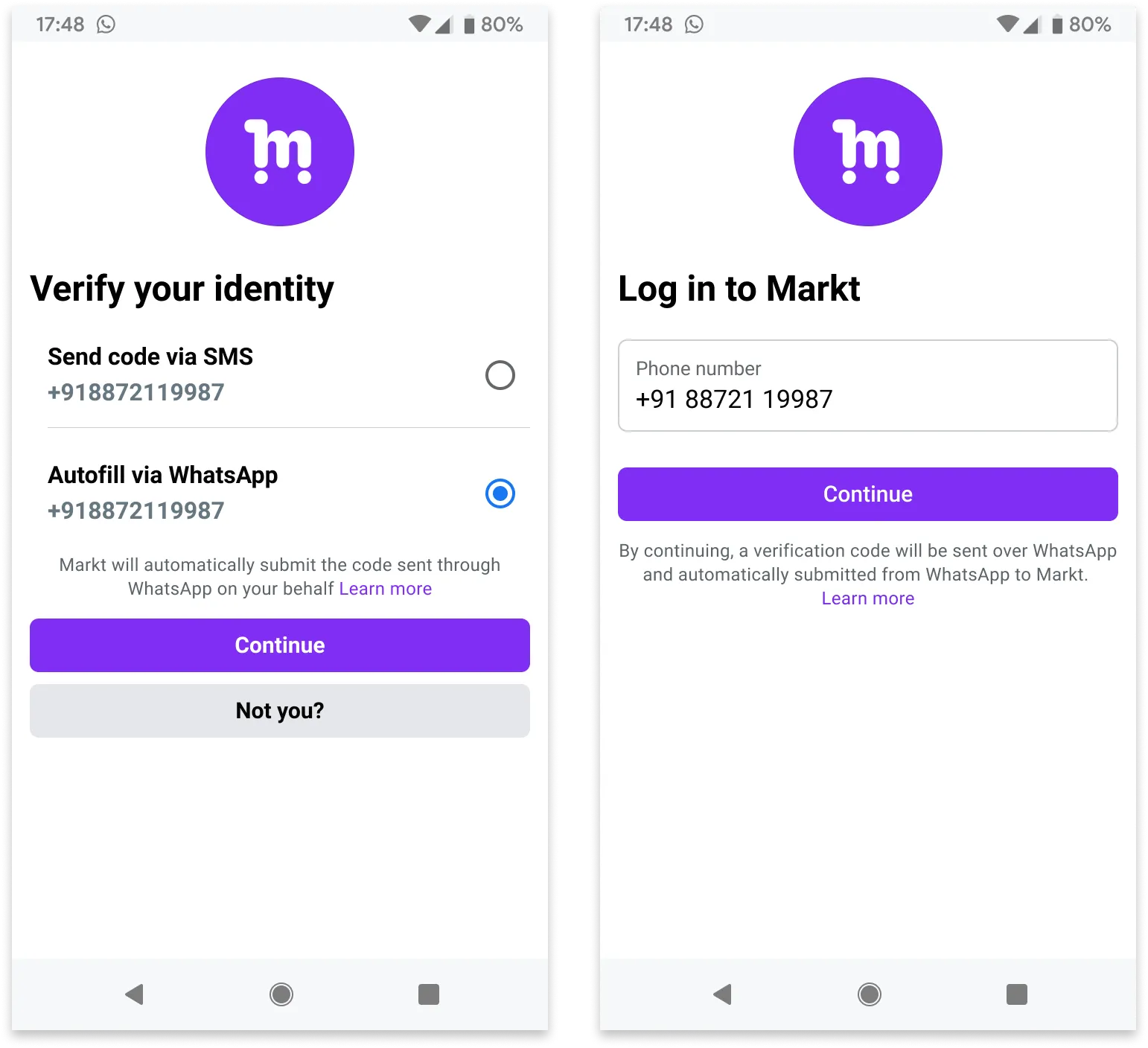
In this case, you have an **[Authentication template with Copy Code button](/en/api-reference/guides/examples/api-examples/whatsapp-template-creation-examples#authentication-template-with-copy-code-button)**, **[Authentication template with one-tap button](/en/api-reference/guides/examples/api-examples/whatsapp-template-creation-examples#authentication-template-with-one-tap-button)**, or **[Zero-tap authentication template](/en/api-reference/guides/examples/api-examples/whatsapp-template-creation-examples#zero-tap-authentication-template)**, and send a template message:
* Contains a one-time password or verification code to be delivered to the customer.
* Contains a **copy code** button, a **one-tap autofill** button, or no button at all if using **zero-tap**.
**ZERO-TAP
**
#### Request
```shell theme={"theme":{"light":"github-light","dark":"github-dark"}}
curl 'https://api.ycloud.com/v2/whatsapp/messages/sendDirectly' \
-H 'Content-Type: application/json' \
-H 'X-API-Key: {{YOUR-API-KEY}}' \
-d '{
"from": "{{BUSINESS-PHONE-NUMBER}}",
"to": "{{CUSTOMER-PHONE-NUMBER}}",
"type": "template",
"template": {
"name": "otp_one_tap",
"language": {
"code": "{{LANGUAGE-CODE}}",
"policy": "deterministic"
},
"components": [
{
"type": "body",
"parameters": [
{
"type": "text",
"text": "797011"
}
]
},
{
"type": "button",
"sub_type": "url",
"index": "0",
"parameters": [
{
"type": "text",
"text": "797011"
}
]
}
]
}
}'
```
#### Response
A successful request returns the YCloud message object. An initial `accepted` status confirms submission, not final delivery.
```json theme={"theme":{"light":"github-light","dark":"github-dark"}}
{
"id": "MESSAGE_ID",
"status": "accepted"
}
```
Store `id` and correlate later `whatsapp.message.updated` events.
#### Explanation
* The message body text will contain the verification code found in the body component. On the other hand, the code that is really used when users click the one-tap or copy code buttons is the one in the button component. They ought to be the same in most cases.
### Template message with variables
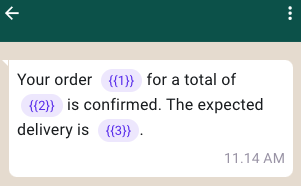
In this case, you have a **[Utility template with variables in body](/en/api-reference/guides/examples/api-examples/whatsapp-template-creation-examples#utility-template-with-variables-in-body)**, and send a template message:
* Contains text with 3 variables in the body.
#### Request
```shell theme={"theme":{"light":"github-light","dark":"github-dark"}}
curl 'https://api.ycloud.com/v2/whatsapp/messages/sendDirectly' \
-H 'Content-Type: application/json' \
-H 'X-API-Key: {{YOUR-API-KEY}}' \
-d '{
"from": "{{BUSINESS-PHONE-NUMBER}}",
"to": "{{CUSTOMER-PHONE-NUMBER}}",
"type": "template",
"template": {
"name": "order_confirmation",
"language": {
"code": "{{LANGUAGE-CODE}}",
"policy": "deterministic"
},
"components": [
{
"type": "body",
"parameters": [
{
"type": "text",
"text": "ORDER-TITLE"
},
{
"type": "text",
"text": "9.9 USD"
},
{
"type": "text",
"text": "February 25"
}
]
}
]
}
}'
```
#### Response
A successful request returns the YCloud message object. An initial `accepted` status confirms submission, not final delivery.
```json theme={"theme":{"light":"github-light","dark":"github-dark"}}
{
"id": "MESSAGE_ID",
"status": "accepted"
}
```
Store `id` and correlate later `whatsapp.message.updated` events.
#### Explanation
* Make sure that the corresponding template has been approved.
* **Set the right `type` for messages you send. In this case, `type` is set to `template`, and the `components` and `parameters` of the messaging request must match the template.**
### Template message with image and Quick Reply buttons
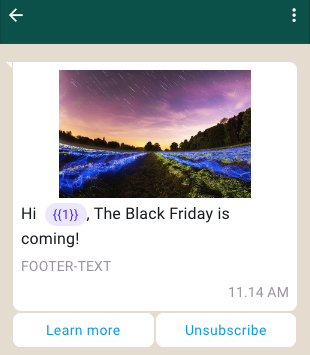
In this case, you have a **[Marketing template with image and Quick Reply buttons](/en/api-reference/guides/examples/api-examples/whatsapp-template-creation-examples#marketing-template-with-image-and-quick-reply-buttons)**, and send a template message:
* Contains an image in the header.
* Contains text with 1 variable in the body.
* Contains text in the footer.
* Contains 2 Quick Reply buttons. The maximum number of Quick Reply buttons is 3.
#### Request
```shell theme={"theme":{"light":"github-light","dark":"github-dark"}}
curl 'https://api.ycloud.com/v2/whatsapp/messages/sendDirectly' \
-H 'Content-Type: application/json' \
-H 'X-API-Key: {{YOUR-API-KEY}}' \
-d '{
"from": "{{BUSINESS-PHONE-NUMBER}}",
"to": "{{CUSTOMER-PHONE-NUMBER}}",
"type": "template",
"template": {
"name": "marketing_friday",
"language": {
"code": "{{LANGUAGE-CODE}}",
"policy": "deterministic"
},
"components": [
{
"type": "header",
"parameters": [
{
"type": "image",
"image": {
"link": "https://oss-ycloud-publicread.oss-ap-southeast-1.aliyuncs.com/api-docs/sample/sample.jpg"
}
}
]
},
{
"type": "body",
"parameters": [
{
"type": "text",
"text": "Lucy"
}
]
},
{
"type": "button",
"sub_type": "quick_reply",
"index": 0,
"parameters": [
{
"type": "payload",
"payload": "more_about_marketing_friday"
}
]
},
{
"type": "button",
"sub_type": "quick_reply",
"index": 1,
"parameters": [
{
"type": "payload",
"payload": "unsubscribe_marketing_notifications"
}
]
}
]
}
}'
```
#### Response
A successful request returns the YCloud message object. An initial `accepted` status confirms submission, not final delivery.
```json theme={"theme":{"light":"github-light","dark":"github-dark"}}
{
"id": "MESSAGE_ID",
"status": "accepted"
}
```
Store `id` and correlate later `whatsapp.message.updated` events.
#### Explanation
* The `caption` parameter (Used to describe the specified `image`, `video`, or `document` media.) is unsupported in `template` or `interactive` messages.
* For more information about header media limitations, see [Supported Media Types](https://developers.facebook.com/docs/whatsapp/cloud-api/reference/media#supported-media-types).
* Use `payload` to track user clicks on buttons. The button payload is not visible, but will be included when a user clicks a button, see also [Inbound Template Button message](/en/api-reference/guides/examples/webhook-examples/whatsapp-inbound-message-webhook-examples#inbound-template-button-message).
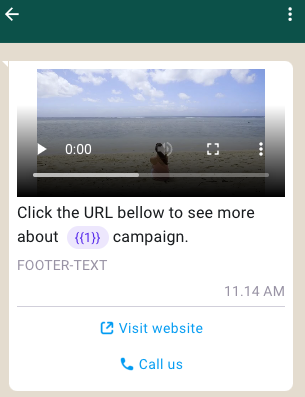
### Template message with video and Call To Action buttons
In this case, you have a **[Marketing template with video and Call To Action buttons](/en/api-reference/guides/examples/api-examples/whatsapp-template-creation-examples#marketing-template-with-video-and-call-to-action-buttons)**, and send a template message:
* Contains a video in the header.
* Contains text with 1 variable in the body.
* Contains text in the footer.
* Contains 2 Call To Action buttons: 1 `PHONE_NUMBER` button, and 1 `URL` button. The `URL` button can have at most 1 variable at the end of the URL.
#### Request
```shell theme={"theme":{"light":"github-light","dark":"github-dark"}}
curl 'https://api.ycloud.com/v2/whatsapp/messages/sendDirectly' \
-H 'Content-Type: application/json' \
-H 'X-API-Key: {{YOUR-API-KEY}}' \
-d '{
"from": "{{BUSINESS-PHONE-NUMBER}}",
"to": "{{CUSTOMER-PHONE-NUMBER}}",
"type": "template",
"template": {
"name": "marketing_friday_more",
"language": {
"code": "{{LANGUAGE-CODE}}",
"policy": "deterministic"
},
"components": [
{
"type": "header",
"parameters": [
{
"type": "video",
"video": {
"link": "https://oss-ycloud-publicread.oss-ap-southeast-1.aliyuncs.com/api-docs/sample/sample.mp4"
}
}
]
},
{
"type": "body",
"parameters": [
{
"type": "text",
"text": "The Friday"
}
]
},
{
"type": "button",
"sub_type": "url",
"index": 0,
"parameters": [
{
"type": "text",
"text": "qptHJVK2EjU"
}
]
}
]
}
}'
```
#### Response
A successful request returns the YCloud message object. An initial `accepted` status confirms submission, not final delivery.
```json theme={"theme":{"light":"github-light","dark":"github-dark"}}
{
"id": "MESSAGE_ID",
"status": "accepted"
}
```
Store `id` and correlate later `whatsapp.message.updated` events.
#### Explanation
* The `caption` parameter (Used to describe the specified `image`, `video`, or `document` media.) is unsupported in `template` or `interactive` messages.
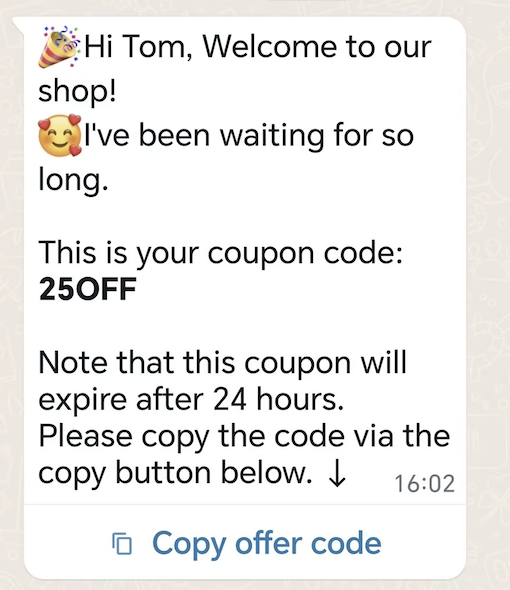
### Coupon template message
In this case, you have a **[Coupon template](/en/api-reference/guides/examples/api-examples/whatsapp-template-creation-examples#coupon-template)**, and send a template message:
* Contains text with 2 variables in the body.
* Contains 1 Copy Code button.
#### Request
```shell theme={"theme":{"light":"github-light","dark":"github-dark"}}
curl 'https://api.ycloud.com/v2/whatsapp/messages/sendDirectly' \
-H 'Content-Type: application/json' \
-H 'X-API-Key: {{YOUR-API-KEY}}' \
-d '{
"from": "{{BUSINESS-PHONE-NUMBER}}",
"to": "{{CUSTOMER-PHONE-NUMBER}}",
"type": "template",
"template": {
"name": "marketing_coupon",
"language": {
"code": "{{LANGUAGE-CODE}}",
"policy": "deterministic"
},
"components": [
{
"type": "body",
"parameters": [
{
"type": "text",
"text": "Tom"
},
{
"type": "text",
"text": "25OFF"
}
]
},
{
"type": "button",
"sub_type": "copy_code",
"index": 0,
"parameters": [
{
"type": "coupon_code",
"coupon_code": "25OFF"
}
]
}
]
}
}'
```
#### Response
A successful request returns the YCloud message object. An initial `accepted` status confirms submission, not final delivery.
```json theme={"theme":{"light":"github-light","dark":"github-dark"}}
{
"id": "MESSAGE_ID",
"status": "accepted"
}
```
Store `id` and correlate later `whatsapp.message.updated` events.
#### Explanation
* Coupon codes are limited to 15 characters.
* Button text cannot be customized.
### Location template message
In this case, you have a **[Location template](/en/api-reference/guides/examples/api-examples/whatsapp-template-creation-examples#location-template)**, and send a location template message:
#### Request
```shell theme={"theme":{"light":"github-light","dark":"github-dark"}}
curl 'https://api.ycloud.com/v2/whatsapp/messages/sendDirectly' \
-H 'Content-Type: application/json' \
-H 'X-API-Key: {{YOUR-API-KEY}}' \
-d '{
"from": "{{BUSINESS-PHONE-NUMBER}}",
"to": "{{CUSTOMER-PHONE-NUMBER}}",
"type": "template",
"template": {
"name": "location_header",
"language": {
"code": "{{LANGUAGE-CODE}}",
"policy": "deterministic"
},
"components": [
{
"type": "header",
"parameters": [
{
"type": "location",
"location": {
"latitude": 37.483307,
"longitude": 122.148981,
"name": "Pablo Morales",
"address": "1 Hacker Way, Menlo Park, CA 94025"
}
}
]
}
]
}
}'
```
#### Response
A successful request returns the YCloud message object. An initial `accepted` status confirms submission, not final delivery.
```json theme={"theme":{"light":"github-light","dark":"github-dark"}}
{
"id": "MESSAGE_ID",
"status": "accepted"
}
```
Store `id` and correlate later `whatsapp.message.updated` events.
#### Explanation
* `latitude` and `longitude` are required.
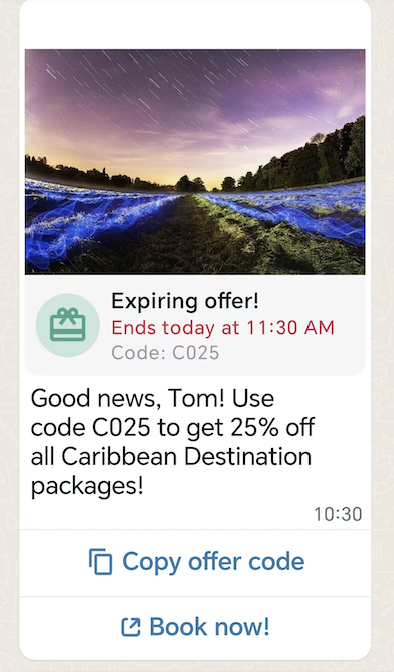
### Limited-Time Offer template message
In this case, you have a **[Limited-Time Offer template](/en/api-reference/guides/examples/api-examples/whatsapp-template-creation-examples#limited-time-offer-template)**, and send a limited-time offer (LTO) template message:
* Contains an image in the header.
* Displays expiration dates and running countdown timers for the offer code.
* Contains text with 2 variables in the body.
* Contains 2 buttons: 1 `COPY_CODE` button, and 1 `URL` button.
#### Request
```shell theme={"theme":{"light":"github-light","dark":"github-dark"}}
curl 'https://api.ycloud.com/v2/whatsapp/messages/sendDirectly' \
-H 'Content-Type: application/json' \
-H 'X-API-Key: {{YOUR-API-KEY}}' \
-d '{
"from": "{{BUSINESS-PHONE-NUMBER}}",
"to": "{{CUSTOMER-PHONE-NUMBER}}",
"type": "template",
"template": {
"name": "limited_time_offer_caribbean_pkg_2023",
"language": {
"code": "{{LANGUAGE-CODE}}",
"policy": "deterministic"
},
"components": [
{
"type": "header",
"parameters": [
{
"type": "image",
"image": {
"link": "https://oss-ycloud-publicread.oss-ap-southeast-1.aliyuncs.com/api-docs/sample/sample.jpg"
}
}
]
},
{
"type": "limited_time_offer",
"parameters": [
{
"type": "limited_time_offer",
"limited_time_offer": {
"expiration_time_ms": 1698118200000
}
}
]
},
{
"type": "body",
"parameters": [
{
"type": "text",
"text": "Tom"
},
{
"type": "text",
"text": "C025"
}
]
},
{
"type": "button",
"sub_type": "copy_code",
"index": "0",
"parameters": [
{
"type": "coupon_code",
"coupon_code": "C025"
}
]
},
{
"type": "button",
"sub_type": "url",
"index": "1",
"parameters": [
{
"type": "text",
"text": "param025"
}
]
}
]
}
}'
```
#### Response
A successful request returns the YCloud message object. An initial `accepted` status confirms submission, not final delivery.
```json theme={"theme":{"light":"github-light","dark":"github-dark"}}
{
"id": "MESSAGE_ID",
"status": "accepted"
}
```
Store `id` and correlate later `whatsapp.message.updated` events.
#### Explanation
Match the request fields to the selected message type and use the returned message ID for status correlation.
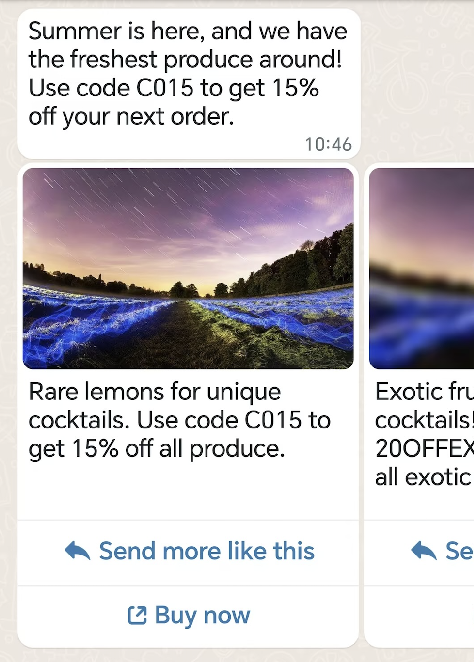
### Carousel template message
In this case, you have a **[Carousel template](/en/api-reference/guides/examples/api-examples/whatsapp-template-creation-examples#carousel-template)**, and send a carousel template message:
* Contains text with 2 variables in the body.
* Contains 2 carousel cards in a horizontally scrollable view.
#### Request
```shell theme={"theme":{"light":"github-light","dark":"github-dark"}}
curl 'https://api.ycloud.com/v2/whatsapp/messages/sendDirectly' \
-H 'Content-Type: application/json' \
-H 'X-API-Key: {{YOUR-API-KEY}}' \
-d '{
"from": "{{BUSINESS-PHONE-NUMBER}}",
"to": "{{CUSTOMER-PHONE-NUMBER}}",
"type": "template",
"template": {
"name": "summer_carousel_promo_2023",
"language": {
"code": "{{LANGUAGE-CODE}}",
"policy": "deterministic"
},
"components": [
{
"type": "body",
"parameters": [
{
"type": "text",
"text": "C015"
},
{
"type": "text",
"text": "15%"
}
]
},
{
"type": "carousel",
"cards": [
{
"card_index": 0,
"components": [
{
"type": "header",
"parameters": [
{
"type": "image",
"image": {
"link": "https://oss-ycloud-publicread.oss-ap-southeast-1.aliyuncs.com/api-docs/sample/sample.jpg"
}
}
]
},
{
"type": "body",
"parameters": [
{
"type": "text",
"text": "C015"
},
{
"type": "text",
"text": "15%"
}
]
},
{
"type": "button",
"sub_type": "quick_reply",
"index": 0,
"parameters": [
{
"type": "payload",
"payload": "summer_lemons_2023"
}
]
},
{
"type": "button",
"sub_type": "url",
"index": 1,
"parameters": [
{
"type": "text",
"text": "summer_lemons_2023"
}
]
}
]
},
{
"card_index": 1,
"components": [
{
"type": "header",
"parameters": [
{
"type": "image",
"image": {
"link": "https://oss-ycloud-publicread.oss-ap-southeast-1.aliyuncs.com/api-docs/sample/sample.jpg"
}
}
]
},
{
"type": "body",
"parameters": [
{
"type": "text",
"text": "20OFFEXOTIC"
},
{
"type": "text",
"text": "20%"
}
]
},
{
"type": "button",
"sub_type": "quick_reply",
"index": 0,
"parameters": [
{
"type": "payload",
"payload": "summer_blues_2023"
}
]
},
{
"type": "button",
"sub_type": "url",
"index": 1,
"parameters": [
{
"type": "text",
"text": "summer_blues_2023"
}
]
}
]
}
]
}
]
}
}'
```
#### Response
A successful request returns the YCloud message object. An initial `accepted` status confirms submission, not final delivery.
```json theme={"theme":{"light":"github-light","dark":"github-dark"}}
{
"id": "MESSAGE_ID",
"status": "accepted"
}
```
Store `id` and correlate later `whatsapp.message.updated` events.
#### Explanation
* Message bubbles are text-only and support variables. There is no maximum character limit on variables, but it counts against the message bubble limit of 1024 characters.
* Card body text supports variables. There is no maximum character limit on variables, but they count against the card body text limit of 160 characters.
### Catalog template message
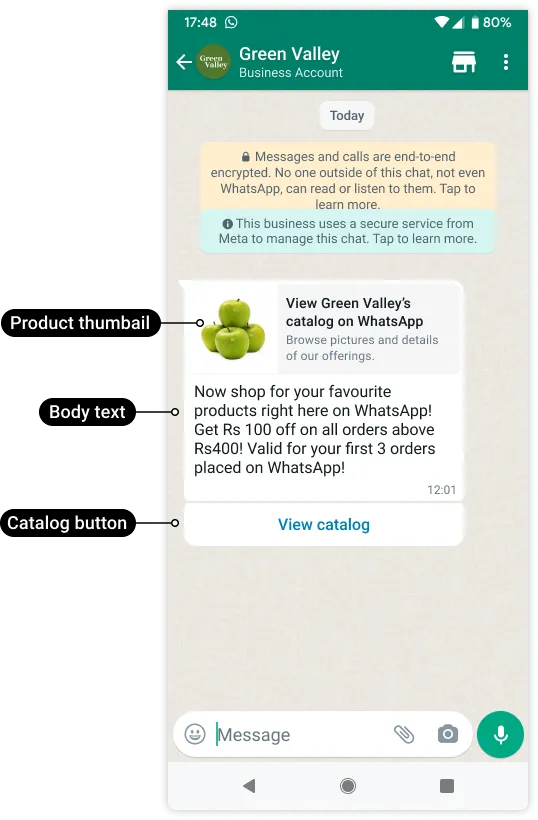
In this case, you have a [Catalog template](/en/api-reference/guides/examples/api-examples/whatsapp-template-creation-examples#catalog-template), and send a message to share your product catalog with customers.
#### Request
```shell theme={"theme":{"light":"github-light","dark":"github-dark"}}
curl 'https://api.ycloud.com/v2/whatsapp/messages/sendDirectly' \
-H 'Content-Type: application/json' \
-H 'X-API-Key: {{YOUR-API-KEY}}' \
-d '{
"from": "{{BUSINESS-PHONE-NUMBER}}",
"to": "{{CUSTOMER-PHONE-NUMBER}}",
"type": "template",
"template": {
"name": "intro_catalog_offer",
"language": {
"code": "{{LANGUAGE-CODE}}"
},
"components": [
{
"type": "body",
"parameters": [
{
"type": "text",
"text": "100"
},
{
"type": "text",
"text": "400"
},
{
"type": "text",
"text": "3"
}
]
},
{
"type": "button",
"sub_type": "catalog",
"index": 0,
"parameters": [
{
"type": "action",
"action": {
"thumbnail_product_retailer_id": "2lc20305pt"
}
}
]
}
]
}
}'
```
#### Response
A successful request returns the YCloud message object. An initial `accepted` status confirms submission, not final delivery.
```json theme={"theme":{"light":"github-light","dark":"github-dark"}}
{
"id": "MESSAGE_ID",
"status": "accepted"
}
```
Store `id` and correlate later `whatsapp.message.updated` events.
#### Explanation
* `thumbnail_product_retailer_id` is optional. The SKU number is labeled as Content ID in the [Commerce Manager](https://business.facebook.com/commerce/). The thumbnail of this item will be used as the message's header image. If the `parameters` object is omitted, the product image of the first item in your catalog will be used.
### MPM template message
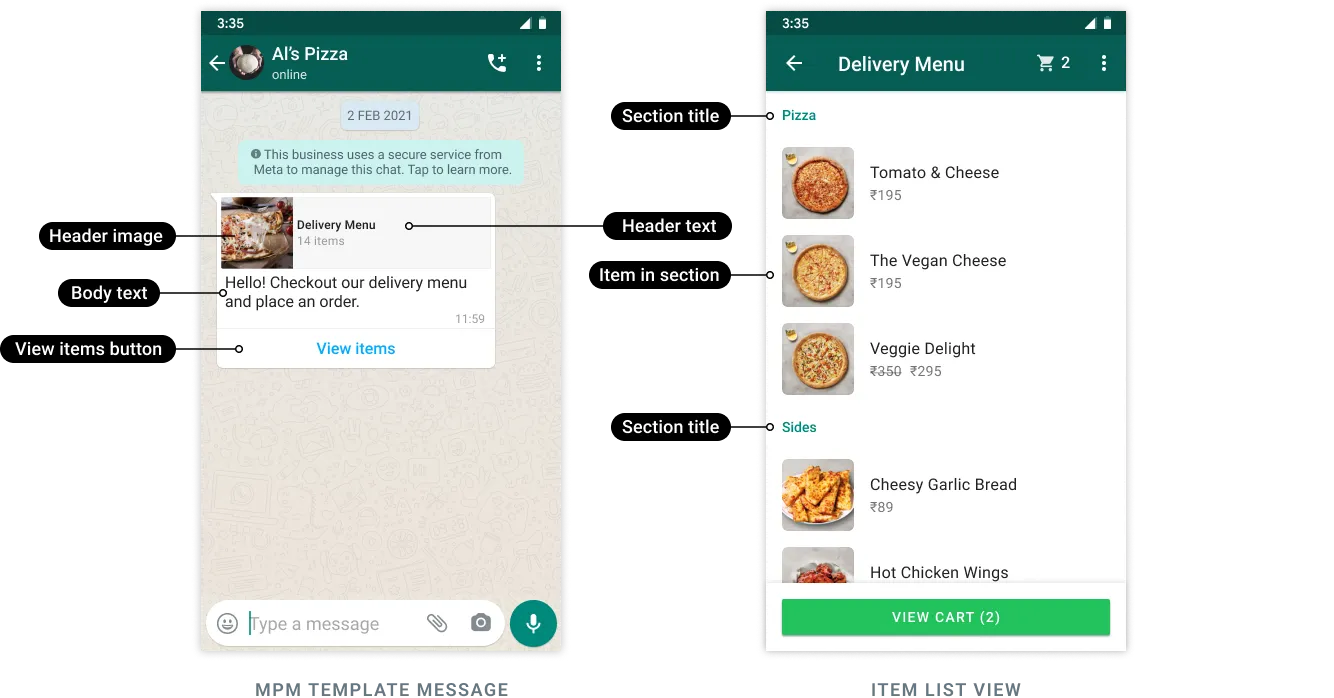
In this case, you have an [MPM template](/en/api-reference/guides/examples/api-examples/whatsapp-template-creation-examples#multi-product-message-template), and send a message to share products with customers.
This example sends an approved template named "abandoned\_cart" and injects a variable (the customer's first name) into the template header and a discount code into the template body. It also defines two sections ("Popular Bundles" and "Premium Packages") and identifies the products (a total of 3) that should be injected into those sections.
#### Request
```shell theme={"theme":{"light":"github-light","dark":"github-dark"}}
curl 'https://api.ycloud.com/v2/whatsapp/messages/sendDirectly' \
-H 'Content-Type: application/json' \
-H 'X-API-Key: {{YOUR-API-KEY}}' \
-d '{
"from": "{{BUSINESS-PHONE-NUMBER}}",
"to": "{{CUSTOMER-PHONE-NUMBER}}",
"type": "template",
"template": {
"name": "abandoned_cart",
"language": {
"code": "{{LANGUAGE-CODE}}"
},
"components": [
{
"type": "header",
"parameters": [
{
"type": "text",
"text": "Pablo"
}
]
},
{
"type": "body",
"parameters": [
{
"type": "text",
"text": "10OFF"
}
]
},
{
"type": "button",
"sub_type": "mpm",
"index": 0,
"parameters": [
{
"type": "action",
"action": {
"thumbnail_product_retailer_id": "2lc20305pt",
"sections": [
{
"title": "Popular Bundles",
"product_items": [
{
"product_retailer_id": "2lc20305pt"
},
{
"product_retailer_id": "nseiw1x3ch"
}
]
},
{
"title": "Premium Packages",
"product_items": [
{
"product_retailer_id": "n6k6x0y7oe"
}
]
}
]
}
}
]
}
]
}
}'
```
#### Response
A successful request returns the YCloud message object. An initial `accepted` status confirms submission, not final delivery.
```json theme={"theme":{"light":"github-light","dark":"github-dark"}}
{
"id": "MESSAGE_ID",
"status": "accepted"
}
```
Store `id` and correlate later `whatsapp.message.updated` events.
#### Explanation
* Customers must be using WhatsApp v2.22.24 or greater.
* MPM template messages cannot be forwarded to other customers.
* When a customer adds one or more products to their cart and submits an order, we will send you a webhook that describes the order. See also [Inbound Order message](/en/api-reference/guides/examples/webhook-examples/whatsapp-inbound-message-webhook-examples#inbound-order-message).
### Flow template message
[WhatsApp Flows](https://developers.facebook.com/docs/whatsapp/flows) is a way to build structured interactions for business messaging. With Flows, businesses can define, configure, and customize messages with rich interactions that give customers more structure in the way they communicate.
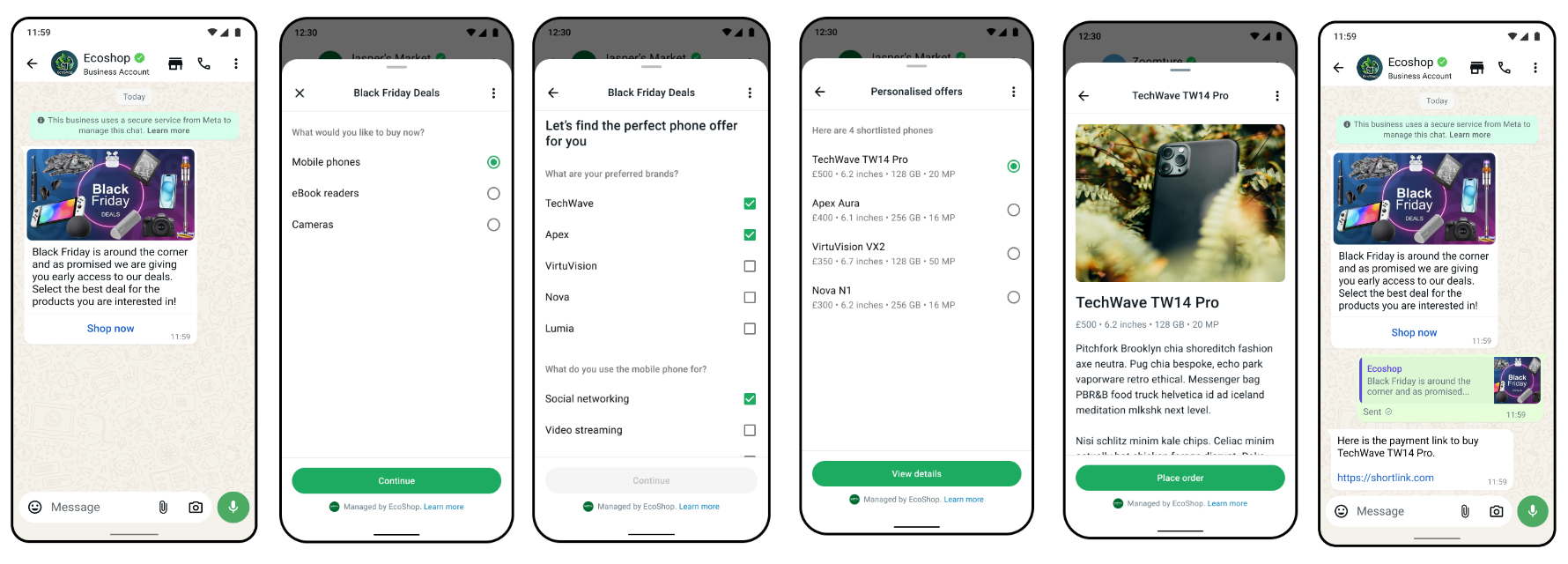
In this case, you send a message with a [Flow template](/en/api-reference/guides/examples/api-examples/whatsapp-template-creation-examples#flow-template):
#### Request
```shell theme={"theme":{"light":"github-light","dark":"github-dark"}}
curl 'https://api.ycloud.com/v2/whatsapp/messages/sendDirectly' \
-H 'Content-Type: application/json' \
-H 'X-API-Key: {{YOUR-API-KEY}}' \
-d '{
"from": "{{BUSINESS-PHONE-NUMBER}}",
"to": "{{CUSTOMER-PHONE-NUMBER}}",
"type": "template",
"template": {
"name": "TEMPLATE_NAME",
"language": {
"code": "{{LANGUAGE-CODE}}"
},
"components": [
{
"type": "button",
"sub_type": "flow",
"index": 0,
"parameters": [
{
"type": "action",
"action": {
"flow_token": "",
"flow_action_data": {
"data1": "value1"
}
}
}
]
}
]
}
}'
```
#### Response
A successful request returns the YCloud message object. An initial `accepted` status confirms submission, not final delivery.
```json theme={"theme":{"light":"github-light","dark":"github-dark"}}
{
"id": "MESSAGE_ID",
"status": "accepted"
}
```
Store `id` and correlate later `whatsapp.message.updated` events.
#### Explanation
* `flow_action_data` is the JSON object with the data payload for the first screen. See also [Send template with Flow - WhatsApp Business Platform](https://developers.facebook.com/docs/whatsapp/flows/guides/sendingaflow#send-template-with-flow).
* To send an interactive message with a Flow, see [Interactive Flow message](/en/api-reference/guides/examples/api-examples/whatsapp-messaging-examples#interactive-flow-message).
* To receive Flow Response, see [Inbound Interactive Flow Response message](/en/api-reference/guides/examples/webhook-examples/whatsapp-inbound-message-webhook-examples#inbound-interactive-flow-response-message).
### Order Details template message
Order details template message allows the businesses to send order details message as pre-defined `Open order details` call-to-action button component parameters. It supports businesses to send all payment integration (such as [UPI Intent](https://developers.facebook.com/docs/whatsapp/cloud-api/payments-api/payments-in/upi-intent), [Payment Gateway](https://developers.facebook.com/docs/whatsapp/cloud-api/payments-api/payments-in/pg) or [Payment Links](https://developers.facebook.com/docs/whatsapp/cloud-api/payments-api/payments-in/payment-links)) integration as button parameters.
Here is an example of sending Payment Gateway in order details template message parameters to prompt the consumer to make a payment.
#### Request
```shell theme={"theme":{"light":"github-light","dark":"github-dark"}}
curl 'https://api.ycloud.com/v2/whatsapp/messages/sendDirectly' \
-H 'Content-Type: application/json' \
-H 'X-API-Key: {{YOUR-API-KEY}}' \
-d '{
"from": "{{BUSINESS-PHONE-NUMBER}}",
"to": "{{CUSTOMER-PHONE-NUMBER}}",
"type": "template",
"template": {
"name": "order_details_example",
"language": {
"policy": "deterministic",
"code": "{{LANGUAGE-CODE}}"
},
"components": [
{
"type": "header",
"parameters": [
{
"type": "text",
"text": "",
}
]
},
{
"type": "button",
"sub_type": "order_details",
"index": 0,
"parameters": [
{
"type": "action",
"action": {
"order_details": {
"currency": "INR",
"order": {
"discount": {
"offset": 100,
"value": 250
},
"items": [
{
"amount": {
"offset": 100,
"value": 400
},
"name": "",
"quantity": 1,
"retailer_id": "",
"country_of_origin": "",
"importer_name": "",
"importer_address": {
"address_line1": "",
"city": "",
"country_code": "",
"postal_code": ""
}
}
],
"shipping": {
"offset": 100,
"value": 0
},
"status": "pending",
"subtotal": {
"offset": 100,
"value": 400
},
"tax": {
"offset": 100,
"value": 500
}
},
"payment_settings": [
{
"type": "payment_gateway",
"payment_gateway": {
"type": "billdesk",
"configuration_name": "",
"billdesk": {
"additional_info1": "additional_info1-value",
"additional_info2": "additional_info2-value",
"additional_info3": "additional_info3-value",
"additional_info4": "additional_info4-value",
"additional_info5": "additional_info5-value",
"additional_info6": "additional_info6-value",
"additional_info7": "additional_info7-value",
}
}
}
],
"reference_id": "",
"total_amount": {
"offset": 100,
"value": 650
},
"type": "digital-goods"
}
}
}
]
}
]
}
}'
```
#### Response
A successful request returns the YCloud message object. An initial `accepted` status confirms submission, not final delivery.
```json theme={"theme":{"light":"github-light","dark":"github-dark"}}
{
"id": "MESSAGE_ID",
"status": "accepted"
}
```
Store `id` and correlate later `whatsapp.message.updated` events.
#### Explanation
* To learn more about `template` parameters, see also [Sending order details template message](https://developers.facebook.com/docs/whatsapp/cloud-api/payments-api/payments-in/orderdetailstemplate#sending-order-details-template-message).
* Before you can send order details template messages, create an [Order Details template](/en/api-reference/guides/examples/api-examples/whatsapp-template-creation-examples#order-details-template).
* You will be notified via webhooks when the customer attempted and the payment status changed. See [Payment transaction updated](/en/api-reference/guides/examples/webhook-examples/whatsapp-payment-updated-webhook-examples).
* If no more than 24 hours have passed since the customer last replied to your business phone number, you can also send an [Interactive Order Details message](/en/api-reference/guides/examples/api-examples/whatsapp-messaging-examples#interactive-order-details-message) instead.
### Order Status template message
Order status template is one of the interactive message templates that extends the call-to-action button to support updating order status through a template. It allows the businesses to update the order status outside of the customer session window in use cases such as charging the card for past order and updating about a shipment on order placed in the past.
Upon receiving the payment signals, the businesses must update the order status to keep the user up to date. Currently we support the following order status values.
#### Request
```shell theme={"theme":{"light":"github-light","dark":"github-dark"}}
curl 'https://api.ycloud.com/v2/whatsapp/messages/sendDirectly' \
-H 'Content-Type: application/json' \
-H 'X-API-Key: {{YOUR-API-KEY}}' \
-d '{
"from": "{{BUSINESS-PHONE-NUMBER}}",
"to": "{{CUSTOMER-PHONE-NUMBER}}",
"type": "template",
"template": {
"name": "order_status_template",
"language": {
"policy": "deterministic",
"code": "{{LANGUAGE-CODE}}"
},
"components": [
{
"type": "order_status",
"parameters": [
{
"type": "order_status",
"order_status": {
"reference_id": "",
"order": {
"status": "processing | partially_shipped | shipped | completed | canceled",
"description": ""
}
}
}
]
}
]
}
}'
```
#### Response
A successful request returns the YCloud message object. An initial `accepted` status confirms submission, not final delivery.
```json theme={"theme":{"light":"github-light","dark":"github-dark"}}
{
"id": "MESSAGE_ID",
"status": "accepted"
}
```
Store `id` and correlate later `whatsapp.message.updated` events.
#### Explanation
* To learn more about `template` parameters, see also [Sending order status template message](https://developers.facebook.com/docs/whatsapp/cloud-api/payments-api/payments-in/orderstatustemplate#sending-order-status-template-message).
* Before you can send order status template messages, create an [Order Status template](/en/api-reference/guides/examples/api-examples/whatsapp-template-creation-examples#order-status-template).
* If no more than 24 hours have passed since the customer last replied to your business phone number, you can also send an [Interactive Order Status message](/en/api-reference/guides/examples/api-examples/whatsapp-messaging-examples#interactive-order-status-message) instead.
***
## Free-form message examples
The following examples are free-form messages. These messages do not require a pre-approved template and can be sent directly. However, they can only be sent within the 24-hour customer service window, which starts from the customer’s most recent message.
### Text message
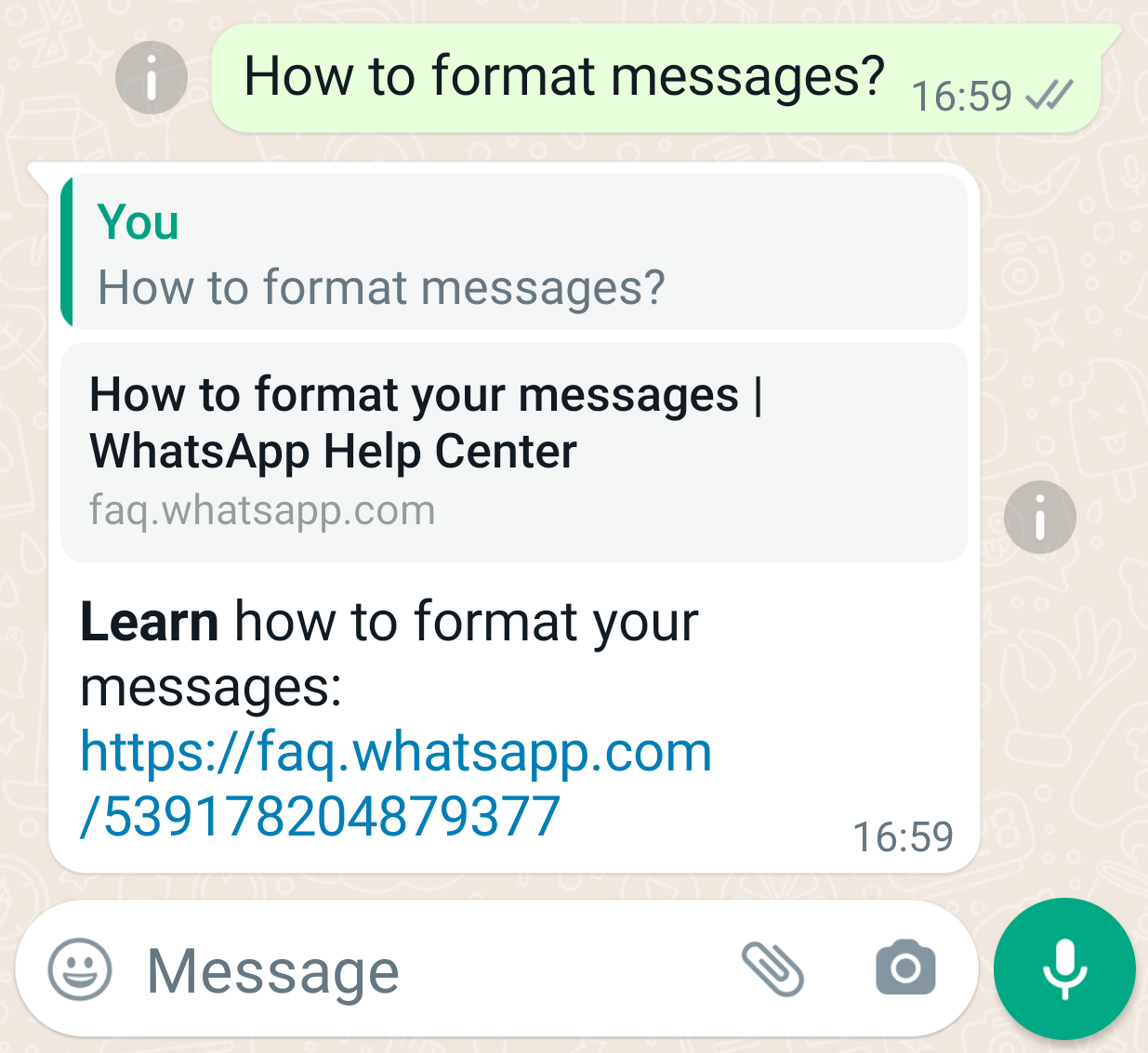
In this case, you send a text message:
* Contains only plain text.
* Contains a URL, and includes a preview box in text messages by setting `preview_url` to `true`.
* Specifies a message (`context.message_id`) you reply to.
#### Request
```shell theme={"theme":{"light":"github-light","dark":"github-dark"}}
curl 'https://api.ycloud.com/v2/whatsapp/messages/sendDirectly' \
-H 'Content-Type: application/json' \
-H 'X-API-Key: {{YOUR-API-KEY}}' \
-d '{
"from": "{{BUSINESS-PHONE-NUMBER}}",
"to": "{{CUSTOMER-PHONE-NUMBER}}",
"type": "text",
"text": {
"body": "*Learn* how to format your messages: https://faq.whatsapp.com/539178204879377",
"preview_url": true
},
"context": {
"message_id": "wamid.BgNODYxN..."
}
}'
```
#### Response
A successful request returns the YCloud message object. An initial `accepted` status confirms submission, not final delivery.
```json theme={"theme":{"light":"github-light","dark":"github-dark"}}
{
"id": "MESSAGE_ID",
"status": "accepted"
}
```
Store `id` and correlate later `whatsapp.message.updated` events.
#### Explanation
* **You can only send template messages before the customer replies to your message.**
* Use `context.message_id` to specify a message you reply to. Please be aware that it’s the original message ID on WhatsApp’s platform, starting with `wamid.`, not the message ID on YCloud. The `wamid` can be found in both YCloud’s `whatsappMessage` object (when the status changes to `sent`) and `whatsappInboundMessage` object. This feature also applies to other types of messages, except `template` and `sticker` messages.
* WhatsApp message body supports text formatting, such as *Italic*, **Bold**, ~~Strikethrough~~, Monospace, Bulleted list, Numbered list, Quote, and Inline code. See also [**How to format your messages**](https://faq.whatsapp.com/539178204879377).
### Image message
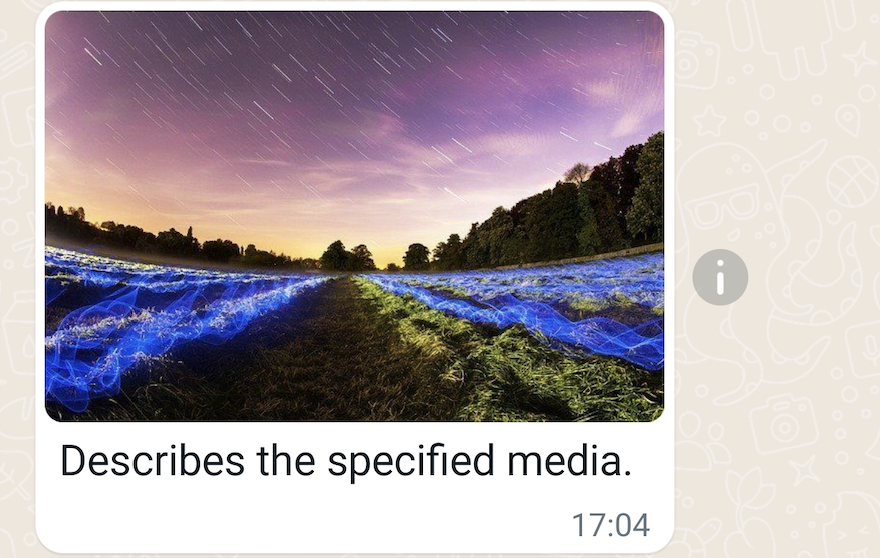
In this case, you send an image message:
* Contains an image URL.
* Contains a caption to describe the image.
#### Request
```shell theme={"theme":{"light":"github-light","dark":"github-dark"}}
curl 'https://api.ycloud.com/v2/whatsapp/messages/sendDirectly' \
-H 'Content-Type: application/json' \
-H 'X-API-Key: {{YOUR-API-KEY}}' \
-d '{
"from": "{{BUSINESS-PHONE-NUMBER}}",
"to": "{{CUSTOMER-PHONE-NUMBER}}",
"type": "image",
"image": {
"link": "https://oss-ycloud-publicread.oss-ap-southeast-1.aliyuncs.com/api-docs/sample/sample.jpg",
"caption": "Describes the specified media."
}
}'
```
#### Response
A successful request returns the YCloud message object. An initial `accepted` status confirms submission, not final delivery.
```json theme={"theme":{"light":"github-light","dark":"github-dark"}}
{
"id": "MESSAGE_ID",
"status": "accepted"
}
```
Store `id` and correlate later `whatsapp.message.updated` events.
#### Explanation
* Supported image types: `image/jpeg`, `image/png`. Images must be 8-bit, RGB or RGBA.
* An embedded color profile is required. See also [How to Embed the Profile](https://digital-photography-school.com/choose-right-color-profile-sharing-images-online/#how-to-embed-the-profile), [Embed a color profile in Adobe Photoshop](https://helpx.adobe.com/photoshop/using/working-with-color-profiles.html#Embedacolorprofile).
* Image size limit: 5MB.
* See also [Supported Media Types](https://developers.facebook.com/docs/whatsapp/cloud-api/reference/media#supported-media-types).
### Video message
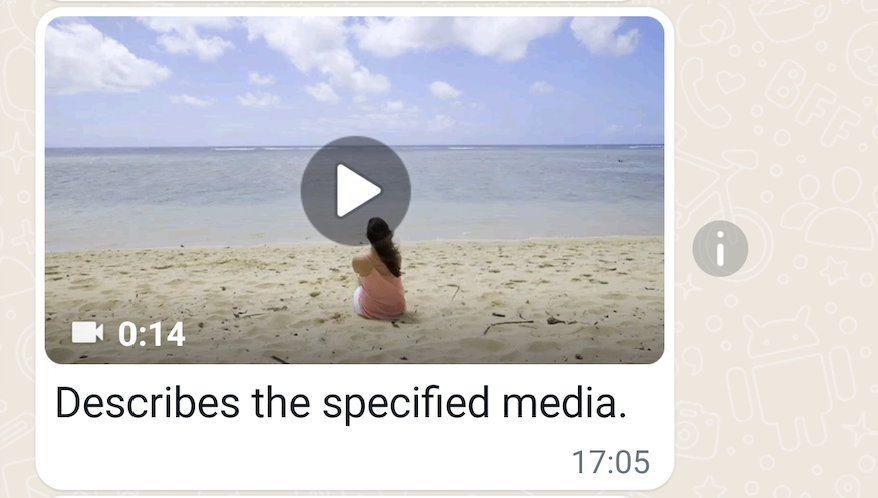
In this case, you send a video message:
* Contains a video URL.
* Contains a caption to describe the video.
#### Request
```shell theme={"theme":{"light":"github-light","dark":"github-dark"}}
curl 'https://api.ycloud.com/v2/whatsapp/messages/sendDirectly' \
-H 'Content-Type: application/json' \
-H 'X-API-Key: {{YOUR-API-KEY}}' \
-d '{
"from": "{{BUSINESS-PHONE-NUMBER}}",
"to": "{{CUSTOMER-PHONE-NUMBER}}",
"type": "video",
"video": {
"link": "https://oss-ycloud-publicread.oss-ap-southeast-1.aliyuncs.com/api-docs/sample/sample.mp4",
"caption": "Describes the specified media."
}
}'
```
#### Response
A successful request returns the YCloud message object. An initial `accepted` status confirms submission, not final delivery.
```json theme={"theme":{"light":"github-light","dark":"github-dark"}}
{
"id": "MESSAGE_ID",
"status": "accepted"
}
```
Store `id` and correlate later `whatsapp.message.updated` events.
#### Explanation
* Supported video types: `video/mp4`, `video/3gpp`.
* Only H.264 video codec and AAC audio codec is supported.
* We support videos with a single audio stream or no audio stream.
* The [MP4 file format](https://en.wikipedia.org/wiki/MP4_file_format) is derived from the [ISO base media file format](https://en.wikipedia.org/wiki/ISO_base_media_file_format), which is directly derived from the [QuickTime file format](https://en.wikipedia.org/wiki/QuickTime_File_Format) developed by [Apple](https://www.apple.com). **But QuickTime video files are not supported, even if you renamed the file extension from`.mov` to `.mp4`.**
* Video size limit: 16MB.
* See also [Supported Media Types](https://developers.facebook.com/docs/whatsapp/cloud-api/reference/media#supported-media-types).
### Audio message
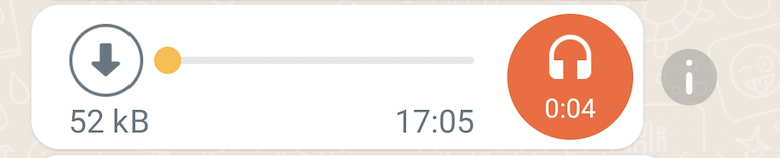
In this case, you send an audio message:
* Contains an audio URL.
#### Request
```shell theme={"theme":{"light":"github-light","dark":"github-dark"}}
curl 'https://api.ycloud.com/v2/whatsapp/messages/sendDirectly' \
-H 'Content-Type: application/json' \
-H 'X-API-Key: {{YOUR-API-KEY}}' \
-d '{
"from": "{{BUSINESS-PHONE-NUMBER}}",
"to": "{{CUSTOMER-PHONE-NUMBER}}",
"type": "audio",
"audio": {
"link": "https://oss-ycloud-publicread.oss-ap-southeast-1.aliyuncs.com/api-docs/sample/sample.mp3"
}
}'
```
#### Response
A successful request returns the YCloud message object. An initial `accepted` status confirms submission, not final delivery.
```json theme={"theme":{"light":"github-light","dark":"github-dark"}}
{
"id": "MESSAGE_ID",
"status": "accepted"
}
```
Store `id` and correlate later `whatsapp.message.updated` events.
#### Explanation
* Supported audio types: `audio/aac`, `audio/mp4`, `audio/mpeg`, `audio/amr`, `audio/ogg` (only opus codecs, base `audio/ogg` is not supported).
* Audio size limit: 16MB.
* See also [Supported Media Types](https://developers.facebook.com/docs/whatsapp/cloud-api/reference/media#supported-media-types).
* `caption` can be used for `image`, `video`, and `document` media messages, but is not supported for audio messages.
### Document message
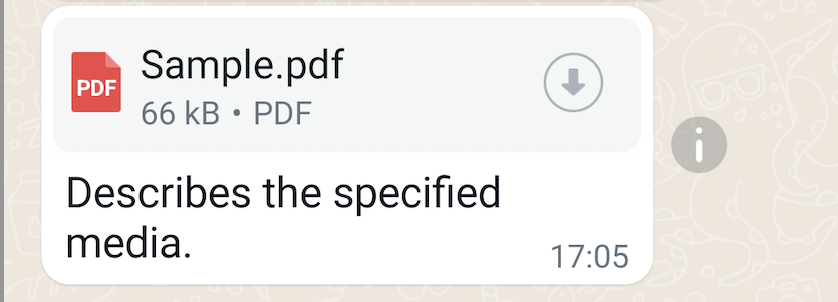
In this case, you send a document message:
* Contains a document URL.
* Contains a caption to describe the document.
* Specifies the document filename.
#### Request
```shell theme={"theme":{"light":"github-light","dark":"github-dark"}}
curl 'https://api.ycloud.com/v2/whatsapp/messages/sendDirectly' \
-H 'Content-Type: application/json' \
-H 'X-API-Key: {{YOUR-API-KEY}}' \
-d '{
"from": "{{BUSINESS-PHONE-NUMBER}}",
"to": "{{CUSTOMER-PHONE-NUMBER}}",
"type": "document",
"document": {
"link": "https://oss-ycloud-publicread.oss-ap-southeast-1.aliyuncs.com/api-docs/sample/sample.pdf",
"caption": "Describes the specified media.",
"filename": "Sample.pdf"
}
}'
```
#### Response
A successful request returns the YCloud message object. An initial `accepted` status confirms submission, not final delivery.
```json theme={"theme":{"light":"github-light","dark":"github-dark"}}
{
"id": "MESSAGE_ID",
"status": "accepted"
}
```
Store `id` and correlate later `whatsapp.message.updated` events.
#### Explanation
* Supported document types: `text/plain`, `application/pdf`, `application/vnd.ms-powerpoint`, `application/msword`, `application/vnd.ms-excel`, `application/vnd.openxmlformats-officedocument.wordprocessingml.document`, `application/vnd.openxmlformats-officedocument.presentationml.presentation`, `application/vnd.openxmlformats-officedocument.spreadsheetml.sheet`.
* Document size limit: 100MB.
* See also [Supported Media Types](https://developers.facebook.com/docs/whatsapp/cloud-api/reference/media#supported-media-types).
* `filename` is only supported for document messages, not supported for any other media messages.
### Sticker message
In this case, you send a sticker message:
* Contains a sticker URL.
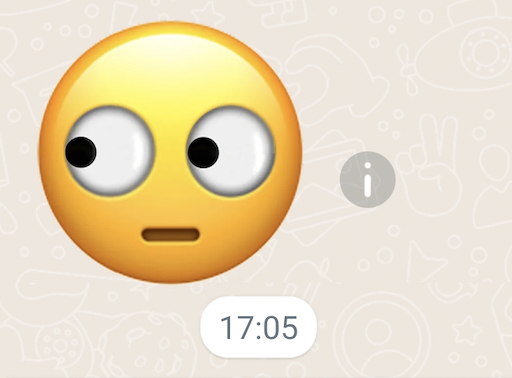
#### Request
```shell theme={"theme":{"light":"github-light","dark":"github-dark"}}
curl 'https://api.ycloud.com/v2/whatsapp/messages/sendDirectly' \
-H 'Content-Type: application/json' \
-H 'X-API-Key: {{YOUR-API-KEY}}' \
-d '{
"from": "{{BUSINESS-PHONE-NUMBER}}",
"to": "{{CUSTOMER-PHONE-NUMBER}}",
"type": "sticker",
"sticker": {
"link": "https://whatsticker.online/stickers_asset/ws-pack-196906m7W4ngr/c8e072f92595.webp"
}
}'
```
#### Response
A successful request returns the YCloud message object. An initial `accepted` status confirms submission, not final delivery.
```json theme={"theme":{"light":"github-light","dark":"github-dark"}}
{
"id": "MESSAGE_ID",
"status": "accepted"
}
```
Store `id` and correlate later `whatsapp.message.updated` events.
#### Explanation
* Supported sticker types: `image/webp`. Expected dimension: 512x512.
* Sticker size limit: 100KB for statics stickers, and 500KB for animated stickers.
* See also [Supported Media Types](https://developers.facebook.com/docs/whatsapp/cloud-api/reference/media#supported-media-types).
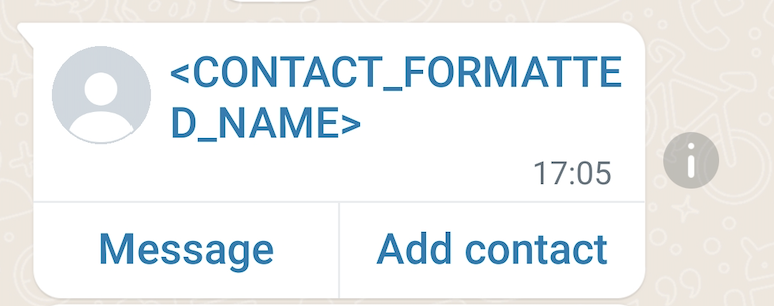
### Contacts message
In this case, you send a contacts message:
* Contains 1 contact with addresses, birthday, emails, name, phones, etc.
#### Request
```shell theme={"theme":{"light":"github-light","dark":"github-dark"}}
curl 'https://api.ycloud.com/v2/whatsapp/messages/sendDirectly' \
-H 'Content-Type: application/json' \
-H 'X-API-Key: {{YOUR-API-KEY}}' \
-d '{
"from": "{{BUSINESS-PHONE-NUMBER}}",
"to": "{{CUSTOMER-PHONE-NUMBER}}",
"type": "contacts",
"contacts": [
{
"addresses": [
{
"street": "",
"city": "",
"state": "",
"zip": "",
"country": "",
"country_code": "",
"type": "HOME"
}
],
"birthday": "2001-01-01",
"emails": [
{
"email": "joe@example.com",
"type": "WORK"
}
],
"name": {
"formatted_name": "",
"first_name": "",
"last_name": "",
"middle_name": "",
"suffix": "",
"prefix": ""
},
"org": {
"company": "",
"department": "",
"title": ""
},
"phones": [
{
"phone": "+447901614024",
"wa_id": "447901614024",
"type": "WORK"
}
],
"urls": [
{
"url": "",
"type": "WORK"
}
]
}
]
}'
```
#### Response
A successful request returns the YCloud message object. An initial `accepted` status confirms submission, not final delivery.
```json theme={"theme":{"light":"github-light","dark":"github-dark"}}
{
"id": "MESSAGE_ID",
"status": "accepted"
}
```
Store `id` and correlate later `whatsapp.message.updated` events.
#### Explanation
* `contacts[].name.formatted_name` is required.
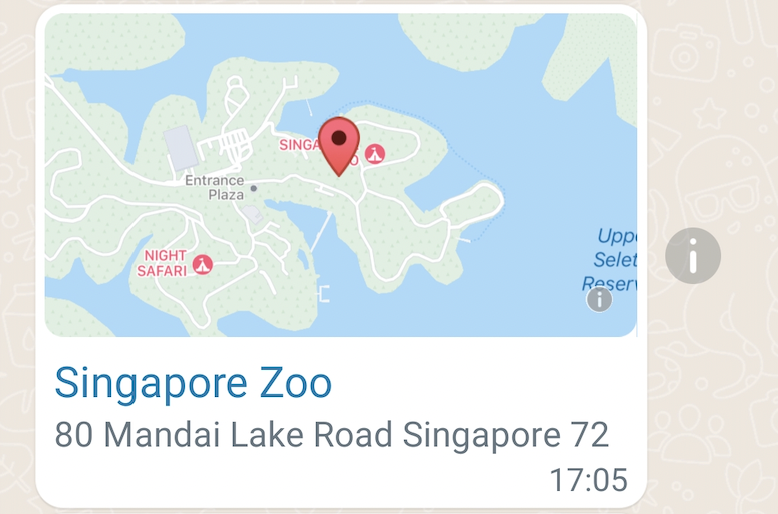
### Location message
In this case, you send a location message:
* Contains latitude and longitude of the place.
* Contains name and address of the place.
#### Request
```shell theme={"theme":{"light":"github-light","dark":"github-dark"}}
curl 'https://api.ycloud.com/v2/whatsapp/messages/sendDirectly' \
-H 'Content-Type: application/json' \
-H 'X-API-Key: {{YOUR-API-KEY}}' \
-d '{
"from": "{{BUSINESS-PHONE-NUMBER}}",
"to": "{{CUSTOMER-PHONE-NUMBER}}",
"type": "location",
"location": {
"latitude": 1.40435,
"longitude": 103.79304,
"name": "Singapore Zoo",
"address": "80 Mandai Lake Road Singapore 72"
}
}'
```
#### Response
A successful request returns the YCloud message object. An initial `accepted` status confirms submission, not final delivery.
```json theme={"theme":{"light":"github-light","dark":"github-dark"}}
{
"id": "MESSAGE_ID",
"status": "accepted"
}
```
Store `id` and correlate later `whatsapp.message.updated` events.
#### Explanation
* `latitude` and `longitude` are required.
### Reaction message
In this case, you send an emoji reaction message:
* Contains the ID of the mentioned message.
* Contains an emoji.
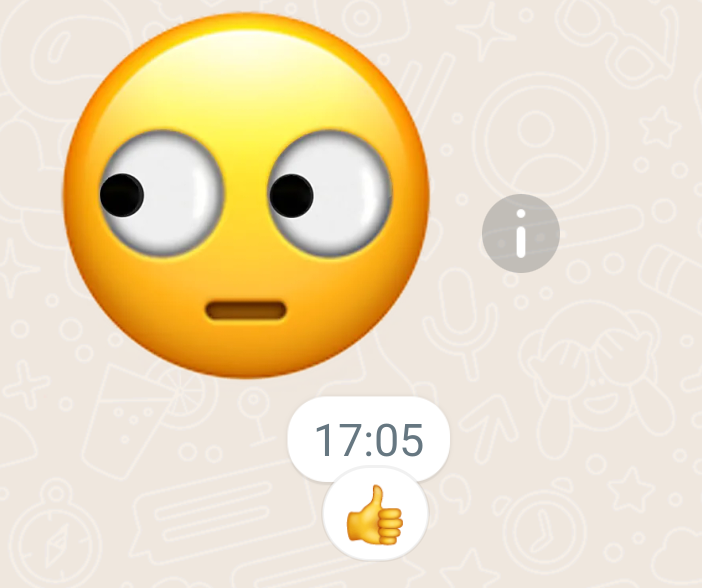
Gives a thumbs up to a message previously sent or received.
#### Request
```shell theme={"theme":{"light":"github-light","dark":"github-dark"}}
curl 'https://api.ycloud.com/v2/whatsapp/messages/sendDirectly' \
-H 'Content-Type: application/json' \
-H 'X-API-Key: {{YOUR-API-KEY}}' \
-d '{
"from": "{{BUSINESS-PHONE-NUMBER}}",
"to": "{{CUSTOMER-PHONE-NUMBER}}",
"type": "reaction",
"reaction": {
"message_id": "wamid.BgNODYxN...",
"emoji": "👍"
}
}'
```
#### Response
A successful request returns the YCloud message object. An initial `accepted` status confirms submission, not final delivery.
```json theme={"theme":{"light":"github-light","dark":"github-dark"}}
{
"id": "MESSAGE_ID",
"status": "accepted"
}
```
Store `id` and correlate later `whatsapp.message.updated` events.
#### Explanation
* The `message_id` is the original message ID on WhatsApp's platform, starting with `wamid.`.
* Set `emoji` to `""` if you want to remove the emoji.
* Reaction messages do not support read receipts.
### Interactive List message
In this case, you send an interactive list message:
* Contains header text, body text, and footer text.
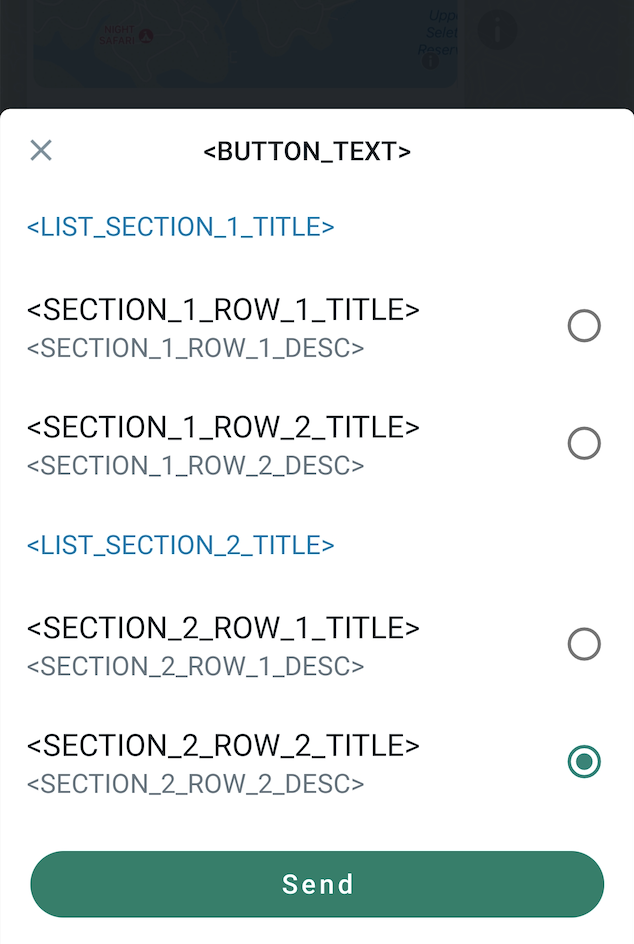
* Sets the `interactive.type` to `list`, and contains a button with 2 sections, and each section has 2 rows.
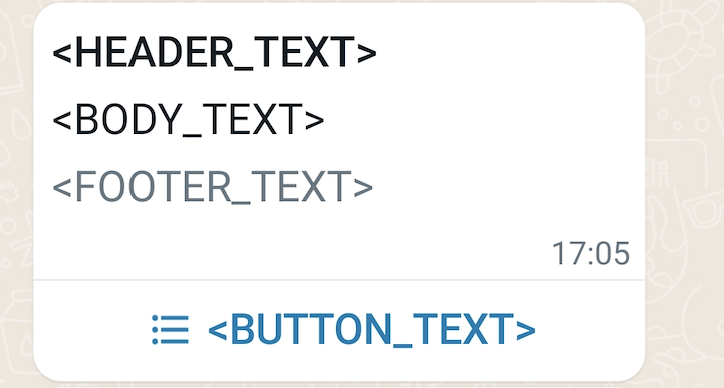
The recipient can select an item from the list by clicking the button:
#### Request
```shell theme={"theme":{"light":"github-light","dark":"github-dark"}}
curl 'https://api.ycloud.com/v2/whatsapp/messages/sendDirectly' \
-H 'Content-Type: application/json' \
-H 'X-API-Key: {{YOUR-API-KEY}}' \
-d '{
"from": "{{BUSINESS-PHONE-NUMBER}}",
"to": "{{CUSTOMER-PHONE-NUMBER}}",
"type": "interactive",
"interactive": {
"type": "list",
"header": {
"type": "text",
"text": ""
},
"body": {
"text": ""
},
"footer": {
"text": ""
},
"action": {
"button": "",
"sections": [
{
"title": "",
"rows": [
{
"id": "",
"title": "",
"description": ""
},
{
"id": "",
"title": "",
"description": ""
}
]
},
{
"title": "",
"rows": [
{
"id": "",
"title": "",
"description": ""
},
{
"id": "",
"title": "",
"description": ""
}
]
}
]
}
}
}'
```
#### Response
A successful request returns the YCloud message object. An initial `accepted` status confirms submission, not final delivery.
```json theme={"theme":{"light":"github-light","dark":"github-dark"}}
{
"id": "MESSAGE_ID",
"status": "accepted"
}
```
Store `id` and correlate later `whatsapp.message.updated` events.
#### Explanation
* For interactive `list` messages, you need to set a button and set 1 to 10 sections. You can have a total of 10 rows across your sections.
### Interactive Button message
In this case, you send an interactive button message:
* Contains body text.
* Sets the `interactive.type` to `button`, and contains 2 quick reply buttons.
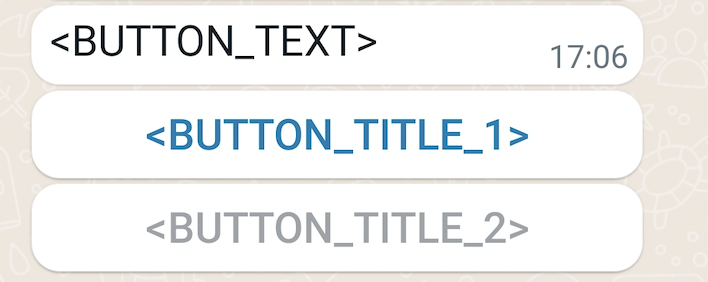
The recipient can click any of the buttons to reply to you a message.
#### Request
```shell theme={"theme":{"light":"github-light","dark":"github-dark"}}
curl 'https://api.ycloud.com/v2/whatsapp/messages/sendDirectly' \
-H 'Content-Type: application/json' \
-H 'X-API-Key: {{YOUR-API-KEY}}' \
-d '{
"from": "{{BUSINESS-PHONE-NUMBER}}",
"to": "{{CUSTOMER-PHONE-NUMBER}}",
"type": "interactive",
"interactive": {
"type": "button",
"body": {
"text": ""
},
"action": {
"buttons": [
{
"type": "reply",
"reply": {
"id": "",
"title": ""
}
},
{
"type": "reply",
"reply": {
"id": "",
"title": ""
}
}
]
}
}
}'
```
#### Response
A successful request returns the YCloud message object. An initial `accepted` status confirms submission, not final delivery.
```json theme={"theme":{"light":"github-light","dark":"github-dark"}}
{
"id": "MESSAGE_ID",
"status": "accepted"
}
```
Store `id` and correlate later `whatsapp.message.updated` events.
#### Explanation
* For interactive `buttons` messages, you need to set at most 3 quick reply buttons.
### Interactive CTA URL message
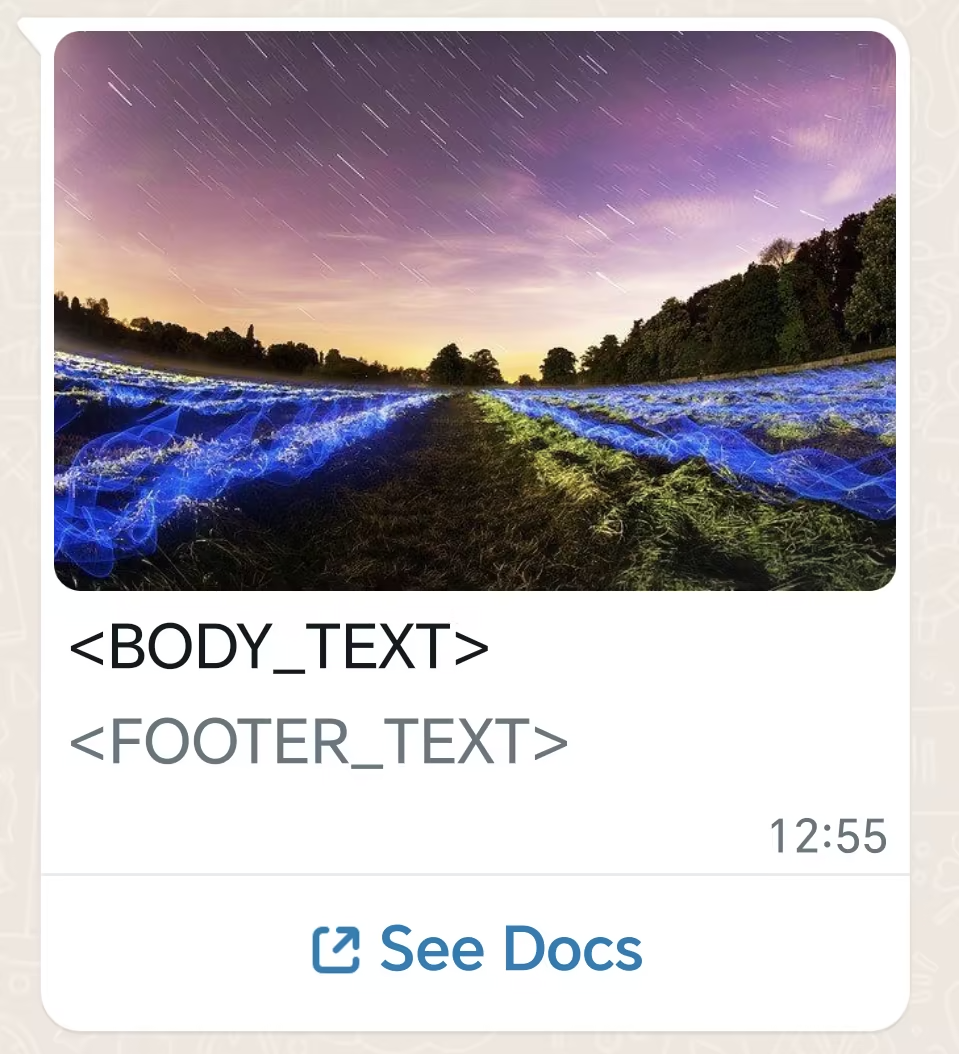
In this case, you send an interactive message with a call-to-action (CTA) URL button:
* Contains header, body, and footer text.
* Contains a URL button.
#### Request
```shell theme={"theme":{"light":"github-light","dark":"github-dark"}}
curl 'https://api.ycloud.com/v2/whatsapp/messages/sendDirectly' \
-H 'Content-Type: application/json' \
-H 'X-API-Key: {{YOUR-API-KEY}}' \
-d '{
"from": "{{BUSINESS-PHONE-NUMBER}}",
"to": "{{CUSTOMER-PHONE-NUMBER}}",
"type": "interactive",
"interactive": {
"type": "cta_url",
"header": {
"type": "image",
"image": {
"link": "https://oss-ycloud-publicread.oss-ap-southeast-1.aliyuncs.com/api-docs/sample/sample.jpg"
}
},
"body": {
"text": ""
},
"footer": {
"text": ""
},
"action": {
"name": "cta_url",
"parameters": {
"display_text": "See Docs",
"url": "https://developers.facebook.com/docs/whatsapp"
}
}
}
}'
```
#### Response
A successful request returns the YCloud message object. An initial `accepted` status confirms submission, not final delivery.
```json theme={"theme":{"light":"github-light","dark":"github-dark"}}
{
"id": "MESSAGE_ID",
"status": "accepted"
}
```
Store `id` and correlate later `whatsapp.message.updated` events.
#### Explanation
* Button text requires a length of at most 20 bytes.
* `body` and `action` are required. `header` and `footer` are optional.
### Interactive Single-Product message
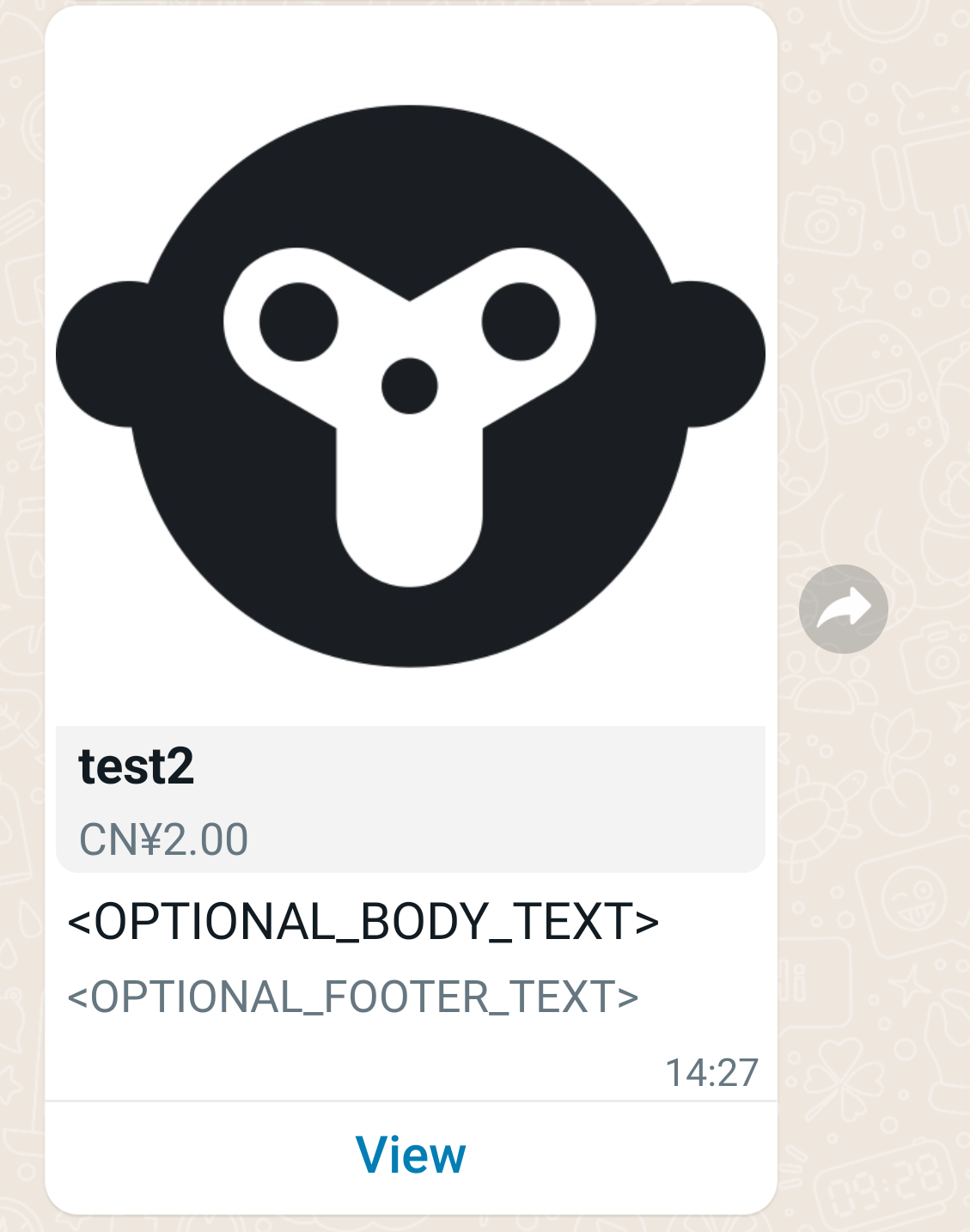
In this case, you send an interactive product message:
* Contains body text and footer text.
* Sets the `interactive.type` to `product`, and contains an action with product info.
#### Request
```shell theme={"theme":{"light":"github-light","dark":"github-dark"}}
curl 'https://api.ycloud.com/v2/whatsapp/messages/sendDirectly' \
-H 'Content-Type: application/json' \
-H 'X-API-Key: {{YOUR-API-KEY}}' \
-d '{
"from": "{{BUSINESS-PHONE-NUMBER}}",
"to": "{{CUSTOMER-PHONE-NUMBER}}",
"type": "interactive",
"interactive": {
"type": "product",
"body": {
"text": ""
},
"footer": {
"text": ""
},
"action": {
"catalog_id": "367025965434465",
"product_retailer_id": ""
}
}
}'
```
#### Response
A successful request returns the YCloud message object. An initial `accepted` status confirms submission, not final delivery.
```json theme={"theme":{"light":"github-light","dark":"github-dark"}}
{
"id": "MESSAGE_ID",
"status": "accepted"
}
```
Store `id` and correlate later `whatsapp.message.updated` events.
#### Explanation
* To get product and catalog ID, go to [Meta Commerce Manager](https://business.facebook.com/commerce/).
* See also [Share Products With Customers](https://developers.facebook.com/docs/whatsapp/guides/commerce-guides/share-products-with-customers).
### Interactive Multi-Product message
In this case, you send an interactive product list message:
* Contains body text and footer text.
* Sets the `interactive.type` to `product_list`, and contains multi products.
#### Request
```shell theme={"theme":{"light":"github-light","dark":"github-dark"}}
curl 'https://api.ycloud.com/v2/whatsapp/messages/sendDirectly' \
-H 'Content-Type: application/json' \
-H 'X-API-Key: {{YOUR-API-KEY}}' \
-d '{
"from": "{{BUSINESS-PHONE-NUMBER}}",
"to": "{{CUSTOMER-PHONE-NUMBER}}",
"type": "interactive",
"interactive": {
"type": "product_list",
"header": {
"type": "text",
"text": ""
},
"body": {
"text": ""
},
"footer": {
"text": ""
},
"action": {
"catalog_id": "146265584024623",
"sections": [
{
"title": "",
"product_items": [
{
"product_retailer_id": ""
},
{
"product_retailer_id": ""
}
]
},
{
"title": "",
"product_items": [
{
"product_retailer_id": ""
},
{
"product_retailer_id": ""
}
]
}
]
}
}
}'
```
#### Response
A successful request returns the YCloud message object. An initial `accepted` status confirms submission, not final delivery.
```json theme={"theme":{"light":"github-light","dark":"github-dark"}}
{
"id": "MESSAGE_ID",
"status": "accepted"
}
```
Store `id` and correlate later `whatsapp.message.updated` events.
#### Explanation
* To get product and catalog ID, go to [Meta Commerce Manager](https://business.facebook.com/commerce/).
### Interactive Catalog message
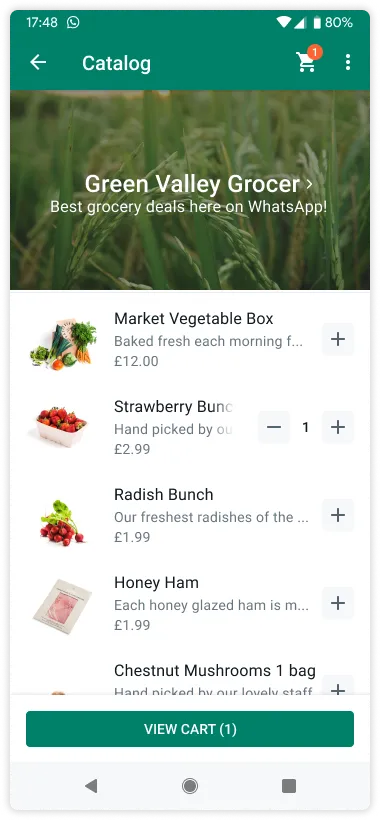
Catalog messages are free-form messages that allow you to showcase your product catalog entirely within WhatsApp.
Catalog messages display a product thumbnail header image of your choice, custom body text, a fixed text header, a fixed text sub-header, and a **View catalog** button.
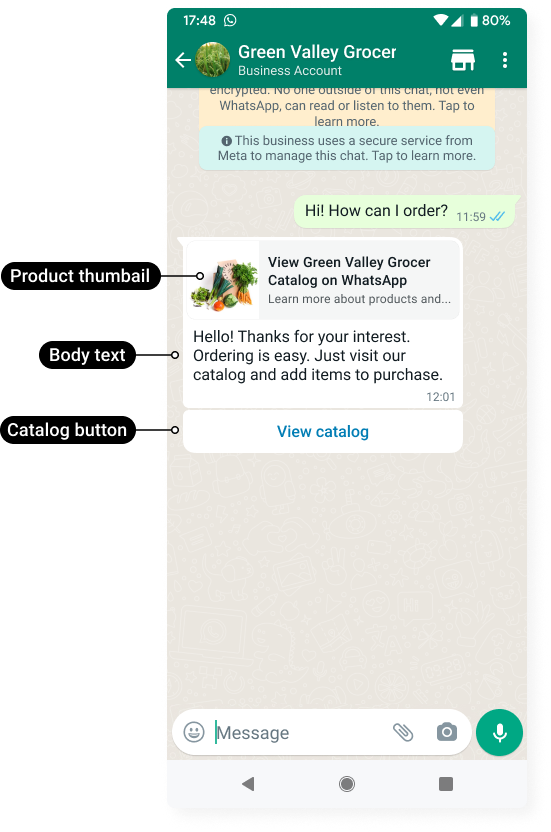
When a customer taps the **View catalog** button, your product catalog appears within WhatsApp.
#### Request
```shell theme={"theme":{"light":"github-light","dark":"github-dark"}}
curl 'https://api.ycloud.com/v2/whatsapp/messages/sendDirectly' \
-H 'Content-Type: application/json' \
-H 'X-API-Key: {{YOUR-API-KEY}}' \
-d '{
"from": "{{BUSINESS-PHONE-NUMBER}}",
"to": "{{CUSTOMER-PHONE-NUMBER}}",
"type": "interactive",
"interactive": {
"type": "catalog_message",
"body": {
"text": "Hello! Thanks for your interest. Ordering is easy. Just visit our catalog and add items to purchase."
},
"action": {
"name": "catalog_message",
"parameters": {
"thumbnail_product_retailer_id": "2lc20305pt"
}
},
"footer": {
"text": "Best grocery deals on WhatsApp!"
}
}
}'
```
#### Response
A successful request returns the YCloud message object. An initial `accepted` status confirms submission, not final delivery.
```json theme={"theme":{"light":"github-light","dark":"github-dark"}}
{
"id": "MESSAGE_ID",
"status": "accepted"
}
```
Store `id` and correlate later `whatsapp.message.updated` events.
#### Explanation
* You must have [inventory uploaded to Meta](https://developers.facebook.com/docs/whatsapp/cloud-api/guides/sell-products-and-services/upload-inventory) in an ecommerce catalog [connected to your WhatsApp Business Account](https://www.facebook.com/business/help/158662536425974).
* Enable the shopping cart and the product catalog on a per-business phone number basis. By default, the shopping cart is enabled and the storefront icon is hidden for all business phone numbers associated with a WhatsApp Business Account. Use the [Update commerce settings](https://docs.ycloud.com/reference/whatsapp_phone_number-update-commerce-settings) endpoint to enable or disable these features.
### Interactive Location Request message
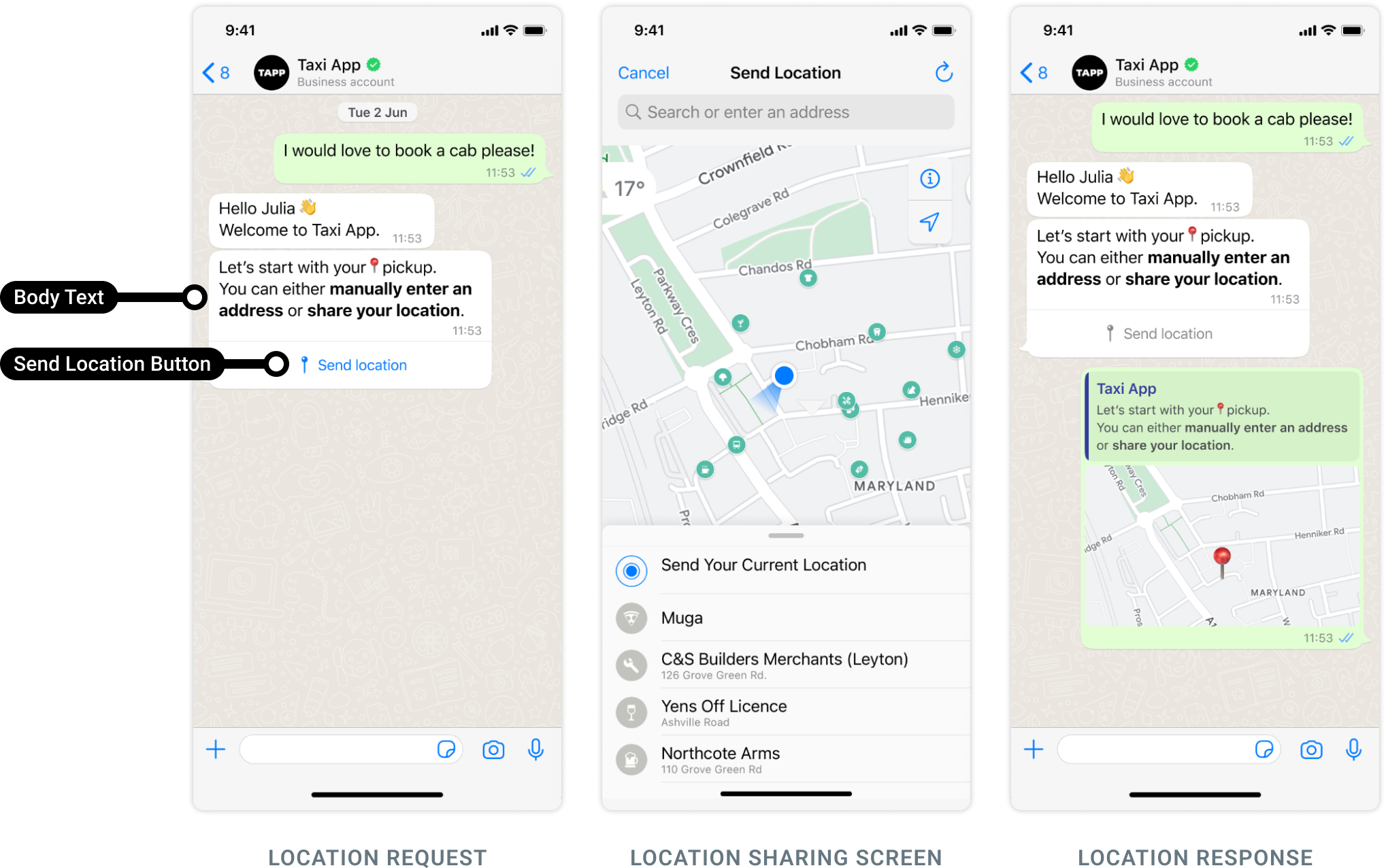
Location request messages are free-form messages displaying **body text** and a **send location button**. When a WhatsApp user taps the button, a location sharing screen appears which the user can then use to share their location.
#### Request
```shell theme={"theme":{"light":"github-light","dark":"github-dark"}}
curl 'https://api.ycloud.com/v2/whatsapp/messages/sendDirectly' \
-H 'Content-Type: application/json' \
-H 'X-API-Key: {{YOUR-API-KEY}}' \
-d '{
"from": "{{BUSINESS-PHONE-NUMBER}}",
"to": "{{CUSTOMER-PHONE-NUMBER}}",
"type": "interactive",
"interactive": {
"type": "location_request_message",
"body": {
"text": ""
},
"action": {
"name": "send_location"
}
}
}'
```
#### Response
A successful request returns the YCloud message object. An initial `accepted` status confirms submission, not final delivery.
```json theme={"theme":{"light":"github-light","dark":"github-dark"}}
{
"id": "MESSAGE_ID",
"status": "accepted"
}
```
Store `id` and correlate later `whatsapp.message.updated` events.
#### Explanation
* Body text (i.e., `interactive.body`) is required and has a maximum length of 1024 characters. Header and footer are not supported.
* Once the user shares their location, a `whatsapp.inbound_message.received` webhook is triggered, containing the user's location details. See also [Inbound Location message](/en/api-reference/guides/examples/webhook-examples/whatsapp-inbound-message-webhook-examples#inbound-location-message).
### Interactive Flow message
You can send a Message with a Flow in a user-initiated conversation using a Message with a Call To Action (CTA):
#### Request
```shell theme={"theme":{"light":"github-light","dark":"github-dark"}}
curl 'https://api.ycloud.com/v2/whatsapp/messages/sendDirectly' \
-H 'Content-Type: application/json' \
-H 'X-API-Key: {{YOUR-API-KEY}}' \
-d '{
"from": "{{BUSINESS-PHONE-NUMBER}}",
"to": "{{CUSTOMER-PHONE-NUMBER}}",
"type": "interactive",
"interactive": {
"type": "flow",
"header": {
"type": "text",
"text": "Flow message header"
},
"body": {
"text": "Flow message body"
},
"footer": {
"text": "Flow message footer"
},
"action": {
"name": "flow",
"parameters": {
"flow_message_version": "3",
"flow_token": "AQAAAAACS5FpgQ_cAAAAAD0QI3s.",
"flow_id": "1",
"flow_cta": "Book!",
"flow_action": "navigate",
"flow_action_payload": {
"screen": "",
"data": {
"product_name": "name",
"product_description": "description",
"product_price": 100
}
}
}
}
}
}'
```
#### Response
A successful request returns the YCloud message object. An initial `accepted` status confirms submission, not final delivery.
```json theme={"theme":{"light":"github-light","dark":"github-dark"}}
{
"id": "MESSAGE_ID",
"status": "accepted"
}
```
Store `id` and correlate later `whatsapp.message.updated` events.
#### Explanation
* To send a message with a Flow, we have introduced a new type of the `interactive` object named `flow`. For more information, see [Interactive message parameters](https://developers.facebook.com/docs/whatsapp/flows/guides/sendingaflow#interactive-message-parameters) .
* To send a template message with a Flow, see [Flow template message](/en/api-reference/guides/examples/api-examples/whatsapp-messaging-examples#flow-template-message).
* To receive Flow Response, see [Inbound Interactive Flow Response message](/en/api-reference/guides/examples/webhook-examples/whatsapp-inbound-message-webhook-examples#inbound-interactive-flow-response-message).
### Interactive Order Details message
An `order_details` message is a new type of `interactive` message, which always contains the same 4 main components: `header`, `body`, `footer`, and `action`. Inside the `action` component, the business includes all the information needed for the customer to complete their payment.
#### Request
```shell theme={"theme":{"light":"github-light","dark":"github-dark"}}
curl 'https://api.ycloud.com/v2/whatsapp/messages/sendDirectly' \
-H 'Content-Type: application/json' \
-H 'X-API-Key: {{YOUR-API-KEY}}' \
-d '{
"from": "{{BUSINESS-PHONE-NUMBER}}",
"to": "{{CUSTOMER-PHONE-NUMBER}}",
"type": "interactive",
"interactive": {
"type": "order_details",
"header": {
"type": "image",
"image": {
"link": "https://the-url",
"provider": {
"name": "provider-name"
}
}
},
"body": {
"text": "your-text-body-content"
},
"footer": {
"text": "your-text-footer-content"
},
"action": {
"name": "review_and_pay",
"parameters": {
"reference_id": "reference-id-value",
"type": "digital-goods",
"payment_settings": [
{
"type": "payment_gateway",
"payment_gateway": {
"type": "billdesk",
"configuration_name": "payment-config-id",
"billdesk": {
"additional_info1": "additional_info1-value",
"additional_info2": "additional_info2-value",
"additional_info3": "additional_info3-value",
"additional_info4": "additional_info4-value",
"additional_info5": "additional_info5-value",
"additional_info6": "additional_info6-value",
"additional_info7": "additional_info7-value",
}
}
}
],
"currency": "INR",
"total_amount": {
"value": 21000,
"offset": 100
},
"order": {
"status": "pending",
"catalog_id": "the-catalog_id",
"expiration": {
"timestamp": "utc_timestamp_in_seconds",
"description": "cancellation-explanation"
},
"items": [
{
"retailer_id": "1234567",
"name": "Product name, for example bread",
"amount": {
"value": 10000,
"offset": 100
},
"quantity": 1,
"sale_amount": {
"value": 100,
"offset": 100
}
}
],
"subtotal": {
"value": 20000,
"offset": 100
},
"tax": {
"value": 1000,
"offset": 100,
"description": "optional_text"
},
"shipping": {
"value": 1000,
"offset": 100,
"description": "optional_text"
},
"discount": {
"value": 1000,
"offset": 100,
"description": "optional_text",
"discount_program_name": "optional_text"
}
}
}
}
}
}'
```
#### Response
A successful request returns the YCloud message object. An initial `accepted` status confirms submission, not final delivery.
```json theme={"theme":{"light":"github-light","dark":"github-dark"}}
{
"id": "MESSAGE_ID",
"status": "accepted"
}
```
Store `id` and correlate later `whatsapp.message.updated` events.
#### Explanation
* To learn more about `interactive` parameters, see [Send Order Details Interactive Message](https://developers.facebook.com/docs/whatsapp/cloud-api/payments-api/payments-in/pg#step-1).
* If more than 24 hours have passed since the customer last replied to your business phone number, send an [Order Details template message](/en/api-reference/guides/examples/api-examples/whatsapp-messaging-examples#order-details-template-message) instead.
### Interactive Order Status message
To notify the customer with updates to an order, you can send an interactive message of type order\_status as shown below.
#### Request
```shell theme={"theme":{"light":"github-light","dark":"github-dark"}}
curl 'https://api.ycloud.com/v2/whatsapp/messages/sendDirectly' \
-H 'Content-Type: application/json' \
-H 'X-API-Key: {{YOUR-API-KEY}}' \
-d '{
"from": "{{BUSINESS-PHONE-NUMBER}}",
"to": "{{CUSTOMER-PHONE-NUMBER}}",
"type": "interactive",
"interactive": {
"type": "order_status",
"body": {
"text": "your-text-body-content"
},
"action": {
"name": "review_order",
"parameters": {
"reference_id": "reference-id-value",
"order": {
"status": "processing | partially_shipped | shipped | completed | canceled",
"description": "optional-text"
}
}
}
}
}'
```
#### Response
A successful request returns the YCloud message object. An initial `accepted` status confirms submission, not final delivery.
```json theme={"theme":{"light":"github-light","dark":"github-dark"}}
{
"id": "MESSAGE_ID",
"status": "accepted"
}
```
Store `id` and correlate later `whatsapp.message.updated` events.
#### Explanation
* To learn more about `interactive` parameters, see [Send order status updates](https://developers.facebook.com/docs/whatsapp/cloud-api/payments-api/payments-in/pg#step-4--update-order-status).
* If more than 24 hours have passed since the customer last replied to your business phone number, send an [Order Details template message](/en/api-reference/guides/examples/api-examples/whatsapp-messaging-examples#order-status-template-message) instead.
* You will be notified via webhooks when the customer attempted and the payment status changed. See [Payment transaction updated](/en/api-reference/guides/examples/webhook-examples/whatsapp-payment-updated-webhook-examples).
### Interactive Voice Call message
Business calls this API to send a message to consumers to raise awareness of the calling support using an inline button embedded within the message. When a consumer clicks that button, it initiates a WhatsApp call to the business number that sent this message. This behavior is the same as a consumer clicking the phone/call icon in the chat title bar. There is no support for the button to WhatsApp call a different phone number.
#### Request
```shell theme={"theme":{"light":"github-light","dark":"github-dark"}}
curl 'https://api.ycloud.com/v2/whatsapp/messages/sendDirectly' \
-H 'Content-Type: application/json' \
-H 'X-API-Key: {{YOUR-API-KEY}}' \
-d '{
"from": "{{BUSINESS-PHONE-NUMBER}}",
"to": "{{CUSTOMER-PHONE-NUMBER}}",
"type": "interactive",
"interactive": {
"type": "voice_call",
"body": {
"text": "You can call us on WhatsApp now for faster service!"
},
"action": {
"name": "voice_call",
"parameters": {
"display_text": "Call on WhatsApp"
}
}
}
}'
```
#### Response
A successful request returns the YCloud message object. An initial `accepted` status confirms submission, not final delivery.
```json theme={"theme":{"light":"github-light","dark":"github-dark"}}
{
"id": "MESSAGE_ID",
"status": "accepted"
}
```
Store `id` and correlate later `whatsapp.message.updated` events.
#### Explanation
Match the request fields to the selected message type and use the returned message ID for status correlation.
### Interactive media carousel messages
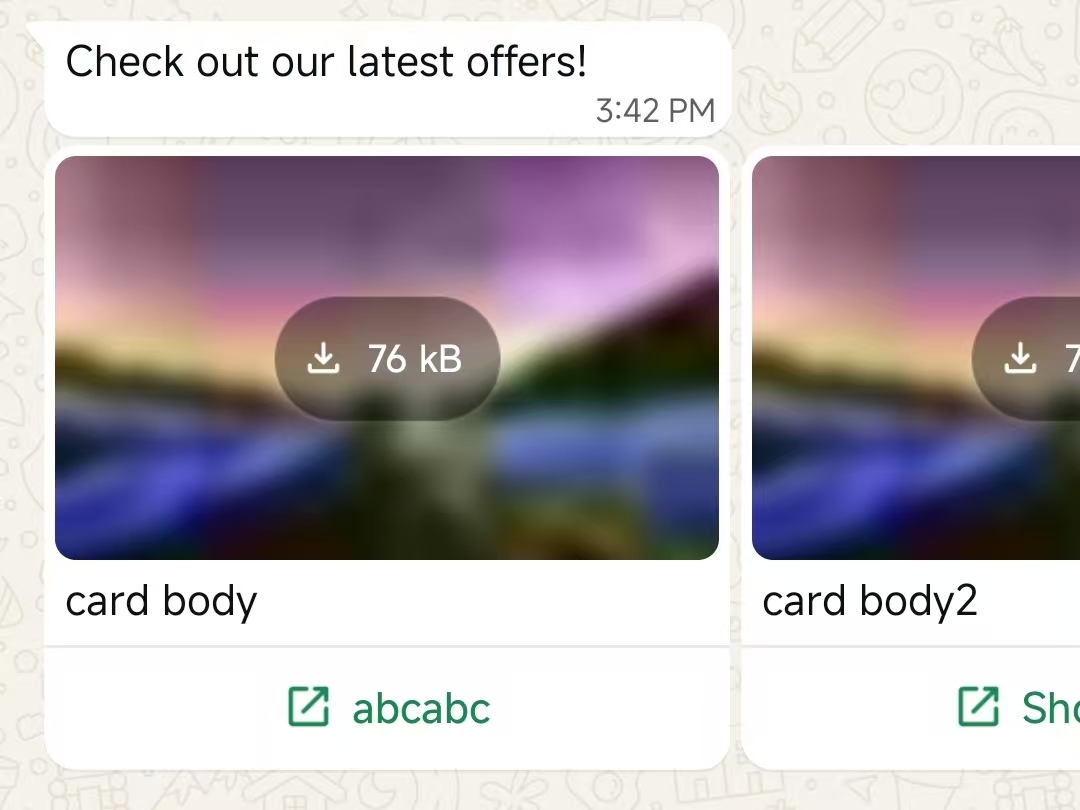
The interactive media carousel message enables businesses to send horizontally scrollable cards with images or videos, each with a call-to-action button, within WhatsApp conversations. This format allows users to browse multiple offers or content in a single message, providing a rich and engaging experience via the WhatsApp Business APIs and mobile clients.
* `interactive.type` must be `carousel`
* `interactive.action.cards` must add at least 2 card objects to your message, and can add a maximum of 10.
* The type of each card must be set to `cta_url`
* all cards must have the same header type (`image` or `video`)
* must add a message body(`interactive.body`) to the message (max 1024 characters). No header, footer, or buttons are allowed outside the cards.
* must have the same structure for all cards(header, body, action).
* card body is optional, but max 160 chars, and up to 2 line breaks.
#### Request
```shell theme={"theme":{"light":"github-light","dark":"github-dark"}}
curl 'https://api.ycloud.com/v2/whatsapp/messages/sendDirectly' \
-H 'Content-Type: application/json' \
-H 'X-API-Key: {{YOUR-API-KEY}}' \
-d '{
"from": "{{BUSINESS-PHONE-NUMBER}}",
"to": "{{CUSTOMER-PHONE-NUMBER}}",
"type": "interactive",
"interactive": {
"type": "carousel",
"body": {
"text": "Check out our latest offers!"
},
"action": {
"cards": [
{
"card_index": 0,
"type": "cta_url",
"header": {
"type": "image",
"image": {
"link": "https://oss-ycloud-publicread.oss-ap-southeast-1.aliyuncs.com/api-docs/sample/sample.jpg"
}
},
"body": {
"text": "Exclusive deal #1"
},
"action": {
"name": "cta_url",
"parameters": {
"display_text": "Shop now",
"url": "https://shop.example.com/deal1"
}
}
},
{
"card_index": 1,
"type": "cta_url",
"header": {
"type": "image",
"image": {
"link": "https://oss-ycloud-publicread.oss-ap-southeast-1.aliyuncs.com/api-docs/sample/sample.jpg"
}
},
"body": {
"text": "Exclusive deal #2"
},
"action": {
"name": "cta_url",
"parameters": {
"display_text": "Shop now",
"url": "https://shop.example.com/deal2"
}
}
}
]
}
}
}'
```
#### Response
A successful request returns the YCloud message object. An initial `accepted` status confirms submission, not final delivery.
```json theme={"theme":{"light":"github-light","dark":"github-dark"}}
{
"id": "MESSAGE_ID",
"status": "accepted"
}
```
Store `id` and correlate later `whatsapp.message.updated` events.
#### Explanation
Match the request fields to the selected message type and use the returned message ID for status correlation.
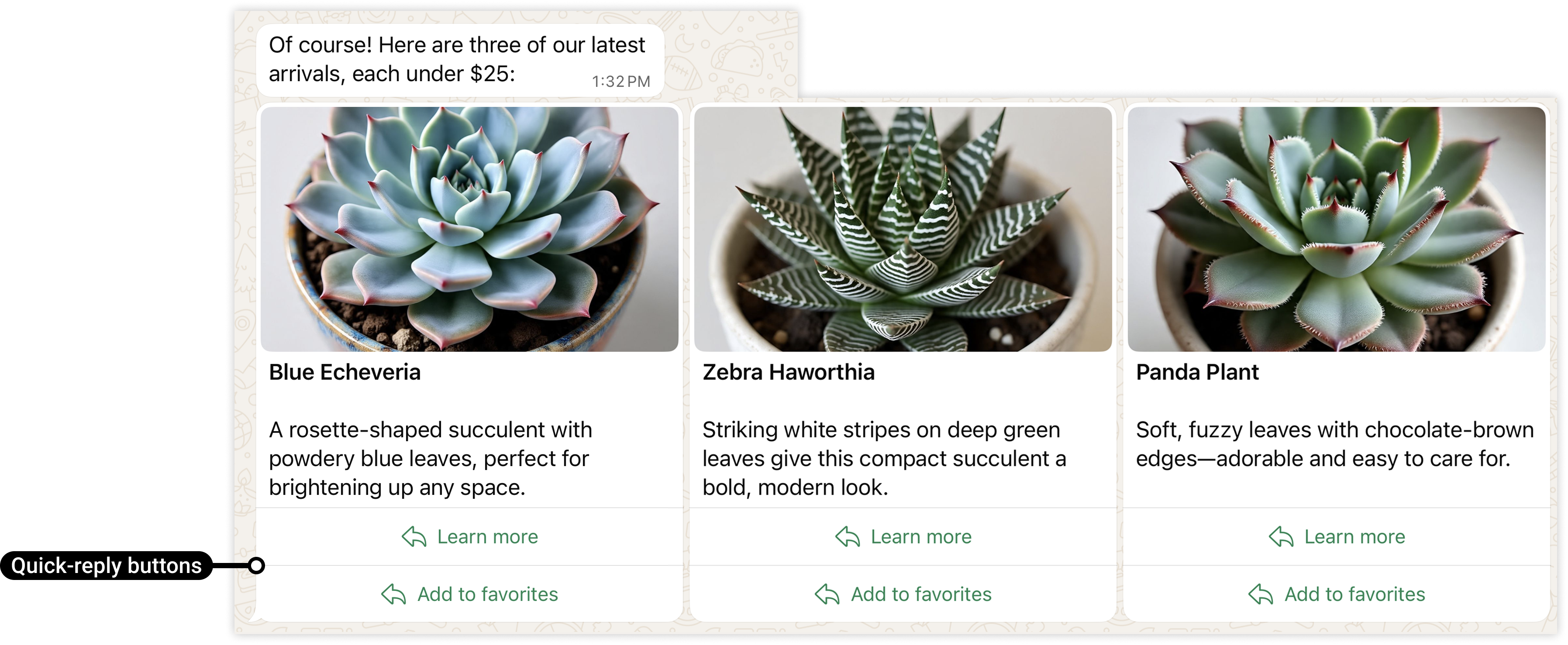
### Interactive media carousel messages with quick reply buttons
* Cards must include either one URL button, or one or more quick-reply buttons. Button types and numbers must match across all cards (for example, if you define a card with 2 quick-reply buttons, all cards must define exactly 2 quick-reply buttons).
#### Request
```shell theme={"theme":{"light":"github-light","dark":"github-dark"}}
curl 'https://api.ycloud.com/v2/whatsapp/messages/sendDirectly' \
-H 'Content-Type: application/json' \
-H 'X-API-Key: {{YOUR-API-KEY}}' \
-d '{
"from": "{{BUSINESS-PHONE-NUMBER}}",
"to": "{{CUSTOMER-PHONE-NUMBER}}",
"type": "interactive",
"interactive": {
"type": "carousel",
"body": {
"text": "Check out our latest offers!"
},
"action": {
"cards": [
{
"card_index": 0,
"type": "cta_url",
"header": {
"type": "image",
"image": {
"link": "https://oss-ycloud-publicread.oss-ap-southeast-1.aliyuncs.com/api-docs/sample/sample.jpg"
}
},
"body": {
"text": "Exclusive deal #1"
},
"action": {
"buttons": [
{
"type": "quick_reply",
"quick_reply": {
"id": "learn-zebra-haworthia",
"title": "Learn more"
}
},
{
"type": "quick_reply",
"quick_reply": {
"id": "fav-zebra-haworthia",
"title": "Add to favorites"
}
}
]
}
},
{
"card_index": 1,
"type": "cta_url",
"header": {
"type": "image",
"image": {
"link": "https://oss-ycloud-publicread.oss-ap-southeast-1.aliyuncs.com/api-docs/sample/sample.jpg"
}
},
"body": {
"text": "Exclusive deal #2"
},
"action": {
"buttons": [
{
"type": "quick_reply",
"quick_reply": {
"id": "learn-zebra-haworthia",
"title": "Learn more"
}
},
{
"type": "quick_reply",
"quick_reply": {
"id": "fav-zebra-haworthia",
"title": "Add to favorites"
}
}
]
}
}
]
}
}
}'
```
#### Response
A successful request returns the YCloud message object. An initial `accepted` status confirms submission, not final delivery.
```json theme={"theme":{"light":"github-light","dark":"github-dark"}}
{
"id": "MESSAGE_ID",
"status": "accepted"
}
```
Store `id` and correlate later `whatsapp.message.updated` events.
#### Explanation
Match the request fields to the selected message type and use the returned message ID for status correlation.
### Checkout Button message
Once your checkout button template has been approved, you can send it in a template message
#### Request
```shell theme={"theme":{"light":"github-light","dark":"github-dark"}}
curl 'https://api.ycloud.com/v2/whatsapp/messages/sendDirectly' \
-H 'Content-Type: application/json' \
-H 'X-API-Key: {{YOUR-API-KEY}}' \
-d '{
"from": "{{BUSINESS-PHONE-NUMBER}}",
"to": "{{CUSTOMER-PHONE-NUMBER}}",
"type": "template",
"template": {
"name": "item_back_in_stock_v1",
"language": {
"code": "{{LANGUAGE-CODE}}",
"policy": "deterministic",
},
"components": [
{
"type": "header",
"parameters": [
{
"type": "image",
"image": {
"id": "12312312",
"link": "https://oss-ycloud-publicread.oss-ap-southeast-1.aliyuncs.com/api-docs/sample/sample.jpg"
}
}
]
},
{
"type": "body",
"parameters": [
{
"type": "text",
"text": "Nidhi"
},
{
"type": "text",
"text": "Blue Elf Aloe"
}
]
},
{
"type": "button",
"sub_type": "order_details",
"index": 0,
"parameters": [
{
"type": "action",
"action": {
"order_details": {
"reference_id": "abc.123_xyz-1",
"type": "physical-goods",
"currency": "INR",
"payment_settings": [
{
"type": "payment_gateway",
"payment_gateway": {
"type": "razorpay",
"configuration_name": "prod-razor-pay-config-05"
}
}
],
"shipping_info": {
"country": "IN",
"addresses": [
{
"name": "Nidhi Tripathi",
"phone_number": "919000090000",
"address": "Bandra Kurla Complex",
"city": "Mumbai",
"state": "Maharastra",
"in_pin_code": "400051",
"house_number": "12",
"tower_number": "5",
"building_name": "One BKC",
"landmark_area": "Near BKC Circle"
}
]
},
"order": {
"items": [
{
"amount": {
"offset": 100,
"value": 200000
},
"sale_amount": {
"offset": 100,
"value": 150000
},
"name": "Blue Elf Aloe",
"quantity": 1,
"country_of_origin": "India",
"importer_name": "Lucky Shrub Imports and Exports",
"importer_address": {
"address_line1": "One BKC",
"address_line2": "Bandra Kurla Complex",
"city": "Mumbai",
"zone_code": "MH",
"postal_code": "400051",
"country_code": "IN"
}
}
],
"subtotal": {
"offset": 100,
"value": 150000
},
"shipping": {
"offset": 100,
"value": 20000
},
"tax": {
"offset": 100,
"value": 10000
},
"discount": {
"offset": 100,
"value": 15000,
"description": "Additional 10% off"
},
"status": "pending",
"expiration": {
"timestamp": "1726627150"
}
},
"total_amount": {
"offset": 100,
"value": 165000
}
}
}
}
]
}
]
}
}'
```
#### Response
A successful request returns the YCloud message object. An initial `accepted` status confirms submission, not final delivery.
```json theme={"theme":{"light":"github-light","dark":"github-dark"}}
{
"id": "MESSAGE_ID",
"status": "accepted"
}
```
Store `id` and correlate later `whatsapp.message.updated` events.
#### Explanation
Match the request fields to the selected message type and use the returned message ID for status correlation.
### Gif template message
In this case, you send a gif template message:
* Contains a gif URL.
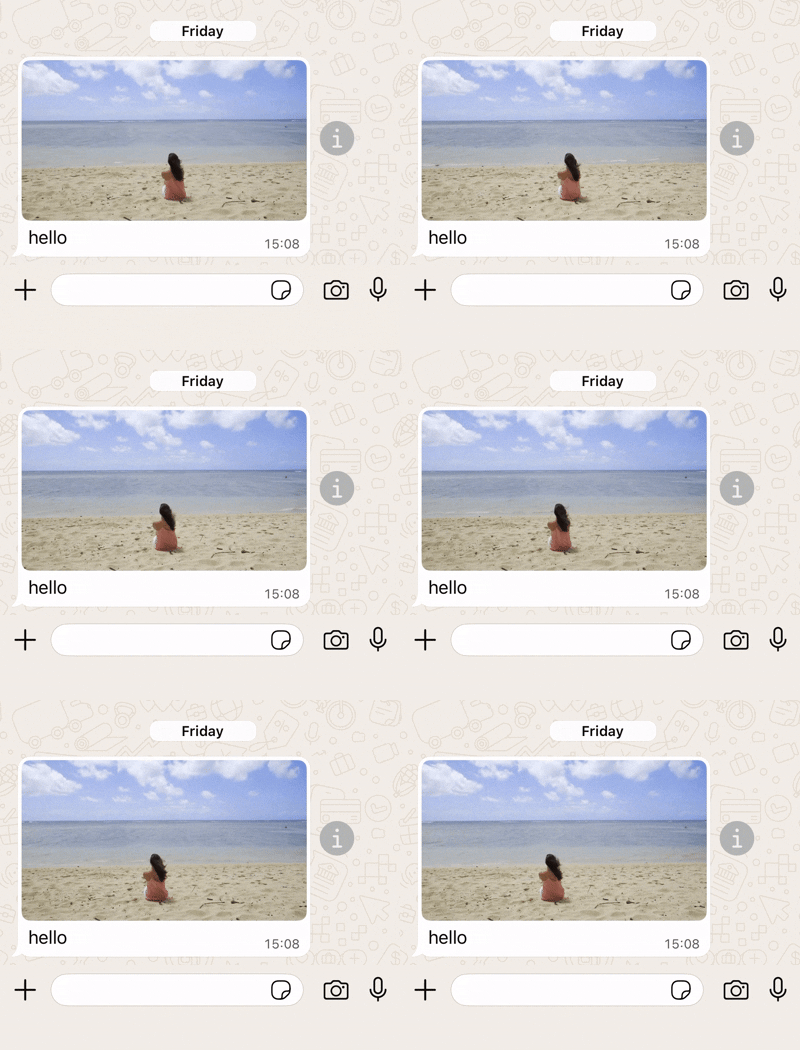
#### Request
```shell theme={"theme":{"light":"github-light","dark":"github-dark"}}
curl 'https://api.ycloud.com/v2/whatsapp/messages/sendDirectly' \
-H 'Content-Type: application/json' \
-H 'X-API-Key: {{YOUR-API-KEY}}' \
-d '{
"from": "{{BUSINESS-PHONE-NUMBER}}",
"to": "{{CUSTOMER-PHONE-NUMBER}}",
"type": "template",
"template": {
"name": "marketing_friday_more",
"language": {
"code": "{{LANGUAGE-CODE}}",
"policy": "deterministic"
},
"components": [
{
"type": "header",
"parameters": [
{
"type": "gif",
"gif": {
"link": "https://oss-ycloud-publicread.oss-ap-southeast-1.aliyuncs.com/api-docs/sample/sample.mp4"
}
}
]
}
]
}
}'
```
#### Response
A successful request returns the YCloud message object. An initial `accepted` status confirms submission, not final delivery.
```json theme={"theme":{"light":"github-light","dark":"github-dark"}}
{
"id": "MESSAGE_ID",
"status": "accepted"
}
```
Store `id` and correlate later `whatsapp.message.updated` events.
#### Explanation
Match the request fields to the selected message type and use the returned message ID for status correlation.
This documentation is built and hosted on [Mintlify](https://mintlify.com), a developer documentation platform.