> ## Documentation Index
> Fetch the complete documentation index at: https://docs.ycloud.com/llms.txt
> Use this file to discover all available pages before exploring further.
# Manage WhatsApp calls
> Set up WhatsApp Calling, handle inbound and outbound call signaling, process call events, and download recordings or transcriptions.
## What it is
YCloud's WhatsApp Calling API manages voice call signaling between a WhatsApp user and a business phone number. Your application exchanges SDP through YCloud, while your WebRTC implementation handles the audio connection.
Calls can start in either direction:
* **User-initiated:** A WhatsApp user calls your business. Your application receives an offer and accepts or rejects the call.
* **Business-initiated:** Your application creates an offer and asks YCloud to call a WhatsApp user.
The Calling API handles call signaling, not the WebRTC media stack. Your application is responsible for peer connection setup, audio capture and playback, SDP generation, and WebRTC resource cleanup.
## API map
Calling APIs and webhook events follow the same lifecycle, but they do not form one sequence that applies to every call. Complete the shared setup, then follow the user-initiated or business-initiated flow. Use the call ID, `wacid`, to correlate every operation and event.
### Shared setup
| API | When you use it | What happens next |
| - | - | - |
| [`GET settings`](/api-reference/whatsapp-phone-numbers/retrieve-phone-number-settings) or [`POST settings`](/api-reference/whatsapp-phone-numbers/save-phone-number-settings) | Before handling calls, or when Calling and capture settings change. | Configure webhooks and prepare your WebRTC implementation, then follow the flow for the call direction. |
### User-initiated calls
| Order | API or event | What happens next |
| - | - | - |
| 1 | [`whatsapp.call.connect`](/en/api-reference/guides/examples/webhook-examples/whatsapp-calling-connect-webhook-examples) | Receive the SDP offer, `phoneId`, and `wacid`, then create an SDP answer. |
| 2 (optional) | [`POST /whatsapp/calls/preAccept`](/api-reference/whatsapp-calling/pre-accept-a-call) | If you plan to accept the call, send the SDP answer to prepare the media path. This does not answer the call. |
| 3 | [`POST /whatsapp/calls/accept`](/api-reference/whatsapp-calling/accept-a-call) or [`POST /whatsapp/calls/reject`](/api-reference/whatsapp-calling/reject-a-call) | Choose one: accept the call with the SDP answer, or reject it. |
### Business-initiated calls
| Order | API or event | What happens next |
| - | - | - |
| 1 | [`POST /whatsapp/calls/connect`](/api-reference/whatsapp-calling/connect-a-call) | Send your SDP offer, start the call, and store the returned `wacid`. |
| 2 | [`whatsapp.call.connect`](/en/api-reference/guides/examples/webhook-examples/whatsapp-calling-connect-webhook-examples) | Receive the remote SDP answer and apply it to the same WebRTC peer connection. |
| 3 | [`whatsapp.call.status.updated`](/en/api-reference/guides/examples/webhook-examples/whatsapp-calling-status-update-webhook-examples) | Track `RINGING`, `ACCEPTED`, or `REJECTED`. This event can arrive more than once as the attempt changes state. |
### Shared call completion
| API or event | When you use it | What happens next |
| - | - | - |
| [`POST /whatsapp/calls/terminate`](/api-reference/whatsapp-calling/terminate-a-call) | Optional. Call it when your application needs to end an active inbound or outbound call. | Keep the call record open while waiting for the final event. |
| [`whatsapp.call.terminate`](/en/api-reference/guides/examples/webhook-examples/whatsapp-calling-terminate-webhook-examples) | Receive it for the terminal call result. | Record the final `COMPLETED` or `FAILED` outcome and duration, then release remaining call resources. |
### Optional media processing
| API or event | When you use it | What happens next |
| - | - | - |
| [`whatsapp.call.recording.updated`](/en/api-reference/webhooks/test-webhooks) or [`whatsapp.call.transcription.updated`](/en/api-reference/webhooks/test-webhooks) | When capture is enabled and processing finishes. | If the event reports `AVAILABLE`, read its `mediaAssetId`. A `FAILED` result is terminal for that asset. |
| [`GET /whatsapp/calls/media/{mediaAssetId}`](/api-reference/whatsapp-calling/download-call-media) | Only after the corresponding event reports `AVAILABLE`. | Download the recording or transcription file. |
These tables describe the application workflow. They do not guarantee that webhooks will be delivered in the same order as the rows. Correlate events by `wacid` and handle redelivery idempotently.
## Before you begin
Before making a Calling request, prepare the following:
1. A YCloud account API key. Send it in the `X-API-Key` header. See [Authentication](/en/api-reference/guides/api-fundamentals/authentication).
2. A WhatsApp Business Account and a business phone number registered with YCloud.
3. Calling enabled for that phone number.
4. A WebRTC audio implementation that can create and apply SDP offers and answers.
5. A YCloud webhook endpoint subscribed to the Calling events used by your integration. See [Configure webhooks](/en/api-reference/guides/api-fundamentals/configure-webhooks).
6. User calling permission when it is required for a business-initiated call.
Contact your YCloud representative to enable Calling API access. For outbound
eligibility, follow the [current Calling requirements](/en/documentation/calling/overview#business-initiated-calls-outbound),
including the Business Portfolio 2,000-customer messaging tier and supported
business-number countries. The older 1,000-conversation threshold is superseded
by the current requirements.
The examples below use these environment variables:
```bash theme={"theme":{"light":"github-light","dark":"github-dark"}}
export YCLOUD_API_KEY="YOUR_API_KEY"
export WABA_ID="YOUR_WABA_ID"
export BUSINESS_PHONE_NUMBER="+16315551111"
```
Keep the API key on your server. Do not put it in browser or mobile application code.
## How it works
Start by configuring the business phone number. Then exchange SDP according to the call direction. API responses acknowledge individual signaling operations, while webhook events report state changes and the final result. If capture is enabled, separate events indicate when a recording or transcription is ready to download.
## Request
## Configure the business phone number
Calling and capture settings belong to a specific WhatsApp business phone number. Configure them before processing calls.
### Read Calling settings
Use [`GET /whatsapp/phoneNumbers/{wabaId}/{phoneNumber}/settings`](/api-reference/whatsapp-phone-numbers/retrieve-phone-number-settings) to check whether Calling is enabled and whether the Calling icon is visible:
```bash theme={"theme":{"light":"github-light","dark":"github-dark"}}
curl --request GET \
"https://api.ycloud.com/v2/whatsapp/phoneNumbers/$WABA_ID/$BUSINESS_PHONE_NUMBER/settings?type=calling" \
--header "X-API-Key: $YCLOUD_API_KEY"
```
If you omit `type`, YCloud returns the Calling settings response.
```json theme={"theme":{"light":"github-light","dark":"github-dark"}}
{
"calling": {
"id": "19213232132",
"status": "ENABLED",
"iconVisibility": "DEFAULT"
}
}
```
| Field | Values | Description |
| - | - | - |
| `calling.id` | String | WhatsApp business phone number ID. |
| `calling.status` | `ENABLED`, `DISABLED` | Whether Calling is enabled for the phone number. |
| `calling.iconVisibility` | `DEFAULT`, `DISABLE_ALL` | Whether WhatsApp uses its default Calling icon behavior or hides all Calling icons. |
### Enable Calling
Save Calling settings with [`POST /whatsapp/phoneNumbers/{wabaId}/{phoneNumber}/settings`](/api-reference/whatsapp-phone-numbers/save-phone-number-settings) before you start accepting or placing calls:
```bash theme={"theme":{"light":"github-light","dark":"github-dark"}}
curl --request POST \
"https://api.ycloud.com/v2/whatsapp/phoneNumbers/$WABA_ID/$BUSINESS_PHONE_NUMBER/settings" \
--header "X-API-Key: $YCLOUD_API_KEY" \
--header "Content-Type: application/json" \
--data '{
"calling": {
"status": "ENABLED",
"iconVisibility": "DEFAULT"
}
}'
```
The response contains the saved `calling` object. Before handling live calls, finish configuring your webhooks and WebRTC sessions.
### Configure recording and transcription
Capture settings apply to new API-sourced calls. You can enable recording, transcription, or both.
```bash theme={"theme":{"light":"github-light","dark":"github-dark"}}
curl --request POST \
"https://api.ycloud.com/v2/whatsapp/phoneNumbers/$WABA_ID/$BUSINESS_PHONE_NUMBER/settings" \
--header "X-API-Key: $YCLOUD_API_KEY" \
--header "Content-Type: application/json" \
--data '{
"capture": {
"recordingEnabled": true,
"transcriptionEnabled": true,
"purpose": "quality_assurance",
"announcementLanguage": "en_US"
}
}'
```
| Field | Type | Required | Description |
| - | - | - | - |
| `capture.recordingEnabled` | Boolean | Yes | Enables or disables recording capture. |
| `capture.transcriptionEnabled` | Boolean | Yes | Enables or disables transcription capture. |
| `capture.purpose` | String | Conditional | Required when either capture option is enabled. Maximum 250 characters. |
| `capture.announcementLanguage` | String | Conditional | Required when either capture option is enabled. Supported values: `en`, `en_US`, `en_AU`, `en_CA`, `en_GB`, `en_IN`, `en_NZ`, `nl`, `fr`, `de`, `hi`, `it`, `kn`, `pt`, `es`, `es_ES`, `te`, `vi`. |
To read capture settings, use `type=capture`:
```bash theme={"theme":{"light":"github-light","dark":"github-dark"}}
curl --request GET \
"https://api.ycloud.com/v2/whatsapp/phoneNumbers/$WABA_ID/$BUSINESS_PHONE_NUMBER/settings?type=capture" \
--header "X-API-Key: $YCLOUD_API_KEY"
```
You can include `calling` and `capture` in the same `POST` request. After validating access to the phone number, YCloud attempts to save each section independently. If either save fails, the other section may already be stored. Read both settings after an error, then retry only the section that still needs an update.
## Handle a user-initiated call
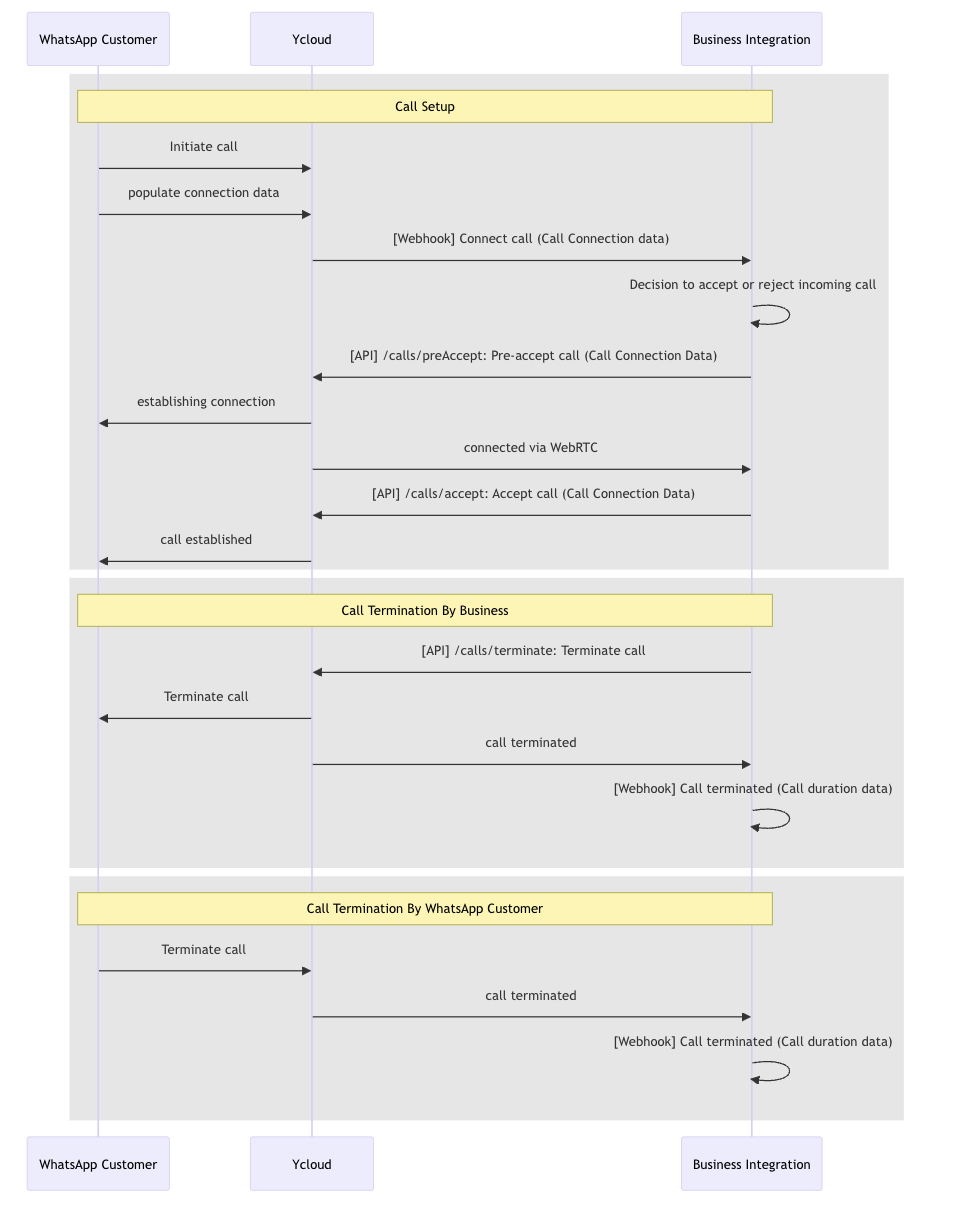
In a user-initiated call, WhatsApp sends the SDP offer. Your application answers that offer and then accepts or rejects the call.
### 1. Receive the connect event
Subscribe to [`whatsapp.call.connect`](/en/api-reference/guides/examples/webhook-examples/whatsapp-calling-connect-webhook-examples). A user-initiated event has `direction` set to `USER_INITIATED` and includes an SDP `offer`.
```json theme={"theme":{"light":"github-light","dark":"github-dark"}}
{
"id": "evt_call_connect_123",
"type": "whatsapp.call.connect",
"apiVersion": "v2",
"createTime": "2024-01-01T12:00:00.000Z",
"callingConnect": {
"id": "6757b723960b25543b9ecc66",
"wacid": "wacid.HBgNNjI4MTM2MTkwNTEzMxUCABIYIEF",
"phoneId": "461269257068832",
"from": "+6281361905133",
"to": "+6283138205150",
"direction": "USER_INITIATED",
"dialTime": 1733826430000,
"sdpType": "offer",
"sdp": "SDP_OFFER"
}
}
```
Store `callingConnect.wacid` and `callingConnect.phoneId` together. Apply the received SDP offer to your WebRTC peer connection and create an SDP answer.
### 2. Pre-accept the call
Call pre-accept after creating an SDP answer, but before the agent accepts the call. This prepares the media path and can reduce audio clipping when the call is answered.
**Endpoint:** [`POST /whatsapp/calls/preAccept`](/api-reference/whatsapp-calling/pre-accept-a-call)
| Field | Type | Required | Description |
| - | - | - | - |
| `phoneId` | String | Yes | Business phone number ID from the connect event. |
| `wacid` | String | Yes | WhatsApp call ID from the connect event. |
| `sdpType` | String | Yes | Must be `answer`. |
| `sdp` | String | Yes | SDP answer created by your WebRTC implementation. |
```bash theme={"theme":{"light":"github-light","dark":"github-dark"}}
curl --request POST https://api.ycloud.com/v2/whatsapp/calls/preAccept \
--header "X-API-Key: $YCLOUD_API_KEY" \
--header "Content-Type: application/json" \
--data '{
"phoneId": "461269257068832",
"wacid": "wacid.HBgNNjI4MTM2MTkwNTEzMxUCABIYIEF",
"sdpType": "answer",
"sdp": "SDP_ANSWER"
}'
```
```json theme={"theme":{"light":"github-light","dark":"github-dark"}}
{
"wacid": "wacid.HBgNNjI4MTM2MTkwNTEzMxUCABIYIEF",
"success": true
}
```
After pre-accept succeeds, keep the call in a ringing or ready state. Pre-accept does not answer the call for the user.
### 3. Accept the call
When the agent answers, send the same `phoneId`, `wacid`, SDP type, and SDP answer to the accept endpoint.
**Endpoint:** [`POST /whatsapp/calls/accept`](/api-reference/whatsapp-calling/accept-a-call)
```bash theme={"theme":{"light":"github-light","dark":"github-dark"}}
curl --request POST https://api.ycloud.com/v2/whatsapp/calls/accept \
--header "X-API-Key: $YCLOUD_API_KEY" \
--header "Content-Type: application/json" \
--data '{
"phoneId": "461269257068832",
"wacid": "wacid.HBgNNjI4MTM2MTkwNTEzMxUCABIYIEF",
"sdpType": "answer",
"sdp": "SDP_ANSWER"
}'
```
The request fields and response shape are the same as pre-accept. After a successful response, use the WebRTC connection state for media readiness and wait for `whatsapp.call.terminate` for the final call result.
The documented inbound acceptance window is approximately 30–60 seconds after
the connect webhook. Accept promptly; an unanswered call ends on the user's
side with a **Not Answered** notification and a terminate webhook.
Even if the WebRTC connection is already established, start audio only after
the accept request returns HTTP `200`. Starting earlier can clip the first
words; starting too late causes silence.
### Reject instead of accepting
If the agent cannot take the inbound call, reject it instead of creating an active session.
**Endpoint:** [`POST /whatsapp/calls/reject`](/api-reference/whatsapp-calling/reject-a-call)
| Field | Type | Required | Description |
| - | - | - | - |
| `phoneId` | String | Yes | Business phone number ID from the connect event. |
| `wacid` | String | Yes | WhatsApp call ID from the connect event. |
```bash theme={"theme":{"light":"github-light","dark":"github-dark"}}
curl --request POST https://api.ycloud.com/v2/whatsapp/calls/reject \
--header "X-API-Key: $YCLOUD_API_KEY" \
--header "Content-Type: application/json" \
--data '{
"phoneId": "461269257068832",
"wacid": "wacid.HBgNNjI4MTM2MTkwNTEzMxUCABIYIEF"
}'
```
The response uses the standard Calling response. Release the local peer connection after the request, and still accept a later termination event for this `wacid` if one arrives.
## Start a business-initiated call
In a business-initiated call, your application creates the SDP offer and sends it to YCloud.
### Obtain calling permission
Before initiating a call, obtain the user's calling permission. An interactive
permission request can be sent within an eligible customer service window:
```json theme={"theme":{"light":"github-light","dark":"github-dark"}}
{
"from": "+16315551111",
"to": "+16315552222",
"type": "interactive",
"interactive": {
"type": "call_permission_request",
"action": { "name": "call_permission_request" },
"body": { "text": "May we call you to help with your order?" }
}
}
```
Send this body to `POST /v2/whatsapp/messages/sendDirectly` or enqueue it with
`POST /v2/whatsapp/messages`.
You can also create a call-permission template. For example, submit this body
to `POST /v2/whatsapp/templates`, then wait for approval:
```json theme={"theme":{"light":"github-light","dark":"github-dark"}}
{
"wabaId": "WABA_ID",
"name": "call_permission_request_template",
"language": "en_US",
"category": "UTILITY",
"components": [
{
"type": "BODY",
"text": "May we call you about order {{1}}?",
"example": { "body_text": [["ORDER_123"]] }
},
{ "type": "call_permission_request" }
]
}
```
Send the approved template with its body parameter:
```json theme={"theme":{"light":"github-light","dark":"github-dark"}}
{
"from": "+16315551111",
"to": "+16315552222",
"type": "template",
"template": {
"name": "call_permission_request_template",
"language": { "code": "en_US", "policy": "deterministic" },
"components": [
{ "type": "body", "parameters": [{ "type": "text", "text": "ORDER_123" }] }
]
}
}
```
When `callback_permission_status` is enabled in the phone number's calling
settings, a user-initiated call can grant callback permission. A user can also
grant permanent calling permission from the business profile.
Permission replies arrive as `whatsapp.inbound_message.received` events. Inspect
the `interactive.call_permission_reply` object, not just whether the permission
request message was delivered:
```json theme={"theme":{"light":"github-light","dark":"github-dark"}}
{
"type": "whatsapp.inbound_message.received",
"whatsappInboundMessage": {
"from": "+16315552222",
"to": "+16315551111",
"type": "interactive",
"interactive": {
"type": "call_permission_reply",
"call_permission_reply": {
"response": "accept",
"is_permanent": true,
"response_source": "user_action"
}
}
}
}
```
| Field | Meaning |
| - | - |
| `response` | The user accepted or rejected the permission request. |
| `is_permanent` | Whether the grant is permanent rather than time-limited. |
| `expiration_timestamp` | Expiration of a temporary permission, when provided. |
| `response_source` | Whether the reply came from a user action or automatically. |
Do not initiate the call after a rejection or an expired permission. Meta error
`138006` means the business number does not have the required calling permission.
For provider error details, see [Meta's Calling errors](https://developers.facebook.com/documentation/business-messaging/whatsapp/calling/reference/errors).
### 1. Create an SDP offer
Create a local WebRTC peer connection and attach the audio track. Generate the SDP offer, set it as the local description, and wait for that operation to finish before sending the offer to YCloud.
### 2. Connect the call
**Endpoint:** [`POST /whatsapp/calls/connect`](/api-reference/whatsapp-calling/connect-a-call)
| Field | Type | Required | Description |
| - | - | - | - |
| `from` | String | Yes | Registered business phone number in E.164 format. |
| `to` | String | Conditional | User phone number in E.164 format. Required when `recipient` is absent. |
| `recipient` | String | Conditional | User BSUID or parent BSUID. Required when `to` is absent. |
| `sdpType` | String | Yes | Must be `offer`. |
| `sdp` | String | Yes | SDP offer created by your WebRTC implementation. |
Provide at least one of `to` or `recipient`. If you send both, YCloud uses `to` and ignores `recipient`.
```bash theme={"theme":{"light":"github-light","dark":"github-dark"}}
curl --request POST https://api.ycloud.com/v2/whatsapp/calls/connect \
--header "X-API-Key: $YCLOUD_API_KEY" \
--header "Content-Type: application/json" \
--data '{
"from": "+16315551111",
"to": "+16315552222",
"sdpType": "offer",
"sdp": "SDP_OFFER"
}'
```
```json theme={"theme":{"light":"github-light","dark":"github-dark"}}
{
"wacid": "wacid.HBgNNjI4MTM2MTkwNTEzMxUCABE",
"success": true
}
```
Store the returned `wacid` immediately. `success: true` means the connect operation was accepted; it does not mean the user answered.
### 3. Apply the answer and track the attempt
YCloud sends [`whatsapp.call.connect`](/en/api-reference/guides/examples/webhook-examples/whatsapp-calling-connect-webhook-examples) for the call. For a business-initiated call, the event has `direction: BUSINESS_INITIATED` and carries the remote SDP `answer`. Apply that answer as the remote description for the same peer connection.
Subscribe to [`whatsapp.call.status.updated`](/en/api-reference/guides/examples/webhook-examples/whatsapp-calling-status-update-webhook-examples) to track the attempt:
```json theme={"theme":{"light":"github-light","dark":"github-dark"}}
{
"id": "evt_676e5ab57a9cb742d02d7646",
"type": "whatsapp.call.status.updated",
"apiVersion": "v2",
"createTime": "2024-12-27T07:41:28.422Z",
"callingStatusUpdated": {
"wabaId": "188234691048809",
"wacid": "wacid.HBgNNjI4MTM2MTkwNTEzMxUCABE",
"phoneId": "461269257068832",
"status": "RINGING",
"recipientPhone": "+16315552222"
}
}
```
| Status | Meaning | Recommended action |
| - | - | - |
| `RINGING` | The call is ringing the user. | Keep the attempt open and continue waiting. |
| `ACCEPTED` | The user accepted the call. | Use the WebRTC connection state to confirm media readiness. |
| `REJECTED` | The user rejected the call. | Stop the attempt and release local WebRTC resources. |
Make event handling idempotent so a redelivery does not repeat agent actions, billing, or cleanup.
## Terminate an active call
Call terminate when your application needs to end an active inbound or outbound call.
**Endpoint:** [`POST /whatsapp/calls/terminate`](/api-reference/whatsapp-calling/terminate-a-call)
```bash theme={"theme":{"light":"github-light","dark":"github-dark"}}
curl --request POST https://api.ycloud.com/v2/whatsapp/calls/terminate \
--header "X-API-Key: $YCLOUD_API_KEY" \
--header "Content-Type: application/json" \
--data '{
"phoneId": "461269257068832",
"wacid": "wacid.HBgNNjI4MTM2MTkwNTEzMxUCABE"
}'
```
The request fields match the reject request. A successful response confirms that YCloud processed the terminate operation. Keep the call record open until you receive the final termination event or your own recovery policy closes it.
## Response
All five signaling endpoints return the same response shape:
```json theme={"theme":{"light":"github-light","dark":"github-dark"}}
{
"wacid": "wacid.HBgNNjI4MTM2MTkwNTEzMxUCABE",
"success": true
}
```
`wacid` identifies the call associated with the operation. `success: true` confirms that the signaling operation succeeded; it does not confirm that the other participant answered or that the call completed. Use WebRTC state and Calling webhook events for those outcomes.
## Process the final call event
[`whatsapp.call.terminate`](/en/api-reference/guides/examples/webhook-examples/whatsapp-calling-terminate-webhook-examples) is the terminal lifecycle event for a call.
```json theme={"theme":{"light":"github-light","dark":"github-dark"}}
{
"id": "evt_6757b889a5a42d369ef48481",
"type": "whatsapp.call.terminate",
"apiVersion": "v2",
"createTime": "2024-12-10T03:42:01.822Z",
"callingTerminate": {
"id": "6757b889960b25543b9ecc67",
"wacid": "wacid.HBgNNjI4MTM2MTkwNTEzMxUCABIYIEFENjB",
"phoneId": "461269257068832",
"from": "+6281361905133",
"to": "+6283138205150",
"direction": "USER_INITIATED",
"startTime": 1733734738000,
"endTime": 1733734771000,
"duration": 33,
"status": "COMPLETED"
}
}
```
| Field | Description |
| - | - |
| `wacid` | Call ID used to match the event to your call record. |
| `direction` | `USER_INITIATED` or `BUSINESS_INITIATED`. |
| `startTime`, `endTime` | Unix timestamps in milliseconds. |
| `duration` | Call duration in seconds. |
| `status` | Final result: `COMPLETED` or `FAILED`. |
| `errorCode` | Numeric error code represented as a string when the call failed. |
When you receive this event, finalize the call record and release any remaining WebRTC resources. An earlier API response does not confirm that the call completed.
## Receive recordings and transcriptions
When capture is enabled, media processing continues after the call lifecycle. Recording and transcription have separate terminal events:
| Event | Payload property | Result |
| - | - | - |
| [`whatsapp.call.recording.updated`](/en/api-reference/webhooks/test-webhooks) | `callingRecording` | Recording is `AVAILABLE` or has permanently `FAILED`. |
| [`whatsapp.call.transcription.updated`](/en/api-reference/webhooks/test-webhooks) | `callingTranscription` | Transcription is `AVAILABLE` or has permanently `FAILED`. |
The following example shows an available recording:
```json theme={"theme":{"light":"github-light","dark":"github-dark"}}
{
"id": "evt_call_recording_01JZ8K4V7H3P6Q9R2T5W8X1Y4Z",
"type": "whatsapp.call.recording.updated",
"apiVersion": "v2",
"createTime": "2026-08-04T08:00:00.000Z",
"callingRecording": {
"wacid": "wacid.HBgNNjI4MTM2MTkwNTEzMxUCABE",
"phoneId": "461269257068832",
"mediaAssetId": "66b1f0c2e4b05c2d8f1a3b47",
"status": "AVAILABLE"
}
}
```
Both payload properties use the same fields:
| Field | Description |
| - | - |
| `wacid` | Call ID associated with the media asset. |
| `phoneId` | Business phone number ID associated with the call. |
| `mediaAssetId` | YCloud asset ID used by the media download API. |
| `status` | `AVAILABLE` or `FAILED`. |
| `error.code` | Stable processing failure code. Present when `status` is `FAILED`. |
| `error.retryable` | Whether retrying the upstream media operation may succeed. Present when `status` is `FAILED`. |
### Download an available asset
Call the media endpoint only after the corresponding event reports `AVAILABLE`.
**Endpoint:** [`GET /whatsapp/calls/media/{mediaAssetId}`](/api-reference/whatsapp-calling/download-call-media)
```bash theme={"theme":{"light":"github-light","dark":"github-dark"}}
curl --request GET \
"https://api.ycloud.com/v2/whatsapp/calls/media/66b1f0c2e4b05c2d8f1a3b47" \
--header "X-API-Key: $YCLOUD_API_KEY" \
--output calling-media.ogg
```
The endpoint returns the complete file as an attachment and does not support byte-range downloads. Recordings use `.ogg`; transcriptions use `.json`.
Only the owning YCloud tenant can download an asset. An asset remains available for 30 days from its creation time. Missing, unavailable, expired, or unowned assets return HTTP 404.
## Build a reliable webhook receiver
Subscribe your endpoint to the events your integration needs:
```json theme={"theme":{"light":"github-light","dark":"github-dark"}}
{
"enabledEvents": [
"whatsapp.call.connect",
"whatsapp.call.status.updated",
"whatsapp.call.terminate",
"whatsapp.call.recording.updated",
"whatsapp.call.transcription.updated"
]
}
```
For each request:
1. Preserve the raw request body and verify `YCloud-Signature` before trusting the event.
2. Persist the event or enqueue durable work.
3. Return a successful `2xx` response promptly.
4. Deduplicate by the top-level event `id`.
5. Correlate call data by `wacid`; keep `phoneId` with it for later operations.
6. Handle related events that arrive close together, and tolerate redelivery.
See [Configure webhooks](/en/api-reference/guides/api-fundamentals/configure-webhooks) for endpoint creation, signature validation, and delivery behavior. The [Webhook payload examples](/en/api-reference/guides/examples/webhook-examples/webhook-payload-examples) page contains the full generated examples.
## Handle errors and recovery
Calling endpoints use YCloud's standard API error response. See [Handle errors](/en/api-reference/guides/api-fundamentals/handle-errors) for the response structure and retry guidance.
Use these checks for common Calling failures:
| Situation | What to check | Recovery |
| - | - | - |
| Request validation fails | Required IDs, E.164 formatting, SDP type, SDP content, or capture fields. | Correct the request. Do not retry unchanged input. |
| Connect target is invalid | At least one of `to` or `recipient` is required. If both are present, `to` takes precedence. | Send a valid E.164 phone number or BSUID. |
| Calling is unavailable | Phone number ownership, registration, Calling settings, permission, and supported destination. | Fix configuration or permission before retrying. |
| Meta rejects signaling | Inspect the returned error details, including `whatsappApiError` when present. | Follow the error's retryability and correct the upstream cause. |
| A combined settings save fails | One of `calling` or `capture` may already have been saved. | Read both settings, then retry only the part that still needs an update. |
| Media download returns 400 | A non-empty `Range` header was sent. | Request the complete asset without `Range`. |
| Media download returns 404 | Asset is missing, not yet available, expired, or owned by another tenant. | Confirm the event status, tenant, asset ID, and 30-day window. |
| Webhook is repeated | The same event was delivered again. | Return `2xx` and skip repeated business processing by event `id`. |
A request timeout does not prove that the signaling action failed. Before retrying, reconcile the request against webhook events and your current local call state. The action may already have reached WhatsApp.
## Integration checklist
* Enable Calling on the correct business phone number.
* Configure and test all required Calling webhook subscriptions.
* Verify webhook signatures and deduplicate events.
* Store `wacid`, `phoneId`, direction, and current state together.
* Treat API `success` as operation acceptance, not as the final call outcome.
* Use `preAccept` only as preparation; call `accept` to answer.
* Finalize calls from `whatsapp.call.terminate`.
* Download captured media only after an `AVAILABLE` event and within 30 days.
* Release WebRTC resources on rejection, termination, failure, and local timeout.
* Avoid logging API keys, full SDP, or participant identifiers in general application logs.
Review the exact request and response schemas for each Calling endpoint.
Inspect the complete Calling event examples generated from the webhook specification.
This documentation is built and hosted on [Mintlify](https://mintlify.com), a developer documentation platform.