> ## Documentation Index
> Fetch the complete documentation index at: https://docs.ycloud.com/llms.txt
> Use this file to discover all available pages before exploring further.
# External Agent
> Connect your own AI agent to YCloud Inbox to receive customer messages, send replies, and hand conversations over to your team.
External Agent is available on **YCloud Pro plans and above**.
Connect your own AI agent to YCloud as an **External Agent**. Your agent runs in your infrastructure and works alongside your human agents in Inbox: it receives customer messages, sends replies, retrieves conversation history, and hands conversations over to your team.
YCloud sends events to your webhook URL. Your service processes those events and calls the Inbox REST API to reply or manage the conversation. YCloud does not call your AI inference API, and the HTTP response from your webhook is not sent to the customer.
## Before you begin
Prepare:
* A publicly reachable HTTPS endpoint that accepts JSON `POST` requests.
* A service that verifies webhook signatures, stores events, prevents duplicate processing, and runs your AI agent.
* A regular YCloud account API key, stored on your server. Developer App API keys are not supported by these Inbox endpoints.
* A WhatsApp business number connected to YCloud and a human team or agent to receive handoffs.
Use `https://api.ycloud.com` as the API base URL.
## Connect your agent
### 1. Create an External Agent
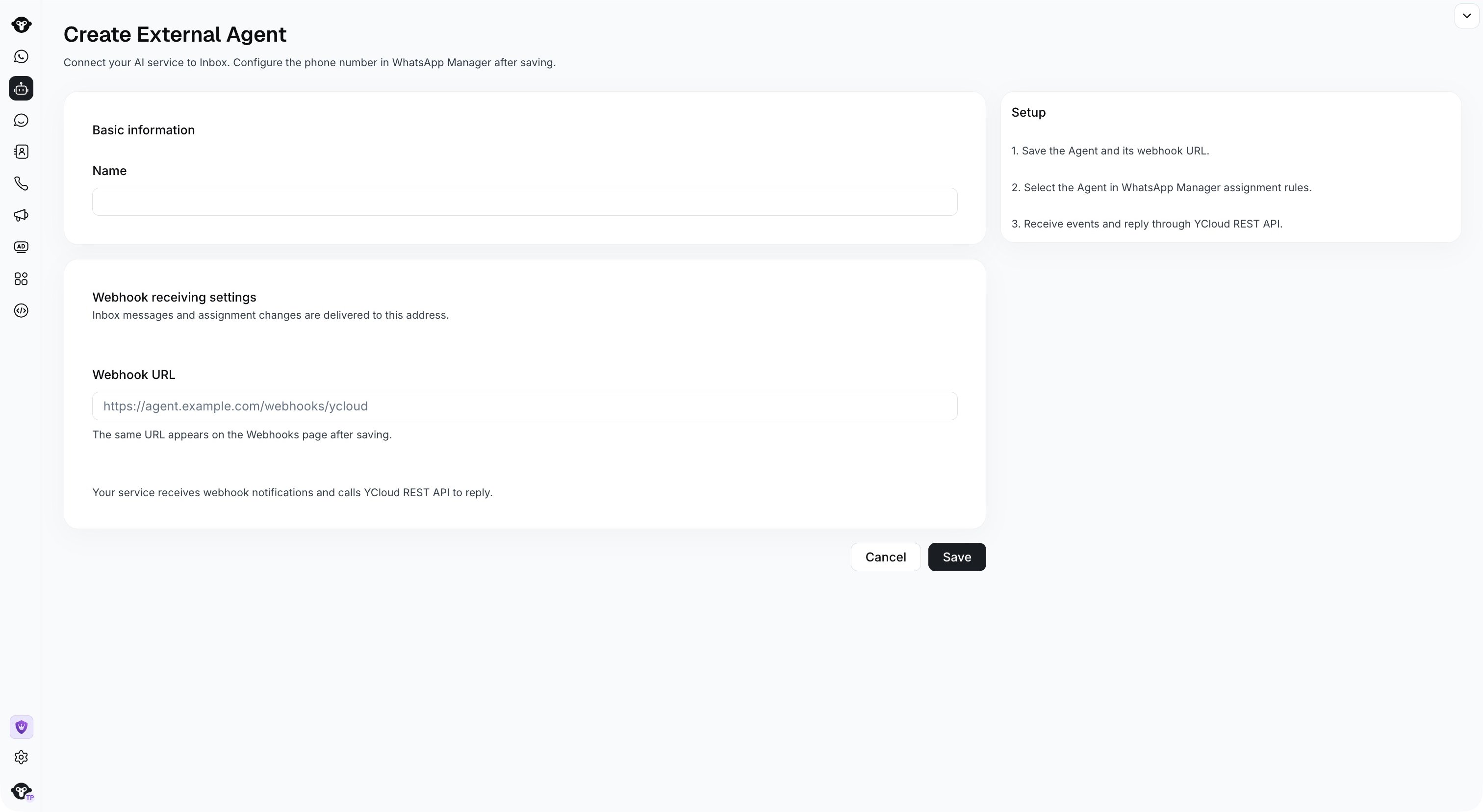
1. In the YCloud console, open **AI Agent** > **AI Agent**.
2. Select **Create Agent** > **External Agent**.
3. Enter a **Name** and your **Webhook URL**, such as `https://agent.example.com/webhooks/ycloud`.
4. Select **Save**.
5. Copy the generated **Bot ID** from the agent details. Use this value as `botId` in API requests; you do not need to supply an ID from your own AI system.
 The details page shows the webhook endpoint, its **Signing secret**, and the four event types. Use the signing secret to verify incoming events. Select **View delivery logs** to investigate webhook delivery. The same endpoint is also available on the **Webhooks** page.
Keep the endpoint signing secret separate from your API key. The secret verifies incoming webhooks; `X-API-Key` authenticates your outbound REST requests. A Bot ID is an identifier, not a credential.
### 2. Assign a WhatsApp number
Open **WhatsApp Manager** > **WhatsApp accounts**, then open the business number's settings and select **Inbox** > **Assignment**. Under **Priority 3 Assign to**, select **AI Agent**, then choose your agent from the **External Agent** section of the agent selector.
Check the rule priority: assignment to the customer's owner or the last handling agent can take precedence. See [Conversation assignment rules](/en/documentation/channels/whatsapp-accounts-management/phone-number-management/conversation-assignment-rules).
One External Agent can handle multiple numbers. Each number is associated with one bot at a time. Manage these associations in the number's assignment settings.
### 3. Process a conversation
1. A customer sends a WhatsApp message to your business number.
2. YCloud opens or continues an Inbox dialog and applies the number's assignment rules.
3. When your External Agent handles the dialog, YCloud delivers the applicable webhook events to its endpoint.
4. Your service verifies and stores the event, returns `2xx`, and processes the customer input asynchronously.
5. Your service calls the Inbox API to reply, hand off, or close the dialog.
6. Your service tracks delivery through `whatsapp.message.updated`.
## Understand the identifiers
| Identifier | Purpose |
| - | - |
| `botId` | The External Agent ID generated by YCloud. |
| `phoneNumberId` | The YCloud WhatsApp business number ID. |
| `conversationId` | The ongoing relationship between a customer and a business number. |
| `dialogId` | One service session, from opening to closure. A handoff keeps this ID; a valid new inbound message after closure starts a new dialog. |
| Webhook `id` | An opaque event ID used for deduplication. It does not encode event order. |
| `inboxMessage.id` / `inboxMessageId` | The Inbox message ID, used for reply references and delivery correlation. |
| `channelMessageId` / `wamid` | Channel and WhatsApp message identifiers. Store them separately from Inbox IDs. |
IDs are strings. Timestamps use UTC RFC 3339. Use `dialogId`, not `conversationId`, in the dialog API paths.
## Receive webhook events
All four event types arrive at the **same webhook URL**. Each dedicated External Agent delivery includes `id`, `type`, `apiVersion`, `createTime`, and `externalBotContext`, plus the corresponding business object.
| Event | Business object | What your service should do |
| - | - | - |
| `inbox.message.created` | `inboxMessage` | Process customer input only when `direction=inbound` and `actionable=true`. Sync outbound messages without triggering another AI reply. |
| `inbox.conversation.assigned` | `inboxConversation` | Track assignment changes. Stop processing when your agent hands off; retrieve history when it takes over an existing dialog. |
| `inbox.conversation.status_updated` | `inboxConversation` | Track dialog state and stop pending work when it closes. |
| `whatsapp.message.updated` | `whatsappMessage` | Track the delivery state or failure of a message your agent sent. |
### Verify, store, and acknowledge
Verify the `YCloud-Signature` header using the endpoint's signing secret and the **raw HTTP request body**, before parsing JSON. The signature format is:
```text theme={"theme":{"light":"github-light","dark":"github-dark"}}
YCloud-Signature: t=UNIX_TIMESTAMP,s=SIGNATURE_HEX
signed_payload = timestamp + "." + raw_request_body
signature = hex(HMAC-SHA256(endpoint_secret, signed_payload))
```
Use a constant-time comparison and validate the timestamp with a reasonable tolerance, such as five minutes. See [Implement a webhook receiver](/en/api-reference/guides/api-fundamentals/implement-a-webhook-receiver) for signature verification examples.
Persist the event and its deduplication state, then return any successful `2xx` response promptly. Run AI inference and other slow work asynchronously. Non-`2xx` responses and timeouts can trigger a limited number of retries.
Deduplicate by **`(botId, event.id)`**, within your YCloud account. An assignment change can notify both the outgoing and incoming agents; using only a global event ID can discard one agent's notification. Keep processing state so a repeated event does not send a second reply.
### Example: customer message
```json theme={"theme":{"light":"github-light","dark":"github-dark"}}
{
"id": "evt_1001",
"type": "inbox.message.created",
"apiVersion": "v2",
"createTime": "2026-10-20T08:00:00Z",
"externalBotContext": {
"botId": "bot_1001",
"phoneNumberId": "phone_1001",
"conversationId": "9001",
"dialogId": "9002",
"status": "open",
"assignee": { "type": "external_bot", "id": "bot_1001" },
"actionable": true
},
"inboxMessage": {
"id": "9003",
"direction": "inbound",
"inbound": {
"id": "wa_in_1001",
"wamid": "wamid.DEMO_IN_1001",
"type": "text",
"sendTime": "2026-10-20T08:00:00Z",
"text": { "body": "How can I change my booking?" }
},
"conversation": { "id": "9001", "dialog": { "id": "9002" } }
}
}
```
Read the customer content from `inboxMessage.inbound`. Outbound creation events use `inboxMessage.outbound` instead. Retain unknown message types and fields for compatibility instead of treating them as text.
### Decide whether to reply
`externalBotContext` is a snapshot taken when the notification is generated. Its `botId` identifies the receiving bot; `assignee` identifies the actual handler in that snapshot. These can differ after a handoff.
`actionable=true` means the receiving bot was handling an open dialog at that time. It can also be `true` on an outbound creation event or a delivery receipt.
Do not trigger an AI reply from `actionable` alone. Check the event type and message direction. A delayed event does not prove your agent still handles the dialog. Query the current dialog when needed, and handle ownership errors from every write request.
Events can arrive more than once or out of order. There is no event sequence field. Group work by `dialogId` and avoid processing the same customer input twice. An initial assignment event should not independently trigger a second reply to the opening customer message.
### What happens after a handoff or closure?
New customer messages and human replies are no longer delivered to the previous External Agent once the dialog is handled by a human, queued, unassigned, or closed.
The previous agent still receives its applicable outgoing-assignment or closure notification. Creation notifications and delivery receipts for messages it already sent remain associated with that sending agent, even after a handoff or number reassignment.
Previously generated notifications can arrive late. Cancel pending work when ownership changes or the dialog closes, and do not resume it solely because an old event has `actionable=true`.
Ordinary webhook endpoints retain their existing subscription behavior and payload format. The dedicated External Agent delivery adds `externalBotContext`; do not require that field on ordinary deliveries of `whatsapp.message.updated`.
## Use the Inbox API
Send `X-API-Key` on every request and `Content-Type: application/json` on `POST` requests. All examples below use placeholder IDs. Replace them with values from your agent and received events.
| Operation | Method and path |
| - | - |
| Get current dialog | `GET /v2/inbox/dialogs/{dialogId}` |
| Get conversation history | `GET /v2/inbox/dialogs/{dialogId}/messages` |
| List handoff targets | `GET /v2/inbox/handoffTargets` |
| Send a reply | `POST /v2/inbox/dialogs/{dialogId}/messages` |
| Hand off | `POST /v2/inbox/dialogs/{dialogId}/handoff` |
| Close the dialog | `POST /v2/inbox/dialogs/{dialogId}/close` |
Successful responses return the business object directly, without a `data` wrapper. Write operations check that the dialog is open and currently handled by the specified bot. YCloud determines the sender and customer from the dialog; do not submit `tenantId`, `from`, `to`, `recipient`, `operatorId`, or `source` to override them.
### Get the current dialog
```bash theme={"theme":{"light":"github-light","dark":"github-dark"}}
curl 'https://api.ycloud.com/v2/inbox/dialogs/9002?botId=bot_1001' \
--header "X-API-Key: $YCLOUD_API_KEY"
```
```json theme={"theme":{"light":"github-light","dark":"github-dark"}}
{
"id": "9002",
"conversationId": "9001",
"phoneNumberId": "phone_1001",
"status": "open",
"bot": { "id": "bot_1001", "name": "Booking assistant" },
"assignee": { "type": "external_bot", "id": "bot_1001" },
"assignmentOutcome": "assigned",
"canAct": true
}
```
Check `status`, `assignee`, and `canAct`. The `bot` field can refer to the last associated external bot and is not proof of current ownership. `canAct` reflects the queried bot's permission at request time; a later write still performs its own checks.
### Retrieve conversation history
```bash theme={"theme":{"light":"github-light","dark":"github-dark"}}
curl 'https://api.ycloud.com/v2/inbox/dialogs/9002/messages?botId=bot_1001&limit=50' \
--header "X-API-Key: $YCLOUD_API_KEY"
```
The response contains `items` and `nextCursor`. Each item includes an Inbox message `id`, `direction`, `type`, `content`, and `createTime`. For a text message, read `content.text.body`.
History includes customer-visible messages from the **same conversation**, potentially across previous dialogs. A message's own `dialogId` can differ from the requested dialog or be absent in older history. Internal notes, private handoff summaries, and internal system messages are excluded.
Messages are returned in ascending message-ID order, from older to newer. Omit `after` on the first request; pass `nextCursor` unchanged as `after` on subsequent requests until it is `null`. The default `limit` is 50, with a range of 1–100. The handoff-target list uses the same pagination pattern.
### Send a reply
```bash theme={"theme":{"light":"github-light","dark":"github-dark"}}
curl --request POST 'https://api.ycloud.com/v2/inbox/dialogs/9002/messages' \
--header "X-API-Key: $YCLOUD_API_KEY" \
--header 'Content-Type: application/json' \
--data '{
"botId": "bot_1001",
"sourceEventId": "evt_1001",
"replyToMessageId": "9003",
"message": {
"type": "text",
"text": { "body": "Open your booking details and select Change booking." }
}
}'
```
`botId` and `message` are required. `sourceEventId` and `replyToMessageId` are optional. The reply reference is an **Inbox message ID**, such as `inboxMessage.id`; it is not a `wamid`.
```json theme={"theme":{"light":"github-light","dark":"github-dark"}}
{
"inboxMessageId": "9004",
"channelMessageId": "wa_out_1001",
"status": "accepted"
}
```
Check `status` even when HTTP returns `200`. `accepted` means the message entered the sending pipeline, not that it reached the customer. A `200` response can also report `failed`; `channelMessageId` may not yet be available.
Use `whatsapp.message.updated` to track subsequent states, including `sent`, `delivered`, `read`, `failed`, `expired`, or `deleted`. Correlate the receipt's `externalBotContext.inboxMessageId` with the send response's `inboxMessageId`. Inspect `whatsappMessage.errorCode` and `errorMessage` for failures.
#### Message types
The `message` object uses the standard WhatsApp message model: `type` plus the matching content field. Examples include `text`, `image`, `video`, `audio`, `document`, `sticker`, `location`, `contacts`, `interactive`, `template`, and `reaction`. Existing WhatsApp sending and template requirements still apply.
For example, replace the `message` object with:
```json theme={"theme":{"light":"github-light","dark":"github-dark"}}
{
"type": "image",
"image": {
"link": "https://cdn.example.com/booking-help.png",
"caption": "Where to find your booking settings."
}
}
```
For media, supply either `id` or `link`. For message-body structures, see [Send a WhatsApp message](/en/api-reference/guides/whatsapp-platform/send-whatsapp-message). Send the reply through the Inbox endpoint above so it uses the dialog's handler checks and Inbox context. Do not submit or rely on `filterUnsubscribed` or `filterBlocked` in this Inbox message request.
Customer responses can include `interactive.button_reply`, `interactive.list_reply`, `interactive.nfm_reply`, or `button`. A Flow response's `response_json` is a JSON string. The inbound `button` type is not an outbound message type for this endpoint.
### Hand off to a human
First list available teams or agents for the dialog's business number:
```bash theme={"theme":{"light":"github-light","dark":"github-dark"}}
curl 'https://api.ycloud.com/v2/inbox/handoffTargets?phoneNumberId=phone_1001&type=team&limit=50' \
--header "X-API-Key: $YCLOUD_API_KEY"
```
Use `type=agent` to list members instead. Each returned target supplies the `id` and `type` for the handoff request. An agent's optional `online` field describes presence; it does not guarantee immediate assignment.
```bash theme={"theme":{"light":"github-light","dark":"github-dark"}}
curl --request POST 'https://api.ycloud.com/v2/inbox/dialogs/9002/handoff' \
--header "X-API-Key: $YCLOUD_API_KEY" \
--header 'Content-Type: application/json' \
--data '{
"botId": "bot_1001",
"sourceEventId": "evt_1001",
"target": { "type": "team", "id": "team_1001" },
"reason": "The customer requested human help.",
"summary": "The customer needs to change a booking and requires assistance."
}'
```
You must specify a `target` with `type` (`team` or `agent`) and `id`. There is no default human fallback. Optional `reason` supports up to 256 characters; optional `summary` supports up to 4,000 characters and is not part of the customer-visible message history.
The response contains `outcome` and the updated `dialog`. Outcomes are `assigned`, `queued`, `team_unassigned`, or `unassigned`. Check the actual outcome instead of assuming a human has accepted the conversation.
A handoff keeps the same `dialogId`. Once your agent loses ownership, stop replying or trying to close that dialog.
### Close a resolved dialog
```bash theme={"theme":{"light":"github-light","dark":"github-dark"}}
curl --request POST 'https://api.ycloud.com/v2/inbox/dialogs/9002/close' \
--header "X-API-Key: $YCLOUD_API_KEY" \
--header 'Content-Type: application/json' \
--data '{ "botId": "bot_1001", "sourceEventId": "evt_1001" }'
```
The response contains `dialog` with `status=closed` and `canAct=false`. Your agent cannot continue sending or handing off that closed dialog. A subsequent valid customer message starts a new dialog and runs the number's assignment rules again.
## Handle errors and retries
Error responses use an `error` object with `status`, `code`, `message`, and `requestId`. Keep the request ID when contacting YCloud support.
| HTTP status / example code | Action |
| - | - |
| `400 INVALID_ARGUMENT` | Correct the request fields, including a missing handoff target. |
| `401`, or `403 CREDENTIAL_TYPE_NOT_SUPPORTED` / `BOT_MISMATCH` | Check the account API key, credential type, Bot ID, and tenant ownership. |
| `404 NOT_FOUND` | Check IDs and tenant scope. If a handoff target is no longer available, list targets again. |
| `409 NOT_CURRENT_HANDLER` / `DIALOG_CLOSED` | Stop stale work. Recheck the current dialog instead of retrying the same action. |
| `429`, `503`, or a network timeout | Back off on reads. For writes, inspect state, history, and receipts before retrying because the original request may have succeeded. |
`sourceEventId` and `X-Request-Id` support tracing; neither is an idempotency key. The API does not provide cross-request deduplication. A blind retry after an uncertain result can send a duplicate message.
Monitor **View delivery logs** for webhook failures. Retain event IDs, dialog IDs, message IDs, request IDs, and processing outcomes. Webhook retries are finite, so use dialog and history queries to recover context when necessary.
## Frequently asked questions
### Can I connect an agent built with my own AI framework?
Yes. Your service must receive and verify YCloud webhooks and call the Inbox REST API. You control how your service generates responses, accesses knowledge, and calls its own tools.
### Will my agent receive all Inbox conversations?
No. Its dedicated endpoint receives events within its handling scope, along with relevant assignment and closure notifications and receipts for its own sent messages. New messages after a human handoff are not forwarded to the previous agent. Previously generated events may still arrive late.
### Can my agent use messages from earlier dialogs?
Yes. The history endpoint returns customer-visible history for the conversation, including earlier dialogs. Use each message's own `dialogId` where available; do not assume every returned message belongs to the current service session.
### What happens if I change the agent assigned to a number?
Open dialogs currently handled by a bot are reassigned asynchronously under the number's routing behavior. The outgoing agent receives `assignmentRole=outgoing` and should stop its work. The incoming agent receives `reason=phone_binding_changed` with `assignmentRole=incoming`; it should query the current dialog and history before continuing.
The dialog ID and history remain unchanged. Dialogs currently handled by a human are not transferred to the new bot by this number reassignment. After another bot replaces it, the old bot can no longer query that dialog through these endpoints.
### Does my webhook's response become the customer reply?
No. Return `2xx` to acknowledge event receipt, then send the customer reply through `POST /v2/inbox/dialogs/{dialogId}/messages`.
### Why does my agent receive `actionable=true` for its own reply?
The field describes who handled the open dialog when the event was generated. Outbound creation events and delivery receipts can therefore have `actionable=true`. Trigger a normal AI response only for an inbound `inbox.message.created` event, and account for changes in live dialog ownership.
This documentation is built and hosted on [Mintlify](https://mintlify.com), a developer documentation platform.
The details page shows the webhook endpoint, its **Signing secret**, and the four event types. Use the signing secret to verify incoming events. Select **View delivery logs** to investigate webhook delivery. The same endpoint is also available on the **Webhooks** page.
Keep the endpoint signing secret separate from your API key. The secret verifies incoming webhooks; `X-API-Key` authenticates your outbound REST requests. A Bot ID is an identifier, not a credential.
### 2. Assign a WhatsApp number
Open **WhatsApp Manager** > **WhatsApp accounts**, then open the business number's settings and select **Inbox** > **Assignment**. Under **Priority 3 Assign to**, select **AI Agent**, then choose your agent from the **External Agent** section of the agent selector.
Check the rule priority: assignment to the customer's owner or the last handling agent can take precedence. See [Conversation assignment rules](/en/documentation/channels/whatsapp-accounts-management/phone-number-management/conversation-assignment-rules).
One External Agent can handle multiple numbers. Each number is associated with one bot at a time. Manage these associations in the number's assignment settings.
### 3. Process a conversation
1. A customer sends a WhatsApp message to your business number.
2. YCloud opens or continues an Inbox dialog and applies the number's assignment rules.
3. When your External Agent handles the dialog, YCloud delivers the applicable webhook events to its endpoint.
4. Your service verifies and stores the event, returns `2xx`, and processes the customer input asynchronously.
5. Your service calls the Inbox API to reply, hand off, or close the dialog.
6. Your service tracks delivery through `whatsapp.message.updated`.
## Understand the identifiers
| Identifier | Purpose |
| - | - |
| `botId` | The External Agent ID generated by YCloud. |
| `phoneNumberId` | The YCloud WhatsApp business number ID. |
| `conversationId` | The ongoing relationship between a customer and a business number. |
| `dialogId` | One service session, from opening to closure. A handoff keeps this ID; a valid new inbound message after closure starts a new dialog. |
| Webhook `id` | An opaque event ID used for deduplication. It does not encode event order. |
| `inboxMessage.id` / `inboxMessageId` | The Inbox message ID, used for reply references and delivery correlation. |
| `channelMessageId` / `wamid` | Channel and WhatsApp message identifiers. Store them separately from Inbox IDs. |
IDs are strings. Timestamps use UTC RFC 3339. Use `dialogId`, not `conversationId`, in the dialog API paths.
## Receive webhook events
All four event types arrive at the **same webhook URL**. Each dedicated External Agent delivery includes `id`, `type`, `apiVersion`, `createTime`, and `externalBotContext`, plus the corresponding business object.
| Event | Business object | What your service should do |
| - | - | - |
| `inbox.message.created` | `inboxMessage` | Process customer input only when `direction=inbound` and `actionable=true`. Sync outbound messages without triggering another AI reply. |
| `inbox.conversation.assigned` | `inboxConversation` | Track assignment changes. Stop processing when your agent hands off; retrieve history when it takes over an existing dialog. |
| `inbox.conversation.status_updated` | `inboxConversation` | Track dialog state and stop pending work when it closes. |
| `whatsapp.message.updated` | `whatsappMessage` | Track the delivery state or failure of a message your agent sent. |
### Verify, store, and acknowledge
Verify the `YCloud-Signature` header using the endpoint's signing secret and the **raw HTTP request body**, before parsing JSON. The signature format is:
```text theme={"theme":{"light":"github-light","dark":"github-dark"}}
YCloud-Signature: t=UNIX_TIMESTAMP,s=SIGNATURE_HEX
signed_payload = timestamp + "." + raw_request_body
signature = hex(HMAC-SHA256(endpoint_secret, signed_payload))
```
Use a constant-time comparison and validate the timestamp with a reasonable tolerance, such as five minutes. See [Implement a webhook receiver](/en/api-reference/guides/api-fundamentals/implement-a-webhook-receiver) for signature verification examples.
Persist the event and its deduplication state, then return any successful `2xx` response promptly. Run AI inference and other slow work asynchronously. Non-`2xx` responses and timeouts can trigger a limited number of retries.
Deduplicate by **`(botId, event.id)`**, within your YCloud account. An assignment change can notify both the outgoing and incoming agents; using only a global event ID can discard one agent's notification. Keep processing state so a repeated event does not send a second reply.
### Example: customer message
```json theme={"theme":{"light":"github-light","dark":"github-dark"}}
{
"id": "evt_1001",
"type": "inbox.message.created",
"apiVersion": "v2",
"createTime": "2026-10-20T08:00:00Z",
"externalBotContext": {
"botId": "bot_1001",
"phoneNumberId": "phone_1001",
"conversationId": "9001",
"dialogId": "9002",
"status": "open",
"assignee": { "type": "external_bot", "id": "bot_1001" },
"actionable": true
},
"inboxMessage": {
"id": "9003",
"direction": "inbound",
"inbound": {
"id": "wa_in_1001",
"wamid": "wamid.DEMO_IN_1001",
"type": "text",
"sendTime": "2026-10-20T08:00:00Z",
"text": { "body": "How can I change my booking?" }
},
"conversation": { "id": "9001", "dialog": { "id": "9002" } }
}
}
```
Read the customer content from `inboxMessage.inbound`. Outbound creation events use `inboxMessage.outbound` instead. Retain unknown message types and fields for compatibility instead of treating them as text.
### Decide whether to reply
`externalBotContext` is a snapshot taken when the notification is generated. Its `botId` identifies the receiving bot; `assignee` identifies the actual handler in that snapshot. These can differ after a handoff.
`actionable=true` means the receiving bot was handling an open dialog at that time. It can also be `true` on an outbound creation event or a delivery receipt.
Do not trigger an AI reply from `actionable` alone. Check the event type and message direction. A delayed event does not prove your agent still handles the dialog. Query the current dialog when needed, and handle ownership errors from every write request.
Events can arrive more than once or out of order. There is no event sequence field. Group work by `dialogId` and avoid processing the same customer input twice. An initial assignment event should not independently trigger a second reply to the opening customer message.
### What happens after a handoff or closure?
New customer messages and human replies are no longer delivered to the previous External Agent once the dialog is handled by a human, queued, unassigned, or closed.
The previous agent still receives its applicable outgoing-assignment or closure notification. Creation notifications and delivery receipts for messages it already sent remain associated with that sending agent, even after a handoff or number reassignment.
Previously generated notifications can arrive late. Cancel pending work when ownership changes or the dialog closes, and do not resume it solely because an old event has `actionable=true`.
Ordinary webhook endpoints retain their existing subscription behavior and payload format. The dedicated External Agent delivery adds `externalBotContext`; do not require that field on ordinary deliveries of `whatsapp.message.updated`.
## Use the Inbox API
Send `X-API-Key` on every request and `Content-Type: application/json` on `POST` requests. All examples below use placeholder IDs. Replace them with values from your agent and received events.
| Operation | Method and path |
| - | - |
| Get current dialog | `GET /v2/inbox/dialogs/{dialogId}` |
| Get conversation history | `GET /v2/inbox/dialogs/{dialogId}/messages` |
| List handoff targets | `GET /v2/inbox/handoffTargets` |
| Send a reply | `POST /v2/inbox/dialogs/{dialogId}/messages` |
| Hand off | `POST /v2/inbox/dialogs/{dialogId}/handoff` |
| Close the dialog | `POST /v2/inbox/dialogs/{dialogId}/close` |
Successful responses return the business object directly, without a `data` wrapper. Write operations check that the dialog is open and currently handled by the specified bot. YCloud determines the sender and customer from the dialog; do not submit `tenantId`, `from`, `to`, `recipient`, `operatorId`, or `source` to override them.
### Get the current dialog
```bash theme={"theme":{"light":"github-light","dark":"github-dark"}}
curl 'https://api.ycloud.com/v2/inbox/dialogs/9002?botId=bot_1001' \
--header "X-API-Key: $YCLOUD_API_KEY"
```
```json theme={"theme":{"light":"github-light","dark":"github-dark"}}
{
"id": "9002",
"conversationId": "9001",
"phoneNumberId": "phone_1001",
"status": "open",
"bot": { "id": "bot_1001", "name": "Booking assistant" },
"assignee": { "type": "external_bot", "id": "bot_1001" },
"assignmentOutcome": "assigned",
"canAct": true
}
```
Check `status`, `assignee`, and `canAct`. The `bot` field can refer to the last associated external bot and is not proof of current ownership. `canAct` reflects the queried bot's permission at request time; a later write still performs its own checks.
### Retrieve conversation history
```bash theme={"theme":{"light":"github-light","dark":"github-dark"}}
curl 'https://api.ycloud.com/v2/inbox/dialogs/9002/messages?botId=bot_1001&limit=50' \
--header "X-API-Key: $YCLOUD_API_KEY"
```
The response contains `items` and `nextCursor`. Each item includes an Inbox message `id`, `direction`, `type`, `content`, and `createTime`. For a text message, read `content.text.body`.
History includes customer-visible messages from the **same conversation**, potentially across previous dialogs. A message's own `dialogId` can differ from the requested dialog or be absent in older history. Internal notes, private handoff summaries, and internal system messages are excluded.
Messages are returned in ascending message-ID order, from older to newer. Omit `after` on the first request; pass `nextCursor` unchanged as `after` on subsequent requests until it is `null`. The default `limit` is 50, with a range of 1–100. The handoff-target list uses the same pagination pattern.
### Send a reply
```bash theme={"theme":{"light":"github-light","dark":"github-dark"}}
curl --request POST 'https://api.ycloud.com/v2/inbox/dialogs/9002/messages' \
--header "X-API-Key: $YCLOUD_API_KEY" \
--header 'Content-Type: application/json' \
--data '{
"botId": "bot_1001",
"sourceEventId": "evt_1001",
"replyToMessageId": "9003",
"message": {
"type": "text",
"text": { "body": "Open your booking details and select Change booking." }
}
}'
```
`botId` and `message` are required. `sourceEventId` and `replyToMessageId` are optional. The reply reference is an **Inbox message ID**, such as `inboxMessage.id`; it is not a `wamid`.
```json theme={"theme":{"light":"github-light","dark":"github-dark"}}
{
"inboxMessageId": "9004",
"channelMessageId": "wa_out_1001",
"status": "accepted"
}
```
Check `status` even when HTTP returns `200`. `accepted` means the message entered the sending pipeline, not that it reached the customer. A `200` response can also report `failed`; `channelMessageId` may not yet be available.
Use `whatsapp.message.updated` to track subsequent states, including `sent`, `delivered`, `read`, `failed`, `expired`, or `deleted`. Correlate the receipt's `externalBotContext.inboxMessageId` with the send response's `inboxMessageId`. Inspect `whatsappMessage.errorCode` and `errorMessage` for failures.
#### Message types
The `message` object uses the standard WhatsApp message model: `type` plus the matching content field. Examples include `text`, `image`, `video`, `audio`, `document`, `sticker`, `location`, `contacts`, `interactive`, `template`, and `reaction`. Existing WhatsApp sending and template requirements still apply.
For example, replace the `message` object with:
```json theme={"theme":{"light":"github-light","dark":"github-dark"}}
{
"type": "image",
"image": {
"link": "https://cdn.example.com/booking-help.png",
"caption": "Where to find your booking settings."
}
}
```
For media, supply either `id` or `link`. For message-body structures, see [Send a WhatsApp message](/en/api-reference/guides/whatsapp-platform/send-whatsapp-message). Send the reply through the Inbox endpoint above so it uses the dialog's handler checks and Inbox context. Do not submit or rely on `filterUnsubscribed` or `filterBlocked` in this Inbox message request.
Customer responses can include `interactive.button_reply`, `interactive.list_reply`, `interactive.nfm_reply`, or `button`. A Flow response's `response_json` is a JSON string. The inbound `button` type is not an outbound message type for this endpoint.
### Hand off to a human
First list available teams or agents for the dialog's business number:
```bash theme={"theme":{"light":"github-light","dark":"github-dark"}}
curl 'https://api.ycloud.com/v2/inbox/handoffTargets?phoneNumberId=phone_1001&type=team&limit=50' \
--header "X-API-Key: $YCLOUD_API_KEY"
```
Use `type=agent` to list members instead. Each returned target supplies the `id` and `type` for the handoff request. An agent's optional `online` field describes presence; it does not guarantee immediate assignment.
```bash theme={"theme":{"light":"github-light","dark":"github-dark"}}
curl --request POST 'https://api.ycloud.com/v2/inbox/dialogs/9002/handoff' \
--header "X-API-Key: $YCLOUD_API_KEY" \
--header 'Content-Type: application/json' \
--data '{
"botId": "bot_1001",
"sourceEventId": "evt_1001",
"target": { "type": "team", "id": "team_1001" },
"reason": "The customer requested human help.",
"summary": "The customer needs to change a booking and requires assistance."
}'
```
You must specify a `target` with `type` (`team` or `agent`) and `id`. There is no default human fallback. Optional `reason` supports up to 256 characters; optional `summary` supports up to 4,000 characters and is not part of the customer-visible message history.
The response contains `outcome` and the updated `dialog`. Outcomes are `assigned`, `queued`, `team_unassigned`, or `unassigned`. Check the actual outcome instead of assuming a human has accepted the conversation.
A handoff keeps the same `dialogId`. Once your agent loses ownership, stop replying or trying to close that dialog.
### Close a resolved dialog
```bash theme={"theme":{"light":"github-light","dark":"github-dark"}}
curl --request POST 'https://api.ycloud.com/v2/inbox/dialogs/9002/close' \
--header "X-API-Key: $YCLOUD_API_KEY" \
--header 'Content-Type: application/json' \
--data '{ "botId": "bot_1001", "sourceEventId": "evt_1001" }'
```
The response contains `dialog` with `status=closed` and `canAct=false`. Your agent cannot continue sending or handing off that closed dialog. A subsequent valid customer message starts a new dialog and runs the number's assignment rules again.
## Handle errors and retries
Error responses use an `error` object with `status`, `code`, `message`, and `requestId`. Keep the request ID when contacting YCloud support.
| HTTP status / example code | Action |
| - | - |
| `400 INVALID_ARGUMENT` | Correct the request fields, including a missing handoff target. |
| `401`, or `403 CREDENTIAL_TYPE_NOT_SUPPORTED` / `BOT_MISMATCH` | Check the account API key, credential type, Bot ID, and tenant ownership. |
| `404 NOT_FOUND` | Check IDs and tenant scope. If a handoff target is no longer available, list targets again. |
| `409 NOT_CURRENT_HANDLER` / `DIALOG_CLOSED` | Stop stale work. Recheck the current dialog instead of retrying the same action. |
| `429`, `503`, or a network timeout | Back off on reads. For writes, inspect state, history, and receipts before retrying because the original request may have succeeded. |
`sourceEventId` and `X-Request-Id` support tracing; neither is an idempotency key. The API does not provide cross-request deduplication. A blind retry after an uncertain result can send a duplicate message.
Monitor **View delivery logs** for webhook failures. Retain event IDs, dialog IDs, message IDs, request IDs, and processing outcomes. Webhook retries are finite, so use dialog and history queries to recover context when necessary.
## Frequently asked questions
### Can I connect an agent built with my own AI framework?
Yes. Your service must receive and verify YCloud webhooks and call the Inbox REST API. You control how your service generates responses, accesses knowledge, and calls its own tools.
### Will my agent receive all Inbox conversations?
No. Its dedicated endpoint receives events within its handling scope, along with relevant assignment and closure notifications and receipts for its own sent messages. New messages after a human handoff are not forwarded to the previous agent. Previously generated events may still arrive late.
### Can my agent use messages from earlier dialogs?
Yes. The history endpoint returns customer-visible history for the conversation, including earlier dialogs. Use each message's own `dialogId` where available; do not assume every returned message belongs to the current service session.
### What happens if I change the agent assigned to a number?
Open dialogs currently handled by a bot are reassigned asynchronously under the number's routing behavior. The outgoing agent receives `assignmentRole=outgoing` and should stop its work. The incoming agent receives `reason=phone_binding_changed` with `assignmentRole=incoming`; it should query the current dialog and history before continuing.
The dialog ID and history remain unchanged. Dialogs currently handled by a human are not transferred to the new bot by this number reassignment. After another bot replaces it, the old bot can no longer query that dialog through these endpoints.
### Does my webhook's response become the customer reply?
No. Return `2xx` to acknowledge event receipt, then send the customer reply through `POST /v2/inbox/dialogs/{dialogId}/messages`.
### Why does my agent receive `actionable=true` for its own reply?
The field describes who handled the open dialog when the event was generated. Outbound creation events and delivery receipts can therefore have `actionable=true`. Trigger a normal AI response only for an inbound `inbox.message.created` event, and account for changes in live dialog ownership.
This documentation is built and hosted on [Mintlify](https://mintlify.com), a developer documentation platform.