> ## Documentation Index
> Fetch the complete documentation index at: https://docs.ycloud.com/llms.txt
> Use this file to discover all available pages before exploring further.
# Rule-based Agent
> Build a flow-based agent for predictable WhatsApp conversations.
## What is a Rule-based Agent?
Use a rule-based agent for a predictable workflow. It triggers preset responses from keywords or message buttons and supports settings such as a welcome message, auto-close timer, and fallback behavior.
## How to configure a rule-based agent?
In the YCloud Dashboard, open **AI Agent** > **AI Agent**. Select **Create Agent** > **Rule-based Agent**, enter a name, and select **Create**. Then open the agent to configure its profile and flows.
#### Profile
**Avatar and name**
You can set up the agent's name and avatar as you need.
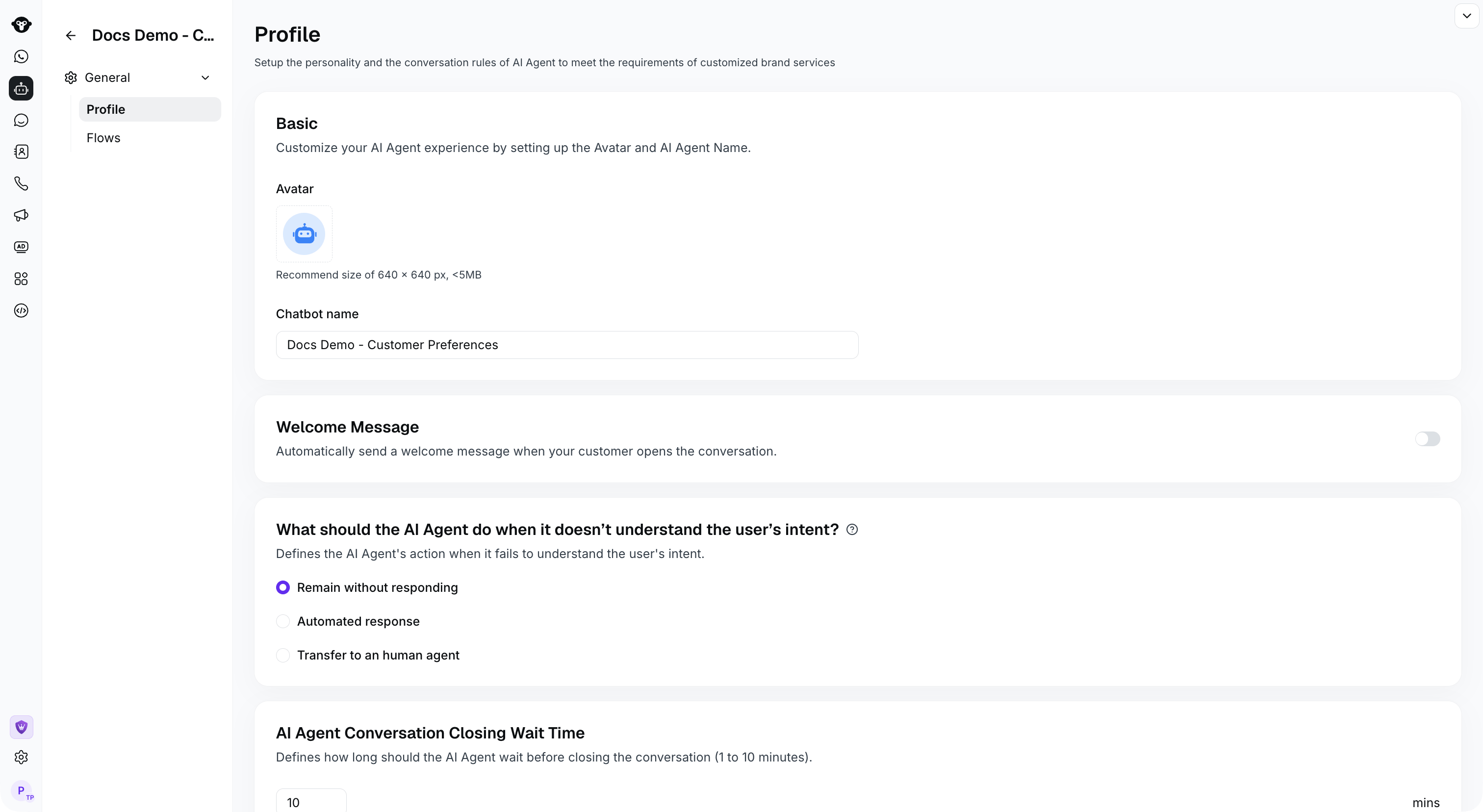 **What should the Rule-based Agent do when it doesn’t understand the user’s intent?**
Choose how the Rule-based Agent responds when it cannot understand the customer's intent:
1. No response.
2. Automatic reply. Selecting this option will automatically reply to questions that cannot be understood based on the reply content you configured
3. Transfer the conversation to a human agent. You can send a message before the transfer to let the customer know they may need to wait.
**How long should the Rule-based Agent wait before closing the conversation**
After the rule-based agent sends a message, if the customer doesn't reply for longer than the configured time, the session will automatically close. The default time is 10 minutes.
**Welcome message sent at the start of a conversation**
The welcome message of the AI agent is an automated message sent to users at the beginning of each conversation it handles. You can configure here some messages that you would like users to see immediately after an incoming message, supporting plain text, media, or interactive types of messages.
#### [Flows](/en/documentation/agents/rule-based-agent/create-a-flow)
Build flows for a Rule-based Agent in the visual editor.
**What should the Rule-based Agent do when it doesn’t understand the user’s intent?**
Choose how the Rule-based Agent responds when it cannot understand the customer's intent:
1. No response.
2. Automatic reply. Selecting this option will automatically reply to questions that cannot be understood based on the reply content you configured
3. Transfer the conversation to a human agent. You can send a message before the transfer to let the customer know they may need to wait.
**How long should the Rule-based Agent wait before closing the conversation**
After the rule-based agent sends a message, if the customer doesn't reply for longer than the configured time, the session will automatically close. The default time is 10 minutes.
**Welcome message sent at the start of a conversation**
The welcome message of the AI agent is an automated message sent to users at the beginning of each conversation it handles. You can configure here some messages that you would like users to see immediately after an incoming message, supporting plain text, media, or interactive types of messages.
#### [Flows](/en/documentation/agents/rule-based-agent/create-a-flow)
Build flows for a Rule-based Agent in the visual editor.
 This documentation is built and hosted on [Mintlify](https://mintlify.com), a developer documentation platform.