> ## Documentation Index
> Fetch the complete documentation index at: https://docs.ycloud.com/llms.txt
> Use this file to discover all available pages before exploring further.
# Quick start with Calling
> Learn the main areas and controls in the YCloud Calling workspace.
## Calling workspace
Open **Calling** from the YCloud console navigation.
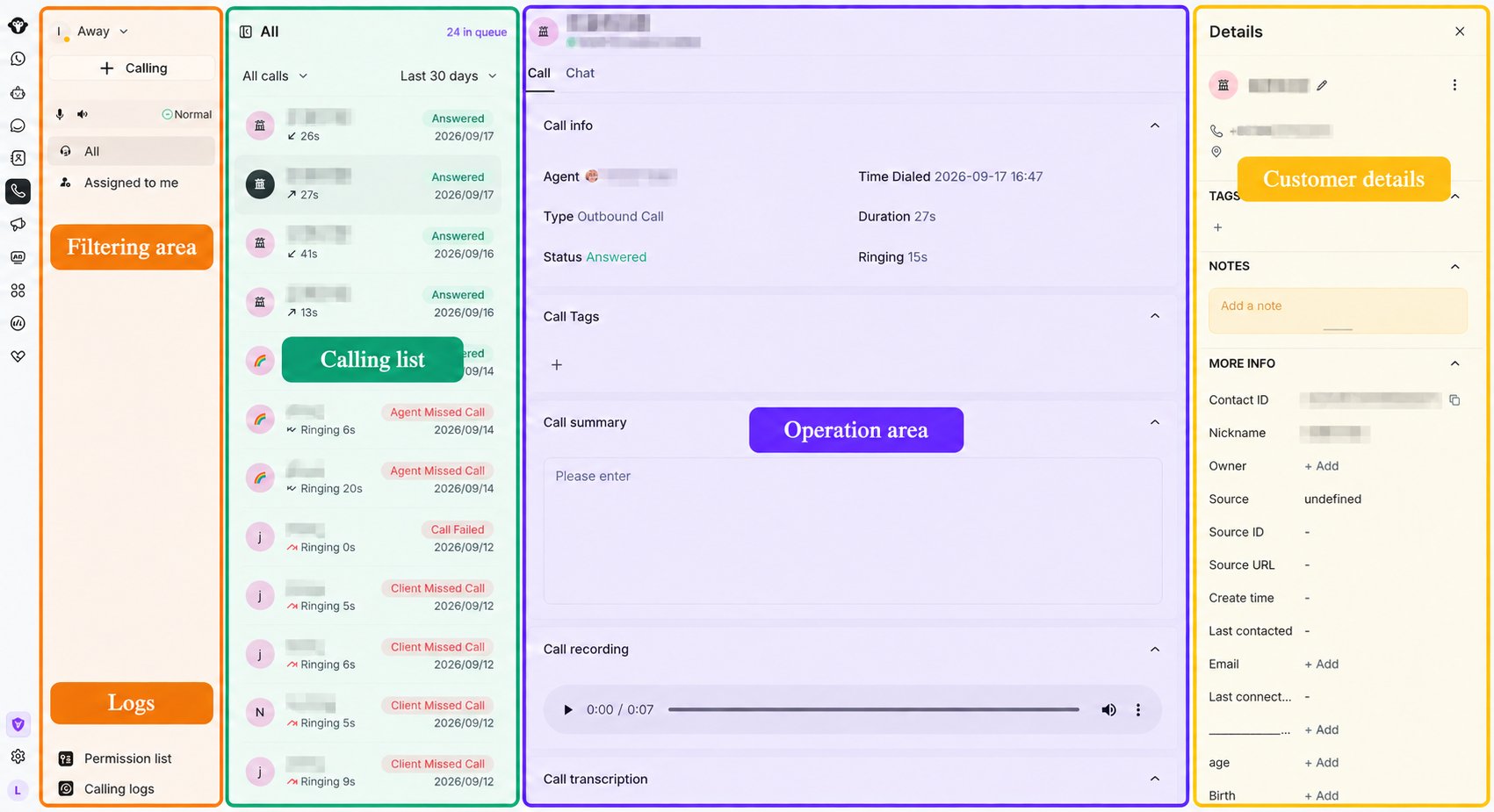 ### Status and controls
* **Agent status:** switch between **Away** and **Available**. Calls are not automatically assigned while you are Away.
* **Browser authorization:** if microphone or audio access has not been granted, authorize the browser before answering calls.
* **Calling:** use the **+ Calling** button to start an outbound call.
* **Audio status:** check the microphone, speaker, and connection status before handling calls.
* **Assignment filters:** switch between **All** and **Assigned to me**.
* **Permission list:** view customers who have granted outbound calling permission.
* **Calling logs:** open historical call records.
### Queue and call list
* The queue count shows how many calls are waiting.
* Use the call-status filter, such as **All calls**, to narrow the list.
* Use the time filter, such as **Today**, **Yesterday**, or **Last 30 days**.
* Select a call to open its details.
### Call details and follow-up
The detail area can show the assigned agent, direction, status, time, tags, and notes for the selected call. During or after a call, agents can:
* Add call tags.
* Add or edit the call summary.
* Update the customer's contact information.
* Switch to the Inbox chat and continue the conversation by message.
### Customer details
The customer panel shows the contact's name, phone number, other contact properties, and tags. Agents can update the available contact information when needed.
This documentation is built and hosted on [Mintlify](https://mintlify.com), a developer documentation platform.
### Status and controls
* **Agent status:** switch between **Away** and **Available**. Calls are not automatically assigned while you are Away.
* **Browser authorization:** if microphone or audio access has not been granted, authorize the browser before answering calls.
* **Calling:** use the **+ Calling** button to start an outbound call.
* **Audio status:** check the microphone, speaker, and connection status before handling calls.
* **Assignment filters:** switch between **All** and **Assigned to me**.
* **Permission list:** view customers who have granted outbound calling permission.
* **Calling logs:** open historical call records.
### Queue and call list
* The queue count shows how many calls are waiting.
* Use the call-status filter, such as **All calls**, to narrow the list.
* Use the time filter, such as **Today**, **Yesterday**, or **Last 30 days**.
* Select a call to open its details.
### Call details and follow-up
The detail area can show the assigned agent, direction, status, time, tags, and notes for the selected call. During or after a call, agents can:
* Add call tags.
* Add or edit the call summary.
* Update the customer's contact information.
* Switch to the Inbox chat and continue the conversation by message.
### Customer details
The customer panel shows the contact's name, phone number, other contact properties, and tags. Agents can update the available contact information when needed.
This documentation is built and hosted on [Mintlify](https://mintlify.com), a developer documentation platform.