> ## Documentation Index
> Fetch the complete documentation index at: https://docs.ycloud.com/llms.txt
> Use this file to discover all available pages before exploring further.
# Message Overview
> Monitor recent WhatsApp message delivery, trends, and failure reasons.
The **Message Overview** page summarizes recent WhatsApp messaging activity across the WhatsApp Business Accounts (WABAs) connected to your YCloud account. Use it to monitor delivery performance, identify changes over time, and understand the main reasons messages fail.
To open the page, go to **Analytics > Overview**.
## Filter the data
Use the filters at the top of the page to narrow the analysis:
* **Time Submitted:** Select the reporting period based on when messages were submitted.
* **WhatsApp Business Number:** View data for one or more sending numbers.
* **Country:** Filter by the recipient's country or region.
* **Message Type:** Filter by message category, such as Authentication, Utility, Marketing, Marketing Lite, or Service.
All sections on the page update based on the selected filters.
 ## Delivery Rate
The **Delivery Rate** section compares message delivery by message type.
| Field | Description |
| - | - |
| **Message Type** | The category of the messages included in the row. |
| **Total** | The number of messages submitted for that message type. |
| **Delivered** | The number of messages successfully delivered to recipients. |
| **Delivery rate** | The percentage of submitted messages that were delivered: **Delivered ÷ Total × 100%**. |
Use this section to quickly compare delivery performance across different message types.
## Failure reason share
The **Failure reason share** section analyzes failed messages by error code. It displays the number and percentage of failures attributed to each reason, making it easier to identify the issues responsible for most delivery failures.
Review the error descriptions before retrying a message or adjusting your sending strategy. You can also export the failure-reason data for further analysis.
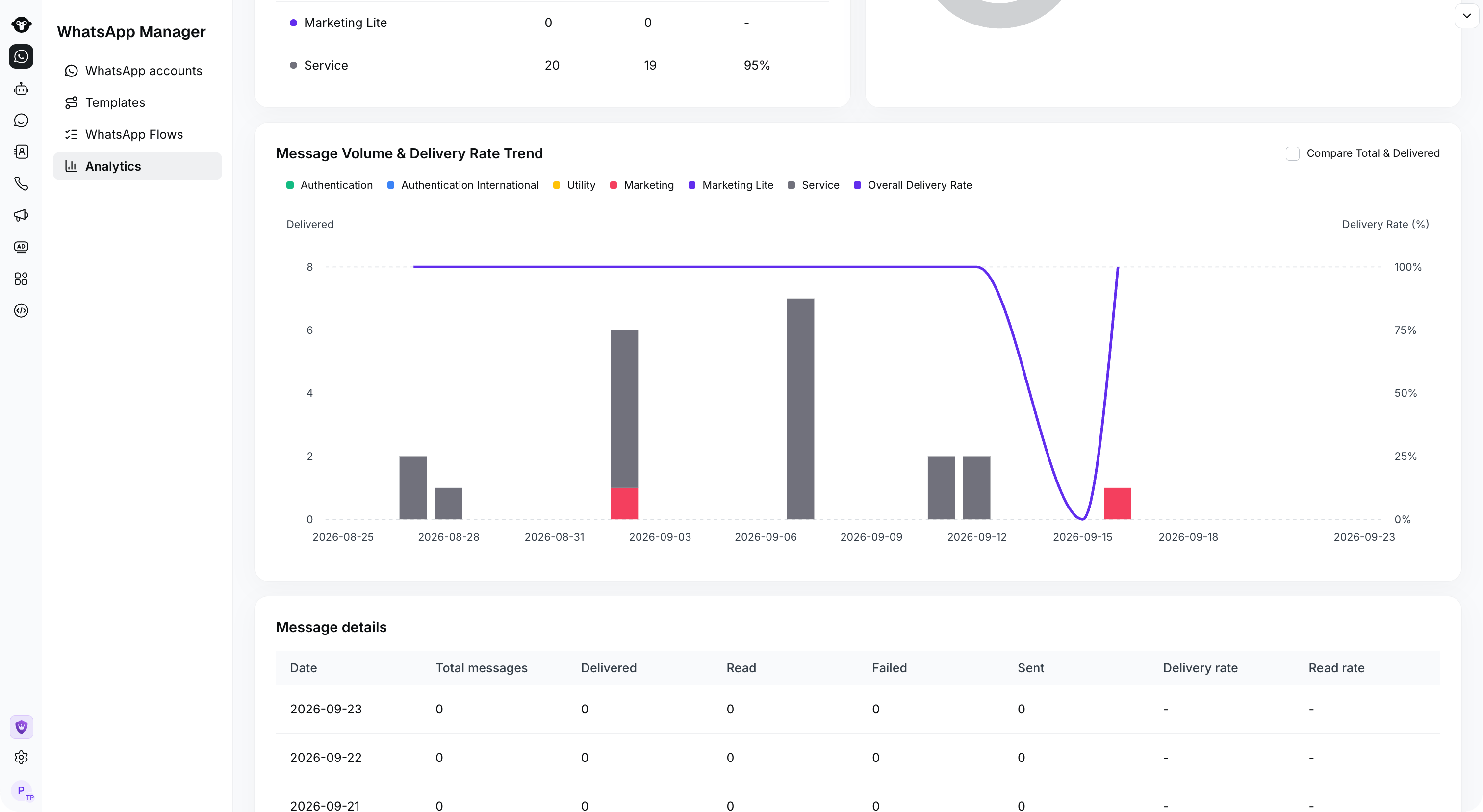
## Message Volume & Delivery Rate Trend
This chart shows message volume and delivery rate over the selected period:
* The stacked bars show delivered-message volume by message type.
* The line shows the overall delivery rate.
* Enable **Compare Total & Delivered** to compare total submissions with delivered messages.
Use the trend to identify sudden delivery-rate changes or unusual changes in message volume.
## Delivery Rate
The **Delivery Rate** section compares message delivery by message type.
| Field | Description |
| - | - |
| **Message Type** | The category of the messages included in the row. |
| **Total** | The number of messages submitted for that message type. |
| **Delivered** | The number of messages successfully delivered to recipients. |
| **Delivery rate** | The percentage of submitted messages that were delivered: **Delivered ÷ Total × 100%**. |
Use this section to quickly compare delivery performance across different message types.
## Failure reason share
The **Failure reason share** section analyzes failed messages by error code. It displays the number and percentage of failures attributed to each reason, making it easier to identify the issues responsible for most delivery failures.
Review the error descriptions before retrying a message or adjusting your sending strategy. You can also export the failure-reason data for further analysis.
## Message Volume & Delivery Rate Trend
This chart shows message volume and delivery rate over the selected period:
* The stacked bars show delivered-message volume by message type.
* The line shows the overall delivery rate.
* Enable **Compare Total & Delivered** to compare total submissions with delivered messages.
Use the trend to identify sudden delivery-rate changes or unusual changes in message volume.
 ## Message details
The **Message details** table provides a daily breakdown:
| Field | Description |
| - | - |
| **Date** | The reporting date. |
| **Total messages** | Messages submitted on that date. |
| **Delivered** | Messages delivered to recipients. |
| **Read** | Messages reported as read. |
| **Failed** | Messages that could not be delivered. |
| **Sent** | Messages sent without a final delivered or failed status yet. |
| **Delivery rate** | Delivered messages divided by total messages. |
| **Read rate** | Read messages divided by delivered messages. |
A read status may be unavailable when a recipient has disabled read receipts.
## Template send details
The **Template send details** table breaks down performance by template name, category, and language. It includes total, delivered, and failed counts, delivery rate, and the most common failure reason for each template.
Search by template name to investigate a specific template, or export the table for offline analysis.
This documentation is built and hosted on [Mintlify](https://mintlify.com), a developer documentation platform.
## Message details
The **Message details** table provides a daily breakdown:
| Field | Description |
| - | - |
| **Date** | The reporting date. |
| **Total messages** | Messages submitted on that date. |
| **Delivered** | Messages delivered to recipients. |
| **Read** | Messages reported as read. |
| **Failed** | Messages that could not be delivered. |
| **Sent** | Messages sent without a final delivered or failed status yet. |
| **Delivery rate** | Delivered messages divided by total messages. |
| **Read rate** | Read messages divided by delivered messages. |
A read status may be unavailable when a recipient has disabled read receipts.
## Template send details
The **Template send details** table breaks down performance by template name, category, and language. It includes total, delivered, and failed counts, delivery rate, and the most common failure reason for each template.
Search by template name to investigate a specific template, or export the table for offline analysis.
This documentation is built and hosted on [Mintlify](https://mintlify.com), a developer documentation platform.