> ## Documentation Index
> Fetch the complete documentation index at: https://docs.ycloud.com/llms.txt
> Use this file to discover all available pages before exploring further.
# TikTok Messaging Ad
> This guide explains how to set up a TikTok-to-WhatsApp messaging ad workflow with YCloud.
# TikTok Messaging Ad
Use TikTok ads to start WhatsApp conversations with potential customers. After a customer sends a message, your team can manage the conversation in YCloud Inbox and configure selected outcomes for reporting to TikTok.
## What you can do
With this workflow, you can:
* Connect a TikTok ad account in YCloud.
* Link a WhatsApp Business number that is already connected to YCloud.
* Create the TikTok campaign with the linked number.
* Handle ad-driven conversations in YCloud Inbox.
* Configure event rules that report selected outcomes to TikTok.
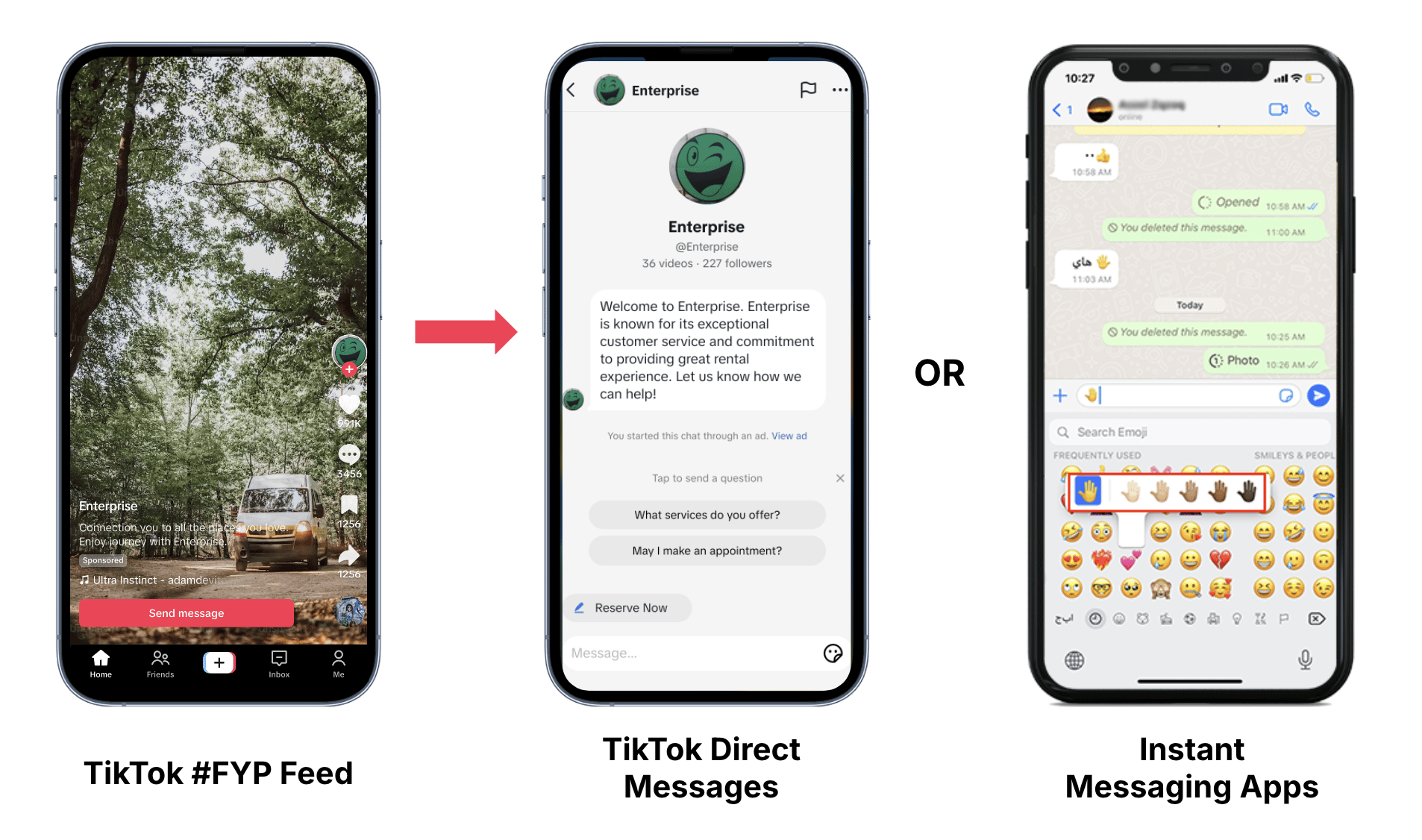 Source: [TikTok: About Messaging Ads](https://ads.tiktok.com/help/article/about-tiktok-messaging-ads?lang=en).
## Before you start
Make sure you have:
* **TikTok ad account:** Create and manage your messaging ads. [Open TikTok Ads Manager](https://ads.tiktok.com/)
* **TikTok user with ad account access:** Authorize the TikTok ad account that you will use in YCloud.
* **WhatsApp Business number:** Receive customer messages from your ads. The number must be connected to YCloud.
If your WhatsApp Business number is not connected yet, see [Connect your WhatsApp Business account](/en/documentation/channels/whatsapp-accounts-management/business-accounts/create-waba-via-embedded-sign-up).
## Setup flow
### 1. Connect your TikTok ad account and link a number
Authorize YCloud to access the TikTok ad account you use for advertising, then link the WhatsApp Business number that will receive ad-driven conversations.
[Connect your TikTok ad account →](./connect-tiktok-ad-account)
### 2. Create a TikTok messaging ad
Create your messaging ad in TikTok Ads Manager with the WhatsApp Business number linked in YCloud.
[Create a TikTok instant messaging ad →](./create-tiktok-instant-messaging-ad)
### 3. Report ad events
Use YCloud Inbox to follow up with customers who start a WhatsApp conversation from your ad. You can also configure selected event rules for reporting to TikTok.
[Handle conversations and configure reporting →](/en/documentation/ctwa-click-to-whatsapp-ad/tiktok-messaging-ad/report-ad-results-to-tiktok)
This documentation is built and hosted on [Mintlify](https://mintlify.com), a developer documentation platform.
Source: [TikTok: About Messaging Ads](https://ads.tiktok.com/help/article/about-tiktok-messaging-ads?lang=en).
## Before you start
Make sure you have:
* **TikTok ad account:** Create and manage your messaging ads. [Open TikTok Ads Manager](https://ads.tiktok.com/)
* **TikTok user with ad account access:** Authorize the TikTok ad account that you will use in YCloud.
* **WhatsApp Business number:** Receive customer messages from your ads. The number must be connected to YCloud.
If your WhatsApp Business number is not connected yet, see [Connect your WhatsApp Business account](/en/documentation/channels/whatsapp-accounts-management/business-accounts/create-waba-via-embedded-sign-up).
## Setup flow
### 1. Connect your TikTok ad account and link a number
Authorize YCloud to access the TikTok ad account you use for advertising, then link the WhatsApp Business number that will receive ad-driven conversations.
[Connect your TikTok ad account →](./connect-tiktok-ad-account)
### 2. Create a TikTok messaging ad
Create your messaging ad in TikTok Ads Manager with the WhatsApp Business number linked in YCloud.
[Create a TikTok instant messaging ad →](./create-tiktok-instant-messaging-ad)
### 3. Report ad events
Use YCloud Inbox to follow up with customers who start a WhatsApp conversation from your ad. You can also configure selected event rules for reporting to TikTok.
[Handle conversations and configure reporting →](/en/documentation/ctwa-click-to-whatsapp-ad/tiktok-messaging-ad/report-ad-results-to-tiktok)
This documentation is built and hosted on [Mintlify](https://mintlify.com), a developer documentation platform.