> ## Documentation Index
> Fetch the complete documentation index at: https://docs.ycloud.com/llms.txt
> Use this file to discover all available pages before exploring further.
# Unsupported messages in Inbox
> Understand the WhatsApp message types that Inbox may display as unsupported.
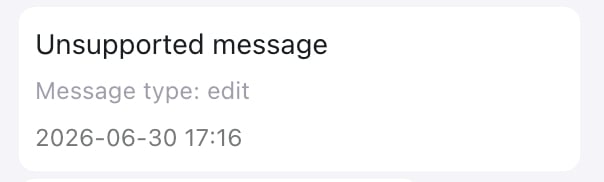
When Inbox shows **Unsupported message**, WhatsApp does not support the message type through its API, or WhatsApp could not make the message content available. Inbox can therefore show only a placeholder, not the original content.
This can affect any WhatsApp message type, but it usually occurs infrequently. In a Coexistence setup, the first message sent from the connected WhatsApp Business app may occasionally appear as unsupported when WhatsApp cannot make its content available. The placeholder does not confirm the underlying cause.
Ask the customer what they sent, or ask them to resend it as text, an image, a video, an audio message, or a document.
## Identify the message type
If Inbox shows a value after **Message type**, use the following table to identify what the customer sent.
 | Message type | What the customer sent |
| - | - |
| `poll_creation`, `poll_update` | A poll or poll vote update |
| `edit` | An edited message |
| `pin` | A pinned message |
| `group_invite` | A group invitation |
| `gif` | A GIF |
| `keep_in_chat` | A Keep in Chat action |
| `link_preview` | A link preview |
| `product`, `order` | A product or order message |
| `reaction` | An emoji reaction |
| `button`, `list`, `interactive` | A button, list, or other interactive message |
| `image`, `location`, `media_placeholder` | An image, location, or media message that WhatsApp could not make available |
| `hsm` | A legacy template message |
| `errors` | A message that WhatsApp could not process |
## If the type is unknown
| Message type | What the customer sent |
| - | - |
| `poll_creation`, `poll_update` | A poll or poll vote update |
| `edit` | An edited message |
| `pin` | A pinned message |
| `group_invite` | A group invitation |
| `gif` | A GIF |
| `keep_in_chat` | A Keep in Chat action |
| `link_preview` | A link preview |
| `product`, `order` | A product or order message |
| `reaction` | An emoji reaction |
| `button`, `list`, `interactive` | A button, list, or other interactive message |
| `image`, `location`, `media_placeholder` | An image, location, or media message that WhatsApp could not make available |
| `hsm` | A legacy template message |
| `errors` | A message that WhatsApp could not process |
## If the type is unknown
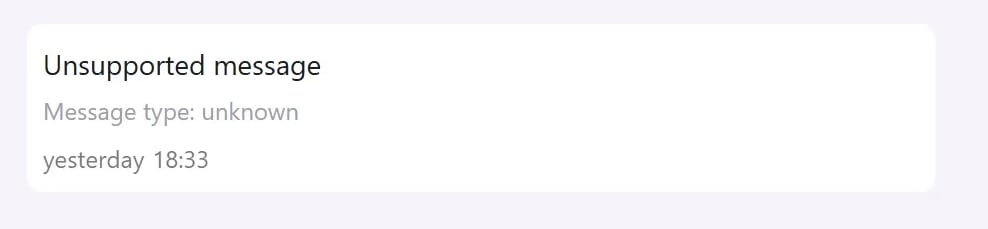 If Inbox shows **Message type: unknown**, WhatsApp did not provide a recognizable message type. Inbox cannot determine the original content from the placeholder alone.
## What happens next
| Area | Effect |
| - | - |
| Inbox | Inbox shows a placeholder and, when available, the message type. It cannot display the original content. |
| Webhook/API | The inbound webhook uses `type: unsupported`. The `errors` field explains why the message is unsupported or unavailable, and `unsupported.type` identifies the message category when WhatsApp provides it. |
| AI Agent and automation | The event can still reach your configured AI Agent or automation. Without the original content, it may not have enough information to reply as expected. |
For payload examples and error details, see [WhatsApp Inbound Message Webhook Examples](/en/api-reference/guides/examples/webhook-examples/whatsapp-inbound-message-webhook-examples#inbound-unsupported-message).
This documentation is built and hosted on [Mintlify](https://mintlify.com), a developer documentation platform.
If Inbox shows **Message type: unknown**, WhatsApp did not provide a recognizable message type. Inbox cannot determine the original content from the placeholder alone.
## What happens next
| Area | Effect |
| - | - |
| Inbox | Inbox shows a placeholder and, when available, the message type. It cannot display the original content. |
| Webhook/API | The inbound webhook uses `type: unsupported`. The `errors` field explains why the message is unsupported or unavailable, and `unsupported.type` identifies the message category when WhatsApp provides it. |
| AI Agent and automation | The event can still reach your configured AI Agent or automation. Without the original content, it may not have enough information to reply as expected. |
For payload examples and error details, see [WhatsApp Inbound Message Webhook Examples](/en/api-reference/guides/examples/webhook-examples/whatsapp-inbound-message-webhook-examples#inbound-unsupported-message).
This documentation is built and hosted on [Mintlify](https://mintlify.com), a developer documentation platform.