> ## Documentation Index
> Fetch the complete documentation index at: https://docs.ycloud.com/llms.txt
> Use this file to discover all available pages before exploring further.
# Set up billing notifications
> Configure low-balance alerts and daily billing notifications.
# Set up billing notifications
Billing notifications help you keep track of your wallet balance and recent billing activity. Configure low-balance alerts when you need a prompt to add funds, and daily billing notifications when you want a regular summary sent to email.
## Open notification settings
1. In the YCloud Dashboard, go to **Settings** > **General**.
2. Select **Notifications**.
3. Choose **Low balance alert** or the daily billing notification setting.
Billing notifications are configured in **Settings** > **General** > **Notifications**, not in the Billing menu.
 ## Set up a low-balance alert
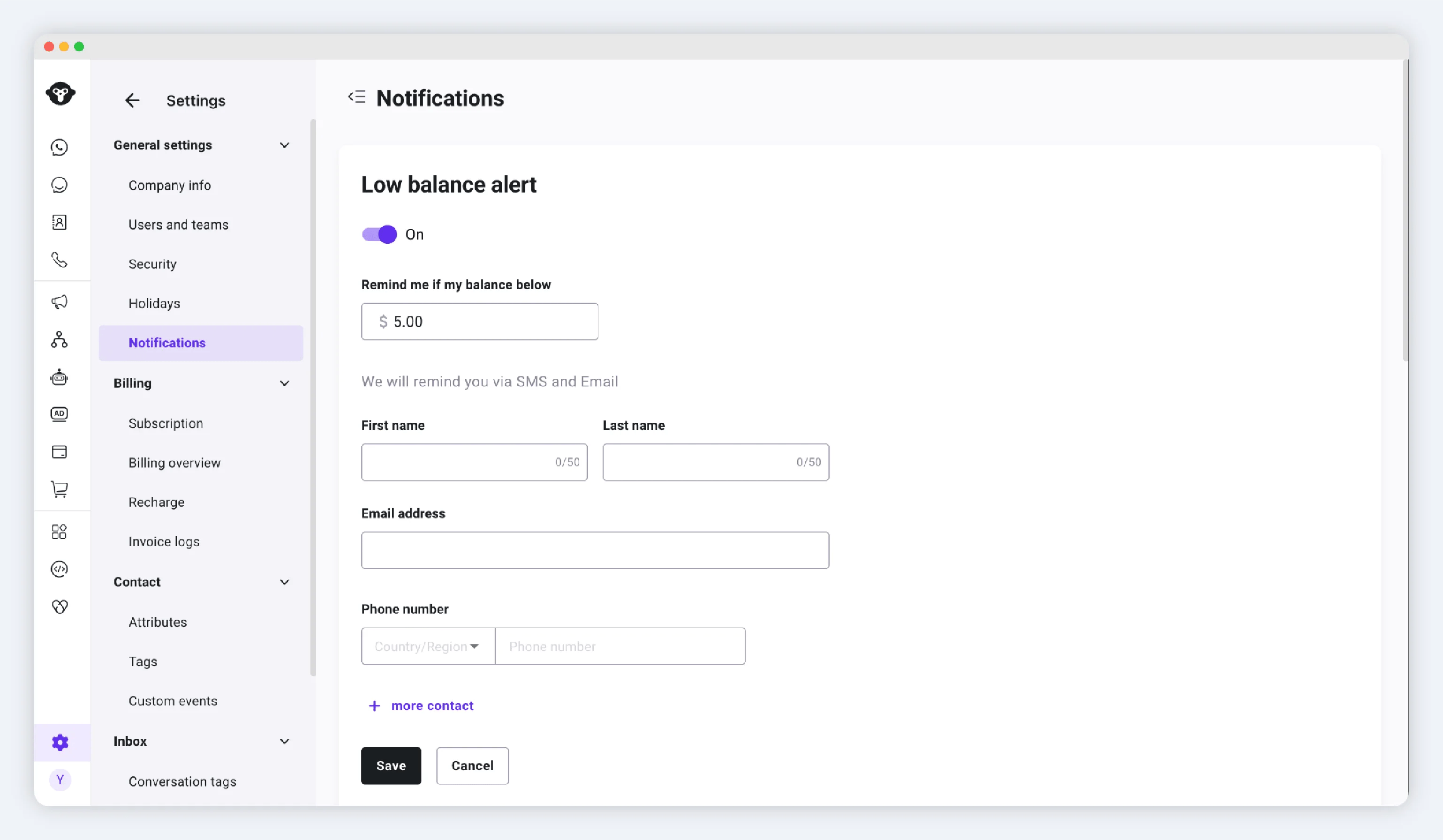
A low-balance alert tells your contacts when the wallet balance falls below the threshold you set.
1. Open **Low balance alert**.
2. Turn on the alert.
3. Set the balance threshold.
4. Add the contacts who should receive the alert.
5. Save your changes.
You can add up to five contacts. YCloud sends the alert by SMS and email to the contacts you configure.
## Set up a low-balance alert
A low-balance alert tells your contacts when the wallet balance falls below the threshold you set.
1. Open **Low balance alert**.
2. Turn on the alert.
3. Set the balance threshold.
4. Add the contacts who should receive the alert.
5. Save your changes.
You can add up to five contacts. YCloud sends the alert by SMS and email to the contacts you configure.
 When you receive an alert, review your wallet in [Billing and Recharge](/en/documentation/pricing-and-billing/billing-and-recharge). You can also check related records in [Billing overview](/en/documentation/pricing-and-billing/billing-overview).
## Set up daily billing notifications
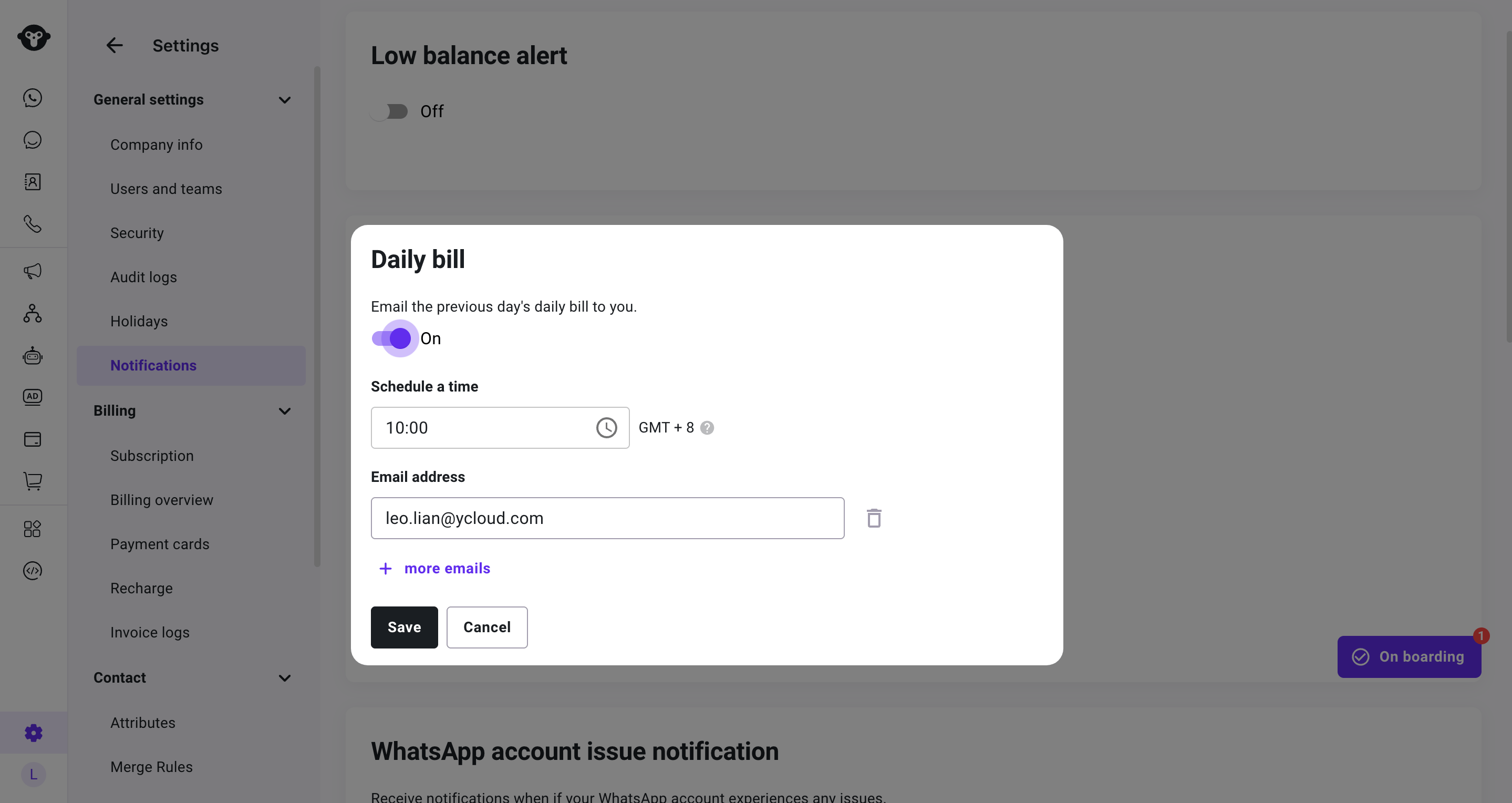
Daily billing notifications send a summary of the previous day's billing activity.
1. Open the daily billing notification setting.
2. Turn on the notification.
3. Select a sending time between **09:00** and **21:00**.
4. Add one or more valid email addresses. Each address must be unique.
5. Save your changes.
Daily billing notifications use GMT+8 and report the previous day's billing activity. Keep at least one valid email address in the recipient list while the notification is on.
When you receive an alert, review your wallet in [Billing and Recharge](/en/documentation/pricing-and-billing/billing-and-recharge). You can also check related records in [Billing overview](/en/documentation/pricing-and-billing/billing-overview).
## Set up daily billing notifications
Daily billing notifications send a summary of the previous day's billing activity.
1. Open the daily billing notification setting.
2. Turn on the notification.
3. Select a sending time between **09:00** and **21:00**.
4. Add one or more valid email addresses. Each address must be unique.
5. Save your changes.
Daily billing notifications use GMT+8 and report the previous day's billing activity. Keep at least one valid email address in the recipient list while the notification is on.
 ## Update or turn off a notification
Return to **Settings** > **General** > **Notifications** whenever you need to change a balance threshold, replace a contact, change a sending time, update recipients, or turn off a notification.
If a daily billing notification prompts you to review a charge, use [Billing overview](/en/documentation/pricing-and-billing/billing-overview) to filter the relevant date and billing record.
## Frequently Asked Questions
You can add up to five contacts.
It covers the previous day's billing activity and uses GMT+8.
This documentation is built and hosted on [Mintlify](https://mintlify.com), a developer documentation platform.
## Update or turn off a notification
Return to **Settings** > **General** > **Notifications** whenever you need to change a balance threshold, replace a contact, change a sending time, update recipients, or turn off a notification.
If a daily billing notification prompts you to review a charge, use [Billing overview](/en/documentation/pricing-and-billing/billing-overview) to filter the relevant date and billing record.
## Frequently Asked Questions
You can add up to five contacts.
It covers the previous day's billing activity and uses GMT+8.
This documentation is built and hosted on [Mintlify](https://mintlify.com), a developer documentation platform.