> ## Documentation Index
> Fetch the complete documentation index at: https://docs.ycloud.com/llms.txt
> Use this file to discover all available pages before exploring further.
# Account structure and WABAs
> Understand business portfolios, WhatsApp Business Accounts, phone numbers, and how they connect to YCloud.
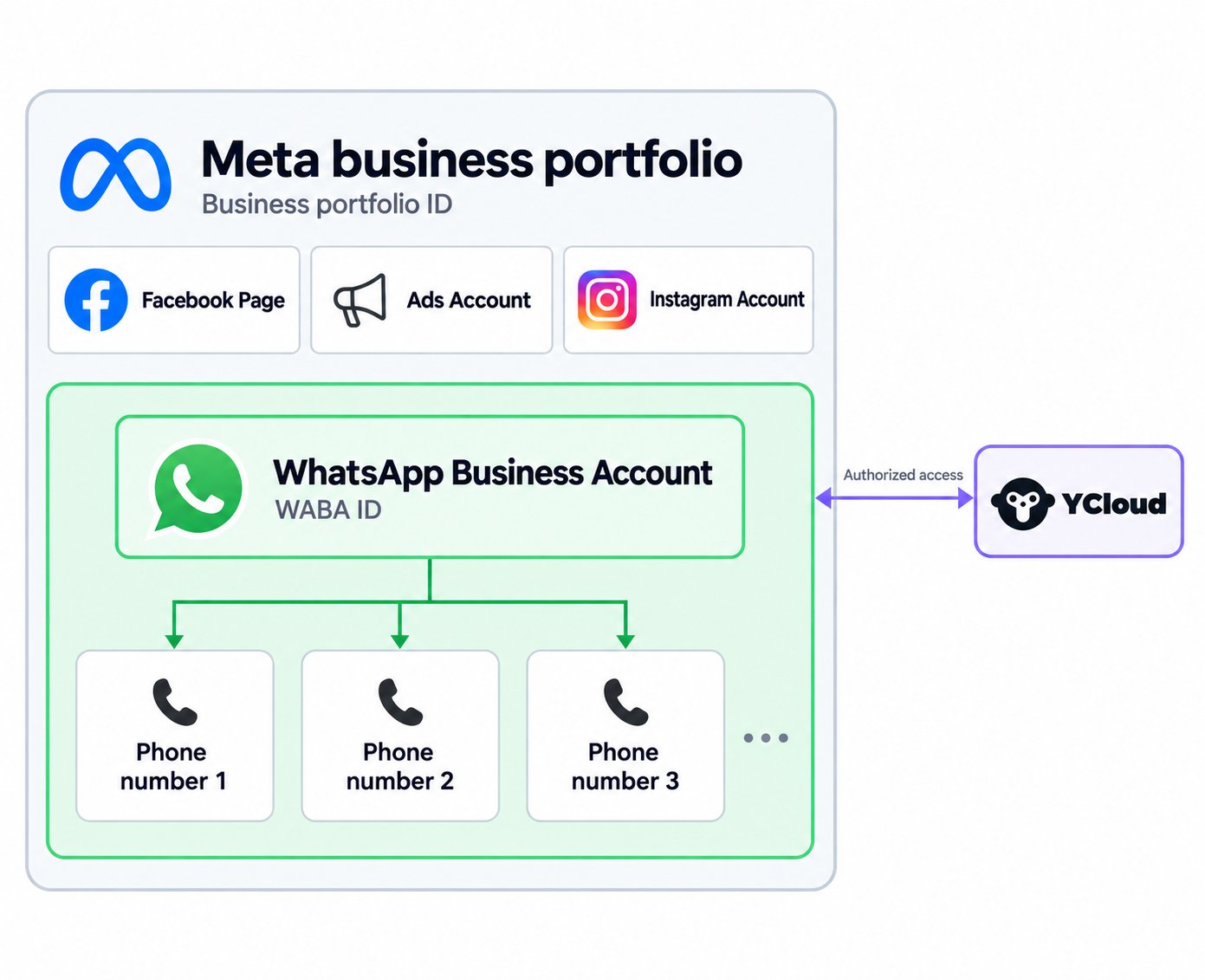
Before you connect WhatsApp, identify the business that owns your assets and the account you will use to manage them. A business portfolio, a WhatsApp Business Account (WABA), and a business phone number serve different purposes.
## Account structure
 ## Business portfolio
A business portfolio groups your Meta business assets and lets you manage access to them. You may also see the older term **Business Manager**, or **BM**, in existing instructions.
For WhatsApp, the portfolio is the business-level container for your WABAs. Select the portfolio that should own the assets when you connect to YCloud.
Do not create a new portfolio only because you cannot see an existing one. First check that you are signed in with the correct Meta account and have the required access.
## WhatsApp Business Account (WABA)
A WABA contains the business phone numbers and message templates used by your business on the platform. It has its own WABA ID.
The WABA is a management asset. Customers exchange messages with a business phone number, not with the WABA ID.
A WABA belongs to one business portfolio. Giving a person or provider access to a WABA does not make that person or provider a second owner. Meta distinguishes access to owned assets from access to assets shared by another business.
See Meta's [WhatsApp Business Accounts documentation](https://developers.facebook.com/docs/whatsapp/overview/business-accounts/) for the platform relationship.
## Phone number
Each connected business phone number has a phone number ID, a display name, and a business profile. The number is the sender identity used in a customer conversation.
See [Business phone numbers](/en/documentation/whatsapp-business-platform/accounts-and-business-identity/business-phone-numbers) for requirements and profile information.
## Your YCloud account
Your YCloud account is where you use YCloud tools and manage authorized connections.
During [Embedded Signup](/en/documentation/channels/whatsapp-accounts-management/business-accounts/create-waba-via-embedded-sign-up), you select or create the relevant Meta assets and authorize access. Check the portfolio, WABA, and number before you finish.
## Keep the identifiers separate
| Identifier | Identifies | Common use |
| - | - | - |
| Business portfolio ID | The business-level Meta container. | Ownership, access, verification, and support. |
| WABA ID | A WhatsApp Business Account. | Template and business-account operations. |
| Phone number | The telephone number used for WhatsApp. | Selecting a sender or contacting the business. |
| Phone number ID | Meta's identifier for the number asset. | Phone-number operations and troubleshooting. |
| YCloud account information | Your account with YCloud. | YCloud access, billing, and support. |
Use the identifier requested by the specific guide or API. A phone number ID is not interchangeable with the phone number itself.
## Check ownership and access before you connect
* Confirm that the selected portfolio represents the business that should own the assets.
* Make sure someone in your organization retains the necessary administrative access.
* Record the WABA ID and number information for future troubleshooting.
* If you already use WhatsApp through another provider, follow the migration guide instead of creating replacement assets without checking the consequences.
* Treat business verification, display name review, and number registration as separate checks.
Creating a WABA does not by itself establish permission to message a customer or guarantee that a number is ready to send.
## Find the asset that owns the problem
Use the level of the operation to choose where to investigate:
| You need to... | Start with | Why |
| - | - | - |
| Complete business verification | Owning business portfolio | The organization is verified at this level. |
| Find or create a template | WABA | Templates belong to the WABA, not to an individual agent's Inbox. |
| Change the customer-facing profile | Business phone number | Each number has its own profile and name-review state. |
| Diagnose a failed notification | Individual message, then sender number and WABA | A message failure does not necessarily mean the whole portfolio is restricted. |
| Give a colleague access to YCloud | YCloud user and permission settings | YCloud access does not automatically grant Meta portfolio administration. |
| Prepare migration | Existing ownership, WABA, number, and provider connection | Creating a new YCloud login does not migrate the number. |
### Example: one business, two numbers
A business can use one number for customer support and another for a regional operation. They remain distinct sender identities even if they belong to the same WABA.
The WABA can contain reusable approved templates, but each number still has its own profile and operational state. A customer messaging the support number does not open a free-form service window with the other number. Portfolio-level messaging capacity is also not multiplied simply by adding more numbers.
### Keep an asset register
Record the portfolio name and ID, WABA name and ID, sender phone number, phone number ID, connected YCloud account, and responsible administrator. Include the intended purpose of each number.
Use this register before completing Embedded Signup. If you see two similarly named portfolios, match the ID and owner instead of choosing by name alone. If an agency is helping, agree which business owns the assets and which party only has delegated access.
When support asks for a WABA ID, do not send the numeric telephone number in its place. In YCloud's Messages API, some operations use the actual `from` number; Meta APIs may ask for a phone-number ID. Follow the specific field contract.
## Next steps
* [Connect WhatsApp to YCloud](/en/documentation/channels/whatsapp-accounts-management/business-accounts/create-waba-via-embedded-sign-up).
* [Review business phone numbers](/en/documentation/whatsapp-business-platform/accounts-and-business-identity/business-phone-numbers).
* [Understand business verification](/en/documentation/whatsapp-business-platform/accounts-and-business-identity/business-verification).
* [Migrate an existing number](/en/documentation/channels/whatsapp-accounts-management/business-accounts/number-migration).
This documentation is built and hosted on [Mintlify](https://mintlify.com), a developer documentation platform.
## Business portfolio
A business portfolio groups your Meta business assets and lets you manage access to them. You may also see the older term **Business Manager**, or **BM**, in existing instructions.
For WhatsApp, the portfolio is the business-level container for your WABAs. Select the portfolio that should own the assets when you connect to YCloud.
Do not create a new portfolio only because you cannot see an existing one. First check that you are signed in with the correct Meta account and have the required access.
## WhatsApp Business Account (WABA)
A WABA contains the business phone numbers and message templates used by your business on the platform. It has its own WABA ID.
The WABA is a management asset. Customers exchange messages with a business phone number, not with the WABA ID.
A WABA belongs to one business portfolio. Giving a person or provider access to a WABA does not make that person or provider a second owner. Meta distinguishes access to owned assets from access to assets shared by another business.
See Meta's [WhatsApp Business Accounts documentation](https://developers.facebook.com/docs/whatsapp/overview/business-accounts/) for the platform relationship.
## Phone number
Each connected business phone number has a phone number ID, a display name, and a business profile. The number is the sender identity used in a customer conversation.
See [Business phone numbers](/en/documentation/whatsapp-business-platform/accounts-and-business-identity/business-phone-numbers) for requirements and profile information.
## Your YCloud account
Your YCloud account is where you use YCloud tools and manage authorized connections.
During [Embedded Signup](/en/documentation/channels/whatsapp-accounts-management/business-accounts/create-waba-via-embedded-sign-up), you select or create the relevant Meta assets and authorize access. Check the portfolio, WABA, and number before you finish.
## Keep the identifiers separate
| Identifier | Identifies | Common use |
| - | - | - |
| Business portfolio ID | The business-level Meta container. | Ownership, access, verification, and support. |
| WABA ID | A WhatsApp Business Account. | Template and business-account operations. |
| Phone number | The telephone number used for WhatsApp. | Selecting a sender or contacting the business. |
| Phone number ID | Meta's identifier for the number asset. | Phone-number operations and troubleshooting. |
| YCloud account information | Your account with YCloud. | YCloud access, billing, and support. |
Use the identifier requested by the specific guide or API. A phone number ID is not interchangeable with the phone number itself.
## Check ownership and access before you connect
* Confirm that the selected portfolio represents the business that should own the assets.
* Make sure someone in your organization retains the necessary administrative access.
* Record the WABA ID and number information for future troubleshooting.
* If you already use WhatsApp through another provider, follow the migration guide instead of creating replacement assets without checking the consequences.
* Treat business verification, display name review, and number registration as separate checks.
Creating a WABA does not by itself establish permission to message a customer or guarantee that a number is ready to send.
## Find the asset that owns the problem
Use the level of the operation to choose where to investigate:
| You need to... | Start with | Why |
| - | - | - |
| Complete business verification | Owning business portfolio | The organization is verified at this level. |
| Find or create a template | WABA | Templates belong to the WABA, not to an individual agent's Inbox. |
| Change the customer-facing profile | Business phone number | Each number has its own profile and name-review state. |
| Diagnose a failed notification | Individual message, then sender number and WABA | A message failure does not necessarily mean the whole portfolio is restricted. |
| Give a colleague access to YCloud | YCloud user and permission settings | YCloud access does not automatically grant Meta portfolio administration. |
| Prepare migration | Existing ownership, WABA, number, and provider connection | Creating a new YCloud login does not migrate the number. |
### Example: one business, two numbers
A business can use one number for customer support and another for a regional operation. They remain distinct sender identities even if they belong to the same WABA.
The WABA can contain reusable approved templates, but each number still has its own profile and operational state. A customer messaging the support number does not open a free-form service window with the other number. Portfolio-level messaging capacity is also not multiplied simply by adding more numbers.
### Keep an asset register
Record the portfolio name and ID, WABA name and ID, sender phone number, phone number ID, connected YCloud account, and responsible administrator. Include the intended purpose of each number.
Use this register before completing Embedded Signup. If you see two similarly named portfolios, match the ID and owner instead of choosing by name alone. If an agency is helping, agree which business owns the assets and which party only has delegated access.
When support asks for a WABA ID, do not send the numeric telephone number in its place. In YCloud's Messages API, some operations use the actual `from` number; Meta APIs may ask for a phone-number ID. Follow the specific field contract.
## Next steps
* [Connect WhatsApp to YCloud](/en/documentation/channels/whatsapp-accounts-management/business-accounts/create-waba-via-embedded-sign-up).
* [Review business phone numbers](/en/documentation/whatsapp-business-platform/accounts-and-business-identity/business-phone-numbers).
* [Understand business verification](/en/documentation/whatsapp-business-platform/accounts-and-business-identity/business-verification).
* [Migrate an existing number](/en/documentation/channels/whatsapp-accounts-management/business-accounts/number-migration).
This documentation is built and hosted on [Mintlify](https://mintlify.com), a developer documentation platform.