> ## Documentation Index
> Fetch the complete documentation index at: https://docs.ycloud.com/llms.txt
> Use this file to discover all available pages before exploring further.
# Authentication templates
> Choose copy-code, one-tap, or zero-tap delivery and distinguish OTP expiry from message delivery validity.
Use an authentication template to send a one-time passcode (OTP) for identity verification, such as login, account recovery, or a transaction confirmation challenge.
Meta requires authentication templates for this purpose. Do not send identity-verification codes through marketing or utility templates. Authentication content uses a constrained format rather than a general promotional message.
## Choose a code-delivery experience
| Experience | What the customer does | What you must prepare |
| - | - | - |
| Copy code | Copies the code from WhatsApp and enters it in your application. | A code-entry flow in your application. |
| One-tap autofill | Taps a button that passes the code to your supported Android app. | The app integration, package name, signing information, and required handshake. |
| Zero-tap | A supported Android app receives the code without the customer switching to WhatsApp. | The required app integration and zero-tap eligibility checks. |
Choose the simplest experience your application can reliably support. Do not choose one-tap or zero-tap only because the template editor offers the option.
Unsupported devices or failed eligibility checks can use a copy-code fallback. Meta also documents native OTP keyboard suggestions on iOS 26 and later, starting June 15, 2026; that client behavior is distinct from the Android one-tap and zero-tap integration. Test the actual customer device and app combination before release.
## Understand the template content
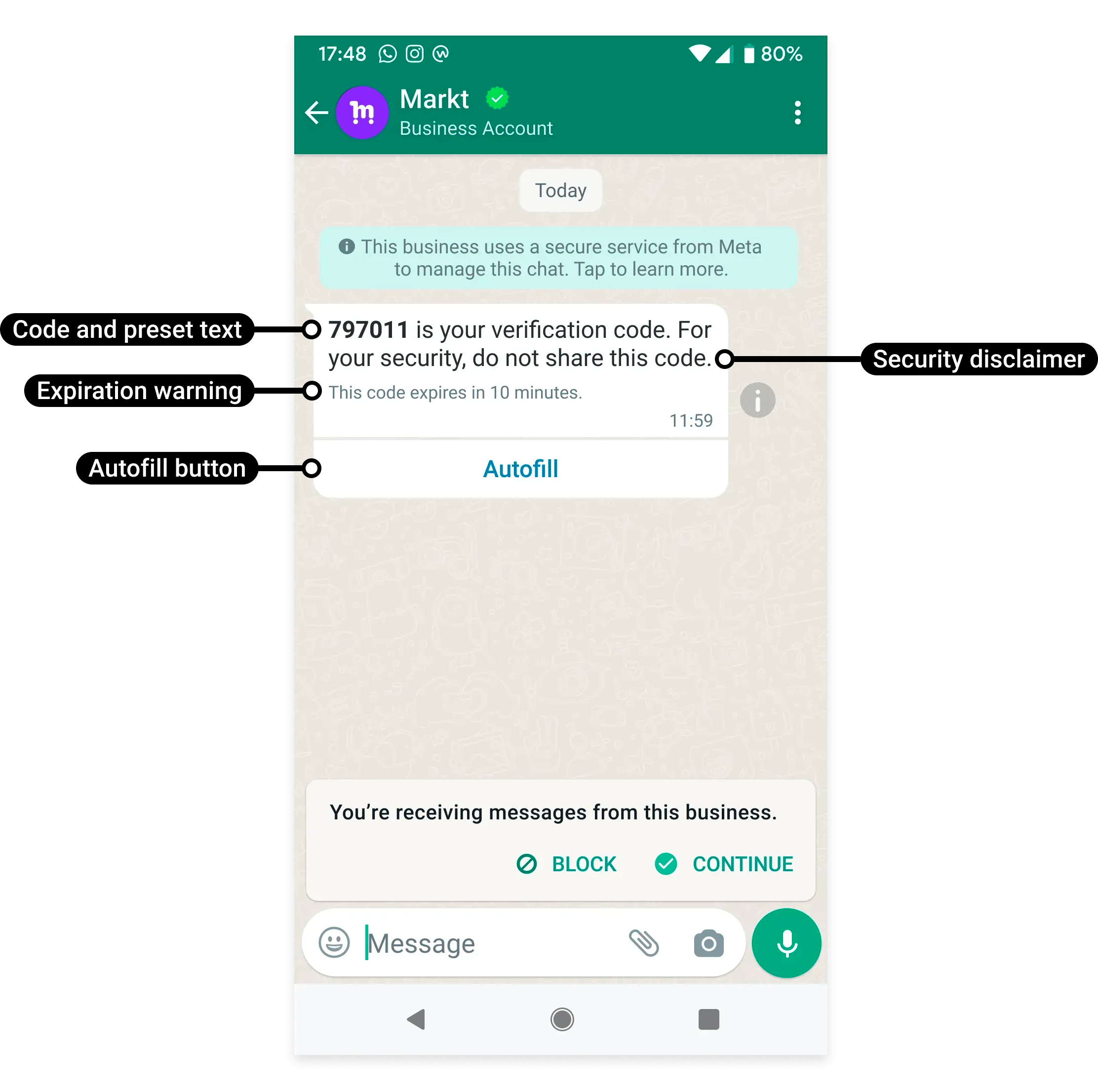
The authentication format includes the verification code, a code-delivery action, and supported security or expiry text. It is not intended for media, marketing copy, or general account notifications.
Source: [Meta official example](https://developers.facebook.com/documentation/business-messaging/whatsapp/templates/authentication-templates/authentication-templates/).
A coupon's **Copy code** button is a marketing format; it is not an authentication template.
Use YCloud's [authentication template settings](/en/documentation/channels/whatsapp-accounts-management/template-management/create-template/index) and the [template API guide](/en/api-reference/guides/whatsapp-platform/manage-whatsapp-templates) for supported fields.
## Keep three kinds of expiry separate
| Setting | What it controls |
| - | - |
| OTP expiry in your application | When your backend stops accepting the code. |
| Expiry text shown to the customer | What the message says about the code's lifetime. |
| Message delivery validity | How long the platform may try to deliver the message. |
Displaying an expiry warning does not make your backend reject an expired code. Configure the verification system itself.
Choose delivery validity that fits the code's useful lifetime. A late message containing an expired code creates a poor sign-in experience even if the message is delivered successfully.
## Configure a code that remains useful when delivered
In YCloud, choose **Authentication**, select the code-delivery experience, and configure the supported security and expiry options. The message text is constrained; do not paste an ordinary marketing template into this category.
For a hypothetical code valid for five minutes:
| Setting | Example choice | Reason |
| - | - | - |
| Backend code lifetime | 5 minutes | Your server rejects the code after this period. |
| Customer-visible expiry text | 5 minutes | The message should describe the same lifetime. |
| Delivery validity | At most 5 minutes, with allowance for processing time | Do not intentionally deliver a code after it is no longer useful. |
The current YCloud template contract supports authentication `messageSendTtlSeconds` values from **30 to 900 seconds**, with a **10-minute default** for newly created authentication templates. Historical templates can have different defaults; inspect the stored setting instead of assuming all existing templates are identical. The displayed expiry option supports **1–90 minutes**, but that display setting does not extend the allowed delivery-validity range.
A five-minute TTL is not a promise of five minutes remaining after receipt: time has already passed since the code was issued. Your application should show the actual remaining lifetime.
### Keep Android integration details current
One-tap and zero-tap require matching app identity and a working handshake. The current YCloud template contract uses `supported_apps`; the older top-level `package_name` and `signature_hash` fields are deprecated.
Meta's current authentication documentation announces **October 15, 2026** as the migration deadline for the older `PendingIntent` handshake and recommends the OTP Android SDK. If your app uses that older flow, treat the migration as an application task, not a template-text edit. Check the [current one-tap and zero-tap documentation](https://developers.facebook.com/docs/whatsapp/business-management-api/authentication-templates/zero-tap-authentication-templates/) before release.
### Test the failure paths
Test an expired code, a second code request, the wrong code, an offline device, an unsupported client, and an Android app-signing mismatch. Decide whether issuing a new code invalidates the previous one, and make the interface match that decision.
Never infer authentication success from `delivered` or `read`. Only your verification backend can determine whether the submitted code is valid for the intended user and action.
## Design the verification flow
1. Let the customer request a code and confirm the destination.
2. Explain that the code will arrive through WhatsApp.
3. Generate and validate the code in your verification system.
4. Send the approved template with the required parameters.
5. Track message delivery separately from successful verification.
6. Offer a controlled retry or alternate route when appropriate.
Apply rate limits and retry controls to code requests. Never treat a WhatsApp delivery or read receipt as proof that the customer passed authentication.
Do not log usable verification codes in general application logs.
## Pricing and availability
Authentication messages have their own rates, and authentication-international rates can apply in eligible circumstances. See [WhatsApp pricing](/en/documentation/whatsapp-business-platform/pricing-limits-and-quality/whatsapp-pricing).
A customer asking for a code is not permission for unrelated future marketing. Match the consent and message purpose to the requested verification.
## Implementation guides
* [Copy-code authentication](/en/documentation/whatsapp-business-platform/messaging/message-templates/authentication-message-templates/copy-code-authentication)
* [One-tap authentication](/en/documentation/whatsapp-business-platform/messaging/message-templates/authentication-message-templates/one-tap-authentication)
* [Zero-tap authentication](/en/documentation/whatsapp-business-platform/messaging/message-templates/authentication-message-templates/zero-tap-authentication)
* [Send verification codes with YCloud](/en/documentation/quick-start/send-verification-codes-via-whatsapp)
For upstream behavior, see Meta's [authentication templates](https://developers.facebook.com/docs/whatsapp/business-management-api/authentication-templates/).
## Frequently asked questions
Compare three times: when your application generated the code, how long the message could wait for delivery, and when the customer submitted it. Template expiry text does not extend your server's validity period. Use a delivery TTL that fits the useful code lifetime, invalidate superseded codes according to your security design, and offer a controlled new-code request.
No. These formats change how a compatible app receives or fills the code. Your backend still validates the request, code, expiry, and attempt limits. A delivered/read message or successful autofill is not proof that verification succeeded.
Check client compatibility, the approved authentication format, and the registered package/signature values for your app. A fallback copy-code experience can be expected on unsupported clients. Test the same template on your supported app/client combinations before assuming the template is broken.
This documentation is built and hosted on [Mintlify](https://mintlify.com), a developer documentation platform.