> ## Documentation Index
> Fetch the complete documentation index at: https://docs.ycloud.com/llms.txt
> Use this file to discover all available pages before exploring further.
# Template components and formats
> Configure template components, variables, buttons, and specialized formats.
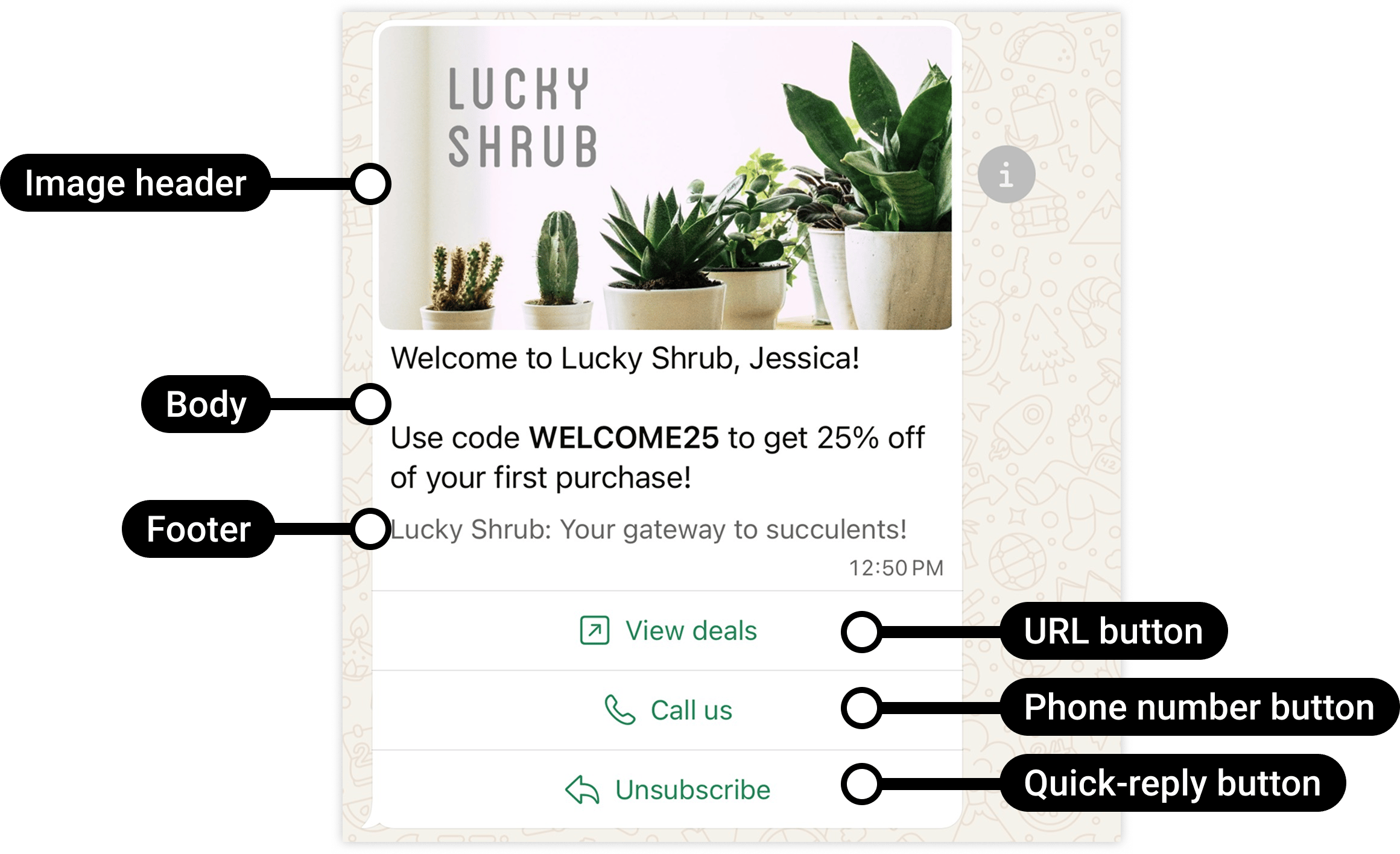
Build your template with a body, optional header and footer, and buttons. Add variables for content that changes between recipients. Authentication and specialized formats have additional constraints.
## Standard template anatomy
| Component | What it contains | Key limits and checks |
| - | - | - |
| Header | Optional short text or a supported media/location header. | Text headers: 60 characters and at most one variable. A single header uses one format, not several media types together. |
| Body | The message's main explanation. | Required; up to 1,024 characters for a standard template body. Keep enough fixed text to establish the purpose. |
| Footer | Optional supporting text. | Up to 60 characters for a standard footer. Do not treat it as another variable-rich body. |
| Buttons | Optional replies or actions. | Up to 10 total for supported standard combinations, with separate limits by button type. |
| Examples | Sample variable values and sample media for review. | Supply the examples required by the selected components. Examples are not the recipient-specific sending data. |
These limits are not a promise that every specialized template accepts every combination. Authentication uses preset text; carousel cards, limited-time offers, commerce templates, and calling components have their own structures.
A useful standard layout is:
```text theme={"theme":{"light":"github-light","dark":"github-dark"}}
HEADER: Appointment update
BODY: Your booking {{1}} is confirmed for {{2}} at {{3}}.
FOOTER: Reply if you need help.
BUTTON: View booking
```
The example illustrates structure only; it is not pre-approved by Meta.
Source: [Meta official example](https://developers.facebook.com/documentation/business-messaging/whatsapp/templates/marketing-templates/custom-marketing-templates/).
## Choose the right button action
| Button | What the customer does | Standard constraint or dependency |
| - | - | - |
| Quick reply | Sends a predefined response back to the business. | Up to 10; keep quick replies grouped together when mixed with other button types. |
| Website URL | Opens a web page. | Up to 2 URL buttons. Label: 25 characters. URL: 2,000 characters, with at most one variable at its end. |
| Phone number | Starts a phone call to the configured number. | Up to 1. Label: 25 characters; phone value: 20 characters. This is not a WhatsApp voice call. |
| Copy offer code | Copies a coupon code to the clipboard. | One copy-code button; intended for the corresponding marketing format. The button label is preset. |
| OTP | Copies or autofills a verification code. | Authentication templates only; use the authentication-specific button configuration. |
| Catalog or multi-product | Opens the corresponding catalog or selected products. | Requires the correct catalog and valid product identifiers. |
| Flow | Opens a structured form in WhatsApp. | Requires the correct Flow, entry action, and usable published version for production. |
| WhatsApp call | Starts a supported WhatsApp calling interaction. | Requires Calling eligibility. Do not substitute a phone-number button or outbound-call permission request. |
A quick-reply button labeled **Stop promotions** is not an automatic unsubscribe implementation. Your workflow must recognize the reply and update the customer's preferences. See [Customer opt-out](/en/documentation/whatsapp-business-platform/consent-policies-and-account-health/customer-opt-out).
### Button order affects usability and compatibility
Put the most important actions first. With more than three buttons, WhatsApp shows the first two and a **See all options** control for the rest.
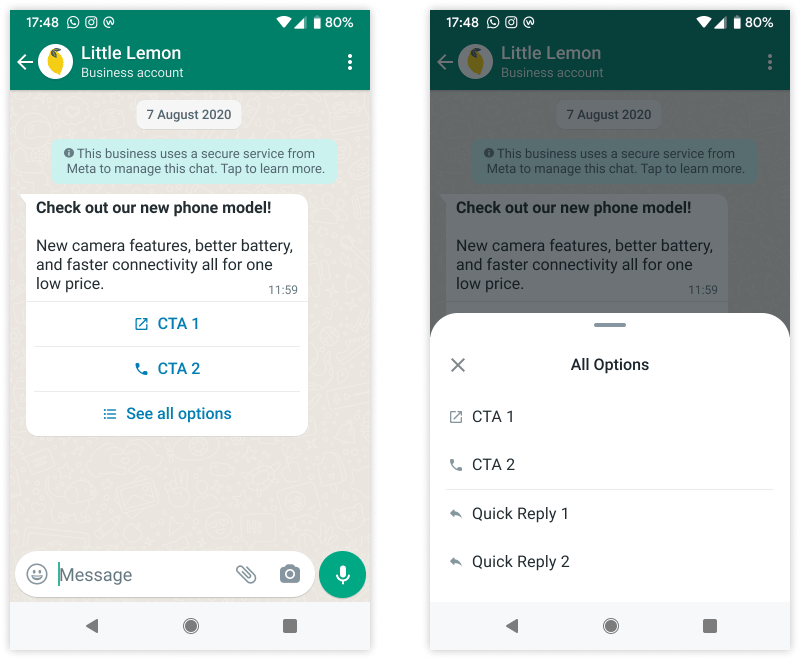 Source: [Meta template components](https://developers.facebook.com/documentation/business-messaging/whatsapp/templates/components).
Keep quick replies and other button types in separate groups:
* Valid grouping: URL → Phone → Quick reply → Quick reply.
* Invalid grouping: Quick reply → URL → Quick reply.
Meta currently documents a desktop limitation for templates with four or more buttons, or a quick reply mixed with another button type: recipients are prompted to view those messages on a phone. Test this if desktop use matters to your audience.
## Variables: design, review, and send are separate stages
For this body:
```text theme={"theme":{"light":"github-light","dark":"github-dark"}}
Your booking {{1}} is confirmed for {{2}} at {{3}}.
```
Use a mapping that your team and integration can maintain:
| Position | Meaning | Review example | Actual send |
| - | - | - | - |
| Body 1 | Booking reference | BOOKING-123 | The recipient's booking reference. |
| Body 2 | Date | 12 October 2026 | The confirmed appointment date. |
| Body 3 | Time and time zone | 10:30 AM UTC | The confirmed time with enough local context. |
Review examples demonstrate what a variable means. They do not configure a data source or automatically populate future messages.
The **header, body, and each dynamic button have separate parameter positions**. Body `{{1}}` and URL-button `{{1}}` do not have to contain the same value. Button `index` identifies the button's position in the template, starting at `0`; it is not a body-variable number.
### Example: body values and a dynamic URL
Suppose the reviewed template has:
* Body: `Your booking {{1}} is confirmed for {{2}}.`
* Button at index `0`: `https://example.com/bookings/{{1}}`
The YCloud message's template object can map them as follows:
```json theme={"theme":{"light":"github-light","dark":"github-dark"}}
{
"name": "booking_confirmation",
"language": { "code": "en_US" },
"components": [
{
"type": "body",
"parameters": [
{ "type": "text", "text": "BOOKING-123" },
{ "type": "text", "text": "12 October 2026, 10:30 AM UTC" }
]
},
{
"type": "button",
"sub_type": "url",
"index": 0,
"parameters": [
{ "type": "text", "text": "BOOKING-123" }
]
}
]
}
```
This is a **template object fragment**, not a complete send request. It assumes that the named template and exact language variant are approved in the sender's WABA. The button parameter supplies the suffix, not the full URL.
Keep a stable destination domain in the reviewed template. Encode URL values correctly, and avoid putting private information or long-lived access credentials in links. Do not use a variable to hide the message's real category.
## Media headers: sample assets are not live attachments
For an image, video, or document header:
1. Select the intended header format when creating the template.
2. Provide a representative sample for review.
3. At send time, supply the actual media using the supported YCloud media ID or link field.
4. Confirm that the file is retrievable, its format matches the template, and it meets the media limits.
5. Test the delivered message, including the file's readability on a phone.
Do not send an image parameter to a video-header template. A private URL that only works after you sign in is not a reliable media link for the messaging service.
GIF headers appear in current contracts, but Meta restricts that capability to the applicable **Marketing Messages API for WhatsApp** route. Do not assume it is available through every ordinary template workflow merely because a field exists.
## Select a specialized format
| You need to... | Choose | Prepare before creation |
| - | - | - |
| Show several visual options with separate actions | [Media carousel](/en/documentation/whatsapp-business-platform/messaging/message-templates/carousel-templates) | Consistent card media and button structure; every card's sending values. |
| Let customers copy a promotion code | [Coupon-code template](/en/documentation/whatsapp-business-platform/messaging/message-templates/coupon-code-templates) | An actual redeemable code and clear offer conditions. |
| Display a time-bound promotion | [Limited-time offer](/en/documentation/whatsapp-business-platform/messaging/message-templates/limited-time-offer-templates) | The expiration value and matching checkout rules. |
| Open the whole product collection | [Catalog template](/en/documentation/whatsapp-business-platform/messaging/message-templates/catalog-templates) | A linked catalog and valid thumbnail product if specified. |
| Show a curated set of catalog products | [Multi-product template](/en/documentation/whatsapp-business-platform/messaging/message-templates/multi-product-templates) | Product IDs, sections, and current availability. |
| Collect structured answers | [Flow](/en/documentation/whatsapp-business-platform/more-whatsapp-features/whatsapp-flows/index) | Flow ID, screens, data handling, and completion workflow. |
| Verify a requested login or recovery action | [Authentication template](/en/documentation/whatsapp-business-platform/messaging/message-templates/authentication-message-templates/index) | Code generation, validation, expiry, and fallback handling. |
## Diagnose a component error
| Symptom | Check first |
| - | - |
| Parameter count or format error | Compare each component's expected variables with the send payload. Do not count all variables as one shared list. |
| Wrong button opens or fails | Check button index, subtype, URL suffix, and reviewed button order. |
| Media cannot be delivered | Check the actual send-time media, accessibility, MIME type, size, and template header format. |
| Template cannot be found | Check WABA, name, and exact language variant. |
| Invalid button combination | Check total count, per-type count, and quick-reply grouping. |
| Works on one device only | Test current Android, iOS, and desktop clients; check format-specific compatibility. |
The [YCloud template API guide](/en/api-reference/guides/whatsapp-platform/manage-whatsapp-templates) and [OpenAPI contract](https://newdocs.ycloud.com/openapi/endpoints/ycloud-api-v2.yaml) define the YCloud fields. Meta's component support does not prove that every YCloud editor, Inbox, Campaign, or API route exposes the same feature.
Continue with [Create a template](/en/documentation/channels/whatsapp-accounts-management/template-management/create-template/index) and [Template review and lifecycle](/en/documentation/whatsapp-business-platform/messaging/message-templates/template-review-and-lifecycle).
This documentation is built and hosted on [Mintlify](https://mintlify.com), a developer documentation platform.
Source: [Meta template components](https://developers.facebook.com/documentation/business-messaging/whatsapp/templates/components).
Keep quick replies and other button types in separate groups:
* Valid grouping: URL → Phone → Quick reply → Quick reply.
* Invalid grouping: Quick reply → URL → Quick reply.
Meta currently documents a desktop limitation for templates with four or more buttons, or a quick reply mixed with another button type: recipients are prompted to view those messages on a phone. Test this if desktop use matters to your audience.
## Variables: design, review, and send are separate stages
For this body:
```text theme={"theme":{"light":"github-light","dark":"github-dark"}}
Your booking {{1}} is confirmed for {{2}} at {{3}}.
```
Use a mapping that your team and integration can maintain:
| Position | Meaning | Review example | Actual send |
| - | - | - | - |
| Body 1 | Booking reference | BOOKING-123 | The recipient's booking reference. |
| Body 2 | Date | 12 October 2026 | The confirmed appointment date. |
| Body 3 | Time and time zone | 10:30 AM UTC | The confirmed time with enough local context. |
Review examples demonstrate what a variable means. They do not configure a data source or automatically populate future messages.
The **header, body, and each dynamic button have separate parameter positions**. Body `{{1}}` and URL-button `{{1}}` do not have to contain the same value. Button `index` identifies the button's position in the template, starting at `0`; it is not a body-variable number.
### Example: body values and a dynamic URL
Suppose the reviewed template has:
* Body: `Your booking {{1}} is confirmed for {{2}}.`
* Button at index `0`: `https://example.com/bookings/{{1}}`
The YCloud message's template object can map them as follows:
```json theme={"theme":{"light":"github-light","dark":"github-dark"}}
{
"name": "booking_confirmation",
"language": { "code": "en_US" },
"components": [
{
"type": "body",
"parameters": [
{ "type": "text", "text": "BOOKING-123" },
{ "type": "text", "text": "12 October 2026, 10:30 AM UTC" }
]
},
{
"type": "button",
"sub_type": "url",
"index": 0,
"parameters": [
{ "type": "text", "text": "BOOKING-123" }
]
}
]
}
```
This is a **template object fragment**, not a complete send request. It assumes that the named template and exact language variant are approved in the sender's WABA. The button parameter supplies the suffix, not the full URL.
Keep a stable destination domain in the reviewed template. Encode URL values correctly, and avoid putting private information or long-lived access credentials in links. Do not use a variable to hide the message's real category.
## Media headers: sample assets are not live attachments
For an image, video, or document header:
1. Select the intended header format when creating the template.
2. Provide a representative sample for review.
3. At send time, supply the actual media using the supported YCloud media ID or link field.
4. Confirm that the file is retrievable, its format matches the template, and it meets the media limits.
5. Test the delivered message, including the file's readability on a phone.
Do not send an image parameter to a video-header template. A private URL that only works after you sign in is not a reliable media link for the messaging service.
GIF headers appear in current contracts, but Meta restricts that capability to the applicable **Marketing Messages API for WhatsApp** route. Do not assume it is available through every ordinary template workflow merely because a field exists.
## Select a specialized format
| You need to... | Choose | Prepare before creation |
| - | - | - |
| Show several visual options with separate actions | [Media carousel](/en/documentation/whatsapp-business-platform/messaging/message-templates/carousel-templates) | Consistent card media and button structure; every card's sending values. |
| Let customers copy a promotion code | [Coupon-code template](/en/documentation/whatsapp-business-platform/messaging/message-templates/coupon-code-templates) | An actual redeemable code and clear offer conditions. |
| Display a time-bound promotion | [Limited-time offer](/en/documentation/whatsapp-business-platform/messaging/message-templates/limited-time-offer-templates) | The expiration value and matching checkout rules. |
| Open the whole product collection | [Catalog template](/en/documentation/whatsapp-business-platform/messaging/message-templates/catalog-templates) | A linked catalog and valid thumbnail product if specified. |
| Show a curated set of catalog products | [Multi-product template](/en/documentation/whatsapp-business-platform/messaging/message-templates/multi-product-templates) | Product IDs, sections, and current availability. |
| Collect structured answers | [Flow](/en/documentation/whatsapp-business-platform/more-whatsapp-features/whatsapp-flows/index) | Flow ID, screens, data handling, and completion workflow. |
| Verify a requested login or recovery action | [Authentication template](/en/documentation/whatsapp-business-platform/messaging/message-templates/authentication-message-templates/index) | Code generation, validation, expiry, and fallback handling. |
## Diagnose a component error
| Symptom | Check first |
| - | - |
| Parameter count or format error | Compare each component's expected variables with the send payload. Do not count all variables as one shared list. |
| Wrong button opens or fails | Check button index, subtype, URL suffix, and reviewed button order. |
| Media cannot be delivered | Check the actual send-time media, accessibility, MIME type, size, and template header format. |
| Template cannot be found | Check WABA, name, and exact language variant. |
| Invalid button combination | Check total count, per-type count, and quick-reply grouping. |
| Works on one device only | Test current Android, iOS, and desktop clients; check format-specific compatibility. |
The [YCloud template API guide](/en/api-reference/guides/whatsapp-platform/manage-whatsapp-templates) and [OpenAPI contract](https://newdocs.ycloud.com/openapi/endpoints/ycloud-api-v2.yaml) define the YCloud fields. Meta's component support does not prove that every YCloud editor, Inbox, Campaign, or API route exposes the same feature.
Continue with [Create a template](/en/documentation/channels/whatsapp-accounts-management/template-management/create-template/index) and [Template review and lifecycle](/en/documentation/whatsapp-business-platform/messaging/message-templates/template-review-and-lifecycle).
This documentation is built and hosted on [Mintlify](https://mintlify.com), a developer documentation platform.