> ## Documentation Index
> Fetch the complete documentation index at: https://docs.ycloud.com/llms.txt
> Use this file to discover all available pages before exploring further.
# Utility templates
> Write non-promotional updates tied to customer requests, transactions, accounts, or qualifying essential information.
Use a utility template to provide a non-promotional update that is specific to a customer's request, transaction, account, or service, or meets Meta's criteria for essential information.
## Start with the event that triggered the message
Identify the customer action or operational event before writing the template.
| Event | Appropriate focus | Content to avoid adding |
| - | - | - |
| An order ships | Order reference, delivery update, and tracking. | A coupon for another purchase. |
| An appointment changes | The existing appointment and the change. | An invitation to buy an unrelated service. |
| A requested refund completes | Refund reference, amount, and relevant next steps. | A promotion to spend the refund. |
| A customer requests an account update | The requested update and any action needed. | General product recommendations. |
Meta's [utility categorization criteria](https://developers.facebook.com/docs/whatsapp/updates-to-pricing/new-template-guidelines/) also cover qualifying essential or critical information. Do not assume every announcement fits that exception.
## Make the context visible
Include enough information for the customer and reviewer to understand why the message was sent.
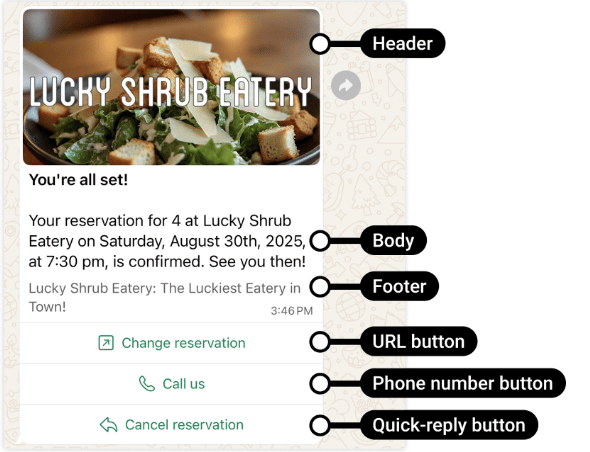
An illustrative template:
```text theme={"theme":{"light":"github-light","dark":"github-dark"}}
Your appointment {{1}} has been moved to {{2}}.
Use the button below to review the updated details.
```
Provide representative sample values when submitting. Do not leave the business purpose hidden inside a variable.
The example is not an approved template. Review depends on the complete message and use case.
## Compare concrete drafts
| Draft | Assessment |
| - | - |
| `Your refund for order {{1}} was processed on {{2}}. The amount is {{3}}.` | Clear transaction-specific update when the inserted values match a real refund. |
| `Your appointment {{1}} is tomorrow at {{2}}. Reply if you need to reschedule.` | Focused on an existing appointment, without an unrelated promotion. |
| `Your order {{1}} has shipped. Save 15% on your next order.` | Mixed transaction and promotion: use marketing. |
| `We have an important update for you. Tap below.` | Too little visible context to establish a specific utility purpose. State what changed and why it matters to this customer. |
| `Here is your login code: {{1}}.` | Identity-verification OTP: use authentication, not utility. |
These examples illustrate category reasoning, not an approval guarantee. Meta assesses the complete template and the actual use case.
### Define the trigger and stop condition
A utility notification should have both:
* **Trigger:** a specific state change, such as order `PACKED → SHIPPED`.
* **Stop condition:** the update is no longer useful or has been superseded, such as an already delivered parcel.
For a shipment notification, store the order reference, recipient, event version, and template variant used. If your order system emits the same event twice, deduplicate it before sending. If the delivery fails, check the latest order status before retrying.
Do not send an outdated failed-payment warning after payment succeeds. Template approval does not validate the business facts in a message.
## Keep utility and marketing separate
If you add a promotion, upsell, cross-sell, or purchase incentive, the message can be classified as marketing even when it also contains a genuine transaction update.
Do not split a promotional sentence across variables or use a utility template's button to deliver an unrelated offer. Choose [Marketing templates](/en/documentation/whatsapp-business-platform/messaging/message-templates/marketing-templates) when that is the actual purpose.
One-time passcodes used for identity verification belong in [Authentication templates](/en/documentation/whatsapp-business-platform/messaging/message-templates/authentication-message-templates/index).
Source: [Meta official example](https://developers.facebook.com/documentation/business-messaging/whatsapp/templates/utility-templates/utility-templates).
## Choose a template or a service reply
For an event-driven notification outside the customer service window, use an approved template. Within an open window, you may answer with a suitable free-form service message or use a utility template.
The distinction matters for both sending eligibility and pricing. Utility templates delivered inside an open service window have a Meta pricing exemption; outside it, the relevant utility rate normally applies. See [WhatsApp pricing](/en/documentation/whatsapp-business-platform/pricing-limits-and-quality/whatsapp-pricing) for the complete rules.
## Check the message at send time
An approved template does not validate the transaction data you insert. Before sending:
* Verify that the event belongs to the intended customer.
* Use current dates, amounts, and statuses.
* Avoid duplicate notifications when the same event is processed again.
* Check consent and communication preferences.
* Do not expose unnecessary sensitive information.
* Handle delivery failures without repeating an obsolete update.
For example, do not retry a shipment-delay notification after the parcel has already arrived.
## Continue in YCloud
[Create the template](/en/documentation/channels/whatsapp-accounts-management/template-management/create-template/index), then connect it to the workflow that owns the business event.
Use [Template review and lifecycle](/en/documentation/whatsapp-business-platform/messaging/message-templates/template-review-and-lifecycle) if Meta rejects or recategorizes the template, and [Message delivery statuses](/en/documentation/whatsapp-business-platform/messaging/message-delivery-statuses) to track the individual notifications.
This documentation is built and hosted on [Mintlify](https://mintlify.com), a developer documentation platform.