> ## Documentation Index
> Fetch the complete documentation index at: https://docs.ycloud.com/llms.txt
> Use this file to discover all available pages before exploring further.
# Create a WhatsApp Flow
> Create and test a Flow before using it in customer messages.
Create a WhatsApp Flow, test its screens and data handling, then publish it for use in customer messages.
## Choose a creation method
You can manage Flows through the [YCloud Flows API](/en/api-reference/guides/whatsapp-platform/manage-whatsapp-flows). You can also use the Flow-building tools available for your WABA in WhatsApp Manager.
API support and console-editor availability are separate. Confirm the options shown for your account rather than assuming every YCloud screen includes a Flow builder.
 ## Prepare and test
1. Select the WABA that will own the Flow.
2. Define the screens, fields, and completion result.
3. Decide whether the Flow needs a data endpoint.
4. Create a draft and address validation errors.
5. Preview the full customer journey with synthetic data.
6. Publish only after the form and downstream processing are ready.
## Prepare and test
1. Select the WABA that will own the Flow.
2. Define the screens, fields, and completion result.
3. Decide whether the Flow needs a data endpoint.
4. Create a draft and address validation errors.
5. Preview the full customer journey with synthetic data.
6. Publish only after the form and downstream processing are ready.
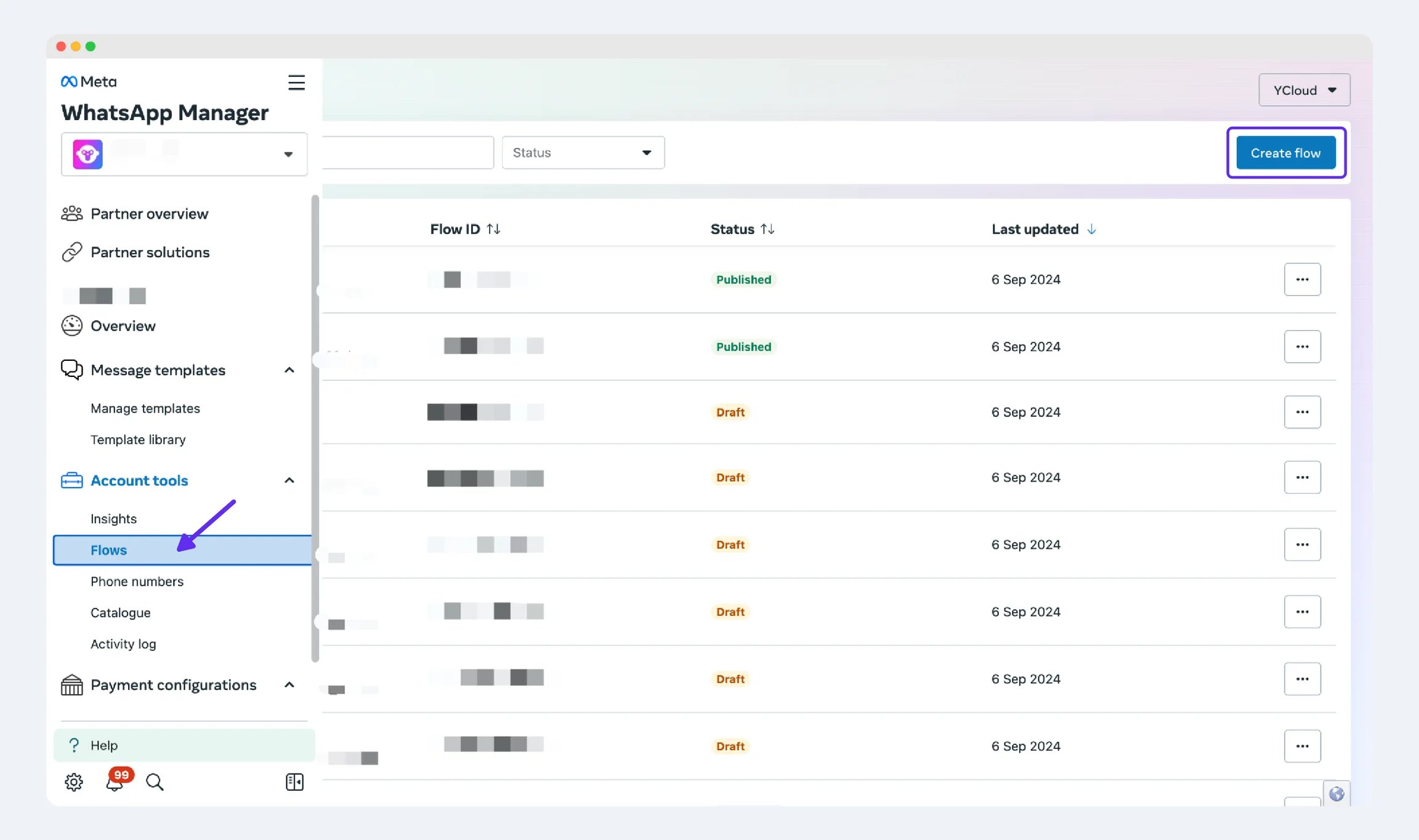 The screenshot illustrates the existing WhatsApp Manager workflow. Follow the current labels and eligibility prompts in your account.
## Define the data before the screens
For an appointment request, write a small field specification:
| Field | Example value | Validation and use |
| - | - | - |
| Service | Consultation | Must be one of the services you actually offer. |
| Location | Downtown | Must support the selected service. |
| Preferred date | 2026-10-12 | Must be an available or acceptable future date. |
| Preferred time | 10:30 | Include the location's timezone in the customer experience. |
| Request reference | An opaque reference | Associates the submission with the customer's request. |
Use the minimum fields needed. A preferred time is not a reserved slot; name it accurately until the booking system confirms availability.
Decide what each screen receives, returns, and displays on failure. For a dynamic Flow, the endpoint must handle stale availability and invalid selections even when the form normally restricts those values.
## Validate the draft in stages
1. **Structure:** retrieve the Flow and inspect `validationErrors`. Fix the indicated JSON locations, not just the first visible error.
2. **Navigation:** test each forward, back, and completion path.
3. **Data:** test empty required fields, maximum expected values, and selections that are no longer valid.
4. **Endpoint:** test unavailable data, timeouts, and a rejected business operation.
5. **Completion:** confirm the response reaches the correct customer context exactly once.
For the API route, the documented sequence is create, retrieve validation details, update the structure, generate a preview, and publish. The preview endpoint creates a public preview URL, so use synthetic data and no secrets.
## Plan a versioned release
Keep the Flow definition and any endpoint changes together in your release record. Record the Flow ID, owning WABA, status, intended invitation template, and business outcome.
The current YCloud contract contains inconsistent descriptions of editing published Flows. Until that behavior is clarified, use a new tested Flow version for a changed live experience rather than relying on an in-place rollback to draft. Update its invitation only after testing the replacement.
Do not deprecate the previous Flow before checking active invitations and the intended transition for customers who already received it.
## Before publishing
Check required fields, navigation, invalid input, duplicate submissions, and endpoint failures. A public preview must not contain production secrets or sensitive customer data.
Publishing changes the lifecycle of the resource. Check the current contract before modifying a live Flow; plan a replacement version when necessary.
If you cannot find the Flow while creating a template, confirm that both resources belong to the intended WABA and that the Flow is available for use.
Continue with [Send a Flow](/en/documentation/whatsapp-business-platform/more-whatsapp-features/whatsapp-flows/send-a-whatsapp-flow).
This documentation is built and hosted on [Mintlify](https://mintlify.com), a developer documentation platform.
The screenshot illustrates the existing WhatsApp Manager workflow. Follow the current labels and eligibility prompts in your account.
## Define the data before the screens
For an appointment request, write a small field specification:
| Field | Example value | Validation and use |
| - | - | - |
| Service | Consultation | Must be one of the services you actually offer. |
| Location | Downtown | Must support the selected service. |
| Preferred date | 2026-10-12 | Must be an available or acceptable future date. |
| Preferred time | 10:30 | Include the location's timezone in the customer experience. |
| Request reference | An opaque reference | Associates the submission with the customer's request. |
Use the minimum fields needed. A preferred time is not a reserved slot; name it accurately until the booking system confirms availability.
Decide what each screen receives, returns, and displays on failure. For a dynamic Flow, the endpoint must handle stale availability and invalid selections even when the form normally restricts those values.
## Validate the draft in stages
1. **Structure:** retrieve the Flow and inspect `validationErrors`. Fix the indicated JSON locations, not just the first visible error.
2. **Navigation:** test each forward, back, and completion path.
3. **Data:** test empty required fields, maximum expected values, and selections that are no longer valid.
4. **Endpoint:** test unavailable data, timeouts, and a rejected business operation.
5. **Completion:** confirm the response reaches the correct customer context exactly once.
For the API route, the documented sequence is create, retrieve validation details, update the structure, generate a preview, and publish. The preview endpoint creates a public preview URL, so use synthetic data and no secrets.
## Plan a versioned release
Keep the Flow definition and any endpoint changes together in your release record. Record the Flow ID, owning WABA, status, intended invitation template, and business outcome.
The current YCloud contract contains inconsistent descriptions of editing published Flows. Until that behavior is clarified, use a new tested Flow version for a changed live experience rather than relying on an in-place rollback to draft. Update its invitation only after testing the replacement.
Do not deprecate the previous Flow before checking active invitations and the intended transition for customers who already received it.
## Before publishing
Check required fields, navigation, invalid input, duplicate submissions, and endpoint failures. A public preview must not contain production secrets or sensitive customer data.
Publishing changes the lifecycle of the resource. Check the current contract before modifying a live Flow; plan a replacement version when necessary.
If you cannot find the Flow while creating a template, confirm that both resources belong to the intended WABA and that the Flow is available for use.
Continue with [Send a Flow](/en/documentation/whatsapp-business-platform/more-whatsapp-features/whatsapp-flows/send-a-whatsapp-flow).
This documentation is built and hosted on [Mintlify](https://mintlify.com), a developer documentation platform.