> ## Documentation Index
> Fetch the complete documentation index at: https://docs.ycloud.com/llms.txt
> Use this file to discover all available pages before exploring further.
# WhatsApp Flows
> Use structured screens inside WhatsApp for forms, bookings, and other multi-step customer tasks.
WhatsApp Flows let customers complete structured tasks inside WhatsApp, such as choosing an appointment, submitting a request, or answering a short questionnaire.
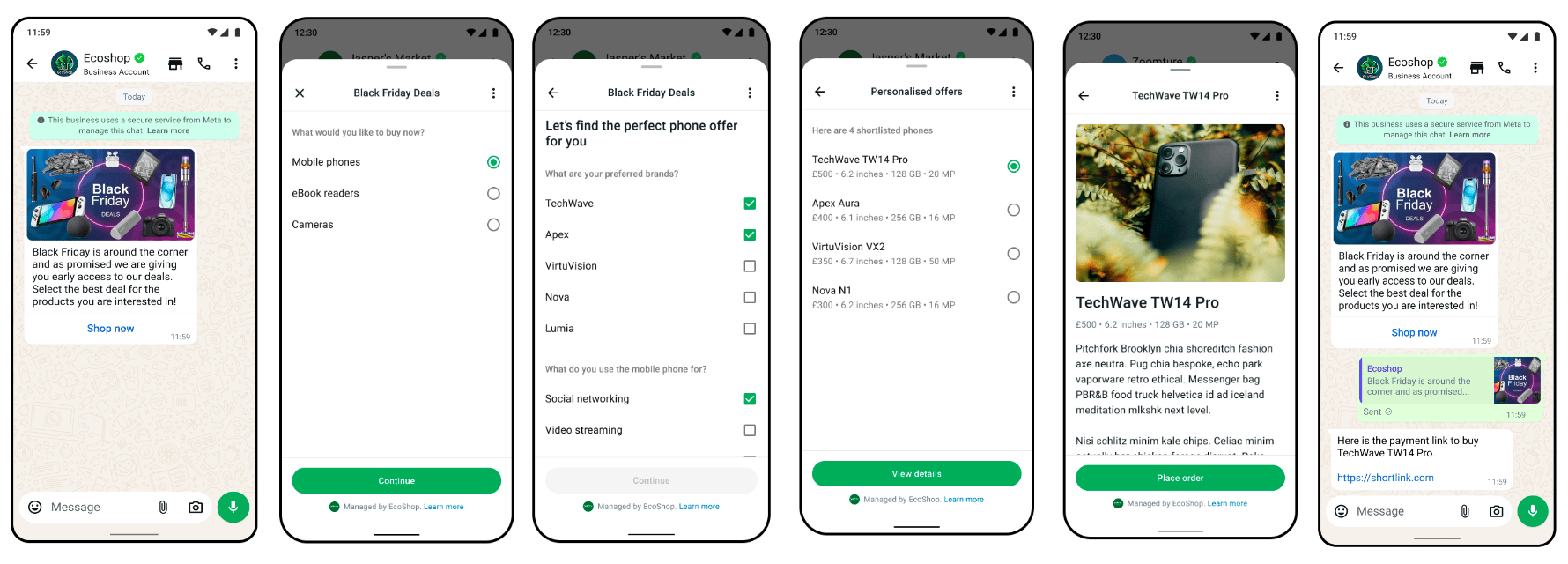 Source: [Meta's official example](https://developers.facebook.com/docs/whatsapp/flows/introduction/).
## Understand the building blocks
A Flow belongs to a WABA. Its definition describes screens, input fields, navigation, and completion behavior.
Some Flows use data supplied when the message is sent. Others need a data endpoint to retrieve current information or process selections during the interaction.
For example, an appointment Flow may collect the service, preferred date, and contact details. If it must show live availability, the endpoint and your booking system must coordinate that data.
Meta provides [Flows guides](https://developers.facebook.com/docs/whatsapp/flows/guides/) for screen design, endpoint integration, encryption, testing, and health monitoring.
## A Flow and its invitation are separate
You send a message that opens the Flow:
* Use a supported interactive Flow message within an open service window.
* Use an approved template with a Flow button when a template is required.
The Flow's purpose does not automatically determine the template category. A promotional invitation and an appointment update may both open a form but require different template treatment.
See [Template components and formats](/en/documentation/whatsapp-business-platform/messaging/message-templates/template-components-and-formats) and [Service messages](/en/documentation/whatsapp-business-platform/messaging/service-messages).
## Create, test, and release
YCloud's [Flows API guide](/en/api-reference/guides/whatsapp-platform/manage-whatsapp-flows) covers creating, retrieving, updating, previewing, publishing, and deprecating Flows.
Keep work in draft while validating the structure and testing the customer journey. Publishing is a lifecycle boundary; plan a replacement version when changing a live experience and check current API rules before attempting an in-place change.
Test:
* Required fields and invalid input.
* Back navigation and abandonment.
* Endpoint errors or unavailable appointments.
* Duplicate submissions.
* Completion messages and the next business action.
A completed Flow is not automatically a confirmed booking, paid order, or approved application. Your business system must validate and complete that action.
## Example: an appointment request
A useful first version has three screens:
| Screen | Customer provides | Your system checks |
| - | - | - |
| Service | A service and location. | The location offers that service. |
| Appointment | A preferred date and time. | The slot still exists and can be reserved. |
| Review | Contact details and confirmation. | Required fields, duplicate requests, and the final booking result. |
Use a static Flow if you only collect a preferred time for an agent to confirm later. Use an endpoint-powered Flow if the available choices must change with live inventory. Do not display a static list as guaranteed availability.
Write the completion screen to match the outcome. “Request received” is appropriate when staff still need to confirm; “Appointment confirmed” requires successful reservation in your booking system.
## Keep the identifiers separate
* The **Flow ID** identifies the reusable form.
* The **message ID** identifies one invitation and its delivery.
* A **Flow token**, where supplied by your integration, associates the interaction with your business context.
* Your **booking or application ID** identifies the resulting business record.
A token should be an opaque reference, not a password or a customer's personal information. Validate submitted values on your server even if the form restricts the available options.
## Diagnose the right stage
| Symptom | Check first |
| - | - |
| Invitation rejected before delivery | Sending window, template approval, parameter values, and sender access. |
| Message arrives but the form cannot open | Flow status, the referenced Flow and screen, and client compatibility. |
| A later screen cannot load | Endpoint availability, encryption setup, and the data returned for that transition. |
| Submission appears but no booking exists | Completion processing, validation, and your business-system response. |
| Two bookings appear | Duplicate-event handling and whether submission processing is idempotent. |
These checks prevent a delivery problem from being confused with a form or booking problem.
## Handle data deliberately
Collect only the information needed. Explain its use and provide relevant privacy information.
For endpoint-powered Flows, follow Meta's encryption and endpoint requirements. Keep secrets out of Flow JSON and public previews. Use synthetic data for tests.
Save and process submissions in the correct customer context. Design duplicate handling so that a repeated submission cannot create two bookings or charges.
## Continue in YCloud
* [Manage Flows through the API](/en/api-reference/guides/whatsapp-platform/manage-whatsapp-flows)
* [Create a Flow](/en/documentation/whatsapp-business-platform/more-whatsapp-features/whatsapp-flows/create-a-whatsapp-flow)
* [Send a Flow](/en/documentation/whatsapp-business-platform/more-whatsapp-features/whatsapp-flows/send-a-whatsapp-flow)
* [Review Flow submissions](/en/documentation/whatsapp-business-platform/more-whatsapp-features/whatsapp-flows/review-whatsapp-flow-submissions)
Keep Flow delivery, form submission, and the business outcome as separate measurements.
## Frequently asked questions
No. A static Flow can collect selections or information without fetching live data during each screen. Use an endpoint when choices or validation depend on current systems, such as available appointment slots. You still need to decide where completed responses go and who acts on them.
Only if your booking system successfully reserved the slot. A completed form can be a request rather than a confirmed booking. Use a request ID, validate availability, handle duplicate submissions, and make the confirmation wording match the actual result.
The form and its invitation are separate. Use an eligible interactive Flow message during the service window, or an approved template with a Flow button when a template is required. The invitation's actual purpose determines its category; attaching a form does not make a promotional message utility.
This documentation is built and hosted on [Mintlify](https://mintlify.com), a developer documentation platform.
Source: [Meta's official example](https://developers.facebook.com/docs/whatsapp/flows/introduction/).
## Understand the building blocks
A Flow belongs to a WABA. Its definition describes screens, input fields, navigation, and completion behavior.
Some Flows use data supplied when the message is sent. Others need a data endpoint to retrieve current information or process selections during the interaction.
For example, an appointment Flow may collect the service, preferred date, and contact details. If it must show live availability, the endpoint and your booking system must coordinate that data.
Meta provides [Flows guides](https://developers.facebook.com/docs/whatsapp/flows/guides/) for screen design, endpoint integration, encryption, testing, and health monitoring.
## A Flow and its invitation are separate
You send a message that opens the Flow:
* Use a supported interactive Flow message within an open service window.
* Use an approved template with a Flow button when a template is required.
The Flow's purpose does not automatically determine the template category. A promotional invitation and an appointment update may both open a form but require different template treatment.
See [Template components and formats](/en/documentation/whatsapp-business-platform/messaging/message-templates/template-components-and-formats) and [Service messages](/en/documentation/whatsapp-business-platform/messaging/service-messages).
## Create, test, and release
YCloud's [Flows API guide](/en/api-reference/guides/whatsapp-platform/manage-whatsapp-flows) covers creating, retrieving, updating, previewing, publishing, and deprecating Flows.
Keep work in draft while validating the structure and testing the customer journey. Publishing is a lifecycle boundary; plan a replacement version when changing a live experience and check current API rules before attempting an in-place change.
Test:
* Required fields and invalid input.
* Back navigation and abandonment.
* Endpoint errors or unavailable appointments.
* Duplicate submissions.
* Completion messages and the next business action.
A completed Flow is not automatically a confirmed booking, paid order, or approved application. Your business system must validate and complete that action.
## Example: an appointment request
A useful first version has three screens:
| Screen | Customer provides | Your system checks |
| - | - | - |
| Service | A service and location. | The location offers that service. |
| Appointment | A preferred date and time. | The slot still exists and can be reserved. |
| Review | Contact details and confirmation. | Required fields, duplicate requests, and the final booking result. |
Use a static Flow if you only collect a preferred time for an agent to confirm later. Use an endpoint-powered Flow if the available choices must change with live inventory. Do not display a static list as guaranteed availability.
Write the completion screen to match the outcome. “Request received” is appropriate when staff still need to confirm; “Appointment confirmed” requires successful reservation in your booking system.
## Keep the identifiers separate
* The **Flow ID** identifies the reusable form.
* The **message ID** identifies one invitation and its delivery.
* A **Flow token**, where supplied by your integration, associates the interaction with your business context.
* Your **booking or application ID** identifies the resulting business record.
A token should be an opaque reference, not a password or a customer's personal information. Validate submitted values on your server even if the form restricts the available options.
## Diagnose the right stage
| Symptom | Check first |
| - | - |
| Invitation rejected before delivery | Sending window, template approval, parameter values, and sender access. |
| Message arrives but the form cannot open | Flow status, the referenced Flow and screen, and client compatibility. |
| A later screen cannot load | Endpoint availability, encryption setup, and the data returned for that transition. |
| Submission appears but no booking exists | Completion processing, validation, and your business-system response. |
| Two bookings appear | Duplicate-event handling and whether submission processing is idempotent. |
These checks prevent a delivery problem from being confused with a form or booking problem.
## Handle data deliberately
Collect only the information needed. Explain its use and provide relevant privacy information.
For endpoint-powered Flows, follow Meta's encryption and endpoint requirements. Keep secrets out of Flow JSON and public previews. Use synthetic data for tests.
Save and process submissions in the correct customer context. Design duplicate handling so that a repeated submission cannot create two bookings or charges.
## Continue in YCloud
* [Manage Flows through the API](/en/api-reference/guides/whatsapp-platform/manage-whatsapp-flows)
* [Create a Flow](/en/documentation/whatsapp-business-platform/more-whatsapp-features/whatsapp-flows/create-a-whatsapp-flow)
* [Send a Flow](/en/documentation/whatsapp-business-platform/more-whatsapp-features/whatsapp-flows/send-a-whatsapp-flow)
* [Review Flow submissions](/en/documentation/whatsapp-business-platform/more-whatsapp-features/whatsapp-flows/review-whatsapp-flow-submissions)
Keep Flow delivery, form submission, and the business outcome as separate measurements.
## Frequently asked questions
No. A static Flow can collect selections or information without fetching live data during each screen. Use an endpoint when choices or validation depend on current systems, such as available appointment slots. You still need to decide where completed responses go and who acts on them.
Only if your booking system successfully reserved the slot. A completed form can be a request rather than a confirmed booking. Use a request ID, validate availability, handle duplicate submissions, and make the confirmation wording match the actual result.
The form and its invitation are separate. Use an eligible interactive Flow message during the service window, or an approved template with a Flow button when a template is required. The invitation's actual purpose determines its category; attaching a form does not make a promotional message utility.
This documentation is built and hosted on [Mintlify](https://mintlify.com), a developer documentation platform.