> ## Documentation Index
> Fetch the complete documentation index at: https://docs.ycloud.com/llms.txt
> Use this file to discover all available pages before exploring further.
# Review WhatsApp Flow submissions
> Find submitted Flow responses in campaign reports and Flow logs.
Review the responses customers submit through your WhatsApp Flows in campaign reports and Flow logs.
## Review campaign responses
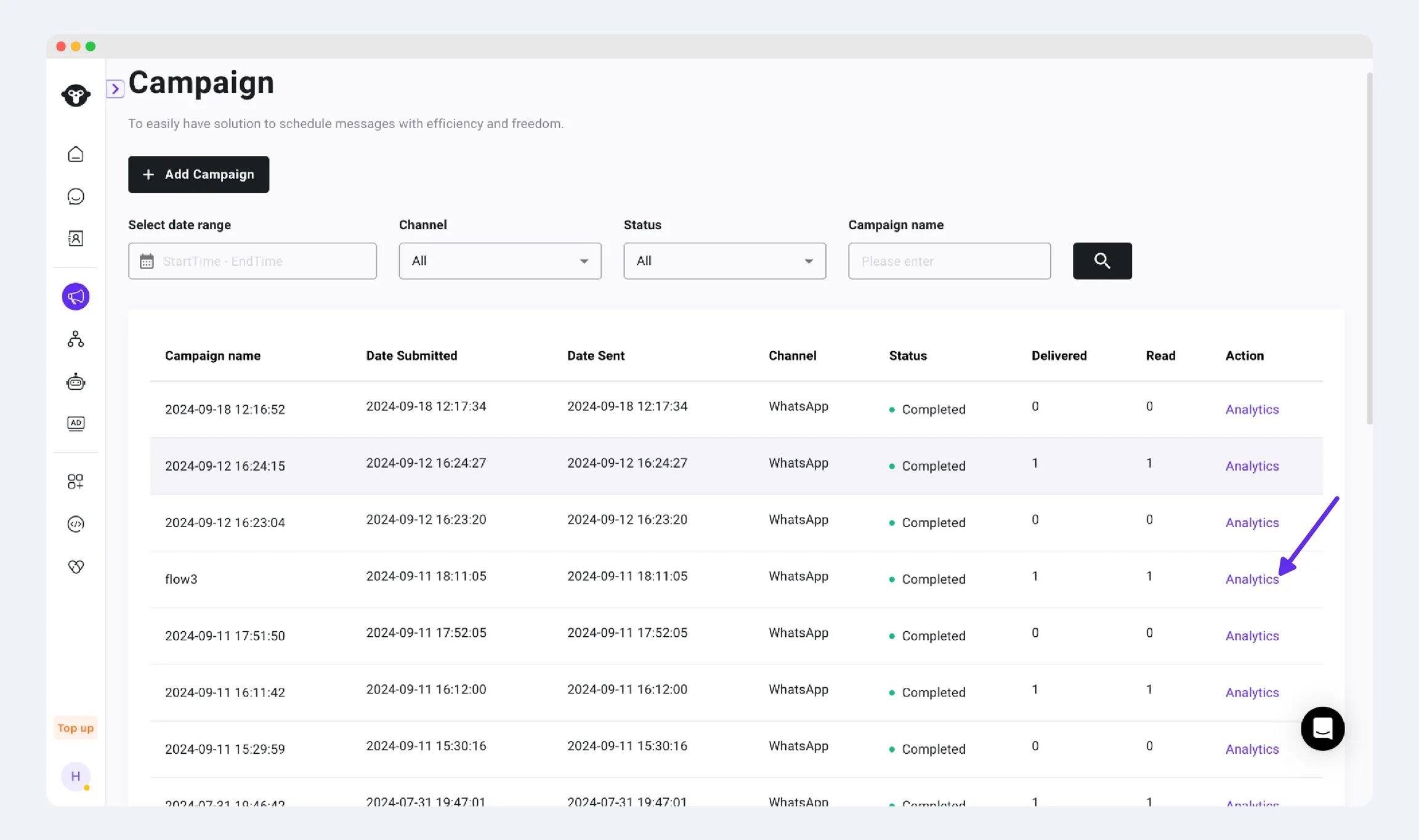
For a Flow sent through a campaign, open the campaign analytics and inspect the Flow response details available for that campaign.
 ## Review Flow logs
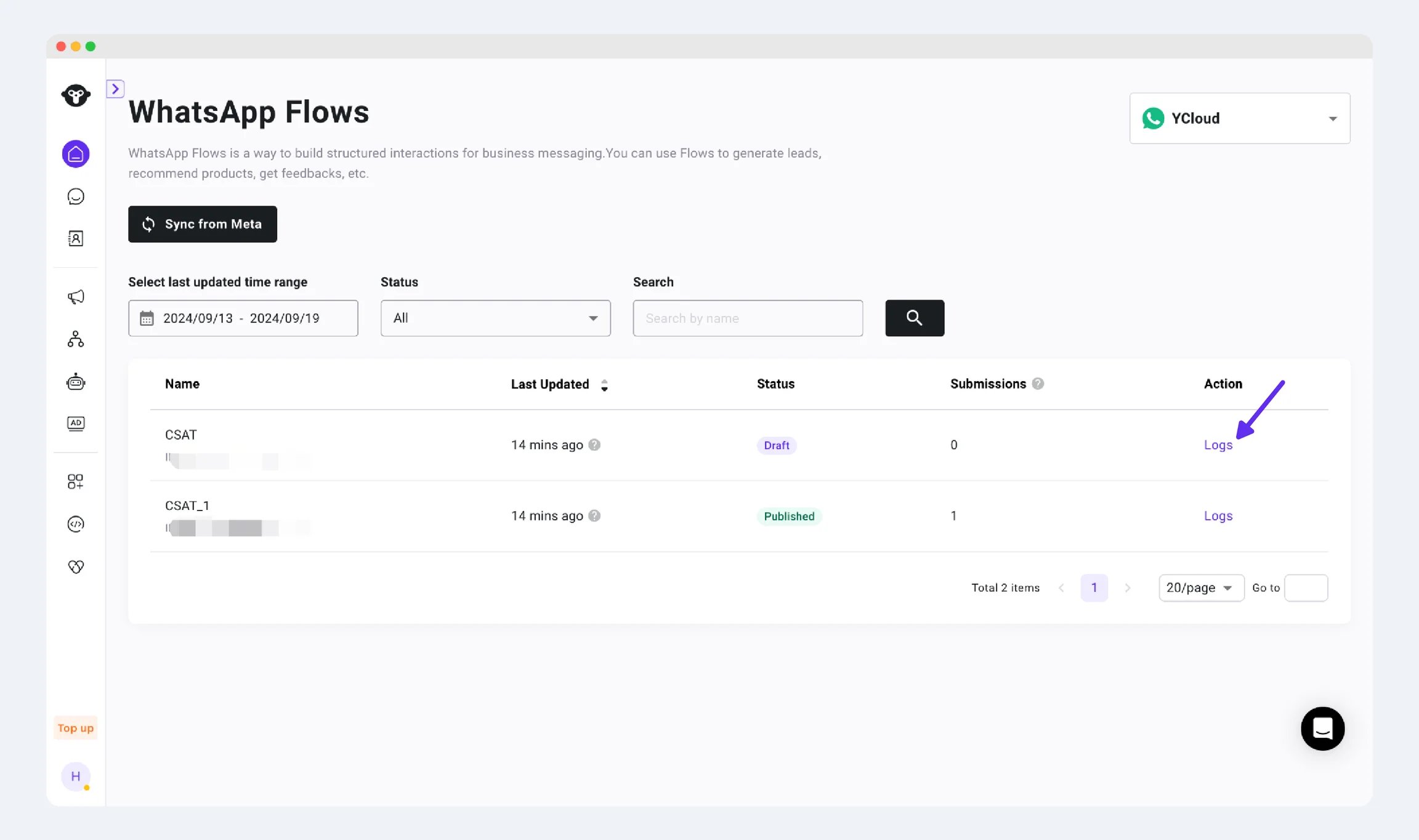
In YCloud's **WhatsApp Flows** area, select the relevant Flow and open its logs to review submitted responses.
## Review Flow logs
In YCloud's **WhatsApp Flows** area, select the relevant Flow and open its logs to review submitted responses.
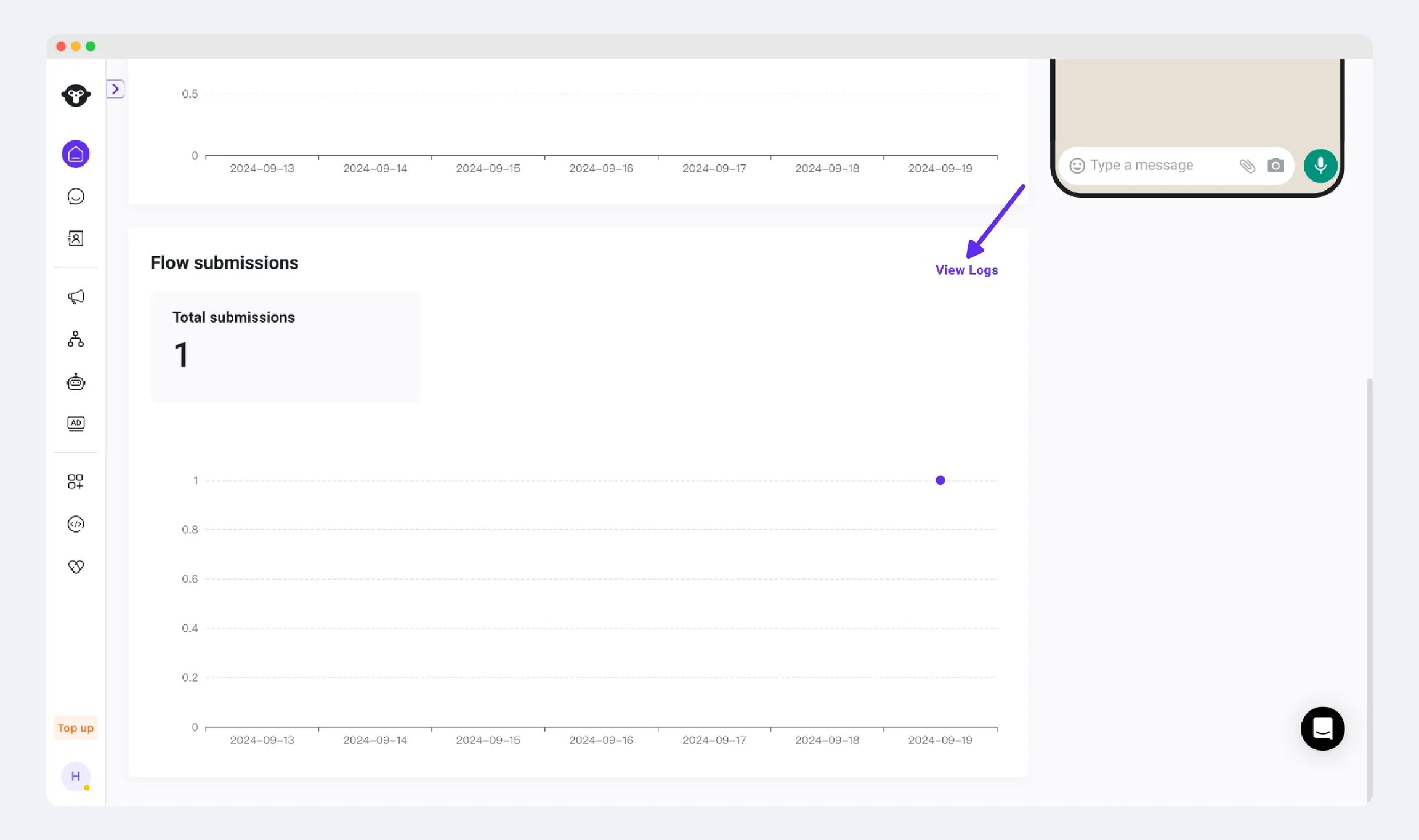
 For a template containing a Flow, the template's reporting view also provides submission information and access to response logs.
 ## Reconcile one response end to end
Start with a known test response and follow it through:
1. Identify the invitation message and its final delivery state.
2. Find the submission in the relevant Flow, campaign, or template reporting context.
3. Match the customer and request reference, using a supplied Flow token where your integration records it.
4. Inspect the values actually submitted—not only the form's default values.
5. Find the resulting booking, lead, or order record in the destination system.
6. Check the outcome sent back to the customer.
If the same Flow is reused in several campaigns, do not attribute every response to the most recent campaign. Use the available message and request context.
## Example: diagnose a conversion gap
Suppose 100 invitations are delivered, 30 valid submissions are recorded, and 24 bookings are confirmed. These are illustrative counts.
* **Submission rate:** 30 / 100 = 30%.
* **Booking completion among submissions:** 24 / 30 = 80%.
* **Booking completion among delivered invitations:** 24 / 100 = 24%.
The six unconfirmed submissions require a business-processing check—for example, no remaining availability or missing customer details. They are not necessarily Flow delivery failures.
Deduplicate repeated processing and define whether you count submissions, customers, or bookings. Keep the reporting period and timezone consistent. A customer can submit more than once without representing multiple new customers.
## Troubleshoot missing or inconsistent results
| Observation | Investigate |
| - | - |
| Delivered invitation, no recorded submission | The customer may not have completed it; check the form and endpoint experience without assuming an open event exists. |
| Submission in Flow logs but not in the expected campaign | Reused Flow, source context, filters, reporting period, or attribution. |
| Submission exists but no business record | Downstream validation, endpoint processing, or integration failure. |
| Duplicate business records | Repeated submissions or events without idempotent processing. |
| Different values in the destination system | Field mapping, transformations, and whether defaults replaced actual submitted data. |
Do not invent an “opened” or “started” metric if the reporting surface does not expose it. Use only the events actually available.
## Handle exports and support evidence
Before exporting, confirm who needs the data and which fields are necessary. Limit access and retention according to your business's policy.
For a support request, provide the Flow ID, relevant message or request reference, timestamp with timezone, expected result, and a redacted example. Do not share an entire customer-response export when a single sanitized record explains the issue.
## Interpret the results
| Result | What it establishes |
| - | - |
| Message delivered | The customer received the invitation message. |
| Flow submitted | A form response was recorded. |
| Booking, order, or other business result | Your downstream system completed the intended action. |
Do not count a submitted form as a paid order without checking payment. Do not infer that every customer who received the invitation opened the form.
Restrict access to response logs and exports. Avoid sharing unnecessary customer data in screenshots or support requests.
For API integration and lifecycle monitoring, see [Manage WhatsApp Flows](/en/api-reference/guides/whatsapp-platform/manage-whatsapp-flows).
This documentation is built and hosted on [Mintlify](https://mintlify.com), a developer documentation platform.
## Reconcile one response end to end
Start with a known test response and follow it through:
1. Identify the invitation message and its final delivery state.
2. Find the submission in the relevant Flow, campaign, or template reporting context.
3. Match the customer and request reference, using a supplied Flow token where your integration records it.
4. Inspect the values actually submitted—not only the form's default values.
5. Find the resulting booking, lead, or order record in the destination system.
6. Check the outcome sent back to the customer.
If the same Flow is reused in several campaigns, do not attribute every response to the most recent campaign. Use the available message and request context.
## Example: diagnose a conversion gap
Suppose 100 invitations are delivered, 30 valid submissions are recorded, and 24 bookings are confirmed. These are illustrative counts.
* **Submission rate:** 30 / 100 = 30%.
* **Booking completion among submissions:** 24 / 30 = 80%.
* **Booking completion among delivered invitations:** 24 / 100 = 24%.
The six unconfirmed submissions require a business-processing check—for example, no remaining availability or missing customer details. They are not necessarily Flow delivery failures.
Deduplicate repeated processing and define whether you count submissions, customers, or bookings. Keep the reporting period and timezone consistent. A customer can submit more than once without representing multiple new customers.
## Troubleshoot missing or inconsistent results
| Observation | Investigate |
| - | - |
| Delivered invitation, no recorded submission | The customer may not have completed it; check the form and endpoint experience without assuming an open event exists. |
| Submission in Flow logs but not in the expected campaign | Reused Flow, source context, filters, reporting period, or attribution. |
| Submission exists but no business record | Downstream validation, endpoint processing, or integration failure. |
| Duplicate business records | Repeated submissions or events without idempotent processing. |
| Different values in the destination system | Field mapping, transformations, and whether defaults replaced actual submitted data. |
Do not invent an “opened” or “started” metric if the reporting surface does not expose it. Use only the events actually available.
## Handle exports and support evidence
Before exporting, confirm who needs the data and which fields are necessary. Limit access and retention according to your business's policy.
For a support request, provide the Flow ID, relevant message or request reference, timestamp with timezone, expected result, and a redacted example. Do not share an entire customer-response export when a single sanitized record explains the issue.
## Interpret the results
| Result | What it establishes |
| - | - |
| Message delivered | The customer received the invitation message. |
| Flow submitted | A form response was recorded. |
| Booking, order, or other business result | Your downstream system completed the intended action. |
Do not count a submitted form as a paid order without checking payment. Do not infer that every customer who received the invitation opened the form.
Restrict access to response logs and exports. Avoid sharing unnecessary customer data in screenshots or support requests.
For API integration and lifecycle monitoring, see [Manage WhatsApp Flows](/en/api-reference/guides/whatsapp-platform/manage-whatsapp-flows).
This documentation is built and hosted on [Mintlify](https://mintlify.com), a developer documentation platform.