> ## Documentation Index
> Fetch the complete documentation index at: https://docs.ycloud.com/llms.txt
> Use this file to discover all available pages before exploring further.
# Overview
> Understand the WhatsApp Business Platform, the assets you need, and where to start with YCloud.
The WhatsApp Business Platform connects a business phone number to software that handles customer conversations, notifications, marketing, and one-time passcodes. Your customers use WhatsApp; your team works in YCloud, a connected system, or an API integration.
## Compare the three WhatsApp products
**YCloud primarily connects businesses to WhatsApp Business Platform.** Customers continue using their familiar WhatsApp app; your team manages the business side through YCloud or connected systems.
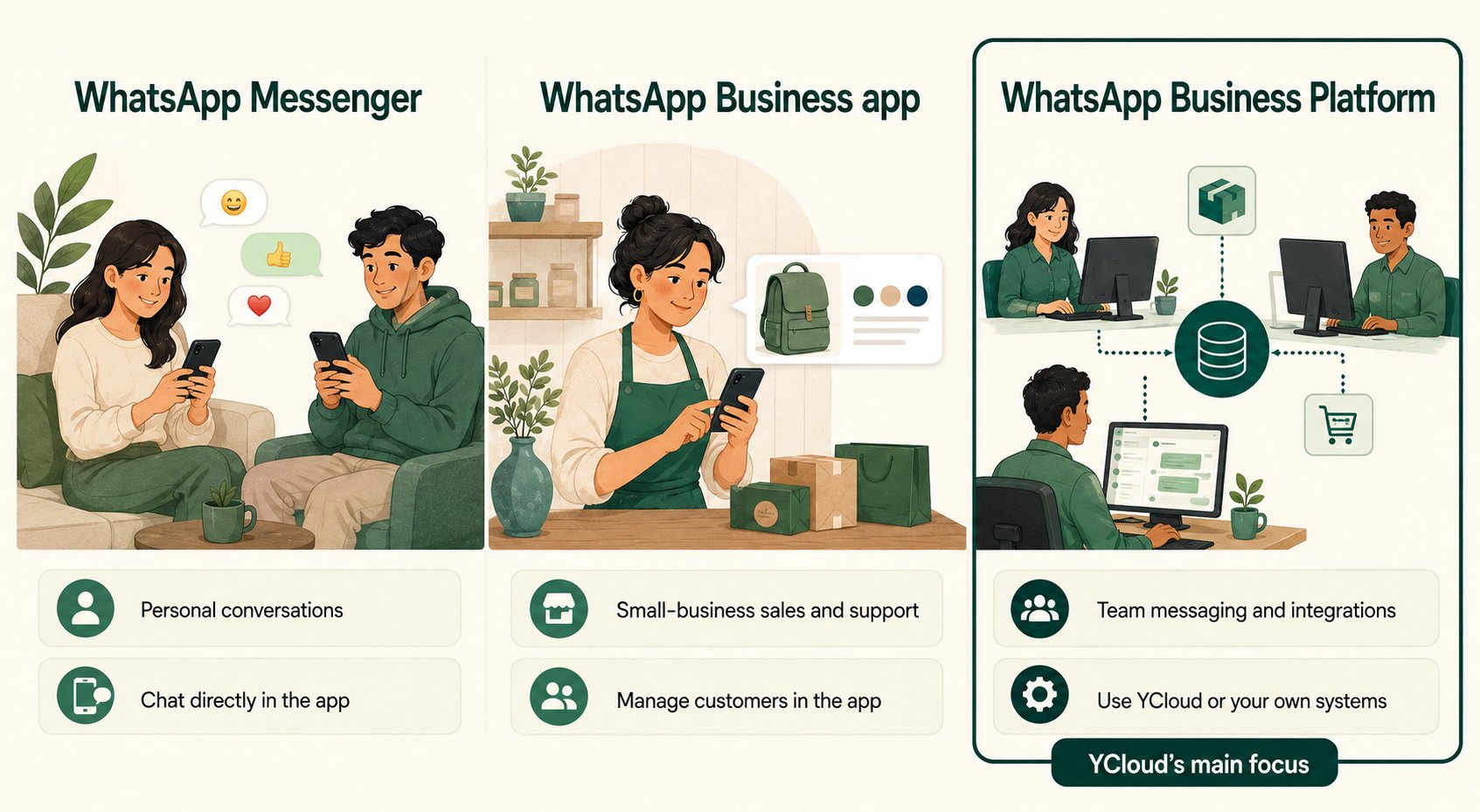 * **WhatsApp Messenger:** personal communication with friends, family, and businesses.
* **WhatsApp Business app:** a ready-to-use app for an owner or small team, with a business profile, catalog, labels, quick replies, greetings, and away messages.
* **WhatsApp Business Platform:** API-based business messaging connected to YCloud Inbox, Campaign, Journey, a CRM, or your backend.
### Use the Platform with YCloud
With YCloud, you can connect WhatsApp to your business workflows. For example:
* A customer asks about an order; a support agent replies in **YCloud Inbox**.
* An order system triggers a shipping update through a reviewed message template.
* A **Journey** responds to a customer action and passes a conversation to a person when needed.
* A login system requests an authentication message and validates the code in your application.
## Connect a number to the Platform
Your number's current registration determines the connection path: a new number, an existing Platform number with another provider, or an app number you want to move fully to the Platform.
Use [Business phone numbers](/en/documentation/whatsapp-business-platform/accounts-and-business-identity/business-phone-numbers#choose-how-to-connect-your-number) to select the correct path and understand the effect on the existing account.
## Know the rules before your first send
| Question | Rule to understand | Example |
| - | - | - |
| Can we message this person? | You need an appropriate permission and expected purpose. A phone number in your database is not sufficient by itself. | A request for an order receipt is not blanket permission for unrelated promotions. |
| Can we write any message? | Free-form service messages depend on an open customer service window. Outside it, use an eligible approved template. | An agent returning to a conversation the next day may need a template. |
| Is approval permanent permission to send? | Template approval, recipient permission, and current sending availability are separate checks. | An approved offer still should not go to an unsubscribed contact. |
| Is sending the same as delivery? | Acceptance is the start of processing, not proof that a customer received the message. | Track delivered and failed outcomes before measuring campaign reach. |
| Is every reply charged? | Pricing depends on message category, delivery, and applicable free windows. | Free-form service messages do not incur Meta messaging charges. |
Start with [How messaging works](/en/documentation/whatsapp-business-platform/messaging/how-messaging-works), then read [Message templates](/en/documentation/whatsapp-business-platform/messaging/message-templates/index) and [Service messages](/en/documentation/whatsapp-business-platform/messaging/service-messages).
## Meta and YCloud: who is responsible for what?
Meta operates the platform, sets its policies, reviews business identities and templates, and applies platform limits. YCloud provides the connection and tools you use to manage messaging.
## Choose a learning path
| Your immediate goal | Read in this order |
| - | - |
| Connect the business for the first time | [Account structure](/en/documentation/whatsapp-business-platform/accounts-and-business-identity/account-structure-and-wabas) → [Business phone numbers](/en/documentation/whatsapp-business-platform/accounts-and-business-identity/business-phone-numbers) → [Connect WhatsApp to YCloud](/en/documentation/channels/whatsapp-accounts-management/business-accounts/create-waba-via-embedded-sign-up). |
| Launch support or outbound messaging | [Messaging](/en/documentation/whatsapp-business-platform/messaging/how-messaging-works) → [Templates](/en/documentation/whatsapp-business-platform/messaging/message-templates/index) → [Service messages](/en/documentation/whatsapp-business-platform/messaging/service-messages) → [Delivery statuses](/en/documentation/whatsapp-business-platform/messaging/message-delivery-statuses). |
| Plan a compliant messaging program | [Opt-in](/en/documentation/whatsapp-business-platform/consent-policies-and-account-health/customer-opt-in) → [Pricing](/en/documentation/whatsapp-business-platform/pricing-limits-and-quality/whatsapp-pricing) → [Limits](/en/documentation/whatsapp-business-platform/pricing-limits-and-quality/messaging-limits-and-throughput) → [Quality](/en/documentation/whatsapp-business-platform/pricing-limits-and-quality/quality-and-delivery-controls). |
| Add a richer experience | [Flows](/en/documentation/whatsapp-business-platform/more-whatsapp-features/whatsapp-flows/index), [Calling](/en/documentation/whatsapp-business-platform/more-whatsapp-features/whatsapp-calling), [Groups](/en/documentation/whatsapp-business-platform/more-whatsapp-features/whatsapp-groups), or [Catalogs and commerce](/en/documentation/whatsapp-business-platform/more-whatsapp-features/catalogs-and-commerce). |
| Acquire new conversations | [Click-to-WhatsApp ads](/en/documentation/whatsapp-business-platform/more-whatsapp-features/click-to-whatsapp-ads), followed by the messaging and consent rules above. |
Product references: [WhatsApp Business app features](https://whatsappbusiness.com/products/business-app-features/) and [WhatsApp Business Platform](https://whatsappbusiness.com/products/business-platform/).
This documentation is built and hosted on [Mintlify](https://mintlify.com), a developer documentation platform.
* **WhatsApp Messenger:** personal communication with friends, family, and businesses.
* **WhatsApp Business app:** a ready-to-use app for an owner or small team, with a business profile, catalog, labels, quick replies, greetings, and away messages.
* **WhatsApp Business Platform:** API-based business messaging connected to YCloud Inbox, Campaign, Journey, a CRM, or your backend.
### Use the Platform with YCloud
With YCloud, you can connect WhatsApp to your business workflows. For example:
* A customer asks about an order; a support agent replies in **YCloud Inbox**.
* An order system triggers a shipping update through a reviewed message template.
* A **Journey** responds to a customer action and passes a conversation to a person when needed.
* A login system requests an authentication message and validates the code in your application.
## Connect a number to the Platform
Your number's current registration determines the connection path: a new number, an existing Platform number with another provider, or an app number you want to move fully to the Platform.
Use [Business phone numbers](/en/documentation/whatsapp-business-platform/accounts-and-business-identity/business-phone-numbers#choose-how-to-connect-your-number) to select the correct path and understand the effect on the existing account.
## Know the rules before your first send
| Question | Rule to understand | Example |
| - | - | - |
| Can we message this person? | You need an appropriate permission and expected purpose. A phone number in your database is not sufficient by itself. | A request for an order receipt is not blanket permission for unrelated promotions. |
| Can we write any message? | Free-form service messages depend on an open customer service window. Outside it, use an eligible approved template. | An agent returning to a conversation the next day may need a template. |
| Is approval permanent permission to send? | Template approval, recipient permission, and current sending availability are separate checks. | An approved offer still should not go to an unsubscribed contact. |
| Is sending the same as delivery? | Acceptance is the start of processing, not proof that a customer received the message. | Track delivered and failed outcomes before measuring campaign reach. |
| Is every reply charged? | Pricing depends on message category, delivery, and applicable free windows. | Free-form service messages do not incur Meta messaging charges. |
Start with [How messaging works](/en/documentation/whatsapp-business-platform/messaging/how-messaging-works), then read [Message templates](/en/documentation/whatsapp-business-platform/messaging/message-templates/index) and [Service messages](/en/documentation/whatsapp-business-platform/messaging/service-messages).
## Meta and YCloud: who is responsible for what?
Meta operates the platform, sets its policies, reviews business identities and templates, and applies platform limits. YCloud provides the connection and tools you use to manage messaging.
## Choose a learning path
| Your immediate goal | Read in this order |
| - | - |
| Connect the business for the first time | [Account structure](/en/documentation/whatsapp-business-platform/accounts-and-business-identity/account-structure-and-wabas) → [Business phone numbers](/en/documentation/whatsapp-business-platform/accounts-and-business-identity/business-phone-numbers) → [Connect WhatsApp to YCloud](/en/documentation/channels/whatsapp-accounts-management/business-accounts/create-waba-via-embedded-sign-up). |
| Launch support or outbound messaging | [Messaging](/en/documentation/whatsapp-business-platform/messaging/how-messaging-works) → [Templates](/en/documentation/whatsapp-business-platform/messaging/message-templates/index) → [Service messages](/en/documentation/whatsapp-business-platform/messaging/service-messages) → [Delivery statuses](/en/documentation/whatsapp-business-platform/messaging/message-delivery-statuses). |
| Plan a compliant messaging program | [Opt-in](/en/documentation/whatsapp-business-platform/consent-policies-and-account-health/customer-opt-in) → [Pricing](/en/documentation/whatsapp-business-platform/pricing-limits-and-quality/whatsapp-pricing) → [Limits](/en/documentation/whatsapp-business-platform/pricing-limits-and-quality/messaging-limits-and-throughput) → [Quality](/en/documentation/whatsapp-business-platform/pricing-limits-and-quality/quality-and-delivery-controls). |
| Add a richer experience | [Flows](/en/documentation/whatsapp-business-platform/more-whatsapp-features/whatsapp-flows/index), [Calling](/en/documentation/whatsapp-business-platform/more-whatsapp-features/whatsapp-calling), [Groups](/en/documentation/whatsapp-business-platform/more-whatsapp-features/whatsapp-groups), or [Catalogs and commerce](/en/documentation/whatsapp-business-platform/more-whatsapp-features/catalogs-and-commerce). |
| Acquire new conversations | [Click-to-WhatsApp ads](/en/documentation/whatsapp-business-platform/more-whatsapp-features/click-to-whatsapp-ads), followed by the messaging and consent rules above. |
Product references: [WhatsApp Business app features](https://whatsappbusiness.com/products/business-app-features/) and [WhatsApp Business Platform](https://whatsappbusiness.com/products/business-platform/).
This documentation is built and hosted on [Mintlify](https://mintlify.com), a developer documentation platform.