> ## Documentation Index
> Fetch the complete documentation index at: https://docs.ycloud.com/llms.txt
> Use this file to discover all available pages before exploring further.
# Overview
WhatsApp Pay can help merchants collect payments from customers in the WhatsApp app, enabling scenarios such as order reminders and shopping cart abandonment.
This feature is currently available only to businesses and users in **India** and requires integration with specific third-party payment platforms: BillDesk, Razorpay, PayU, and Zaakpay. WhatsApp Pay enables businesses to facilitate transactions directly within WhatsApp.
## Use case
Let’s explore how businesses can use WhatsApp Pay to remind consumers to complete their orders.
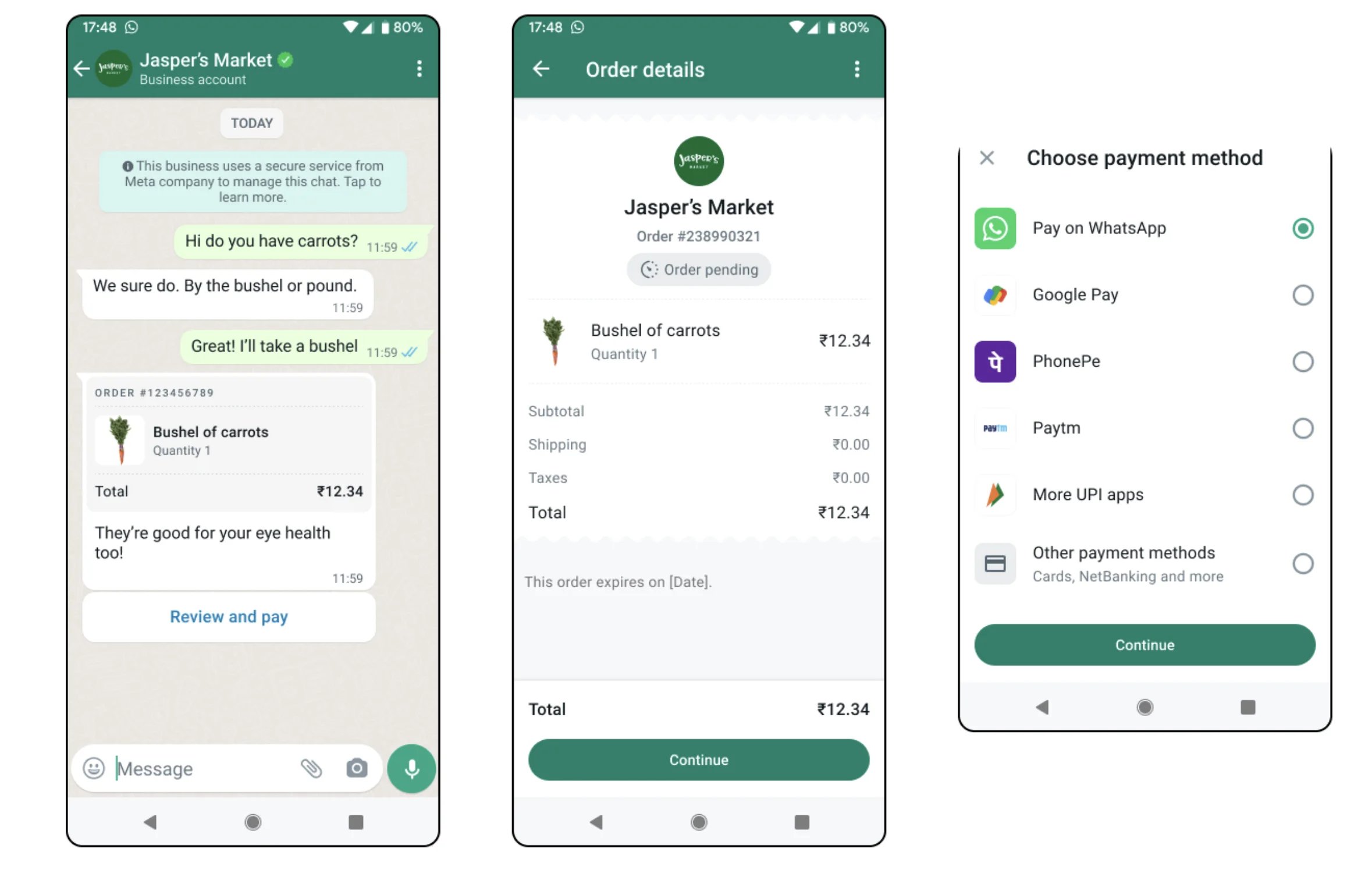
1. **Scenario**: A consumer places an order on the merchant's website but delays payment.
2. **Action**: The merchant applies a discount to the order and sends the consumer a message via WhatsApp using an **Order Details** template. The message includes the updated discounted order details (Image 1).
3. **Consumer Interaction**: The consumer receives the message, taps the **View and Pay** button, and reviews the detailed order information (Image 2).
4. **Payment Completion**: After confirming the order, the consumer clicks the **Continue** button, which triggers the payment interface within WhatsApp (Image 3). The consumer then selects their preferred payment method to complete the transaction.
This streamlined process ensures a seamless payment experience for consumers while helping businesses reduce cart abandonment and boost sales.
 ## Get started with WhatsApp Pay
[link-your-payment-account.md](/en/documentation/whatsapp-pay/link-your-payment-account)
[send-order-detail.md](/en/documentation/whatsapp-pay/send-order-detail-and-checkout-button-message)
This documentation is built and hosted on [Mintlify](https://mintlify.com), a developer documentation platform.
## Get started with WhatsApp Pay
[link-your-payment-account.md](/en/documentation/whatsapp-pay/link-your-payment-account)
[send-order-detail.md](/en/documentation/whatsapp-pay/send-order-detail-and-checkout-button-message)
This documentation is built and hosted on [Mintlify](https://mintlify.com), a developer documentation platform.