> ## Documentation Index
> Fetch the complete documentation index at: https://docs.ycloud.com/llms.txt
> Use this file to discover all available pages before exploring further.
# Crear un flujo
## Paso 1: Crear un flujo de Rule-based Agent
Abre Rule-based Agent y luego selecciona **Crear un flujo**.
 1. Añade un activador. Cuando el mensaje de un cliente coincida con él, se iniciará el flujo.
 2. Añade palabras clave y elige **Coincidencia exacta** o **Que contenga**.
 * Hacer una pregunta: Una vez que el usuario active este Rule-based Agent, puedes configurar en esta sección las preguntas que deseas hacerle, además de definir los botones de respuesta.
* Enviar mensaje: Cuando el usuario haga clic en el botón, el Rule-based Agent responderá automáticamente con la respuesta predefinida.
**Resultado final:**
* Hacer una pregunta: Una vez que el usuario active este Rule-based Agent, puedes configurar en esta sección las preguntas que deseas hacerle, además de definir los botones de respuesta.
* Enviar mensaje: Cuando el usuario haga clic en el botón, el Rule-based Agent responderá automáticamente con la respuesta predefinida.
**Resultado final:**
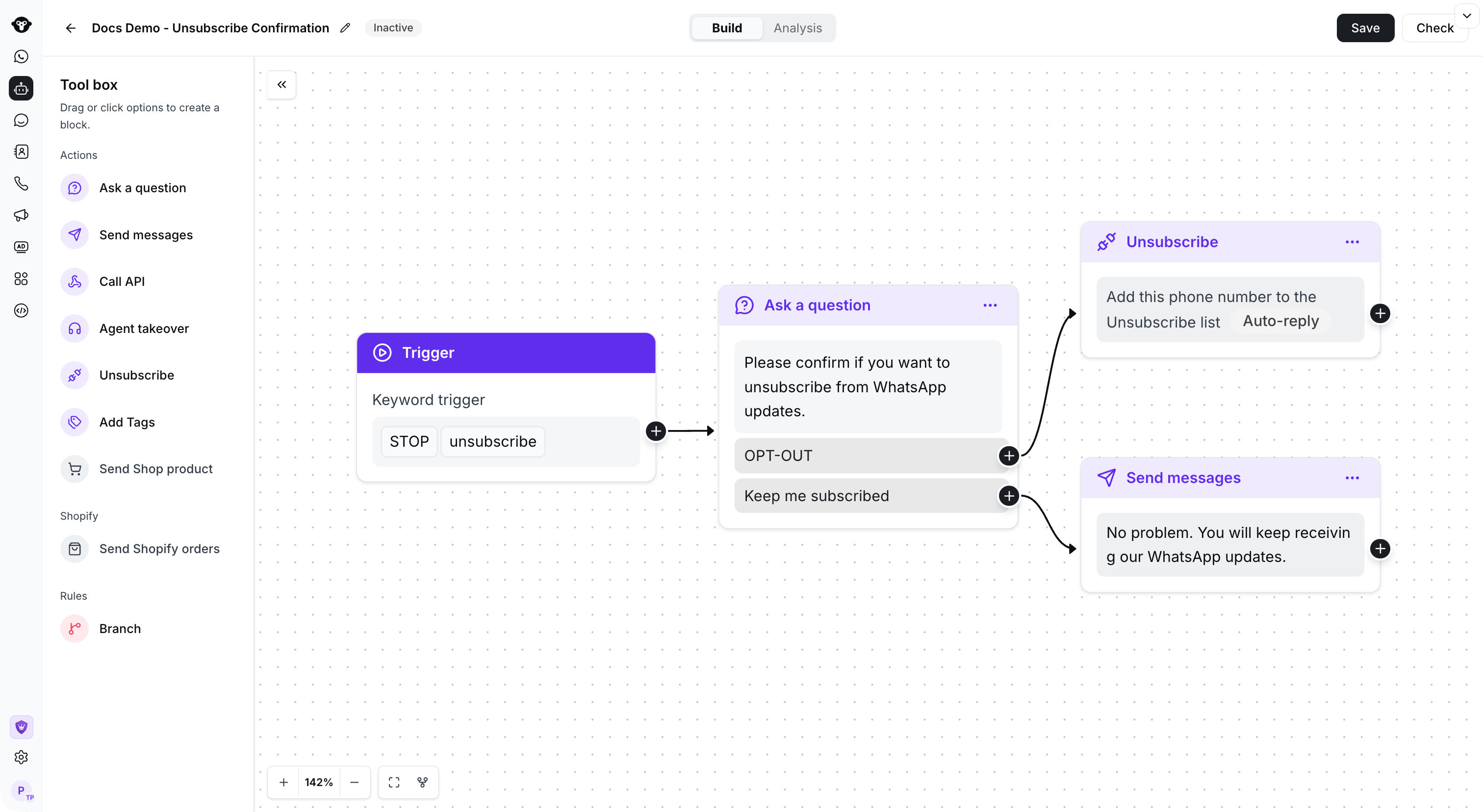 *Flujo de confirmación de ejemplo*
## Copiar un flujo
Abre el menú de acciones del flujo que deseas reutilizar y luego selecciona **Copiar**.
*Flujo de confirmación de ejemplo*
## Copiar un flujo
Abre el menú de acciones del flujo que deseas reutilizar y luego selecciona **Copiar**.
 Elige el Rule-based Agent de destino y luego selecciona **Copiar**.
 ## Ver el video tutorial👇
[Abrir recurso vinculado](https://youtu.be/2MHBoBsNuAg)
This documentation is built and hosted on [Mintlify](https://mintlify.com), a developer documentation platform.
## Ver el video tutorial👇
[Abrir recurso vinculado](https://youtu.be/2MHBoBsNuAg)
This documentation is built and hosted on [Mintlify](https://mintlify.com), a developer documentation platform.