> ## Documentation Index
> Fetch the complete documentation index at: https://docs.ycloud.com/llms.txt
> Use this file to discover all available pages before exploring further.

# Criar um fluxo

## Etapa 1: Criar um fluxo de Rule-based Agent

Abra o Rule-based Agent e selecione **Criar um fluxo**.

<Frame caption="Open Flows, then select Create a flow. The flows shown in this demo are inactive.">
  <img src="https://mintcdn.com/lchnan/gXEJIQXV2JH2VUQJ/product-assets/english-help-2026-09-22/rule-agent-flows-annotated.svg?fit=max&auto=format&n=gXEJIQXV2JH2VUQJ&q=85&s=10e9c4649b87453f94439efeb5967dde" alt="Lista de fluxos do Rule-based Agent com a opção Criar um fluxo destacada." width="3024" height="1656" data-path="product-assets/english-help-2026-09-22/rule-agent-flows-annotated.svg" />
</Frame>

1. Adicione um gatilho. Quando a mensagem de um cliente corresponder a ele, o fluxo será iniciado.

<Frame caption="Start the flow by selecting Add a trigger.">
  <img src="https://mintcdn.com/lchnan/gXEJIQXV2JH2VUQJ/product-assets/english-help-2026-09-22/rule-flow-editor-annotated.svg?fit=max&auto=format&n=gXEJIQXV2JH2VUQJ&q=85&s=5e0c5423b201d2f1c738cb7ebcb44b12" alt="Editor de fluxo inativo com Adicionar um gatilho destacado." width="3024" height="1656" data-path="product-assets/english-help-2026-09-22/rule-flow-editor-annotated.svg" />
</Frame>

2. Adicione palavras-chave e escolha **Correspondência exata** ou **Contém**.

<Frame caption="Choose a matching rule and enter a keyword. This form has not been saved.">
  <img src="https://mintcdn.com/lchnan/gXEJIQXV2JH2VUQJ/product-assets/english-help-2026-09-22/rule-trigger-keyword-annotated.svg?fit=max&auto=format&n=gXEJIQXV2JH2VUQJ&q=85&s=e37d659bb7fa5d5aaa1fe137f7d9c8f3" alt="Editor de gatilho por palavra-chave com as regras de correspondência de palavras-chave e o campo de inserção de palavra-chave destacados." width="3024" height="1656" data-path="product-assets/english-help-2026-09-22/rule-trigger-keyword-annotated.svg" />
</Frame>

* Fazer uma pergunta: depois que o usuário acionar este Rule-based Agent, você pode definir nesta seção as perguntas que deseja fazer a ele, além de configurar botões de resposta.
* Enviar mensagem: quando o usuário clica no botão, o Rule-based Agent responde automaticamente com a resposta predefinida.

**Resultado final:**
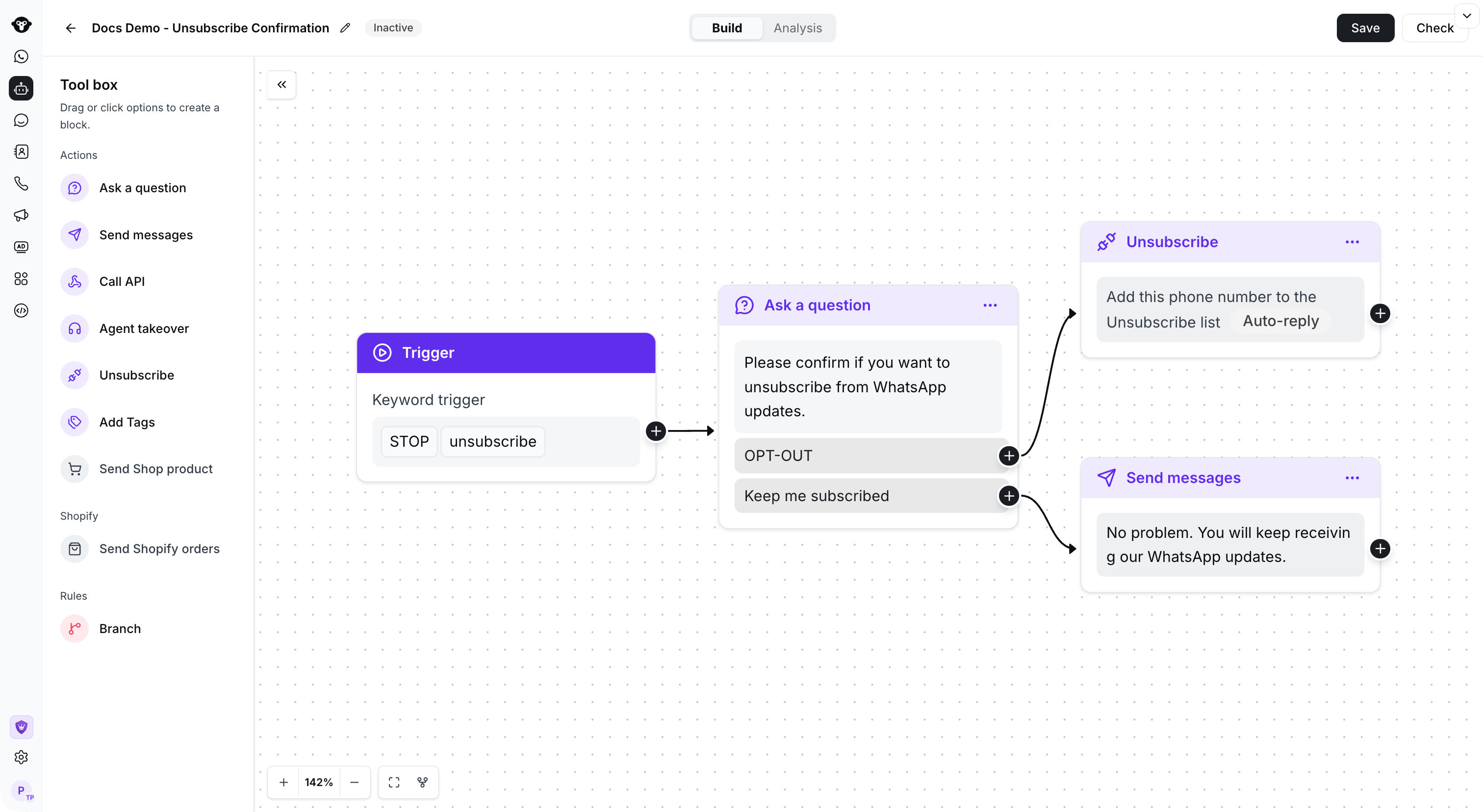
<Frame caption="Example: connect a keyword trigger to a confirmation question and route each reply to an action.">
  <img src="https://mintcdn.com/lchnan/TsMGu8UTNQaUw-Rc/product-assets/english-help-demo-2026-09-23/rule-complete-flow.png?fit=max&auto=format&n=TsMGu8UTNQaUw-Rc&q=85&s=4aead9ee880f3063f987b3194d005835" alt="Fluxo de regras inativo salvo com um gatilho e duas ramificações de resposta conectadas." width="3024" height="1656" data-path="product-assets/english-help-demo-2026-09-23/rule-complete-flow.png" />
</Frame>

*Exemplo de fluxo de confirmação*

## Copiar um fluxo

Abra o menu de ações do fluxo que deseja reutilizar e selecione **Copiar**.

<Frame caption="Open the flow action menu and select Copy.">
  <img src="https://mintcdn.com/lchnan/TsMGu8UTNQaUw-Rc/product-assets/english-help-demo-2026-09-23/rule-copy-menu-annotated.svg?fit=max&auto=format&n=TsMGu8UTNQaUw-Rc&q=85&s=9936969651e1c3a92844e0a6285459b1" alt="Menu de ações do fluxo com a opção Copiar." width="3024" height="1656" data-path="product-assets/english-help-demo-2026-09-23/rule-copy-menu-annotated.svg" />
</Frame>

Escolha o Rule-based Agent de destino e selecione **Copiar**.

<Frame caption="Select the destination agent, then choose Copy.">
  <img src="https://mintcdn.com/lchnan/TsMGu8UTNQaUw-Rc/product-assets/english-help-demo-2026-09-23/rule-copy-destination-annotated.svg?fit=max&auto=format&n=TsMGu8UTNQaUw-Rc&q=85&s=84a9fded513bc3a80056711963951b23" alt="Caixa de diálogo de cópia com um agente de destino selecionado." width="3024" height="1656" data-path="product-assets/english-help-demo-2026-09-23/rule-copy-destination-annotated.svg" />
</Frame>

## Assista ao vídeo tutorial👇

[Abrir recurso vinculado](https://youtu.be/2MHBoBsNuAg)


This documentation is built and hosted on [Mintlify](https://mintlify.com), a developer documentation platform.