> ## Documentation Index
> Fetch the complete documentation index at: https://docs.ycloud.com/llms.txt
> Use this file to discover all available pages before exploring further.
# WhatsApp 消息示例
> 通过带注释的请求示例发送模板、媒体、交互式、商业、Flow 和通话消息。
## 概述
通过带注释的请求示例发送模板、媒体、交互式、商业、Flow 和通话消息。
## 准备工作
* 将 YCloud API Key 存储在服务端密钥中。
* 连接请求中使用的 WhatsApp 商业账户和电话号码。
* 创建并审核通过消息请求中引用的所有模板。
* 将所有占位符替换为您自己账户中的值。
## 工作原理
选择与您要构建的消息或模板匹配的场景。对照 API 参考核对其字段,替换占位符,并在将请求用于生产环境之前通过受控的接收者进行测试。
## 请求
每个场景都包含一个完整的消息请求。示例使用直接发送以快速获取反馈,但相同的消息对象也可以排队发送。
## 响应
发送成功的响应确认 YCloud 已接受消息请求;使用消息检索或 `whatsapp.message.updated` Webhook 来确定最终的送达状态。
请参阅 [WhatsApp 消息指南](/zh/api-reference/guides/whatsapp-platform/send-whatsapp-message) 获取生命周期指导,并查阅 API 参考获取完整模式。
## 选择示例
针对身份验证、营销、公用事业和商业场景发送已审核通过的模板。
在开启的客服窗口期内发送文本、媒体、位置、联系人和 Reaction 消息。
添加列表、按钮、Flow、商品、通话和轮播交互。
发送商品、订单详情、订单状态和结账体验。
以下示例同时适用于 [直接发送 WhatsApp 消息](/api-reference/whatsapp-messages/send-a-message-directly) API 和 [排队发送 WhatsApp 消息](/api-reference/whatsapp-messages/enqueue-a-message) API。
从消息模板开始是发起[会话](https://developers.facebook.com/docs/whatsapp/pricing#opening-conversations)的简便方法。 **客户回复商家的消息模板后,商家即可在 24 小时内向客户发送任何类型的消息。**
## 模板消息示例
以下示例为 WhatsApp 消息模板示例。每个模板在用于发送消息前必须先创建并通过审核。
### 带一次性密码按钮的身份验证模板消息
在此场景中,您拥有一个 **[带复制验证码按钮的身份验证模板](/zh/api-reference/guides/examples/api-examples/whatsapp-template-creation-examples#authentication-template-with-copy-code-button)**、 **[带一键填充按钮的身份验证模板](/zh/api-reference/guides/examples/api-examples/whatsapp-template-creation-examples#authentication-template-with-one-tap-button)** 或 **[零点击身份验证模板](/zh/api-reference/guides/examples/api-examples/whatsapp-template-creation-examples#zero-tap-authentication-template)**,并发送模板消息:
* 包含要交付给客户的一次性密码或验证码。
* 包含一个 **复制验证码** 按钮、一个 **一键自动填充** 按钮,或者如果使用 **零点击**则不包含任何按钮。
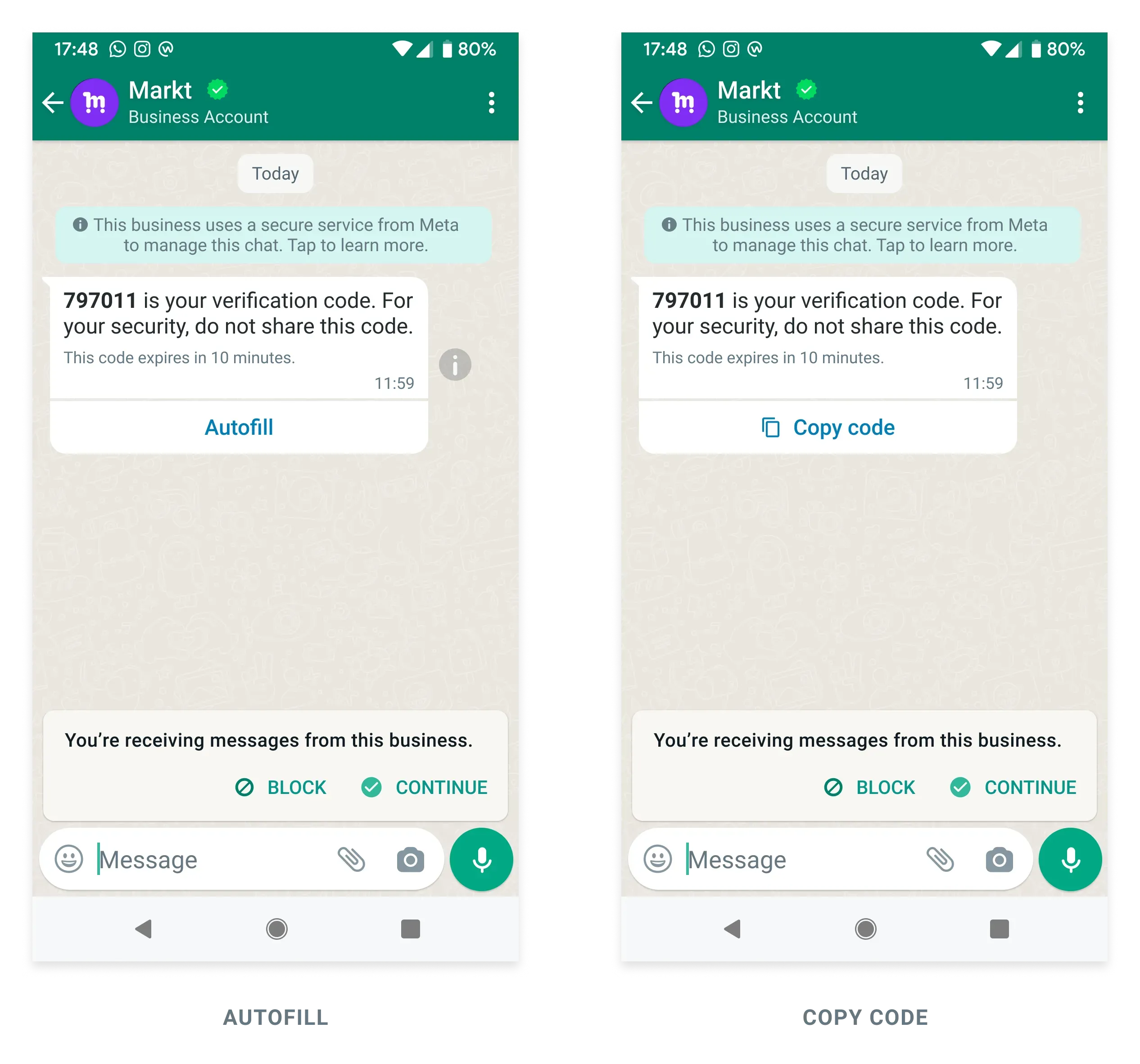
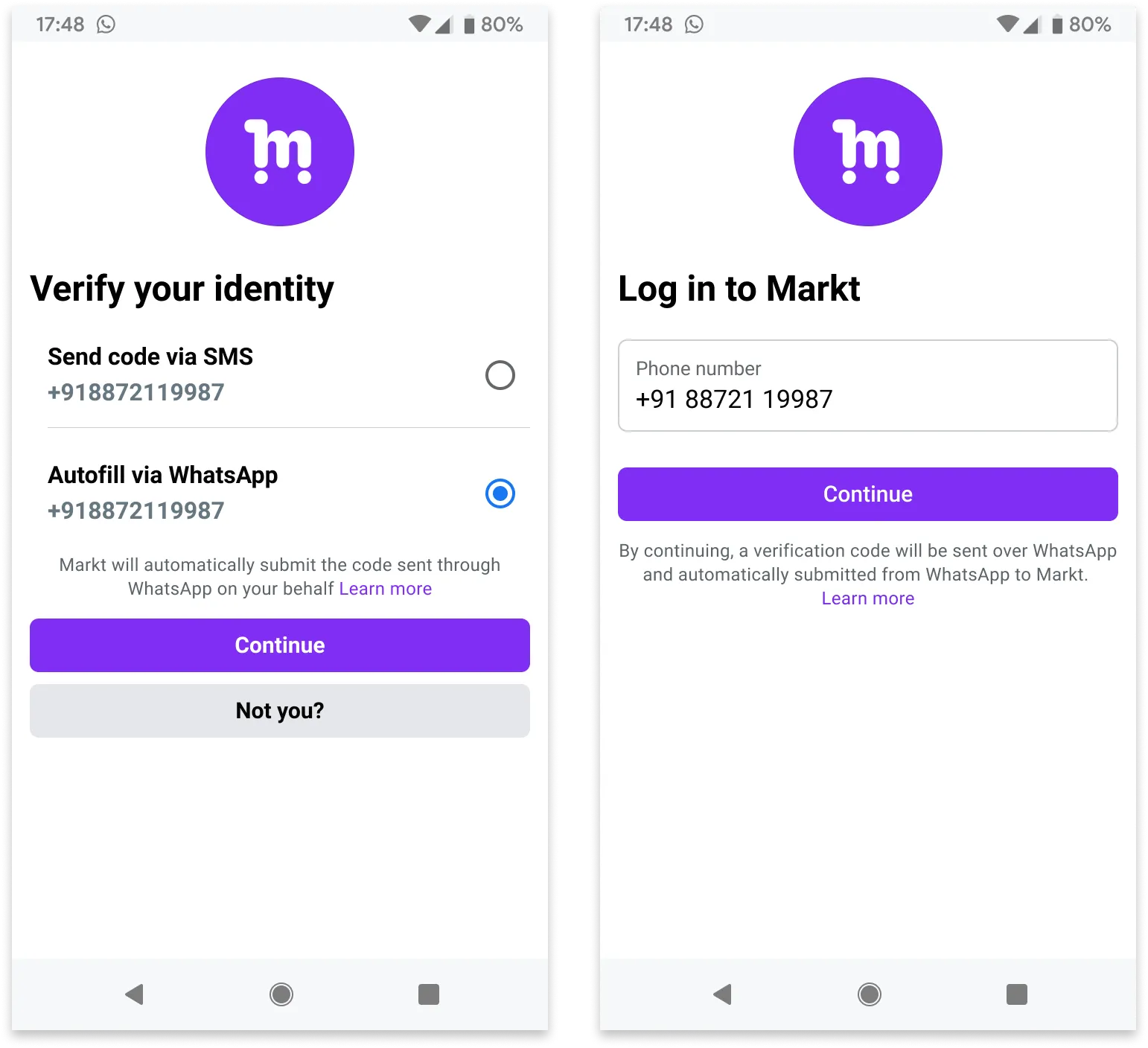
**ZERO-TAP
**
#### 请求
```shell theme={"theme":{"light":"github-light","dark":"github-dark"}}
curl 'https://api.ycloud.com/v2/whatsapp/messages/sendDirectly' \
-H 'Content-Type: application/json' \
-H 'X-API-Key: {{YOUR-API-KEY}}' \
-d '{
"from": "{{BUSINESS-PHONE-NUMBER}}",
"to": "{{CUSTOMER-PHONE-NUMBER}}",
"type": "template",
"template": {
"name": "otp_one_tap",
"language": {
"code": "{{LANGUAGE-CODE}}",
"policy": "deterministic"
},
"components": [
{
"type": "body",
"parameters": [
{
"type": "text",
"text": "797011"
}
]
},
{
"type": "button",
"sub_type": "url",
"index": "0",
"parameters": [
{
"type": "text",
"text": "797011"
}
]
}
]
}
}'
```
#### 响应
成功的请求会返回 YCloud 消息对象。初始的 `accepted` 状态仅确认提交,并不代表最终送达。
```json theme={"theme":{"light":"github-light","dark":"github-dark"}}
{
"id": "MESSAGE_ID",
"status": "accepted"
}
```
存储 `id` 并关联后续的 `whatsapp.message.updated` 事件。
#### 说明
* 消息正文文本将包含在正文组件中找到的验证码。另一方面,当用户点击一键填充或复制验证码按钮时实际使用的验证码是按钮组件中的验证码。在大多数情况下,它们应当保持一致。
### 带变量的模板消息
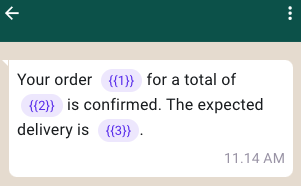
在此场景中,您拥有一个 **[正文包含变量的公用事业模板](/zh/api-reference/guides/examples/api-examples/whatsapp-template-creation-examples#utility-template-with-variables-in-body)**,并发送模板消息:
* 正文中包含带有 3 个变量的文本。
#### 请求
```shell theme={"theme":{"light":"github-light","dark":"github-dark"}}
curl 'https://api.ycloud.com/v2/whatsapp/messages/sendDirectly' \
-H 'Content-Type: application/json' \
-H 'X-API-Key: {{YOUR-API-KEY}}' \
-d '{
"from": "{{BUSINESS-PHONE-NUMBER}}",
"to": "{{CUSTOMER-PHONE-NUMBER}}",
"type": "template",
"template": {
"name": "order_confirmation",
"language": {
"code": "{{LANGUAGE-CODE}}",
"policy": "deterministic"
},
"components": [
{
"type": "body",
"parameters": [
{
"type": "text",
"text": "ORDER-TITLE"
},
{
"type": "text",
"text": "9.9 USD"
},
{
"type": "text",
"text": "February 25"
}
]
}
]
}
}'
```
#### 响应
成功的请求会返回 YCloud 消息对象。初始的 `accepted` 状态仅确认提交,并不代表最终送达。
```json theme={"theme":{"light":"github-light","dark":"github-dark"}}
{
"id": "MESSAGE_ID",
"status": "accepted"
}
```
存储 `id` 并关联后续的 `whatsapp.message.updated` 事件。
#### 说明
* 请确保相应的模板已通过审核。
* **为您发送的消息设置正确的 `type`。在此示例中,`type` 设置为 `template`,且消息请求的 `components` 和 `parameters` 必须与模板一致。**
### 带图片和快速回复按钮的模板消息
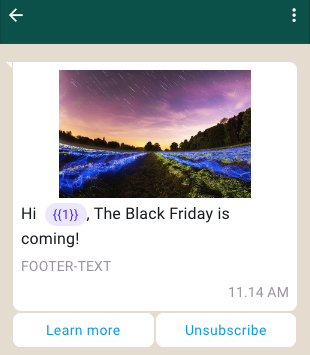
在此场景中,您拥有一个 **[带图片和快速回复按钮的营销模板](/zh/api-reference/guides/examples/api-examples/whatsapp-template-creation-examples#marketing-template-with-image-and-quick-reply-buttons)**,并发送模板消息:
* 页眉包含一张图片。
* 正文包含带有 1 个变量的文本。
* 页脚包含文本。
* 包含 2 个快速回复按钮。快速回复按钮的上限为 3 个。
#### 请求
```shell theme={"theme":{"light":"github-light","dark":"github-dark"}}
curl 'https://api.ycloud.com/v2/whatsapp/messages/sendDirectly' \
-H 'Content-Type: application/json' \
-H 'X-API-Key: {{YOUR-API-KEY}}' \
-d '{
"from": "{{BUSINESS-PHONE-NUMBER}}",
"to": "{{CUSTOMER-PHONE-NUMBER}}",
"type": "template",
"template": {
"name": "marketing_friday",
"language": {
"code": "{{LANGUAGE-CODE}}",
"policy": "deterministic"
},
"components": [
{
"type": "header",
"parameters": [
{
"type": "image",
"image": {
"link": "https://oss-ycloud-publicread.oss-ap-southeast-1.aliyuncs.com/api-docs/sample/sample.jpg"
}
}
]
},
{
"type": "body",
"parameters": [
{
"type": "text",
"text": "Lucy"
}
]
},
{
"type": "button",
"sub_type": "quick_reply",
"index": 0,
"parameters": [
{
"type": "payload",
"payload": "more_about_marketing_friday"
}
]
},
{
"type": "button",
"sub_type": "quick_reply",
"index": 1,
"parameters": [
{
"type": "payload",
"payload": "unsubscribe_marketing_notifications"
}
]
}
]
}
}'
```
#### 响应
成功的请求会返回 YCloud 消息对象。初始的 `accepted` 状态仅确认提交,并不代表最终送达。
```json theme={"theme":{"light":"github-light","dark":"github-dark"}}
{
"id": "MESSAGE_ID",
"status": "accepted"
}
```
存储 `id` 并关联后续的 `whatsapp.message.updated` 事件。
#### 说明
* `caption` 参数(用于描述指定的 `image`、`video` 或 `document` 媒体)在 `template` 或 `interactive` 消息中不受支持。
* 有关页眉媒体限制的更多信息,请参阅[支持的媒体类型](https://developers.facebook.com/docs/whatsapp/cloud-api/reference/media#supported-media-types)。
* 使用 `payload` 跟踪用户对按钮的点击。按钮 payload 不可见,但在用户点击按钮时会被包含在内,另请参阅[接收模板按钮消息](/zh/api-reference/guides/examples/webhook-examples/whatsapp-inbound-message-webhook-examples#inbound-template-button-message)。
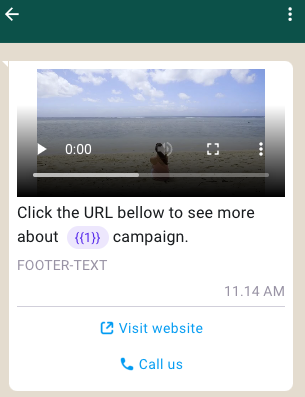
### 带视频和行动号召按钮的消息模板
在这种情况下,您拥有一个 **[带视频和行动号召按钮的营销模板](/zh/api-reference/guides/examples/api-examples/whatsapp-template-creation-examples#marketing-template-with-video-and-call-to-action-buttons)**,并发送一条模板消息:
* 页眉中包含一个视频。
* 正文中包含带有 1 个变量的文本。
* 页脚中包含文本。
* 包含 2 个行动号召按钮:1 个 `PHONE_NUMBER` 按钮和 1 个 `URL` 按钮。`URL` 按钮在 URL 末尾最多可以包含 1 个变量。
#### 请求
```shell theme={"theme":{"light":"github-light","dark":"github-dark"}}
curl 'https://api.ycloud.com/v2/whatsapp/messages/sendDirectly' \
-H 'Content-Type: application/json' \
-H 'X-API-Key: {{YOUR-API-KEY}}' \
-d '{
"from": "{{BUSINESS-PHONE-NUMBER}}",
"to": "{{CUSTOMER-PHONE-NUMBER}}",
"type": "template",
"template": {
"name": "marketing_friday_more",
"language": {
"code": "{{LANGUAGE-CODE}}",
"policy": "deterministic"
},
"components": [
{
"type": "header",
"parameters": [
{
"type": "video",
"video": {
"link": "https://oss-ycloud-publicread.oss-ap-southeast-1.aliyuncs.com/api-docs/sample/sample.mp4"
}
}
]
},
{
"type": "body",
"parameters": [
{
"type": "text",
"text": "The Friday"
}
]
},
{
"type": "button",
"sub_type": "url",
"index": 0,
"parameters": [
{
"type": "text",
"text": "qptHJVK2EjU"
}
]
}
]
}
}'
```
#### 响应
成功的请求将返回 YCloud 消息对象。初始状态 `accepted` 仅确认已提交,并不代表最终送达。
```json theme={"theme":{"light":"github-light","dark":"github-dark"}}
{
"id": "MESSAGE_ID",
"status": "accepted"
}
```
保存 `id` 并关联后续的 `whatsapp.message.updated` 事件。
#### 说明
* `caption` 参数(用于描述指定的 `image`、`video` 或 `document` 媒体)在 `template` 或 `interactive` 消息中不受支持。
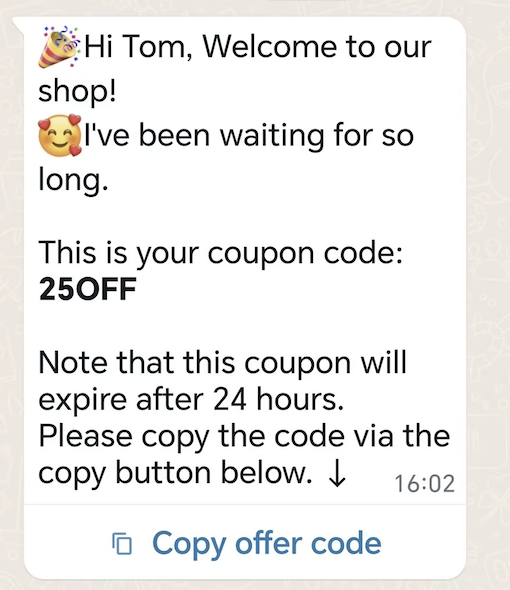
### 优惠券消息模板
在这种情况下,您拥有一个 **[优惠券模板](/zh/api-reference/guides/examples/api-examples/whatsapp-template-creation-examples#coupon-template)**,并发送一条模板消息:
* 正文中包含带有 2 个变量的文本。
* 包含 1 个复制代码按钮。
#### 请求
```shell theme={"theme":{"light":"github-light","dark":"github-dark"}}
curl 'https://api.ycloud.com/v2/whatsapp/messages/sendDirectly' \
-H 'Content-Type: application/json' \
-H 'X-API-Key: {{YOUR-API-KEY}}' \
-d '{
"from": "{{BUSINESS-PHONE-NUMBER}}",
"to": "{{CUSTOMER-PHONE-NUMBER}}",
"type": "template",
"template": {
"name": "marketing_coupon",
"language": {
"code": "{{LANGUAGE-CODE}}",
"policy": "deterministic"
},
"components": [
{
"type": "body",
"parameters": [
{
"type": "text",
"text": "Tom"
},
{
"type": "text",
"text": "25OFF"
}
]
},
{
"type": "button",
"sub_type": "copy_code",
"index": 0,
"parameters": [
{
"type": "coupon_code",
"coupon_code": "25OFF"
}
]
}
]
}
}'
```
#### 响应
成功的请求将返回 YCloud 消息对象。初始状态 `accepted` 仅确认已提交,并不代表最终送达。
```json theme={"theme":{"light":"github-light","dark":"github-dark"}}
{
"id": "MESSAGE_ID",
"status": "accepted"
}
```
保存 `id` 并关联后续的 `whatsapp.message.updated` 事件。
#### 说明
* 优惠券代码限制为 15 个字符以内。
* 按钮文本无法自定义。
### 位置消息模板
在这种情况下,您拥有一个 **[位置模板](/zh/api-reference/guides/examples/api-examples/whatsapp-template-creation-examples#location-template)**,并发送一条位置模板消息:
#### 请求
```shell theme={"theme":{"light":"github-light","dark":"github-dark"}}
curl 'https://api.ycloud.com/v2/whatsapp/messages/sendDirectly' \
-H 'Content-Type: application/json' \
-H 'X-API-Key: {{YOUR-API-KEY}}' \
-d '{
"from": "{{BUSINESS-PHONE-NUMBER}}",
"to": "{{CUSTOMER-PHONE-NUMBER}}",
"type": "template",
"template": {
"name": "location_header",
"language": {
"code": "{{LANGUAGE-CODE}}",
"policy": "deterministic"
},
"components": [
{
"type": "header",
"parameters": [
{
"type": "location",
"location": {
"latitude": 37.483307,
"longitude": 122.148981,
"name": "Pablo Morales",
"address": "1 Hacker Way, Menlo Park, CA 94025"
}
}
]
}
]
}
}'
```
#### 响应
成功的请求将返回 YCloud 消息对象。初始状态 `accepted` 仅确认已提交,并不代表最终送达。
```json theme={"theme":{"light":"github-light","dark":"github-dark"}}
{
"id": "MESSAGE_ID",
"status": "accepted"
}
```
保存 `id` 并关联后续的 `whatsapp.message.updated` 事件。
#### 说明
* `latitude` 和 `longitude` 为必填项。
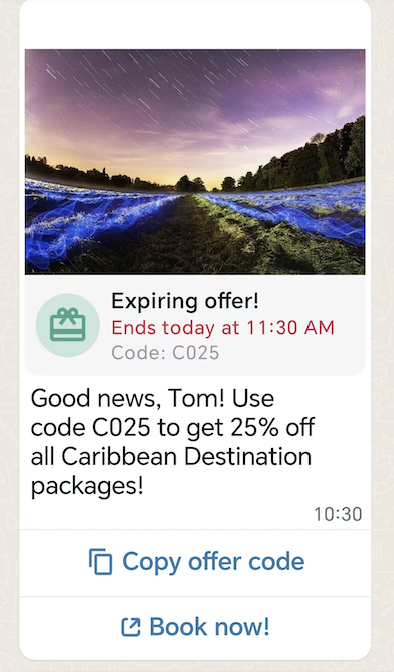
### 限时特惠消息模板
在这种情况下,您拥有一个 **[限时特惠模板](/zh/api-reference/guides/examples/api-examples/whatsapp-template-creation-examples#limited-time-offer-template)**,并发送一条限时特惠 (LTO) 模板消息:
* 页眉中包含一张图片。
* 显示优惠代码的过期日期和正在运行的倒计时计时器。
* 正文中包含带有 2 个变量的文本。
* 包含 2 个按钮:1 个 `COPY_CODE` 按钮和 1 个 `URL` 按钮。
#### 请求
```shell theme={"theme":{"light":"github-light","dark":"github-dark"}}
curl 'https://api.ycloud.com/v2/whatsapp/messages/sendDirectly' \
-H 'Content-Type: application/json' \
-H 'X-API-Key: {{YOUR-API-KEY}}' \
-d '{
"from": "{{BUSINESS-PHONE-NUMBER}}",
"to": "{{CUSTOMER-PHONE-NUMBER}}",
"type": "template",
"template": {
"name": "limited_time_offer_caribbean_pkg_2023",
"language": {
"code": "{{LANGUAGE-CODE}}",
"policy": "deterministic"
},
"components": [
{
"type": "header",
"parameters": [
{
"type": "image",
"image": {
"link": "https://oss-ycloud-publicread.oss-ap-southeast-1.aliyuncs.com/api-docs/sample/sample.jpg"
}
}
]
},
{
"type": "limited_time_offer",
"parameters": [
{
"type": "limited_time_offer",
"limited_time_offer": {
"expiration_time_ms": 1698118200000
}
}
]
},
{
"type": "body",
"parameters": [
{
"type": "text",
"text": "Tom"
},
{
"type": "text",
"text": "C025"
}
]
},
{
"type": "button",
"sub_type": "copy_code",
"index": "0",
"parameters": [
{
"type": "coupon_code",
"coupon_code": "C025"
}
]
},
{
"type": "button",
"sub_type": "url",
"index": "1",
"parameters": [
{
"type": "text",
"text": "param025"
}
]
}
]
}
}'
```
#### 响应
成功的请求将返回 YCloud 消息对象。初始状态 `accepted` 仅确认已提交,并不代表最终送达。
```json theme={"theme":{"light":"github-light","dark":"github-dark"}}
{
"id": "MESSAGE_ID",
"status": "accepted"
}
```
保存 `id` 并关联后续的 `whatsapp.message.updated` 事件。
#### 说明
将请求字段与所选的消息类型进行匹配,并使用返回的消息 ID 来关联状态。
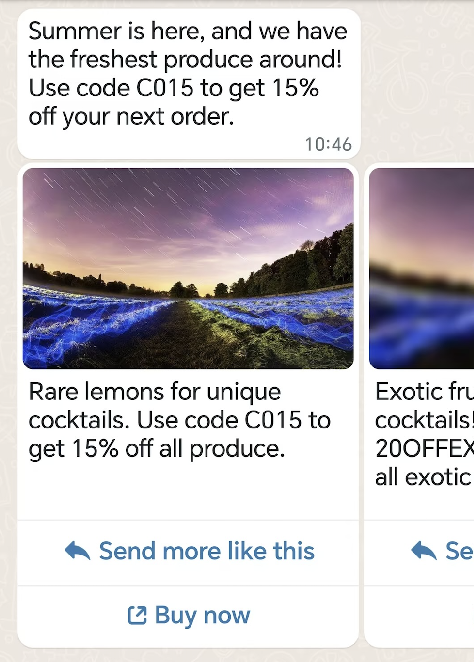
### 轮播消息模板
在这种情况下,您拥有一个 **[轮播模板](/zh/api-reference/guides/examples/api-examples/whatsapp-template-creation-examples#carousel-template)**,并发送一条轮播模板消息:
* 正文中包含带有 2 个变量的文本。
* 在水平可滚动的视图中包含 2 张轮播卡片。
#### 请求
```shell theme={"theme":{"light":"github-light","dark":"github-dark"}}
curl 'https://api.ycloud.com/v2/whatsapp/messages/sendDirectly' \
-H 'Content-Type: application/json' \
-H 'X-API-Key: {{YOUR-API-KEY}}' \
-d '{
"from": "{{BUSINESS-PHONE-NUMBER}}",
"to": "{{CUSTOMER-PHONE-NUMBER}}",
"type": "template",
"template": {
"name": "summer_carousel_promo_2023",
"language": {
"code": "{{LANGUAGE-CODE}}",
"policy": "deterministic"
},
"components": [
{
"type": "body",
"parameters": [
{
"type": "text",
"text": "C015"
},
{
"type": "text",
"text": "15%"
}
]
},
{
"type": "carousel",
"cards": [
{
"card_index": 0,
"components": [
{
"type": "header",
"parameters": [
{
"type": "image",
"image": {
"link": "https://oss-ycloud-publicread.oss-ap-southeast-1.aliyuncs.com/api-docs/sample/sample.jpg"
}
}
]
},
{
"type": "body",
"parameters": [
{
"type": "text",
"text": "C015"
},
{
"type": "text",
"text": "15%"
}
]
},
{
"type": "button",
"sub_type": "quick_reply",
"index": 0,
"parameters": [
{
"type": "payload",
"payload": "summer_lemons_2023"
}
]
},
{
"type": "button",
"sub_type": "url",
"index": 1,
"parameters": [
{
"type": "text",
"text": "summer_lemons_2023"
}
]
}
]
},
{
"card_index": 1,
"components": [
{
"type": "header",
"parameters": [
{
"type": "image",
"image": {
"link": "https://oss-ycloud-publicread.oss-ap-southeast-1.aliyuncs.com/api-docs/sample/sample.jpg"
}
}
]
},
{
"type": "body",
"parameters": [
{
"type": "text",
"text": "20OFFEXOTIC"
},
{
"type": "text",
"text": "20%"
}
]
},
{
"type": "button",
"sub_type": "quick_reply",
"index": 0,
"parameters": [
{
"type": "payload",
"payload": "summer_blues_2023"
}
]
},
{
"type": "button",
"sub_type": "url",
"index": 1,
"parameters": [
{
"type": "text",
"text": "summer_blues_2023"
}
]
}
]
}
]
}
]
}
}'
```
#### 响应
成功的请求将返回 YCloud 消息对象。初始状态 `accepted` 仅确认已提交,并不代表最终送达。
```json theme={"theme":{"light":"github-light","dark":"github-dark"}}
{
"id": "MESSAGE_ID",
"status": "accepted"
}
```
保存 `id` 并关联后续的 `whatsapp.message.updated` 事件。
#### 说明
* 消息气泡仅支持文本并支持变量。变量没有最大字符数限制,但会计入消息气泡 1024 个字符的上限。
* 卡片正文文本支持变量。变量没有最大字符数限制,但会计入卡片正文文本 160 个字符的上限。
### 目录消息模板
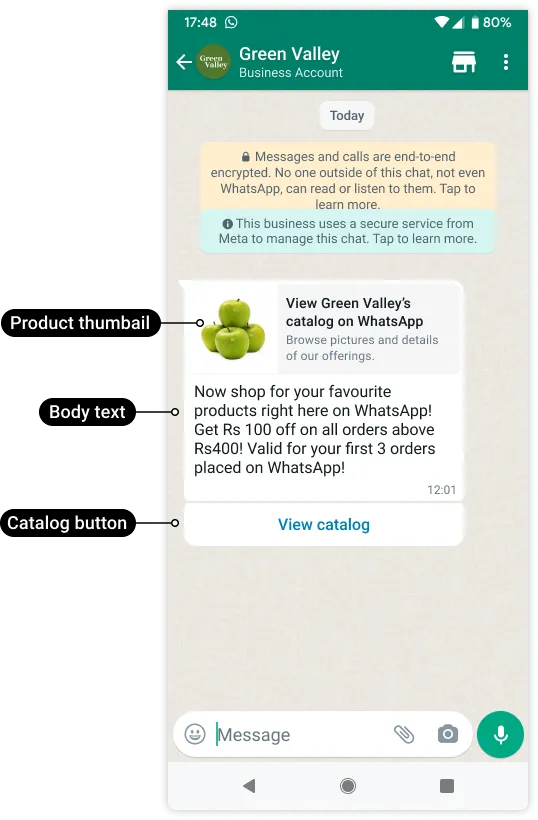
在这种情况下,您拥有一个 [目录模板](/zh/api-reference/guides/examples/api-examples/whatsapp-template-creation-examples#catalog-template),并发送一条消息与客户分享您的商品目录。
#### 请求
```shell theme={"theme":{"light":"github-light","dark":"github-dark"}}
curl 'https://api.ycloud.com/v2/whatsapp/messages/sendDirectly' \
-H 'Content-Type: application/json' \
-H 'X-API-Key: {{YOUR-API-KEY}}' \
-d '{
"from": "{{BUSINESS-PHONE-NUMBER}}",
"to": "{{CUSTOMER-PHONE-NUMBER}}",
"type": "template",
"template": {
"name": "intro_catalog_offer",
"language": {
"code": "{{LANGUAGE-CODE}}"
},
"components": [
{
"type": "body",
"parameters": [
{
"type": "text",
"text": "100"
},
{
"type": "text",
"text": "400"
},
{
"type": "text",
"text": "3"
}
]
},
{
"type": "button",
"sub_type": "catalog",
"index": 0,
"parameters": [
{
"type": "action",
"action": {
"thumbnail_product_retailer_id": "2lc20305pt"
}
}
]
}
]
}
}'
```
#### 响应
成功的请求将返回 YCloud 消息对象。初始状态 `accepted` 仅确认已提交,并不代表最终送达。
```json theme={"theme":{"light":"github-light","dark":"github-dark"}}
{
"id": "MESSAGE_ID",
"status": "accepted"
}
```
保存 `id` 并关联后续的 `whatsapp.message.updated` 事件。
#### 说明
* `thumbnail_product_retailer_id` 是可选的。SKU 编号在 [Commerce Manager](https://business.facebook.com/commerce/) 中标记为 Content ID。该商品的缩略图将用作消息的页眉图片。如果省略 `parameters` 对象,将使用目录中第一件商品的商品图片。
### MPM 消息模板
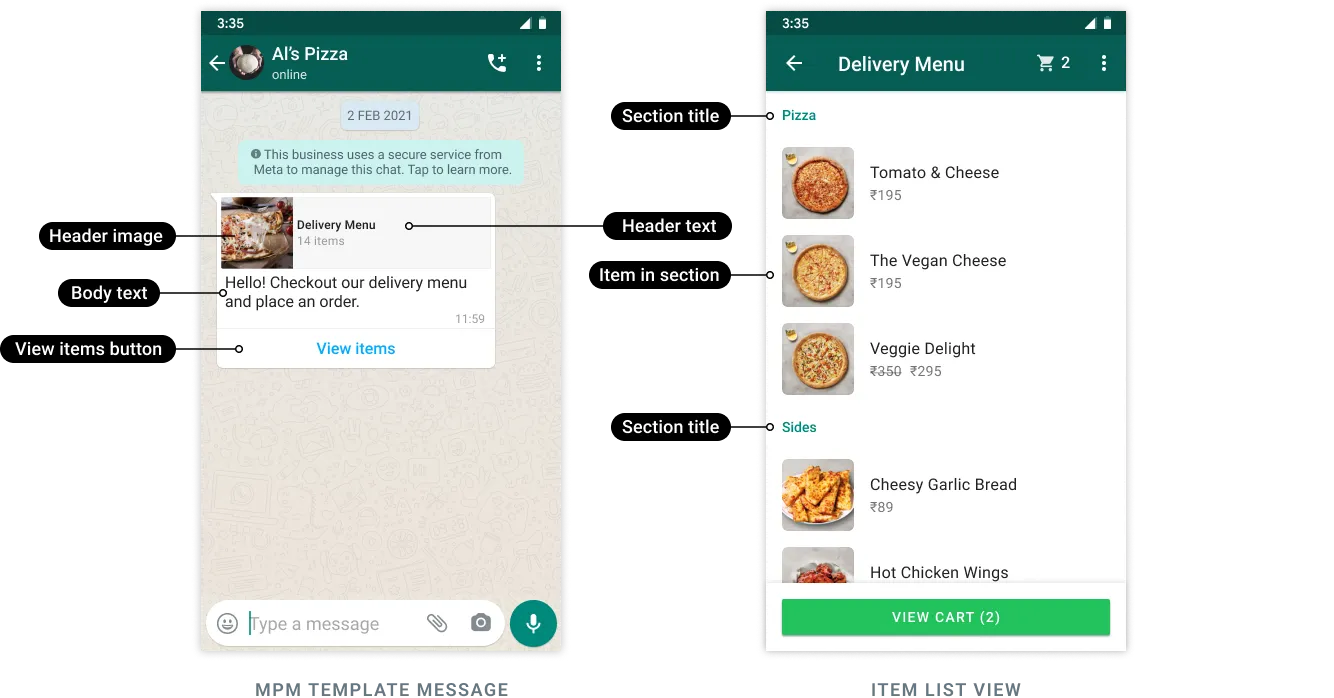
在这种情况下,您拥有一个 [MPM 模板](/zh/api-reference/guides/examples/api-examples/whatsapp-template-creation-examples#multi-product-message-template),并发送一条消息与客户分享商品。
本示例发送一个名为“abandoned\_cart”的已获批模板,并将一个变量(客户的名字)插入模板标头中,将折扣代码插入模板正文中。它还定义了两个分区(“Popular Bundles”和“Premium Packages”),并指定了应插入这些分区的商品(共 3 个)。
#### 请求
```shell theme={"theme":{"light":"github-light","dark":"github-dark"}}
curl 'https://api.ycloud.com/v2/whatsapp/messages/sendDirectly' \
-H 'Content-Type: application/json' \
-H 'X-API-Key: {{YOUR-API-KEY}}' \
-d '{
"from": "{{BUSINESS-PHONE-NUMBER}}",
"to": "{{CUSTOMER-PHONE-NUMBER}}",
"type": "template",
"template": {
"name": "abandoned_cart",
"language": {
"code": "{{LANGUAGE-CODE}}"
},
"components": [
{
"type": "header",
"parameters": [
{
"type": "text",
"text": "Pablo"
}
]
},
{
"type": "body",
"parameters": [
{
"type": "text",
"text": "10OFF"
}
]
},
{
"type": "button",
"sub_type": "mpm",
"index": 0,
"parameters": [
{
"type": "action",
"action": {
"thumbnail_product_retailer_id": "2lc20305pt",
"sections": [
{
"title": "Popular Bundles",
"product_items": [
{
"product_retailer_id": "2lc20305pt"
},
{
"product_retailer_id": "nseiw1x3ch"
}
]
},
{
"title": "Premium Packages",
"product_items": [
{
"product_retailer_id": "n6k6x0y7oe"
}
]
}
]
}
}
]
}
]
}
}'
```
#### 响应
请求成功后将返回 YCloud 消息对象。初始的 `accepted` 状态仅确认提交成功,并不代表最终送达。
```json theme={"theme":{"light":"github-light","dark":"github-dark"}}
{
"id": "MESSAGE_ID",
"status": "accepted"
}
```
请保存 `id`,以便后续关联 `whatsapp.message.updated` 事件。
#### 说明
* 客户必须使用 WhatsApp v2.22.24 或更高版本。
* MPM 模板消息无法转发给其他客户。
* 当客户将一个或多个商品添加到购物车并提交订单时,我们将向您发送包含订单详情的 Webhook。另请参阅 [入站订单消息](/zh/api-reference/guides/examples/webhook-examples/whatsapp-inbound-message-webhook-examples#inbound-order-message)。
### Flow 模板消息
[WhatsApp Flows](https://developers.facebook.com/docs/whatsapp/flows) 是一种为商业消息构建结构化交互的方式。借助 Flows,企业可以定义、配置和自定义包含丰富交互的消息,让客户以更结构化的方式进行沟通。
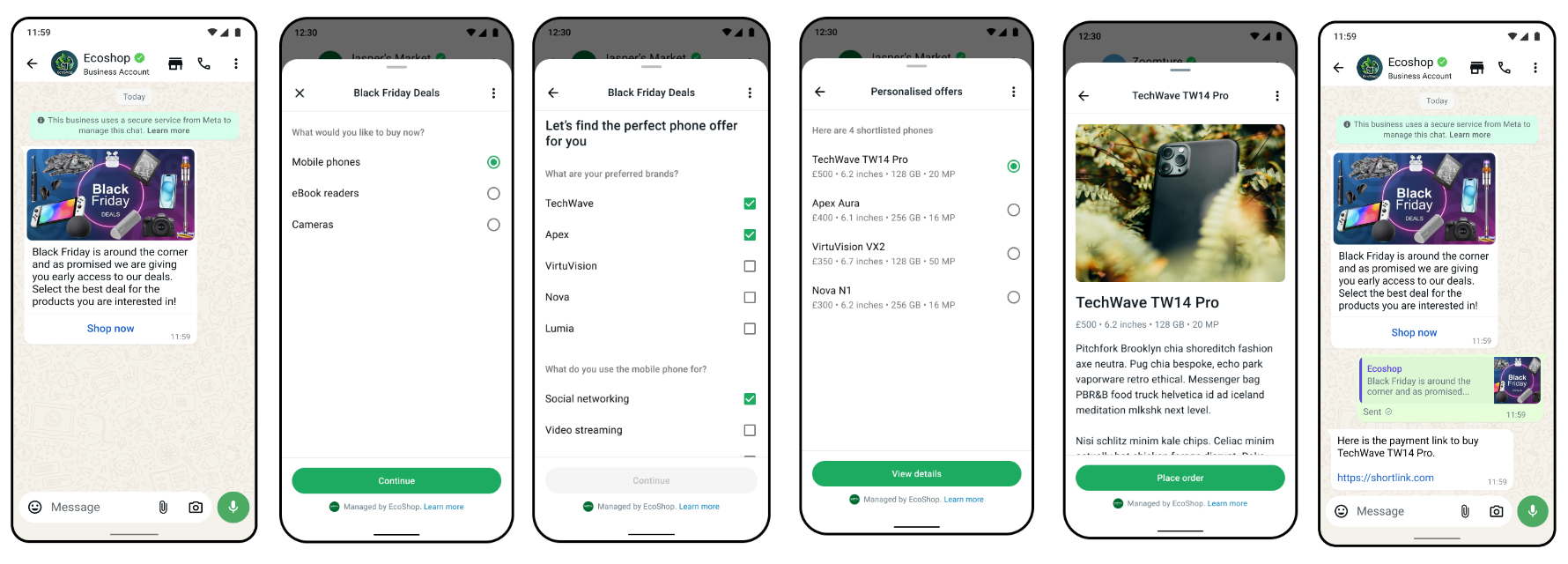
在这种情况下,您发送带有 [Flow 模板](/zh/api-reference/guides/examples/api-examples/whatsapp-template-creation-examples#flow-template) 的消息:
#### 请求
```shell theme={"theme":{"light":"github-light","dark":"github-dark"}}
curl 'https://api.ycloud.com/v2/whatsapp/messages/sendDirectly' \
-H 'Content-Type: application/json' \
-H 'X-API-Key: {{YOUR-API-KEY}}' \
-d '{
"from": "{{BUSINESS-PHONE-NUMBER}}",
"to": "{{CUSTOMER-PHONE-NUMBER}}",
"type": "template",
"template": {
"name": "TEMPLATE_NAME",
"language": {
"code": "{{LANGUAGE-CODE}}"
},
"components": [
{
"type": "button",
"sub_type": "flow",
"index": 0,
"parameters": [
{
"type": "action",
"action": {
"flow_token": "",
"flow_action_data": {
"data1": "value1"
}
}
}
]
}
]
}
}'
```
#### 响应
请求成功后将返回 YCloud 消息对象。初始的 `accepted` 状态仅确认提交成功,并不代表最终送达。
```json theme={"theme":{"light":"github-light","dark":"github-dark"}}
{
"id": "MESSAGE_ID",
"status": "accepted"
}
```
请保存 `id`,以便后续关联 `whatsapp.message.updated` 事件。
#### 说明
* `flow_action_data` 是包含首个屏幕数据负载的 JSON 对象。另请参阅 [使用 Flow 发送模板 - WhatsApp Business 开放平台](https://developers.facebook.com/docs/whatsapp/flows/guides/sendingaflow#send-template-with-flow)。
* 要发送带有 Flow 的互动消息,请参阅 [互动 Flow 消息](/zh/api-reference/guides/examples/api-examples/whatsapp-messaging-examples#interactive-flow-message)。
* 要接收 Flow 响应,请参阅 [入站互动 Flow 响应消息](/zh/api-reference/guides/examples/webhook-examples/whatsapp-inbound-message-webhook-examples#inbound-interactive-flow-response-message)。
### 订单详情模板消息
订单详情模板消息允许企业将订单详情消息作为预定义的 `Open order details` 行动号召按钮组件参数发送。它支持企业将所有支付集成(例如 [UPI Intent](https://developers.facebook.com/docs/whatsapp/cloud-api/payments-api/payments-in/upi-intent)、[Payment Gateway](https://developers.facebook.com/docs/whatsapp/cloud-api/payments-api/payments-in/pg) 或 [Payment Links](https://developers.facebook.com/docs/whatsapp/cloud-api/payments-api/payments-in/payment-links))作为按钮参数发送。
以下是在订单详情模板消息参数中发送 Payment Gateway 以提示消费者付款的示例。
#### 请求
```shell theme={"theme":{"light":"github-light","dark":"github-dark"}}
curl 'https://api.ycloud.com/v2/whatsapp/messages/sendDirectly' \
-H 'Content-Type: application/json' \
-H 'X-API-Key: {{YOUR-API-KEY}}' \
-d '{
"from": "{{BUSINESS-PHONE-NUMBER}}",
"to": "{{CUSTOMER-PHONE-NUMBER}}",
"type": "template",
"template": {
"name": "order_details_example",
"language": {
"policy": "deterministic",
"code": "{{LANGUAGE-CODE}}"
},
"components": [
{
"type": "header",
"parameters": [
{
"type": "text",
"text": "",
}
]
},
{
"type": "button",
"sub_type": "order_details",
"index": 0,
"parameters": [
{
"type": "action",
"action": {
"order_details": {
"currency": "INR",
"order": {
"discount": {
"offset": 100,
"value": 250
},
"items": [
{
"amount": {
"offset": 100,
"value": 400
},
"name": "",
"quantity": 1,
"retailer_id": "",
"country_of_origin": "",
"importer_name": "",
"importer_address": {
"address_line1": "",
"city": "",
"country_code": "",
"postal_code": ""
}
}
],
"shipping": {
"offset": 100,
"value": 0
},
"status": "pending",
"subtotal": {
"offset": 100,
"value": 400
},
"tax": {
"offset": 100,
"value": 500
}
},
"payment_settings": [
{
"type": "payment_gateway",
"payment_gateway": {
"type": "billdesk",
"configuration_name": "",
"billdesk": {
"additional_info1": "additional_info1-value",
"additional_info2": "additional_info2-value",
"additional_info3": "additional_info3-value",
"additional_info4": "additional_info4-value",
"additional_info5": "additional_info5-value",
"additional_info6": "additional_info6-value",
"additional_info7": "additional_info7-value",
}
}
}
],
"reference_id": "",
"total_amount": {
"offset": 100,
"value": 650
},
"type": "digital-goods"
}
}
}
]
}
]
}
}'
```
#### 响应
请求成功后将返回 YCloud 消息对象。初始的 `accepted` 状态仅确认提交成功,并不代表最终送达。
```json theme={"theme":{"light":"github-light","dark":"github-dark"}}
{
"id": "MESSAGE_ID",
"status": "accepted"
}
```
请保存 `id`,以便后续关联 `whatsapp.message.updated` 事件。
#### 说明
* 要详细了解 `template` 参数,另请参阅 [发送订单详情模板消息](https://developers.facebook.com/docs/whatsapp/cloud-api/payments-api/payments-in/orderdetailstemplate#sending-order-details-template-message)。
* 在发送订单详情模板消息之前,请先创建一个 [订单详情模板](/zh/api-reference/guides/examples/api-examples/whatsapp-template-creation-examples#order-details-template)。
* 当客户尝试付款且支付状态发生变化时,系统将通过 Webhook 通知您。请参阅[支付交易已更新](/zh/api-reference/guides/examples/webhook-examples/whatsapp-payment-updated-webhook-examples)。
* 如果距离客户最后一次回复您的商业电话号码未超过 24 小时,您也可以改发 [互动订单详情消息](/zh/api-reference/guides/examples/api-examples/whatsapp-messaging-examples#interactive-order-details-message)。
### 订单状态模板消息
订单状态模板是一种互动消息模板,它扩展了行动号召按钮,以支持通过模板更新订单状态。它允许企业在客户会话窗口之外更新订单状态,适用于对以往订单扣款以及更新过往订单的发货状态等场景。
收到支付信号后,企业必须更新订单状态以及时告知用户。目前我们支持以下订单状态值。
#### 请求
```shell theme={"theme":{"light":"github-light","dark":"github-dark"}}
curl 'https://api.ycloud.com/v2/whatsapp/messages/sendDirectly' \
-H 'Content-Type: application/json' \
-H 'X-API-Key: {{YOUR-API-KEY}}' \
-d '{
"from": "{{BUSINESS-PHONE-NUMBER}}",
"to": "{{CUSTOMER-PHONE-NUMBER}}",
"type": "template",
"template": {
"name": "order_status_template",
"language": {
"policy": "deterministic",
"code": "{{LANGUAGE-CODE}}"
},
"components": [
{
"type": "order_status",
"parameters": [
{
"type": "order_status",
"order_status": {
"reference_id": "",
"order": {
"status": "processing | partially_shipped | shipped | completed | canceled",
"description": ""
}
}
}
]
}
]
}
}'
```
#### 响应
请求成功后将返回 YCloud 消息对象。初始的 `accepted` 状态仅确认提交成功,并不代表最终送达。
```json theme={"theme":{"light":"github-light","dark":"github-dark"}}
{
"id": "MESSAGE_ID",
"status": "accepted"
}
```
请保存 `id`,以便后续关联 `whatsapp.message.updated` 事件。
#### 说明
* 要详细了解 `template` 参数,另请参阅 [发送订单状态模板消息](https://developers.facebook.com/docs/whatsapp/cloud-api/payments-api/payments-in/orderstatustemplate#sending-order-status-template-message)。
* 在发送订单状态模板消息之前,请先创建一个 [订单状态模板](/zh/api-reference/guides/examples/api-examples/whatsapp-template-creation-examples#order-status-template)。
* 如果距离客户最后一次回复您的商业电话号码未超过 24 小时,您也可以改发 [互动订单状态消息](/zh/api-reference/guides/examples/api-examples/whatsapp-messaging-examples#interactive-order-status-message)。
***
## 自由格式消息示例
以下示例为自由格式消息。这些消息不需要预先获批的模板,可以直接发送。但是,它们只能在 24 小时客服窗口期内发送,该窗口期从客户发送的最新一条消息开始计算。
### 文本消息
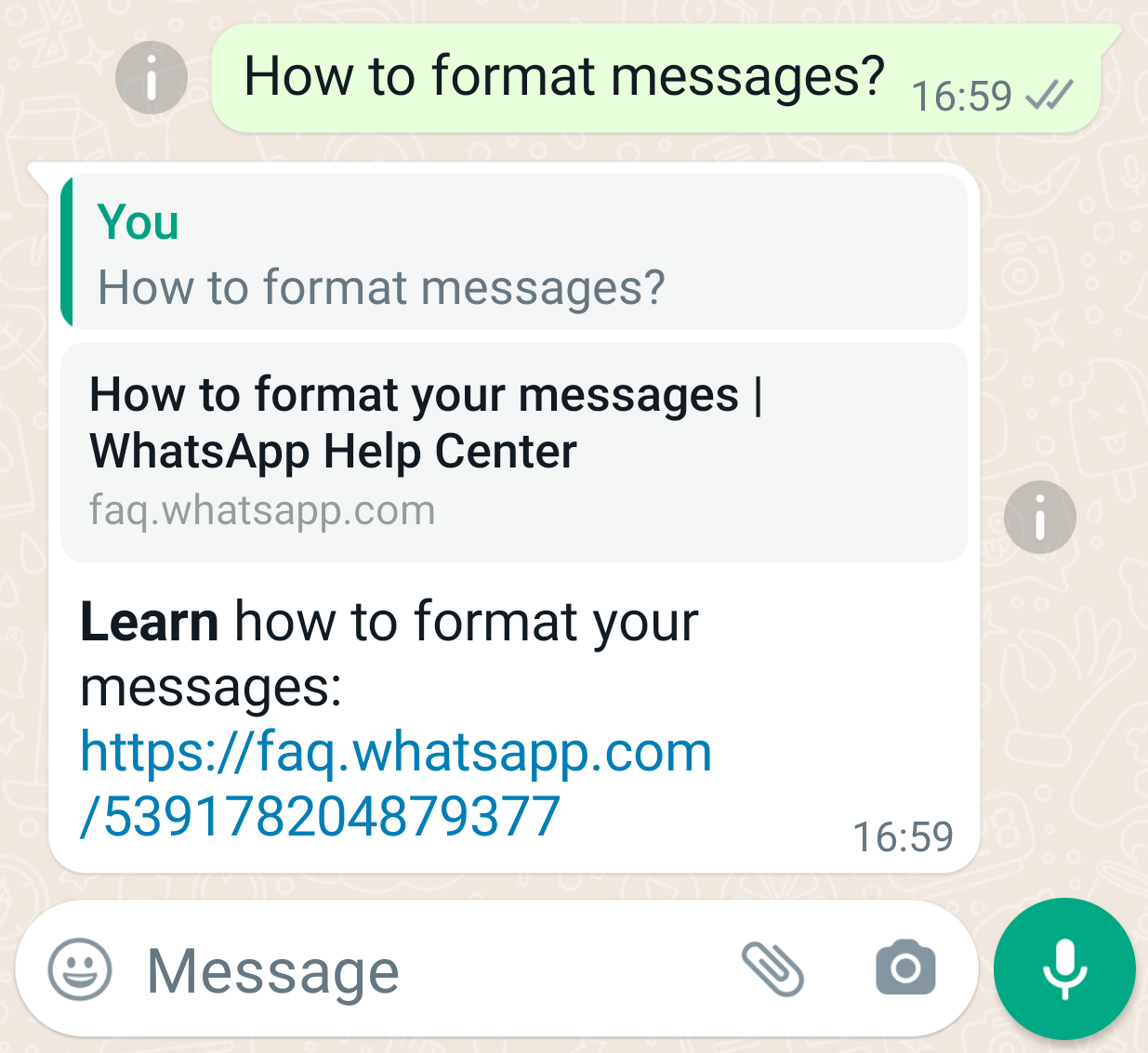
在这种情况下,您发送一条文本消息:
* 仅包含纯文本。
* 包含一个 URL,并通过将 `preview_url` 设置为 `true` 在文本消息中包含预览框。
* 指定您回复的消息(`context.message_id`)。
#### 请求
```shell theme={"theme":{"light":"github-light","dark":"github-dark"}}
curl 'https://api.ycloud.com/v2/whatsapp/messages/sendDirectly' \
-H 'Content-Type: application/json' \
-H 'X-API-Key: {{YOUR-API-KEY}}' \
-d '{
"from": "{{BUSINESS-PHONE-NUMBER}}",
"to": "{{CUSTOMER-PHONE-NUMBER}}",
"type": "text",
"text": {
"body": "*Learn* how to format your messages: https://faq.whatsapp.com/539178204879377",
"preview_url": true
},
"context": {
"message_id": "wamid.BgNODYxN..."
}
}'
```
#### 响应
请求成功后将返回 YCloud 消息对象。初始的 `accepted` 状态仅确认提交成功,并不代表最终送达。
```json theme={"theme":{"light":"github-light","dark":"github-dark"}}
{
"id": "MESSAGE_ID",
"status": "accepted"
}
```
请保存 `id`,以便与后续的 `whatsapp.message.updated` 事件进行关联。
#### 说明
* **在客户回复您的消息之前,您只能发送模板消息。**
* 使用 `context.message_id` 指定您要回复的消息。请注意,该 ID 是 WhatsApp 平台上的原始消息 ID(以 `wamid.` 开头),而不是 YCloud 上的消息 ID。`wamid` 可以在 YCloud 的 `whatsappMessage` 对象(当状态变更为 `sent` 时)以及 `whatsappInboundMessage` 对象中找到。此功能也适用于除 `template` 和 `sticker` 消息以外的其他类型消息。
* WhatsApp 消息正文支持文本格式化,例如 *斜体*、 **粗体**、 ~~删除线~~、等宽字体、项目符号列表、编号列表、引用以及行内代码。另请参阅 [**如何设置消息格式**](https://faq.whatsapp.com/539178204879377)。
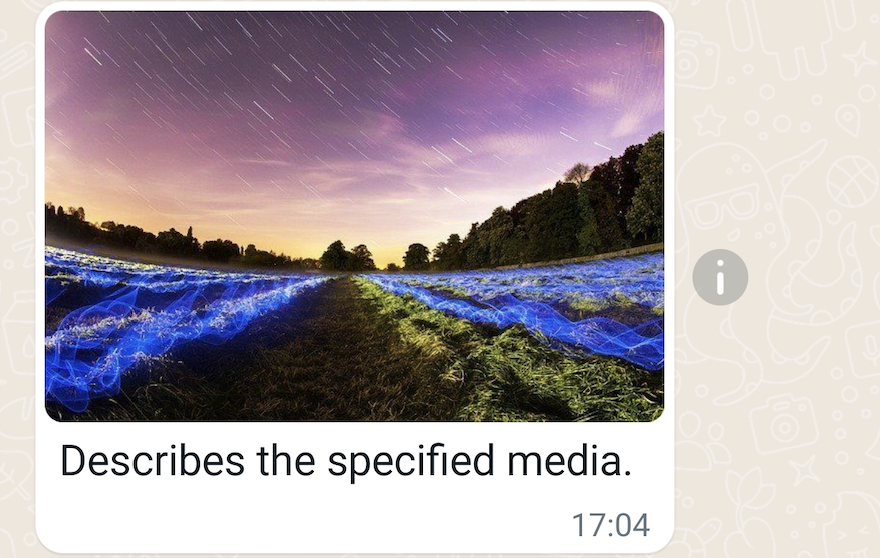
### 图片消息
在此示例中,您将发送一条图片消息:
* 包含图片 URL。
* 包含用于描述图片的说明文字。
#### 请求
```shell theme={"theme":{"light":"github-light","dark":"github-dark"}}
curl 'https://api.ycloud.com/v2/whatsapp/messages/sendDirectly' \
-H 'Content-Type: application/json' \
-H 'X-API-Key: {{YOUR-API-KEY}}' \
-d '{
"from": "{{BUSINESS-PHONE-NUMBER}}",
"to": "{{CUSTOMER-PHONE-NUMBER}}",
"type": "image",
"image": {
"link": "https://oss-ycloud-publicread.oss-ap-southeast-1.aliyuncs.com/api-docs/sample/sample.jpg",
"caption": "Describes the specified media."
}
}'
```
#### 响应
请求成功后将返回 YCloud 消息对象。初始的 `accepted` 状态仅确认提交成功,并不代表最终送达。
```json theme={"theme":{"light":"github-light","dark":"github-dark"}}
{
"id": "MESSAGE_ID",
"status": "accepted"
}
```
请保存 `id`,以便与后续的 `whatsapp.message.updated` 事件进行关联。
#### 说明
* 支持的图片类型:`image/jpeg`、`image/png`。图片必须为 8 位、RGB 或 RGBA 格式。
* 必须包含嵌入的颜色配置文件。另请参阅 [如何嵌入配置文件](https://digital-photography-school.com/choose-right-color-profile-sharing-images-online/#how-to-embed-the-profile)、[在 Adobe Photoshop 中嵌入颜色配置文件](https://helpx.adobe.com/photoshop/using/working-with-color-profiles.html#Embedacolorprofile)。
* 图片大小限制:5MB。
* 另请参阅[支持的媒体类型](https://developers.facebook.com/docs/whatsapp/cloud-api/reference/media#supported-media-types)。
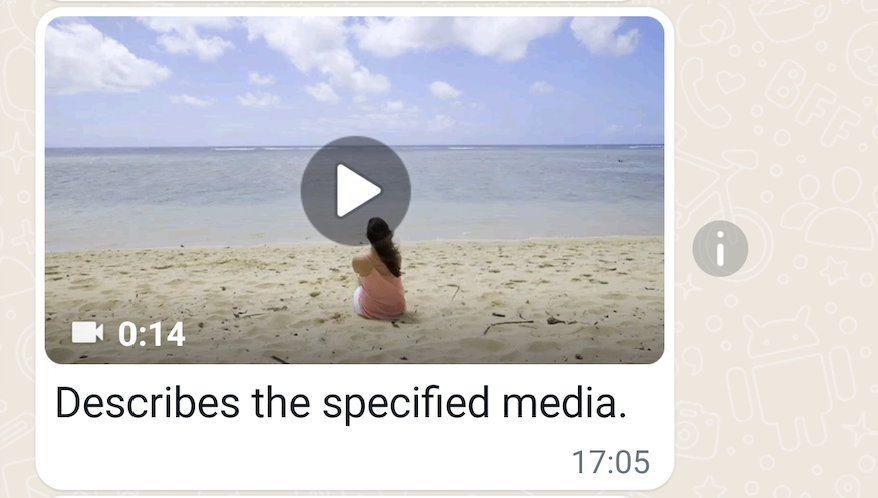
### 视频消息
在此示例中,您将发送一条视频消息:
* 包含视频 URL。
* 包含用于描述视频的说明文字。
#### 请求
```shell theme={"theme":{"light":"github-light","dark":"github-dark"}}
curl 'https://api.ycloud.com/v2/whatsapp/messages/sendDirectly' \
-H 'Content-Type: application/json' \
-H 'X-API-Key: {{YOUR-API-KEY}}' \
-d '{
"from": "{{BUSINESS-PHONE-NUMBER}}",
"to": "{{CUSTOMER-PHONE-NUMBER}}",
"type": "video",
"video": {
"link": "https://oss-ycloud-publicread.oss-ap-southeast-1.aliyuncs.com/api-docs/sample/sample.mp4",
"caption": "Describes the specified media."
}
}'
```
#### 响应
请求成功后将返回 YCloud 消息对象。初始的 `accepted` 状态仅确认提交成功,并不代表最终送达。
```json theme={"theme":{"light":"github-light","dark":"github-dark"}}
{
"id": "MESSAGE_ID",
"status": "accepted"
}
```
请保存 `id`,以便与后续的 `whatsapp.message.updated` 事件进行关联。
#### 说明
* 支持的视频类型:`video/mp4`、`video/3gpp`。
* 仅支持 H.264 视频编解码器和 AAC 音频编解码器。
* 我们支持单音频流或无音频流的视频。
* [MP4 文件格式](https://en.wikipedia.org/wiki/MP4_file_format)派生自 [ISO 基础媒体文件格式](https://en.wikipedia.org/wiki/ISO_base_media_file_format),而后者直接派生自 [Apple](https://www.apple.com) 开发的 [QuickTime 文件格式](https://en.wikipedia.org/wiki/QuickTime_File_Format)。 **但不支持 QuickTime 视频文件,即使您将文件扩展名从 `.mov` 改为 `.mp4` 也不支持。**
* 视频大小限制:16MB。
* 另请参阅[支持的媒体类型](https://developers.facebook.com/docs/whatsapp/cloud-api/reference/media#supported-media-types)。
### 音频消息
在此示例中,您将发送一条音频消息:
* 包含音频 URL。
#### 请求
```shell theme={"theme":{"light":"github-light","dark":"github-dark"}}
curl 'https://api.ycloud.com/v2/whatsapp/messages/sendDirectly' \
-H 'Content-Type: application/json' \
-H 'X-API-Key: {{YOUR-API-KEY}}' \
-d '{
"from": "{{BUSINESS-PHONE-NUMBER}}",
"to": "{{CUSTOMER-PHONE-NUMBER}}",
"type": "audio",
"audio": {
"link": "https://oss-ycloud-publicread.oss-ap-southeast-1.aliyuncs.com/api-docs/sample/sample.mp3"
}
}'
```
#### 响应
请求成功后将返回 YCloud 消息对象。初始的 `accepted` 状态仅确认提交成功,并不代表最终送达。
```json theme={"theme":{"light":"github-light","dark":"github-dark"}}
{
"id": "MESSAGE_ID",
"status": "accepted"
}
```
请保存 `id`,以便与后续的 `whatsapp.message.updated` 事件进行关联。
#### 说明
* 支持的音频类型:`audio/aac`、`audio/mp4`、`audio/mpeg`、`audio/amr`、`audio/ogg`(仅支持 opus 编解码器,不支持基础 `audio/ogg`)。
* 音频大小限制:16MB。
* 另请参阅[支持的媒体类型](https://developers.facebook.com/docs/whatsapp/cloud-api/reference/media#supported-media-types)。
* `caption` 可用于 `image`、`video` 和 `document` 媒体消息,但音频消息不支持。
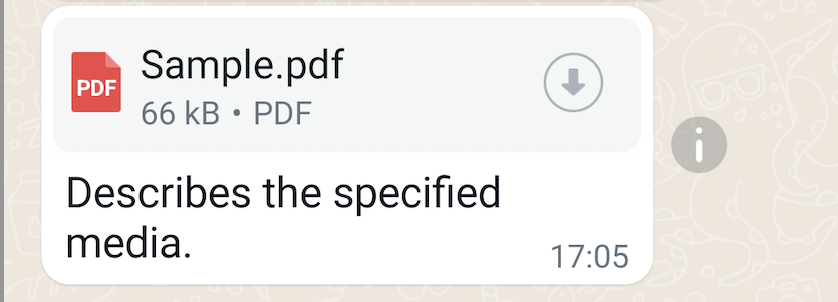
### 文档消息
在此示例中,您将发送一条文档消息:
* 包含文档 URL。
* 包含用于描述文档的说明文字。
* 指定文档文件名。
#### 请求
```shell theme={"theme":{"light":"github-light","dark":"github-dark"}}
curl 'https://api.ycloud.com/v2/whatsapp/messages/sendDirectly' \
-H 'Content-Type: application/json' \
-H 'X-API-Key: {{YOUR-API-KEY}}' \
-d '{
"from": "{{BUSINESS-PHONE-NUMBER}}",
"to": "{{CUSTOMER-PHONE-NUMBER}}",
"type": "document",
"document": {
"link": "https://oss-ycloud-publicread.oss-ap-southeast-1.aliyuncs.com/api-docs/sample/sample.pdf",
"caption": "Describes the specified media.",
"filename": "Sample.pdf"
}
}'
```
#### 响应
请求成功后将返回 YCloud 消息对象。初始的 `accepted` 状态仅确认提交成功,并不代表最终送达。
```json theme={"theme":{"light":"github-light","dark":"github-dark"}}
{
"id": "MESSAGE_ID",
"status": "accepted"
}
```
请保存 `id`,以便与后续的 `whatsapp.message.updated` 事件进行关联。
#### 说明
* 支持的文档类型:`text/plain`、`application/pdf`、`application/vnd.ms-powerpoint`、`application/msword`、`application/vnd.ms-excel`、`application/vnd.openxmlformats-officedocument.wordprocessingml.document`、`application/vnd.openxmlformats-officedocument.presentationml.presentation`、`application/vnd.openxmlformats-officedocument.spreadsheetml.sheet`。
* 文档大小限制:100MB。
* 另请参阅[支持的媒体类型](https://developers.facebook.com/docs/whatsapp/cloud-api/reference/media#supported-media-types)。
* `filename` 仅支持文档消息,不支持任何其他媒体消息。
### 贴纸消息
在此示例中,您将发送一条贴纸消息:
* 包含贴纸 URL。
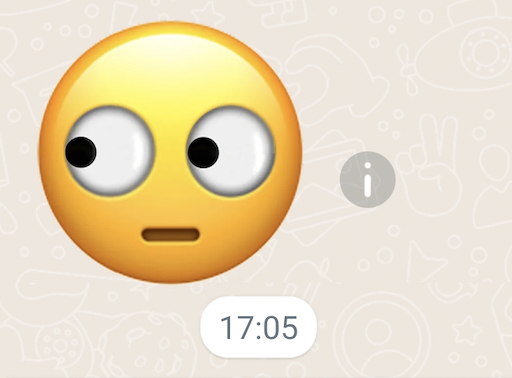
#### 请求
```shell theme={"theme":{"light":"github-light","dark":"github-dark"}}
curl 'https://api.ycloud.com/v2/whatsapp/messages/sendDirectly' \
-H 'Content-Type: application/json' \
-H 'X-API-Key: {{YOUR-API-KEY}}' \
-d '{
"from": "{{BUSINESS-PHONE-NUMBER}}",
"to": "{{CUSTOMER-PHONE-NUMBER}}",
"type": "sticker",
"sticker": {
"link": "https://whatsticker.online/stickers_asset/ws-pack-196906m7W4ngr/c8e072f92595.webp"
}
}'
```
#### 响应
请求成功后将返回 YCloud 消息对象。初始的 `accepted` 状态仅确认提交成功,并不代表最终送达。
```json theme={"theme":{"light":"github-light","dark":"github-dark"}}
{
"id": "MESSAGE_ID",
"status": "accepted"
}
```
请保存 `id`,以便与后续的 `whatsapp.message.updated` 事件进行关联。
#### 说明
* 支持的贴纸类型:`image/webp`。预期尺寸:512x512。
* 贴纸大小限制:静态贴纸为 100KB,动态贴纸为 500KB。
* 另请参阅[支持的媒体类型](https://developers.facebook.com/docs/whatsapp/cloud-api/reference/media#supported-media-types)。
### 联系人消息
在此示例中,您将发送一条联系人消息:
* 包含 1 个联系人,包含地址、生日、电子邮件、姓名、电话等信息。
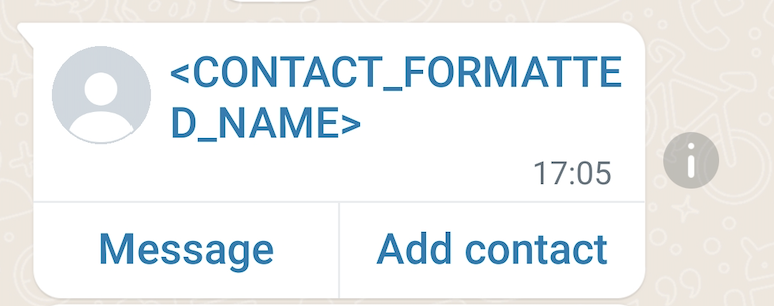
#### 请求
```shell theme={"theme":{"light":"github-light","dark":"github-dark"}}
curl 'https://api.ycloud.com/v2/whatsapp/messages/sendDirectly' \
-H 'Content-Type: application/json' \
-H 'X-API-Key: {{YOUR-API-KEY}}' \
-d '{
"from": "{{BUSINESS-PHONE-NUMBER}}",
"to": "{{CUSTOMER-PHONE-NUMBER}}",
"type": "contacts",
"contacts": [
{
"addresses": [
{
"street": "",
"city": "",
"state": "",
"zip": "",
"country": "",
"country_code": "",
"type": "HOME"
}
],
"birthday": "2001-01-01",
"emails": [
{
"email": "joe@example.com",
"type": "WORK"
}
],
"name": {
"formatted_name": "",
"first_name": "",
"last_name": "",
"middle_name": "",
"suffix": "",
"prefix": ""
},
"org": {
"company": "",
"department": "",
"title": ""
},
"phones": [
{
"phone": "+447901614024",
"wa_id": "447901614024",
"type": "WORK"
}
],
"urls": [
{
"url": "",
"type": "WORK"
}
]
}
]
}'
```
#### 响应
请求成功后将返回 YCloud 消息对象。初始的 `accepted` 状态仅确认提交成功,并不代表最终送达。
```json theme={"theme":{"light":"github-light","dark":"github-dark"}}
{
"id": "MESSAGE_ID",
"status": "accepted"
}
```
请保存 `id`,以便与后续的 `whatsapp.message.updated` 事件进行关联。
#### 说明
* `contacts[].name.formatted_name` 为必填项。
### 位置消息
在此示例中,你发送一条位置消息:
* 包含地点的纬度和经度。
* 包含地点的名称和地址。
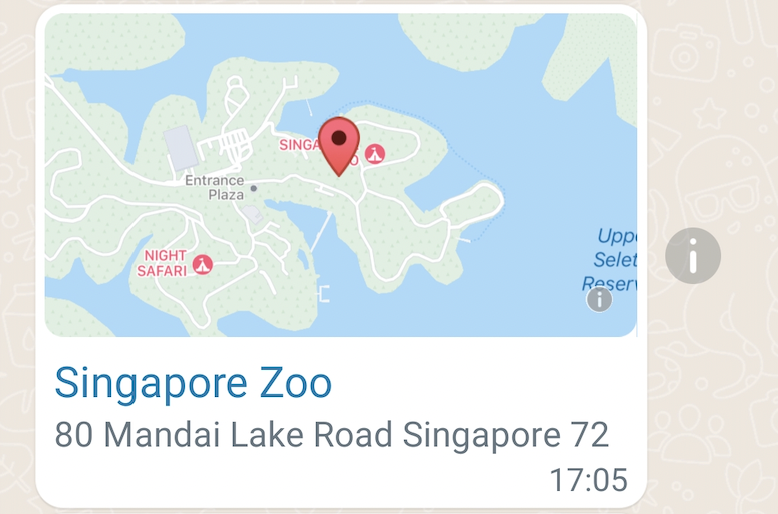
#### 请求
```shell theme={"theme":{"light":"github-light","dark":"github-dark"}}
curl 'https://api.ycloud.com/v2/whatsapp/messages/sendDirectly' \
-H 'Content-Type: application/json' \
-H 'X-API-Key: {{YOUR-API-KEY}}' \
-d '{
"from": "{{BUSINESS-PHONE-NUMBER}}",
"to": "{{CUSTOMER-PHONE-NUMBER}}",
"type": "location",
"location": {
"latitude": 1.40435,
"longitude": 103.79304,
"name": "Singapore Zoo",
"address": "80 Mandai Lake Road Singapore 72"
}
}'
```
#### 响应
请求成功后将返回 YCloud 消息对象。初始的 `accepted` 状态仅确认提交成功,并不代表最终送达。
```json theme={"theme":{"light":"github-light","dark":"github-dark"}}
{
"id": "MESSAGE_ID",
"status": "accepted"
}
```
请保存 `id`,以便与后续的 `whatsapp.message.updated` 事件进行关联。
#### 说明
* `latitude` 和 `longitude` 为必填项。
### 回应表情消息
在此示例中,你发送一条 Emoji 回应消息:
* 包含所提及消息的 ID。
* 包含一个 Emoji 表情。
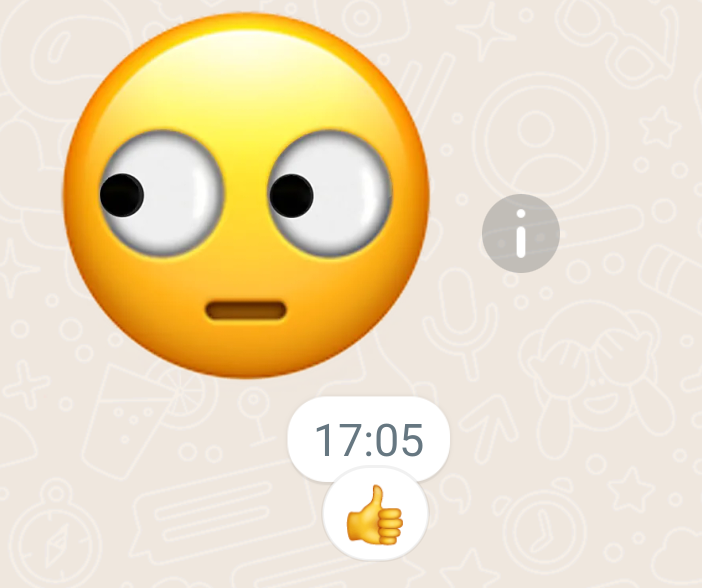
对先前发送或接收的消息点赞(竖起大拇指)。
#### 请求
```shell theme={"theme":{"light":"github-light","dark":"github-dark"}}
curl 'https://api.ycloud.com/v2/whatsapp/messages/sendDirectly' \
-H 'Content-Type: application/json' \
-H 'X-API-Key: {{YOUR-API-KEY}}' \
-d '{
"from": "{{BUSINESS-PHONE-NUMBER}}",
"to": "{{CUSTOMER-PHONE-NUMBER}}",
"type": "reaction",
"reaction": {
"message_id": "wamid.BgNODYxN...",
"emoji": "👍"
}
}'
```
#### 响应
请求成功后将返回 YCloud 消息对象。初始的 `accepted` 状态仅确认提交成功,并不代表最终送达。
```json theme={"theme":{"light":"github-light","dark":"github-dark"}}
{
"id": "MESSAGE_ID",
"status": "accepted"
}
```
请保存 `id`,以便与后续的 `whatsapp.message.updated` 事件进行关联。
#### 说明
* `message_id` 是 WhatsApp 平台上的原始消息 ID,以 `wamid.` 开头。
* 如果你想移除 Emoji 表情,请将 `emoji` 设置为 `""`。
* 回应消息不支持已读回执。
### 交互式列表消息
在此示例中,你发送一条交互式列表消息:
* 包含页眉文本、正文文本和页脚文本。
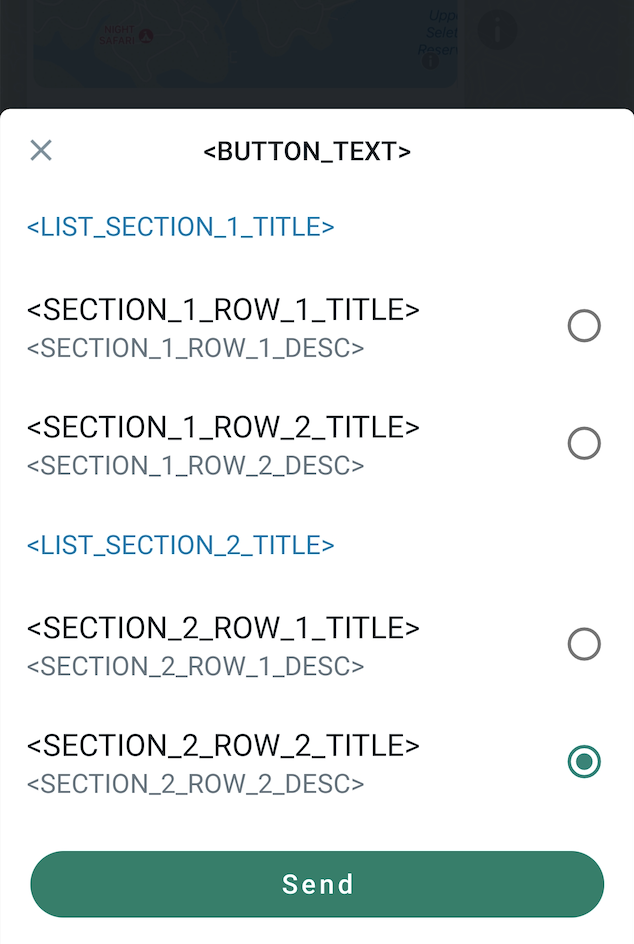
* 将 `interactive.type` 设置为 `list`,并包含一个带有 2 个分区的按钮,每个分区有 2 行。
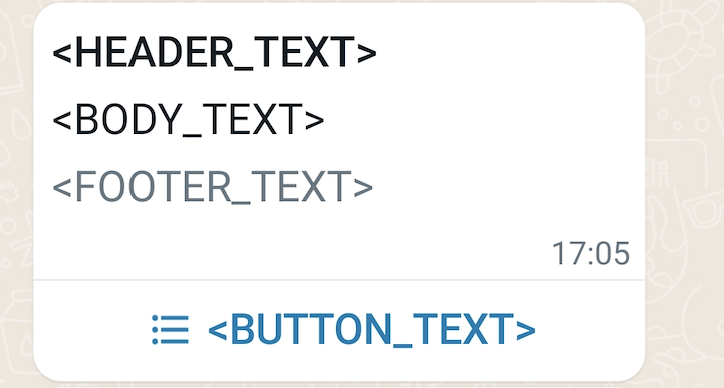
接收者可以通过点击按钮从列表中选择项目:
#### 请求
```shell theme={"theme":{"light":"github-light","dark":"github-dark"}}
curl 'https://api.ycloud.com/v2/whatsapp/messages/sendDirectly' \
-H 'Content-Type: application/json' \
-H 'X-API-Key: {{YOUR-API-KEY}}' \
-d '{
"from": "{{BUSINESS-PHONE-NUMBER}}",
"to": "{{CUSTOMER-PHONE-NUMBER}}",
"type": "interactive",
"interactive": {
"type": "list",
"header": {
"type": "text",
"text": ""
},
"body": {
"text": ""
},
"footer": {
"text": ""
},
"action": {
"button": "",
"sections": [
{
"title": "",
"rows": [
{
"id": "",
"title": "",
"description": ""
},
{
"id": "",
"title": "",
"description": ""
}
]
},
{
"title": "",
"rows": [
{
"id": "",
"title": "",
"description": ""
},
{
"id": "",
"title": "",
"description": ""
}
]
}
]
}
}
}'
```
#### 响应
请求成功后将返回 YCloud 消息对象。初始的 `accepted` 状态仅确认提交成功,并不代表最终送达。
```json theme={"theme":{"light":"github-light","dark":"github-dark"}}
{
"id": "MESSAGE_ID",
"status": "accepted"
}
```
请保存 `id`,以便与后续的 `whatsapp.message.updated` 事件进行关联。
#### 说明
* 对于交互式 `list` 消息,你需要设置一个按钮并设置 1 到 10 个分区。所有分区总共最多可包含 10 行。
### 交互式按钮消息
在此示例中,你发送一条交互式按钮消息:
* 包含正文文本。
* 将 `interactive.type` 设置为 `button`,并包含 2 个快速回复按钮。
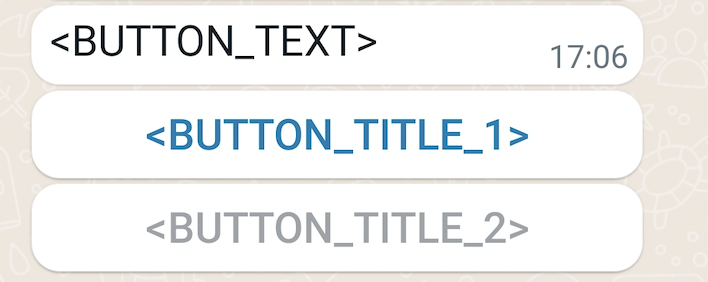
接收者可以点击任意按钮向你回复消息。
#### 请求
```shell theme={"theme":{"light":"github-light","dark":"github-dark"}}
curl 'https://api.ycloud.com/v2/whatsapp/messages/sendDirectly' \
-H 'Content-Type: application/json' \
-H 'X-API-Key: {{YOUR-API-KEY}}' \
-d '{
"from": "{{BUSINESS-PHONE-NUMBER}}",
"to": "{{CUSTOMER-PHONE-NUMBER}}",
"type": "interactive",
"interactive": {
"type": "button",
"body": {
"text": ""
},
"action": {
"buttons": [
{
"type": "reply",
"reply": {
"id": "",
"title": ""
}
},
{
"type": "reply",
"reply": {
"id": "",
"title": ""
}
}
]
}
}
}'
```
#### 响应
请求成功后将返回 YCloud 消息对象。初始的 `accepted` 状态仅确认提交成功,并不代表最终送达。
```json theme={"theme":{"light":"github-light","dark":"github-dark"}}
{
"id": "MESSAGE_ID",
"status": "accepted"
}
```
请保存 `id`,以便与后续的 `whatsapp.message.updated` 事件进行关联。
#### 说明
* 对于交互式 `buttons` 消息,你最多可以设置 3 个快速回复按钮。
### 交互式 CTA URL 消息
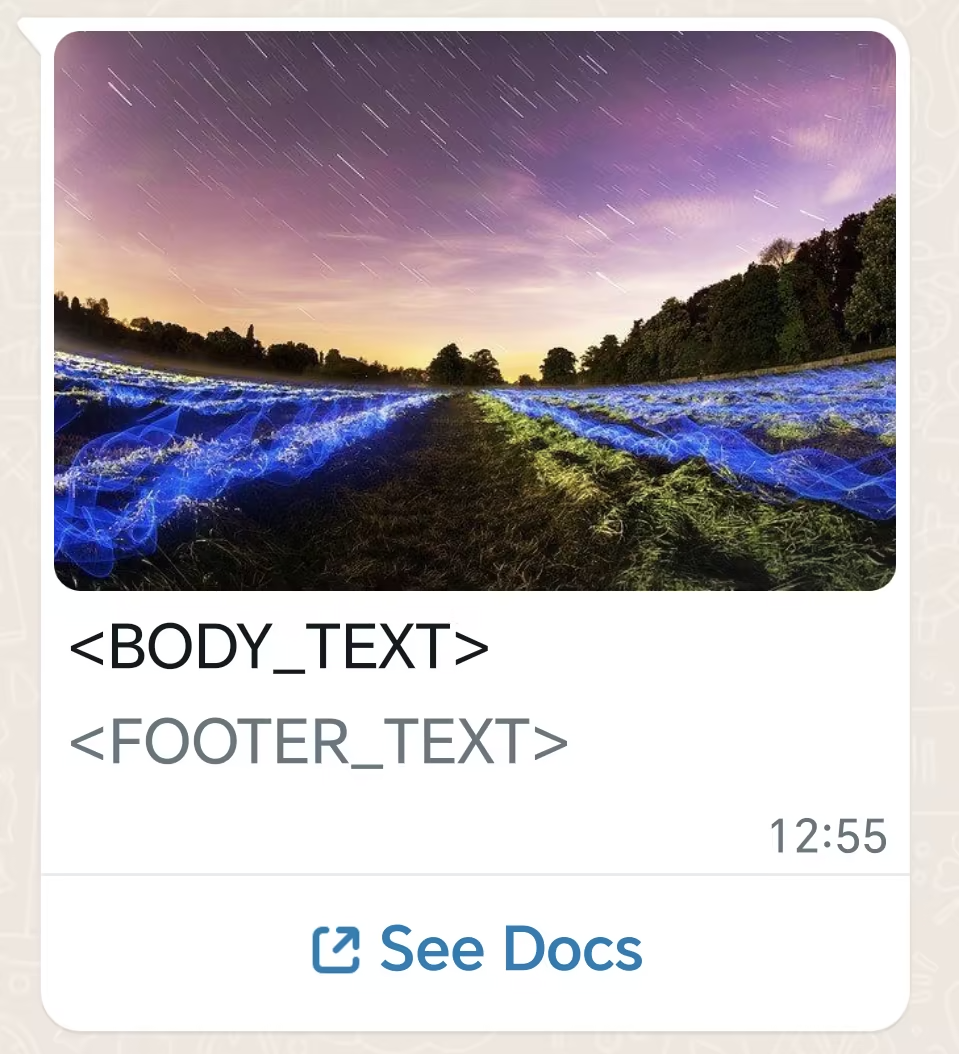
在此示例中,你发送一条带有行动号召 (CTA) URL 按钮的交互式消息:
* 包含页眉、正文和页脚文本。
* 包含一个 URL 按钮。
#### 请求
```shell theme={"theme":{"light":"github-light","dark":"github-dark"}}
curl 'https://api.ycloud.com/v2/whatsapp/messages/sendDirectly' \
-H 'Content-Type: application/json' \
-H 'X-API-Key: {{YOUR-API-KEY}}' \
-d '{
"from": "{{BUSINESS-PHONE-NUMBER}}",
"to": "{{CUSTOMER-PHONE-NUMBER}}",
"type": "interactive",
"interactive": {
"type": "cta_url",
"header": {
"type": "image",
"image": {
"link": "https://oss-ycloud-publicread.oss-ap-southeast-1.aliyuncs.com/api-docs/sample/sample.jpg"
}
},
"body": {
"text": ""
},
"footer": {
"text": ""
},
"action": {
"name": "cta_url",
"parameters": {
"display_text": "See Docs",
"url": "https://developers.facebook.com/docs/whatsapp"
}
}
}
}'
```
#### 响应
请求成功后将返回 YCloud 消息对象。初始的 `accepted` 状态仅确认提交成功,并不代表最终送达。
```json theme={"theme":{"light":"github-light","dark":"github-dark"}}
{
"id": "MESSAGE_ID",
"status": "accepted"
}
```
请保存 `id`,以便与后续的 `whatsapp.message.updated` 事件进行关联。
#### 说明
* 按钮文本长度最多为 20 个字节。
* `body` 和 `action` 为必填项。`header` 和 `footer` 为选填项。
### 交互式单商品消息
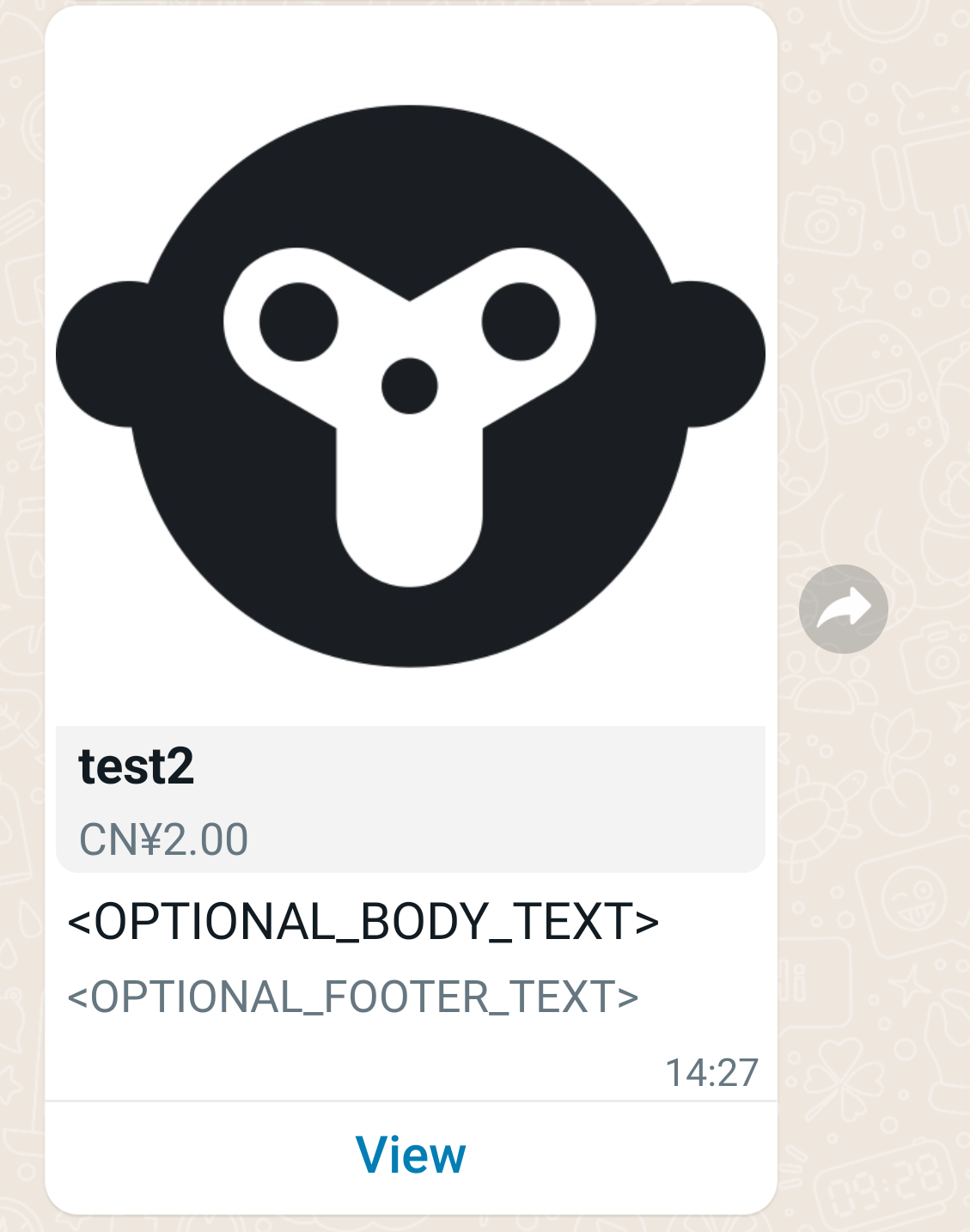
在此示例中,你发送一条交互式商品消息:
* 包含正文文本和页脚文本。
* 将 `interactive.type` 设置为 `product`,并包含带有商品信息的动作。
#### 请求
```shell theme={"theme":{"light":"github-light","dark":"github-dark"}}
curl 'https://api.ycloud.com/v2/whatsapp/messages/sendDirectly' \
-H 'Content-Type: application/json' \
-H 'X-API-Key: {{YOUR-API-KEY}}' \
-d '{
"from": "{{BUSINESS-PHONE-NUMBER}}",
"to": "{{CUSTOMER-PHONE-NUMBER}}",
"type": "interactive",
"interactive": {
"type": "product",
"body": {
"text": ""
},
"footer": {
"text": ""
},
"action": {
"catalog_id": "367025965434465",
"product_retailer_id": ""
}
}
}'
```
#### 响应
请求成功后将返回 YCloud 消息对象。初始的 `accepted` 状态仅确认提交成功,并不代表最终送达。
```json theme={"theme":{"light":"github-light","dark":"github-dark"}}
{
"id": "MESSAGE_ID",
"status": "accepted"
}
```
请保存 `id`,以便与后续的 `whatsapp.message.updated` 事件进行关联。
#### 说明
* 若要获取商品和目录 ID,请前往 [Meta Commerce Manager](https://business.facebook.com/commerce/)。
* 另请参阅[与客户分享商品](https://developers.facebook.com/docs/whatsapp/guides/commerce-guides/share-products-with-customers)。
### 交互式多商品消息
在此示例中,你发送一条交互式商品列表消息:
* 包含正文文本和页脚文本。
* 将 `interactive.type` 设置为 `product_list`,并包含多个商品。
#### 请求
```shell theme={"theme":{"light":"github-light","dark":"github-dark"}}
curl 'https://api.ycloud.com/v2/whatsapp/messages/sendDirectly' \
-H 'Content-Type: application/json' \
-H 'X-API-Key: {{YOUR-API-KEY}}' \
-d '{
"from": "{{BUSINESS-PHONE-NUMBER}}",
"to": "{{CUSTOMER-PHONE-NUMBER}}",
"type": "interactive",
"interactive": {
"type": "product_list",
"header": {
"type": "text",
"text": ""
},
"body": {
"text": ""
},
"footer": {
"text": ""
},
"action": {
"catalog_id": "146265584024623",
"sections": [
{
"title": "",
"product_items": [
{
"product_retailer_id": ""
},
{
"product_retailer_id": ""
}
]
},
{
"title": "",
"product_items": [
{
"product_retailer_id": ""
},
{
"product_retailer_id": ""
}
]
}
]
}
}
}'
```
#### 响应
请求成功后将返回 YCloud 消息对象。初始的 `accepted` 状态仅确认提交成功,并不代表最终送达。
```json theme={"theme":{"light":"github-light","dark":"github-dark"}}
{
"id": "MESSAGE_ID",
"status": "accepted"
}
```
请保存 `id`,以便与后续的 `whatsapp.message.updated` 事件进行关联。
#### 说明
* 若要获取商品和目录 ID,请前往 [Meta Commerce Manager](https://business.facebook.com/commerce/)。
### 交互式目录消息
目录消息是自由格式的消息,允许你完全在 WhatsApp 内展示你的商品目录。
目录消息会显示你选择的商品缩略图顶部图像、自定义正文文本、固定文本标题、固定文本副标题以及 **查看目录** 按钮。
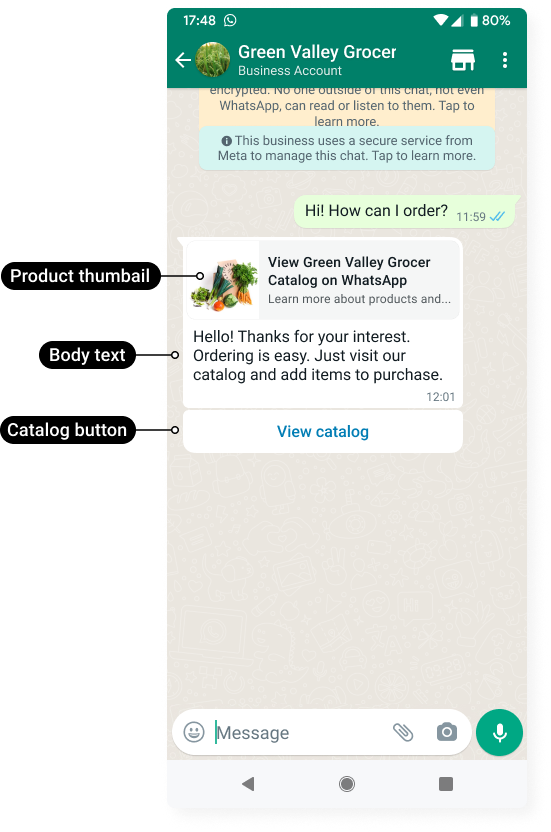
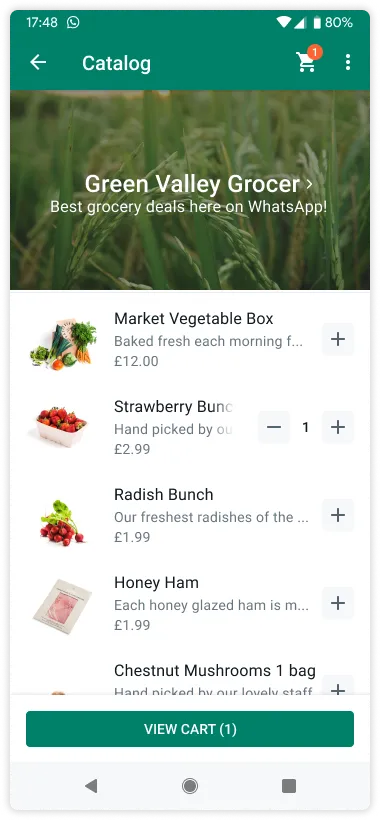
当客户点击 **查看目录** 按钮时,你的商品目录将显示在 WhatsApp 中。
#### 请求
```shell theme={"theme":{"light":"github-light","dark":"github-dark"}}
curl 'https://api.ycloud.com/v2/whatsapp/messages/sendDirectly' \
-H 'Content-Type: application/json' \
-H 'X-API-Key: {{YOUR-API-KEY}}' \
-d '{
"from": "{{BUSINESS-PHONE-NUMBER}}",
"to": "{{CUSTOMER-PHONE-NUMBER}}",
"type": "interactive",
"interactive": {
"type": "catalog_message",
"body": {
"text": "Hello! Thanks for your interest. Ordering is easy. Just visit our catalog and add items to purchase."
},
"action": {
"name": "catalog_message",
"parameters": {
"thumbnail_product_retailer_id": "2lc20305pt"
}
},
"footer": {
"text": "Best grocery deals on WhatsApp!"
}
}
}'
```
#### 响应
请求成功后将返回 YCloud 消息对象。初始的 `accepted` 状态仅确认提交成功,并不代表最终已送达。
```json theme={"theme":{"light":"github-light","dark":"github-dark"}}
{
"id": "MESSAGE_ID",
"status": "accepted"
}
```
请保存 `id`,以便与后续的 `whatsapp.message.updated` 事件进行关联。
#### 说明
* 您必须已将 [库存上传到 Meta](https://developers.facebook.com/docs/whatsapp/cloud-api/guides/sell-products-and-services/upload-inventory),并置于[已关联到 WhatsApp 商业账户](https://www.facebook.com/business/help/158662536425974)的电子商务目录中。
* 按商业电话号码分别启用购物车和产品目录。默认情况下,与 WhatsApp 商业账户关联的所有商业电话号码均已启用购物车并隐藏店面图标。使用 [Update commerce settings](https://docs.ycloud.com/reference/whatsapp_phone_number-update-commerce-settings) 端点可启用或禁用这些功能。
### 交互式位置请求消息 (Interactive Location Request)
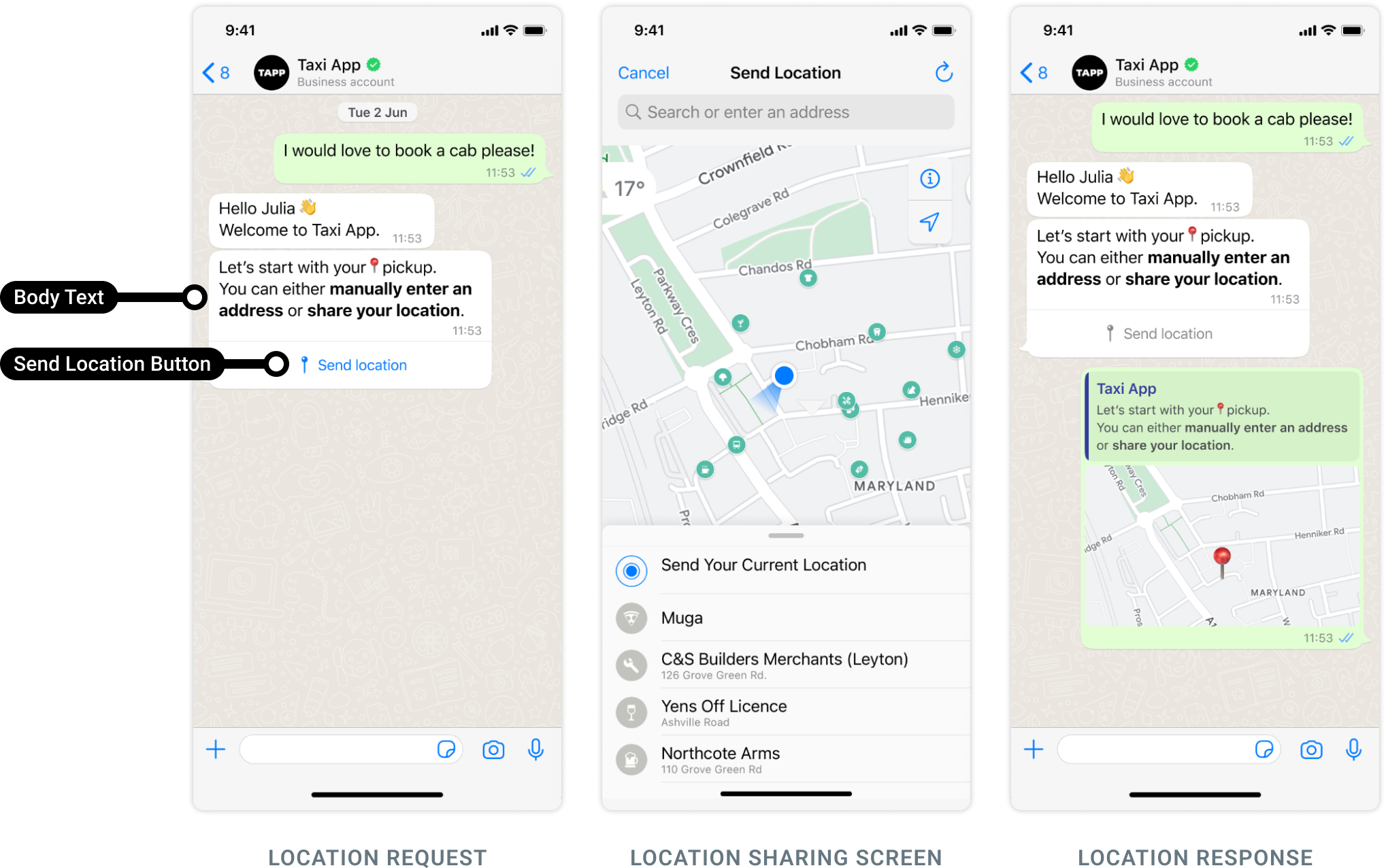
位置请求消息是包含 **正文文本** 和 **发送位置按钮**的自由格式消息。当 WhatsApp 用户点击该按钮时,将显示位置共享屏幕,用户随后可使用该屏幕共享其位置。
#### 请求
```shell theme={"theme":{"light":"github-light","dark":"github-dark"}}
curl 'https://api.ycloud.com/v2/whatsapp/messages/sendDirectly' \
-H 'Content-Type: application/json' \
-H 'X-API-Key: {{YOUR-API-KEY}}' \
-d '{
"from": "{{BUSINESS-PHONE-NUMBER}}",
"to": "{{CUSTOMER-PHONE-NUMBER}}",
"type": "interactive",
"interactive": {
"type": "location_request_message",
"body": {
"text": ""
},
"action": {
"name": "send_location"
}
}
}'
```
#### 响应
请求成功后将返回 YCloud 消息对象。初始的 `accepted` 状态仅确认提交成功,并不代表最终已送达。
```json theme={"theme":{"light":"github-light","dark":"github-dark"}}
{
"id": "MESSAGE_ID",
"status": "accepted"
}
```
请保存 `id`,以便与后续的 `whatsapp.message.updated` 事件进行关联。
#### 说明
* 正文文本(即 `interactive.body`)为必填项,最大长度为 1024 个字符。不支持页眉和页脚。
* 用户共享其位置后,将触发 `whatsapp.inbound_message.received` Webhook,其中包含用户的位置详细信息。另请参阅 [Inbound Location message](/zh/api-reference/guides/examples/webhook-examples/whatsapp-inbound-message-webhook-examples#inbound-location-message)。
### 交互式 Flow 消息 (Interactive Flow)
您可以在用户发起的对话中使用带有行动号召 (CTA) 的消息来发送带有 Flow 的消息:
#### 请求
```shell theme={"theme":{"light":"github-light","dark":"github-dark"}}
curl 'https://api.ycloud.com/v2/whatsapp/messages/sendDirectly' \
-H 'Content-Type: application/json' \
-H 'X-API-Key: {{YOUR-API-KEY}}' \
-d '{
"from": "{{BUSINESS-PHONE-NUMBER}}",
"to": "{{CUSTOMER-PHONE-NUMBER}}",
"type": "interactive",
"interactive": {
"type": "flow",
"header": {
"type": "text",
"text": "Flow message header"
},
"body": {
"text": "Flow message body"
},
"footer": {
"text": "Flow message footer"
},
"action": {
"name": "flow",
"parameters": {
"flow_message_version": "3",
"flow_token": "AQAAAAACS5FpgQ_cAAAAAD0QI3s.",
"flow_id": "1",
"flow_cta": "Book!",
"flow_action": "navigate",
"flow_action_payload": {
"screen": "",
"data": {
"product_name": "name",
"product_description": "description",
"product_price": 100
}
}
}
}
}
}'
```
#### 响应
请求成功后将返回 YCloud 消息对象。初始的 `accepted` 状态仅确认提交成功,并不代表最终已送达。
```json theme={"theme":{"light":"github-light","dark":"github-dark"}}
{
"id": "MESSAGE_ID",
"status": "accepted"
}
```
请保存 `id`,以便与后续的 `whatsapp.message.updated` 事件进行关联。
#### 说明
* 为了发送带有 Flow 的消息,我们引入了一种名为 `flow` 的新 `interactive` 对象类型。有关详细信息,请参阅 [Interactive message parameters](https://developers.facebook.com/docs/whatsapp/flows/guides/sendingaflow#interactive-message-parameters)。
* 若要发送带有 Flow 的模板消息,请参阅 [Flow template message](/zh/api-reference/guides/examples/api-examples/whatsapp-messaging-examples#flow-template-message)。
* 若要接收 Flow 响应,请参阅 [Inbound Interactive Flow Response message](/zh/api-reference/guides/examples/webhook-examples/whatsapp-inbound-message-webhook-examples#inbound-interactive-flow-response-message)。
### 交互式订单详情消息 (Interactive Order Details)
`order_details` 消息是一种新型的 `interactive` 消息,始终包含相同的 4 个主要组件:`header`、`body`、`footer` 和 `action`。在 `action` 组件中,商家包含客户完成付款所需的所有信息。
#### 请求
```shell theme={"theme":{"light":"github-light","dark":"github-dark"}}
curl 'https://api.ycloud.com/v2/whatsapp/messages/sendDirectly' \
-H 'Content-Type: application/json' \
-H 'X-API-Key: {{YOUR-API-KEY}}' \
-d '{
"from": "{{BUSINESS-PHONE-NUMBER}}",
"to": "{{CUSTOMER-PHONE-NUMBER}}",
"type": "interactive",
"interactive": {
"type": "order_details",
"header": {
"type": "image",
"image": {
"link": "https://the-url",
"provider": {
"name": "provider-name"
}
}
},
"body": {
"text": "your-text-body-content"
},
"footer": {
"text": "your-text-footer-content"
},
"action": {
"name": "review_and_pay",
"parameters": {
"reference_id": "reference-id-value",
"type": "digital-goods",
"payment_settings": [
{
"type": "payment_gateway",
"payment_gateway": {
"type": "billdesk",
"configuration_name": "payment-config-id",
"billdesk": {
"additional_info1": "additional_info1-value",
"additional_info2": "additional_info2-value",
"additional_info3": "additional_info3-value",
"additional_info4": "additional_info4-value",
"additional_info5": "additional_info5-value",
"additional_info6": "additional_info6-value",
"additional_info7": "additional_info7-value",
}
}
}
],
"currency": "INR",
"total_amount": {
"value": 21000,
"offset": 100
},
"order": {
"status": "pending",
"catalog_id": "the-catalog_id",
"expiration": {
"timestamp": "utc_timestamp_in_seconds",
"description": "cancellation-explanation"
},
"items": [
{
"retailer_id": "1234567",
"name": "Product name, for example bread",
"amount": {
"value": 10000,
"offset": 100
},
"quantity": 1,
"sale_amount": {
"value": 100,
"offset": 100
}
}
],
"subtotal": {
"value": 20000,
"offset": 100
},
"tax": {
"value": 1000,
"offset": 100,
"description": "optional_text"
},
"shipping": {
"value": 1000,
"offset": 100,
"description": "optional_text"
},
"discount": {
"value": 1000,
"offset": 100,
"description": "optional_text",
"discount_program_name": "optional_text"
}
}
}
}
}
}'
```
#### 响应
请求成功后将返回 YCloud 消息对象。初始的 `accepted` 状态仅确认提交成功,并不代表最终已送达。
```json theme={"theme":{"light":"github-light","dark":"github-dark"}}
{
"id": "MESSAGE_ID",
"status": "accepted"
}
```
请保存 `id`,以便与后续的 `whatsapp.message.updated` 事件进行关联。
#### 说明
* 若要详细了解 `interactive` 参数,请参阅 [Send Order Details Interactive Message](https://developers.facebook.com/docs/whatsapp/cloud-api/payments-api/payments-in/pg#step-1)。
* 如果距离客户最后一次回复您的商业电话号码已超过 24 小时,请改发 [Order Details template message](/zh/api-reference/guides/examples/api-examples/whatsapp-messaging-examples#order-details-template-message)。
### 交互式订单状态消息 (Interactive Order Status)
若要向客户通知订单更新,您可以发送类型为 order\_status 的交互式消息,如下所示。
#### 请求
```shell theme={"theme":{"light":"github-light","dark":"github-dark"}}
curl 'https://api.ycloud.com/v2/whatsapp/messages/sendDirectly' \
-H 'Content-Type: application/json' \
-H 'X-API-Key: {{YOUR-API-KEY}}' \
-d '{
"from": "{{BUSINESS-PHONE-NUMBER}}",
"to": "{{CUSTOMER-PHONE-NUMBER}}",
"type": "interactive",
"interactive": {
"type": "order_status",
"body": {
"text": "your-text-body-content"
},
"action": {
"name": "review_order",
"parameters": {
"reference_id": "reference-id-value",
"order": {
"status": "processing | partially_shipped | shipped | completed | canceled",
"description": "optional-text"
}
}
}
}
}'
```
#### 响应
请求成功后将返回 YCloud 消息对象。初始的 `accepted` 状态仅确认提交成功,并不代表最终已送达。
```json theme={"theme":{"light":"github-light","dark":"github-dark"}}
{
"id": "MESSAGE_ID",
"status": "accepted"
}
```
请保存 `id`,以便与后续的 `whatsapp.message.updated` 事件进行关联。
#### 说明
* 若要详细了解 `interactive` 参数,请参阅 [Send order status updates](https://developers.facebook.com/docs/whatsapp/cloud-api/payments-api/payments-in/pg#step-4--update-order-status)。
* 如果距离客户最后一次回复您的商业电话号码已超过 24 小时,请改发 [Order Details template message](/zh/api-reference/guides/examples/api-examples/whatsapp-messaging-examples#order-status-template-message)。
* 当客户尝试付款且付款状态发生变更时,您将通过 Webhook 收到通知。请参阅 [Payment transaction updated](/zh/api-reference/guides/examples/webhook-examples/whatsapp-payment-updated-webhook-examples)。
### 交互式语音通话消息 (Interactive Voice Call)
企业调用此 API 向消费者发送消息,通过消息中嵌入的内联按钮让消费者了解语音通话支持功能。当消费者点击该按钮时,将发起拨打至发送此消息的商业号码的 WhatsApp 通话。此行为与消费者点击聊天标题栏中的电话/通话图标相同。不支持通过该按钮拨打 WhatsApp 通话至其他电话号码。
#### 请求
```shell theme={"theme":{"light":"github-light","dark":"github-dark"}}
curl 'https://api.ycloud.com/v2/whatsapp/messages/sendDirectly' \
-H 'Content-Type: application/json' \
-H 'X-API-Key: {{YOUR-API-KEY}}' \
-d '{
"from": "{{BUSINESS-PHONE-NUMBER}}",
"to": "{{CUSTOMER-PHONE-NUMBER}}",
"type": "interactive",
"interactive": {
"type": "voice_call",
"body": {
"text": "You can call us on WhatsApp now for faster service!"
},
"action": {
"name": "voice_call",
"parameters": {
"display_text": "Call on WhatsApp"
}
}
}
}'
```
#### 响应
请求成功后将返回 YCloud 消息对象。初始的 `accepted` 状态仅确认提交成功,并不代表最终已送达。
```json theme={"theme":{"light":"github-light","dark":"github-dark"}}
{
"id": "MESSAGE_ID",
"status": "accepted"
}
```
请保存 `id`,以便与后续的 `whatsapp.message.updated` 事件进行关联。
#### 说明
将请求字段与所选消息类型相匹配,并使用返回的消息 ID 进行状态关联。
### 交互式媒体轮播消息 (Interactive media carousel)
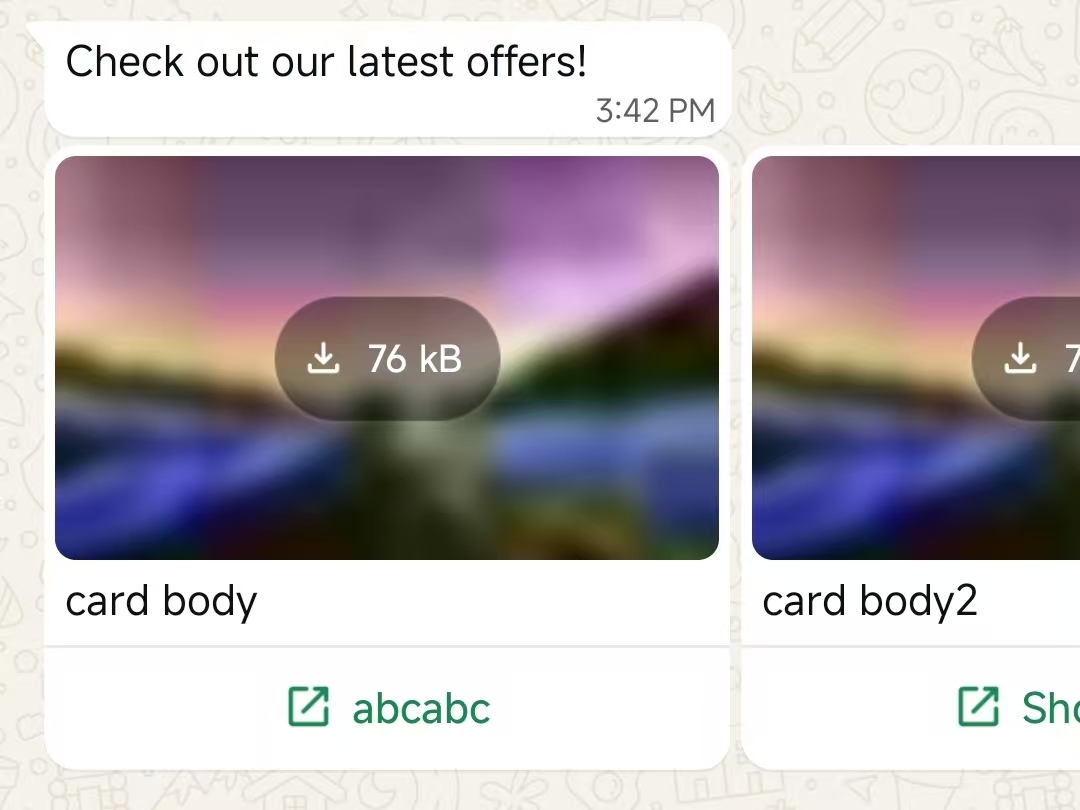
交互式媒体轮播消息允许企业在 WhatsApp 对话中发送带有图片或视频的可横向滚动卡片,每张卡片都带有行动号召按钮。这种格式允许用户在单条消息中浏览多个优惠或内容,通过 WhatsApp 商业 API 和移动客户端提供丰富且引人入胜的体验。
* `interactive.type` 必须为 `carousel`
* `interactive.action.cards` 必须向您的消息中添加至少 2 个卡片对象,最多可添加 10 个。
* 每个卡片的类型必须设置为 `cta_url`
* 所有卡片必须具有相同的页眉类型(`image` 或 `video`)
* 必须向消息添加正文(`interactive.body`)(最多 1024 个字符)。卡片外部不允许有页眉、页脚或按钮。
* 所有卡片必须具有相同的结构(页眉、正文、操作)。
* 卡片正文为选填,但最多 160 个字符,最多 2 个换行符。
#### 请求
```shell theme={"theme":{"light":"github-light","dark":"github-dark"}}
curl 'https://api.ycloud.com/v2/whatsapp/messages/sendDirectly' \
-H 'Content-Type: application/json' \
-H 'X-API-Key: {{YOUR-API-KEY}}' \
-d '{
"from": "{{BUSINESS-PHONE-NUMBER}}",
"to": "{{CUSTOMER-PHONE-NUMBER}}",
"type": "interactive",
"interactive": {
"type": "carousel",
"body": {
"text": "Check out our latest offers!"
},
"action": {
"cards": [
{
"card_index": 0,
"type": "cta_url",
"header": {
"type": "image",
"image": {
"link": "https://oss-ycloud-publicread.oss-ap-southeast-1.aliyuncs.com/api-docs/sample/sample.jpg"
}
},
"body": {
"text": "Exclusive deal #1"
},
"action": {
"name": "cta_url",
"parameters": {
"display_text": "Shop now",
"url": "https://shop.example.com/deal1"
}
}
},
{
"card_index": 1,
"type": "cta_url",
"header": {
"type": "image",
"image": {
"link": "https://oss-ycloud-publicread.oss-ap-southeast-1.aliyuncs.com/api-docs/sample/sample.jpg"
}
},
"body": {
"text": "Exclusive deal #2"
},
"action": {
"name": "cta_url",
"parameters": {
"display_text": "Shop now",
"url": "https://shop.example.com/deal2"
}
}
}
]
}
}
}'
```
#### 响应
请求成功后将返回 YCloud 消息对象。初始状态 `accepted` 仅确认已提交,并不代表最终送达。
```json theme={"theme":{"light":"github-light","dark":"github-dark"}}
{
"id": "MESSAGE_ID",
"status": "accepted"
}
```
存储 `id` 并关联后续的 `whatsapp.message.updated` 事件。
#### 说明
将请求字段与所选消息类型进行匹配,并使用返回的消息 ID 进行状态关联。
### 带快速回复按钮的交互式媒体轮播消息
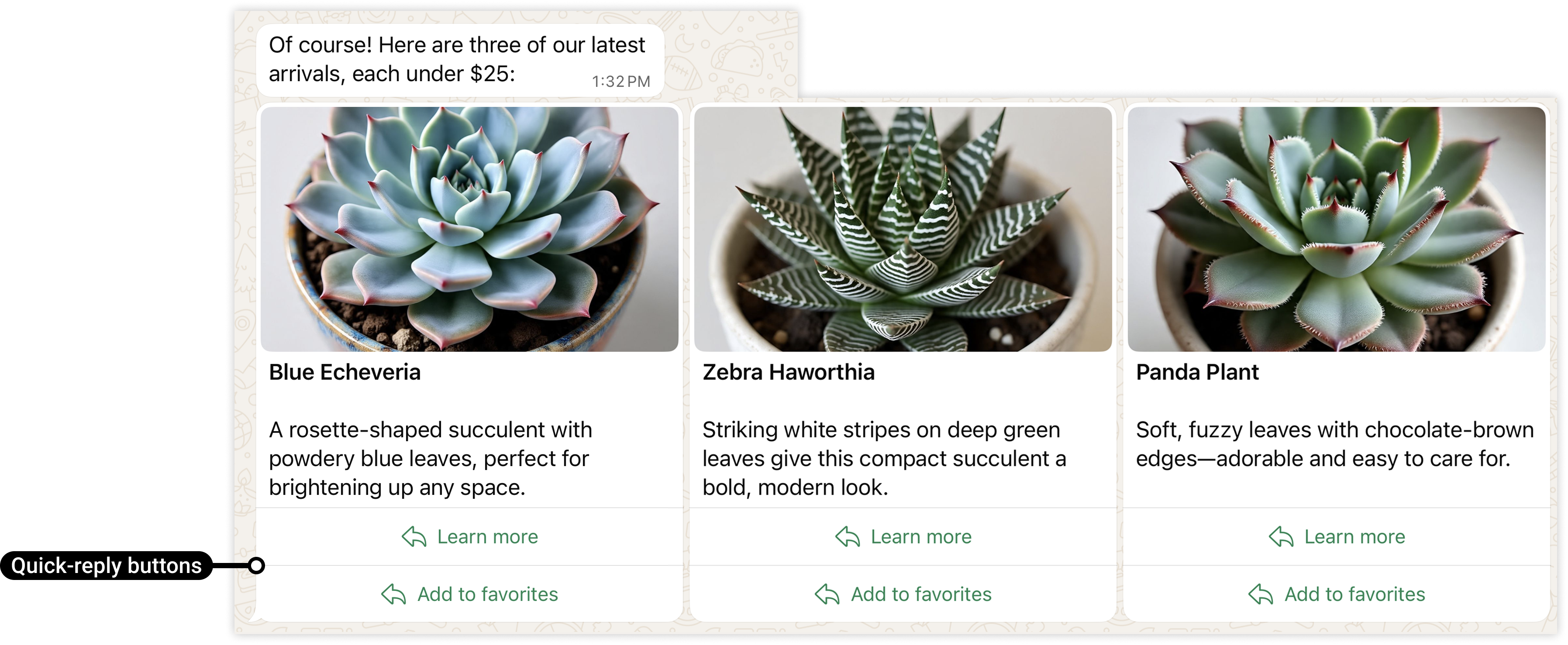
* 卡片必须包含一个 URL 按钮,或者一个或多个快速回复按钮。所有卡片中的按钮类型和数量必须保持一致(例如,如果您定义了一个包含 2 个快速回复按钮的卡片,则所有卡片必须定义恰好 2 个快速回复按钮)。
#### 请求
```shell theme={"theme":{"light":"github-light","dark":"github-dark"}}
curl 'https://api.ycloud.com/v2/whatsapp/messages/sendDirectly' \
-H 'Content-Type: application/json' \
-H 'X-API-Key: {{YOUR-API-KEY}}' \
-d '{
"from": "{{BUSINESS-PHONE-NUMBER}}",
"to": "{{CUSTOMER-PHONE-NUMBER}}",
"type": "interactive",
"interactive": {
"type": "carousel",
"body": {
"text": "Check out our latest offers!"
},
"action": {
"cards": [
{
"card_index": 0,
"type": "cta_url",
"header": {
"type": "image",
"image": {
"link": "https://oss-ycloud-publicread.oss-ap-southeast-1.aliyuncs.com/api-docs/sample/sample.jpg"
}
},
"body": {
"text": "Exclusive deal #1"
},
"action": {
"buttons": [
{
"type": "quick_reply",
"quick_reply": {
"id": "learn-zebra-haworthia",
"title": "Learn more"
}
},
{
"type": "quick_reply",
"quick_reply": {
"id": "fav-zebra-haworthia",
"title": "Add to favorites"
}
}
]
}
},
{
"card_index": 1,
"type": "cta_url",
"header": {
"type": "image",
"image": {
"link": "https://oss-ycloud-publicread.oss-ap-southeast-1.aliyuncs.com/api-docs/sample/sample.jpg"
}
},
"body": {
"text": "Exclusive deal #2"
},
"action": {
"buttons": [
{
"type": "quick_reply",
"quick_reply": {
"id": "learn-zebra-haworthia",
"title": "Learn more"
}
},
{
"type": "quick_reply",
"quick_reply": {
"id": "fav-zebra-haworthia",
"title": "Add to favorites"
}
}
]
}
}
]
}
}
}'
```
#### 响应
请求成功后将返回 YCloud 消息对象。初始状态 `accepted` 仅确认已提交,并不代表最终送达。
```json theme={"theme":{"light":"github-light","dark":"github-dark"}}
{
"id": "MESSAGE_ID",
"status": "accepted"
}
```
存储 `id` 并关联后续的 `whatsapp.message.updated` 事件。
#### 说明
将请求字段与所选消息类型进行匹配,并使用返回的消息 ID 进行状态关联。
### 结账按钮消息
结账按钮模板获得批准后,您就可以在消息模板中发送它
#### 请求
```shell theme={"theme":{"light":"github-light","dark":"github-dark"}}
curl 'https://api.ycloud.com/v2/whatsapp/messages/sendDirectly' \
-H 'Content-Type: application/json' \
-H 'X-API-Key: {{YOUR-API-KEY}}' \
-d '{
"from": "{{BUSINESS-PHONE-NUMBER}}",
"to": "{{CUSTOMER-PHONE-NUMBER}}",
"type": "template",
"template": {
"name": "item_back_in_stock_v1",
"language": {
"code": "{{LANGUAGE-CODE}}",
"policy": "deterministic",
},
"components": [
{
"type": "header",
"parameters": [
{
"type": "image",
"image": {
"id": "12312312",
"link": "https://oss-ycloud-publicread.oss-ap-southeast-1.aliyuncs.com/api-docs/sample/sample.jpg"
}
}
]
},
{
"type": "body",
"parameters": [
{
"type": "text",
"text": "Nidhi"
},
{
"type": "text",
"text": "Blue Elf Aloe"
}
]
},
{
"type": "button",
"sub_type": "order_details",
"index": 0,
"parameters": [
{
"type": "action",
"action": {
"order_details": {
"reference_id": "abc.123_xyz-1",
"type": "physical-goods",
"currency": "INR",
"payment_settings": [
{
"type": "payment_gateway",
"payment_gateway": {
"type": "razorpay",
"configuration_name": "prod-razor-pay-config-05"
}
}
],
"shipping_info": {
"country": "IN",
"addresses": [
{
"name": "Nidhi Tripathi",
"phone_number": "919000090000",
"address": "Bandra Kurla Complex",
"city": "Mumbai",
"state": "Maharastra",
"in_pin_code": "400051",
"house_number": "12",
"tower_number": "5",
"building_name": "One BKC",
"landmark_area": "Near BKC Circle"
}
]
},
"order": {
"items": [
{
"amount": {
"offset": 100,
"value": 200000
},
"sale_amount": {
"offset": 100,
"value": 150000
},
"name": "Blue Elf Aloe",
"quantity": 1,
"country_of_origin": "India",
"importer_name": "Lucky Shrub Imports and Exports",
"importer_address": {
"address_line1": "One BKC",
"address_line2": "Bandra Kurla Complex",
"city": "Mumbai",
"zone_code": "MH",
"postal_code": "400051",
"country_code": "IN"
}
}
],
"subtotal": {
"offset": 100,
"value": 150000
},
"shipping": {
"offset": 100,
"value": 20000
},
"tax": {
"offset": 100,
"value": 10000
},
"discount": {
"offset": 100,
"value": 15000,
"description": "Additional 10% off"
},
"status": "pending",
"expiration": {
"timestamp": "1726627150"
}
},
"total_amount": {
"offset": 100,
"value": 165000
}
}
}
}
]
}
]
}
}'
```
#### 响应
请求成功后将返回 YCloud 消息对象。初始状态 `accepted` 仅确认已提交,并不代表最终送达。
```json theme={"theme":{"light":"github-light","dark":"github-dark"}}
{
"id": "MESSAGE_ID",
"status": "accepted"
}
```
存储 `id` 并关联后续的 `whatsapp.message.updated` 事件。
#### 说明
将请求字段与所选消息类型进行匹配,并使用返回的消息 ID 进行状态关联。
### Gif 消息模板
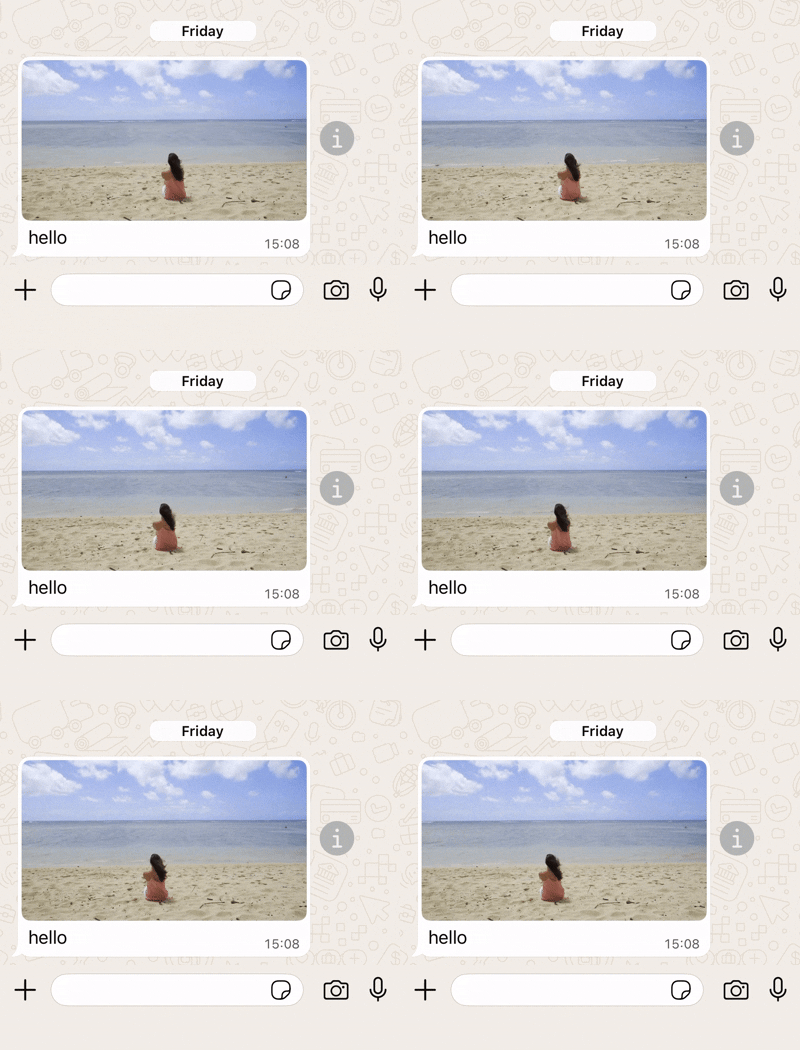
在这种情况下,您发送一条 Gif 消息模板:
* 包含一个 Gif URL。
#### 请求
```shell theme={"theme":{"light":"github-light","dark":"github-dark"}}
curl 'https://api.ycloud.com/v2/whatsapp/messages/sendDirectly' \
-H 'Content-Type: application/json' \
-H 'X-API-Key: {{YOUR-API-KEY}}' \
-d '{
"from": "{{BUSINESS-PHONE-NUMBER}}",
"to": "{{CUSTOMER-PHONE-NUMBER}}",
"type": "template",
"template": {
"name": "marketing_friday_more",
"language": {
"code": "{{LANGUAGE-CODE}}",
"policy": "deterministic"
},
"components": [
{
"type": "header",
"parameters": [
{
"type": "gif",
"gif": {
"link": "https://oss-ycloud-publicread.oss-ap-southeast-1.aliyuncs.com/api-docs/sample/sample.mp4"
}
}
]
}
]
}
}'
```
#### 响应
请求成功后将返回 YCloud 消息对象。初始状态 `accepted` 仅确认已提交,并不代表最终送达。
```json theme={"theme":{"light":"github-light","dark":"github-dark"}}
{
"id": "MESSAGE_ID",
"status": "accepted"
}
```
存储 `id` 并关联后续的 `whatsapp.message.updated` 事件。
#### 说明
将请求字段与所选消息类型进行匹配,并使用返回的消息 ID 进行状态关联。
This documentation is built and hosted on [Mintlify](https://mintlify.com), a developer documentation platform.