> ## Documentation Index
> Fetch the complete documentation index at: https://docs.ycloud.com/llms.txt
> Use this file to discover all available pages before exploring further.
# WhatsApp 消息模板创建示例
> 通过附带注解的请求示例,创建身份验证、实用工具、营销、商务、Flow 和通话模板。
## 概述
通过附带注解的请求示例,创建身份验证、实用工具、营销、商务、Flow 和通话模板。
## 准备工作
* 将 YCloud API 密钥存储在服务端密钥库中。
* 连接请求所使用的 WhatsApp 商业账户和电话号码。
* 创建并获批消息请求所引用的所有模板。
* 将所有占位符替换为您自己账户中的实际值。
## 工作原理
选择与您想要构建的消息或模板匹配的场景。对照 API 参考核对其字段,替换占位符,并在将请求用于生产环境之前使用受控接收者进行测试。
## 请求
每个场景都包含一个完整的模板创建请求。选择与您的用例匹配的模板类别和组件结构。
## 响应
成功的响应将返回生成的模板资源及其当前状态。某些模板需要经过 Meta 审核才能发送。
使用[管理 WhatsApp 模板](/zh/api-reference/guides/whatsapp-platform/manage-whatsapp-templates)
规划所有权、版本、语言区域、审核门控、发布和下线。
参考 [WhatsApp 消息发送指南](/zh/api-reference/guides/whatsapp-platform/send-whatsapp-message) 了解发送
行为,并查阅 API 参考获取完整的架构定义。
## 选择示例
创建复制验证码、一键式(one-tap)和零点击(zero-tap)验证模板。
构建媒体、优惠、轮播、优惠券和深度链接模板。
创建目录、多商品、订单和结账模板。
创建用于启动 Flow 或 WhatsApp 通话的模板。
### 带“复制验证码”按钮的身份验证模板
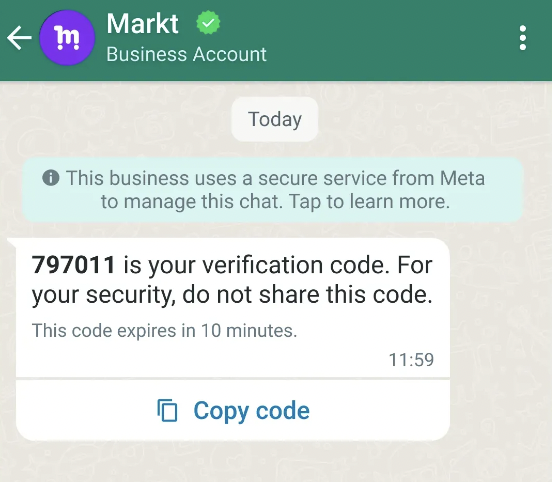
在此场景中,您将创建一个带有“复制验证码”按钮的身份验证模板:
* 通过将 `language` 设置为 `en_US` 来使用固定文本 *\ is your verification code.* 。所有代码请另见 [支持的语言](https://developers.facebook.com/docs/whatsapp/api/messages/message-templates#supported-languages)。
* 在文本末尾添加安全免责声明。
* 在页脚中包含过期警告。
#### 请求
```shell theme={"theme":{"light":"github-light","dark":"github-dark"}}
curl 'https://api.ycloud.com/v2/whatsapp/templates' \
-H 'Content-Type: application/json' \
-H 'X-API-Key: {{YOUR-API-KEY}}' \
-d '{
"wabaId": "{{WABA-ID}}",
"name": "otp_copy_code",
"language": "en_US",
"category": "AUTHENTICATION",
"messageSendTtlSeconds": 600,
"components": [
{
"type": "BODY",
"add_security_recommendation": true
},
{
"type": "FOOTER",
"code_expiration_minutes": 5
},
{
"type": "BUTTONS",
"buttons": [
{
"type": "OTP",
"otp_type": "COPY_CODE",
"text": "Copy Code"
}
]
}
]
}'
```
#### 响应
返回实际的模板正文文本和按钮。模板已自动获批(`status` 为 `APPROVED`)。
```json theme={"theme":{"light":"github-light","dark":"github-dark"}}
{
"wabaId": "{{WABA-ID}}",
"name": "otp_copy_code",
"language": "en_US",
"category": "AUTHENTICATION",
"messageSendTtlSeconds": 600,
"status": "APPROVED",
"components": [
{
"type": "BODY",
"text": "*{{1}}* is your verification code. For your security, do not share this code.",
"add_security_recommendation": true,
"example": {
"body_text": [
[
"123456"
]
]
}
},
{
"type": "FOOTER",
"text": "This code expires in 5 minutes.",
"code_expiration_minutes": 5
},
{
"type": "BUTTONS",
"buttons": [
{
"type": "URL",
"otp_type": "COPY_CODE",
"text": "Copy Code",
"url": "https://www.whatsapp.com/otp/code/?otp_type=COPY_CODE&code=otp{{1}}",
"example": [
"https://www.whatsapp.com/otp/code/?otp_type=COPY_CODE&code=otp123456"
]
}
]
}
]
}
```
#### 说明
* 带有 OTP 按钮的身份验证模板包含以下内容:
* 固定的 **预设文本**: *\ is your verification code.*
* 可选的 **安全免责声明**: *For your security, do not share this code.*
* 可选的 **过期警告**: *This code expires in\ minutes.*
* **复制代码** 按钮、 **一键自动填充** 按钮,或者如果使用 **零点击**则完全不配置按钮。
* “复制验证码”文本是可选的。如果省略,文本将默认为与模板语言相匹配的预设值。例如,英语(美国)为 *Copy Code* 。
* 不支持 URL、媒体和表情符号。由于带有 OTP 按钮的身份验证模板仅由预设文本和按钮组成,因此它们被暂停的风险已显著降低。
* 如果我们无法在超过消息存活时间的时间内送达消息,我们将停止重试并丢弃该消息。默认情况下,使用身份验证模板的消息默认 TTL 为 **10 分钟**,而使用实用工具或营销模板的消息默认 TTL 为 **30 天**。
对于身份验证模板,将其值设置为 `30` 到 `900` 秒之间(即 30 秒至 15 分钟);对于实用工具模板,设置为 `30` 到 `43200` 秒之间(即 30 秒至 12 小时);对于营销模板,设置为 `43200` 到 `2592000` 秒之间(即 12 小时至 30 天)。或者,您可以将此值设置为 `-1`,这将为任意类型的模板设置 30 天的自定义 TTL。
* 另请参阅发送[身份验证消息模板](/zh/api-reference/guides/examples/api-examples/whatsapp-messaging-examples#authentication-template-message-with-one-time-password-buttons)。
### 带一键式按钮的身份验证模板
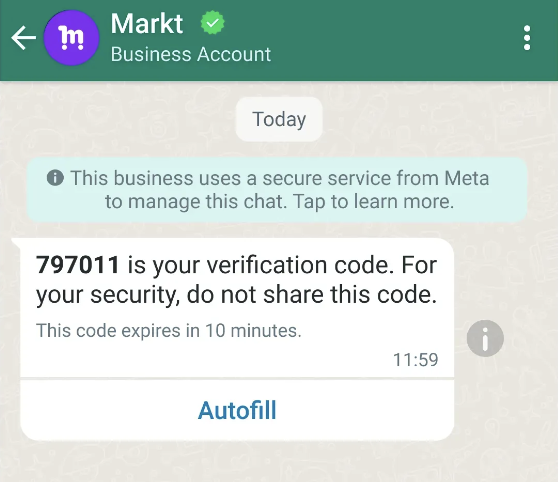
在此场景中,您将创建一个带有一键式按钮的身份验证模板:
* 通过将 `language` 设置为 `en_US` 来使用固定文本 *\ is your verification code.* 。
* 在文本末尾添加安全免责声明。
* 在页脚中包含过期警告。
* 包含“复制验证码”按钮文本和一键式按钮文本。
* 指定您的 Android 应用包名和签名哈希。
#### 请求
```shell theme={"theme":{"light":"github-light","dark":"github-dark"}}
curl 'https://api.ycloud.com/v2/whatsapp/templates' \
-H 'Content-Type: application/json' \
-H 'X-API-Key: {{YOUR-API-KEY}}' \
-d '{
"wabaId": "{{WABA-ID}}",
"name": "otp_one_tap",
"language": "en_US",
"category": "AUTHENTICATION",
"messageSendTtlSeconds": 600,
"components": [
{
"type": "BODY",
"add_security_recommendation": true
},
{
"type": "FOOTER",
"code_expiration_minutes": 5
},
{
"type": "BUTTONS",
"buttons": [
{
"type": "OTP",
"otp_type": "ONE_TAP",
"text": "Copy Code",
"autofill_text": "Autofill",
"supported_apps": [
{
"package_name": "com.example.myapplication",
"signature_hash": "K8aFAINcGX7"
}
]
}
]
}
]
}'
```
#### 响应
返回实际的模板正文文本和按钮。模板已自动获批(`status` 为 `APPROVED`)。
```json theme={"theme":{"light":"github-light","dark":"github-dark"}}
{
"wabaId": "{{WABA-ID}}",
"name": "otp_one_tap",
"language": "en_US",
"category": "AUTHENTICATION",
"messageSendTtlSeconds": 600,
"status": "APPROVED",
"components": [
{
"type": "BODY",
"text": "*{{1}}* is your verification code. For your security, do not share this code.",
"add_security_recommendation": true,
"example": {
"body_text": [
[
"123456"
]
]
}
},
{
"type": "FOOTER",
"text": "This code expires in 5 minutes.",
"code_expiration_minutes": 5
},
{
"type": "BUTTONS",
"buttons": [
{
"type": "URL",
"otp_type": "ONE_TAP",
"text": "Copy Code",
"autofill_text": "Autofill",
"supported_apps": [
{
"package_name": "com.example.myapplication",
"signature_hash": "K8aFAINcGX7"
}
],
"url": "https://www.whatsapp.com/otp/code/?otp_type=ONE_TAP&cta_display_name=Autofill&package_name=com.example.myapplication&signature_hash=K8aFAINcGX7&code=otp{{1}}",
"example": [
"https://www.whatsapp.com/otp/code/?otp_type=ONE_TAP&cta_display_name=Autofill&package_name=com.example.myapplication&signature_hash=K8aFAINcGX7&code=otp123456"
]
}
]
}
]
}
```
#### 说明
* 一键操作(one-tap)按钮是首选方案,因为它们能提供最佳的用户体验。不过,一键操作按钮目前仅在 Android 上受支持,并且需要修改应用的代码以执行“握手”,还需要您应用的应用签名密钥哈希(app signing key hash)。请参阅 [应用签名密钥哈希](https://developers.facebook.com/docs/whatsapp/business-management-api/authentication-templates/zero-tap-authentication-templates#app-signing-key-hash) 和 [握手](https://developers.facebook.com/docs/whatsapp/business-management-api/authentication-templates/autofill-button-authentication-templates#handshake)。
* 如果我们无法验证您的握手,身份验证消息模板将改为显示带有此文本的复制代码按钮。
* 复制代码文本和自动填充文本是可选的。如果省略,文本将默认为根据模板语言本地化的预设值。
* 另请参阅发送[身份验证消息模板](/zh/api-reference/guides/examples/api-examples/whatsapp-messaging-examples#authentication-template-message-with-one-time-password-buttons)。
### 零点击(Zero-tap)身份验证模板
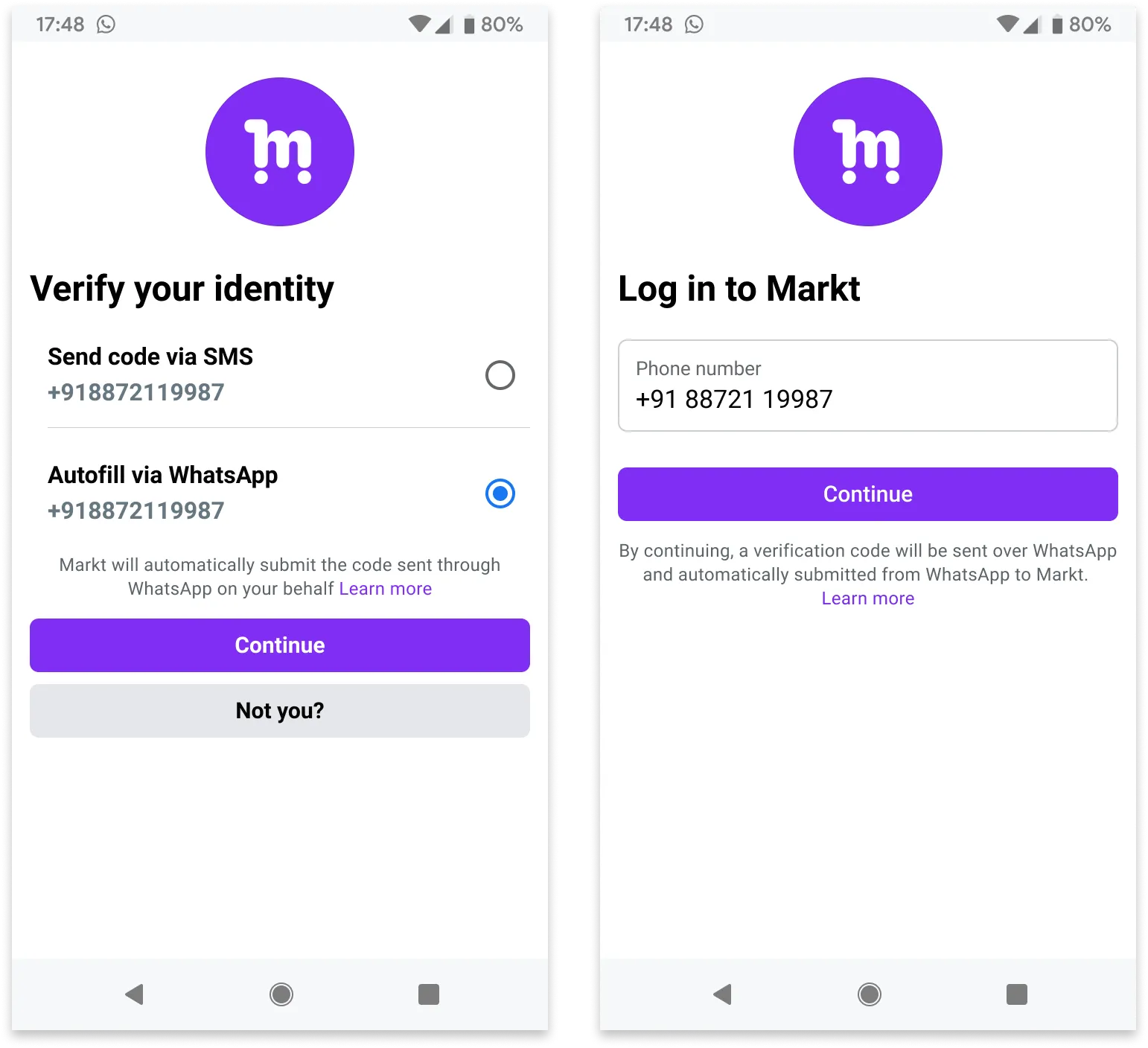
零点击身份验证模板允许您的用户通过 WhatsApp 接收一次性密码或验证码,而无需离开您的应用。
当应用中的用户请求密码或验证码,且您使用零点击身份验证模板发送时,WhatsApp 客户端会直接广播包含的密码或验证码,您的应用可以通过广播接收器立即捕获它。
从用户的角度来看,他们在您的应用中请求密码或验证码,它就会自动出现在您的应用中。如果应用用户恰好在 WhatsApp 客户端中查看该消息,他们只会看到一条显示默认固定文本的消息: *\ 是您的验证码。*
#### 请求
```shell theme={"theme":{"light":"github-light","dark":"github-dark"}}
curl 'https://api.ycloud.com/v2/whatsapp/templates' \
-H 'Content-Type: application/json' \
-H 'X-API-Key: {{YOUR-API-KEY}}' \
-d '{
"wabaId": "{{WABA-ID}}",
"name": "otp_zero_tap",
"language": "en_US",
"category": "AUTHENTICATION",
"messageSendTtlSeconds": 600,
"components": [
{
"type": "BODY",
"add_security_recommendation": true
},
{
"type": "FOOTER",
"code_expiration_minutes": 5
},
{
"type": "BUTTONS",
"buttons": [
{
"type": "OTP",
"otp_type": "ZERO_TAP",
"text": "Copy Code",
"autofill_text": "Autofill",
"supported_apps": [
{
"package_name": "com.example.myapplication",
"signature_hash": "K8aFAINcGX7"
}
],
"zero_tap_terms_accepted": true
}
]
}
]
}'
```
#### 响应
返回实际的模板正文文本和按钮。自动审核通过该模板(`status` 为 `APPROVED`)。
```json theme={"theme":{"light":"github-light","dark":"github-dark"}}
{
"wabaId": "{{WABA-ID}}",
"name": "otp_zero_tap",
"language": "en_US",
"category": "AUTHENTICATION",
"messageSendTtlSeconds": 600,
"status": "APPROVED",
"components": [
{
"type": "BODY",
"text": "*{{1}}* is your verification code. For your security, do not share this code.",
"add_security_recommendation": true,
"example": {
"body_text": [
[
"123456"
]
]
}
},
{
"type": "FOOTER",
"text": "This code expires in 5 minutes.",
"code_expiration_minutes": 5
},
{
"type": "BUTTONS",
"buttons": [
{
"type": "URL",
"otp_type": "ZERO_TAP",
"text": "Copy Code",
"autofill_text": "Autofill",
"supported_apps": [
{
"package_name": "com.example.myapplication",
"signature_hash": "K8aFAINcGX7"
}
],
"zero_tap_terms_accepted": true,
"url": "https://www.whatsapp.com/otp/code/?otp_type=ZERO_TAP&cta_display_name=Autofill&package_name=com.example.myapplication&signature_hash=K8aFAINcGX7&code=otp{{1}}",
"example": [
"https://www.whatsapp.com/otp/code/?otp_type=ZERO_TAP&cta_display_name=Autofill&package_name=com.example.myapplication&signature_hash=K8aFAINcGX7&code=otp123456"
]
}
]
}
]
}
```
#### 说明
* 零点击功能仅在 Android 上受支持。如果您向使用非 Android 设备的用户发送零点击身份验证模板,WhatsApp 客户端将改为显示复制代码按钮。请参阅 [应用签名密钥哈希](https://developers.facebook.com/docs/whatsapp/business-management-api/authentication-templates/zero-tap-authentication-templates#app-signing-key-hash) 和 [握手](https://developers.facebook.com/docs/whatsapp/business-management-api/authentication-templates/zero-tap-authentication-templates#handshake)。
* 复制代码文本和自动填充文本是可选的。如果省略,文本将默认为根据模板语言本地化的预设值。
* 另请参阅发送[身份验证消息模板](/zh/api-reference/guides/examples/api-examples/whatsapp-messaging-examples#authentication-template-message-with-one-time-password-buttons)。
### 正文中包含变量的服务模板
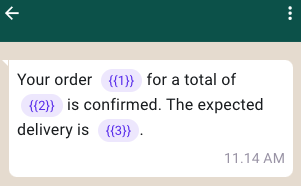
在此示例中,您创建了一个用于订单确认通知的模板:
* 正文中包含带有 3 个变量的文本。
* 无页眉。
* 无页脚。
* 无按钮。
#### 请求
```shell theme={"theme":{"light":"github-light","dark":"github-dark"}}
curl 'https://api.ycloud.com/v2/whatsapp/templates' \
-H 'Content-Type: application/json' \
-H 'X-API-Key: {{YOUR-API-KEY}}' \
-d '{
"wabaId": "{{WABA-ID}}",
"name": "order_confirmation",
"language": "en_US",
"category": "UTILITY",
"components": [
{
"type": "BODY",
"text": "Your order {{1}} for a total of {{2}} is confirmed. The expected delivery is {{3}}.",
"example": {
"body_text": [
[
"ORDER-5555",
"99 USD",
"February 25, 2023"
]
]
}
}
]
}'
```
#### 响应
请求成功后将返回模板资源及其当前审核状态。
```json theme={"theme":{"light":"github-light","dark":"github-dark"}}
{
"wabaId": "WABA_ID",
"name": "TEMPLATE_NAME",
"language": "en_US",
"category": "UTILITY",
"status": "PENDING"
}
```
使用返回的 `status` 来判断该模板是否可以发送。
#### 说明
* 模板由 `HEADER`、`BODY`、`FOOTER` 和 `BUTTONS` 组件组成。其中 `BODY` 组件是必需的,其他组件为可选。
* 模板变量是用于发送消息的占位符(用花括号括起来的数字),例如 `{{1}}`。发送消息时,您可以将这些占位符替换为实际值。有关发送 `template` 消息时如何使用变量的示例,另请参阅 [WhatsApp 消息发送示例](/zh/api-reference/guides/examples/api-examples/whatsapp-messaging-examples)。
* 变量参数在每个模板组件中必须按顺序连续编号。例如,定义了 `{{1}}`、`{{2}}`、`{{4}}`、`{{5}}` 但不存在 `{{3}}` 是无效的。
* 如果我们未能在超过生存时间(TTL)的时长内成功送达消息,我们将停止重试并丢弃该消息。默认情况下,使用身份验证模板的消息的默认 TTL 为 **10 分钟**,使用服务模板或营销模板的消息的默认 TTL 为 **30 天**。
对于身份验证模板,将其值设置为 `30` 到 `900` 秒之间(即 30 秒到 15 分钟);对于服务模板,设置为 `30` 到 `43200` 秒之间(即 30 秒到 12 小时);对于营销模板,设置为 `43200` 到 `2592000` 秒之间(即 12 小时到 30 天)。或者,您可以将此值设置为 `-1`,这将为任意类型的模板设置 30 天的自定义 TTL。
* 另请参阅[常见拒绝原因](https://developers.facebook.com/docs/whatsapp/message-templates/guidelines#common-rejection-reasons)。
* 另请参阅发送[带变量的消息模板](/zh/api-reference/guides/examples/api-examples/whatsapp-messaging-examples#template-message-with-variables)。
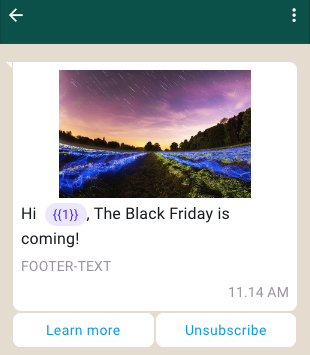
### 包含图片和快速回复按钮的营销模板
在此示例中,您创建了一个用于特定活动的模板:
* 页眉中包含一张图片。
* 正文中包含带有 1 个变量的文本。
* 页脚中包含文本。
* 包含 2 个快速回复按钮。
#### 请求
```shell theme={"theme":{"light":"github-light","dark":"github-dark"}}
curl 'https://api.ycloud.com/v2/whatsapp/templates' \
-H 'Content-Type: application/json' \
-H 'X-API-Key: {{YOUR-API-KEY}}' \
-d '{
"wabaId": "{{WABA-ID}}",
"name": "marketing_friday",
"language": "en_US",
"category": "MARKETING",
"components": [
{
"type": "HEADER",
"format": "IMAGE",
"example": {
"header_url": [
"https://oss-ycloud-publicread.oss-ap-southeast-1.aliyuncs.com/api-docs/sample/sample.jpg"
]
}
},
{
"type": "BODY",
"text": "Hi {{1}}, The Black Friday is coming!",
"example": {
"body_text": [
[
"Joe"
]
]
}
},
{
"type": "FOOTER",
"text": "FOOTER-TEXT"
},
{
"type": "BUTTONS",
"buttons": [
{
"type": "QUICK_REPLY",
"text": "Learn more"
},
{
"type": "QUICK_REPLY",
"text": "Unsubscribe"
}
]
}
]
}'
```
#### 响应
请求成功后将返回模板资源及其当前审核状态。
```json theme={"theme":{"light":"github-light","dark":"github-dark"}}
{
"wabaId": "WABA_ID",
"name": "TEMPLATE_NAME",
"language": "en_US",
"category": "UTILITY",
"status": "PENDING"
}
```
使用返回的 `status` 来判断该模板是否可以发送。
#### 说明
* `HEADER` 组件格式可以是 `TEXT`、`IMAGE`、`VIDEO` 或 `DOCUMENT` 之一。对于 `TEXT`,您需要在 `example.header_text` 中提供示例文本。对于其他媒体格式(即 `IMAGE`、`VIDEO` 或 `DOCUMENT`),您需要在 `example.header_url` 中提供示例 URL。
* `FOOTER` 组件只能是文本,不支持变量。
* 对于页眉中的图片媒体,消息发送请求的 `example.header_url` 必须以 `.jpg`、`.jpeg` 或 `.png` 之一结尾。图片大小限制为 5MB。
* 对于页眉中的视频媒体,请求负载的 `example.header_url` 必须以 `.mp4` 结尾。视频大小限制为 16MB。
* 对于页眉中的文档媒体,请求负载的 `example.header_url` 必须以 `.pdf` 结尾。文档大小限制为 100MB。
* 按钮是可选的互动组件,在点击时会执行特定操作。模板总共最多可以包含 10 个混合按钮组件,但对相同类型的单独按钮以及组合均有限制。
* 快速回复按钮是自定义纯文本按钮,应用用户点击后会立即向您发送指定的文本字符串。模板最多支持 10 个快速回复按钮。如果快速回复按钮与其他按钮一起使用,按钮必须分为两组:快速回复按钮和非快速回复按钮。如果分组不正确,API 将返回表示组合无效的错误。
有效分组示例:
* 快速回复、快速回复
* 快速回复、快速回复、URL、电话
* URL、电话、快速回复、快速回复
无效分组示例:
* 快速回复、URL、快速回复
* URL、快速回复、URL
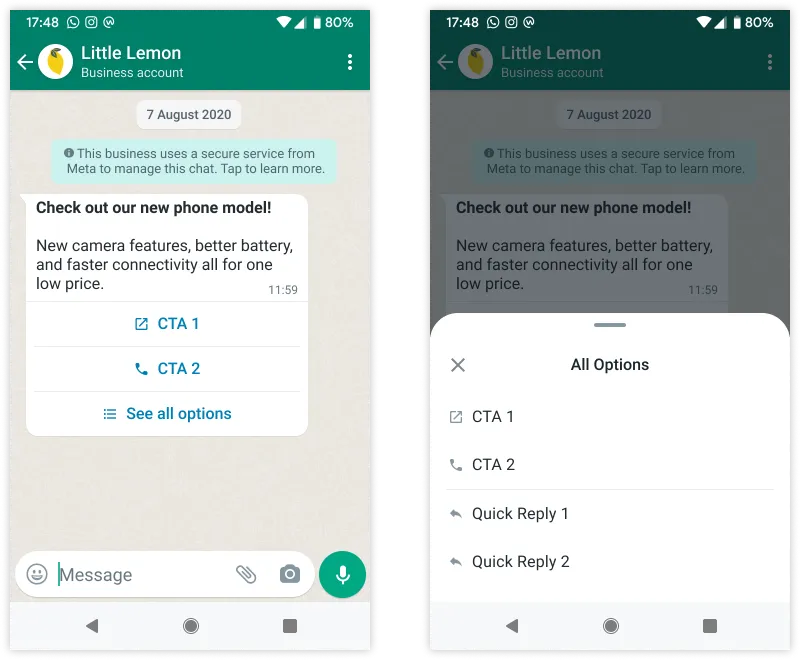
* 如果模板包含超过三个按钮,送达的消息中将显示两个按钮,其余按钮将被替换为“查看所有选项”按钮。点击“查看所有选项”按钮将展开显示其余按钮。
* 另请参阅发送[带有图片和快速回复按钮的模板消息](/zh/api-reference/guides/examples/api-examples/whatsapp-messaging-examples#template-message-with-image-and-quick-reply-buttons)。
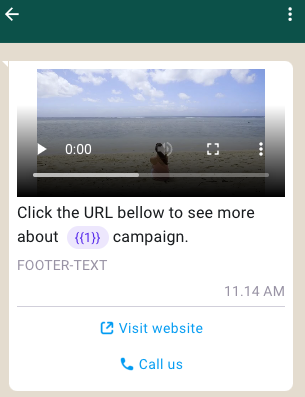
### 包含视频和行动号召按钮的营销模板
在此情况下,您为特定营销活动创建一个模板:
* 页眉中包含视频。
* 正文中包含带有 1 个变量的文本。
* 页脚中包含文本。
* 包含 2 个行动号召按钮:1 个 `PHONE_NUMBER` 按钮和 1 个 `URL` 按钮。`URL` 按钮在 URL 末尾最多可以包含 1 个变量。
#### 请求
```shell theme={"theme":{"light":"github-light","dark":"github-dark"}}
curl 'https://api.ycloud.com/v2/whatsapp/templates' \
-H 'Content-Type: application/json' \
-H 'X-API-Key: {{YOUR-API-KEY}}' \
-d '{
"wabaId": "{{WABA-ID}}",
"name": "marketing_friday_more",
"language": "en_US",
"category": "MARKETING",
"components": [
{
"type": "HEADER",
"format": "VIDEO",
"example": {
"header_url": [
"https://oss-ycloud-publicread.oss-ap-southeast-1.aliyuncs.com/api-docs/sample/sample.mp4"
]
}
},
{
"type": "BODY",
"text": "Click the URL bellow to see more about {{1}} campaign.",
"example": {
"body_text": [
[
"The Friday"
]
]
}
},
{
"type": "FOOTER",
"text": "FOOTER-TEXT"
},
{
"type": "BUTTONS",
"buttons": [
{
"type": "URL",
"text": "Visit website",
"url": "https://www.youtube.com/watch?v={{1}}",
"example": [
"https://www.youtube.com/watch?v=zvI4cVGWJhM"
]
},
{
"type": "PHONE_NUMBER",
"text": "Call us",
"phone_number": "+447901614024"
}
]
}
]
}'
```
#### 响应
成功的请求将返回模板资源及其当前审核状态。
```json theme={"theme":{"light":"github-light","dark":"github-dark"}}
{
"wabaId": "WABA_ID",
"name": "TEMPLATE_NAME",
"language": "en_US",
"category": "UTILITY",
"status": "PENDING"
}
```
使用返回的 `status` 来判断该模板是否可以发送。
#### 说明
* 电话号码按钮在应用用户点击时会拨打指定的商家电话号码。模板限制只能包含一个电话号码按钮。
* URL 按钮在应用用户点击时会在设备的默认网络浏览器中加载指定的 URL。模板限制最多包含两个 URL 按钮。
* **设置动态 `URL` 按钮(在 URL 末尾包含变量)时,您应该在 `example` 中提供完整的 URL,而不是仅提供变量的示例值。**
* 另请参阅发送[带有视频和行动号召按钮的模板消息](/zh/api-reference/guides/examples/api-examples/whatsapp-messaging-examples#template-message-with-video-and-call-to-action-buttons)。
### 优惠券模板
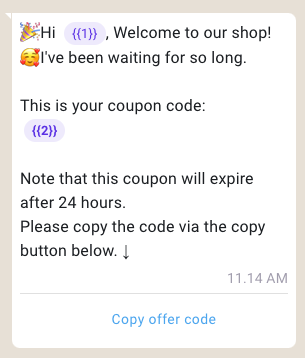
优惠券代码模板是显示单个复制代码按钮的营销模板。点击后,代码会被复制到客户的剪贴板。
在此情况下,您为特定营销活动创建优惠券代码模板:
* 正文中包含带有 2 个变量的文本。
* 包含一个复制代码按钮,以便客户复制优惠券代码。
#### 请求
```shell theme={"theme":{"light":"github-light","dark":"github-dark"}}
curl 'https://api.ycloud.com/v2/whatsapp/templates' \
-H 'Content-Type: application/json' \
-H 'X-API-Key: {{YOUR-API-KEY}}' \
-d '{
"wabaId": "{{WABA-ID}}",
"name": "marketing_coupon",
"language": "en_US",
"category": "MARKETING",
"components": [
{
"type": "BODY",
"text": "🎉Hi {{1}}, Welcome to our shop!\n🥰I'\''ve been waiting for so long. \n\nThis is your coupon code:\n*{{2}}*\n\nNote that this coupon will expire after 24 hours. \nPlease copy the code via the copy button below. ↓",
"example": {
"body_text": [
[
"Mike",
"12312393"
]
]
}
},
{
"type": "BUTTONS",
"buttons": [
{
"type": "COPY_CODE",
"example": [
"12312393"
]
}
]
}
]
}'
```
#### 响应
成功的请求将返回模板资源及其当前审核状态。
```json theme={"theme":{"light":"github-light","dark":"github-dark"}}
{
"wabaId": "WABA_ID",
"name": "TEMPLATE_NAME",
"language": "en_US",
"category": "UTILITY",
"status": "PENDING"
}
```
使用返回的 `status` 来判断该模板是否可以发送。
#### 说明
* 复制代码按钮在应用用户点击时会将文本字符串(在通过模板消息发送模板时定义)复制到设备剪贴板。模板限制只能包含一个复制代码按钮。
* 按钮文本为预设值,无法自定义。
* 另请参阅发送[优惠券模板消息](/zh/api-reference/guides/examples/api-examples/whatsapp-messaging-examples#coupon-template-message)。
### 位置模板
您可以在归类为 `UTILITY` 或 `MARKETING` 的模板中添加位置页眉。位置页眉在模板顶部显示为通用地图,适用于订单追踪、配送更新、网约车接送、实体店定位等场景。
#### 请求
```shell theme={"theme":{"light":"github-light","dark":"github-dark"}}
curl 'https://api.ycloud.com/v2/whatsapp/templates' \
-H 'Content-Type: application/json' \
-H 'X-API-Key: {{YOUR-API-KEY}}' \
-d '{
"wabaId": "{{WABA-ID}}",
"name": "location_header",
"language": "en_US",
"category": "UTILITY",
"components": [
{
"type": "HEADER",
"format": "LOCATION"
},
{
"type": "BODY",
"text": "Click and see our location"
}
]
}'
```
#### 响应
成功的请求将返回模板资源及其当前审核状态。
```json theme={"theme":{"light":"github-light","dark":"github-dark"}}
{
"wabaId": "WABA_ID",
"name": "TEMPLATE_NAME",
"language": "en_US",
"category": "UTILITY",
"status": "PENDING"
}
```
使用返回的 `status` 来判断该模板是否可以发送。
#### 说明
* 发送此模板时请提供位置的经度和纬度。另请参阅[位置模板消息](/zh/api-reference/guides/examples/api-examples/whatsapp-messaging-examples#location-template-message)。
### 限时特惠模板
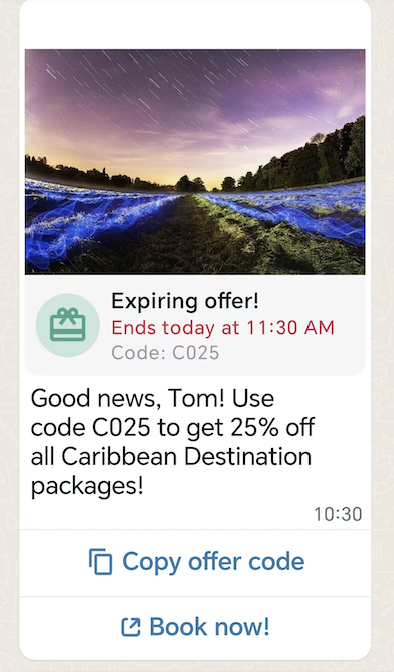
在此情况下,您为特定营销活动创建限时特惠 (LTO) 模板:
* 页眉中包含图片。
* 显示优惠代码的到期日期和动态倒计时计时器。
* 正文中包含带有 2 个变量的文本。
* 包含 2 个按钮:1 个 `COPY_CODE` 按钮和 1 个 `URL` 按钮。
#### 请求
```shell theme={"theme":{"light":"github-light","dark":"github-dark"}}
curl 'https://api.ycloud.com/v2/whatsapp/templates' \
-H 'Content-Type: application/json' \
-H 'X-API-Key: {{YOUR-API-KEY}}' \
-d '{
"wabaId": "{{WABA-ID}}",
"name": "limited_time_offer_caribbean_pkg_2023",
"language": "en_US",
"category": "MARKETING",
"components": [
{
"type": "HEADER",
"format": "IMAGE",
"example": {
"header_url": [
"https://oss-ycloud-publicread.oss-ap-southeast-1.aliyuncs.com/api-docs/sample/sample.jpg"
]
}
},
{
"type": "LIMITED_TIME_OFFER",
"limited_time_offer": {
"text": "Expiring offer!",
"has_expiration": true
}
},
{
"type": "BODY",
"text": "Good news, {{1}}! Use code {{2}} to get 25% off all Caribbean Destination packages!",
"example": {
"body_text": [
[
"Pablo",
"CARIBE25"
]
]
}
},
{
"type": "BUTTONS",
"buttons": [
{
"type": "COPY_CODE",
"example": [
"CARIBE25"
]
},
{
"type": "URL",
"text": "Book now!",
"url": "https://awesomedestinations.com/offers?code={{1}}",
"example": [
"https://awesomedestinations.com/offers?ref=n3mtql"
]
}
]
}
]
}'
```
#### 响应
请求成功后将返回模板资源及其当前的审核状态。
```json theme={"theme":{"light":"github-light","dark":"github-dark"}}
{
"wabaId": "WABA_ID",
"name": "TEMPLATE_NAME",
"language": "en_US",
"category": "UTILITY",
"status": "PENDING"
}
```
使用返回的 `status` 来判断模板是否可以发送。
#### 说明
* 仅支持分类为 `MARKETING` 的模板。
* 不支持页脚组件。
* 使用 WhatsApp 网页版或桌面端应用查看限时特惠模板消息的用户将无法看到优惠内容,而是会看到一条提示消息,说明他们收到了一条消息,但当前使用的客户端不支持该消息类型。
* 另请参阅发送[限时特惠模板消息](/zh/api-reference/guides/examples/api-examples/whatsapp-messaging-examples#limited-time-offer-template-message)。
### 轮播模板
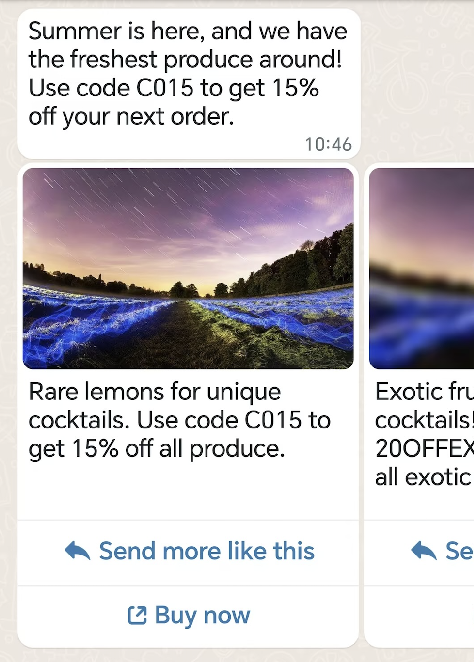
在此示例中,你将为特定营销活动创建一个轮播模板:
* 正文中包含带有 2 个变量的文本。
* 在水平可滚动的视图中包含 2 个轮播卡片。
#### 请求
```shell theme={"theme":{"light":"github-light","dark":"github-dark"}}
curl 'https://api.ycloud.com/v2/whatsapp/templates' \
-H 'Content-Type: application/json' \
-H 'X-API-Key: {{YOUR-API-KEY}}' \
-d '{
"wabaId": "{{WABA-ID}}",
"name": "summer_carousel_promo_2023",
"language": "en_US",
"category": "MARKETING",
"components": [
{
"type": "BODY",
"text": "Summer is here, and we have the freshest produce around! Use code {{1}} to get {{2}} off your next order.",
"example": {
"body_text": [
[
"15OFF",
"15%"
]
]
}
},
{
"type": "CAROUSEL",
"cards": [
{
"components": [
{
"type": "HEADER",
"format": "IMAGE",
"example": {
"header_url": [
"https://oss-ycloud-publicread.oss-ap-southeast-1.aliyuncs.com/api-docs/sample/sample.jpg"
]
}
},
{
"type": "BODY",
"text": "Rare lemons for unique cocktails. Use code {{1}} to get {{2}} off all produce.",
"example": {
"body_text": [
[
"15OFF",
"15%"
]
]
}
},
{
"type": "BUTTONS",
"buttons": [
{
"type": "QUICK_REPLY",
"text": "Send more like this"
},
{
"type": "URL",
"text": "Buy now",
"url": "https://www.luckyshrub.com/shop?promo={{1}}",
"example": [
"https://www.luckyshrub.com/shop?promo=summer_lemons_2023"
]
}
]
}
]
},
{
"components": [
{
"type": "HEADER",
"format": "IMAGE",
"example": {
"header_url": [
"https://oss-ycloud-publicread.oss-ap-southeast-1.aliyuncs.com/api-docs/sample/sample.jpg"
]
}
},
{
"type": "BODY",
"text": "Exotic fruit for unique cocktails! Use code {{1}} to get {{2}} off all exotic produce.",
"example": {
"body_text": [
[
"20OFFEXOTIC",
"20%"
]
]
}
},
{
"type": "BUTTONS",
"buttons": [
{
"type": "QUICK_REPLY",
"text": "Send more like this"
},
{
"type": "URL",
"text": "Buy now",
"url": "https://www.luckyshrub.com/shop?promo={{1}}",
"example": [
"https://www.luckyshrub.com/shop?promo=exotic_produce_2023"
]
}
]
}
]
}
]
}
]
}'
```
#### 响应
请求成功后将返回模板资源及其当前的审核状态。
```json theme={"theme":{"light":"github-light","dark":"github-dark"}}
{
"wabaId": "WABA_ID",
"name": "TEMPLATE_NAME",
"language": "en_US",
"category": "UTILITY",
"status": "PENDING"
}
```
使用返回的 `status` 来判断模板是否可以发送。
#### 说明
* 消息气泡为必填项。消息气泡仅支持纯文本并支持变量。变量没有最大字符数限制,但会计入消息气泡 1024 个字符的上限。
* 卡片正文文本支持变量。最多 160 个字符。
* 轮播模板最多支持 10 个轮播卡片。卡片必须包含媒体标头(图片或视频)、正文文本以及至少一个按钮。最多支持 2 个按钮。按钮可以相同,也可以是快速回复按钮、电话号码按钮或 URL 按钮的组合。
* 构成轮播模板的所有卡片中的媒体标头格式和按钮必须保持一致。
* 媒体素材将根据客户的设备裁剪为宽屏比例。
* 另请参阅发送[轮播模板消息](/zh/api-reference/guides/examples/api-examples/whatsapp-messaging-examples#carousel-template-message)。
### 目录模板
目录模板是一种营销模板,可让你完全在 WhatsApp 内展示产品目录。目录模板会显示你选择的产品缩略图标头图片和自定义正文文本,以及固定的文本标头和固定的文本副标头。
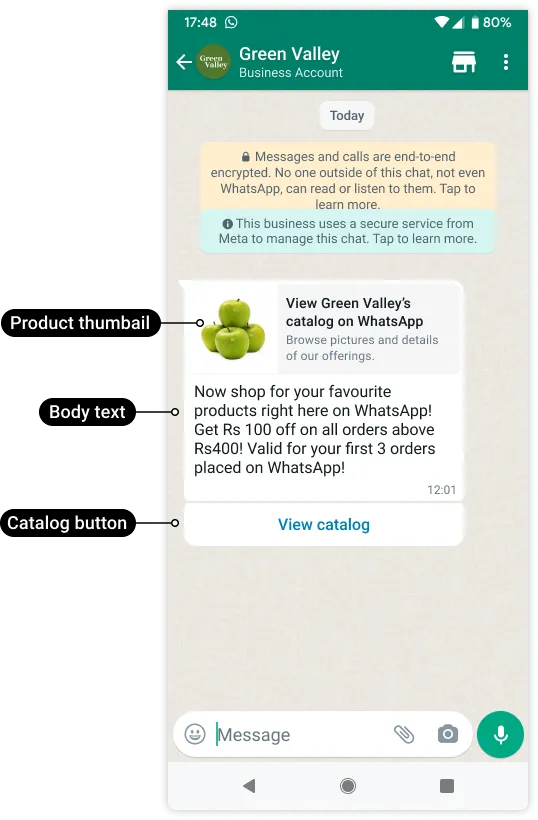
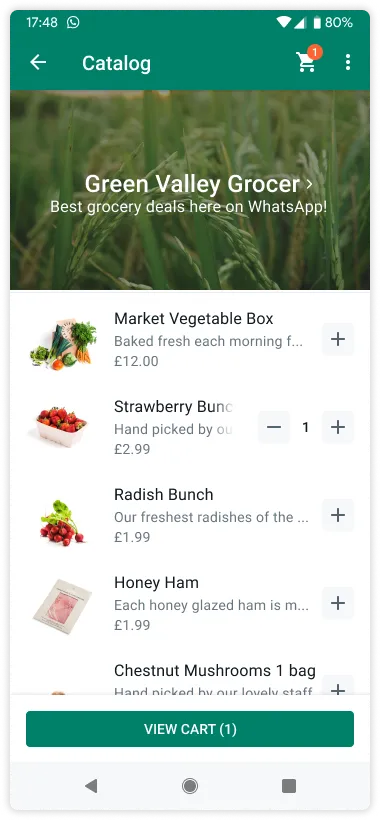
当客户点击目录模板消息中的 **查看目录** 按钮时,你的产品目录将直接在 WhatsApp 内显示。
#### 请求
```shell theme={"theme":{"light":"github-light","dark":"github-dark"}}
curl 'https://api.ycloud.com/v2/whatsapp/templates' \
-H 'Content-Type: application/json' \
-H 'X-API-Key: {{YOUR-API-KEY}}' \
-d '{
"wabaId": "{{WABA-ID}}",
"name": "intro_catalog_offer",
"language": "en_US",
"category": "MARKETING",
"components": [
{
"type": "BODY",
"text": "Now shop for your favourite products right here on WhatsApp! Get Rs {{1}} off on all orders above {{2}}Rs! Valid for your first {{3}} orders placed on WhatsApp!",
"example": {
"body_text": [
[
"100",
"400",
"3"
]
]
}
},
{
"type": "FOOTER",
"text": "Best grocery deals on WhatsApp!"
},
{
"type": "BUTTONS",
"buttons": [
{
"type": "CATALOG",
"text": "View catalog"
}
]
}
]
}'
```
#### 响应
请求成功后将返回模板资源及其当前的审核状态。
```json theme={"theme":{"light":"github-light","dark":"github-dark"}}
{
"wabaId": "WABA_ID",
"name": "TEMPLATE_NAME",
"language": "en_US",
"category": "UTILITY",
"status": "PENDING"
}
```
使用返回的 `status` 来判断模板是否可以发送。
#### 说明
* 你必须已将[库存上传到 Meta](https://developers.facebook.com/docs/whatsapp/cloud-api/guides/sell-products-and-services/upload-inventory),且该库存位于[已关联到 WhatsApp 商业账户](https://www.facebook.com/business/help/158662536425974)的电商目录中。
* 按商业电话号码分别启用购物车和产品目录。默认情况下,与 WhatsApp 商业账户关联的所有商业电话号码均已启用购物车,且店面图标处于隐藏状态。使用 [Update commerce settings](https://docs.ycloud.com/reference/whatsapp_phone_number-update-commerce-settings) 端点可以启用或禁用这些功能。
* `CATALOG` 按钮的文本不可修改,且必须始终为 **View catalog**。
* 另请参阅发送[目录模板消息](/zh/api-reference/guides/examples/api-examples/whatsapp-messaging-examples#catalog-template-message)。
### 多产品消息模板
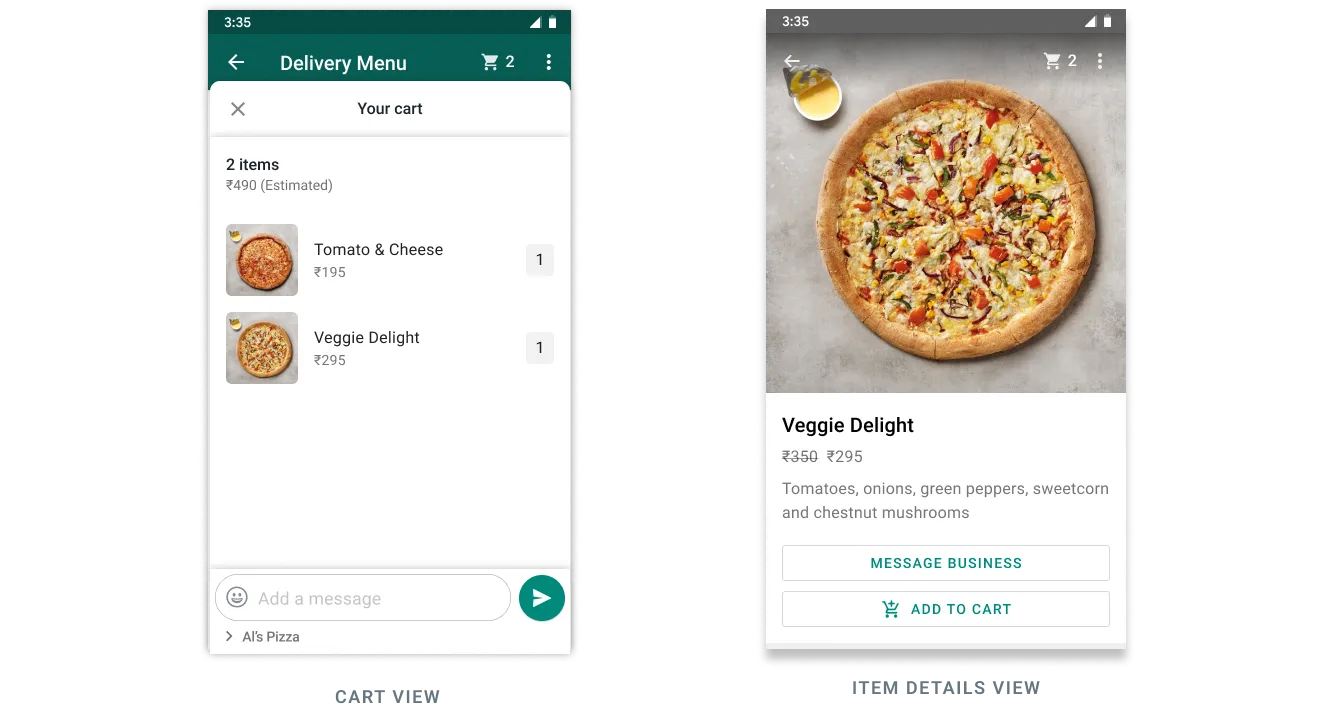
MPM 模板可用于发起营销对话。它们允许你在单条消息中展示电商目录中最多 30 种产品,并最多分为 10 个分区。
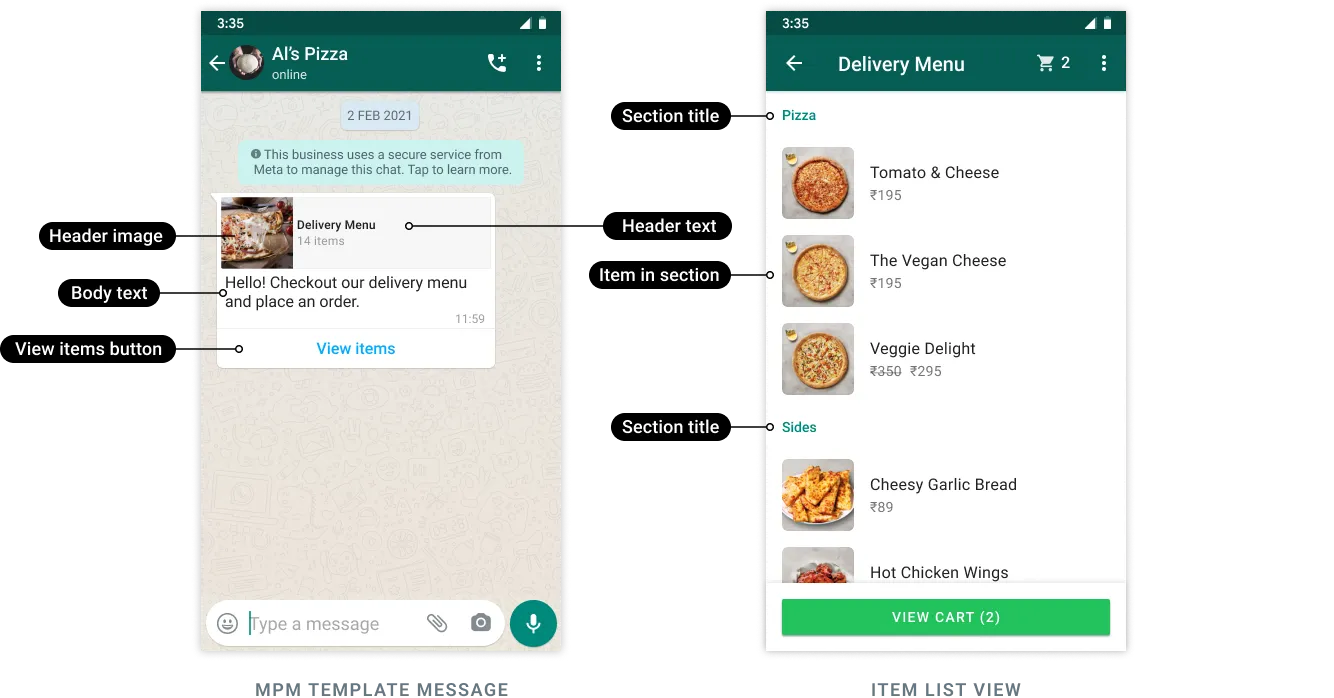
客户可以在消息内浏览产品和分区、查看每个产品的详细信息、在购物车中添加和移除产品,并提交购物车完成下单。订单随后会通过 Webhook 发送给你。
#### 请求
```shell theme={"theme":{"light":"github-light","dark":"github-dark"}}
curl 'https://api.ycloud.com/v2/whatsapp/templates' \
-H 'Content-Type: application/json' \
-H 'X-API-Key: {{YOUR-API-KEY}}' \
-d '{
"wabaId": "{{WABA-ID}}",
"name": "abandoned_cart",
"language": "en_US",
"category": "MARKETING",
"components": [
{
"type": "HEADER",
"format": "TEXT",
"text": "Forget something, {{1}}?",
"example": {
"header_text": [
"Pablo"
]
}
},
{
"type": "BODY",
"text": "Looks like you left these items in your cart, still interested? Use code {{1}} to get 10% off!",
"example": {
"body_text": [
[
"10OFF"
]
]
}
},
{
"type": "BUTTONS",
"buttons": [
{
"type": "MPM",
"text": "View items"
}
]
}
]
}'
```
#### 响应
请求成功后将返回模板资源及其当前的审核状态。
```json theme={"theme":{"light":"github-light","dark":"github-dark"}}
{
"wabaId": "WABA_ID",
"name": "TEMPLATE_NAME",
"language": "en_US",
"category": "UTILITY",
"status": "PENDING"
}
```
使用返回的 `status` 来判断模板是否可以发送。
#### 说明
* 你必须已将[库存上传到 Meta](https://developers.facebook.com/docs/whatsapp/cloud-api/guides/sell-products-and-services/upload-inventory),且该库存位于[已关联到 WhatsApp 商业账户](https://www.facebook.com/business/help/158662536425974)的电商目录中。
* 按商业电话号码分别启用购物车和产品目录。默认情况下,与 WhatsApp 商业账户关联的所有商业电话号码均已启用购物车,且店面图标处于隐藏状态。使用 [Update commerce settings](https://docs.ycloud.com/reference/whatsapp_phone_number-update-commerce-settings) 端点可以启用或禁用这些功能。
* `components` 的值必须是描述构成模板的各个组件的对象数组。MPM 模板必须包含以下组件:
* 单个标头组件
* 单个正文组件
* 单个页脚组件(可选)
* 单个 MPM 按钮组件
* `MPM` 按钮的文本不可修改,且必须始终为 **View items**。
* 另请参阅发送 [MPM 模板消息](/zh/api-reference/guides/examples/api-examples/whatsapp-messaging-examples#mpm-template-message)。
### Flow 模板
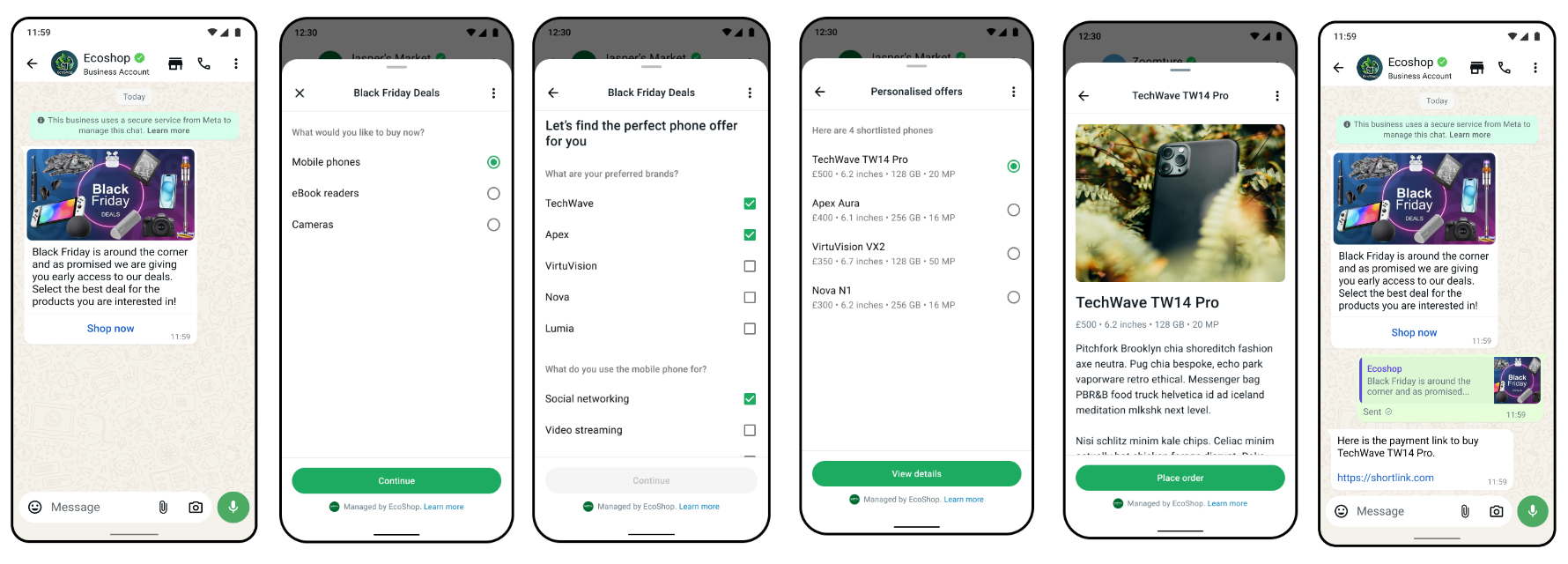
[WhatsApp Flows](https://developers.facebook.com/docs/whatsapp/flows) 是一种为商业消息构建结构化交互的方式。借助 Flows,企业可以通过丰富的交互来定义、配置和自定义消息,从而为客户提供更具结构化的沟通方式。
您可以使用 Flows 来收集潜在客户线索、推荐产品、获取新销售线索,或用于任何结构化沟通对客户而言更自然或更舒适的场景。
#### 请求
```shell theme={"theme":{"light":"github-light","dark":"github-dark"}}
curl 'https://api.ycloud.com/v2/whatsapp/templates' \
-H 'Content-Type: application/json' \
-H 'X-API-Key: {{YOUR-API-KEY}}' \
-d '{
"wabaId": "{{WABA-ID}}",
"name": "example_template_name",
"language": "en_US",
"category": "MARKETING",
"components": [
{
"type": "BODY",
"text": "This is a flows as template demo"
},
{
"type": "BUTTONS",
"buttons": [
{
"type": "FLOW",
"text": "Open flow!",
"flow_id": "{{FLOW-ID}}",
"navigate_screen": "{{SCREEN-ID}}",
"flow_action": "navigate"
}
]
}
]
}'
```
#### 响应
请求成功后将返回模板资源及其当前的审核状态。
```json theme={"theme":{"light":"github-light","dark":"github-dark"}}
{
"wabaId": "WABA_ID",
"name": "TEMPLATE_NAME",
"language": "en_US",
"category": "UTILITY",
"status": "PENDING"
}
```
使用返回的 `status` 来确定是否可以发送该模板。
#### 说明
* 要使用 [WhatsApp Flows](https://developers.facebook.com/docs/whatsapp/flows),您需要[验证您的企业](https://developers.facebook.com/docs/development/release/business-verification)、完成[显示名称审核流程](https://developers.facebook.com/docs/whatsapp/cloud-api/phone-numbers#display-names)并保持[高质量的消息评级](https://developers.facebook.com/docs/whatsapp/messaging-limits#messaging-quality)。
* 创建模板需要 Flow ID。如需使用 Flows 构建器界面创建新的 WhatsApp Flow,请参阅[此视频](https://www.youtube.com/watch?v=gx_QGaSLoOA)。
* 有关发送 Flow 模板消息的信息,请参阅 [Flow 模板消息](/zh/api-reference/guides/examples/api-examples/whatsapp-messaging-examples#flow-template-message)。
### 订单详情模板
订单详情消息模板是一种交互式消息模板,它扩展了号召性用语按钮以支持将订单详情作为模板发送,与标准消息模板相比可提供更丰富的体验。
订单详情模板归类为 `UTILITY` 模板,除所选名称和语言外,它还包含通用模板组件,例如 `HEADER`、`BODY`、`FOOTER` 以及类型为 `ORDER_DETAILS` 且文本为 `Review and Pay` 的固定 `BUTTON`。
#### 请求
```shell theme={"theme":{"light":"github-light","dark":"github-dark"}}
curl 'https://api.ycloud.com/v2/whatsapp/templates' \
-H 'Content-Type: application/json' \
-H 'X-API-Key: {{YOUR-API-KEY}}' \
-d '{
"wabaId": "{{WABA-ID}}",
"name": "order_details_example",
"language": "en_US",
"category": "UTILITY",
"components": [
{
"type": "HEADER",
"format": "TEXT",
"text": "Header text"
},
{
"type": "BODY",
"text": "Template Body text"
},
{
"type": "FOOTER",
"text": "Footer text"
},
{
"type": "BUTTONS",
"buttons": [
{
"type": "ORDER_DETAILS",
"text": "Review and Pay"
}
]
}
]
}'
```
#### 响应
请求成功后将返回模板资源及其当前的审核状态。
```json theme={"theme":{"light":"github-light","dark":"github-dark"}}
{
"wabaId": "WABA_ID",
"name": "TEMPLATE_NAME",
"language": "en_US",
"category": "UTILITY",
"status": "PENDING"
}
```
使用返回的 `status` 来确定是否可以发送该模板。
#### 说明
* 必须包含一个按钮,其中 `type` 为 `ORDER_DETAILS` 且 `text` 为 `Review and Pay`。
* 另请参阅发送[订单详情模板消息](/zh/api-reference/guides/examples/api-examples/whatsapp-messaging-examples#order-details-template-message)。
### 订单状态模板
订单状态模板是一种交互式消息模板,它扩展了号召性用语按钮以支持通过模板更新订单状态。它允许企业在客户会话窗口之外更新订单状态,适用于对历史订单扣款以及更新历史订单物流状态等场景。
#### 请求
```shell theme={"theme":{"light":"github-light","dark":"github-dark"}}
curl 'https://api.ycloud.com/v2/whatsapp/templates' \
-H 'Content-Type: application/json' \
-H 'X-API-Key: {{YOUR-API-KEY}}' \
-d '{
"wabaId": "{{WABA-ID}}",
"name": "order_status_example",
"language": "en_US",
"category": "UTILITY",
"subCategory": "ORDER_STATUS",
"components": [
{
"type": "BODY",
"text": "Template Body text"
},
{
"type": "FOOTER",
"text": "Footer text"
}
]
}'
```
#### 响应
请求成功后将返回模板资源及其当前的审核状态。
```json theme={"theme":{"light":"github-light","dark":"github-dark"}}
{
"wabaId": "WABA_ID",
"name": "TEMPLATE_NAME",
"language": "en_US",
"category": "UTILITY",
"status": "PENDING"
}
```
使用返回的 `status` 来确定是否可以发送该模板。
#### 说明
* 必须将 `category` 设置为 `UTILITY`,并将 `subCategory` 设置为 `ORDER_STATUS`。
* 另请参阅发送[订单状态模板消息](/zh/api-reference/guides/examples/api-examples/whatsapp-messaging-examples#order-status-template-message)。
### 语音通话模板
支持一种新的按钮类型 `VOICE_CALL`,WhatsApp 用户点击该按钮时将发起 WhatsApp 通话。通常,该按钮可以用于可以使用现有电话号码按钮的任何位置。
#### 请求
```shell theme={"theme":{"light":"github-light","dark":"github-dark"}}
curl 'https://api.ycloud.com/v2/whatsapp/templates' \
-H 'Content-Type: application/json' \
-H 'X-API-Key: {{YOUR-API-KEY}}' \
-d '{
"wabaId": "{{WABA-ID}}",
"name": "voice_call_example",
"language": "en_US",
"category": "UTILITY",
"components": [
{
"type": "BODY",
"text": "You can call us on WhatsApp now for faster service!"
},
{
"type": "BUTTONS",
"buttons": [
{
"type": "VOICE_CALL",
"text": "Call Now"
},
{
"type": "URL",
"text": "Contact Support",
"url": "https://www.luckyshrub.com/support"
}
]
}
]
}'
```
#### 响应
请求成功后将返回模板资源及其当前的审核状态。
```json theme={"theme":{"light":"github-light","dark":"github-dark"}}
{
"wabaId": "WABA_ID",
"name": "TEMPLATE_NAME",
"language": "en_US",
"category": "UTILITY",
"status": "PENDING"
}
```
使用返回的 `status` 来确定是否可以发送该模板。
#### 说明
* 使用 WhatsApp 语音通话按钮创建模板后,您可以直接使用现有的 API 而无需做任何更改,因为 `voice_call` 按钮在发送消息时不可配置。
* 另请参阅发送[交互式语音通话消息](/zh/api-reference/guides/examples/api-examples/whatsapp-messaging-examples#interactive-voice-call-message)
### 结账按钮模板
结账按钮模板是营销模板,可以展示一个或多个产品以及对应的结账按钮,WhatsApp 用户无需离开 WhatsApp 客户端即可完成购买。结账按钮模板可以显示单个产品图片或视频页眉,以及消息正文文本、消息页脚、单个结账按钮和最多 9 个快捷回复按钮。
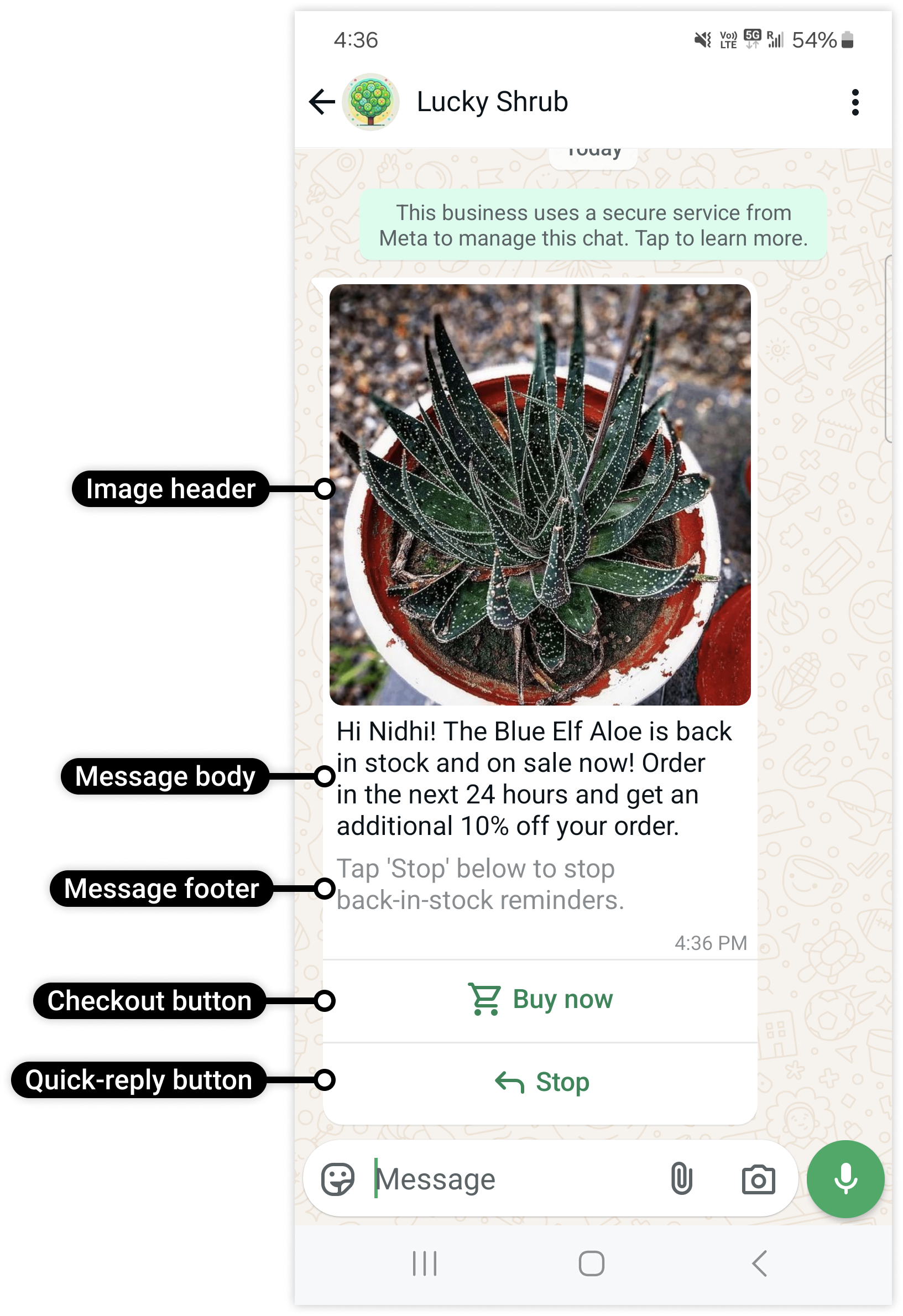
点击该按钮的 WhatsApp 用户将看到订单详情:
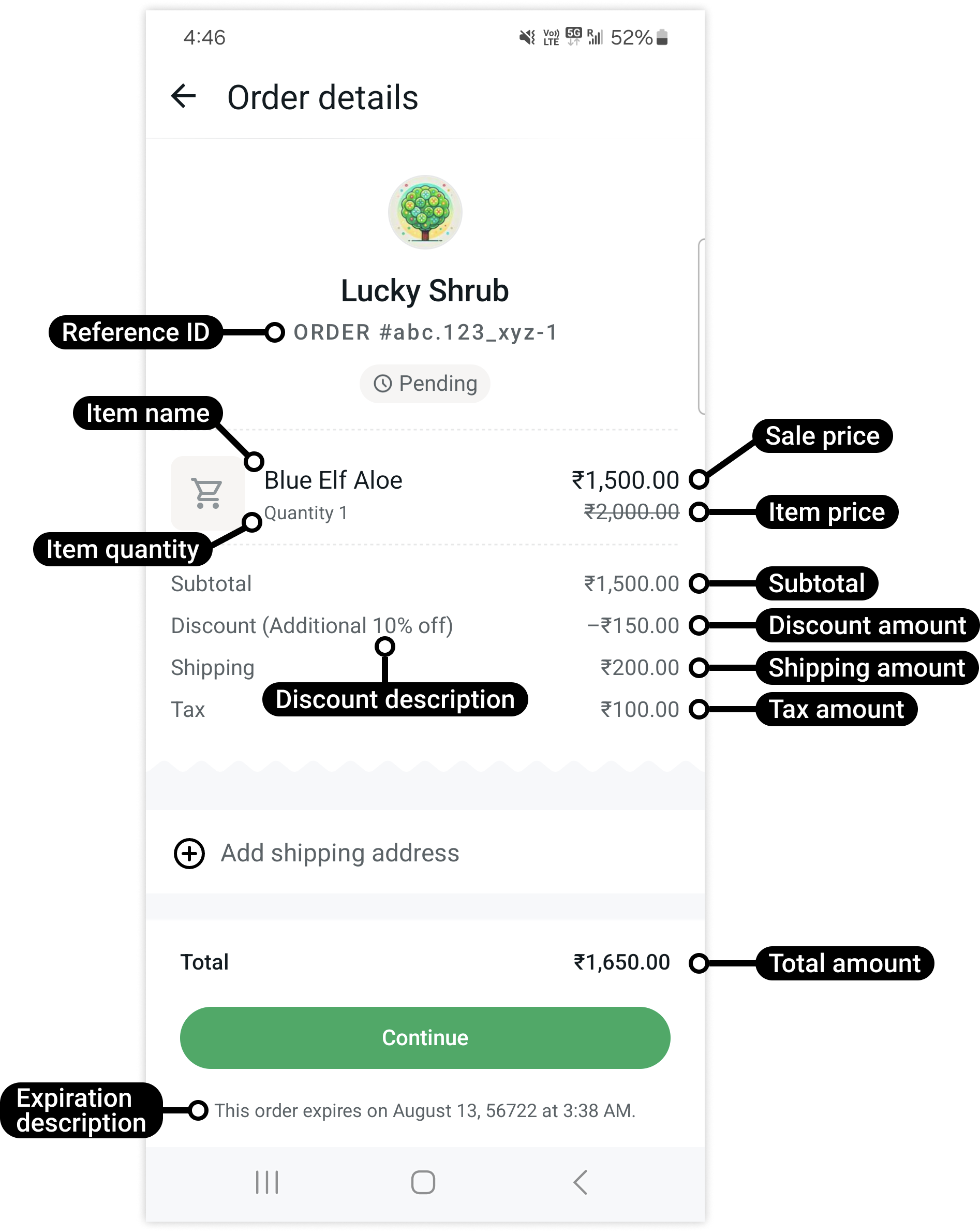
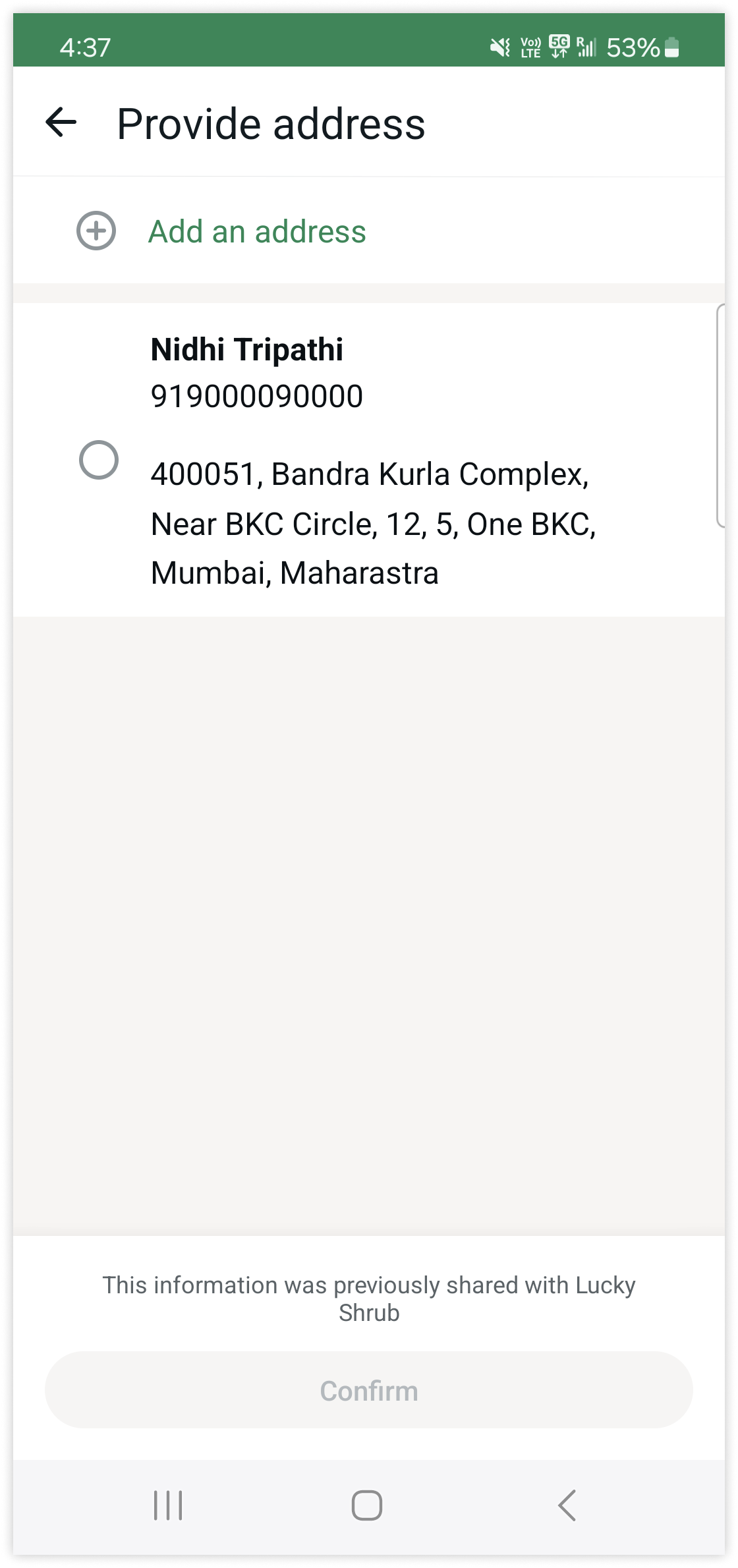
用户可以通过选择您提供的配送信息继续操作(如果您知道其信息并在发送消息负载中提供了该信息)……
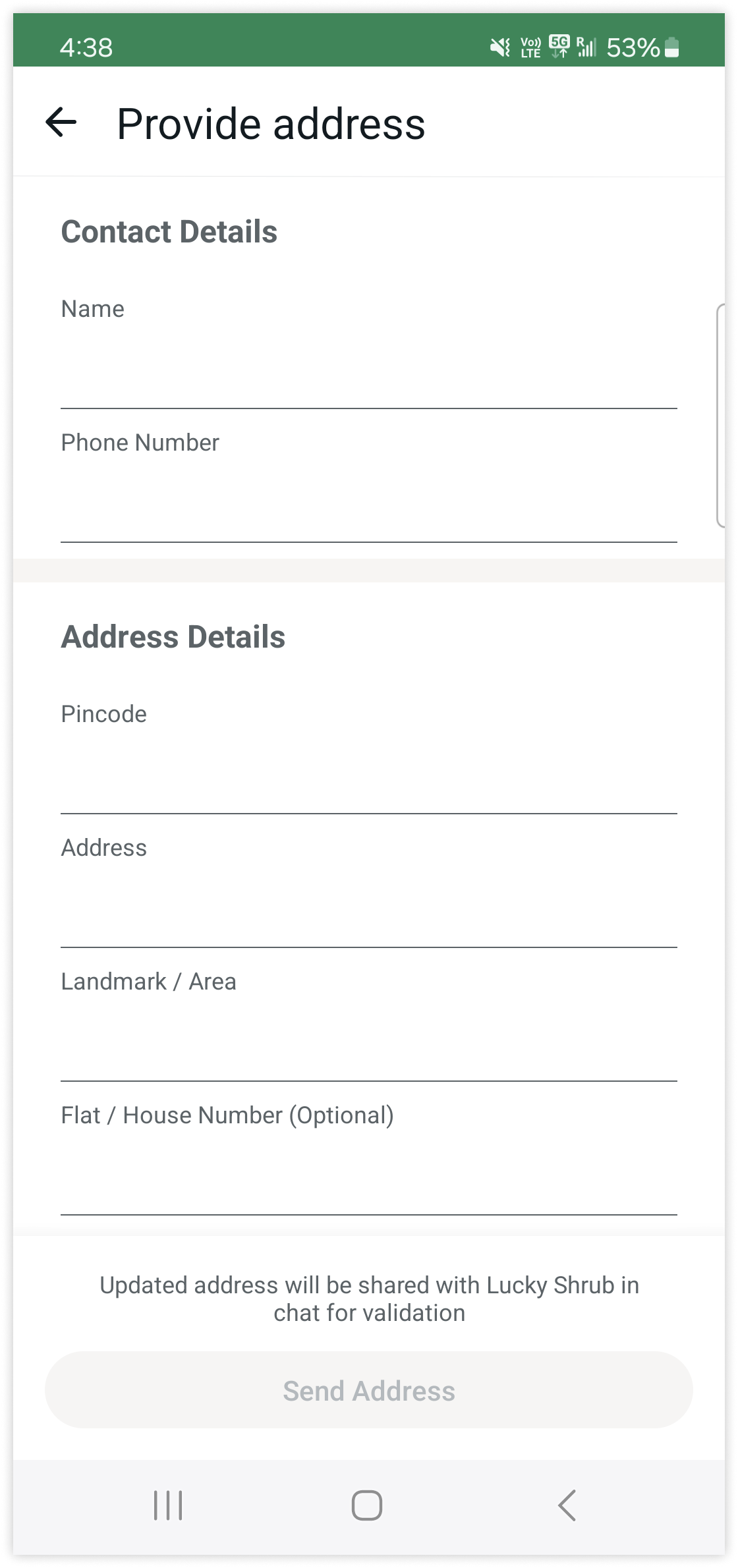
也可以添加自己的配送信息:
#### 请求
此示例请求创建了一个结账按钮模板,包含单张图片消息页眉、使用两个变量的消息正文文本、页脚、单个结账按钮以及一个快捷回复按钮。
```shell Shell theme={"theme":{"light":"github-light","dark":"github-dark"}}
curl 'https://api.ycloud.com/v2/whatsapp/templates' \
-H 'Content-Type: application/json' \
-H 'X-API-Key: {{YOUR-API-KEY}}' \
-d '{
"wabaId": "{{WABA-ID}}",
"name": "item_back_in_stock_v1",
"language": "en_US",
"category": "MARKETING",
"components": [
{
"type": "header",
"format": "image",
"example": {
"header_url": [
"https://oss-ycloud-publicread.oss-ap-southeast-1.aliyuncs.com/api-docs/sample/sample.jpg"
]
}
},
{
"type": "body",
"text": "Hi {{1}}! The {{2}} is back in stock! Order now before it\'s gone!",
"example": {
"body_text": [
[
"Pablo",
"Blue Elf Aloe"
]
]
}
},
{
"type": "footer",
"text": "Tap \'Stop\' below to stop back-in-stock reminders."
},
{
"type": "buttons",
"buttons": [
{
"type": "order_details",
"text": "Buy now"
},
{
"type": "quick_reply",
"text": "Stop"
}
]
}
]
}'
```
#### 响应
请求成功后将返回模板资源及其当前的审核状态。
```json theme={"theme":{"light":"github-light","dark":"github-dark"}}
{
"wabaId": "WABA_ID",
"name": "TEMPLATE_NAME",
"language": "en_US",
"category": "UTILITY",
"status": "PENDING"
}
```
使用返回的 `status` 来确定是否可以发送该模板。
#### 说明
保持模板组件与其类别一致,并在发送前等待其状态变为已批准。
### 通话权限请求模板
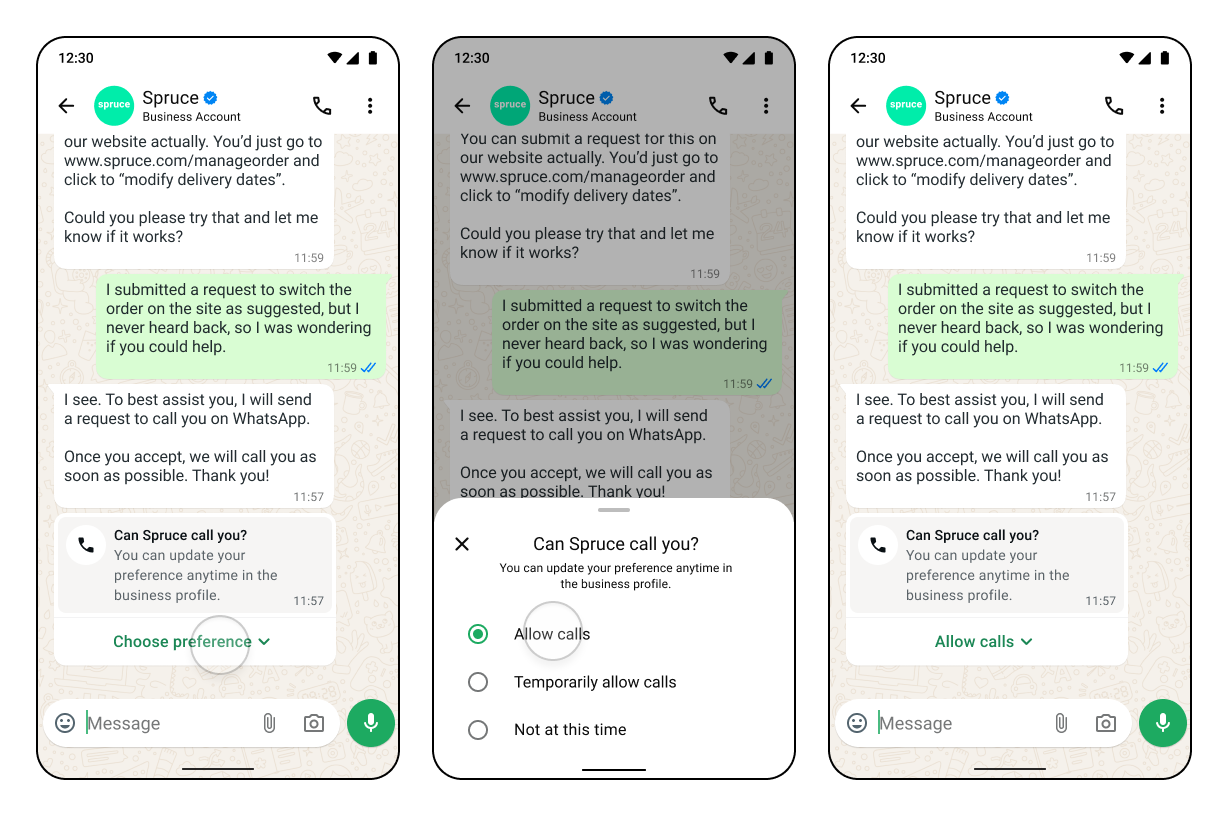
如果您想向 WhatsApp 用户发起通话,您的企业必须首先获得用户许可。当 WhatsApp 用户授予通话权限时,该权限可以是临时的,也可以是永久的。
企业无法控制此权限,因为它仅由用户授予,并且用户可以随时撤销。永久权限数据将一直保存,直到被撤销。
您可以通过以下任一方式从 WhatsApp 用户处获取通话权限:
1. 向用户发送通话权限请求 — 发送自由格式或模板消息,向用户请求通话权限。用户可以选择临时或永久权限。
2. 由 WhatsApp 用户提供回拨权限 — WhatsApp 用户通过向企业发起通话,自动提供临时通话权限。必须在企业电话号码上启用回拨设置。
3. WhatsApp 用户通过商业资料提供通话权限 — WhatsApp 用户通过其商业资料向企业授予通话权限。
#### 请求
以下是创建通话权限请求模板类型的示例
```shell Shell theme={"theme":{"light":"github-light","dark":"github-dark"}}
curl 'https://api.ycloud.com/v2/whatsapp/templates' \
-H 'Content-Type: application/json' \
-H 'X-API-Key: {{YOUR-API-KEY}}' \
-d '{
"wabaId": "{{WABA-ID}}",
"name": "calling_permisson_request_example",
"language": "en_US",
"category": "MARKETING",
"components": [
{
"type": "HEADER",
"text": "Support of Order No: {{1}}",
"example": {
"body_text": [
[
"ON-12345"
]
]
}
},
{
"type": "BODY",
"text": "We would like to call you to help support your query on Order No: {{1}} for the item {{2}}.",
"example": {
"body_text": [
[
"ON-12345",
"Avocados"
]
]
}
},
{
"type": "FOOTER",
"text": "Talk to you soon!"
},
{
"type": "call_permission_request"
}
]
}'
```
#### 响应
请求成功后将返回模板资源及其当前审核状态。
```json theme={"theme":{"light":"github-light","dark":"github-dark"}}
{
"wabaId": "WABA_ID",
"name": "TEMPLATE_NAME",
"language": "en_US",
"category": "UTILITY",
"status": "PENDING"
}
```
使用返回的 `status` 来判断模板是否可以发送。
#### 说明
保持模板组件与其类别一致,并在发送前等待其状态变为已批准。
### Android 深度链接模板
您可以将 Android 深度链接映射到营销模板的 URL 按钮,点击该按钮即可在您的应用内加载特定位置或内容。
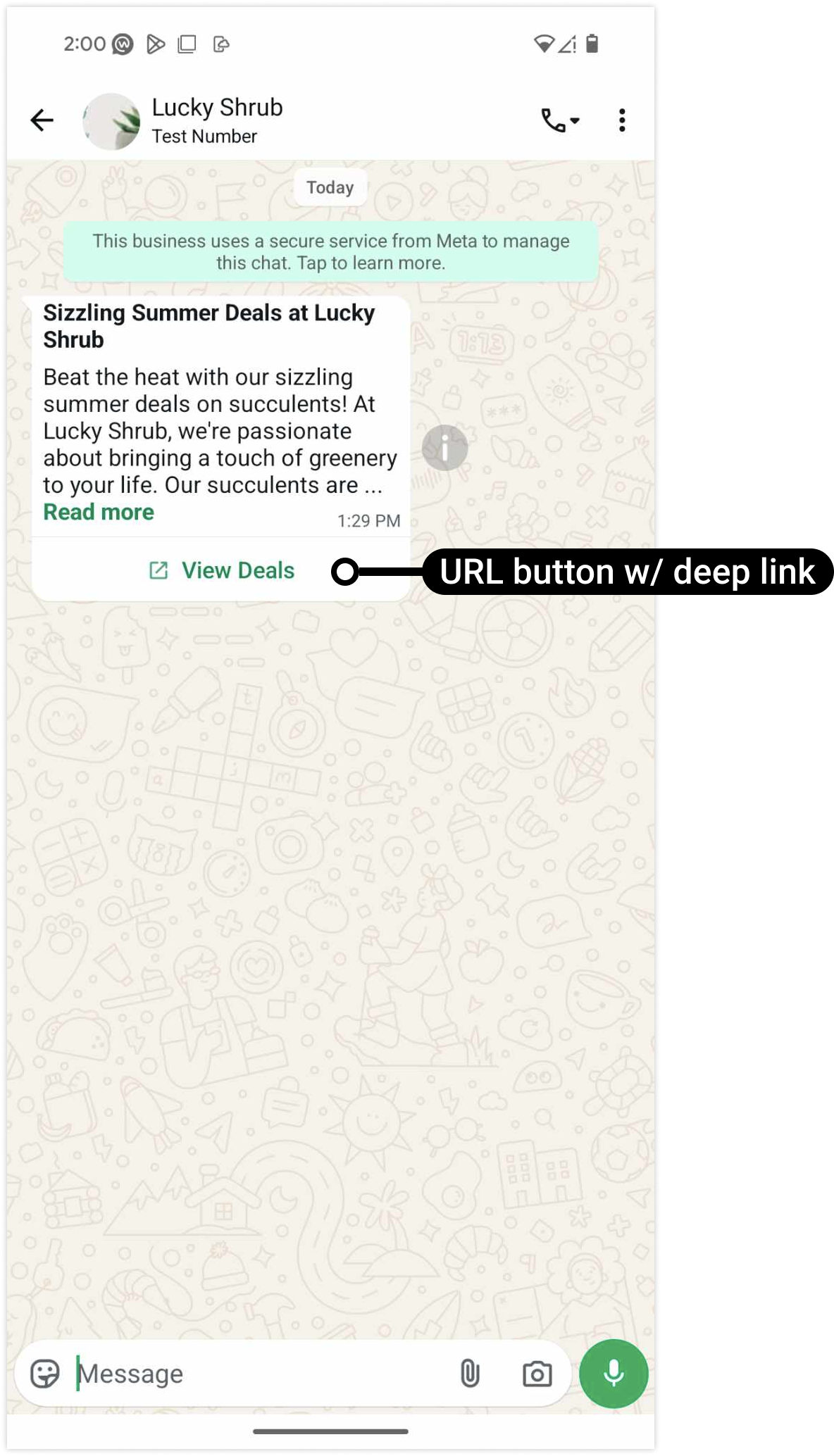
#### 请求
以下是创建深度链接模板的示例。
```shell theme={"theme":{"light":"github-light","dark":"github-dark"}}
curl 'https://api.ycloud.com/v2/whatsapp/templates' \
-H 'Content-Type: application/json' \
-H 'X-API-Key: {{YOUR-API-KEY}}' \
-d '{
"wabaId": "{{WABA-ID}}",
"name": "calling_permisson_request_example",
"language": "en_US",
"category": "MARKETING",
"components": [
{
"type": "BODY",
"text": "hello"
},
{
"type": "BUTTONS",
"buttons": [
{
"type": "url",
"text": "View Deals",
"url": "https://www.luckyshrub.com/deals/summer/",
"app_deep_link": {
"meta_app_id": 2892949377516980,
"android_deep_link": "luckyshrub://deals/summer/",
"android_fallback_playstore_url": "https://www.luckyshrub.com/deals/summer/"
}
}
]
}
]
}'
```
#### 响应
请求成功后将返回模板资源及其当前审核状态。
```json theme={"theme":{"light":"github-light","dark":"github-dark"}}
{
"wabaId": "WABA_ID",
"name": "TEMPLATE_NAME",
"language": "en_US",
"category": "UTILITY",
"status": "PENDING"
}
```
使用返回的 `status` 来判断模板是否可以发送。
#### 说明
保持模板组件与其类别一致,并在发送前等待其状态变为已批准。
### 带 GIF 的营销模板
在本例中,您将为特定营销活动创建一个模板:
* 页眉中包含 GIF。
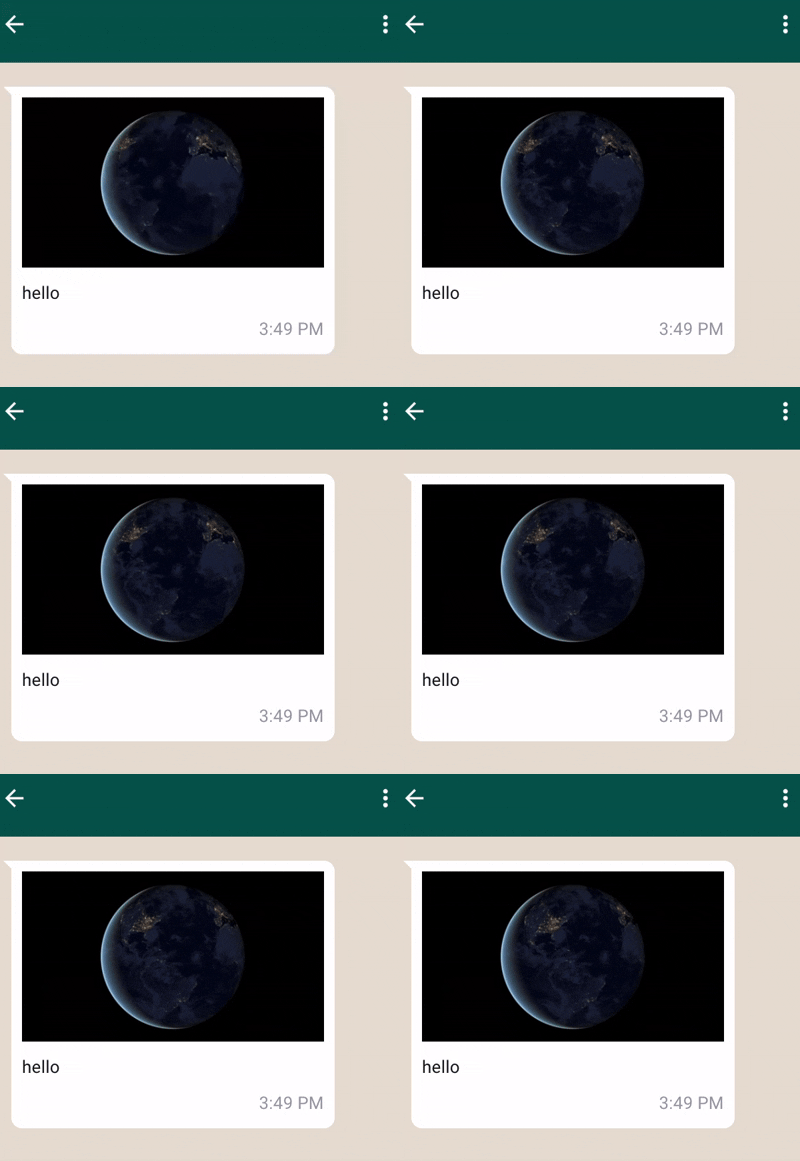
#### 请求
以下是创建 GIF 模板的示例。
```shell theme={"theme":{"light":"github-light","dark":"github-dark"}}
curl 'https://api.ycloud.com/v2/whatsapp/templates' \
-H 'Content-Type: application/json' \
-H 'X-API-Key: {{YOUR-API-KEY}}' \
-d '{
"wabaId": "{{WABA-ID}}",
"name": "marketing_friday_more",
"language": "en_US",
"category": "MARKETING",
"components": [
{
"type": "HEADER",
"format": "GIF",
"example": {
"header_url": [
"https://oss-ycloud-publicread.oss-ap-southeast-1.aliyuncs.com/api-docs/sample/sample.mp4"
]
}
},
{
"type": "BODY",
"text": "hello"
}
]
}'
```
#### 响应
请求成功后将返回模板资源及其当前审核状态。
```json theme={"theme":{"light":"github-light","dark":"github-dark"}}
{
"wabaId": "WABA_ID",
"name": "TEMPLATE_NAME",
"language": "en_US",
"category": "UTILITY",
"status": "PENDING"
}
```
使用返回的 `status` 来判断模板是否可以发送。
#### 说明
保持模板组件与其类别一致,并在发送前等待其状态变为已批准。
### 请求电话号码模板
若要在实用或营销模板中添加请求联系信息按钮,请在创建模板时于 components 数组中包含 REQUEST\_CONTACT\_INFO 按钮:
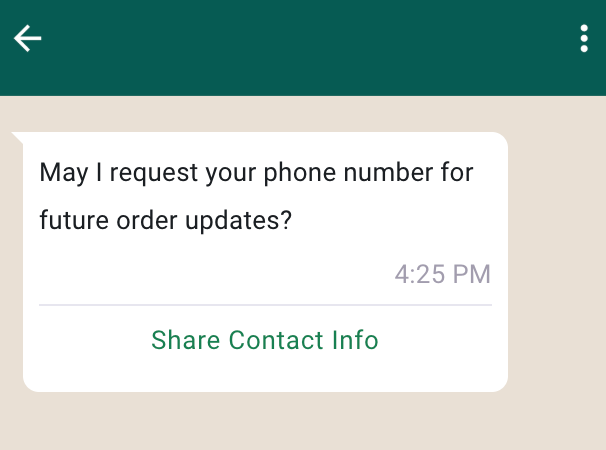
#### 请求
以下是创建 `REQUEST_CONTACT_INFO` 模板的示例
* `Share Contact Info` 为固定按钮文本,不可修改
```shell theme={"theme":{"light":"github-light","dark":"github-dark"}}
curl 'https://api.ycloud.com/v2/whatsapp/templates' \
-H 'Content-Type: application/json' \
-H 'X-API-Key: {{YOUR-API-KEY}}' \
-d '{
"wabaId": "{{WABA-ID}}",
"name": "{{TEMPLATE_NAME}}",
"language": "en",
"category": "utility",
"components": [
{
"type": "body",
"text": ""
},
{
"type": "buttons",
"buttons": [
{
"type": "REQUEST_CONTACT_INFO",
"text": "Share Contact Info"
}
]
}
]
}'
```
#### 响应
请求成功后将返回模板资源及其当前审核状态。
```json theme={"theme":{"light":"github-light","dark":"github-dark"}}
{
"wabaId": "WABA_ID",
"name": "TEMPLATE_NAME",
"language": "en_US",
"category": "UTILITY",
"status": "PENDING"
}
```
使用返回的 `status` 来判断模板是否可以发送。
#### 说明
保持模板组件与其类别一致,并在发送前等待其状态变为已批准。
This documentation is built and hosted on [Mintlify](https://mintlify.com), a developer documentation platform.