> ## Documentation Index
> Fetch the complete documentation index at: https://docs.ycloud.com/llms.txt
> Use this file to discover all available pages before exploring further.
# 虚拟客服
### 什么是虚拟客服?
虚拟客服(Virtual Agent)是一项让您能够更灵活地管理 WhatsApp 对话的功能。
它允许单个客服人员同时管理多个 WhatsApp 商业账户的对话,确保在不同使用场景下都能正确查看并跟进消息及客户数据。
### 为什么需要虚拟客服?
在实际业务运营中,您可能会遇到以下情况:
#### 场景一:移动端设备 + 平台混合使用
* 客户已超出 WhatsApp 的 24 小时免费聊天窗口。
* 销售人员通过移动设备上的 WhatsApp Business App 主动联系客户。
* 客户回复后,希望回到平台的收件箱(Inbox)中继续进行集中管理。
👉 若没有虚拟客服,部分客服人员可能无法查看这些会话。
#### 场景二:一个客服代表管理多个 WhatsApp 账户
* 多品牌运营
* 不同国家 / 市场 / 渠道
* 客服代表必须同时处理来自多个号码的咨询。
👉 若没有统一绑定,容易出现会话割裂以及权限受限等问题。
### 虚拟客服如何解决这些问题?
通过虚拟客服,您可以:
* 将单个客服代表绑定到多个 WhatsApp 商业账户。
* 确保客服代表能够在收件箱(Inbox)中查看并管理相关对话。
* 确保分析数据(Analytics)和对话日志(Conversation Logs)等数据的一致性。
* 不会影响现有的号码或自动化配置。
### 如何配置虚拟客服?
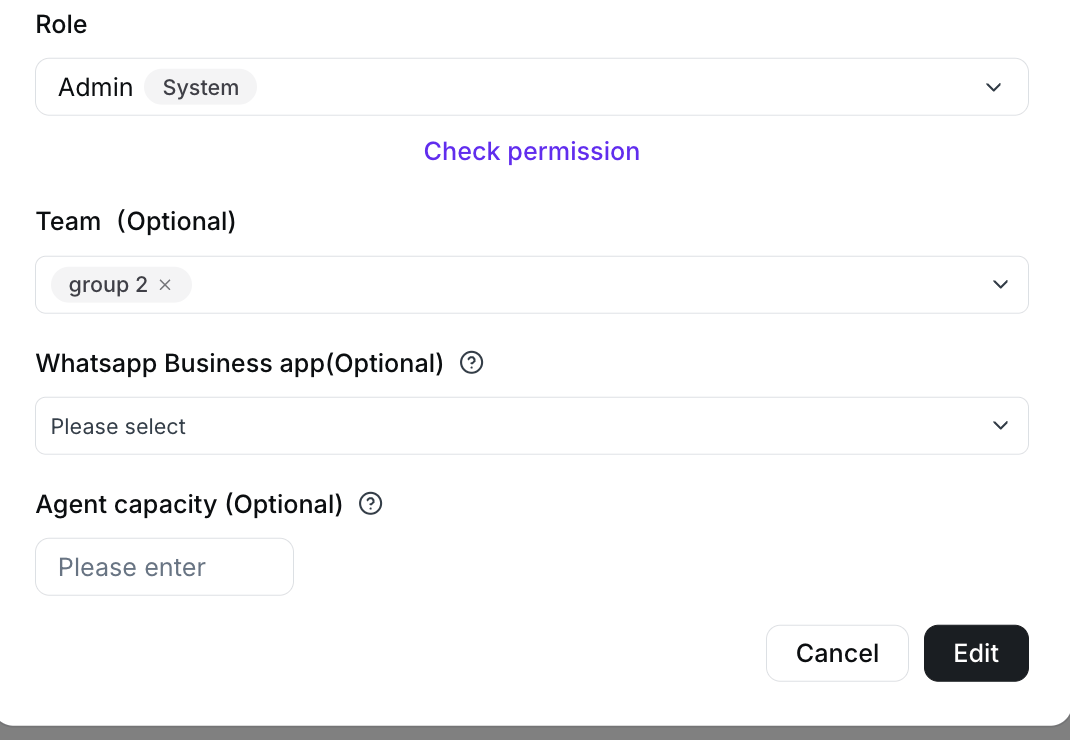 1. 访问 YCloud 控制台,并在“用户和团队”下绑定您的 WhatsApp 商业账户。
2. 在邀请用户或编辑用户时:
1. 找到 WhatsApp Business app。
2. 从下拉列表中选择一个或多个 WhatsApp 商业账户。
3. 保存设置。
> 该字段用于控制:
>
> 该客服代表可以管理哪些 WhatsApp 商业账户的对话。
This documentation is built and hosted on [Mintlify](https://mintlify.com), a developer documentation platform.
1. 访问 YCloud 控制台,并在“用户和团队”下绑定您的 WhatsApp 商业账户。
2. 在邀请用户或编辑用户时:
1. 找到 WhatsApp Business app。
2. 从下拉列表中选择一个或多个 WhatsApp 商业账户。
3. 保存设置。
> 该字段用于控制:
>
> 该客服代表可以管理哪些 WhatsApp 商业账户的对话。
This documentation is built and hosted on [Mintlify](https://mintlify.com), a developer documentation platform.