> ## Documentation Index
> Fetch the complete documentation index at: https://docs.ycloud.com/llms.txt
> Use this file to discover all available pages before exploring further.

# 创建流程

## 第 1 步：创建规则智能体流程

打开规则智能体，然后选择 **创建流程**。

<Frame caption="Open Flows, then select Create a flow. The flows shown in this demo are inactive.">
  <img src="https://mintcdn.com/lchnan/gXEJIQXV2JH2VUQJ/product-assets/english-help-2026-09-22/rule-agent-flows-annotated.svg?fit=max&auto=format&n=gXEJIQXV2JH2VUQJ&q=85&s=10e9c4649b87453f94439efeb5967dde" alt="高亮显示“创建流程”的规则智能体流程列表。" width="3024" height="1656" data-path="product-assets/english-help-2026-09-22/rule-agent-flows-annotated.svg" />
</Frame>

1. 添加触发器。当客户的消息与其匹配时，流程即会启动。

<Frame caption="Start the flow by selecting Add a trigger.">
  <img src="https://mintcdn.com/lchnan/gXEJIQXV2JH2VUQJ/product-assets/english-help-2026-09-22/rule-flow-editor-annotated.svg?fit=max&auto=format&n=gXEJIQXV2JH2VUQJ&q=85&s=5e0c5423b201d2f1c738cb7ebcb44b12" alt="高亮显示“添加触发器”的未启用流程编辑器。" width="3024" height="1656" data-path="product-assets/english-help-2026-09-22/rule-flow-editor-annotated.svg" />
</Frame>

2. 添加关键词并选择 **精准匹配** 或 **包含**。

<Frame caption="Choose a matching rule and enter a keyword. This form has not been saved.">
  <img src="https://mintcdn.com/lchnan/gXEJIQXV2JH2VUQJ/product-assets/english-help-2026-09-22/rule-trigger-keyword-annotated.svg?fit=max&auto=format&n=gXEJIQXV2JH2VUQJ&q=85&s=e37d659bb7fa5d5aaa1fe137f7d9c8f3" alt="高亮显示关键词匹配规则和关键词输入的关键词触发器编辑器。" width="3024" height="1656" data-path="product-assets/english-help-2026-09-22/rule-trigger-keyword-annotated.svg" />
</Frame>

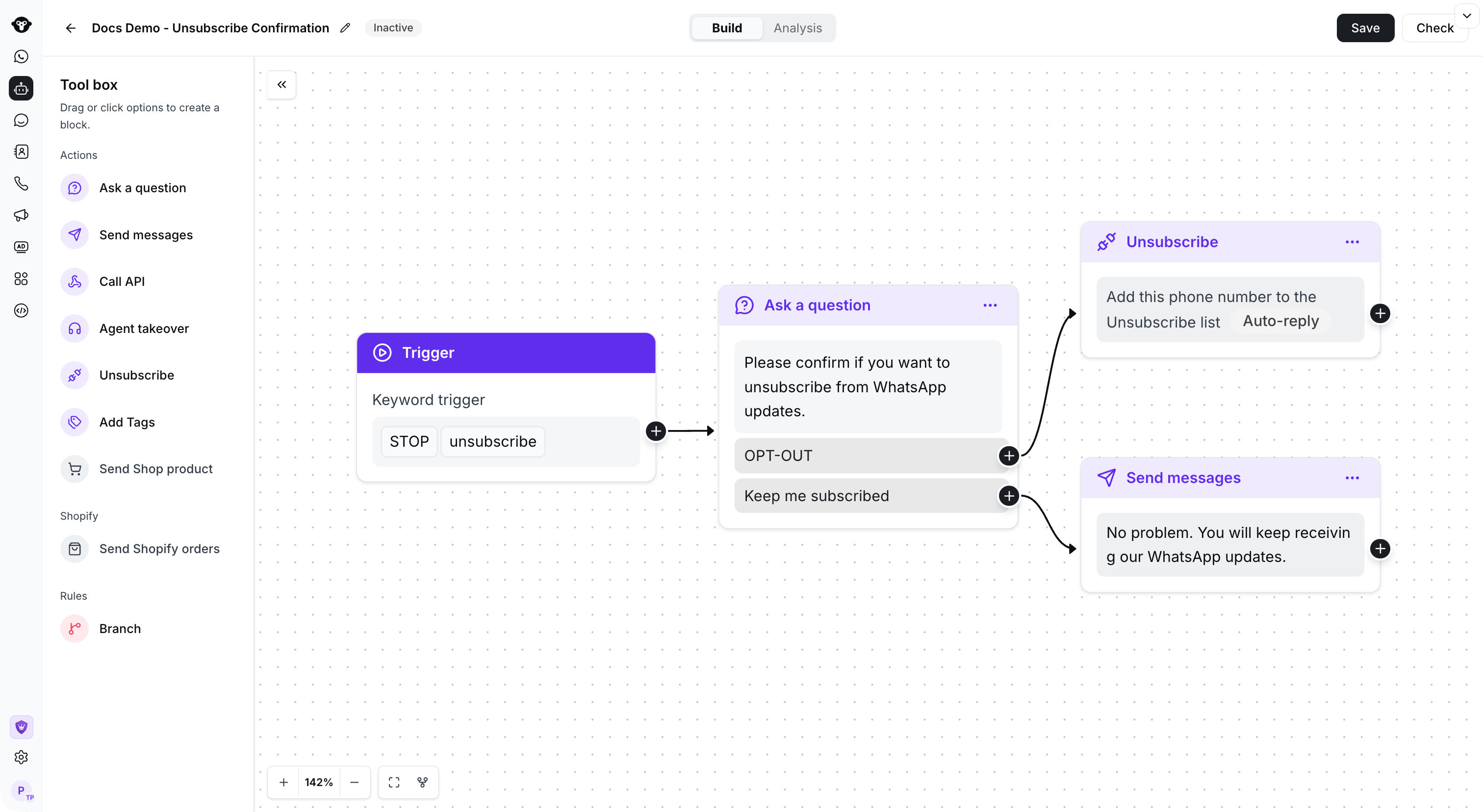
* 提问：用户触发此规则智能体后，您可以在此部分设置要向用户提出的问题，并配置回复按钮。
* 发送消息：当用户点击按钮时，规则智能体将自动回复预设答案。

**最终效果：**

<Frame caption="Example: connect a keyword trigger to a confirmation question and route each reply to an action.">
  <img src="https://mintcdn.com/lchnan/TsMGu8UTNQaUw-Rc/product-assets/english-help-demo-2026-09-23/rule-complete-flow.png?fit=max&auto=format&n=TsMGu8UTNQaUw-Rc&q=85&s=4aead9ee880f3063f987b3194d005835" alt="包含一个触发器和两个连接响应分支的已保存未启用规则流程。" width="3024" height="1656" data-path="product-assets/english-help-demo-2026-09-23/rule-complete-flow.png" />
</Frame>

*示例确认流程*

## 复制流程

打开要复用的流程的操作菜单，然后选择 **复制**。

<Frame caption="Open the flow action menu and select Copy.">
  <img src="https://mintcdn.com/lchnan/TsMGu8UTNQaUw-Rc/product-assets/english-help-demo-2026-09-23/rule-copy-menu-annotated.svg?fit=max&auto=format&n=TsMGu8UTNQaUw-Rc&q=85&s=9936969651e1c3a92844e0a6285459b1" alt="包含“复制”的流程操作菜单。" width="3024" height="1656" data-path="product-assets/english-help-demo-2026-09-23/rule-copy-menu-annotated.svg" />
</Frame>

选择目标规则智能体，然后选择 **复制**。

<Frame caption="Select the destination agent, then choose Copy.">
  <img src="https://mintcdn.com/lchnan/TsMGu8UTNQaUw-Rc/product-assets/english-help-demo-2026-09-23/rule-copy-destination-annotated.svg?fit=max&auto=format&n=TsMGu8UTNQaUw-Rc&q=85&s=84a9fded513bc3a80056711963951b23" alt="已选择目标智能体的复制对话框。" width="3024" height="1656" data-path="product-assets/english-help-demo-2026-09-23/rule-copy-destination-annotated.svg" />
</Frame>

## 观看教程视频👇

[打开关联资源](https://youtu.be/2MHBoBsNuAg)


This documentation is built and hosted on [Mintlify](https://mintlify.com), a developer documentation platform.