> ## Documentation Index
> Fetch the complete documentation index at: https://docs.ycloud.com/llms.txt
> Use this file to discover all available pages before exploring further.
# 提问
## 什么是“提问”?
“提问”代表企业主动发起的一个问题,该组件会等待用户回复,然后根据回复执行后续操作。
## “提问”的类型
 * #### 文本(Text 形式)
* 以文本形式呈现的问题。用户回复后,他们提供的信息可以存储为变量,用于后续给客户的回复。
* *示例:你可以询问客户的姓名,然后将他们提供的姓名保存到客户画像中。之后在与客户聊天时,可以将此姓名插入到对话中。*
* #### 按钮:快速回复按钮(最多可设置 3 个)
* 你可以在提问中提示客户选择几个选项。客户点击某个选项后,系统会自动回复该选项,从而根据客户的选择进行不同的流程路由。
* *示例:你可以询问客户是想了解价格还是产品。如果客户回复价格,则自动向他们发送价格表文档。如果他们点击产品,则向他们自动发送产品介绍。*
* #### 文本(Text 形式)
* 以文本形式呈现的问题。用户回复后,他们提供的信息可以存储为变量,用于后续给客户的回复。
* *示例:你可以询问客户的姓名,然后将他们提供的姓名保存到客户画像中。之后在与客户聊天时,可以将此姓名插入到对话中。*
* #### 按钮:快速回复按钮(最多可设置 3 个)
* 你可以在提问中提示客户选择几个选项。客户点击某个选项后,系统会自动回复该选项,从而根据客户的选择进行不同的流程路由。
* *示例:你可以询问客户是想了解价格还是产品。如果客户回复价格,则自动向他们发送价格表文档。如果他们点击产品,则向他们自动发送产品介绍。*
 * #### 列表:菜单栏(List)
* 最多可设置 10 个回复选项。适合希望提供快速回复但受限于快速回复按钮数量的企业。它还可以针对用户的问题和需求进行进一步的细分和回复。
## 其他相关设置
### **设置为仅收集一次用户回复**
操作指南:\
登录你的 YCloud 账户 > 规则机器人(Rule-based Agent)> 流程(Flow)> 提问(选择 List/按钮格式)> 开启“限制用户仅回答一次(Limit user to answer once only)”按钮。
启用后,规则机器人针对当前问题将仅收集用户的单次回复。用户无法针对同一个问题选择两个不同的选项。流程将根据用户首次选择的选项继续进行。
* #### 列表:菜单栏(List)
* 最多可设置 10 个回复选项。适合希望提供快速回复但受限于快速回复按钮数量的企业。它还可以针对用户的问题和需求进行进一步的细分和回复。
## 其他相关设置
### **设置为仅收集一次用户回复**
操作指南:\
登录你的 YCloud 账户 > 规则机器人(Rule-based Agent)> 流程(Flow)> 提问(选择 List/按钮格式)> 开启“限制用户仅回答一次(Limit user to answer once only)”按钮。
启用后,规则机器人针对当前问题将仅收集用户的单次回复。用户无法针对同一个问题选择两个不同的选项。流程将根据用户首次选择的选项继续进行。
 ### **为列表消息添加描述**
操作指南:\
登录 YCloud 控制台 > 规则机器人(Rule-based Agent)> 流程(Flow)> 提问 > 选择 List 格式 > 点击“添加描述(Add description)”以添加描述。
请注意:描述限制在 72 个字符以内。
### **为列表消息添加描述**
操作指南:\
登录 YCloud 控制台 > 规则机器人(Rule-based Agent)> 流程(Flow)> 提问 > 选择 List 格式 > 点击“添加描述(Add description)”以添加描述。
请注意:描述限制在 72 个字符以内。
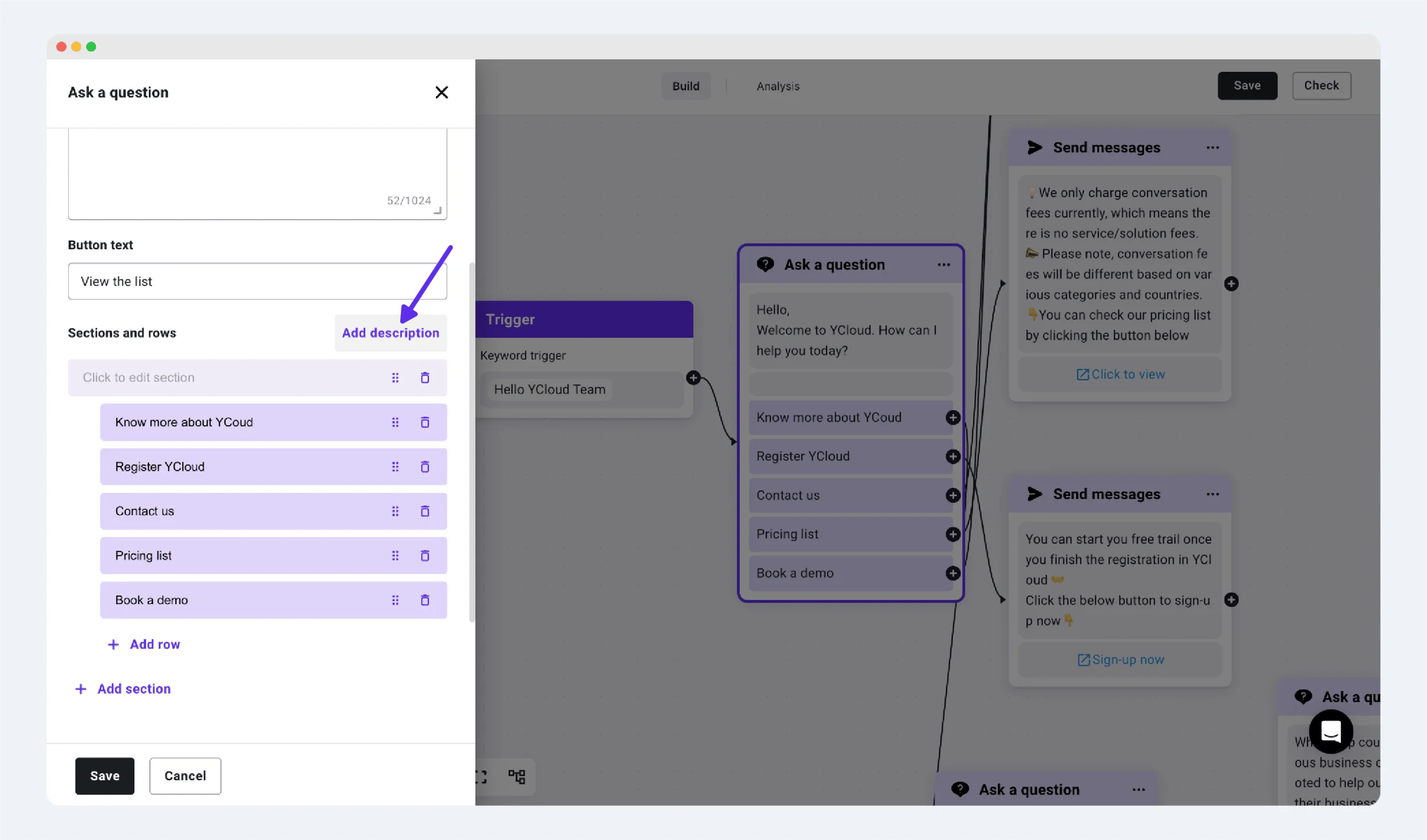
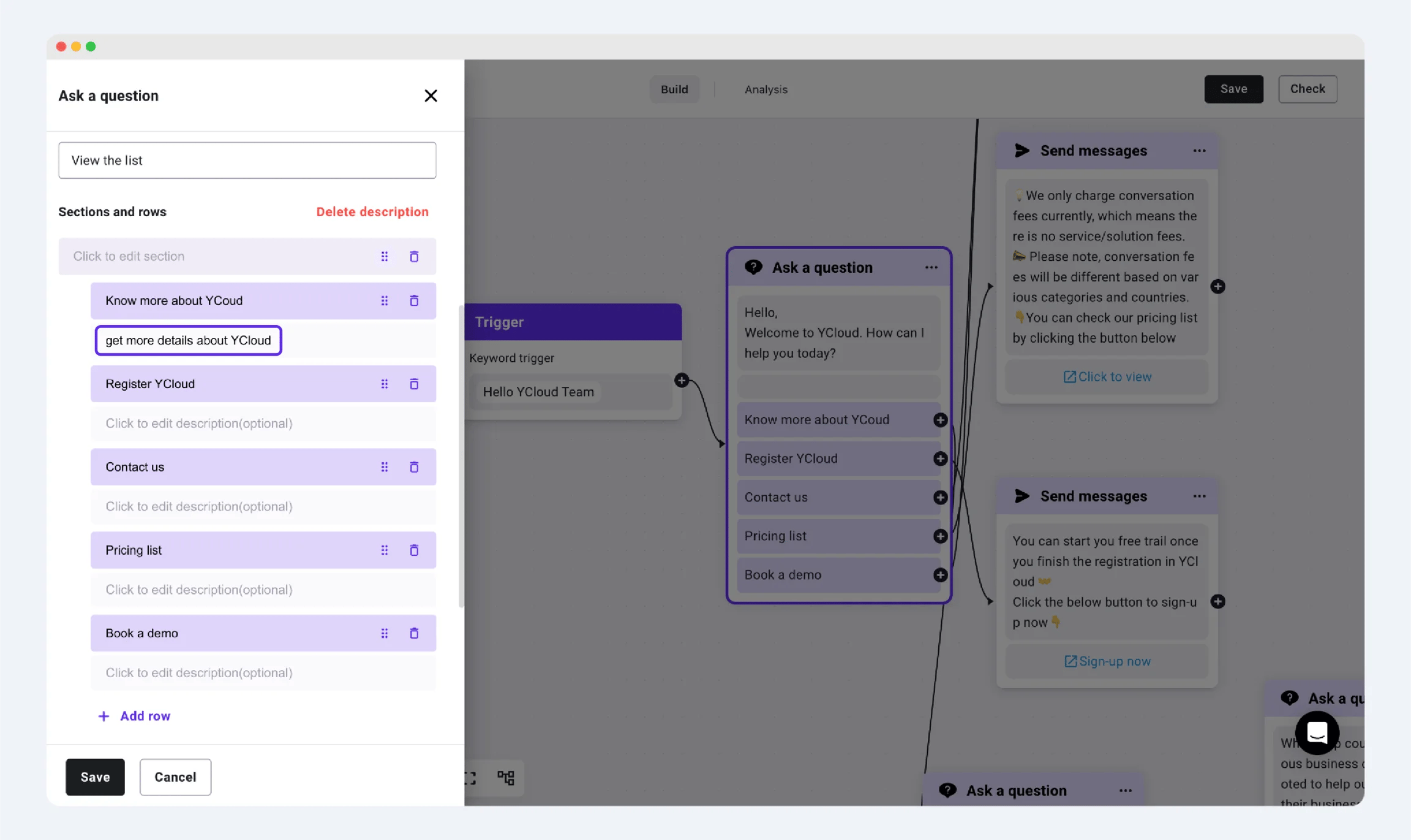 *在列表按钮下方添加描述*
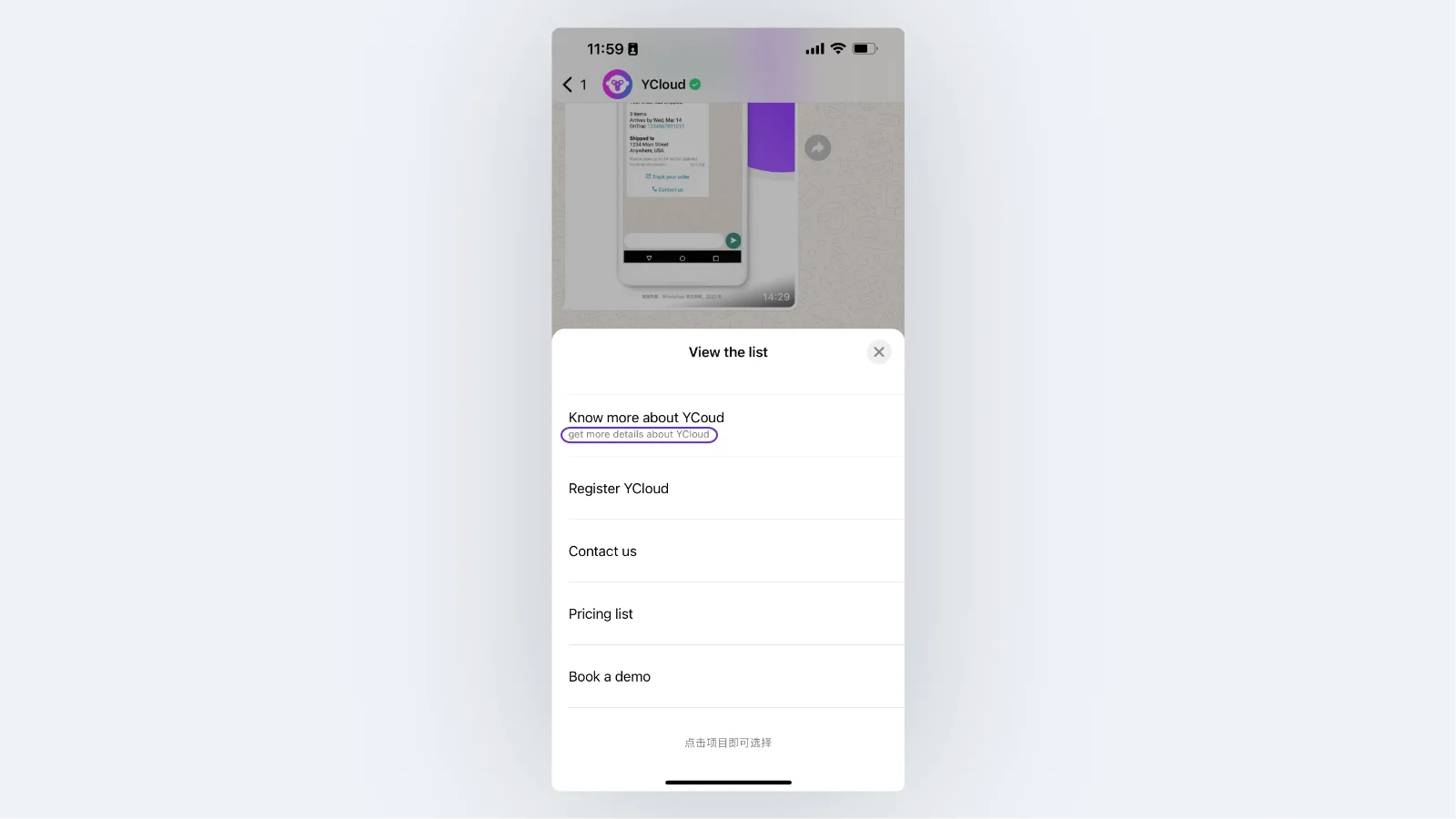 *最终展示效果*
This documentation is built and hosted on [Mintlify](https://mintlify.com), a developer documentation platform.
*最终展示效果*
This documentation is built and hosted on [Mintlify](https://mintlify.com), a developer documentation platform.