> ## Documentation Index
> Fetch the complete documentation index at: https://docs.ycloud.com/llms.txt
> Use this file to discover all available pages before exploring further.
# 分支
## 什么是分支?
分支用于客户属性条件判断,不对客户显示。企业可以通过添加判断组件,针对不同属性的客户和场景提供多样化的回复。
在一个分支中,可以设置多个“筛选条件”,以便对满足不同条件的客户进行分流和响应。
 ## 适用场景
### 用户属性判断
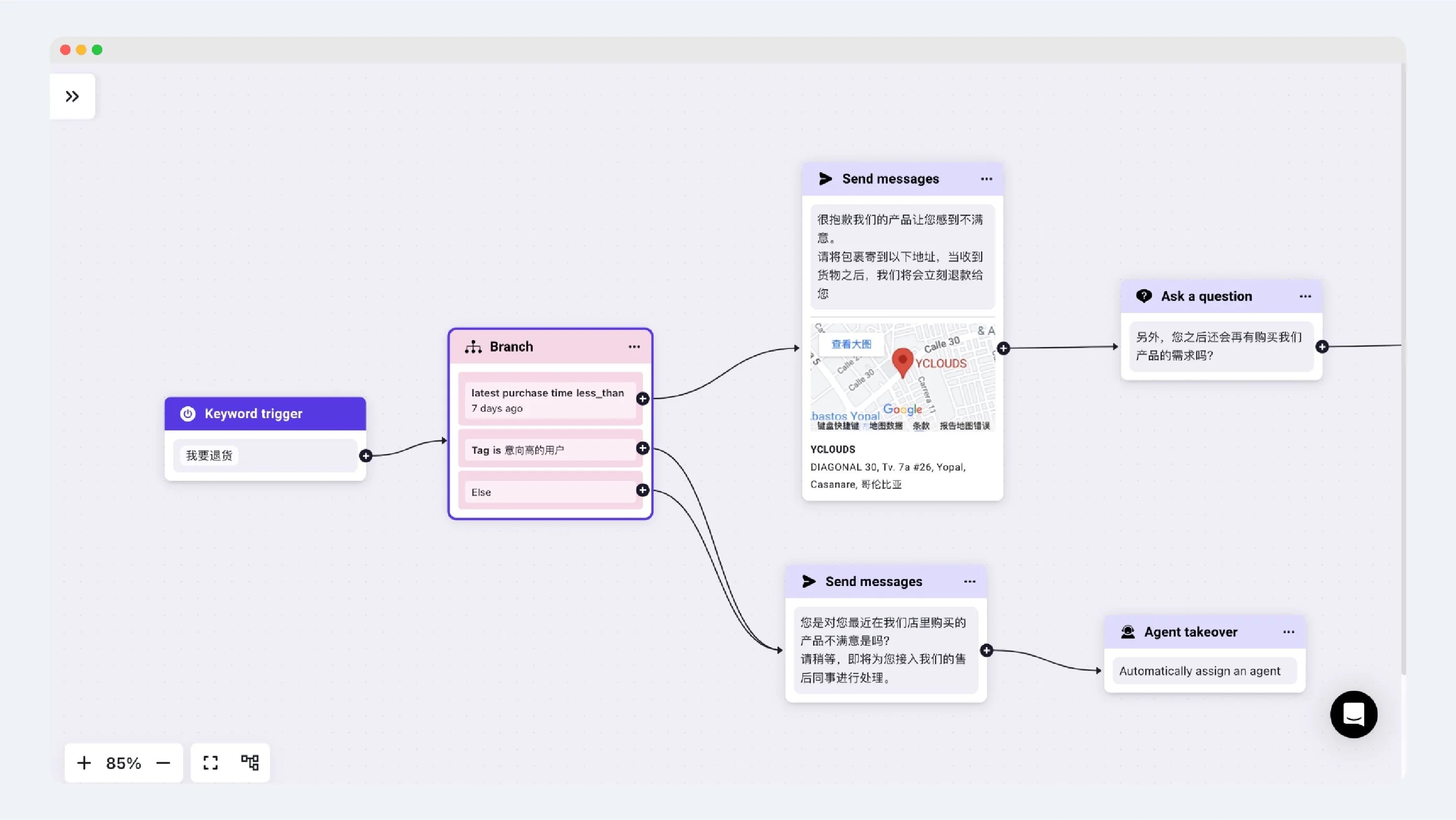
以下面的基于规则的 Agent 为例,这是一个电商客户的退货场景。下图设置了三个分支:
1. 最近一次购买记录在 7 天以内。
2. 客户具有高意向标签(TAG)。
3. 其他条件。
当用户触发基于规则的 Agent 关键词并开始对话时,Agent 会在发送第一条消息前先判断用户属性。例如:如果用户满足条件一,Agent 将回复退货地址信息;如果用户满足条件二或条件三,则会匹配到转接人工客服的另一个流程。
> 请注意:当用户同时满足多个条件时,对话将按照分支的先后顺序,继续执行连接到首个满足条件的流程。
## 适用场景
### 用户属性判断
以下面的基于规则的 Agent 为例,这是一个电商客户的退货场景。下图设置了三个分支:
1. 最近一次购买记录在 7 天以内。
2. 客户具有高意向标签(TAG)。
3. 其他条件。
当用户触发基于规则的 Agent 关键词并开始对话时,Agent 会在发送第一条消息前先判断用户属性。例如:如果用户满足条件一,Agent 将回复退货地址信息;如果用户满足条件二或条件三,则会匹配到转接人工客服的另一个流程。
> 请注意:当用户同时满足多个条件时,对话将按照分支的先后顺序,继续执行连接到首个满足条件的流程。
 This documentation is built and hosted on [Mintlify](https://mintlify.com), a developer documentation platform.