> ## Documentation Index
> Fetch the complete documentation index at: https://docs.ycloud.com/llms.txt
> Use this file to discover all available pages before exploring further.
# 发送 Shopify 订单
自动查询 Shopify 订单并回复。\
当客户咨询其 Shopify 订单详情时,此组件可以自动在您的 Shopify 商店中搜索该订单,并回复相关的订单信息。
在使用此组件之前,您需要在您的 Shopify 商店中安装 YCloud 应用。
## 最佳实践
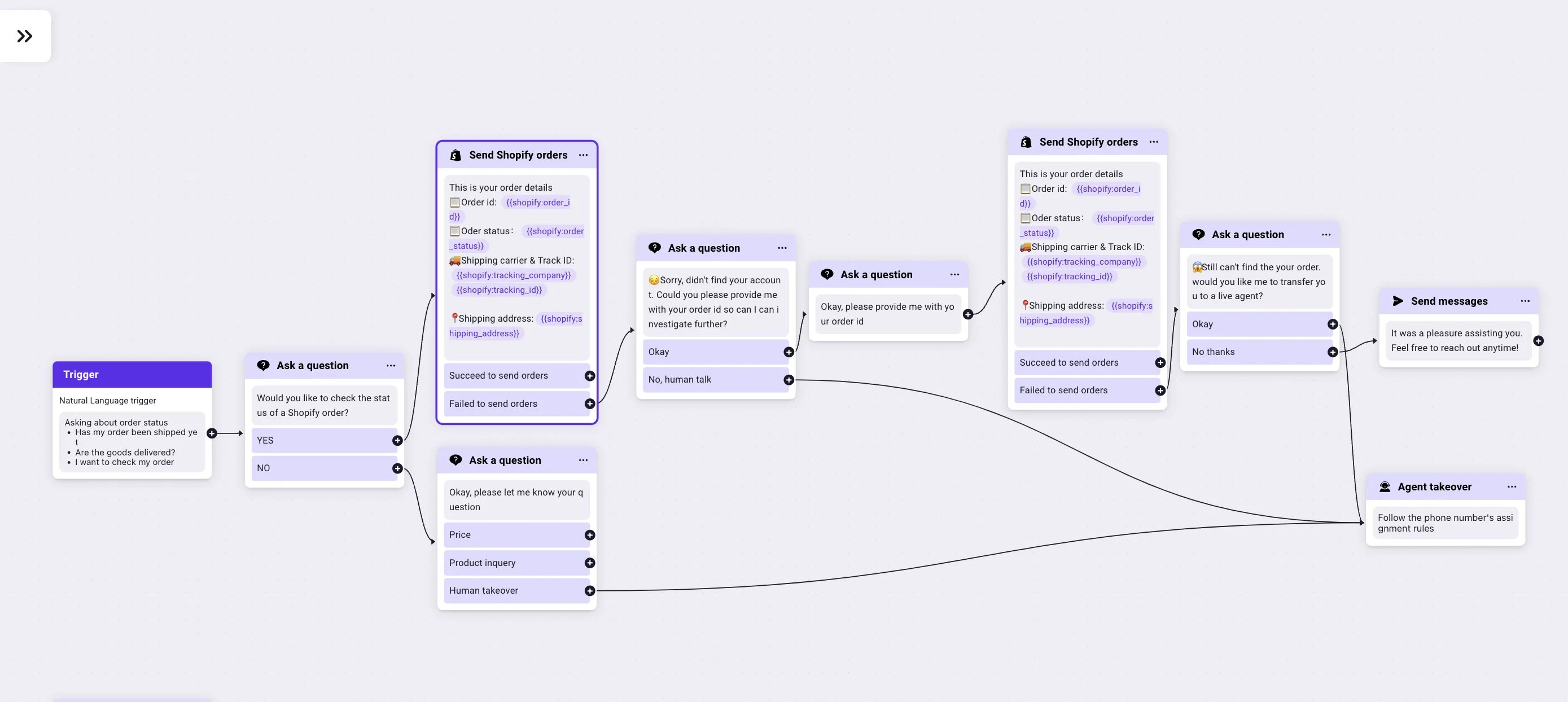
1\. 使用自然语言识别触发器识别客户意图,并确认他们是否要查询其 Shopify 订单。
2\. 确认意图后,使用客户的 WhatsApp 手机号自动搜索订单并返回相关订单详情。
3\. 如果使用 WhatsApp 手机号未找到订单,请使用“提问”组件请求客户提供订单 ID。
4\. 获取订单 ID 后,检索 Shopify 订单详情并将信息提供给客户。
5\. 如果仍未找到任何订单,请使用“人工接管”组件将对话转接给人工客服。
 ### 组件设置
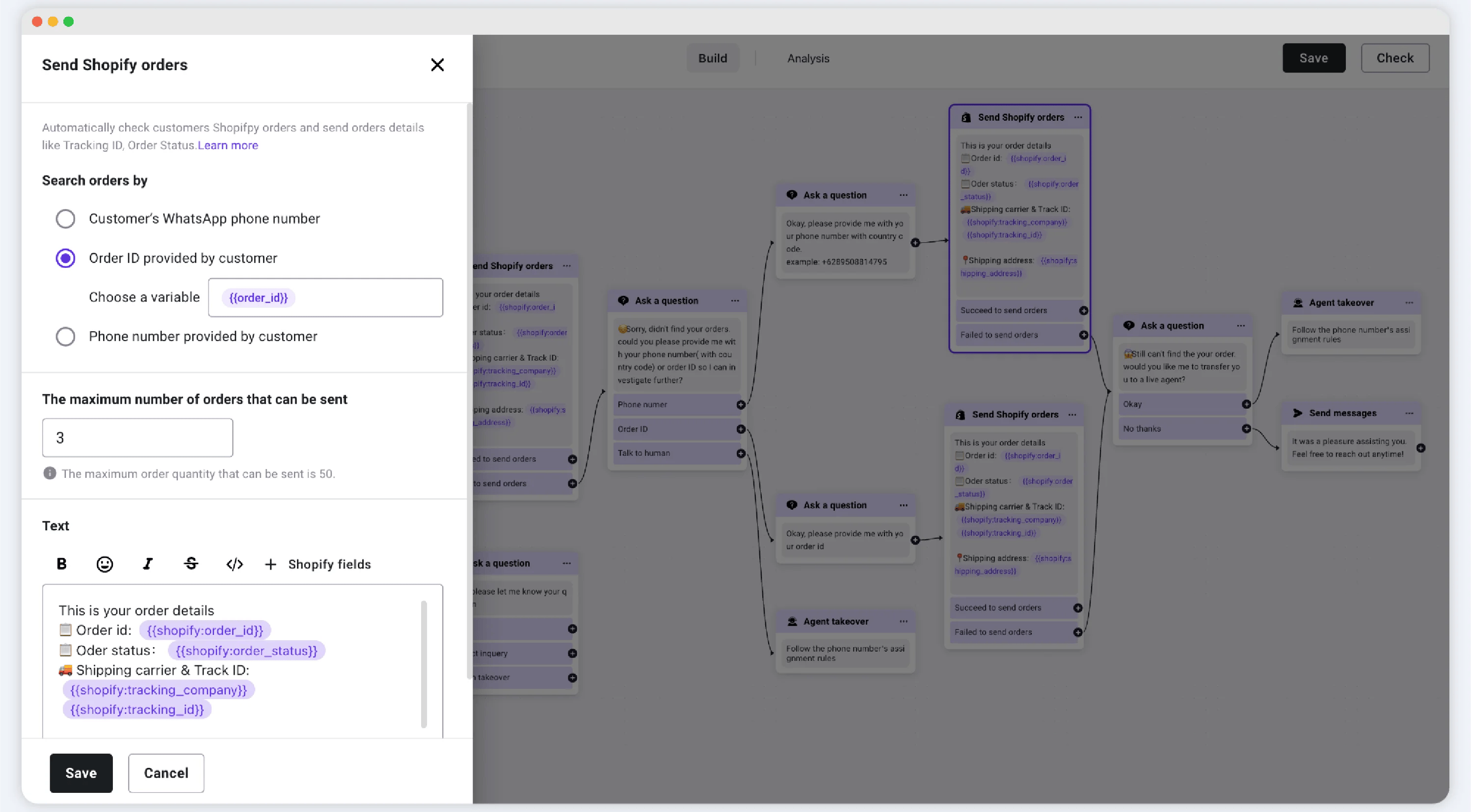 #### 搜索方式:
• 按客户的 WhatsApp 手机号搜索 – 系统会自动使用客户的 WhatsApp 手机号搜索 Shopify 订单。
• 按订单 ID 搜索 – 需要使用“提问”组件收集订单 ID 并将其保存为“订单 ID”字段。
#### 要发送的订单数量
在 Shopify 中找到多个订单时,您可以配置返回多少条订单详情。
支持范围:1–50
#### 要发送的订单详情
您可以通过在回复中插入 Shopify 字段来自定义要发送的订单详情。支持的订单数据字段包括:
1. order\_id
2. order\_status
3. order\_link
4. item\_number
5. order\_amount
6. product\_name
7. shop\_name
8. total\_discounts
9. tracking\_url
10. tracking\_company
11. tracking\_id
12. currency
This documentation is built and hosted on [Mintlify](https://mintlify.com), a developer documentation platform.
#### 搜索方式:
• 按客户的 WhatsApp 手机号搜索 – 系统会自动使用客户的 WhatsApp 手机号搜索 Shopify 订单。
• 按订单 ID 搜索 – 需要使用“提问”组件收集订单 ID 并将其保存为“订单 ID”字段。
#### 要发送的订单数量
在 Shopify 中找到多个订单时,您可以配置返回多少条订单详情。
支持范围:1–50
#### 要发送的订单详情
您可以通过在回复中插入 Shopify 字段来自定义要发送的订单详情。支持的订单数据字段包括:
1. order\_id
2. order\_status
3. order\_link
4. item\_number
5. order\_amount
6. product\_name
7. shop\_name
8. total\_discounts
9. tracking\_url
10. tracking\_company
11. tracking\_id
12. currency
This documentation is built and hosted on [Mintlify](https://mintlify.com), a developer documentation platform.