> ## Documentation Index
> Fetch the complete documentation index at: https://docs.ycloud.com/llms.txt
> Use this file to discover all available pages before exploring further.
# 坐席指南
> 在 YCloud 中处理 WhatsApp 通话并完成跟进工作。
## 准备接听来电
1. 打开 **通话**。
2. 如果系统提示,请在浏览器中授权麦克风和音频访问权限。
3. 确认麦克风、扬声器和连接指示状态正常。
4. 准备就绪后,将您的状态从 **离开** 更改为 **就绪** 。
当您的状态为“离开”时,系统不会自动分配通话。
 ## 接听和挂断电话
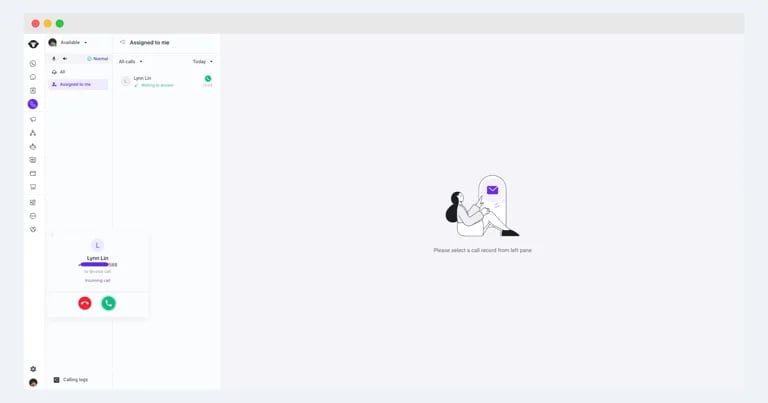
分配来电时,会出现来电提示。点击绿色接听按钮即可接听电话。通话结束后,点击红色挂断按钮。
## 接听和挂断电话
分配来电时,会出现来电提示。点击绿色接听按钮即可接听电话。通话结束后,点击红色挂断按钮。
 ## 完成通话跟进
 在通话过程中或通话结束后,您可以:
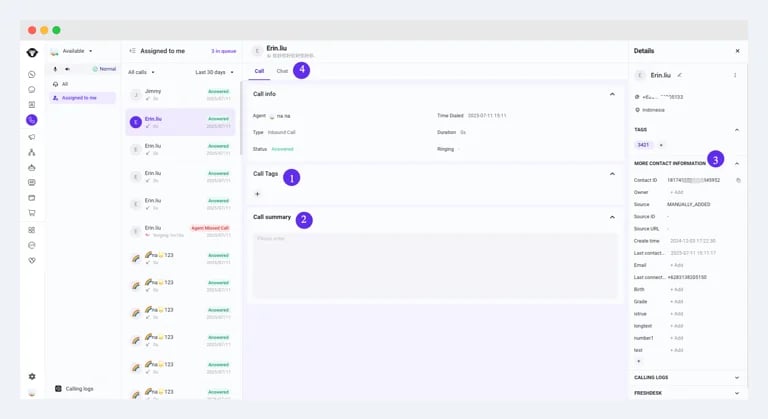
1. **添加通话标签:** 对通话进行分类,以便后续查找和生成报表。
2. **添加或编辑通话小结:** 记录解决方案、遗留问题以及任何重要的跟进事项。
3. **更新联系人信息:** 在联系人面板中编辑客户的详细信息。
4. **在收件箱中继续沟通:** 切换到“聊天”选项卡,向客户发送文本、图片或其他支持的消息。
This documentation is built and hosted on [Mintlify](https://mintlify.com), a developer documentation platform.
在通话过程中或通话结束后,您可以:
1. **添加通话标签:** 对通话进行分类,以便后续查找和生成报表。
2. **添加或编辑通话小结:** 记录解决方案、遗留问题以及任何重要的跟进事项。
3. **更新联系人信息:** 在联系人面板中编辑客户的详细信息。
4. **在收件箱中继续沟通:** 切换到“聊天”选项卡,向客户发送文本、图片或其他支持的消息。
This documentation is built and hosted on [Mintlify](https://mintlify.com), a developer documentation platform.