> ## Documentation Index
> Fetch the complete documentation index at: https://docs.ycloud.com/llms.txt
> Use this file to discover all available pages before exploring further.
# 通话日志
> 搜索、查看并导出历史 WhatsApp 通话记录。
## 访问权限
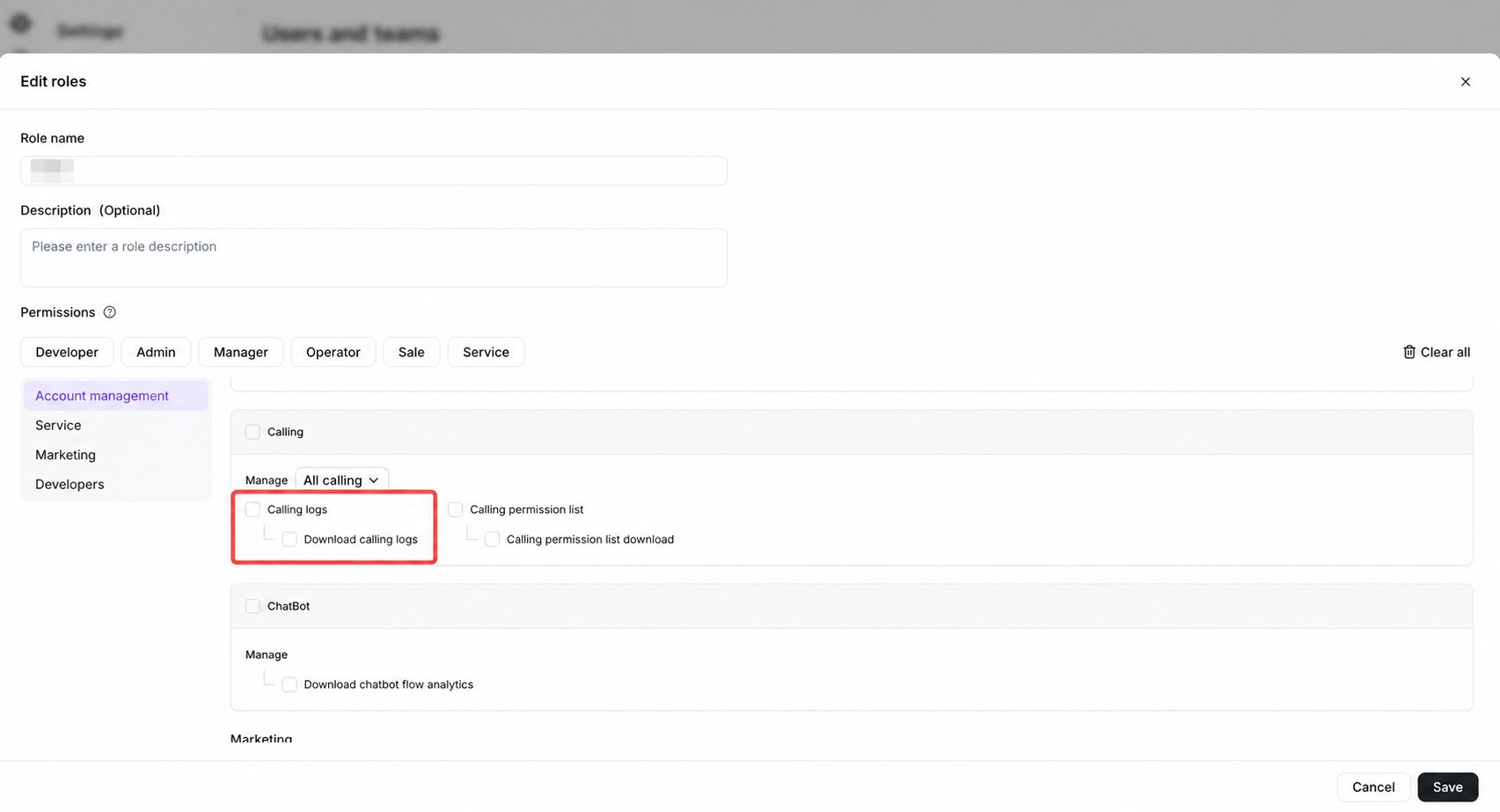
默认的 **Admin**、 **Manager** 和 **Operator** 角色可以访问通话日志。也可以为自定义角色授予相关的通话日志权限。
 ## 打开通话日志
前往 **通话** 并在左下方区域选择 **通话日志** 。
## 打开通话日志
前往 **通话** 并在左下方区域选择 **通话日志** 。
 ## 搜索和筛选记录
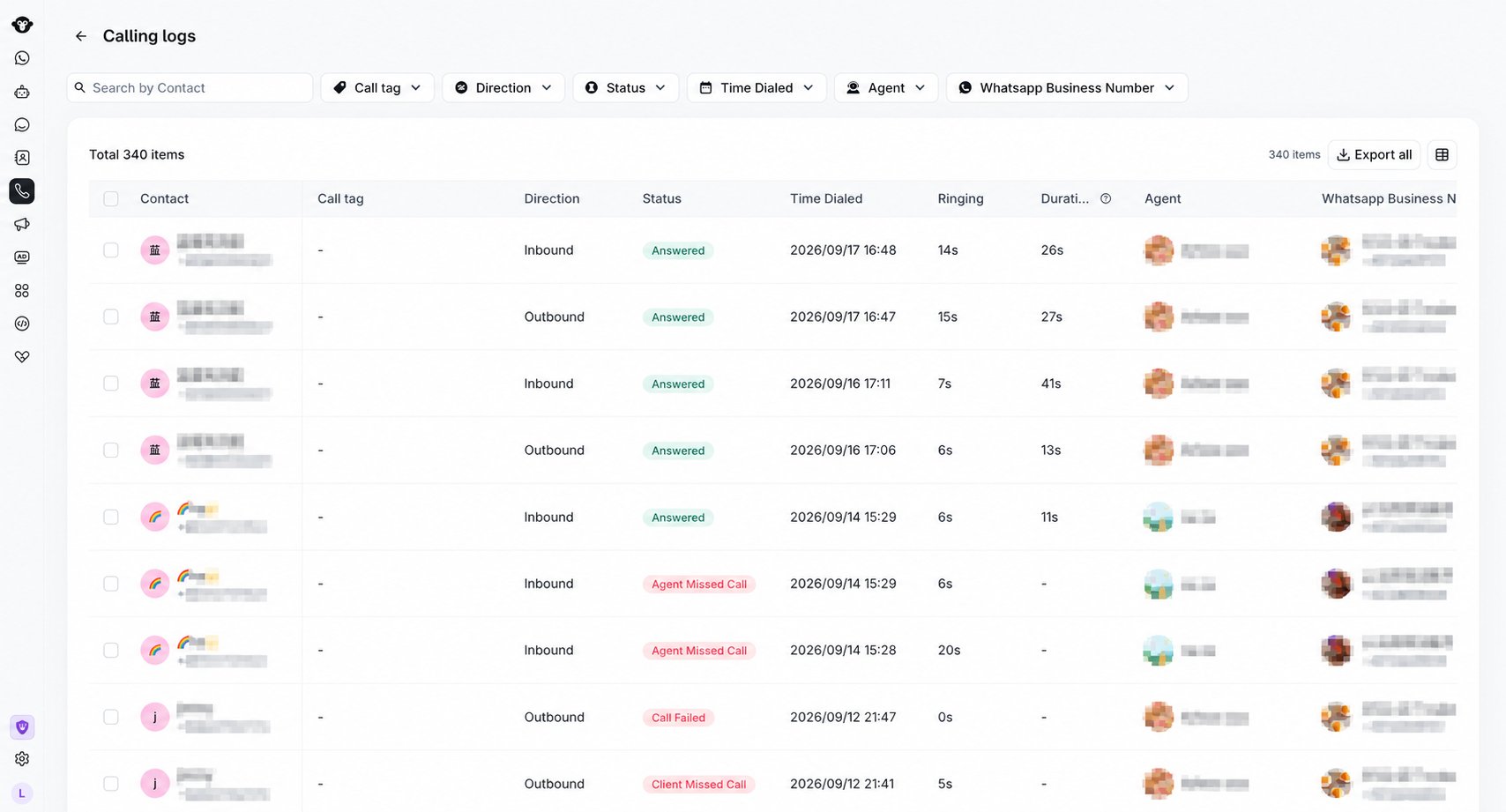
当前的通话日志页面包括:
* 按联系人搜索。
* 按 **通话标签**、 **呼叫方向**、 **状态**、 **拨打时间**、 **坐席** 和 **WhatsApp 商业号码** 进行筛选。
* **导出全部** 用于导出可用的日志数据。
* **设置显示字段** 用于选择表格中可见的字段。
## 搜索和筛选记录
当前的通话日志页面包括:
* 按联系人搜索。
* 按 **通话标签**、 **呼叫方向**、 **状态**、 **拨打时间**、 **坐席** 和 **WhatsApp 商业号码** 进行筛选。
* **导出全部** 用于导出可用的日志数据。
* **设置显示字段** 用于选择表格中可见的字段。
 ## 查看日志详情
表格可显示 **联系人**、 **通话标签**、 **呼叫方向**、 **状态**、 **拨打时间**、 **振铃**、 **通话时长**、 **坐席**、 **WhatsApp 商业号码**、 **备注**、 **录音** 和 **转录文本**。
* 当录音可播放或下载时,**录音** 会显示 **可用** 。破折号表示没有可用录音。
* **转录文本** 显示转录内容的单行预览。客户和企业的语音分别以 `[Customer]` 和 `[Business]` 标识。破折号表示没有可用的转录文本。
较长的转录预览会在表格中缩短显示。将鼠标悬停在转录文本上或聚焦查看完整内容。
## 查看日志详情
表格可显示 **联系人**、 **通话标签**、 **呼叫方向**、 **状态**、 **拨打时间**、 **振铃**、 **通话时长**、 **坐席**、 **WhatsApp 商业号码**、 **备注**、 **录音** 和 **转录文本**。
* 当录音可播放或下载时,**录音** 会显示 **可用** 。破折号表示没有可用录音。
* **转录文本** 显示转录内容的单行预览。客户和企业的语音分别以 `[Customer]` 和 `[Business]` 标识。破折号表示没有可用的转录文本。
较长的转录预览会在表格中缩短显示。将鼠标悬停在转录文本上或聚焦查看完整内容。
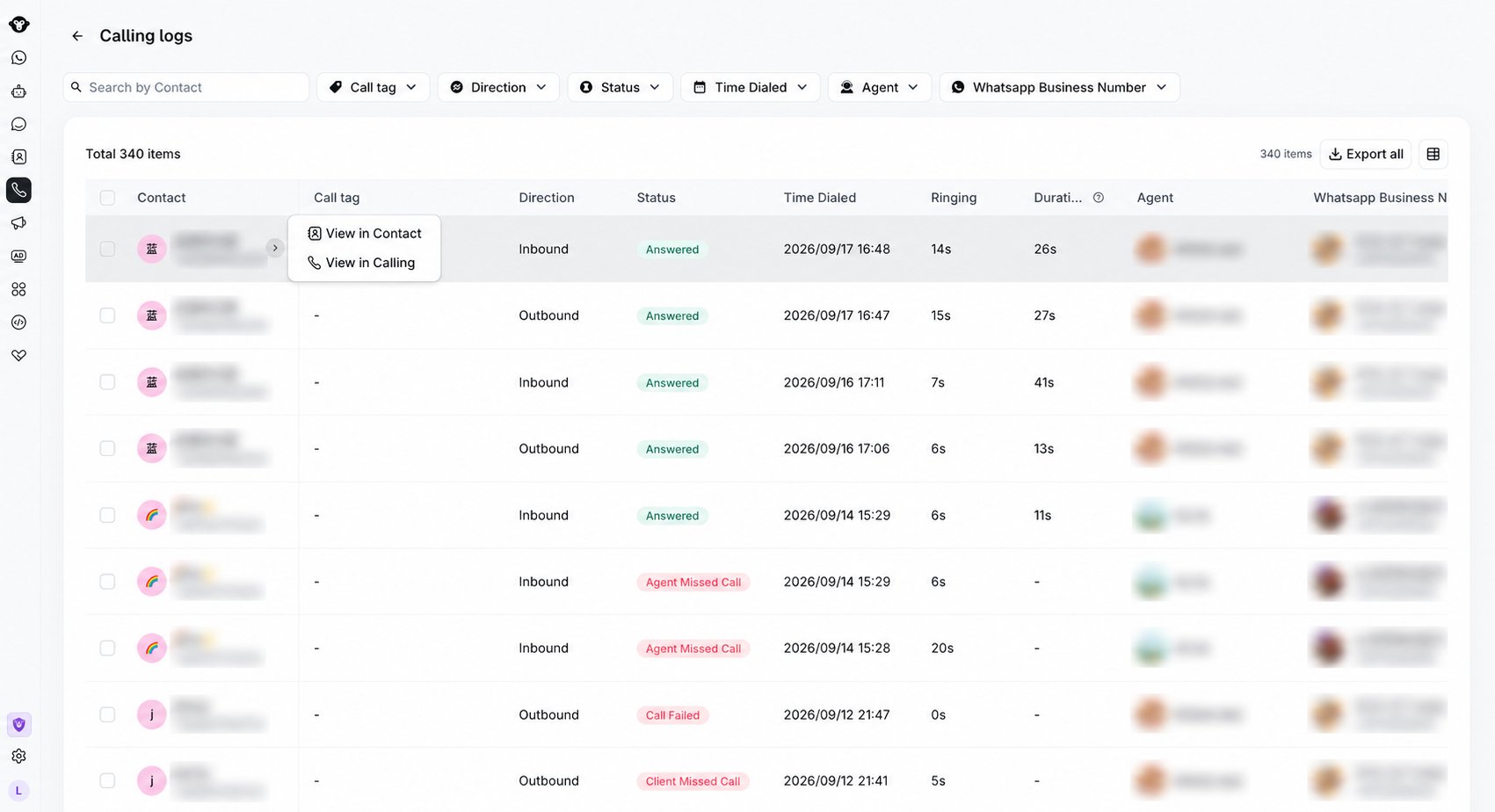
 将鼠标悬停在联系人列上,可以使用可用快捷方式打开联系人或相关的通话视图。
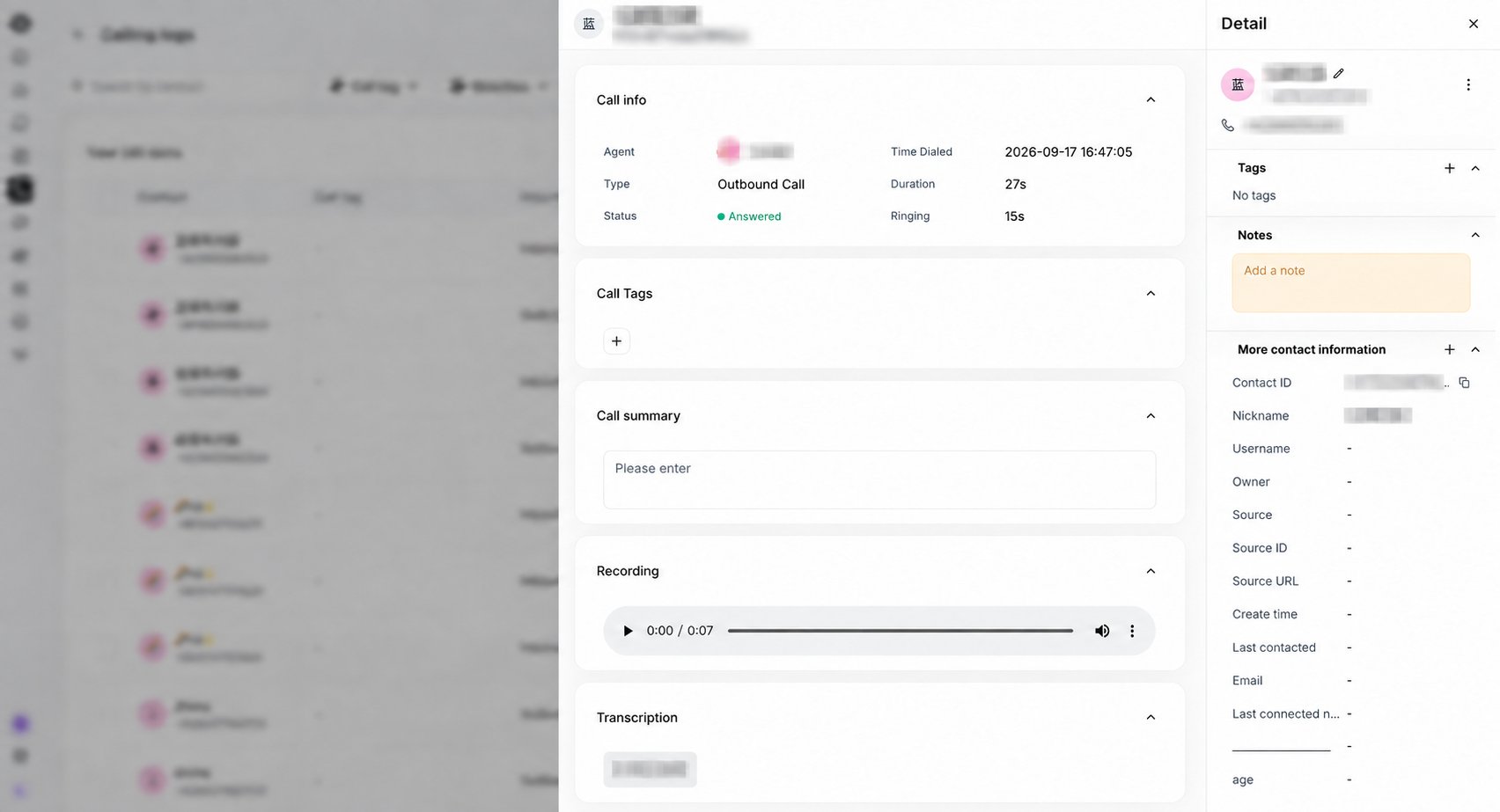
 选择一条通话记录以打开详情面板。在 **通话摘要** 下方展开 **录音** 或 **转录文本** 。
### 录音
当录音可用时,可以使用播放器播放或暂停通话、快进/快退录音、调节音量或下载音频。播放器会显示当前进度和总时长。
如果通话未录音,该部分将显示 **无可用录音**。
### 转录文本
转录文本按照对话顺序列出,并区分说话人:
* 客户消息显示在左侧。
* 企业消息显示在右侧,并在可用时附带坐席或企业名称。
如果通话未转录,该部分将显示 **无可用转录文本**。
选择一条通话记录以打开详情面板。在 **通话摘要** 下方展开 **录音** 或 **转录文本** 。
### 录音
当录音可用时,可以使用播放器播放或暂停通话、快进/快退录音、调节音量或下载音频。播放器会显示当前进度和总时长。
如果通话未录音,该部分将显示 **无可用录音**。
### 转录文本
转录文本按照对话顺序列出,并区分说话人:
* 客户消息显示在左侧。
* 企业消息显示在右侧,并在可用时附带坐席或企业名称。
如果通话未转录,该部分将显示 **无可用转录文本**。
 ## 导出通话日志
使用 **导出全部** 导出符合当前筛选条件的记录。如需仅导出特定通话,请勾选对应复选框并使用 **导出所选**。
对于每条导出的通话记录:
* 当音频可用时,**录音** 包含受控录音 URL。
* **转录文本** 包含按对话顺序排列的内容,使用 `[Business]` 和 `[Customer]` 来区分说话人。
* 当相应内容不可用时,任一字段都将留空。
在继续导出之前,YCloud 会要求您验证账户。播放、下载、查看转录文本以及导出功能取决于您的通话日志权限。
This documentation is built and hosted on [Mintlify](https://mintlify.com), a developer documentation platform.
## 导出通话日志
使用 **导出全部** 导出符合当前筛选条件的记录。如需仅导出特定通话,请勾选对应复选框并使用 **导出所选**。
对于每条导出的通话记录:
* 当音频可用时,**录音** 包含受控录音 URL。
* **转录文本** 包含按对话顺序排列的内容,使用 `[Business]` 和 `[Customer]` 来区分说话人。
* 当相应内容不可用时,任一字段都将留空。
在继续导出之前,YCloud 会要求您验证账户。播放、下载、查看转录文本以及导出功能取决于您的通话日志权限。
This documentation is built and hosted on [Mintlify](https://mintlify.com), a developer documentation platform.