> ## Documentation Index
> Fetch the complete documentation index at: https://docs.ycloud.com/llms.txt
> Use this file to discover all available pages before exploring further.

# 呼出通话指南

> 请求客户授权并发起合规的 WhatsApp 呼出通话。

## 使用要求

要使用 WhatsApp 呼出通话功能，您的商业账户必须满足以下条件：

1. Business Portfolio 消息发送限制已达到 2,000 位客户级别。
2. 商业号码的注册国家或地区不是：
   * 美国
   * 加拿大
   * 土耳其
   * 埃及
   * 越南
   * 尼日利亚

## 通话规则

1. 商家发起呼出通话前，必须先获得客户的授权许可。
2. 72 小时内发送通话权限请求消息不得超过 2 条。
3. 24 小时内发起的呼出语音通话不得超过 100 次。

<Warning>
  客户授权具有时效性。拨打电话前请确认权限依然有效。WhatsApp 或 YCloud 可能会实施额外的资格、质量及频次限制。
</Warning>

## 请求客户授权

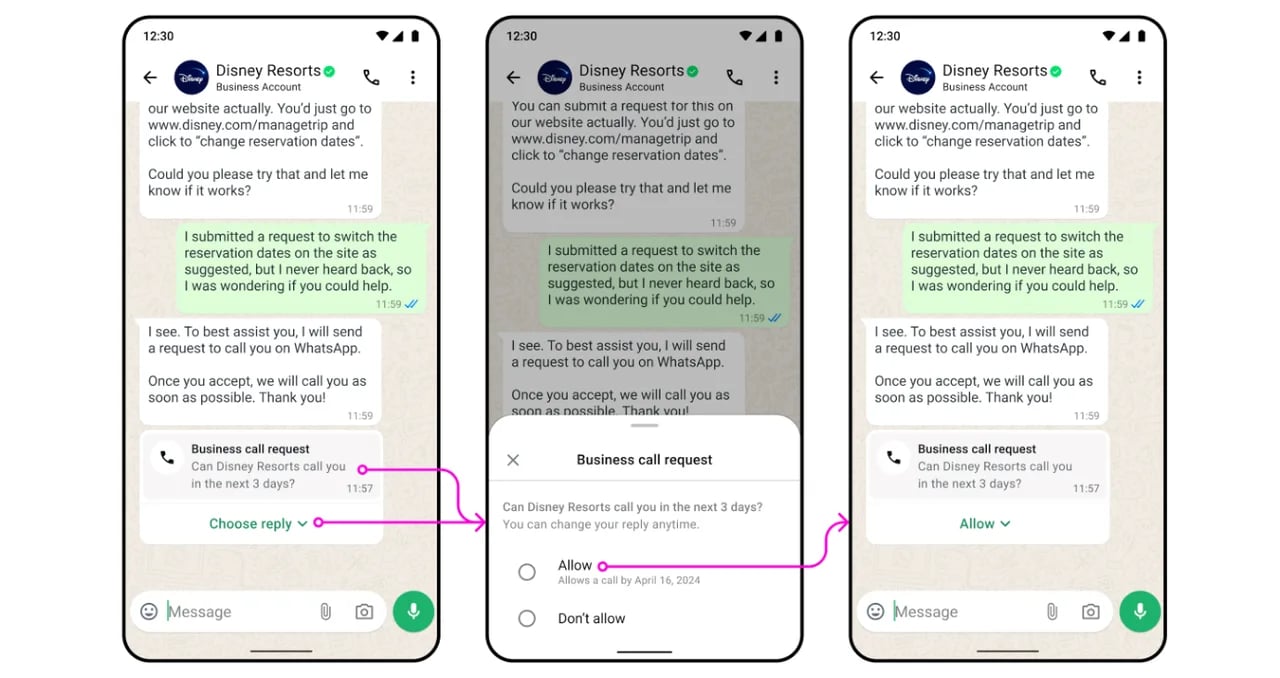
发送 **Calling Request** 模板消息。客户可以选择允许或拒绝该请求。
<img src="https://mintcdn.com/lchnan/6CxA7mK2t7klNAOL/product-assets/9a6416bde9-image-798.webp?fit=max&auto=format&n=6CxA7mK2t7klNAOL&q=85&s=478fe8c5d03010ffbd7cae70f742d1b7" alt="YCloud product screenshot" width="1280" height="678" data-path="product-assets/9a6416bde9-image-798.webp" />

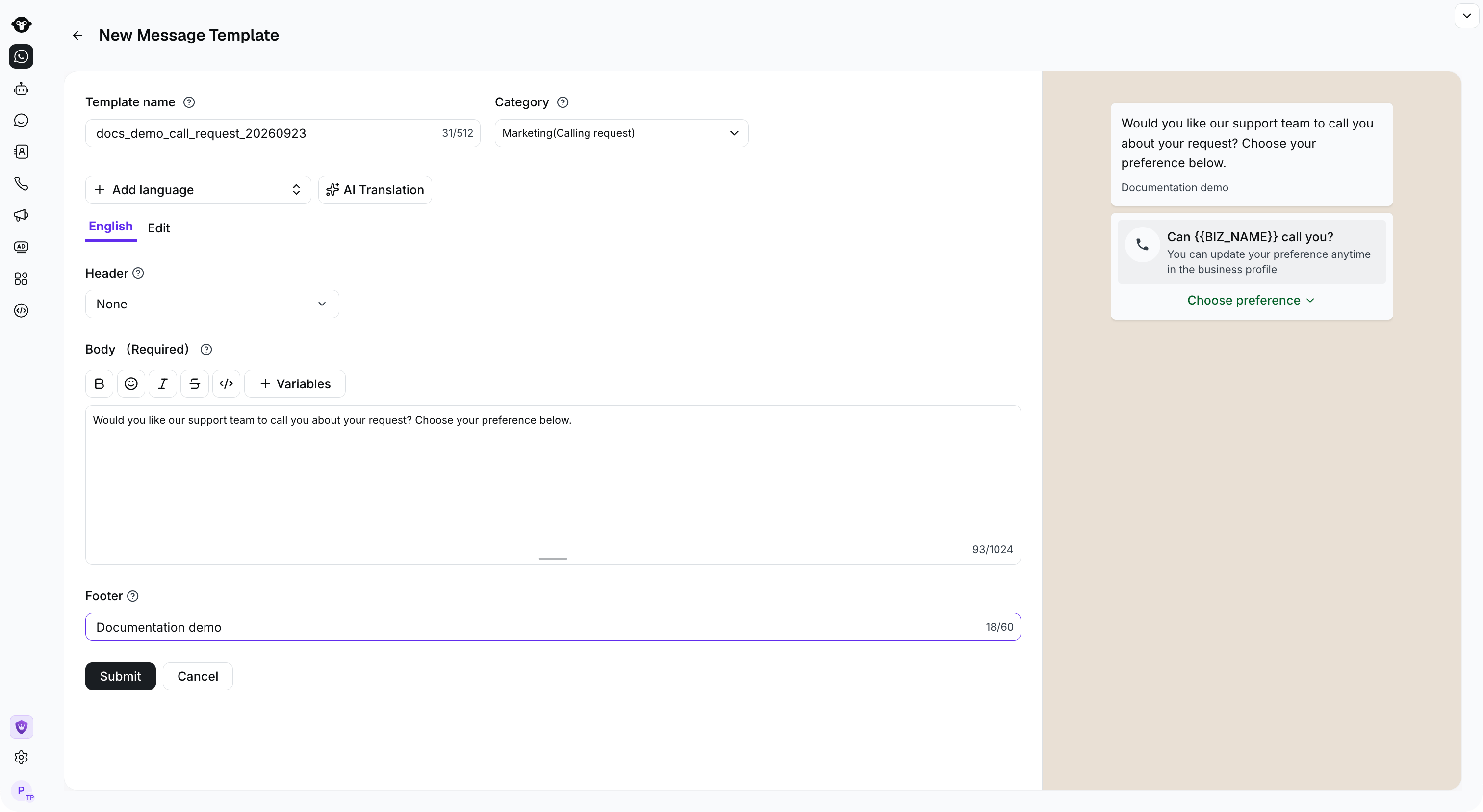
### 创建通话请求模板

1. 前往 **Templates**。
2. 创建一个包含 **Calling Request** 按钮的模板。
3. 输入消息内容并提交模板以供审核。
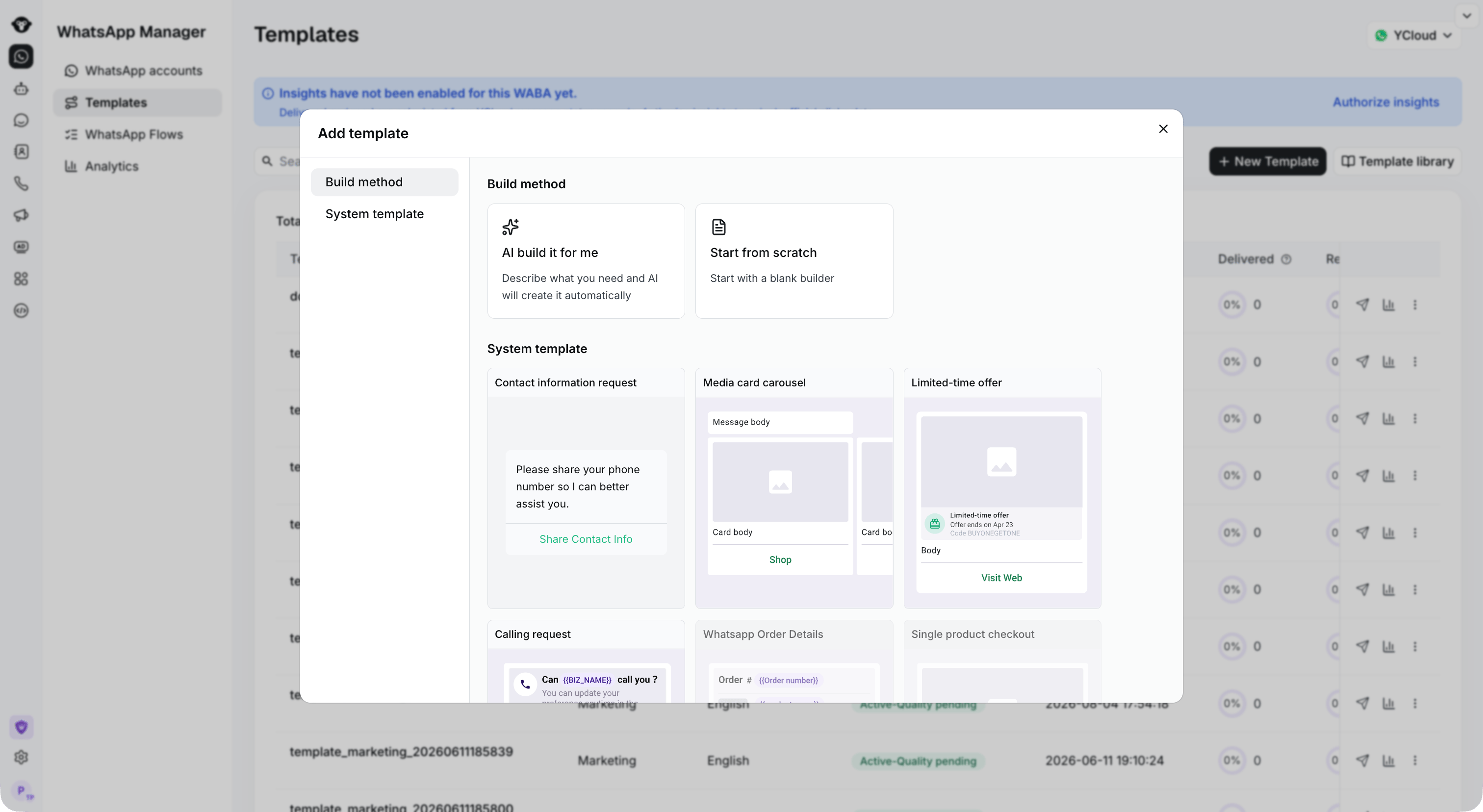
<Frame caption="Choose Calling request to open the matching template editor.">
  <img src="https://mintcdn.com/lchnan/TsMGu8UTNQaUw-Rc/product-assets/english-help-demo-2026-09-23/template-special-formats.png?fit=max&auto=format&n=TsMGu8UTNQaUw-Rc&q=85&s=49c869accb0c2c3483c533497bf25ec1" alt="带有通话请求的营销模板选择器" width="3024" height="1656" data-path="product-assets/english-help-demo-2026-09-23/template-special-formats.png" />
</Frame>

<Frame caption="Enter the request text and review the calling-permission preview before submitting the template.">
  <img src="https://mintcdn.com/lchnan/TsMGu8UTNQaUw-Rc/product-assets/english-help-demo-2026-09-23/calling-request-editor.png?fit=max&auto=format&n=TsMGu8UTNQaUw-Rc&q=85&s=1fa71d58f5d4395c887c7b1b0bc00996" alt="通话请求模板编辑器与客户偏好预览" width="3024" height="1656" data-path="product-assets/english-help-demo-2026-09-23/calling-request-editor.png" />
</Frame>

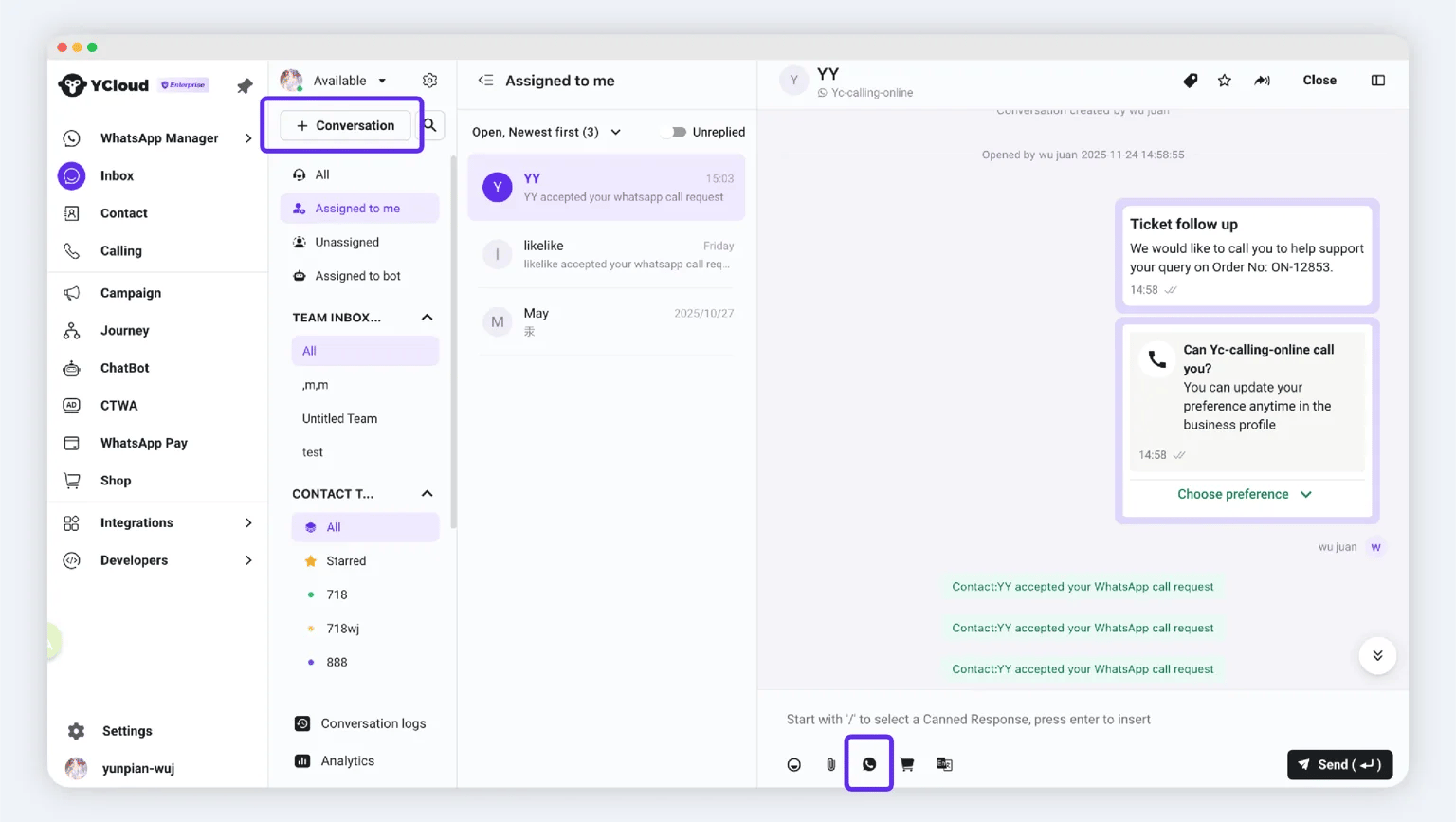
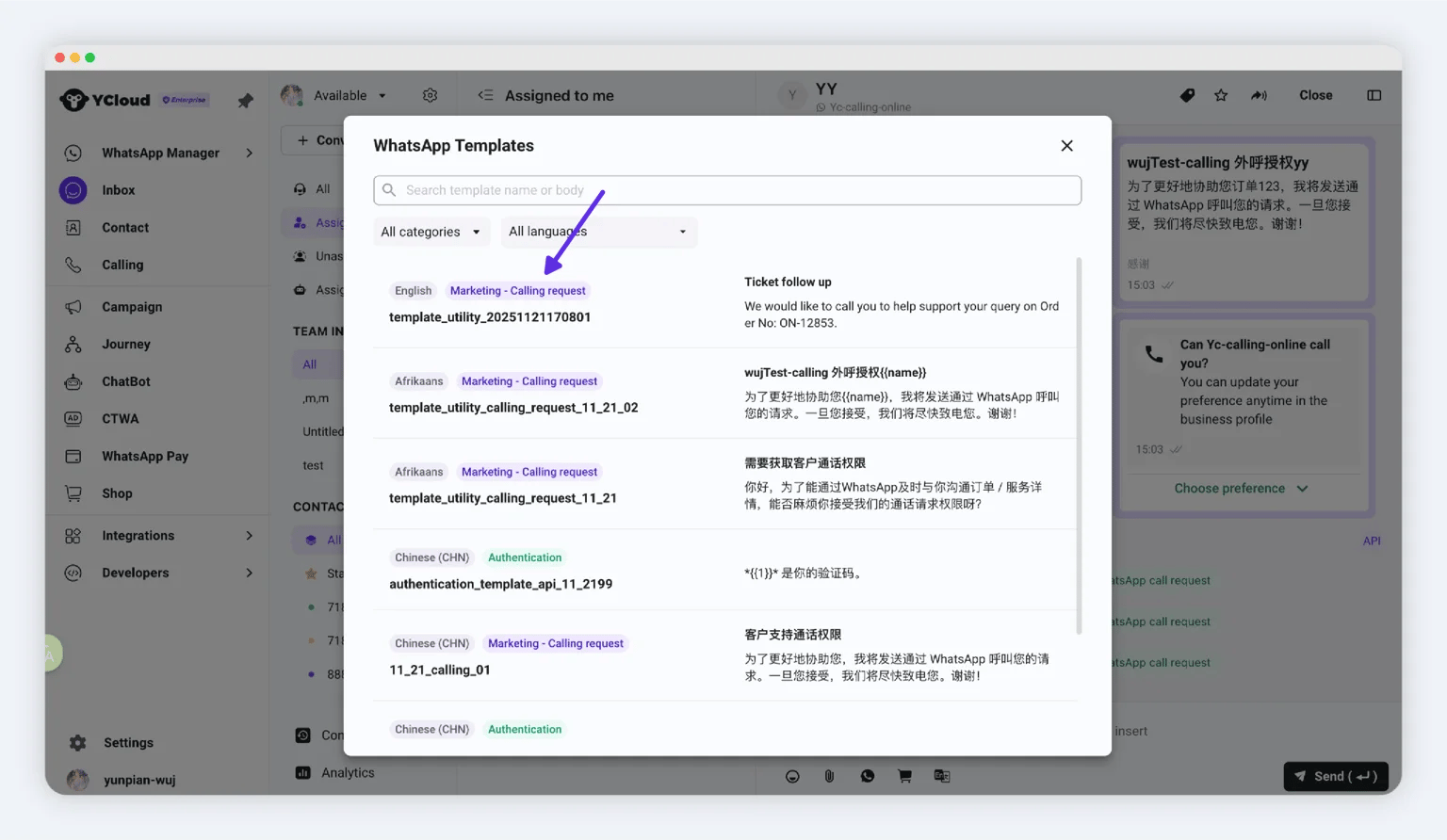
### 从收件箱发送请求

模板审核通过后：

1. 打开 **Inbox**。
2. 为新联系人发起对话，或打开现有对话。
3. 选择已审核通过的通话请求模板并发送。

<img src="https://mintcdn.com/lchnan/NjO13A6gLJKR9m7M/product-assets/75806346ab-image-801.webp?fit=max&auto=format&n=NjO13A6gLJKR9m7M&q=85&s=211a7d01b9583664c56d20e5d3730085" alt="YCloud product screenshot" width="1536" height="867" data-path="product-assets/75806346ab-image-801.webp" />

<img src="https://mintcdn.com/lchnan/WD-ixrYVrqB7b7aQ/product-assets/3daaf07515-image-802.webp?fit=max&auto=format&n=WD-ixrYVrqB7b7aQ&q=85&s=27153cb15c0748be7720eed269933403" alt="YCloud product screenshot" width="1536" height="892" data-path="product-assets/3daaf07515-image-802.webp" />

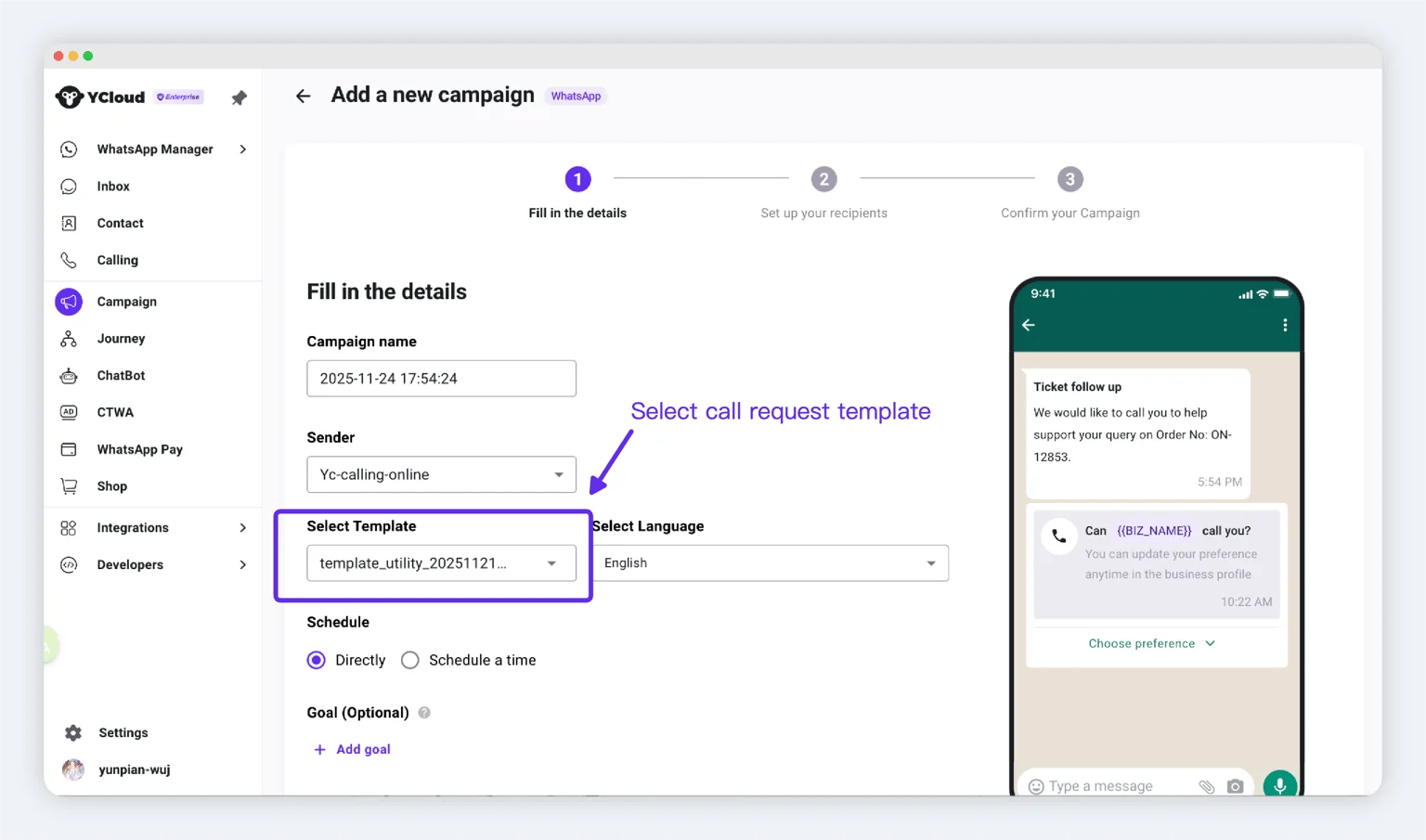
### 通过群发活动发送请求

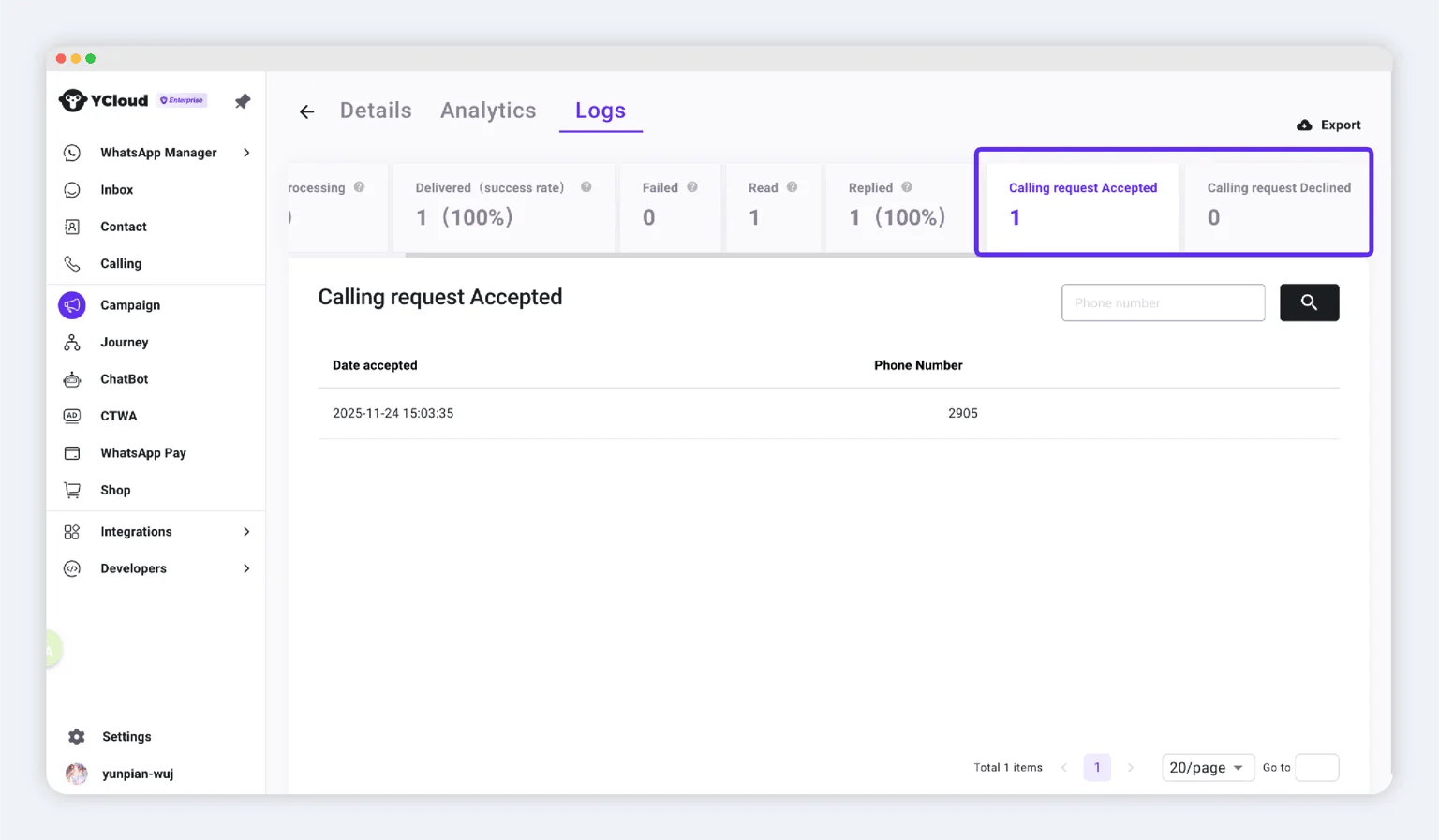
针对更多受众，可以创建 Campaign 并选择已审核通过的通话请求模板。发送后，使用活动统计数据查看结果和授权情况。

<img src="https://mintcdn.com/lchnan/7IqVC2giQEcOq6-5/product-assets/2496f310aa-image-803.webp?fit=max&auto=format&n=7IqVC2giQEcOq6-5&q=85&s=09c4183a7d9f622b3cb330707a8e6534" alt="YCloud product screenshot" width="1536" height="905" data-path="product-assets/2496f310aa-image-803.webp" />

<img src="https://mintcdn.com/lchnan/RN4tXfXENVvDu0Te/product-assets/d6ced9523a-image-805.webp?fit=max&auto=format&n=RN4tXfXENVvDu0Te&q=85&s=5b6bca36b113732ff590911ae6f5336a" alt="YCloud product screenshot" width="1536" height="897" data-path="product-assets/d6ced9523a-image-805.webp" />

## 查看已授权客户

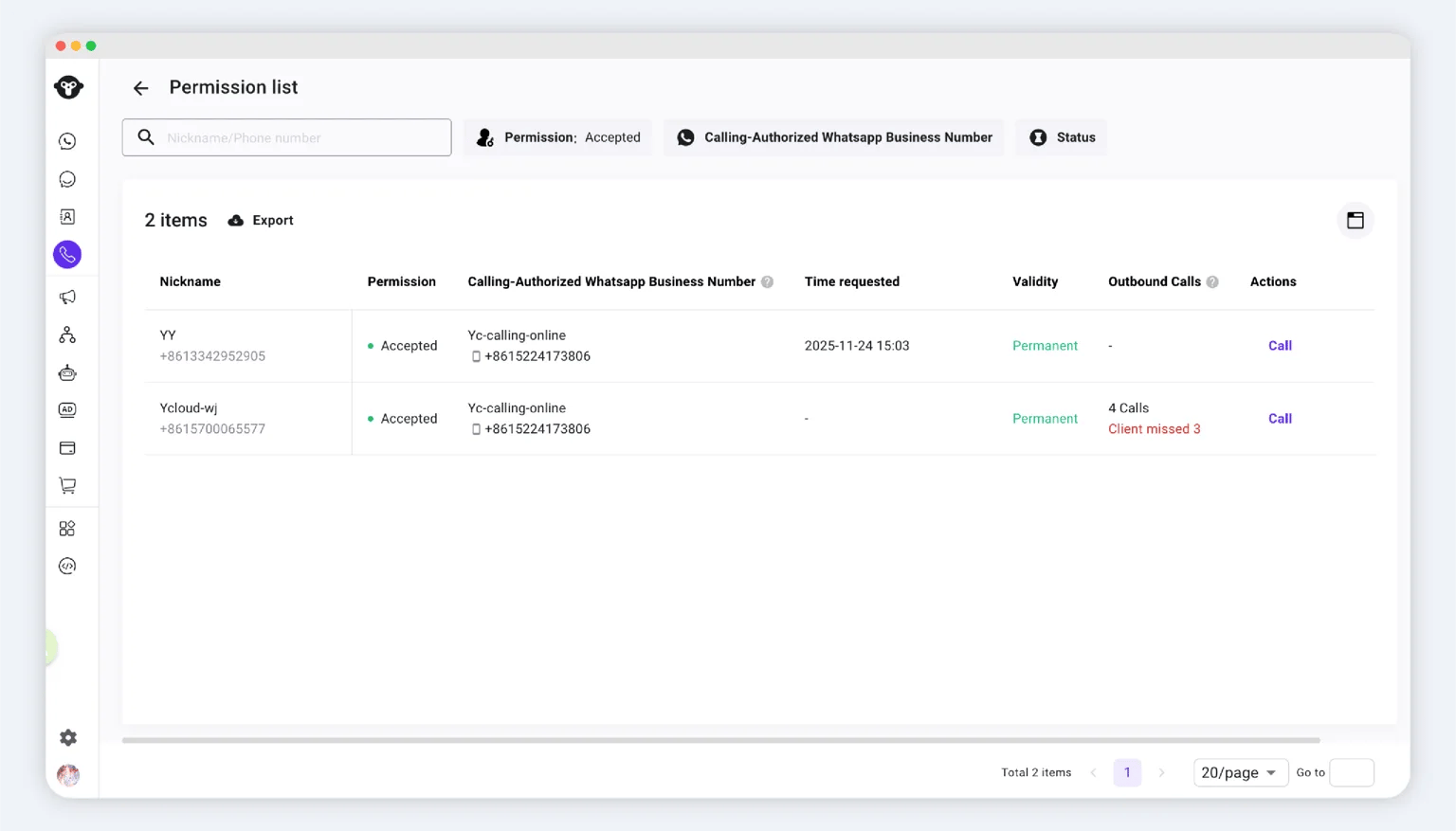
打开 **Calling > Permission list**。列表中显示您角色及数据访问权限范围内的授权记录。
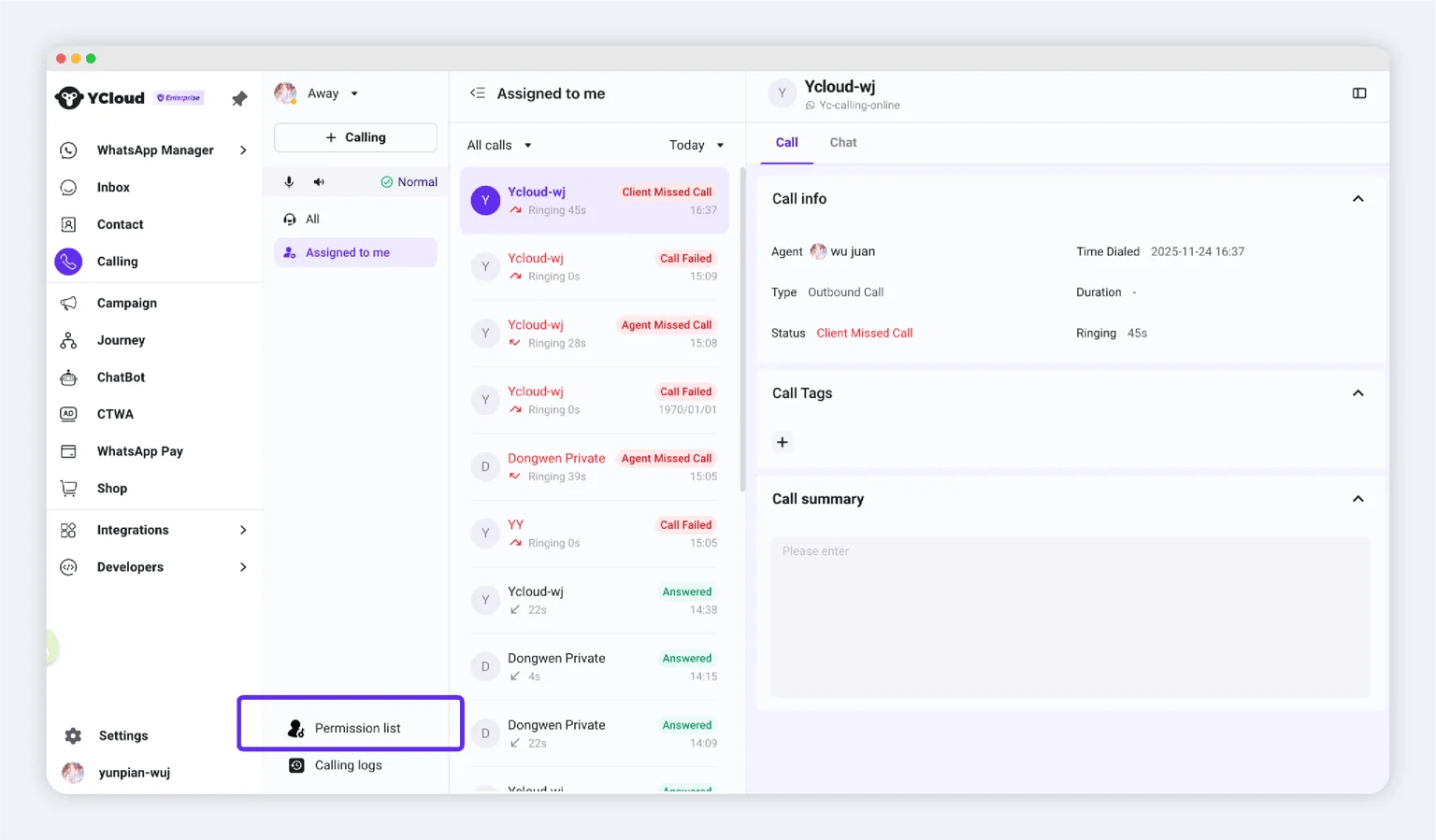
<img src="https://mintcdn.com/lchnan/Z2X3BzyqaivSGKDr/product-assets/5954206ec8-image-806.webp?fit=max&auto=format&n=Z2X3BzyqaivSGKDr&q=85&s=6fcd26abf902618e0ad468efe5e7eda0" alt="YCloud product screenshot" width="1536" height="899" data-path="product-assets/5954206ec8-image-806.webp" />

<img src="https://mintcdn.com/lchnan/WD-ixrYVrqB7b7aQ/product-assets/3902981353-image-807.webp?fit=max&auto=format&n=WD-ixrYVrqB7b7aQ&q=85&s=b89a7761890f5cdca50203c975ea7674" alt="YCloud product screenshot" width="1536" height="877" data-path="product-assets/3902981353-image-807.webp" />

## 发起呼出通话

拨打电话前，请确认：

* 客户已授权许可且授权依然有效。
* 您对所选商业号码拥有呼出权限。

### 方法 1：权限列表

1. 打开 **Calling > Permission list**。
2. 找到对应客户。
3. 点击通话操作。
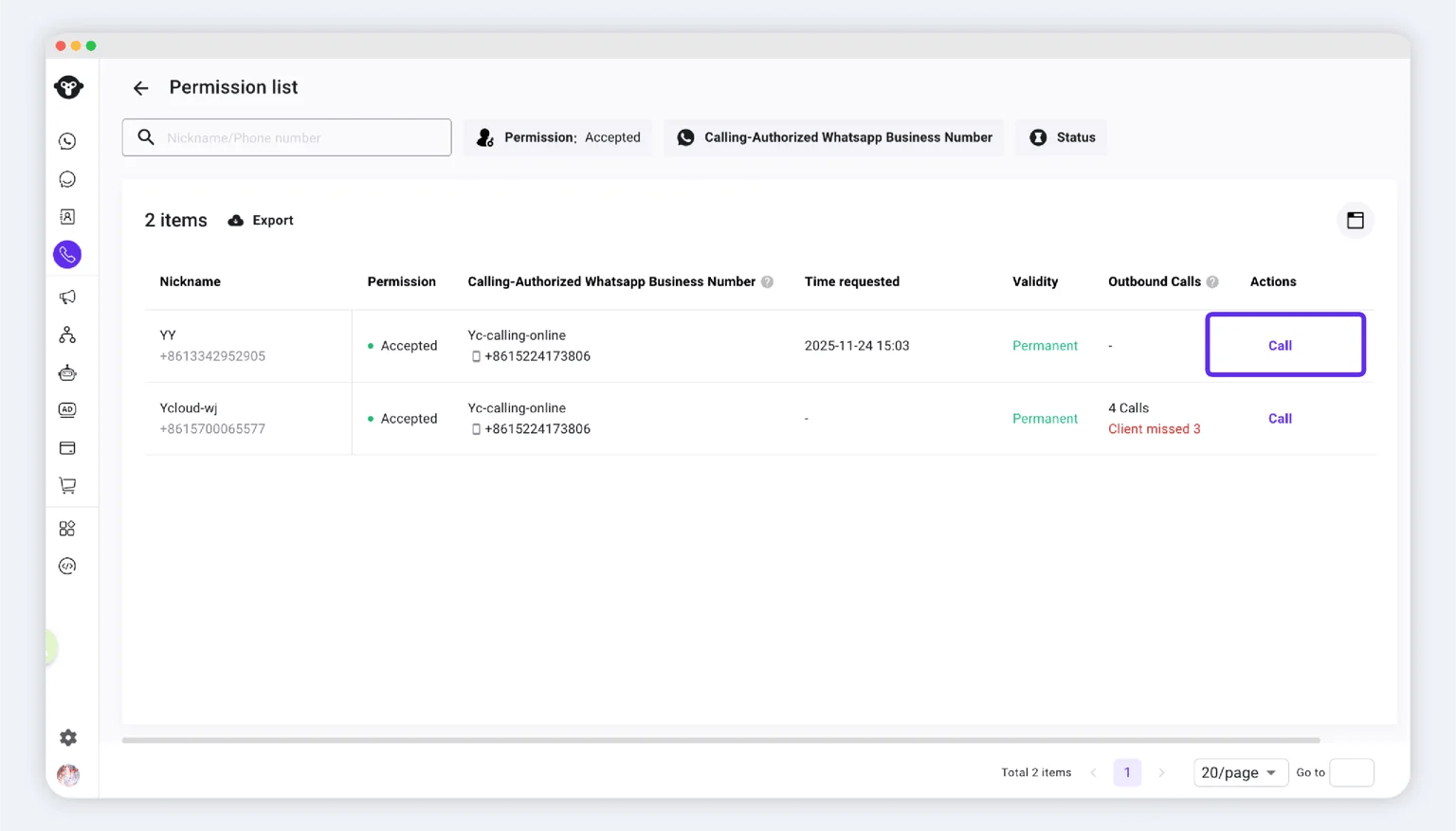
<img src="https://mintcdn.com/lchnan/RN4tXfXENVvDu0Te/product-assets/d6b8517a77-image-808.webp?fit=max&auto=format&n=RN4tXfXENVvDu0Te&q=85&s=3cb91b4390cadfa43729425ae48b7ac5" alt="YCloud product screenshot" width="1536" height="877" data-path="product-assets/d6b8517a77-image-808.webp" />

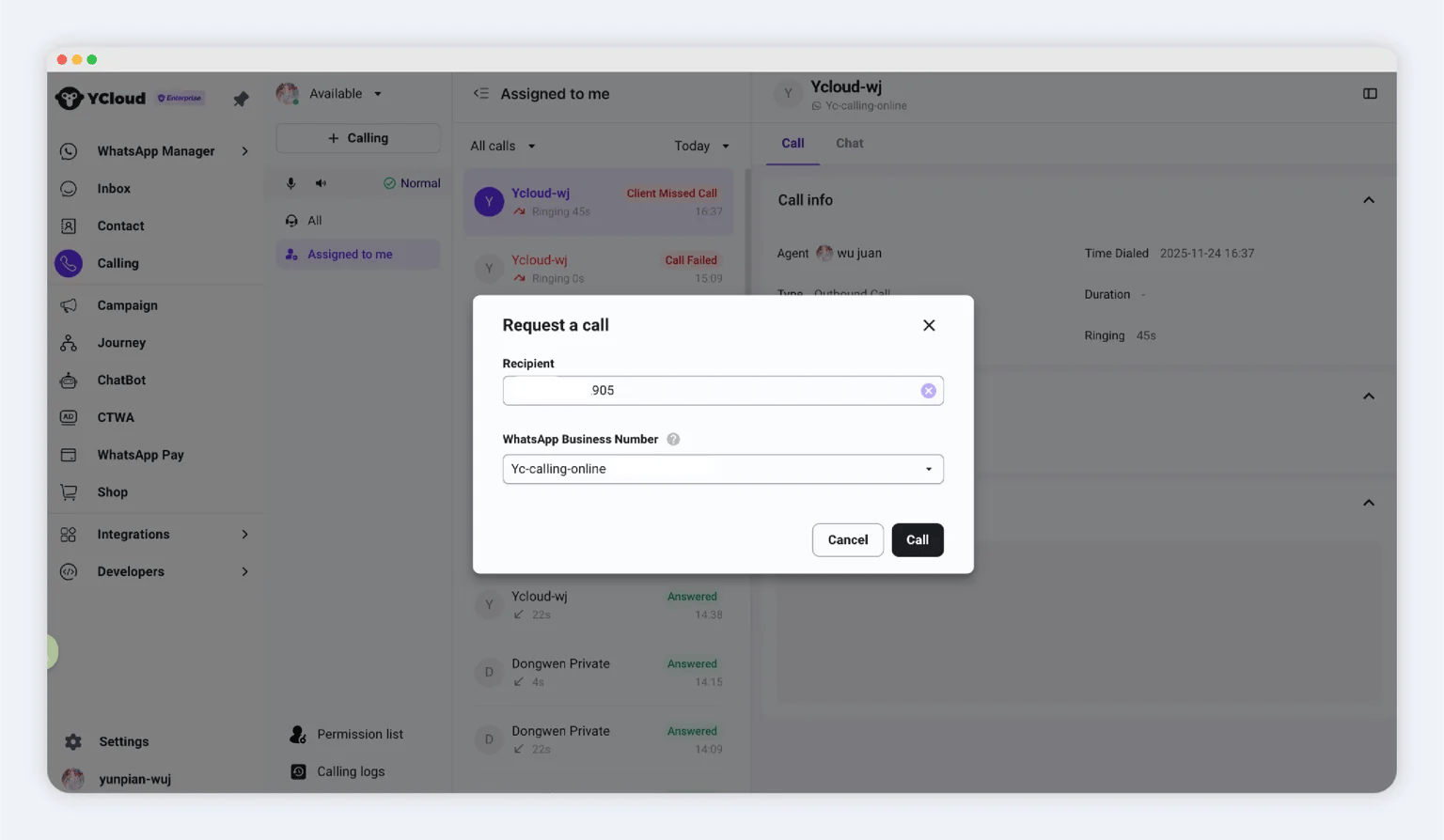
### 方法 2：通话工作区

1. 打开 **Calling**。
2. 点击 **+ Calling**。
3. 输入客户的电话号码。
4. 选择要使用的商业号码。
5. 发起通话。
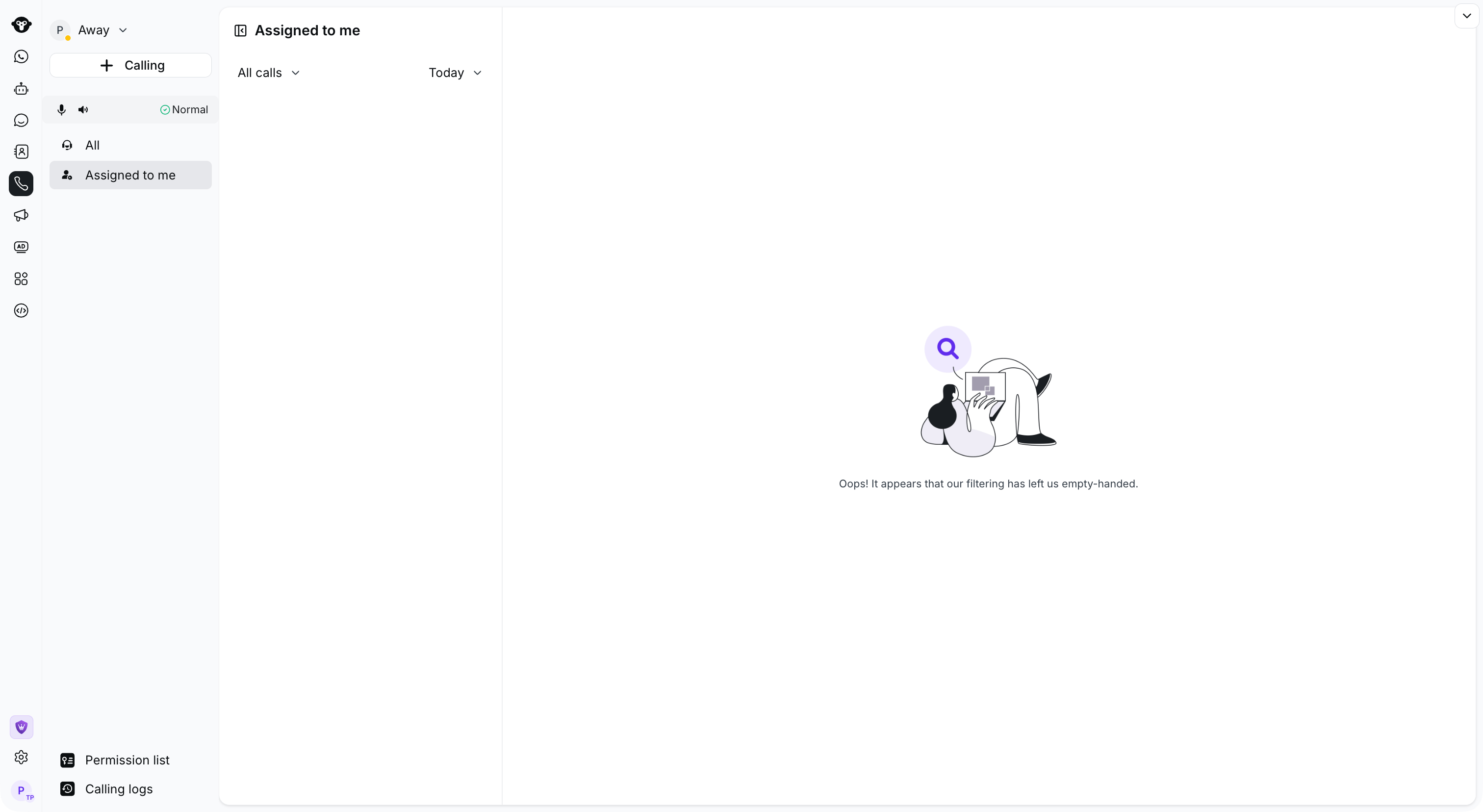
<Frame caption="Select Calling in the left navigation, then use + Calling to start a request.">
  <img src="https://mintcdn.com/lchnan/TsMGu8UTNQaUw-Rc/product-assets/english-help-demo-2026-09-23/calling-workspace.png?fit=max&auto=format&n=TsMGu8UTNQaUw-Rc&q=85&s=3c7ec6e39d094fee7f22a9d5ecc434aa" alt="包含“+ Calling”入口且演示账户中无匹配通话的完整通话工作区。" width="3024" height="1656" data-path="product-assets/english-help-demo-2026-09-23/calling-workspace.png" />
</Frame>

<img src="https://mintcdn.com/lchnan/WD-ixrYVrqB7b7aQ/product-assets/499e13890a-image-810.webp?fit=max&auto=format&n=WD-ixrYVrqB7b7aQ&q=85&s=13c5e786b3983bc2f9ee9cb30d2b7a60" alt="YCloud product screenshot" width="1536" height="894" data-path="product-assets/499e13890a-image-810.webp" />

### 方法 3：收件箱

1. 打开 **Inbox** 并选择客户对话。
2. 打开 **WhatsApp Calling**。
3. 点击 **Call out**。

收件箱操作流程请参见 [Calling in Inbox](/zh/documentation/inbox/whatsapp-calling-in-inbox)。

<Frame caption="In Inbox, open WhatsApp calling and select Call out.">
  <img src="https://mintcdn.com/lchnan/TsMGu8UTNQaUw-Rc/product-assets/english-help-demo-2026-09-23/inbox-live-calling-out-menu-annotated.svg?fit=max&auto=format&n=TsMGu8UTNQaUw-Rc&q=85&s=4ce2dee0c7c6ff84c1903b766a058d63" alt="包含 WhatsApp 通话菜单和呼出选项的完整收件箱对话界面。" width="690" height="250" data-path="product-assets/english-help-demo-2026-09-23/inbox-live-calling-out-menu-annotated.svg" />
</Frame>


This documentation is built and hosted on [Mintlify](https://mintlify.com), a developer documentation platform.