> ## Documentation Index
> Fetch the complete documentation index at: https://docs.ycloud.com/llms.txt
> Use this file to discover all available pages before exploring further.
# 概述
> 了解 WhatsApp 通话功能、其要求、计费方式以及在 YCloud 中的设置选项。
WhatsApp 通话是 WhatsApp Business Cloud API 提供的一种语音通话 (VoIP) 功能。它使企业能够直接在 WhatsApp 中与客户进行实时语音对话。
YCloud 支持两种通话类型:
* **呼入通话:** 客户致电您的企业。
* **呼出通话:** 您的企业在获得许可后致电客户。
## 计费方式
#### 呼入通话
呼入通话免费,无论您的企业是否接听。
#### 呼出通话
* 费用根据接通时长计算。
* 计费单位为 6 秒。不足一个计费单位的部分按一个计费单位计算。
* 费率取决于客户电话号码的国家代码。
例如,如果印度尼西亚的费率为每分钟 0.0242 美元,且一次接通的通话持续了 9 秒:
**计费金额 = 2 个单位 × 0.0242 美元 ÷ 10 = 0.00484 美元**
有关当前各个国家/地区的费率,请参见 [WhatsApp 通话定价](https://www.ycloud.com/pricing#price-table)。
## 用户发起的通话(呼入)
客户可以通过三种方式发起通话。
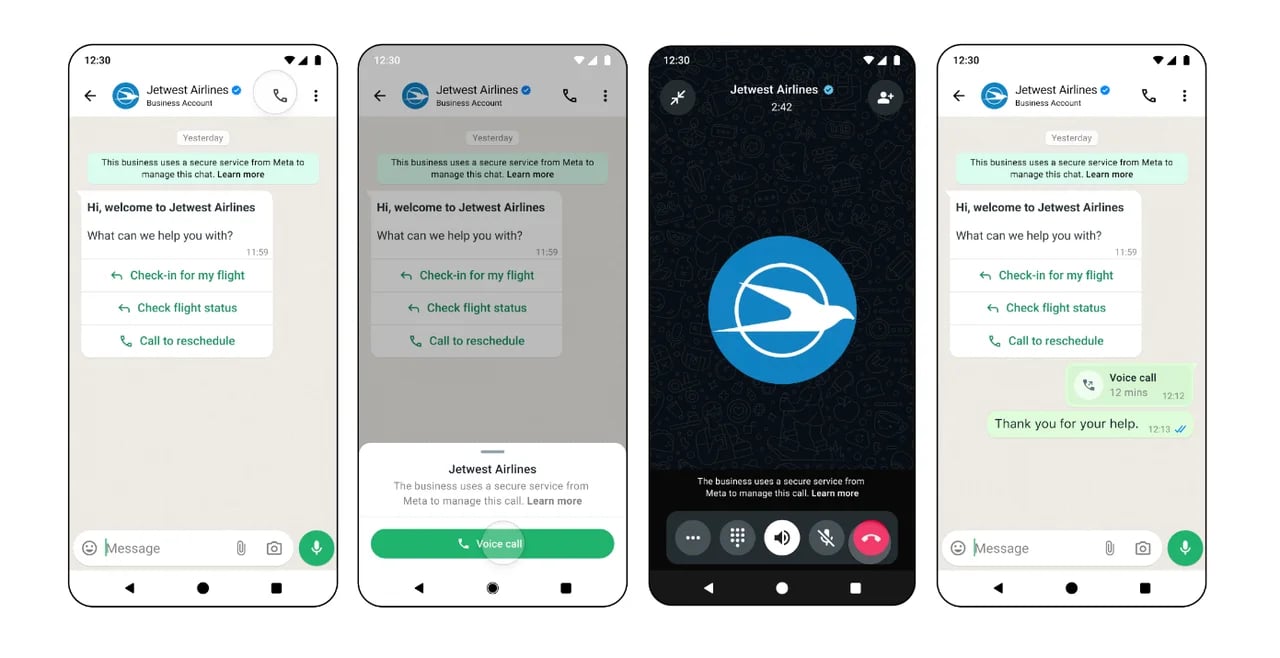
#### 1. WhatsApp 中的通话按钮
为您的商业号码启用通话图标,以便客户可以从对话或商业资料中发起通话。
 #### 2. 呼入链接
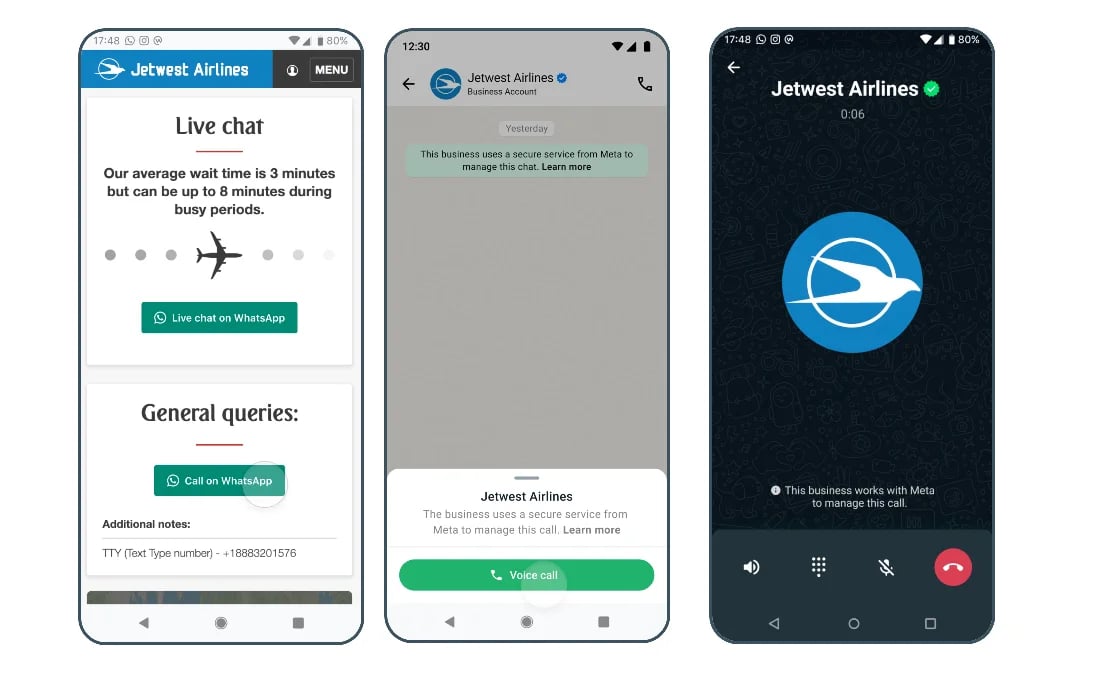
生成呼入链接并将其放置在您的网站、电子邮件或 WhatsApp 消息中。
#### 2. 呼入链接
生成呼入链接并将其放置在您的网站、电子邮件或 WhatsApp 消息中。
 #### 3. 消息中的呼入按钮
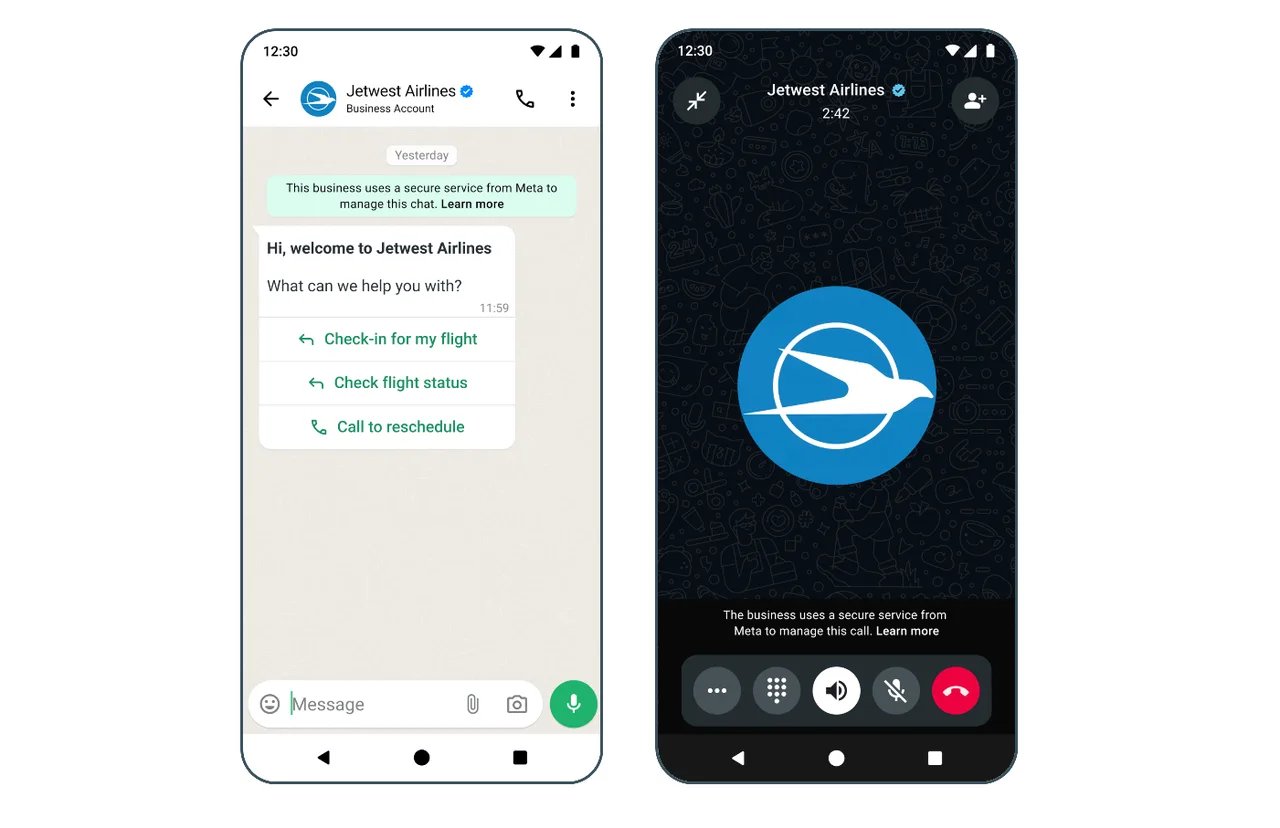
在消息模板或交互式消息中添加呼入按钮。
#### 3. 消息中的呼入按钮
在消息模板或交互式消息中添加呼入按钮。
 ## 企业发起的通话(呼出)
在使用 WhatsApp 呼出通话之前,您的商业账户必须满足以下要求:
1. Business Portfolio 的消息发送限制已达到 2,000 位客户级别。
2. 商业号码的注册国家或地区不属于:
* 美国 (+1)
* 加拿大 (+1)
* 土耳其 (+90)
* 埃及 (+20)
* 越南 (+84)
* 尼日利亚 (+234)
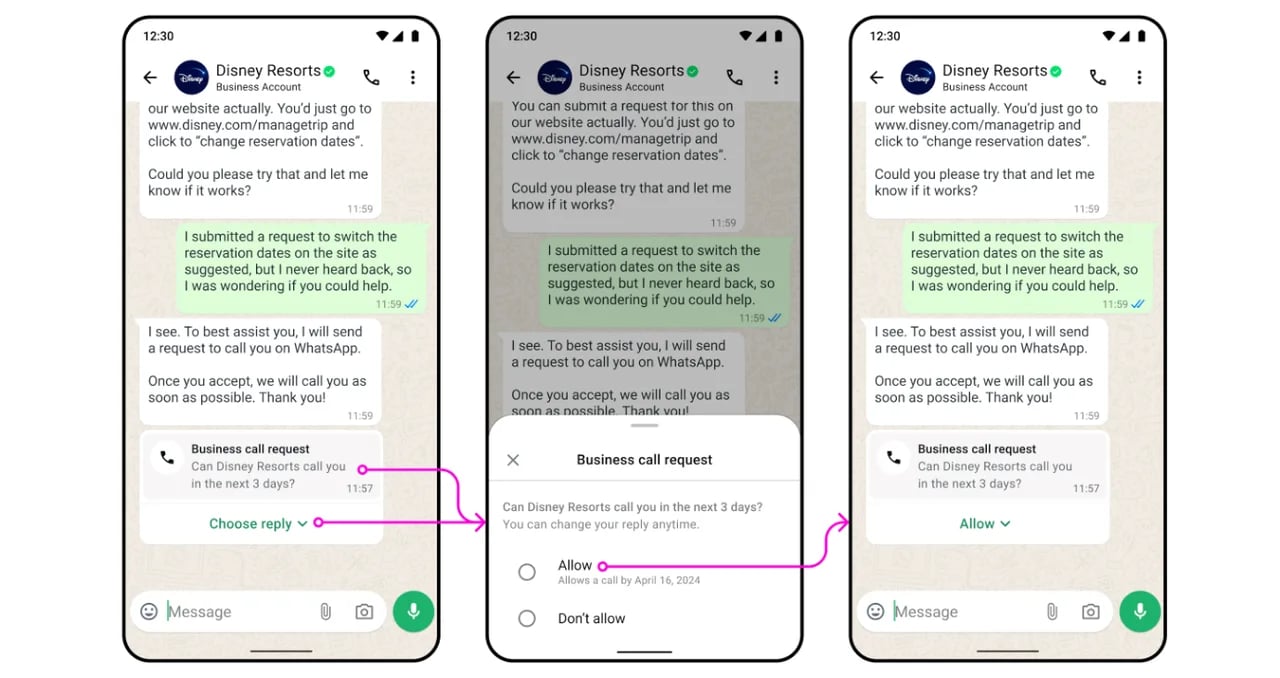
企业在发起通话前必须获得客户的许可。许可可以通过通话请求模板消息或交互式消息进行索取。客户选择 **Allow** 后,企业即可在许可有效期内发起通话。
## 企业发起的通话(呼出)
在使用 WhatsApp 呼出通话之前,您的商业账户必须满足以下要求:
1. Business Portfolio 的消息发送限制已达到 2,000 位客户级别。
2. 商业号码的注册国家或地区不属于:
* 美国 (+1)
* 加拿大 (+1)
* 土耳其 (+90)
* 埃及 (+20)
* 越南 (+84)
* 尼日利亚 (+234)
企业在发起通话前必须获得客户的许可。许可可以通过通话请求模板消息或交互式消息进行索取。客户选择 **Allow** 后,企业即可在许可有效期内发起通话。
 ## 选择集成方式
YCloud 支持两种使用 WhatsApp 通话的方式。请选择符合您实现方案的方式。
#### HTTPS API 集成
如需使用 API 构建呼入或呼出通话功能,请联系您的 YCloud 客户代表以启用通话。请参见 [WhatsApp 通话 API 示例](/api-reference/whatsapp-calling/connect-a-call)。
#### YCloud 平台(推荐)
在 YCloud 控制台中使用通话工作区进行坐席通话。
## 为商业号码启用通话功能
每个商业号码均可单独启用或停用通话功能。
前往 **WhatsApp accounts**,打开商业号码的设置,然后选择 **Calling > Authority**。开启通话功能。
## 选择集成方式
YCloud 支持两种使用 WhatsApp 通话的方式。请选择符合您实现方案的方式。
#### HTTPS API 集成
如需使用 API 构建呼入或呼出通话功能,请联系您的 YCloud 客户代表以启用通话。请参见 [WhatsApp 通话 API 示例](/api-reference/whatsapp-calling/connect-a-call)。
#### YCloud 平台(推荐)
在 YCloud 控制台中使用通话工作区进行坐席通话。
## 为商业号码启用通话功能
每个商业号码均可单独启用或停用通话功能。
前往 **WhatsApp accounts**,打开商业号码的设置,然后选择 **Calling > Authority**。开启通话功能。
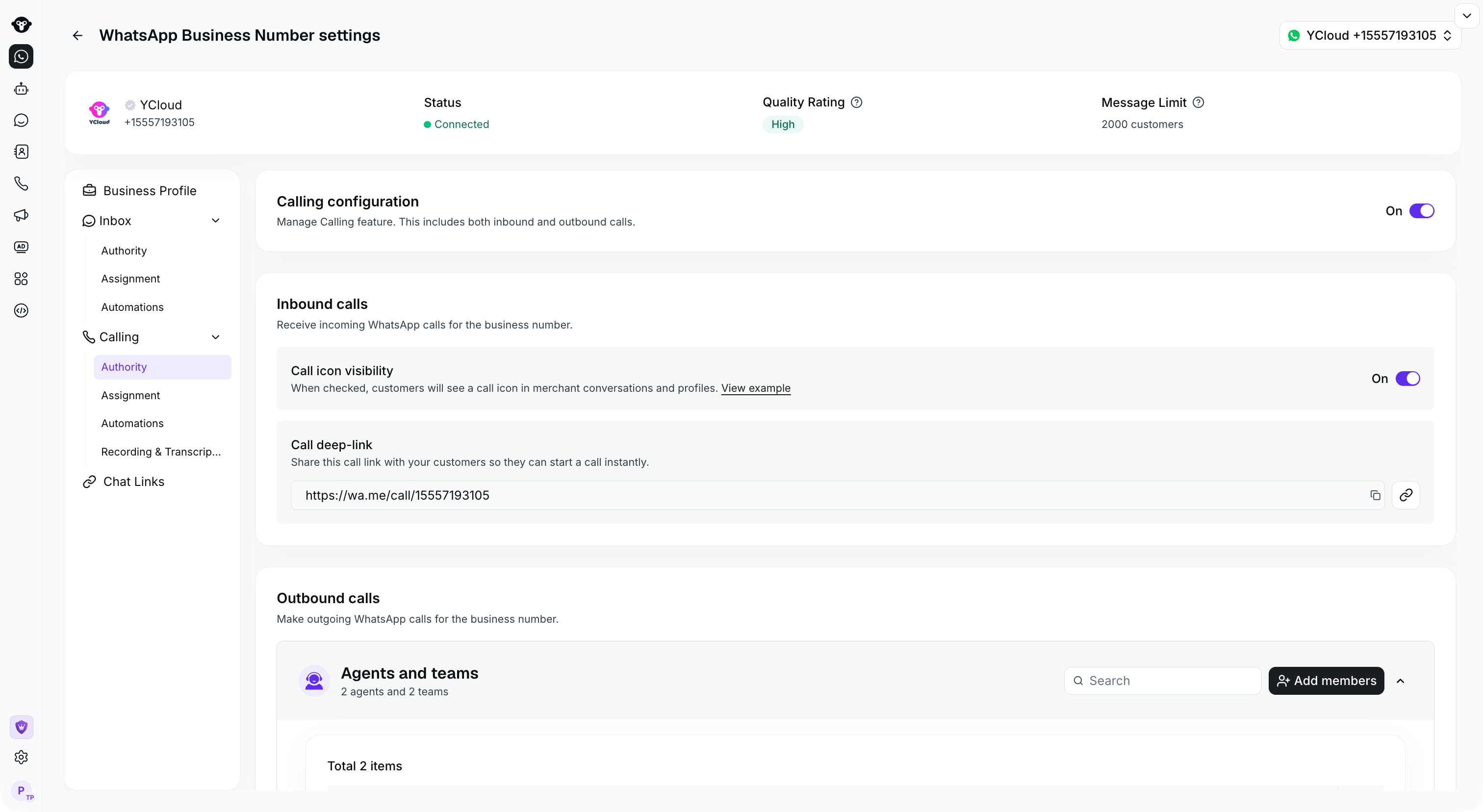 ## 显示呼入通话图标
在通话权限设置中启用通话图标,以便客户可以从其 WhatsApp 对话或您的商业资料中发起通话。即使隐藏了该图标,客户仍然可以通过包含通话按钮的消息发起呼叫。
## 显示呼入通话图标
在通话权限设置中启用通话图标,以便客户可以从其 WhatsApp 对话或您的商业资料中发起通话。即使隐藏了该图标,客户仍然可以通过包含通话按钮的消息发起呼叫。
 ## 配置呼出通话权限
在商业号码设置中,使用 **Calling > Authority** 选择可以使用该号码发起呼出通话的坐席。
此限制适用于在 YCloud 控制台中发起的呼出通话。通过 API 发起的通话不受此控制台设置的限制。
## 配置呼出通话权限
在商业号码设置中,使用 **Calling > Authority** 选择可以使用该号码发起呼出通话的坐席。
此限制适用于在 YCloud 控制台中发起的呼出通话。通过 API 发起的通话不受此控制台设置的限制。
 This documentation is built and hosted on [Mintlify](https://mintlify.com), a developer documentation platform.