> ## Documentation Index
> Fetch the complete documentation index at: https://docs.ycloud.com/llms.txt
> Use this file to discover all available pages before exploring further.
# 移除 WhatsApp 商业账户
> 从 YCloud 中移除已绑定的 WhatsApp 商业账户。
YCloud 目前不支持直接从 YCloud 控制面板中移除已绑定的 WhatsApp 商业账户 (WABA)。
如果您确认需要移除该 WABA,请使用以下方法之一。
## 方式 1:在 Meta 中移除关联
打开 [Meta 业务设置中的 WhatsApp 账户](https://business.facebook.com/latest/settings/whatsapp_account),选择相关的业务资产组合,然后使用以下任一方式:
* 移除 YCloud 对该业务资产组合的访问权限。
* 直接从业务资产组合中移除该 WABA。
如果该 WABA 在过去 30 天内发送过消息,则无法立即移除。请等待 30 天期限结束后,以便 YCloud 完成相关的账单结算,然后再尝试移除。
## 方式 2:联系 YCloud 支持团队
联系 YCloud 支持团队并提供您要移除的 WABA ID。支持团队将审核该账户并协助完成移除流程。
状态为 **Disabled** 的 WABA 不会占用 YCloud 渠道配额。
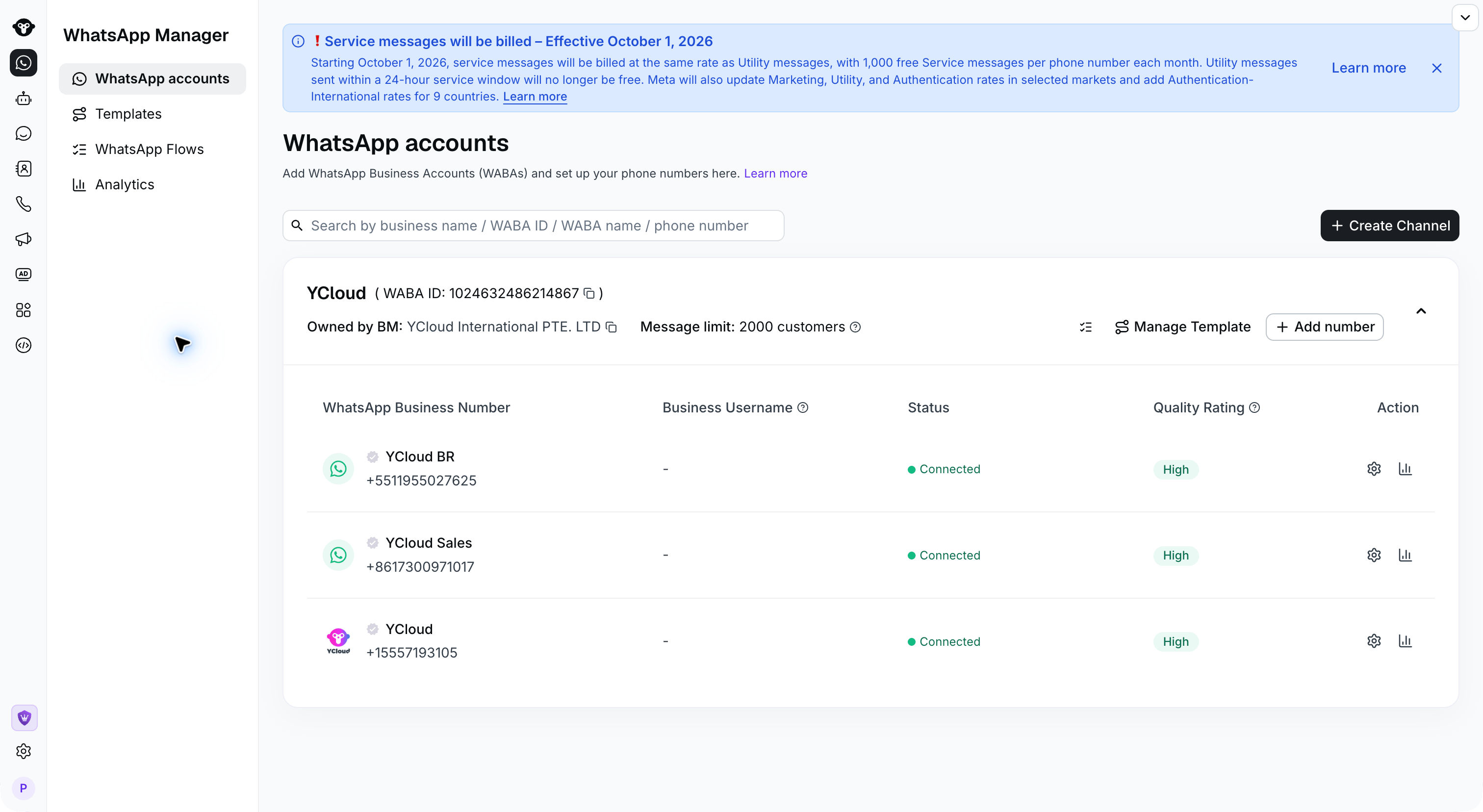 在联系支持团队之前,可在 **WhatsApp 账户** 页面的账户名称旁找到 **WABA ID** 。
## 常见问题
Meta 与 YCloud 之间同步移除状态可能需要一些时间。请等待同步完成,稍后再进行查看。
如果 24 小时后 WABA 仍然可见,请联系 YCloud 支持团队寻求帮助。
This documentation is built and hosted on [Mintlify](https://mintlify.com), a developer documentation platform.
在联系支持团队之前,可在 **WhatsApp 账户** 页面的账户名称旁找到 **WABA ID** 。
## 常见问题
Meta 与 YCloud 之间同步移除状态可能需要一些时间。请等待同步完成,稍后再进行查看。
如果 24 小时后 WABA 仍然可见,请联系 YCloud 支持团队寻求帮助。
This documentation is built and hosted on [Mintlify](https://mintlify.com), a developer documentation platform.