> ## Documentation Index
> Fetch the complete documentation index at: https://docs.ycloud.com/llms.txt
> Use this file to discover all available pages before exploring further.
# 接入 WhatsApp Business App
> 无需离开 WhatsApp Business App 即可解锁高级 API 消息功能
## 什么是 WhatsApp 共存模式
**这意味着您的 WhatsApp Business API 和 WhatsApp Business App 现在可以共同共存!**
将已在 WhatsApp Business App 中使用的号码接入 API 访问权限,允许 API 和应用程序在同一个电话号码上运行。您可以使用大规模消息发送、AI Agent 智能回复、基于规则的流程和旅程(Journeys)等功能,同时继续通过 WhatsApp Business App 发送消息。
该功能非常适合希望在继续使用现有 App 的同时过渡到基于 API 的工作流的团队。
## 为什么使用 WhatsApp 共存模式
**场景 1:** 如果您的员工白天需要使用办公电脑与用户沟通,晚上则需要通过 App 无缝继续对话。
**✅ 对应优势:** 消息将在移动 App 和 API 之间进行同步镜像。即:
1. 通过 API 发送的消息将显示在 WhatsApp Business App 中。
2. 通过 App 发送的消息将显示在 Cloud API 对话记录中,您可以在电脑上进行查看。
**场景 2:** 如果您希望使用批量营销消息、AI Agent 智能自动回复、基于旅程(Journey)的客户互动等高级功能,同时仍保留通过移动 App 的访问权限。
**✅ 对应优势:** WhatsApp 共存模式允许您在 App 中保留一对一消息沟通的同时,使用所有这些高级 API 功能。
**场景 3:** 如果您在 WhatsApp Business App 中已有活跃号码,并希望省去注册新 API 号码的繁琐流程。
**✅ 对应优势:** 无缝连接您的 WhatsApp Business App 号码并使用 API 功能,无需删除原有的 WhatsApp Business 账户。
## 注意事项
#### **吞吐量**
1. 为了保持与 WhatsApp Business App 的兼容性,同时在 WhatsApp Business App 和 Cloud API 中使用的商业电话号码具有固定的 5 mps(每秒消息数)吞吐量限制。
#### **环境要求**
要使用此功能,您必须使用 2.24.17 或更高版本的 WhatsApp Business App。
#### **价格**
从 WhatsApp Business App 发送的消息仍然免费,从 API 合作平台发送的消息则根据现有的 [API 定价模型](https://www.ycloud.com/price) 收取费用。
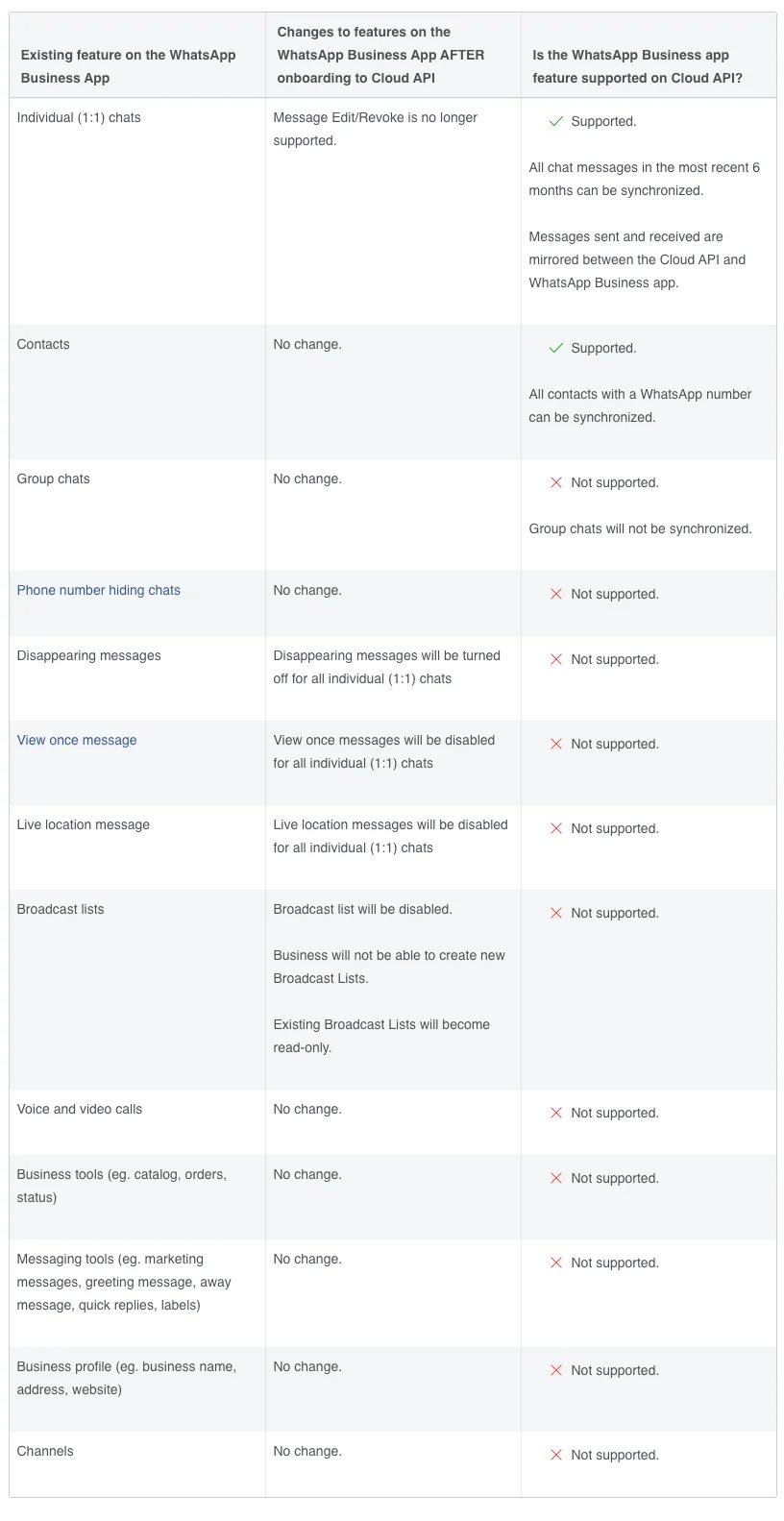
#### **绑定后功能对比**
下表说明了已接入 Cloud API 的企业客户可用的功能,以及接入后 WhatsApp Business App 功能的变化。注意:超过 14 天的媒体消息(例如包含图片、视频和音频的消息)将无法同步。
 ## 工作原理
打开 **WhatsApp 账户**,点击 **创建渠道**,并找到 **WhatsApp Business APP 共存模式**。
## 工作原理
打开 **WhatsApp 账户**,点击 **创建渠道**,并找到 **WhatsApp Business APP 共存模式**。

 可以通过两种方式连接 WhatsApp Business App 共存模式。选择与您企业管理 Meta 资产方式相符的方法。
| 连接方式 | 适用场景 | 所需材料 |
| - | - | - |
| **通过 Facebook 连接** | 当您希望 WhatsApp Business App 号码归属于您的 Meta 业务资产组合并在其下进行管理时,请使用此方法。 | Facebook 账号、公司注册文件以及用于商家认证的企业网站。 |
| **通过二维码连接** | 当您不想在接入过程中使用 Facebook 登录或创建业务资产组合时,请使用这种更快捷的方法。 | 您的企业信息以及对所连接手机上的 WhatsApp Business App 的访问权限。 |
这两种方法都可以在将电话号码连接到 YCloud 的同时,保持其在 WhatsApp Business App 中的可用状态。
## 方式 1:通过 Facebook 连接
该方法将 WhatsApp Business App 号码绑定到 Meta 业务资产组合。之后您可以在 Meta Business Portfolio 中维护和管理关联的业务资产。
开始前,请准备好 Facebook 账号、公司的注册文件及其官方网站。这些材料为商家认证所需。
1. 登录您的 Facebook 账号。
2. 创建业务资产组合或选择现有的业务资产组合。
3. 在 WhatsApp 商业账户步骤中,选择 **连接 WhatsApp Business App**。
4. 输入您的 WhatsApp Business App 所使用的电话号码。
5. 当二维码出现时,在手机上打开 WhatsApp Business App 并扫码以授权连接。
6. 在手机上选择是否同步您的聊天记录。您最多可以同步最近六个月的聊天记录。
## 方式 2:通过二维码连接
这是更快捷的入驻方式。在连接过程中无需登录 Facebook 或创建业务资产组合(business portfolio)。
1. 选择二维码连接方式。
2. 输入您的商家名称和网站信息。
WhatsApp Business App 共存仍需进行企业认证。入驻过程中输入的 **商家名称** 必须与您计划提交的注册文件上的法定商家名称完全一致。若不一致,可能会影响后续的企业认证。
正确填写 **网站** 。如果您的企业没有网站,请勾选 **我的企业没有网站或个人主页** ,切勿将该字段留空。
3. 输入您想要连接的 WhatsApp Business App 电话号码。
4. 在手机上打开 WhatsApp Business App 并扫描二维码以授权连接。
5. 在手机上选择是否同步您的聊天记录。您最多可以同步最近六个月的聊天记录。
## 同步聊天记录
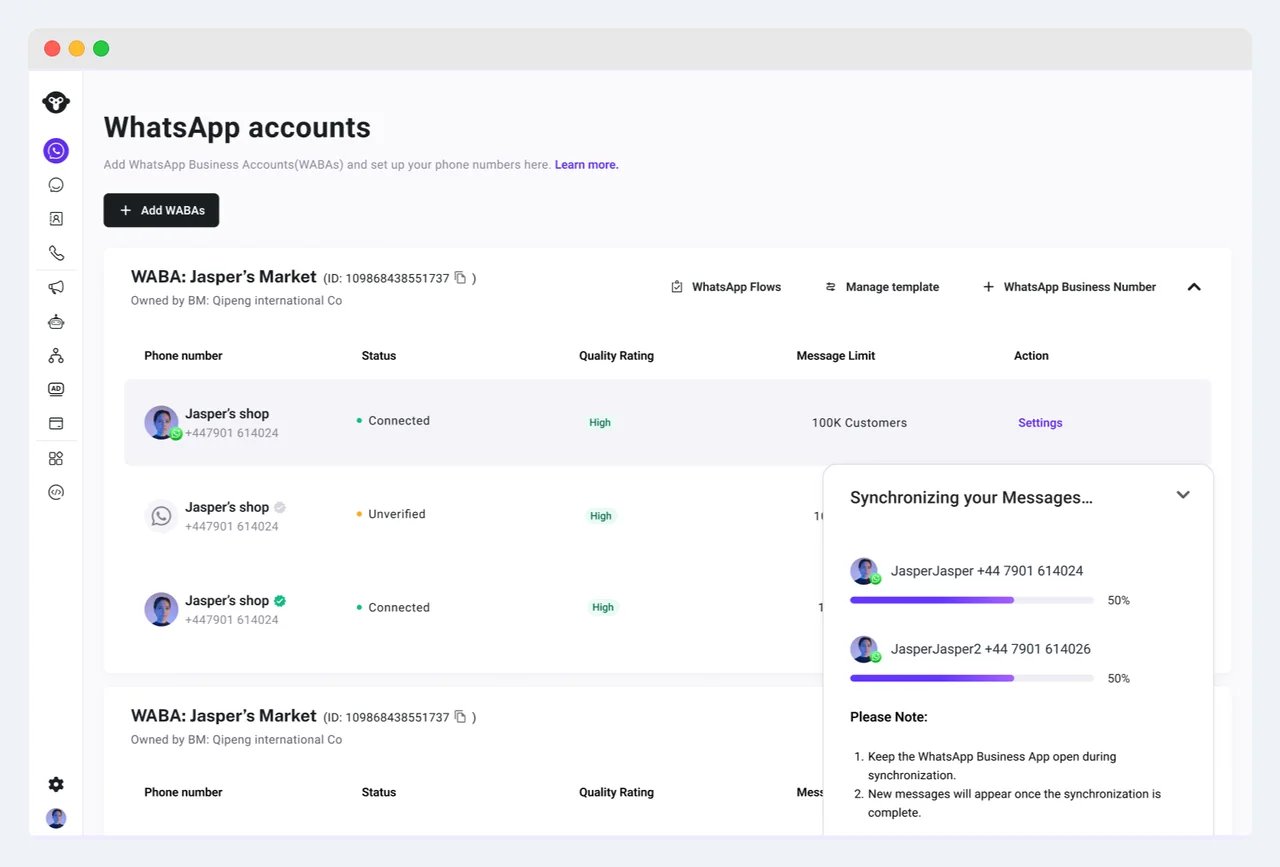
授权完成后,如果您选择共享聊天记录,YCloud 将立即开始同步聊天。
在同步期间请保持 WhatsApp Business App 打开。只有在同步完成后,新消息才会出现在 YCloud 收件箱中。
可以通过两种方式连接 WhatsApp Business App 共存模式。选择与您企业管理 Meta 资产方式相符的方法。
| 连接方式 | 适用场景 | 所需材料 |
| - | - | - |
| **通过 Facebook 连接** | 当您希望 WhatsApp Business App 号码归属于您的 Meta 业务资产组合并在其下进行管理时,请使用此方法。 | Facebook 账号、公司注册文件以及用于商家认证的企业网站。 |
| **通过二维码连接** | 当您不想在接入过程中使用 Facebook 登录或创建业务资产组合时,请使用这种更快捷的方法。 | 您的企业信息以及对所连接手机上的 WhatsApp Business App 的访问权限。 |
这两种方法都可以在将电话号码连接到 YCloud 的同时,保持其在 WhatsApp Business App 中的可用状态。
## 方式 1:通过 Facebook 连接
该方法将 WhatsApp Business App 号码绑定到 Meta 业务资产组合。之后您可以在 Meta Business Portfolio 中维护和管理关联的业务资产。
开始前,请准备好 Facebook 账号、公司的注册文件及其官方网站。这些材料为商家认证所需。
1. 登录您的 Facebook 账号。
2. 创建业务资产组合或选择现有的业务资产组合。
3. 在 WhatsApp 商业账户步骤中,选择 **连接 WhatsApp Business App**。
4. 输入您的 WhatsApp Business App 所使用的电话号码。
5. 当二维码出现时,在手机上打开 WhatsApp Business App 并扫码以授权连接。
6. 在手机上选择是否同步您的聊天记录。您最多可以同步最近六个月的聊天记录。
## 方式 2:通过二维码连接
这是更快捷的入驻方式。在连接过程中无需登录 Facebook 或创建业务资产组合(business portfolio)。
1. 选择二维码连接方式。
2. 输入您的商家名称和网站信息。
WhatsApp Business App 共存仍需进行企业认证。入驻过程中输入的 **商家名称** 必须与您计划提交的注册文件上的法定商家名称完全一致。若不一致,可能会影响后续的企业认证。
正确填写 **网站** 。如果您的企业没有网站,请勾选 **我的企业没有网站或个人主页** ,切勿将该字段留空。
3. 输入您想要连接的 WhatsApp Business App 电话号码。
4. 在手机上打开 WhatsApp Business App 并扫描二维码以授权连接。
5. 在手机上选择是否同步您的聊天记录。您最多可以同步最近六个月的聊天记录。
## 同步聊天记录
授权完成后,如果您选择共享聊天记录,YCloud 将立即开始同步聊天。
在同步期间请保持 WhatsApp Business App 打开。只有在同步完成后,新消息才会出现在 YCloud 收件箱中。
 ## 观看视频教程
[观看 WhatsApp Business App 共存教程](https://youtu.be/gIJx2XGC3gA)
## 常见问题
不会。您可以继续在 WhatsApp Business App 中收发消息以及管理联系人。
不可以。WhatsApp Business App 共存必须通过 YCloud 平台进行连接。YCloud 不为此入驻操作提供 API。
这通常意味着授权已成功,但最终绑定失败。可能的原因包括:
* **之前曾连接到其他平台:** 该账户可能仍与其他服务商关联。在尝试将其绑定到 YCloud 之前,请按照共存账户迁移流程进行操作。
* **临时绑定失败:** 如果绑定接口临时不稳定,请在手机上的 WhatsApp Business App 中取消与 YCloud 的关联,然后重新开始连接。
* **网站信息不完整:** 如果既未输入有效网站,也未勾选 **我的企业没有网站或个人主页** ,账户可能会保持在待处理状态。请在手机上取消关联,并在填写完整的商家信息后重试连接。
| 错误 | 含义及建议操作 |
| - | - |
| `#2655093: already shared with another partner` | 该账户之前曾与其他服务商关联。请要求之前的服务商完全移除其合作伙伴访问权限,然后重试。无法保证重新连接一定成功。 |
| `#2655121: Restricted WhatsApp Business Account` | 该账户在移动应用中已被封禁或曾经被封禁,可能被视为高风险。请更换其他号码,或等待数天后再试。 |
| `#3441061: phone number linked to automated events` | 停用 Meta 指出的自动化事件,等待 Meta 的更改完成同步,然后重试。 |
| `Your phone number isn't eligible to connect to the WhatsApp Business platform. More activity on the WhatsApp Business app is needed to help determine eligibility.` | Meta 尚无足够的近期活动来判定该号码是否符合条件。当账户为新账户、近期对话较少或最近不活跃时,可能会出现此情况。请继续使用 WhatsApp Business App 进行真实对话,然后再尝试连接。 |
当 WhatsApp Business App 长期处于非活跃状态或应用在其他设备上登录时,Meta 可能会自动取消该账户的关联。请在 YCloud 中重新连接该账户。
This documentation is built and hosted on [Mintlify](https://mintlify.com), a developer documentation platform.
## 观看视频教程
[观看 WhatsApp Business App 共存教程](https://youtu.be/gIJx2XGC3gA)
## 常见问题
不会。您可以继续在 WhatsApp Business App 中收发消息以及管理联系人。
不可以。WhatsApp Business App 共存必须通过 YCloud 平台进行连接。YCloud 不为此入驻操作提供 API。
这通常意味着授权已成功,但最终绑定失败。可能的原因包括:
* **之前曾连接到其他平台:** 该账户可能仍与其他服务商关联。在尝试将其绑定到 YCloud 之前,请按照共存账户迁移流程进行操作。
* **临时绑定失败:** 如果绑定接口临时不稳定,请在手机上的 WhatsApp Business App 中取消与 YCloud 的关联,然后重新开始连接。
* **网站信息不完整:** 如果既未输入有效网站,也未勾选 **我的企业没有网站或个人主页** ,账户可能会保持在待处理状态。请在手机上取消关联,并在填写完整的商家信息后重试连接。
| 错误 | 含义及建议操作 |
| - | - |
| `#2655093: already shared with another partner` | 该账户之前曾与其他服务商关联。请要求之前的服务商完全移除其合作伙伴访问权限,然后重试。无法保证重新连接一定成功。 |
| `#2655121: Restricted WhatsApp Business Account` | 该账户在移动应用中已被封禁或曾经被封禁,可能被视为高风险。请更换其他号码,或等待数天后再试。 |
| `#3441061: phone number linked to automated events` | 停用 Meta 指出的自动化事件,等待 Meta 的更改完成同步,然后重试。 |
| `Your phone number isn't eligible to connect to the WhatsApp Business platform. More activity on the WhatsApp Business app is needed to help determine eligibility.` | Meta 尚无足够的近期活动来判定该号码是否符合条件。当账户为新账户、近期对话较少或最近不活跃时,可能会出现此情况。请继续使用 WhatsApp Business App 进行真实对话,然后再尝试连接。 |
当 WhatsApp Business App 长期处于非活跃状态或应用在其他设备上登录时,Meta 可能会自动取消该账户的关联。请在 YCloud 中重新连接该账户。
This documentation is built and hosted on [Mintlify](https://mintlify.com), a developer documentation platform.