> ## Documentation Index
> Fetch the complete documentation index at: https://docs.ycloud.com/llms.txt
> Use this file to discover all available pages before exploring further.

# 联系人标签设置

<Info>
  关于标签设置，我们支持两种添加标签的方法。您可以选择以下任一方法：

  1. 您可以在 **设置 > 联系人 > 标签** 中查看和编辑标签。
  2. 您可以在联系人列表板块中为用户添加标签，也可以在收件箱工具中为用户添加标签。
</Info>

## 在设置中添加标签

### 第 1 步

登录您的 [YCloud 账户](https://www.ycloud.com/console/#/entry/login)，前往 **设置 > 联系人 > 标签**。

<Frame caption="Open Settings > Contact > Tags and select Add Tag.">
  <img src="https://mintcdn.com/lchnan/rmZYWVwRdpR7TJaI/product-assets/english-help-context-2026-09-23/contact-tags-list-context-annotated.svg?fit=max&auto=format&n=rmZYWVwRdpR7TJaI&q=85&s=e15f2b529c2e61b07a9bb99d3a535928" alt="完整的设置联系人标签页面，右上角显示“Add Tag”。" width="3024" height="1656" data-path="product-assets/english-help-context-2026-09-23/contact-tags-list-context-annotated.svg" />
</Frame>

### 第 2 步

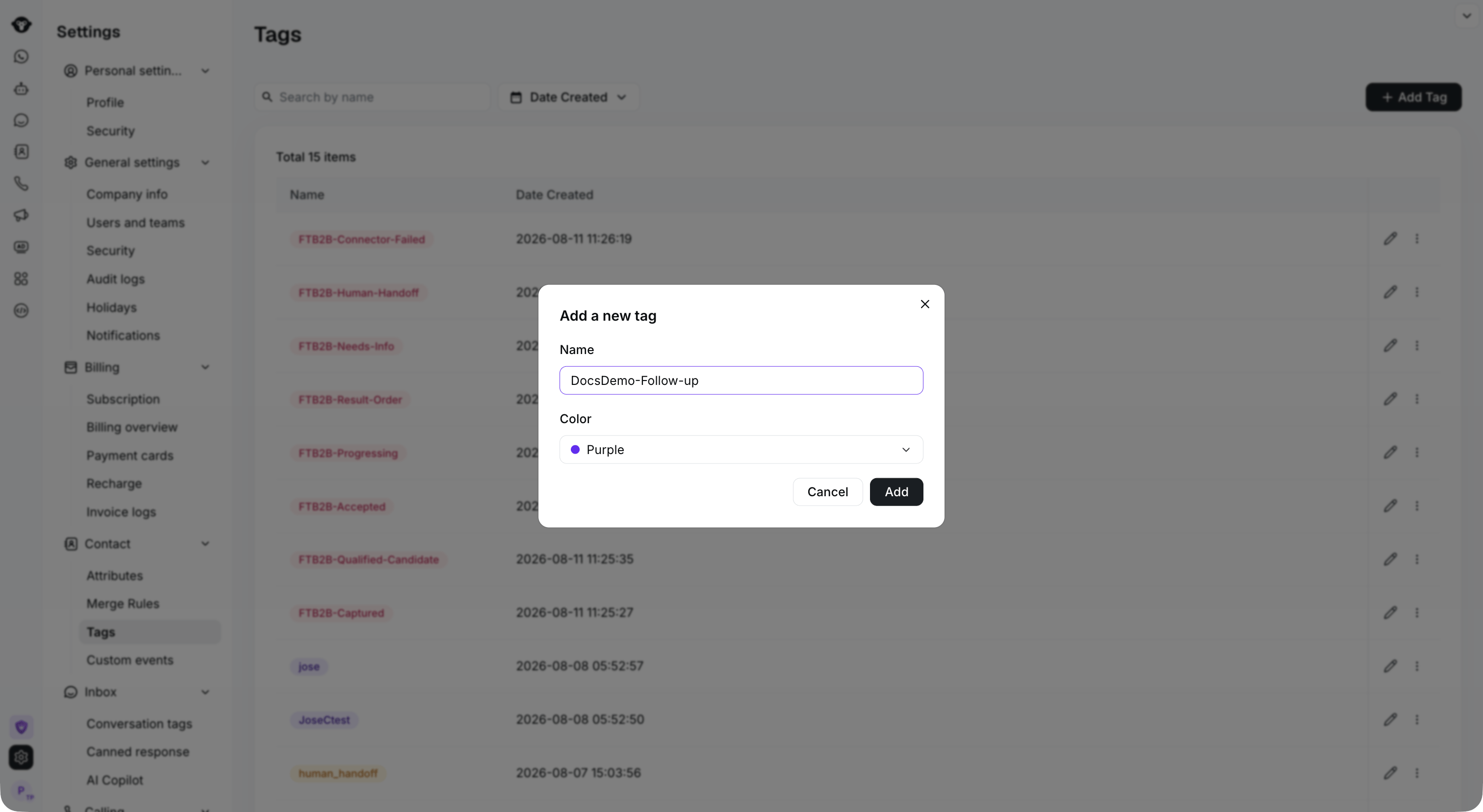
点击 **Add Tag**，输入名称并选择颜色，然后点击 **Add** 完成操作。添加成功后，您可以编辑和删除该标签。

<Frame caption="Enter a tag name and choose a color, then select Add.">
  <img src="https://mintcdn.com/lchnan/rmZYWVwRdpR7TJaI/product-assets/english-help-context-2026-09-23/contact-tag-create-context.png?fit=max&auto=format&n=rmZYWVwRdpR7TJaI&q=85&s=c1aaf4cf4b60d90599e7c635e0d34758" alt="“Add a new tag”对话框下方的完整标签设置页面。" width="3024" height="1656" data-path="product-assets/english-help-context-2026-09-23/contact-tag-create-context.png" />
</Frame>

<Frame caption="The new tag appears in the list. Use the row controls to edit or manage it.">
  <img src="https://mintcdn.com/lchnan/rmZYWVwRdpR7TJaI/product-assets/english-help-context-2026-09-23/contact-tag-actions-context-annotated.svg?fit=max&auto=format&n=rmZYWVwRdpR7TJaI&q=85&s=8674f41c4d15efde1ce3ea924120d392" alt="已创建的 DocsDemo-Follow-up 标签及其编辑和操作控件。" width="3024" height="1656" data-path="product-assets/english-help-context-2026-09-23/contact-tag-actions-context-annotated.svg" />
</Frame>

## 在联系人列表中添加

### 第 1 步

登录您的 [YCloud 账户](https://www.ycloud.com/console/#/entry/login)，打开 **联系人 > 联系人列表**。选择一个或多个联系人，然后点击 **Tag them**。

<Frame caption="Select the contacts you want to tag, then select Tag them.">
  <img src="https://mintcdn.com/lchnan/rmZYWVwRdpR7TJaI/product-assets/english-help-context-2026-09-23/contact-list-tag-entry-context-annotated.svg?fit=max&auto=format&n=rmZYWVwRdpR7TJaI&q=85&s=b2ecfba2b8c8a6c867be6a15c6b3ba64" alt="包含已选联系人和“Tag them”操作的完整联系人列表。" width="3024" height="1656" data-path="product-assets/english-help-context-2026-09-23/contact-list-tag-entry-context-annotated.svg" />
</Frame>

### 第 2 步

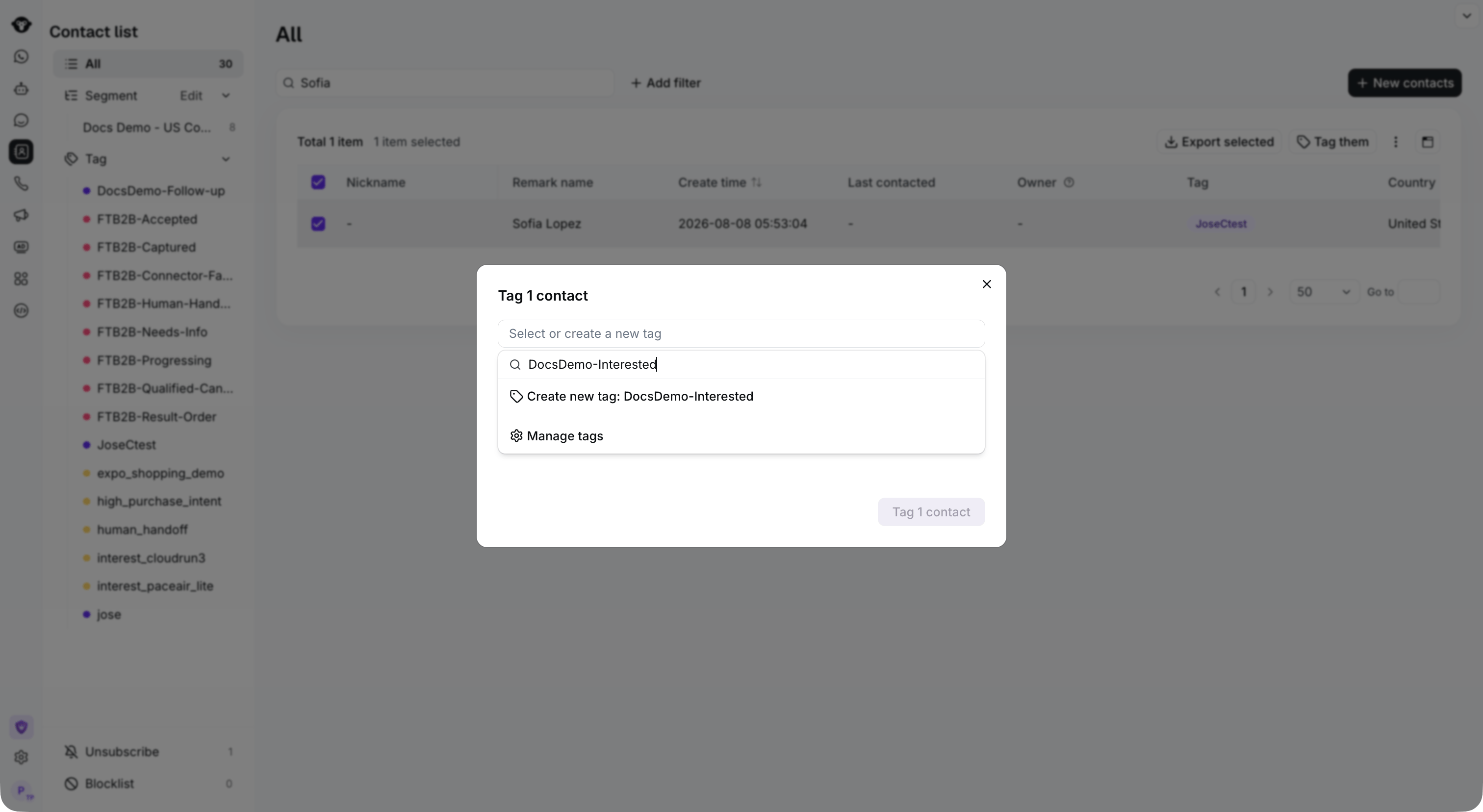
打开 **Select or create a new tag**。搜索已有标签，或输入新名称并选择 **Create new tag**。然后点击 **Tag 1 contact** （数量会反映您的选择）以应用标签。

<Frame caption="Search for an existing tag, or enter a new name and select Create new tag.">
  <img src="https://mintcdn.com/lchnan/rmZYWVwRdpR7TJaI/product-assets/english-help-context-2026-09-23/contact-list-create-tag-context.png?fit=max&auto=format&n=rmZYWVwRdpR7TJaI&q=85&s=994b308f46a20fa1fcad30016d5601be" alt="标签选择器下方的联系人列表，显示有“Create new tag”选项。" width="3024" height="1656" data-path="product-assets/english-help-context-2026-09-23/contact-list-create-tag-context.png" />
</Frame>


This documentation is built and hosted on [Mintlify](https://mintlify.com), a developer documentation platform.