> ## Documentation Index
> Fetch the complete documentation index at: https://docs.ycloud.com/llms.txt
> Use this file to discover all available pages before exploring further.

# 创建/导入联系人

## **单条手动导入**

### 步骤 1

登录您的 [YCloud 账户](https://www.ycloud.com/console/#/entry/login)，打开 **联系人**，然后选择 **新建联系人**。

<Frame caption="Open Contact and select New contacts.">
  <img src="https://mintcdn.com/lchnan/rmZYWVwRdpR7TJaI/product-assets/english-help-context-2026-09-23/contact-new-entry-context-annotated.svg?fit=max&auto=format&n=rmZYWVwRdpR7TJaI&q=85&s=636d8fa8caa9f300663a47d376698202" alt="联系人列表中的“新建联系人”按钮。" width="3024" height="1656" data-path="product-assets/english-help-context-2026-09-23/contact-new-entry-context-annotated.svg" />
</Frame>

### 步骤 2

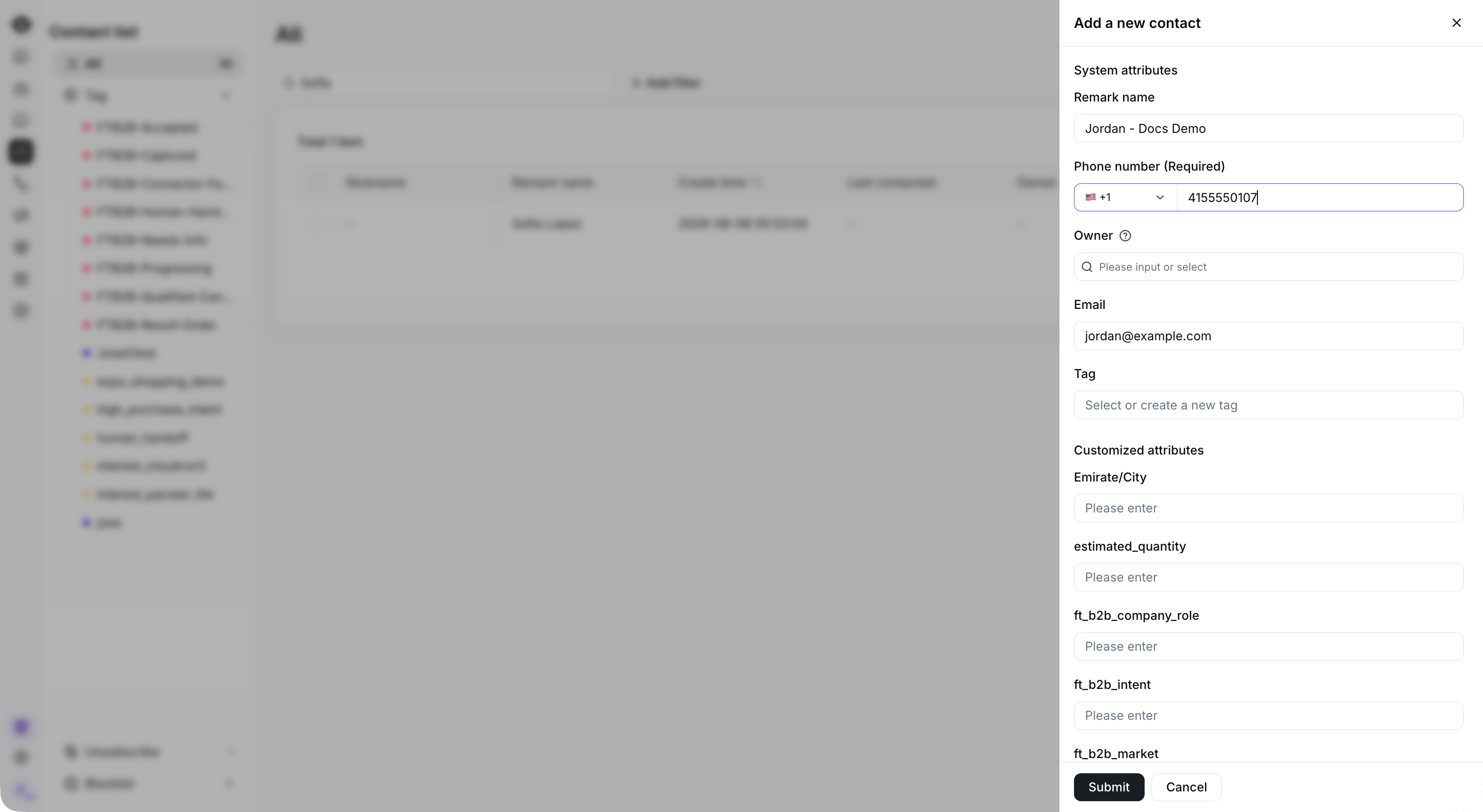
选择 **添加新联系人**，输入联系人详细信息，然后选择 **提交**。

<Frame caption="Enter the required phone number and optional contact details, then select Submit. This example has not been submitted.">
  <img src="https://mintcdn.com/lchnan/rmZYWVwRdpR7TJaI/product-assets/english-help-context-2026-09-23/contact-create-context.png?fit=max&auto=format&n=rmZYWVwRdpR7TJaI&q=85&s=5148ae90bdc3688015e2a4cb63b70aa3" alt="包含新建联系人表单和预留示例详细信息的完整联系人列表。" width="3024" height="1656" data-path="product-assets/english-help-context-2026-09-23/contact-create-context.png" />
</Frame>

## **批量手动导入**

### 步骤 1

登录您的 [YCloud 账户](https://www.ycloud.com/console/#/entry/login)，打开 **联系人**，然后选择 **新建联系人**。

<Frame caption="Start a bulk import from New contacts.">
  <img src="https://mintcdn.com/lchnan/rmZYWVwRdpR7TJaI/product-assets/english-help-context-2026-09-23/contact-import-entry-context-annotated.svg?fit=max&auto=format&n=rmZYWVwRdpR7TJaI&q=85&s=acc5dd150ee057042c0390c00b11cec1" alt="用于启动文件导入的“新建联系人”入口。" width="3024" height="1656" data-path="product-assets/english-help-context-2026-09-23/contact-import-entry-context-annotated.svg" />
</Frame>

### 步骤 2

选择 **上传文件**，选择您的联系人电子表格，然后选择 **下一步**。

<Frame caption="Download the template, prepare your contact data, and select Upload the file.">
  <img src="https://mintcdn.com/lchnan/4TSqTiiIpS59tkT7/product-assets/english-help-context-2026-09-25/contact-import-template-annotated.svg?fit=max&auto=format&n=4TSqTiiIpS59tkT7&q=85&s=d8f8f177891e4d2353edd82dadcdd444" alt="包含“下载模板”和“上传文件”的完整联系人导入页面。" width="3024" height="1656" data-path="product-assets/english-help-context-2026-09-25/contact-import-template-annotated.svg" />
</Frame>

## API 导入

点击查看 [**API 导入**](/api-reference/contacts/create-a-contact) 文档


This documentation is built and hosted on [Mintlify](https://mintlify.com), a developer documentation platform.