> ## Documentation Index
> Fetch the complete documentation index at: https://docs.ycloud.com/llms.txt
> Use this file to discover all available pages before exploring further.

# AI Copilot

> 使用 AI 辅助并提高您的工作效率

## AI 总结

人工坐席之间或从 AI Agent 到人工坐席之间经常发生会话流转。接收会话的坐席需要足够的上下文信息来继续为客户提供帮助。AI 总结能够从会话中提取结构化摘要，方便坐席快速查阅。

### 会话流转时总结

在人工之间流转以及 AI 流转给人工时使用总结。

#### **手动总结**

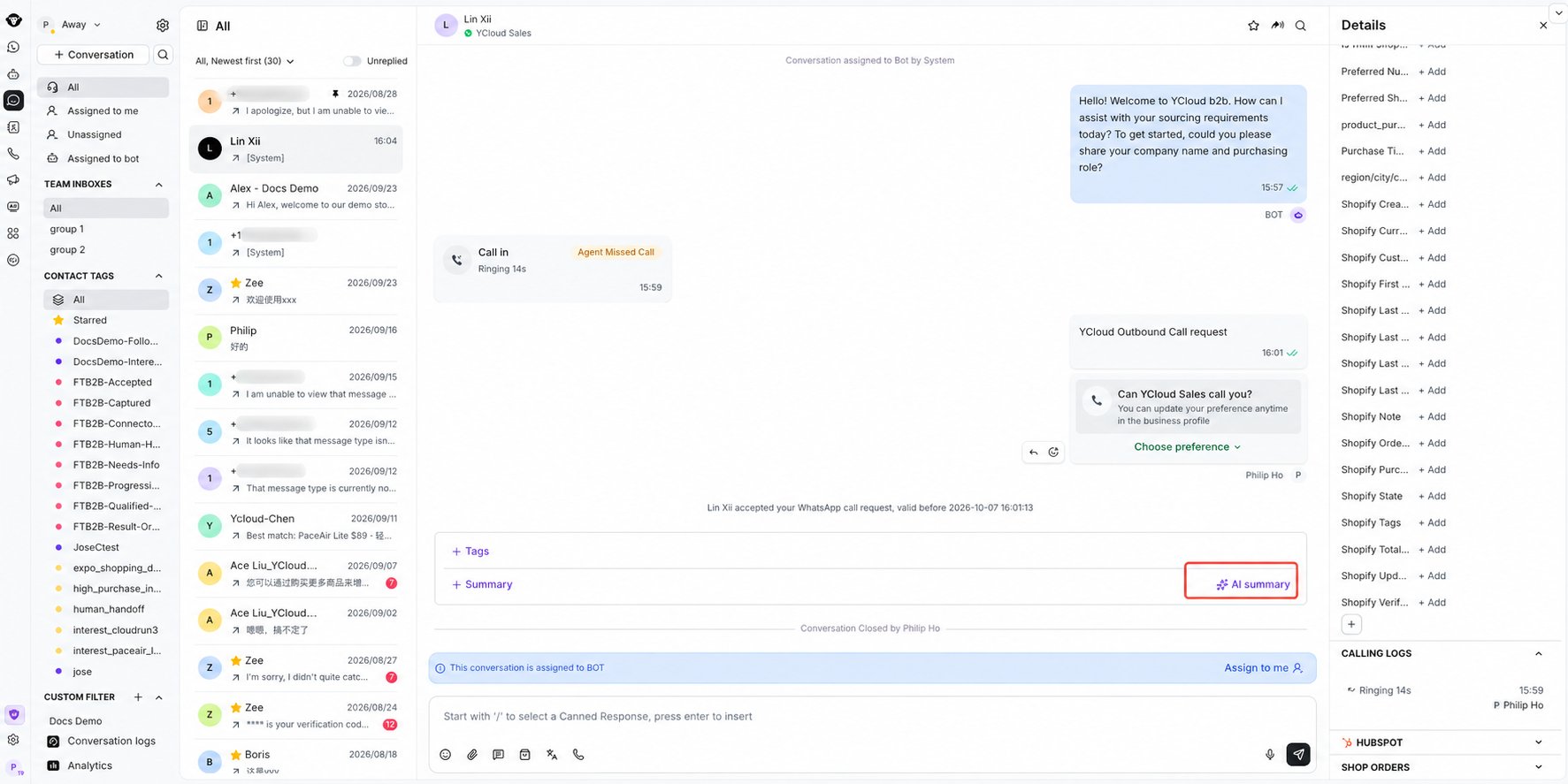
当会话被转接时，接收坐席会在系统流转日志旁看到 \[AI 总结] 按钮。如需 AI 总结当前会话内容，可手动点击此按钮触发 AI 总结。

<Frame caption="Select AI summary below the conversation to generate a handover summary.">
  <img src="https://mintcdn.com/lchnan/INCfGITGB_rYG20v/product-assets/inbox/ai-copilot-summary-entry-blurred.png?fit=max&auto=format&n=INCfGITGB_rYG20v&q=85&s=dd41617a44427274d5ef089039395253" alt="收件箱会话，高亮显示 AI 总结按钮并对电话号码进行了模糊处理" width="1773" height="887" data-path="product-assets/inbox/ai-copilot-summary-entry-blurred.png" />
</Frame>

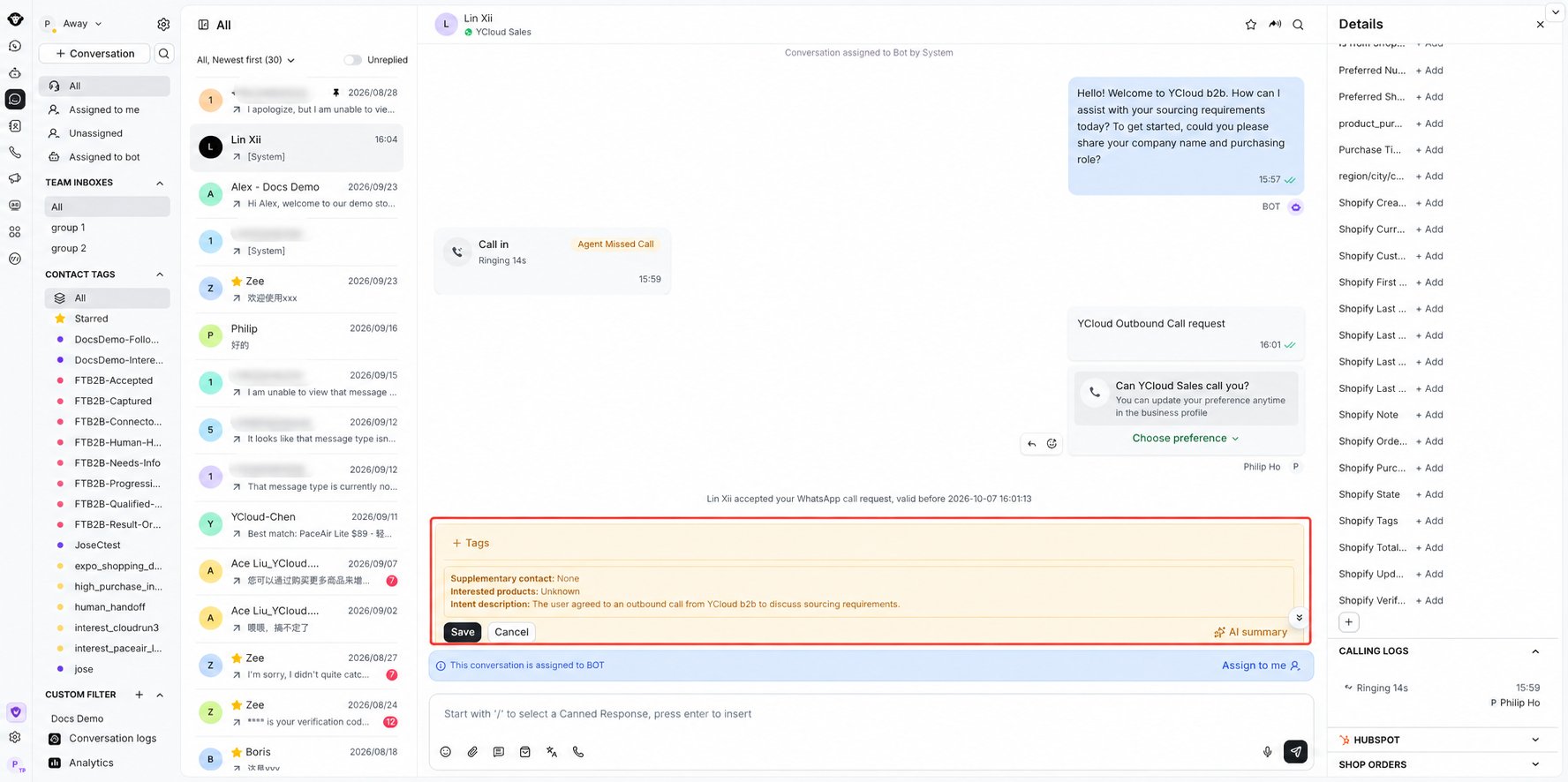
您可以点击 \[AI 总结] 按钮重新生成，或点击 \[收起] 按钮折叠总结内容。

<Frame caption="Review and save the generated conversation summary.">
  <img src="https://mintcdn.com/lchnan/INCfGITGB_rYG20v/product-assets/inbox/ai-copilot-summary-expanded-blurred.png?fit=max&auto=format&n=INCfGITGB_rYG20v&q=85&s=bc586baa19f8384a7acbf729f7754b09" alt="已展开的 AI 生成会话总结，带有保存和取消控件，且电话号码已进行模糊处理" width="1776" height="886" data-path="product-assets/inbox/ai-copilot-summary-expanded-blurred.png" />
</Frame>

#### **自动总结**

通过左侧边栏顶部的齿轮图标打开 **收件箱设置** ，然后选择 **AI Copilot**。

<Frame caption="Open Inbox settings using the gear at the top of the left sidebar.">
  <img src="https://mintcdn.com/lchnan/rmZYWVwRdpR7TJaI/product-assets/english-help-context-2026-09-23/inbox-personal-settings-entry-context-annotated.svg?fit=max&auto=format&n=rmZYWVwRdpR7TJaI&q=85&s=449c3fb84419a7f8428441df7af5172a" alt="完整收件箱界面，会话侧边栏顶部带有设置齿轮图标。" width="3024" height="1656" data-path="product-assets/english-help-context-2026-09-23/inbox-personal-settings-entry-context-annotated.svg" />
</Frame>

开启 **转接会话时自动总结** ，以便在会话转接给您时自动生成总结。

<Frame caption="Open AI Copilot and use Auto-summarize conversations upon transfer.">
  <img src="https://mintcdn.com/lchnan/rmZYWVwRdpR7TJaI/product-assets/english-help-context-2026-09-23/ai-copilot-transfer-settings-context-annotated.svg?fit=max&auto=format&n=rmZYWVwRdpR7TJaI&q=85&s=1bd75f5b077d65fac336c2b86709b26d" alt="个人设置中的 AI Copilot 页面，转接自动总结处于关闭状态。" width="3024" height="1656" data-path="product-assets/english-help-context-2026-09-23/ai-copilot-transfer-settings-context-annotated.svg" />
</Frame>

### 会话结束时总结

主要用于主管查看会话总结。

#### **手动总结**

在会话结束时，在需要总结的会话中手动点击 \[AI 总结] 按钮以触发 AI 总结。

<Frame caption="Select AI summary below the closed conversation to generate a summary.">
  <img src="https://mintcdn.com/lchnan/rmZYWVwRdpR7TJaI/product-assets/english-help-context-2026-09-23/ai-summary-closed-entry-context-annotated.svg?fit=max&auto=format&n=rmZYWVwRdpR7TJaI&q=85&s=710fd87f830fa497f01577ece793f431" alt="完整收件箱界面，显示已关闭演示会话下方的 AI 总结。" width="3024" height="1656" data-path="product-assets/english-help-context-2026-09-23/ai-summary-closed-entry-context-annotated.svg" />
</Frame>

#### **自动总结**

在页面左下角的“设置”中，找到收件箱 AI Copilot 菜单，并开启会话关闭时的自动总结。此设置全局生效。启用后，收件箱中的所有会话在关闭时都会自动生成 AI 总结。

<Frame caption="Find Auto-summarize conversations upon closure under Settings > Inbox > AI Copilot.">
  <img src="https://mintcdn.com/lchnan/rmZYWVwRdpR7TJaI/product-assets/english-help-context-2026-09-23/ai-copilot-closure-settings-context-annotated.svg?fit=max&auto=format&n=rmZYWVwRdpR7TJaI&q=85&s=3f6f58deb6c2ba77df13ba59cd851be5" alt="完整设置界面的收件箱 AI Copilot 页面，关闭自动总结处于未开启状态。" width="3024" height="1656" data-path="product-assets/english-help-context-2026-09-23/ai-copilot-closure-settings-context-annotated.svg" />
</Frame>

### 注意事项

1. AI 点数不足可能导致总结生成失败，请注意关注您的余额；
2. AI 总结会自动判断您的业务场景，并根据会话内容生成售前总结或售后总结。


This documentation is built and hosted on [Mintlify](https://mintlify.com), a developer documentation platform.