> ## Documentation Index
> Fetch the complete documentation index at: https://docs.ycloud.com/llms.txt
> Use this file to discover all available pages before exploring further.

# 会话日志

> 查看并搜索所有会话日志及详情，提升质检效率

## 什么是会话日志

当团队负责人需要对团队成员的会话进行定期检查或抽查时，会话日志通常非常有用。会话日志是会话记录的管理后台，所有已发生的会话都会记录在其中。此外，会话日志页面还提供了便捷的搜索功能，方便管理者快速定位特定会话，并通过会话详情页面查看会话的具体细节。

## 如何查看会话日志

### 查看权限

具有收件箱管理员（Inbox manager）或管理员（Admin）角色的用户可以访问会话日志。

### 会话日志入口

<Frame caption="Select Conversation logs in the Inbox sidebar to review past conversations.">
  <img src="https://mintcdn.com/lchnan/rmZYWVwRdpR7TJaI/product-assets/english-help-context-2026-09-23/inbox-conversation-logs-entry-context-annotated.svg?fit=max&auto=format&n=rmZYWVwRdpR7TJaI&q=85&s=cc603d64e6163d578984438184d0be49" alt="完整收件箱界面，左下侧边栏显示会话日志。" width="3024" height="1656" data-path="product-assets/english-help-context-2026-09-23/inbox-conversation-logs-entry-context-annotated.svg" />
</Frame>

### 查看会话日志

进入会话日志页面后，管理员可以在列表中查看会话日志的相关信息，通过上方的筛选条件搜索联系人，或通过匹配其他条件定位具体会话。

<Frame caption="Use the filters to find conversations and choose which attributes to display.">
  <img src="https://mintcdn.com/lchnan/TsMGu8UTNQaUw-Rc/product-assets/english-help-demo-2026-09-23/conversation-log-filters.png?fit=max&auto=format&n=TsMGu8UTNQaUw-Rc&q=85&s=3b241db9d1045c93f41aceed39f67ad0" alt="会话日志搜索、筛选条件、导出操作及列标题" width="2880" height="420" data-path="product-assets/english-help-demo-2026-09-23/conversation-log-filters.png" />
</Frame>

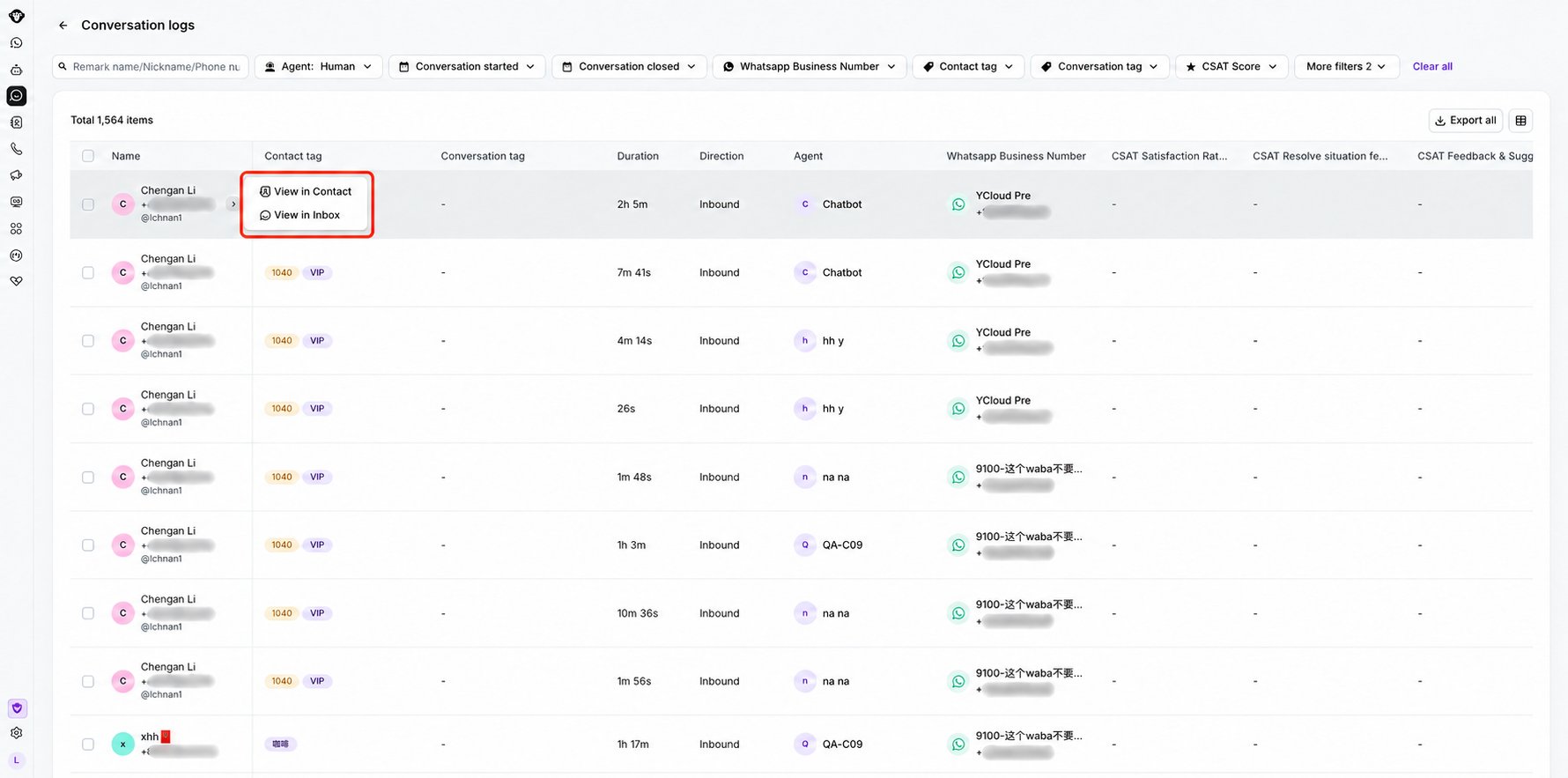
将鼠标悬停在第一列并点击出现的箭头图标，即可跳转到联系人列表或联系人的收件箱以供进一步查看。

<Frame caption="Open the row menu to view the contact or open the conversation in Inbox.">
  <img src="https://mintcdn.com/lchnan/3_MG7u4sxNnj0E_f/product-assets/english-help-context-2026-09-29/conversation-logs-row-actions-redacted.png?fit=max&auto=format&n=3_MG7u4sxNnj0E_f&q=85&s=bca1502975fff07783f41e27f4ed48b8" alt="会话日志表格，其中行菜单已打开且电话号码已脱敏。" width="1780" height="883" data-path="product-assets/english-help-context-2026-09-29/conversation-logs-row-actions-redacted.png" />
</Frame>

点击会话日志特定行的空白区域即可展开该会话的详情抽屉页面。点击可查看该会话的上一个或下一个会话。
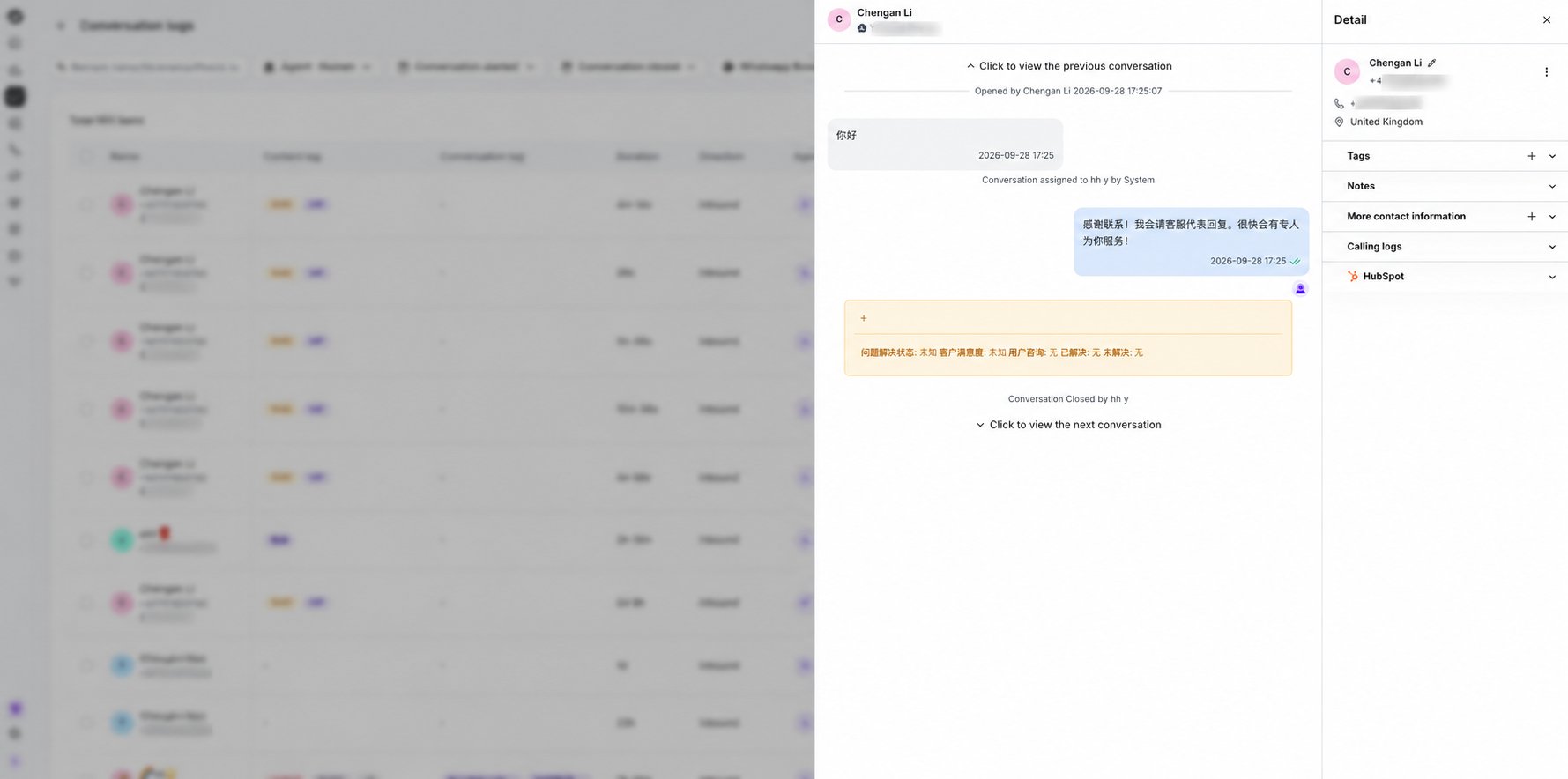
<Frame caption="Open a conversation row to review its message history and timestamps in the details drawer.">
  <img src="https://mintcdn.com/lchnan/3_MG7u4sxNnj0E_f/product-assets/english-help-context-2026-09-29/conversation-log-details-redacted.png?fit=max&auto=format&n=3_MG7u4sxNnj0E_f&q=85&s=d48e6fdeae6f3a8cfb3a8c38795a47ea" alt="会话日志详情抽屉，包含消息历史记录且电话号码已脱敏。" width="1779" height="884" data-path="product-assets/english-help-context-2026-09-29/conversation-log-details-redacted.png" />
</Frame>

在会话日志详情中，你可以为历史会话记录添加和删除会话标签。详情请参阅：[会话标签](/zh/documentation/inbox/conversation-tags)。


This documentation is built and hosted on [Mintlify](https://mintlify.com), a developer documentation platform.