> ## Documentation Index
> Fetch the complete documentation index at: https://docs.ycloud.com/llms.txt
> Use this file to discover all available pages before exploring further.

# 发起新聊天

> 在 Inbox 中与客户发起聊天的方法

了解如何使用 **3** 种方法开始与客户聊天。

如果联系人向您发送了消息，该消息将显示在您的 Inbox 列表中。您可以与客户聊天、将现有会话分配给自己，也可以搜索目标用户的 WhatsApp 号码并发送 WhatsApp 模板。

## 回复客户消息

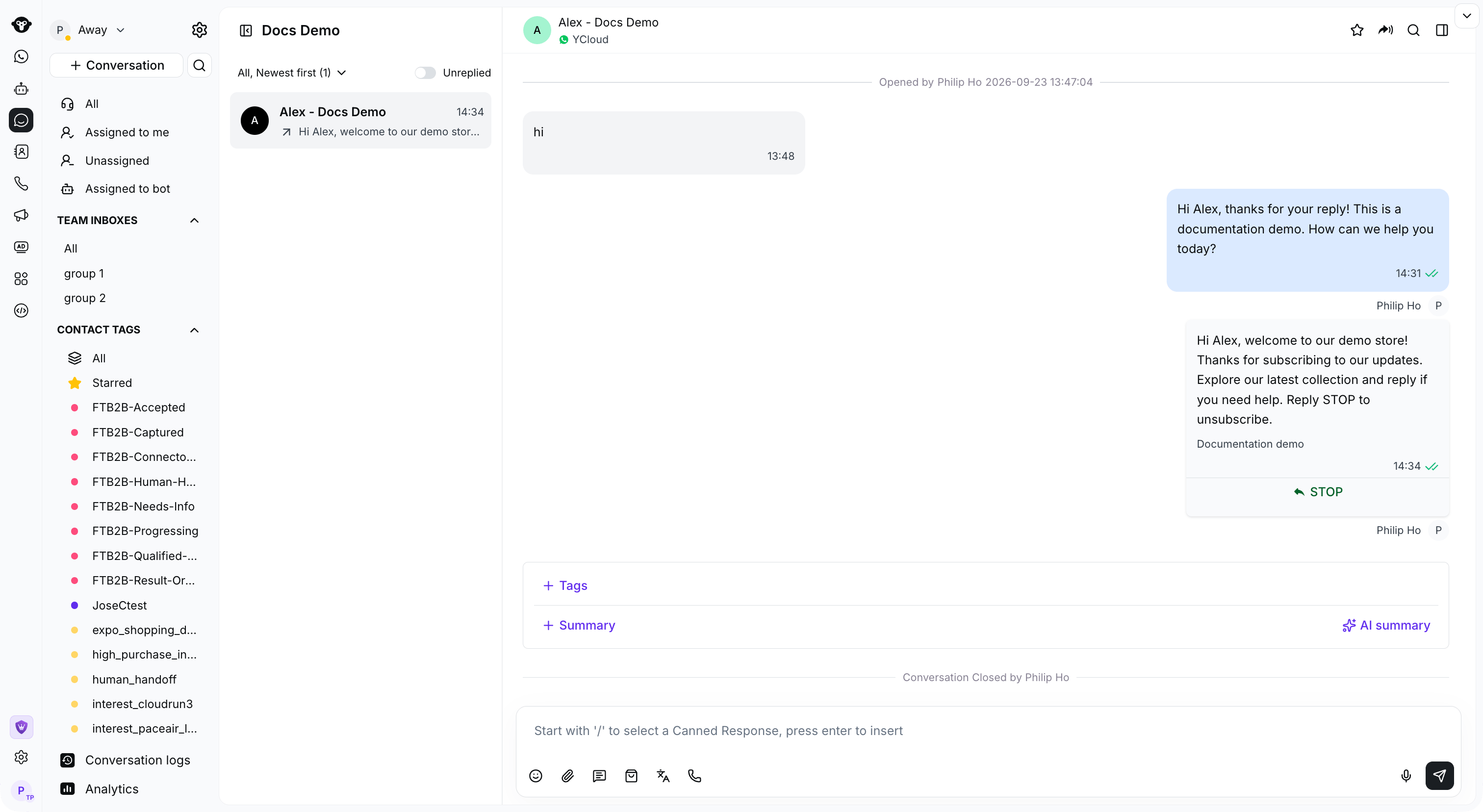
当客户向您发送消息时，您可以立即回复并开始聊天对话。

通过左侧的筛选器，会话列表将显示进行中的会话。选择其中一个会话，右侧将展开会话窗口。

<Frame caption="Select a customer conversation to view its history and reply in the message box.">
  <img src="https://mintcdn.com/lchnan/rmZYWVwRdpR7TJaI/product-assets/english-help-context-2026-09-23/inbox-overview.png?fit=max&auto=format&n=rmZYWVwRdpR7TJaI&q=85&s=cde9c1132d3fff6631cf9fe2b98e3252" alt="包含导航、会话列表、客户消息和回复的完整 Inbox" width="3024" height="1656" data-path="product-assets/english-help-context-2026-09-23/inbox-overview.png" />
</Frame>

## 将对话分配给自己

点击消息框上方的 **分配给我** 将对话分配给自己。

<Frame caption="Click Assign to me above the message box to take ownership of an unassigned conversation.">
  <img src="https://mintcdn.com/lchnan/rmZYWVwRdpR7TJaI/product-assets/english-help-context-2026-09-23/inbox-assign-to-me-annotated.svg?fit=max&auto=format&n=rmZYWVwRdpR7TJaI&q=85&s=53b3bf518ec706627a5a093e3424dc1e" alt="包含未分配会话和“分配给我”操作的完整 Inbox" width="3024" height="1656" data-path="product-assets/english-help-context-2026-09-23/inbox-assign-to-me-annotated.svg" />
</Frame>

## 与任意用户发起对话

如果您想向未保存在 Inbox 中的联系人发送消息，可以搜索该联系人并发送 WhatsApp 模板作为首次互动。

### 步骤 1：搜索客户的电话号码

点击 **会话** 旁边的搜索图标，选择 **联系人**，然后输入电话号码。

<Frame caption="Open Contact search and enter the customer phone number.">
  <img src="https://mintcdn.com/lchnan/rmZYWVwRdpR7TJaI/product-assets/english-help-context-2026-09-23/inbox-contact-search-annotated.svg?fit=max&auto=format&n=rmZYWVwRdpR7TJaI&q=85&s=4a84cb73111d55572145a71baa7732d4" alt="包含联系人电话搜索的完整 Inbox" width="3024" height="1656" data-path="product-assets/english-help-context-2026-09-23/inbox-contact-search-annotated.svg" />
</Frame>

### 步骤 2：点击“+ 发起新会话”下方的按钮创建新会话

<Frame caption="Click Create a new conversation below the search results.">
  <img src="https://mintcdn.com/lchnan/rmZYWVwRdpR7TJaI/product-assets/english-help-context-2026-09-23/inbox-create-conversation-entry-annotated.svg?fit=max&auto=format&n=rmZYWVwRdpR7TJaI&q=85&s=23f25925ad13337d94c50627316aab5f" alt="在联系人搜索结果下方发起新会话" width="3024" height="1656" data-path="product-assets/english-help-context-2026-09-23/inbox-create-conversation-entry-annotated.svg" />
</Frame>

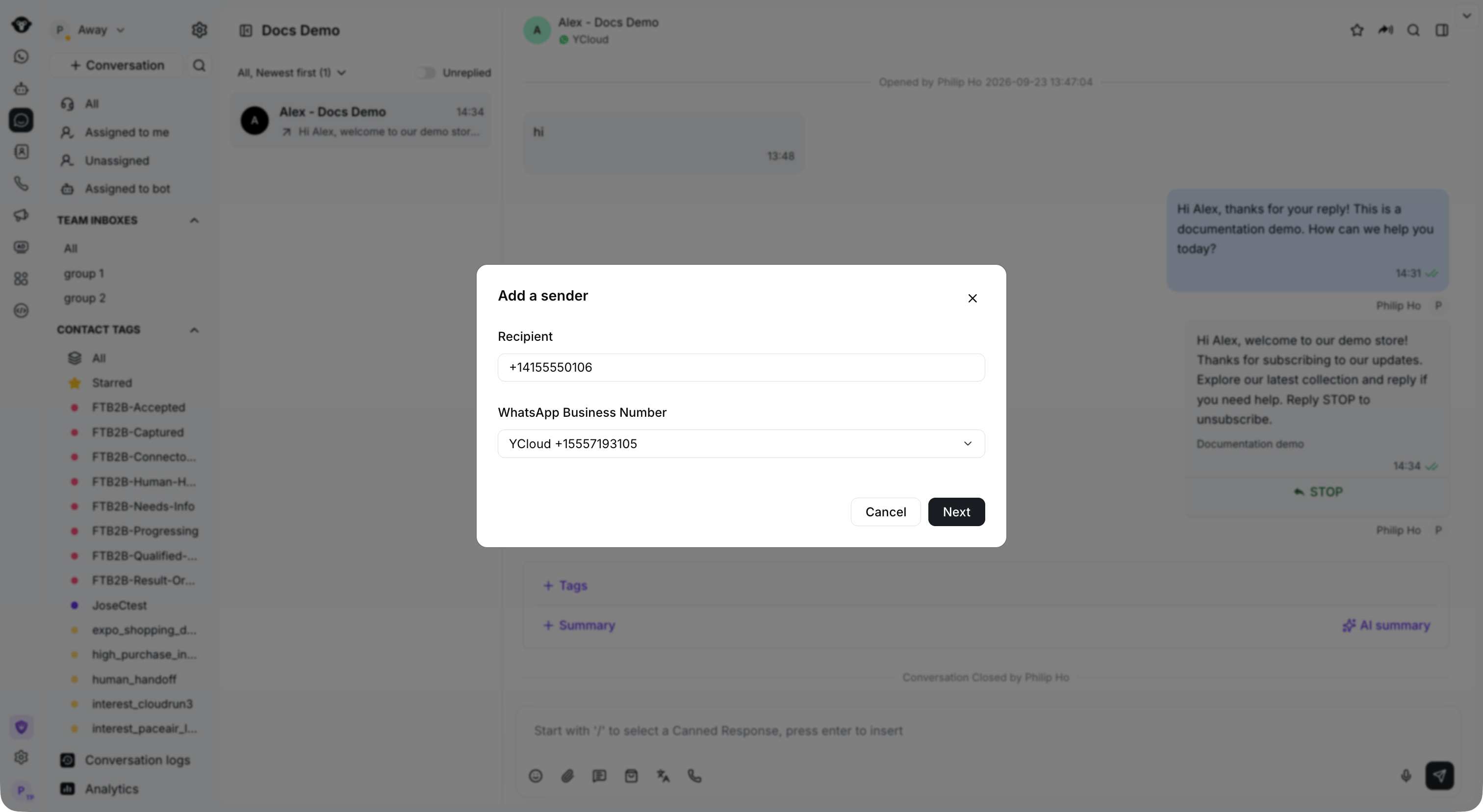
### 步骤 3：选择用于发送消息的 WhatsApp Business 号码

选择您的发送号码，然后点击 **下一步**。

<Frame caption="Enter the recipient and select your WhatsApp Business Number.">
  <img src="https://mintcdn.com/lchnan/rmZYWVwRdpR7TJaI/product-assets/english-help-context-2026-09-23/inbox-new-chat-sender.png?fit=max&auto=format&n=rmZYWVwRdpR7TJaI&q=85&s=ff1abf131355b12aac3c22ec03d99a78" alt="包含收件人和 WhatsApp Business 号码对话框的完整 Inbox" width="3024" height="1656" data-path="product-assets/english-help-context-2026-09-23/inbox-new-chat-sender.png" />
</Frame>

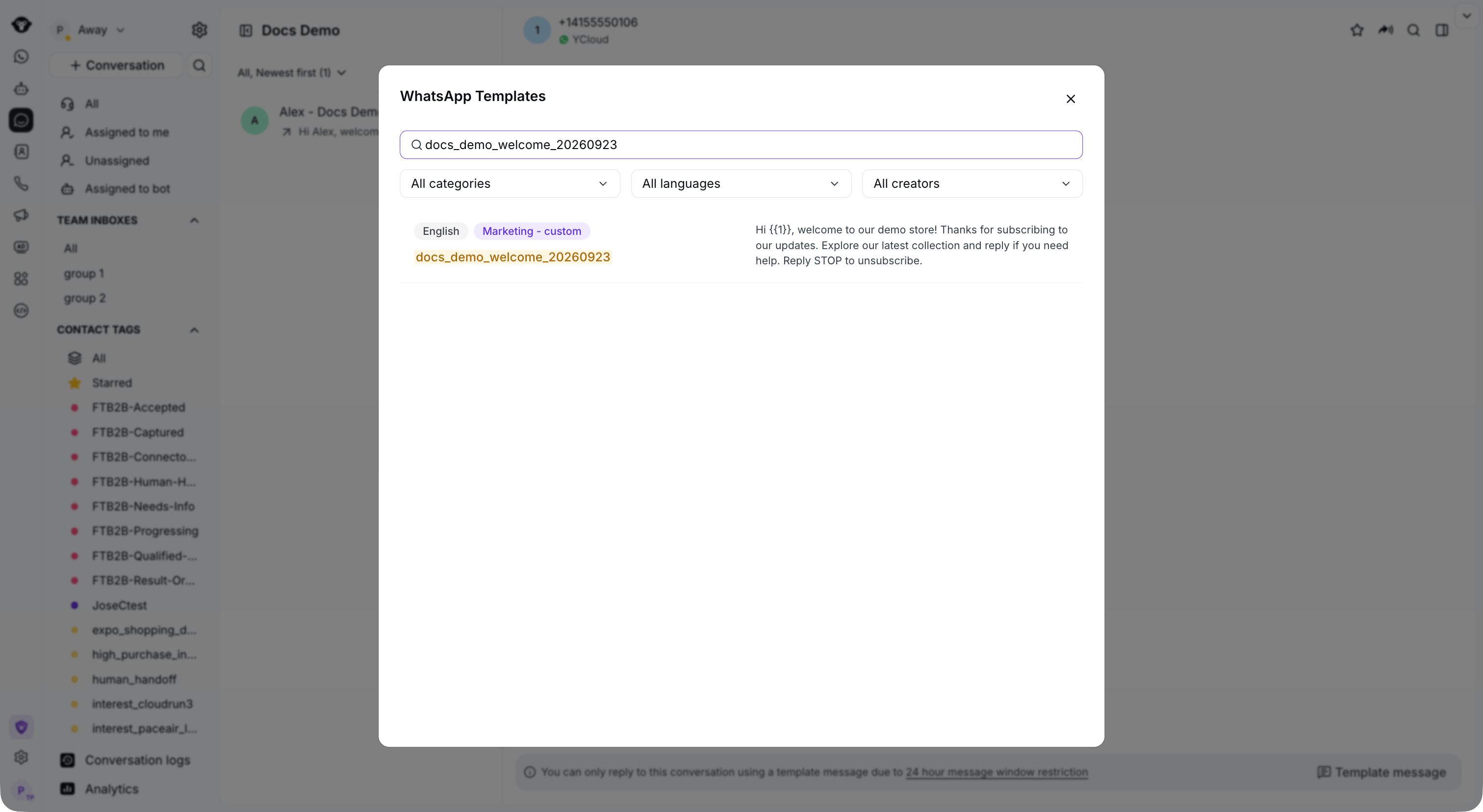
### 步骤 4：选择要发送的模板

按模板名称或正文搜索，或按分类、语言或创建者筛选模板。

<Frame caption="Search for an approved template and filter by category or language.">
  <img src="https://mintcdn.com/lchnan/rmZYWVwRdpR7TJaI/product-assets/english-help-context-2026-09-23/inbox-template-picker.png?fit=max&auto=format&n=rmZYWVwRdpR7TJaI&q=85&s=e269447f51d99697fc5fb4636427d9ac" alt="包含已批准模板搜索结果的完整 Inbox" width="3024" height="1656" data-path="product-assets/english-help-context-2026-09-23/inbox-template-picker.png" />
</Frame>

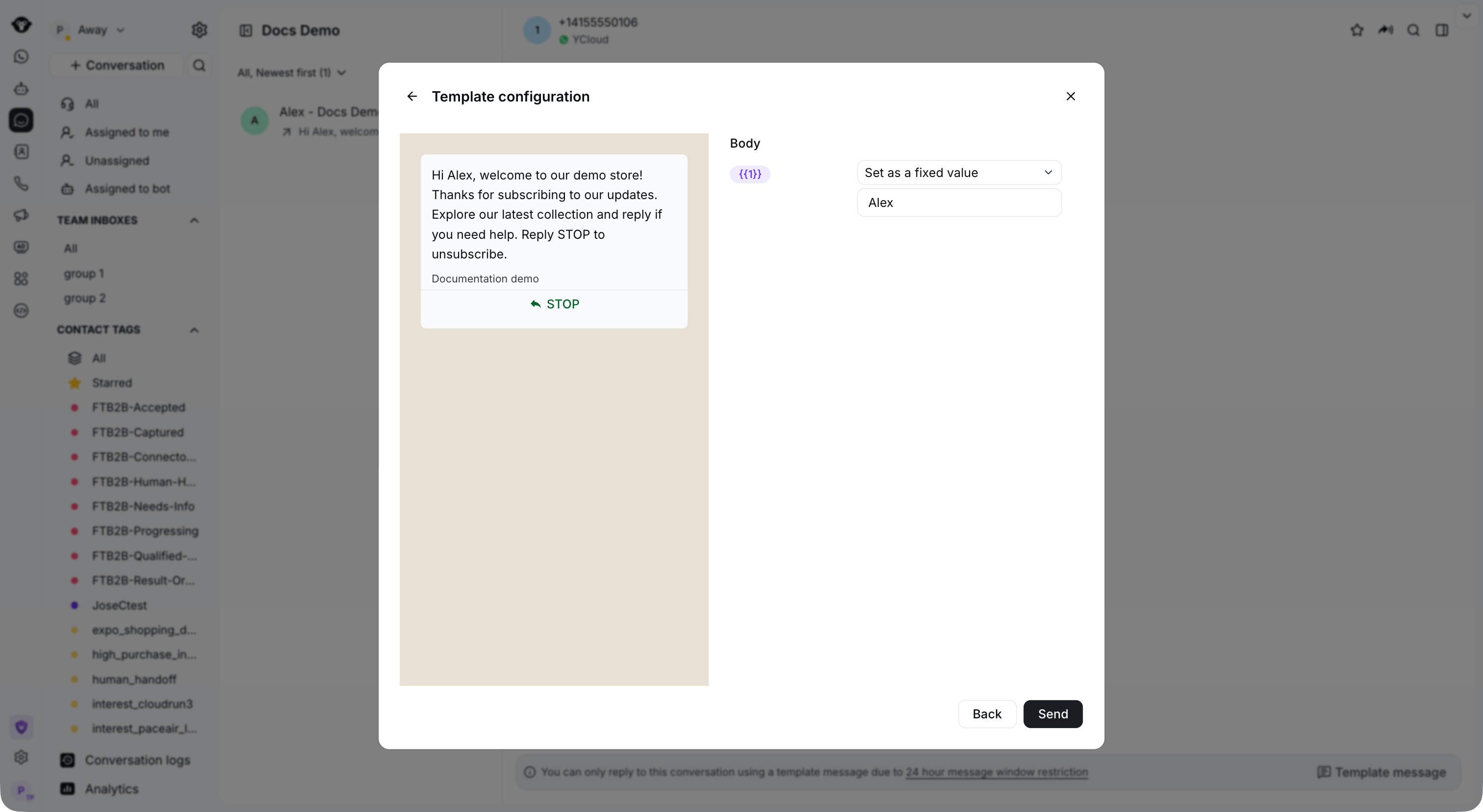
### 步骤 5：确认模板内容/设置模板变量

检查预览和变量值，然后点击 **发送**。

<Frame caption="Set the template variables and review the message before sending.">
  <img src="https://mintcdn.com/lchnan/rmZYWVwRdpR7TJaI/product-assets/english-help-context-2026-09-23/inbox-template-preview.png?fit=max&auto=format&n=rmZYWVwRdpR7TJaI&q=85&s=63d889f33a24f6228bf55aec3bcf572f" alt="包含模板变量和消息预览的完整 Inbox" width="3024" height="1656" data-path="product-assets/english-help-context-2026-09-23/inbox-template-preview.png" />
</Frame>


This documentation is built and hosted on [Mintlify](https://mintlify.com), a developer documentation platform.