> ## Documentation Index
> Fetch the complete documentation index at: https://docs.ycloud.com/llms.txt
> Use this file to discover all available pages before exploring further.

# 收件箱中的 WhatsApp 通话功能

直接在收件箱中拨打和接听 [WhatsApp 语音通话](/zh/documentation/calling/overview)。

## 邀请客户呼入

当沟通过程中文本消息无法满足需求时，您可以邀请客户发起语音通话，从而更快速、更高效地解决问题。

<Info>
  呼入通话完全免费。
</Info>

### 1. 发送通话邀请

入口：

点击 WhatsApp 通话 > 邀请客户呼入

<Frame caption="Open WhatsApp calling and choose Ask customer to call in.">
  <img src="https://mintcdn.com/lchnan/TsMGu8UTNQaUw-Rc/product-assets/english-help-demo-2026-09-23/inbox-live-calling-menu-annotated.svg?fit=max&auto=format&n=TsMGu8UTNQaUw-Rc&q=85&s=8cde3d6ac6b29614c54f984184166b46" alt="包含呼出和邀请客户呼入选项的 WhatsApp 通话菜单" width="690" height="250" data-path="product-assets/english-help-demo-2026-09-23/inbox-live-calling-menu-annotated.svg" />
</Frame>

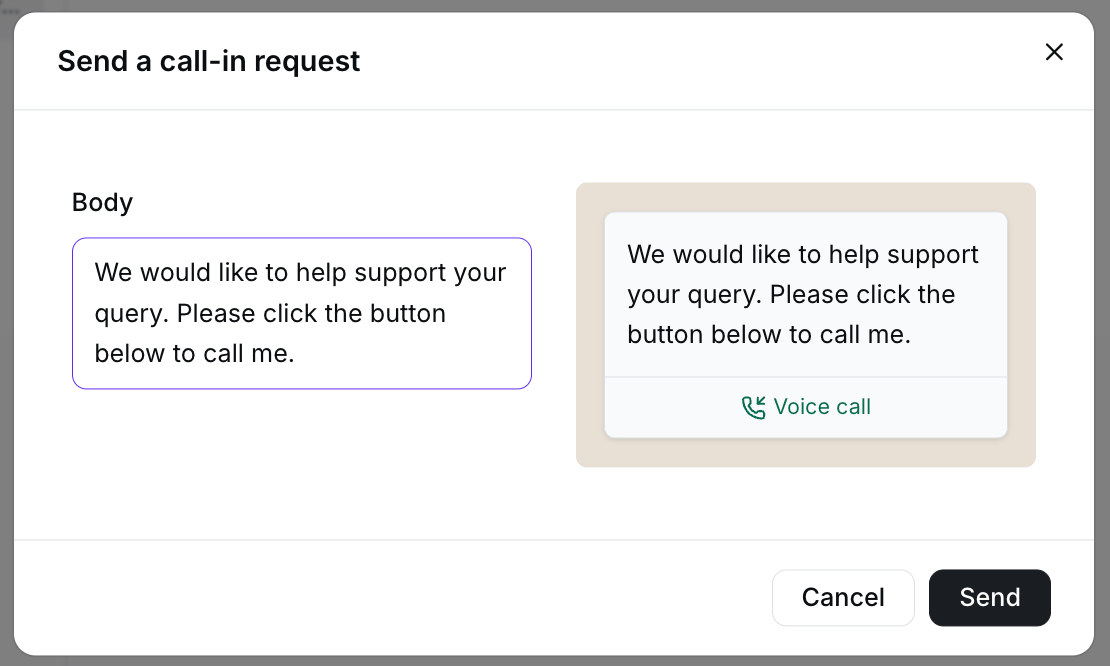
输入通话原因。确认信息无误后，点击发送。

<Frame caption="Edit the invitation text and review the preview before sending.">
  <img src="https://mintcdn.com/lchnan/TsMGu8UTNQaUw-Rc/product-assets/english-help-demo-2026-09-23/inbox-live-call-in-preview.png?fit=max&auto=format&n=TsMGu8UTNQaUw-Rc&q=85&s=020dbb6c96832f0696249e894e0dd740" alt="带有正文编辑器和语音通话按钮预览的未发送呼入请求" width="1110" height="666" data-path="product-assets/english-help-demo-2026-09-23/inbox-live-call-in-preview.png" />
</Frame>

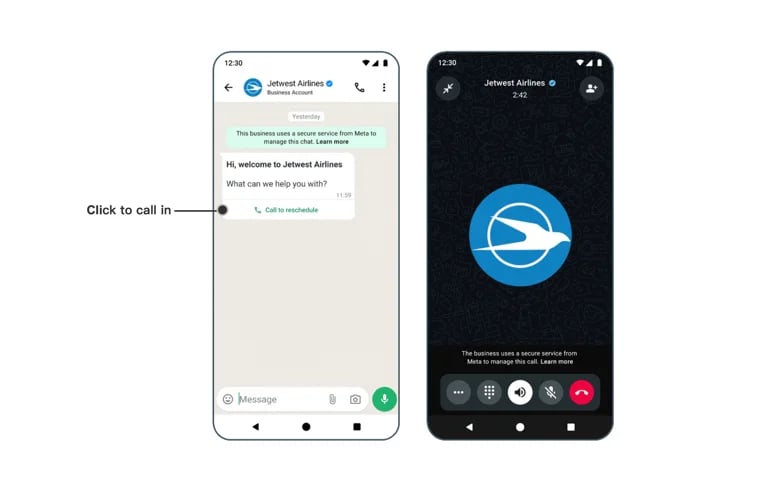
发送后，客户手机上将收到通话邀请消息，如下图所示。客户点击呼叫按钮即可发起通话。

<Frame caption="The customer can use the invitation to start a WhatsApp voice call.">
  <img src="https://mintcdn.com/lchnan/RN4tXfXENVvDu0Te/product-assets/c0f9cd5787-image-814.webp?fit=max&auto=format&n=RN4tXfXENVvDu0Te&q=85&s=d20d07299cd25c3d731b4215418b3d02" alt="客户手机上的 WhatsApp 通话邀请与进行中的语音通话" width="768" height="477" data-path="product-assets/c0f9cd5787-image-814.webp" />
</Frame>

#### 2. 接听来电

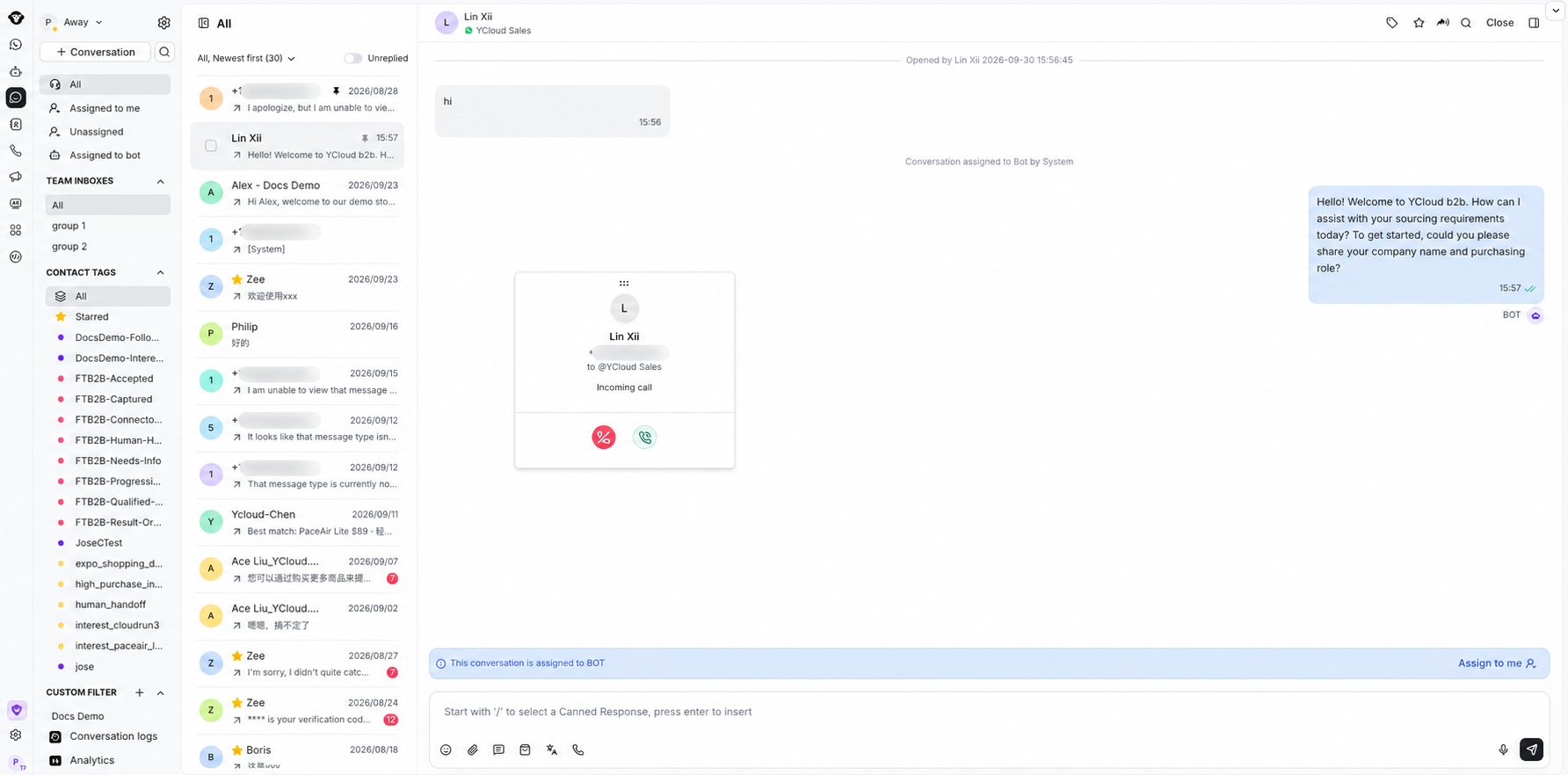
当客户通过您发送的邀请链接发起语音通话时，您将在收件箱中看到通知。

<Frame caption="Answer or decline an incoming WhatsApp call from Inbox.">
  <img src="https://mintcdn.com/lchnan/INCfGITGB_rYG20v/product-assets/inbox/whatsapp-calling-incoming-call-blurred.png?fit=max&auto=format&n=INCfGITGB_rYG20v&q=85&s=c8694e6d97188b1b0bc0777a6371ba96" alt="收件箱中带有电话号码轻度模糊处理的 WhatsApp 来电通知" width="1784" height="882" data-path="product-assets/inbox/whatsapp-calling-incoming-call-blurred.png" />
</Frame>

点击接听即可接受通话并开始沟通。

##

## 拨打外呼电话

在进行外呼之前，您必须拥有使用该商业电话号码拨打电话的权限。更多详情请参阅[相关文档](/zh/documentation/calling/overview#outbound-calling-permissions)。

⚠️ 外呼语音通话为收费项目。

有关价格详情，请访问：[https://www.ycloud.com/pricing#price-table](https://www.ycloud.com/pricing#price-table)

### 1. 申请通话权限

入口：

点击 WhatsApp 通话 > 呼出

<Frame caption="Open WhatsApp calling and choose Call out to continue the outbound calling workflow.">
  <img src="https://mintcdn.com/lchnan/TsMGu8UTNQaUw-Rc/product-assets/english-help-demo-2026-09-23/inbox-live-calling-out-menu-annotated.svg?fit=max&auto=format&n=TsMGu8UTNQaUw-Rc&q=85&s=4ce2dee0c7c6ff84c1903b766a058d63" alt="包含呼出选项的 WhatsApp 通话菜单" width="690" height="250" data-path="product-assets/english-help-demo-2026-09-23/inbox-live-calling-out-menu-annotated.svg" />
</Frame>

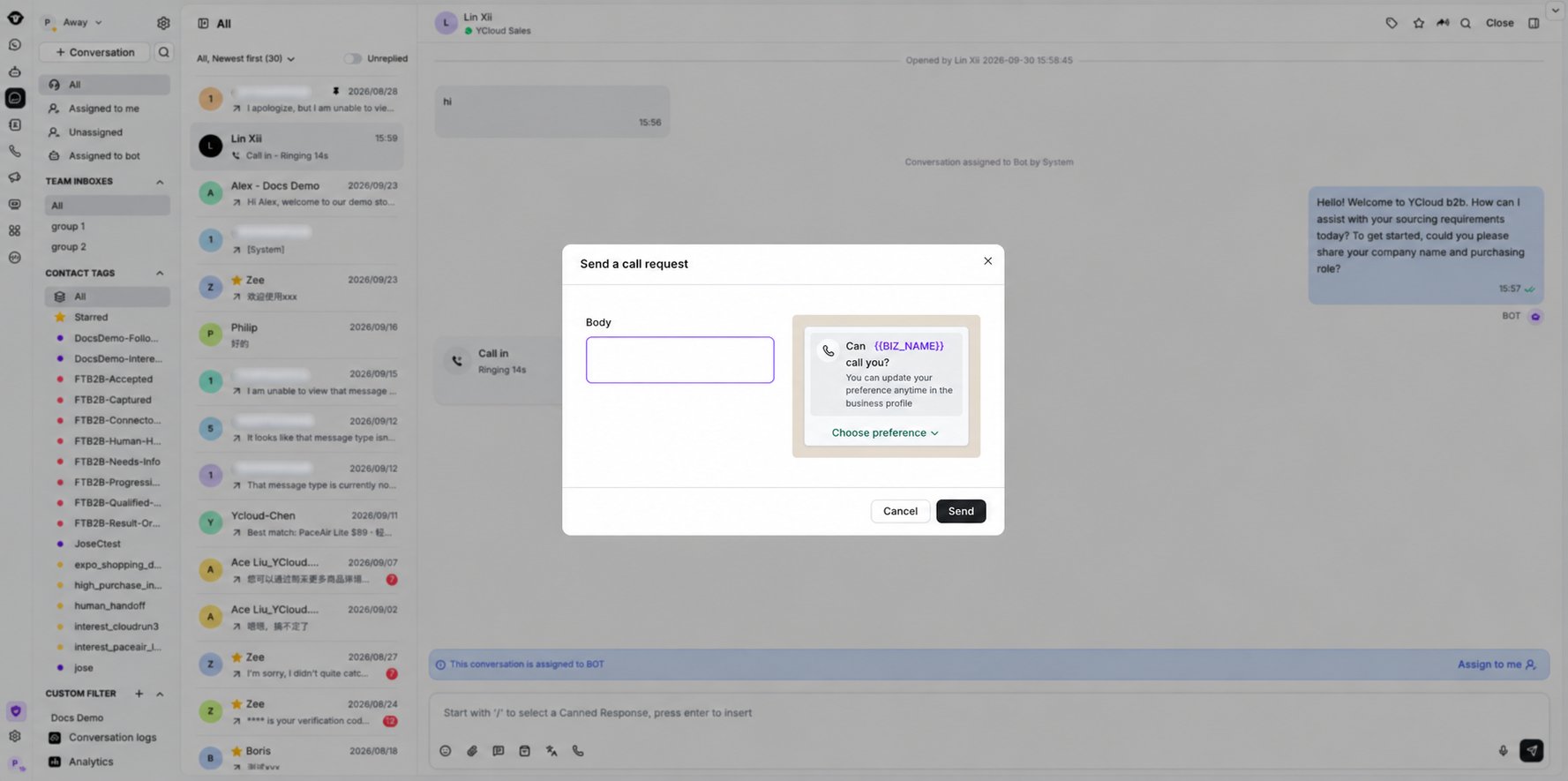
YCloud 将引导您先向客户发送一条通话请求消息。

<Frame caption="Review the call request message, then select Send.">
  <img src="https://mintcdn.com/lchnan/INCfGITGB_rYG20v/product-assets/inbox/whatsapp-calling-call-request-blurred.png?fit=max&auto=format&n=INCfGITGB_rYG20v&q=85&s=5c259e8487dc464147c58c56bb7b544b" alt="收件箱中带有电话号码轻度模糊处理的发送通话请求对话框" width="1777" height="885" data-path="product-assets/inbox/whatsapp-calling-call-request-blurred.png" />
</Frame>

### 2. 获取授权

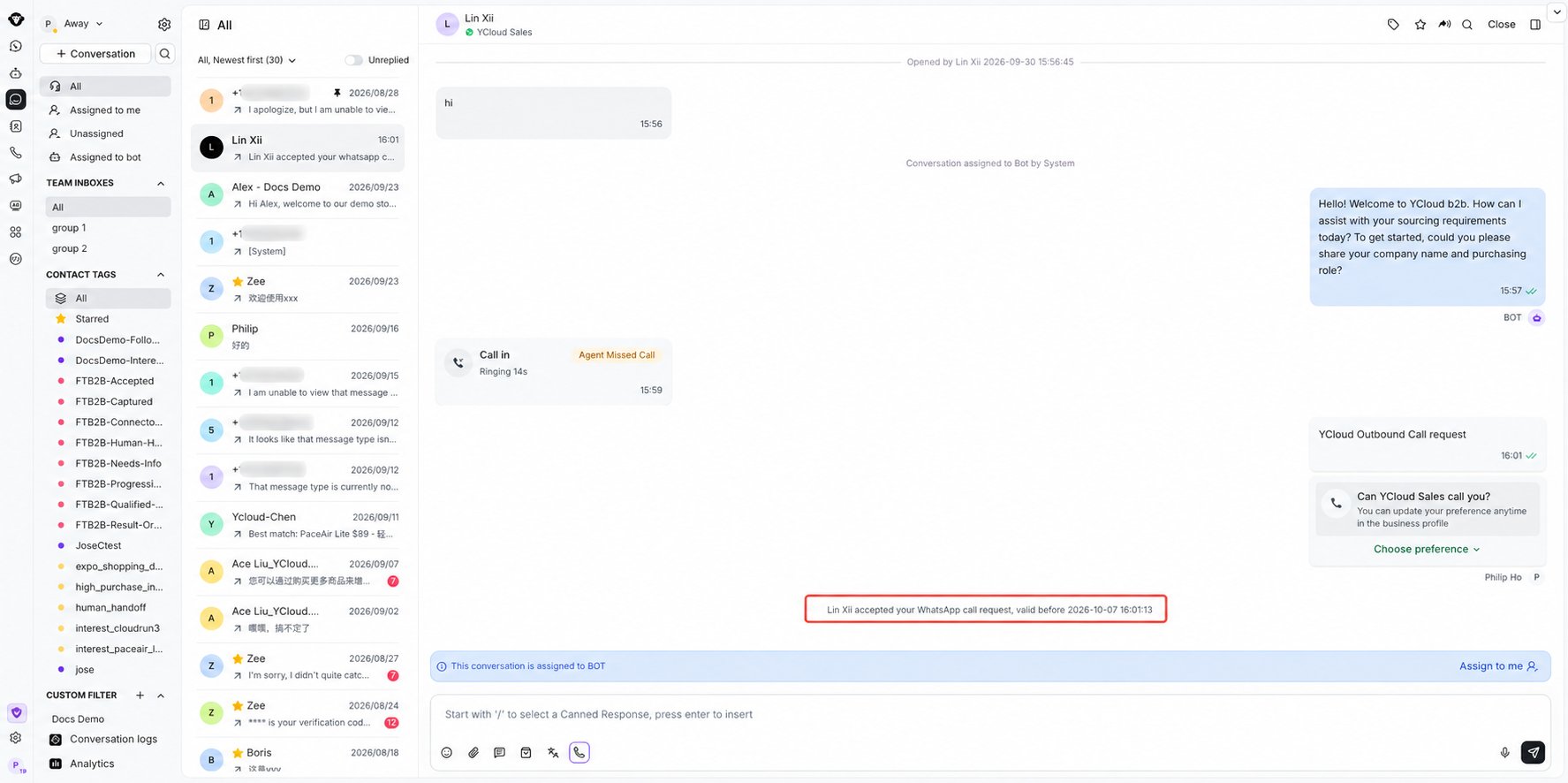
客户同意授权后，您将在收件箱中收到系统通知。

<Frame caption="Inbox confirms when the customer accepts the WhatsApp call request.">
  <img src="https://mintcdn.com/lchnan/INCfGITGB_rYG20v/product-assets/inbox/whatsapp-calling-authorization-blurred.png?fit=max&auto=format&n=INCfGITGB_rYG20v&q=85&s=574aa53cc792d51b05fbcb1a8b2b61a3" alt="收件箱中带有电话号码轻度模糊处理的 WhatsApp 通话请求已接受通知" width="1775" height="886" data-path="product-assets/inbox/whatsapp-calling-authorization-blurred.png" />
</Frame>

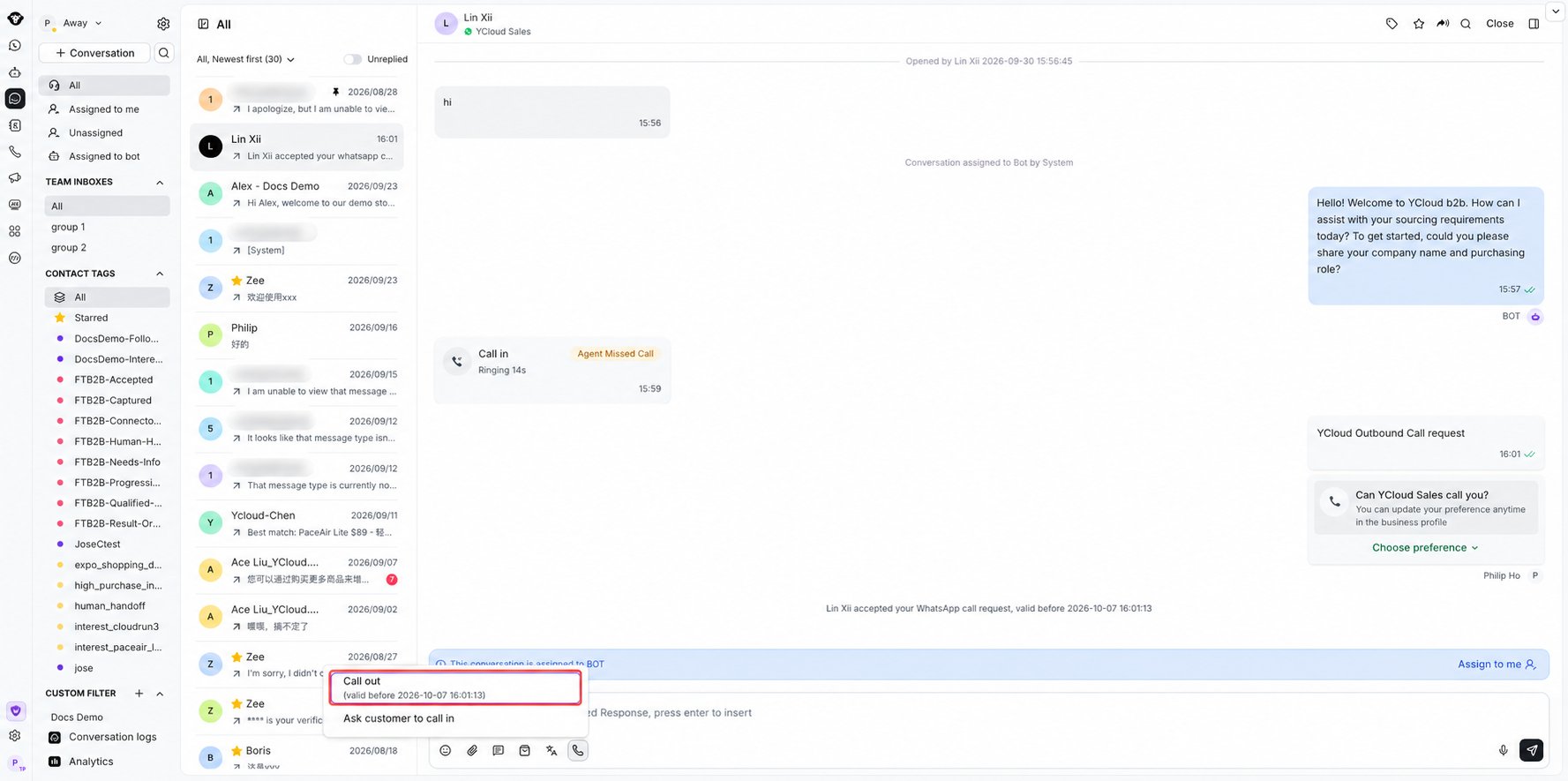
### 3. 开始外呼通话

获得授权后，再次点击呼出按钮即可发起外呼语音通话。

<Frame caption="Open WhatsApp calling and select Call out after authorization is granted.">
  <img src="https://mintcdn.com/lchnan/INCfGITGB_rYG20v/product-assets/inbox/whatsapp-calling-call-out-menu-blurred.png?fit=max&auto=format&n=INCfGITGB_rYG20v&q=85&s=f1b30607ab3b7c9bf95049c5d43586e6" alt="收件箱 WhatsApp 通话菜单中可用的呼出选项（电话号码已轻度模糊处理）" width="1777" height="885" data-path="product-assets/inbox/whatsapp-calling-call-out-menu-blurred.png" />
</Frame>

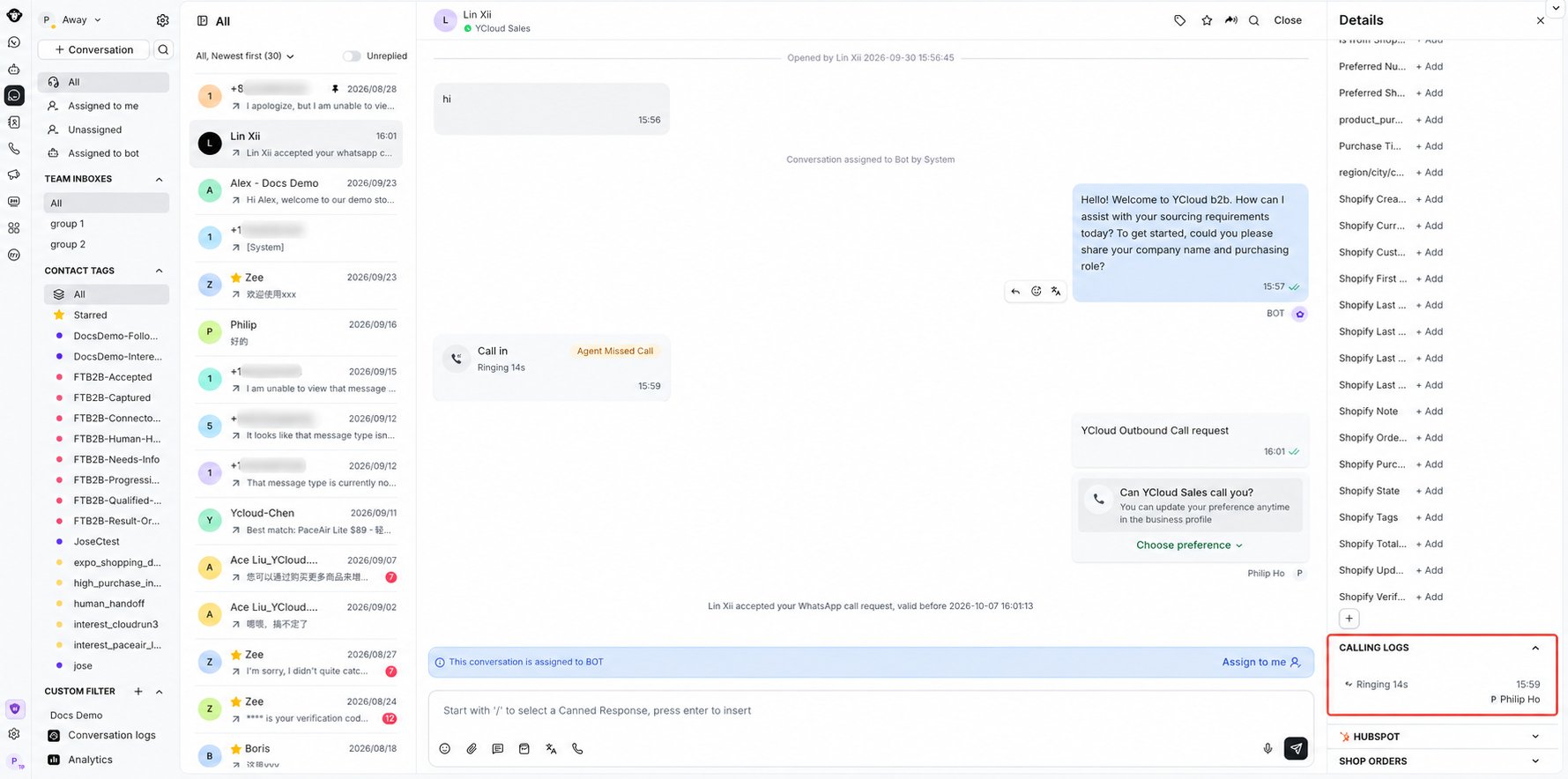
### 查看通话记录

打开收件箱右侧的通话记录面板，即可查看详细的通话日志，包括通话状态和通话时长。

<Frame caption="Review call status and duration under Calling logs in the contact details panel.">
  <img src="https://mintcdn.com/lchnan/INCfGITGB_rYG20v/product-assets/inbox/whatsapp-calling-call-records-blurred.png?fit=max&auto=format&n=INCfGITGB_rYG20v&q=85&s=2ae7ff009c070c89a258da3942cd3206" alt="收件箱联系人详情面板中的通话日志（电话号码已轻度模糊处理）" width="1779" height="884" data-path="product-assets/inbox/whatsapp-calling-call-records-blurred.png" />
</Frame>


This documentation is built and hosted on [Mintlify](https://mintlify.com), a developer documentation platform.