> ## Documentation Index
> Fetch the complete documentation index at: https://docs.ycloud.com/llms.txt
> Use this file to discover all available pages before exploring further.

# 优惠券工具使用指南

上传优惠券码，限制每个客户只能领取一个券码，并通过规则型 Agent、收件箱或营销活动分发券码。

## 使用场景

扫码领券：客户通过扫描二维码在您的商业账户中领取优惠券。

## 使用教程

### 步骤 1：创建优惠券活动

#### 步骤 1.1：启用优惠券功能

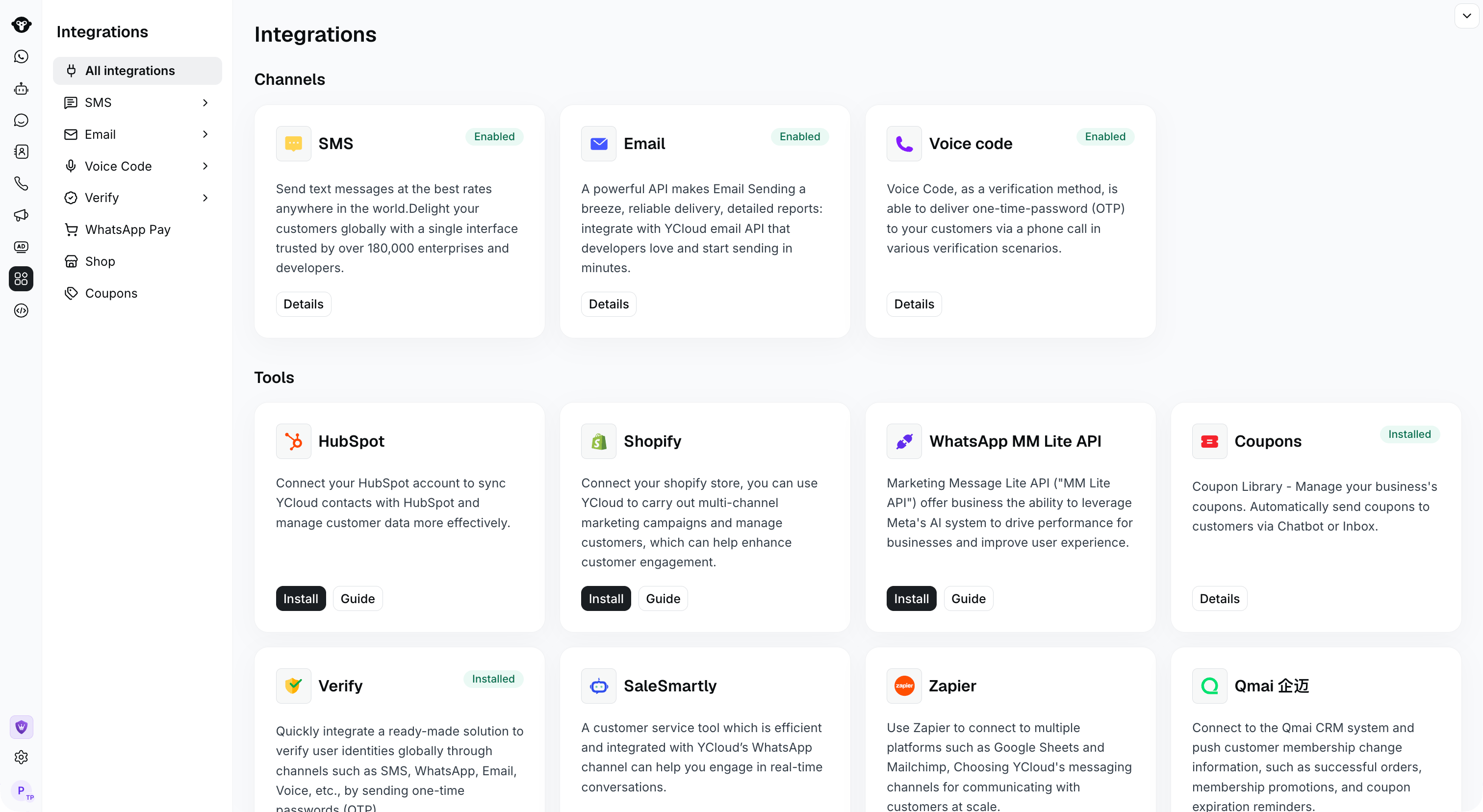
入口：[Integrations](https://www.ycloud.com/console/#/app/integrations/all)，点击 Install 按钮以启用

<Frame caption="Find Coupons in Integrations. This example shows the installed state.">
  <img src="https://mintcdn.com/lchnan/TsMGu8UTNQaUw-Rc/product-assets/english-help-demo-2026-09-23/integrations-enabled.png?fit=max&auto=format&n=TsMGu8UTNQaUw-Rc&q=85&s=a0961446037aeff5bf3bde303b607643" alt="已安装 Coupons 的 Integrations 页面" width="3024" height="1656" data-path="product-assets/english-help-demo-2026-09-23/integrations-enabled.png" />
</Frame>

#### 步骤 1.2：创建优惠券活动

从左侧边栏 Integrations > [Coupons](https://www.ycloud.com/console/#/app/integrations/coupon/list) 进入 Coupons 页面

点击 \[+ New Coupons]
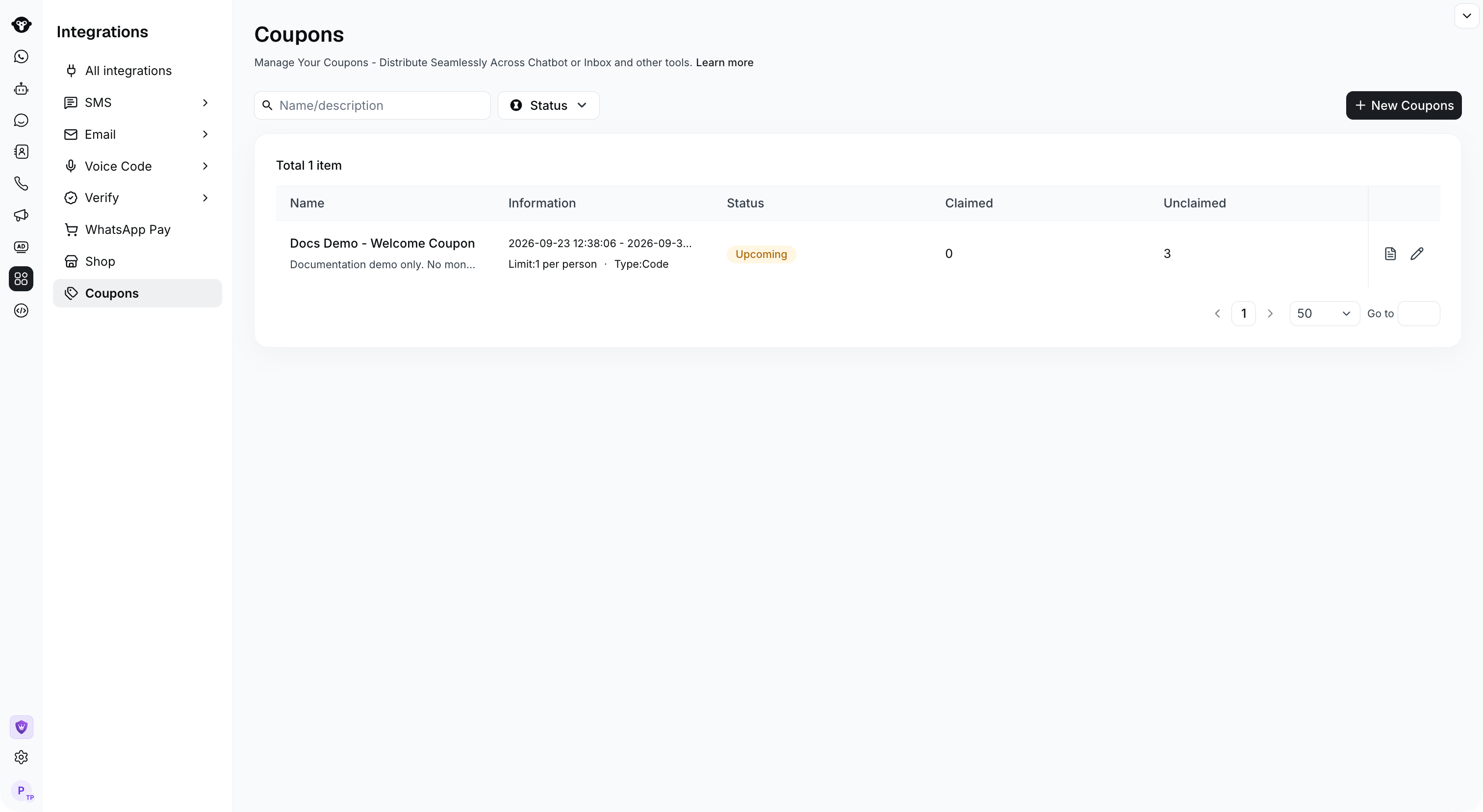
<Frame caption="Select New Coupons to create a campaign.">
  <img src="https://mintcdn.com/lchnan/TsMGu8UTNQaUw-Rc/product-assets/english-help-demo-2026-09-23/coupon-list.png?fit=max&auto=format&n=TsMGu8UTNQaUw-Rc&q=85&s=fbca628682d11096d68bb7fe5013c187" alt="优惠券活动列表及 New Coupons 操作" width="3024" height="1656" data-path="product-assets/english-help-demo-2026-09-23/coupon-list.png" />
</Frame>

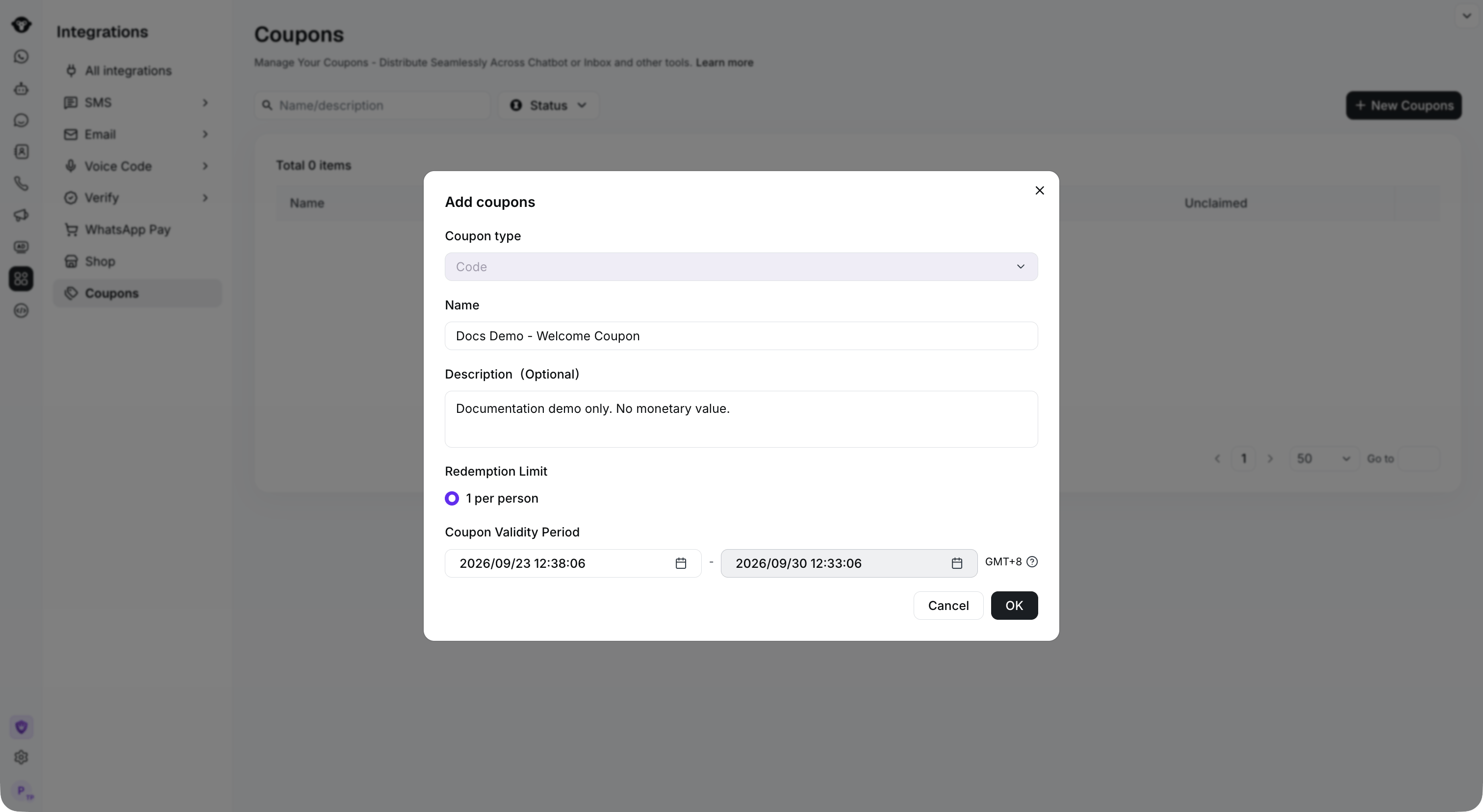
#### 步骤 1.3：配置活动信息

* Coupon Type（优惠券类型）：Code type（优惠码）。目前仅支持该类型；如需其他类型，请联系我们。
* Campaign Name（活动名称）：优惠券活动的名称
* Campaign Notes（活动备注）：关于活动的备注，选填。
* Claim Limit（领取限制）：每人仅限领取一次。
* Campaign Duration（活动时间）：设置活动时间。超出此时间范围将停止发放优惠券。

确认信息无误后，点击 **OK**。

<Frame caption="Set the campaign name, description and validity period, then click OK.">
  <img src="https://mintcdn.com/lchnan/TsMGu8UTNQaUw-Rc/product-assets/english-help-demo-2026-09-23/coupon-create.png?fit=max&auto=format&n=TsMGu8UTNQaUw-Rc&q=85&s=9b4956cb07d14ce47488db3f90505c26" alt="包含名称、有效期和兑换限制的优惠券活动创建界面" width="3024" height="1656" data-path="product-assets/english-help-demo-2026-09-23/coupon-create.png" />
</Frame>

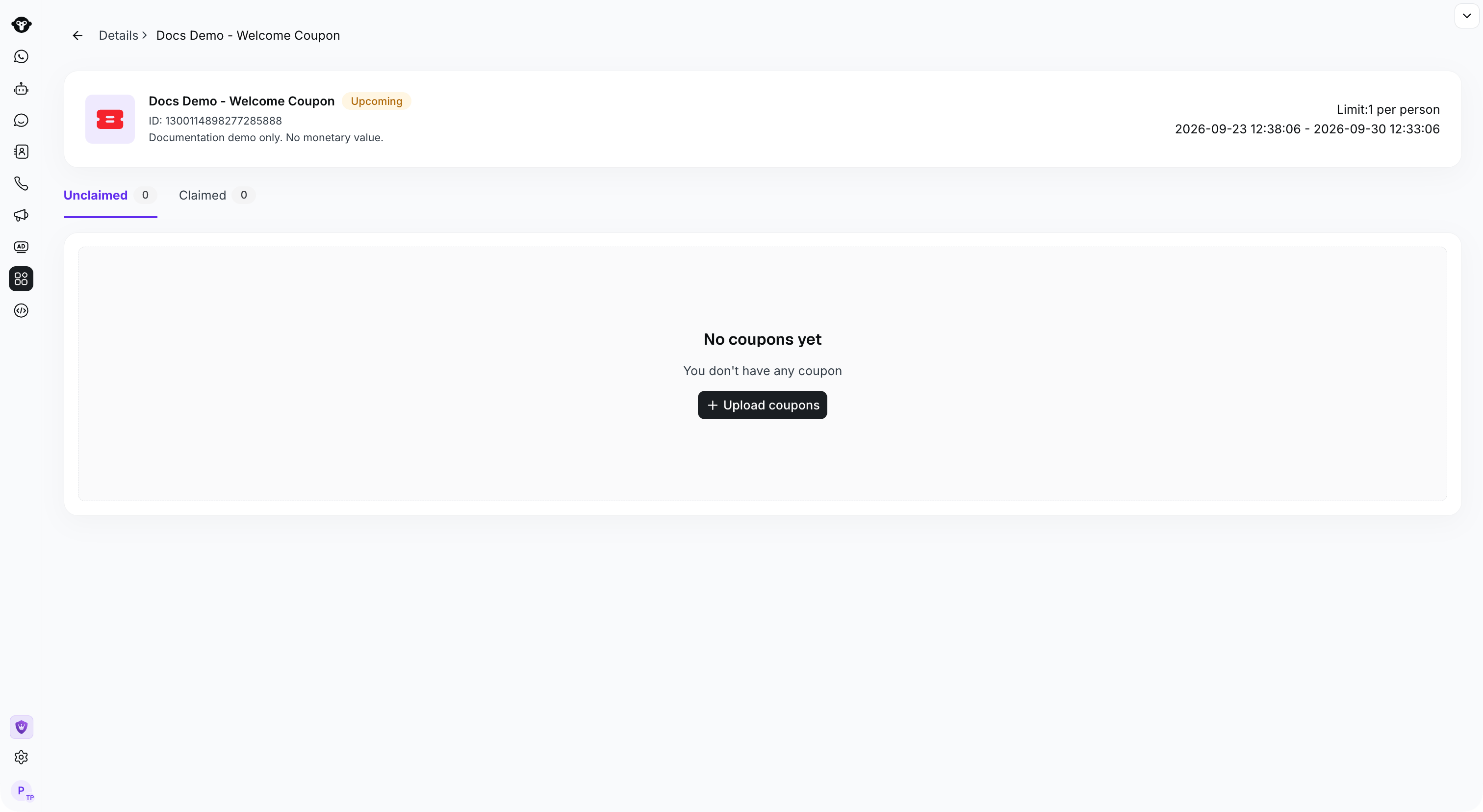
#### 步骤 1.4：上传优惠券码

点击上传按钮

<Frame caption="Open the campaign and click Upload coupons.">
  <img src="https://mintcdn.com/lchnan/TsMGu8UTNQaUw-Rc/product-assets/english-help-demo-2026-09-23/coupon-upload-entry.png?fit=max&auto=format&n=TsMGu8UTNQaUw-Rc&q=85&s=dfd32cc7854239e7dcb11693f93469dc" alt="带有 Upload coupons 操作的新优惠券活动详情" width="3024" height="1656" data-path="product-assets/english-help-demo-2026-09-23/coupon-upload-entry.png" />
</Frame>

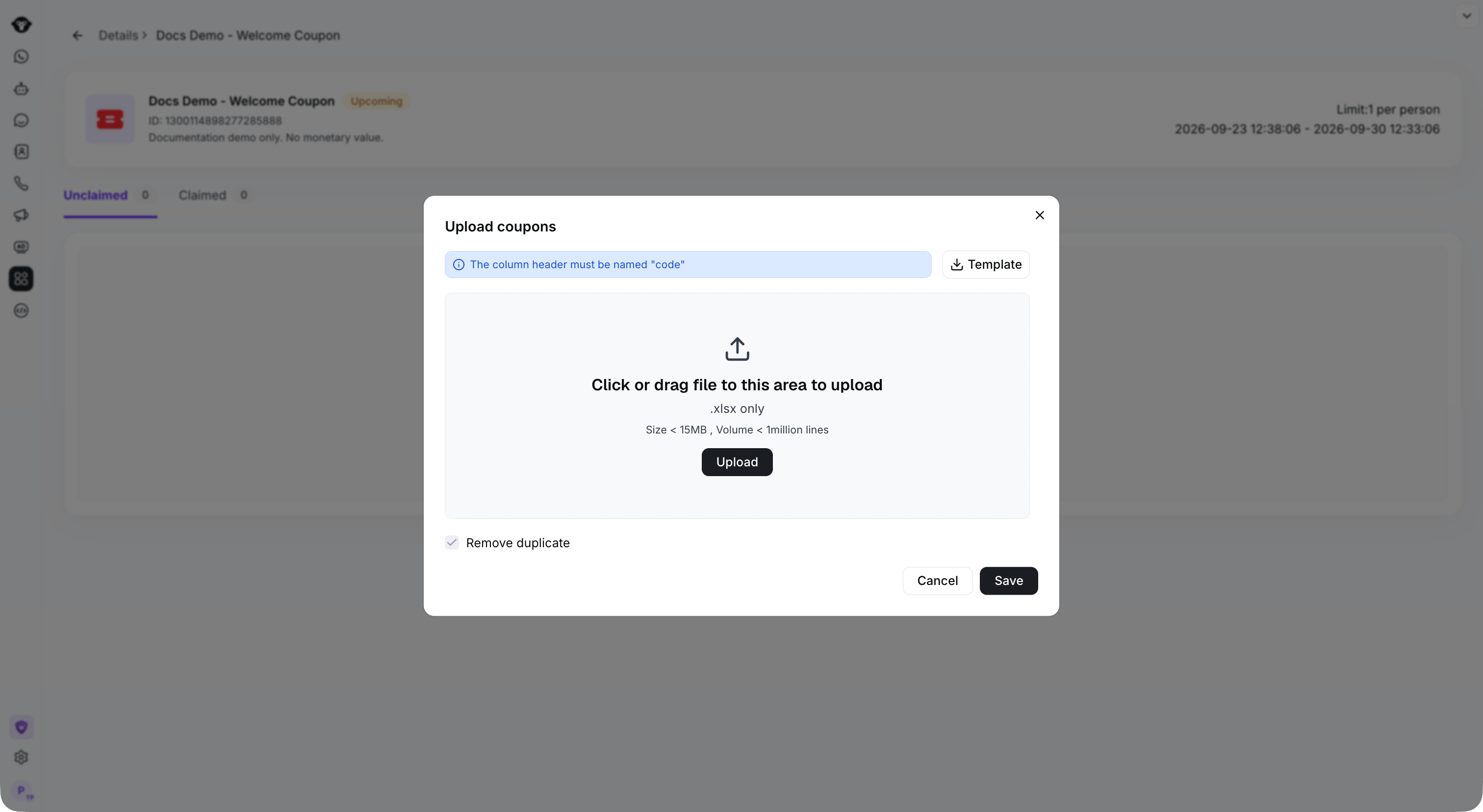
上传包含优惠券码的电子表格。您可以点击模板按钮下载模板。

<Info>
  注意：在上传的 Excel 电子表格中，Code（券码）必须位于第一列。YCloud 将自动去除重复的优惠券码。
</Info>

<Frame caption="Use an XLSX file with a code column.">
  <img src="https://mintcdn.com/lchnan/TsMGu8UTNQaUw-Rc/product-assets/english-help-demo-2026-09-23/coupon-upload-form.png?fit=max&auto=format&n=TsMGu8UTNQaUw-Rc&q=85&s=3e0bb03dae714fdb64331b69e5a391f6" alt="包含模板下载和券码列要求的优惠券上传对话框" width="3024" height="1656" data-path="product-assets/english-help-demo-2026-09-23/coupon-upload-form.png" />
</Frame>

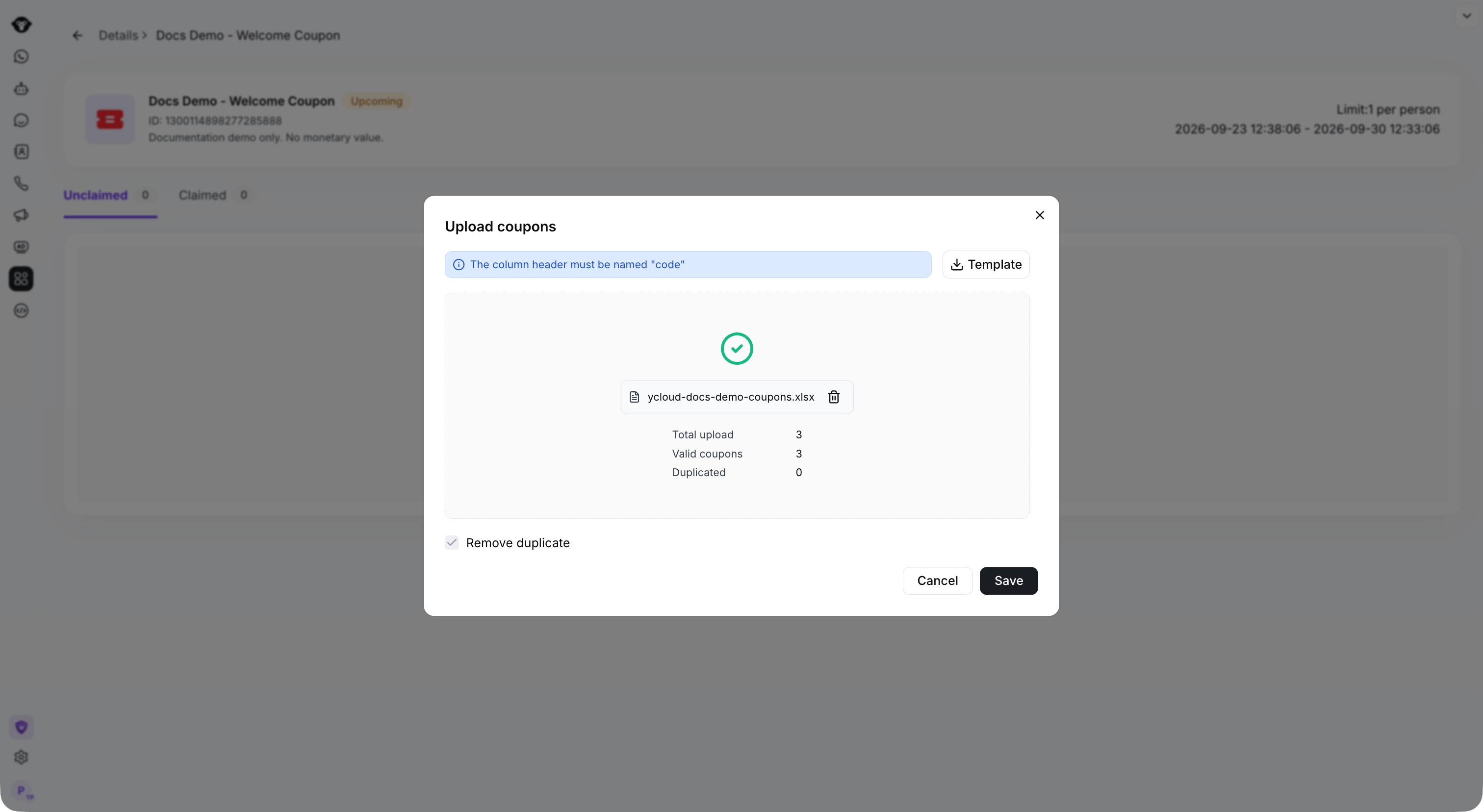
上传完成后，点击 Save

<Frame caption="Check the valid and duplicate counts, then click Save.">
  <img src="https://mintcdn.com/lchnan/TsMGu8UTNQaUw-Rc/product-assets/english-help-demo-2026-09-23/coupon-upload-preview.png?fit=max&auto=format&n=TsMGu8UTNQaUw-Rc&q=85&s=d92de3bb10d3f4c01bce3b76b81b0378" alt="从 XLSX 文件解析出的三个有效优惠券码" width="3024" height="1656" data-path="product-assets/english-help-demo-2026-09-23/coupon-upload-preview.png" />
</Frame>

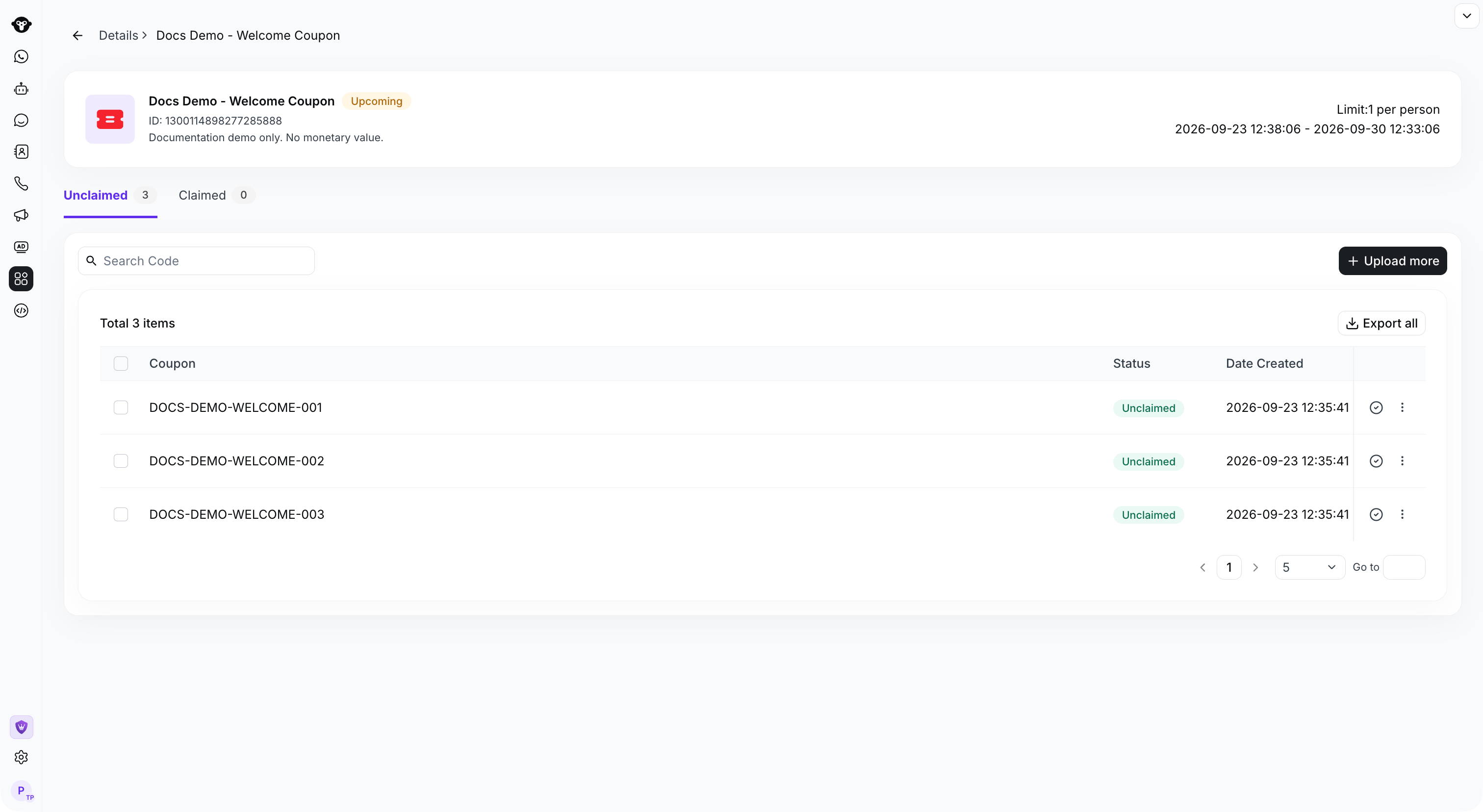
<Frame caption="Saved codes appear in the Unclaimed tab.">
  <img src="https://mintcdn.com/lchnan/TsMGu8UTNQaUw-Rc/product-assets/english-help-demo-2026-09-23/coupon-codes-saved.png?fit=max&auto=format&n=TsMGu8UTNQaUw-Rc&q=85&s=f349371f4dafc2101b59f77ee7b742ed" alt="三个已保存且未领取的演示优惠券码" width="3024" height="1656" data-path="product-assets/english-help-demo-2026-09-23/coupon-codes-saved.png" />
</Frame>

### 步骤 2：在规则型 Agent 中配置领取流程

#### 步骤 2.1：创建规则型 Agent

打开现有的规则型 Agent，或参阅 [Create a Flow](/zh/documentation/agents/rule-based-agent/create-a-flow) 进行配置。

#### 步骤 2.2：创建 Flow

选择该规则型 Agent，然后选择 **Create Flow**。

<Frame caption="Open the rule-based agent and click Create a flow.">
  <img src="https://mintcdn.com/lchnan/TsMGu8UTNQaUw-Rc/product-assets/english-help-demo-2026-09-23/rule-demo-flow-list-annotated.svg?fit=max&auto=format&n=TsMGu8UTNQaUw-Rc&q=85&s=972fcc6559b08de5043e5d0f2f812fe5" alt="在演示规则型 Agent 中创建 Flow" width="3024" height="1656" data-path="product-assets/english-help-demo-2026-09-23/rule-demo-flow-list-annotated.svg" />
</Frame>

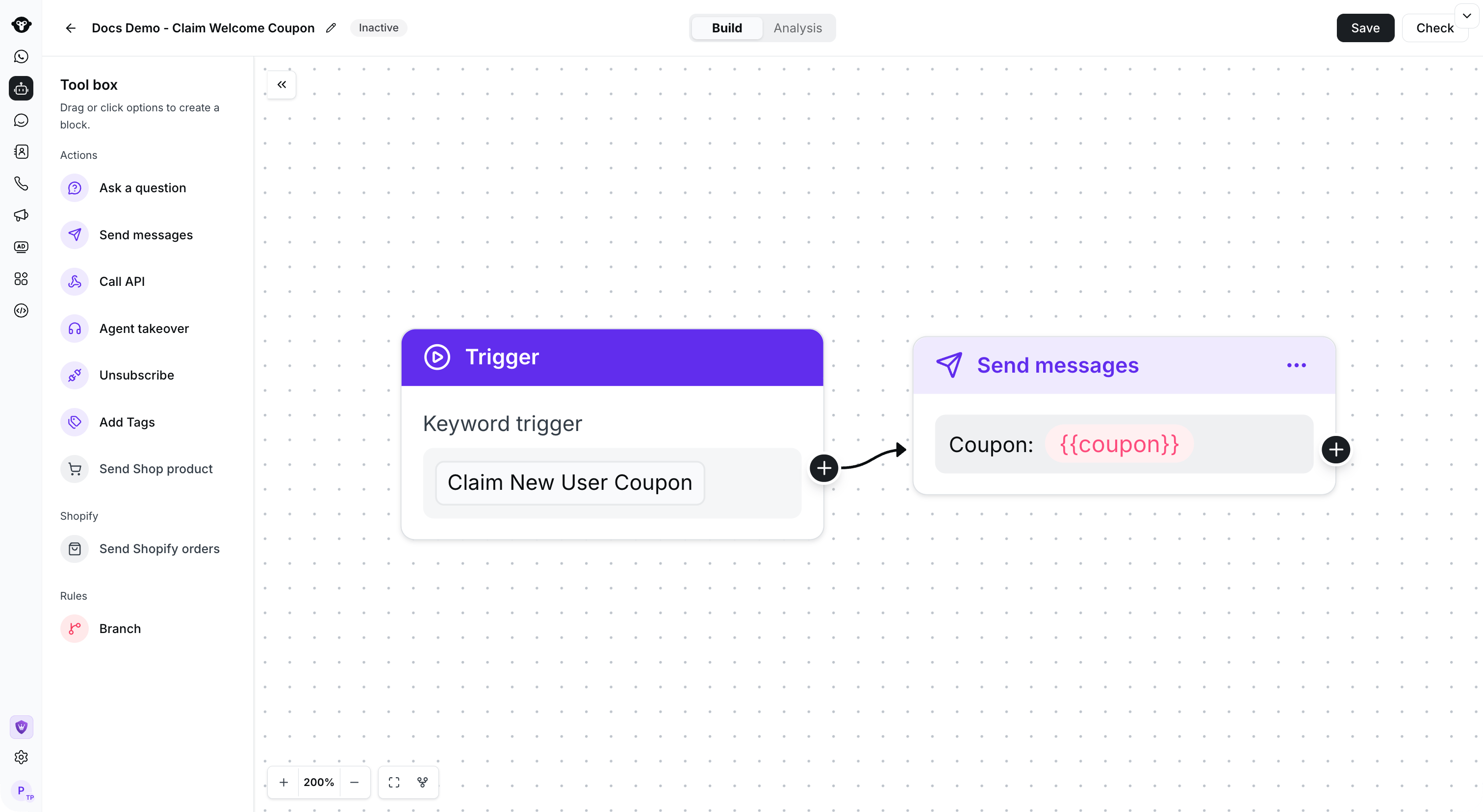
#### 步骤 2.3：配置 Flow 关键词

将 Keyword 设置为领券关键词。

示例：如果您希望客户触发“**Claim New User Coupon**”时收到优惠券，请将 Keyword 设置为 **Claim New User Coupon**。
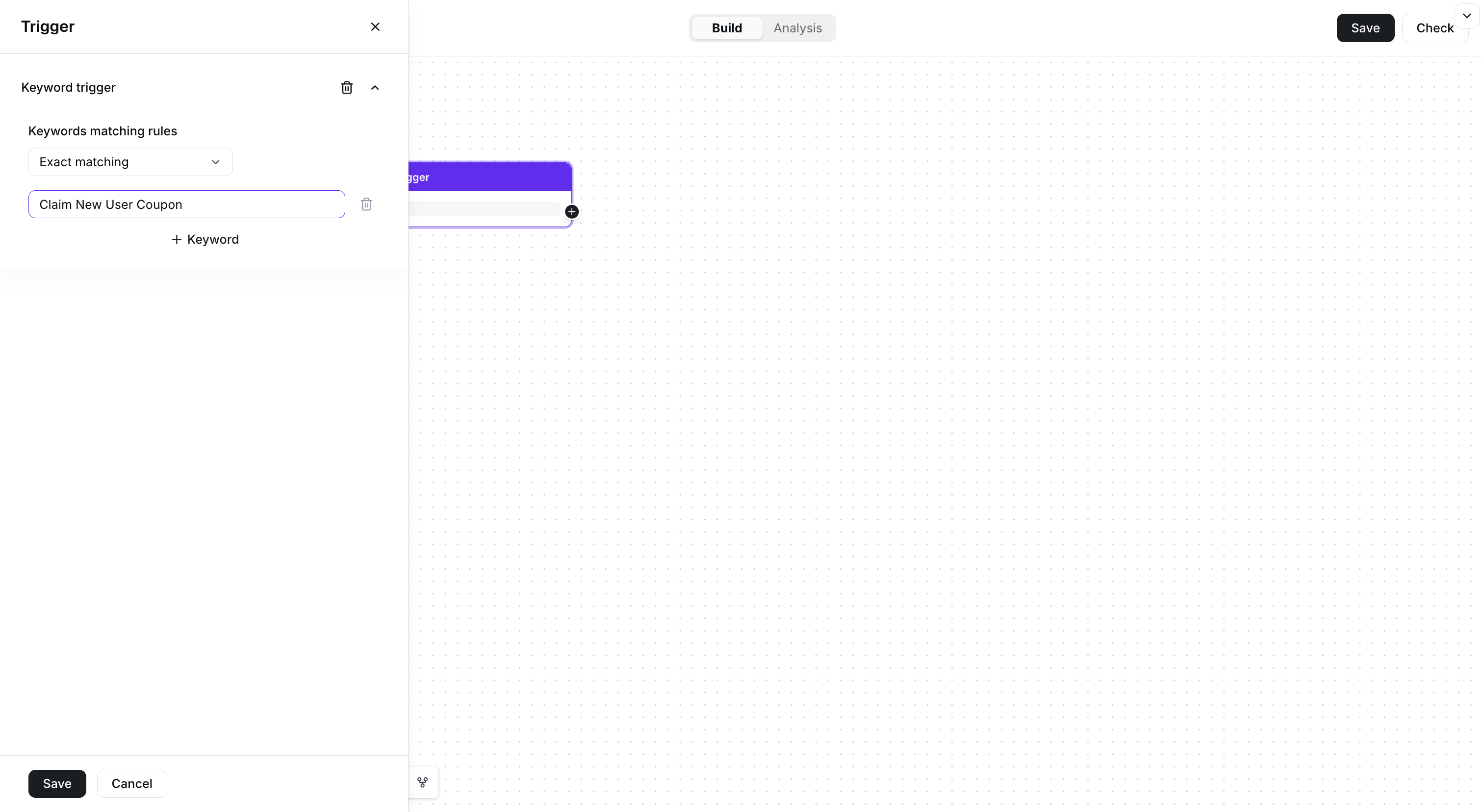
<Frame caption="Set the claim keyword in the trigger.">
  <img src="https://mintcdn.com/lchnan/TsMGu8UTNQaUw-Rc/product-assets/english-help-demo-2026-09-23/coupon-flow-keyword.png?fit=max&auto=format&n=TsMGu8UTNQaUw-Rc&q=85&s=356ec3d87964a9aebeddc3ba32435c57" alt="Claim New User Coupon 关键词的精确匹配设置" width="3024" height="1656" data-path="product-assets/english-help-demo-2026-09-23/coupon-flow-keyword.png" />
</Frame>

#### 步骤 2.4：配置发送的优惠券

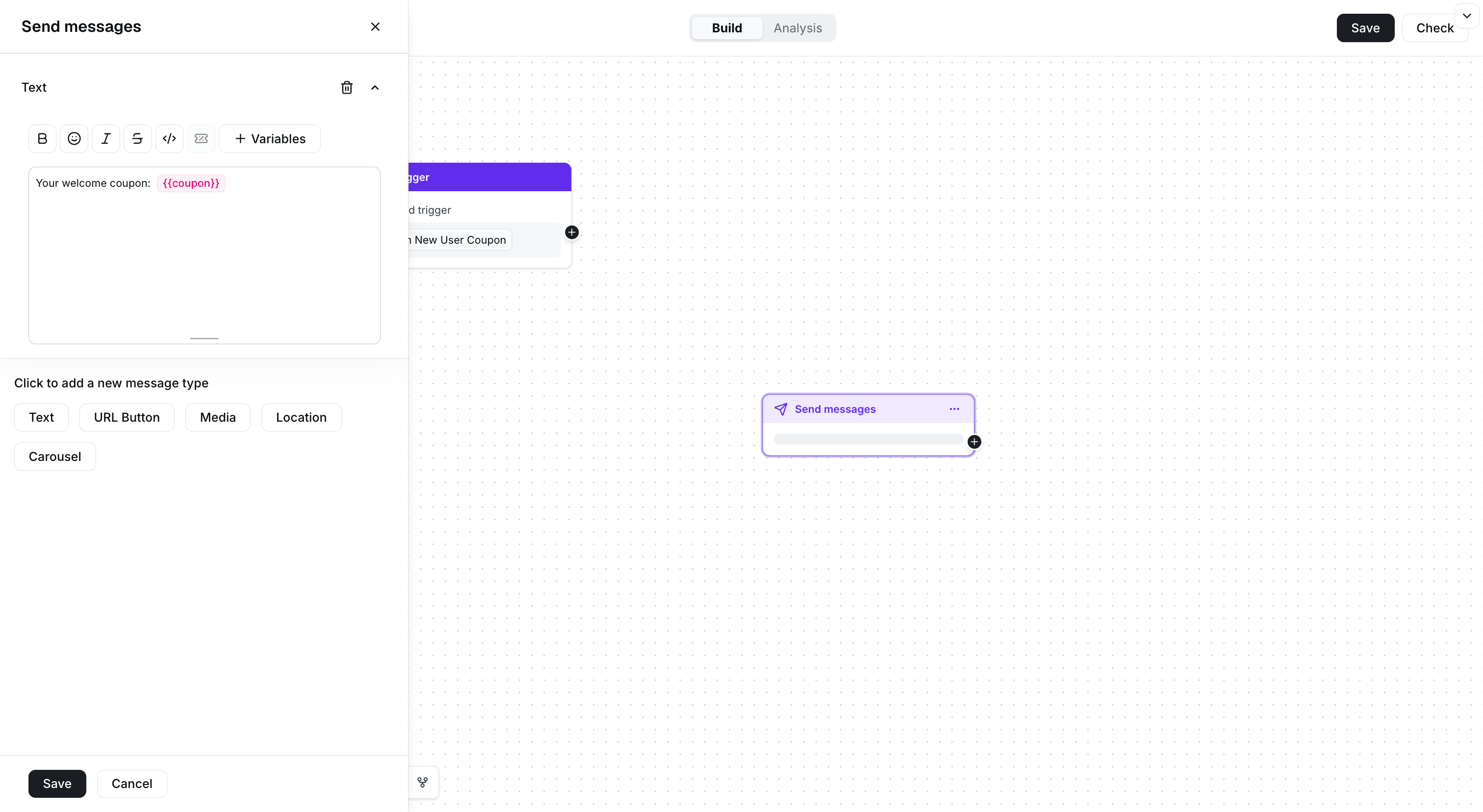
在 Flow 中添加 Send message 组件

<Frame caption="Add a text message and insert the coupon variable.">
  <img src="https://mintcdn.com/lchnan/TsMGu8UTNQaUw-Rc/product-assets/english-help-demo-2026-09-23/coupon-flow-message.png?fit=max&auto=format&n=TsMGu8UTNQaUw-Rc&q=85&s=ccc103824d4f0ffe89794ff6463392e6" alt="包含优惠券变量的文本回复" width="3024" height="1656" data-path="product-assets/english-help-demo-2026-09-23/coupon-flow-message.png" />
</Frame>

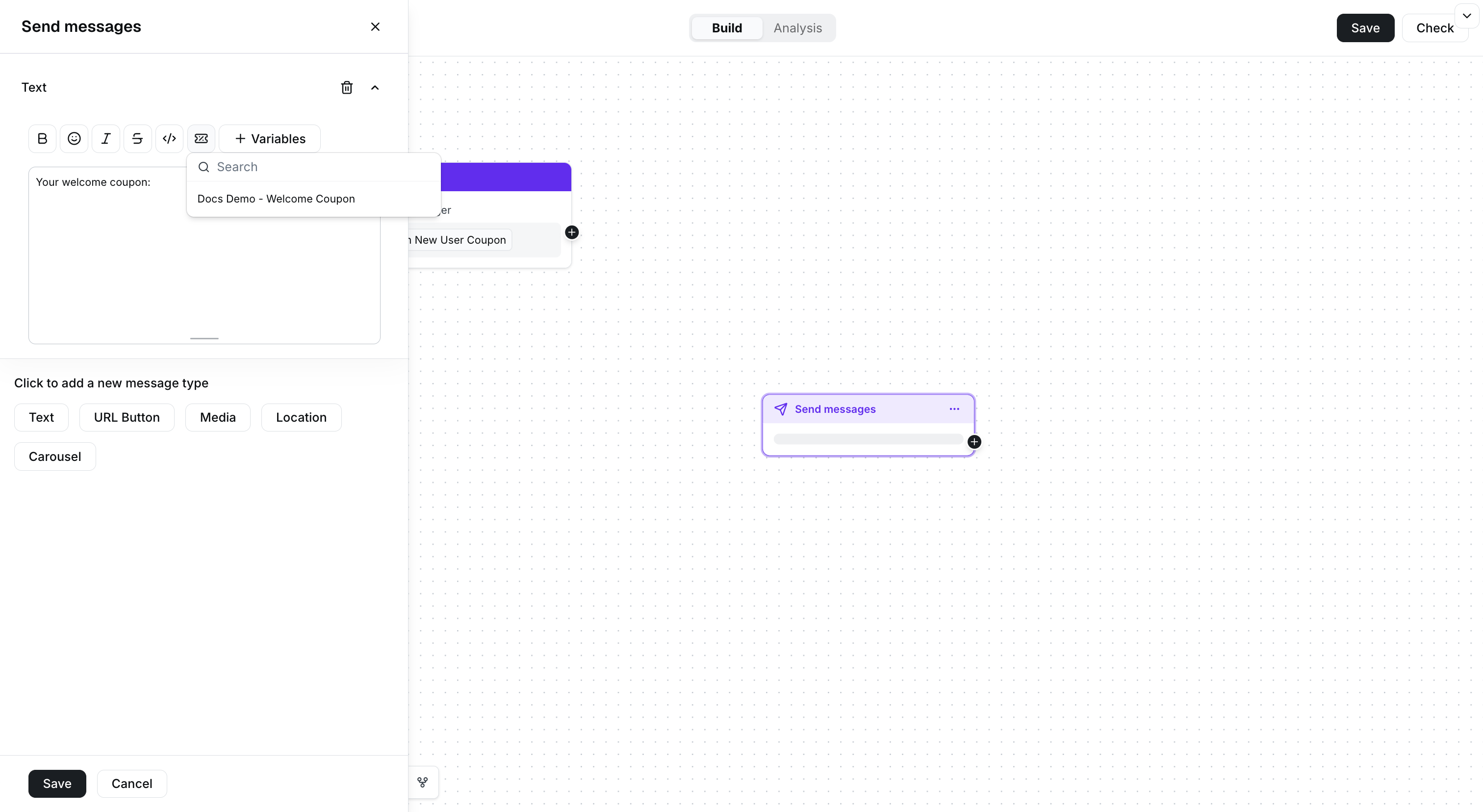
在消息中点击优惠券变量，并选择要插入的优惠券活动。

<Frame caption="Select the coupon campaign from the Coupons menu.">
  <img src="https://mintcdn.com/lchnan/TsMGu8UTNQaUw-Rc/product-assets/english-help-demo-2026-09-23/coupon-flow-selector.png?fit=max&auto=format&n=TsMGu8UTNQaUw-Rc&q=85&s=c5357fb929697ee6b0bacd042c4d97dc" alt="显示 Docs Demo - Welcome Coupon 的优惠券选择器" width="3024" height="1656" data-path="product-assets/english-help-demo-2026-09-23/coupon-flow-selector.png" />
</Frame>

编辑完成后，将 Keyword 与 Send message 组件连接，然后保存 Flow

<Frame caption="Connect the trigger to the coupon reply and save the flow. This example remains inactive.">
  <img src="https://mintcdn.com/lchnan/TsMGu8UTNQaUw-Rc/product-assets/english-help-demo-2026-09-23/coupon-flow-complete.png?fit=max&auto=format&n=TsMGu8UTNQaUw-Rc&q=85&s=5e007401ed70b6c03f9401dd0a17b1e4" alt="连接领券关键词与优惠券回复的未激活规则型 Flow" width="3024" height="1656" data-path="product-assets/english-help-demo-2026-09-23/coupon-flow-complete.png" />
</Frame>

### 步骤 3：生成用于分享的二维码（可选，仅适用于扫码领券场景）

为号码生成二维码，并将关键词设置为： **Claim New User Coupon**。[查看详细的对话链接配置教程](/zh/documentation/channels/whatsapp-accounts-management/phone-number-management/chat-links)
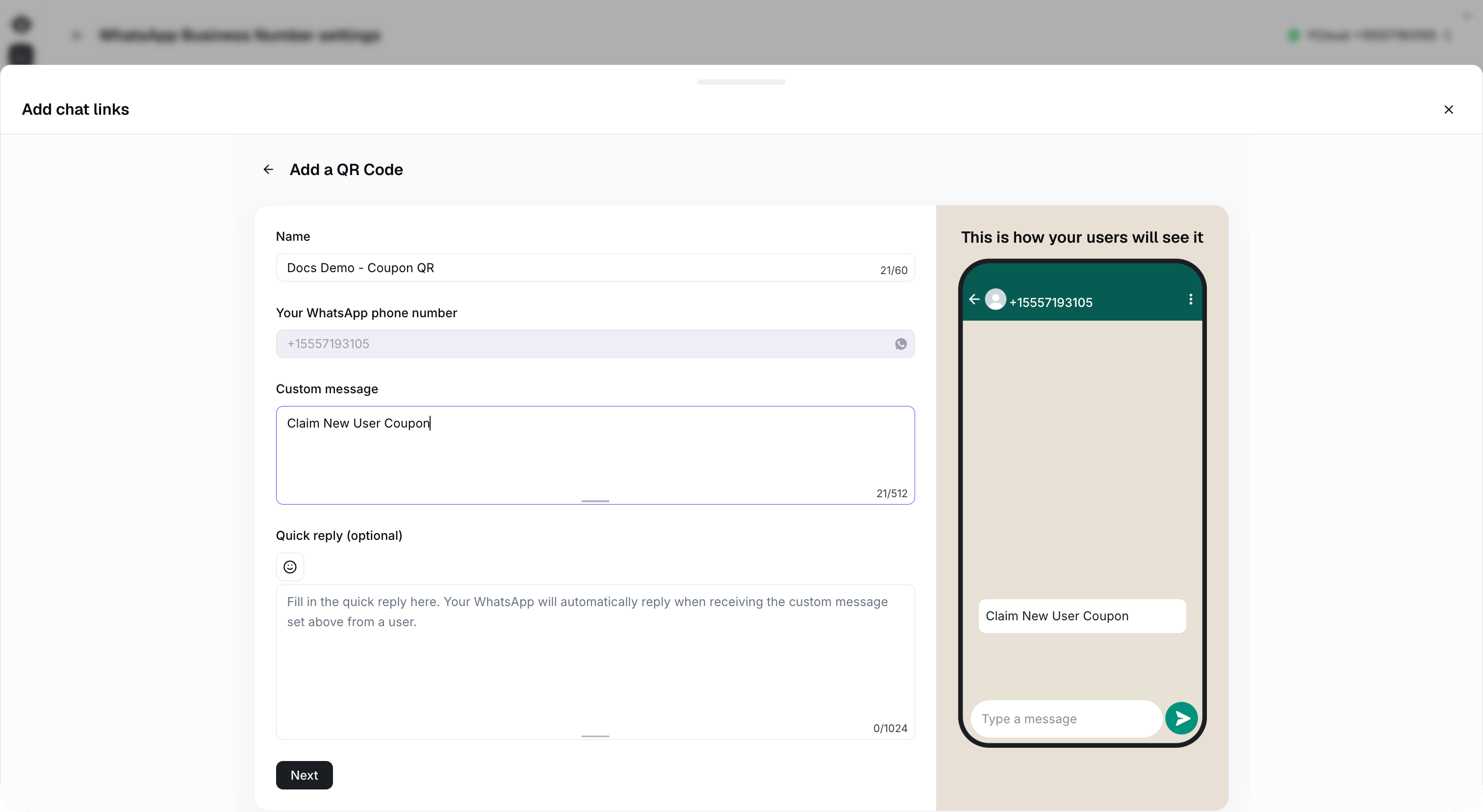
<Frame caption="Use the same custom message as the rule-based flow keyword: Claim New User Coupon.">
  <img src="https://mintcdn.com/lchnan/rmZYWVwRdpR7TJaI/product-assets/english-help-context-2026-09-23/coupon-qr-keyword.png?fit=max&auto=format&n=rmZYWVwRdpR7TJaI&q=85&s=9cc56625e6c5f5cd974af5382b3ded0a" alt="使用 Claim New User Coupon 作为自定义消息的二维码配置" width="3024" height="1656" data-path="product-assets/english-help-context-2026-09-23/coupon-qr-keyword.png" />
</Frame>


This documentation is built and hosted on [Mintlify](https://mintlify.com), a developer documentation platform.