> ## Documentation Index
> Fetch the complete documentation index at: https://docs.ycloud.com/llms.txt
> Use this file to discover all available pages before exploring further.

# 创建客户旅程

# 创建客户旅程

创建客户旅程（Journey），为满足设定条件的联系人自动执行后续操作。您可以从现有模板开始，也可以从头构建流程。

## 准备工作

准备好您要使用的准入条件、发送方（Sender）、模板消息及后续操作。如果您计划添加标签或使用消息状态检查，请在开始前确定它们应如何配合流程运作。

## 打开 Journey

在 YCloud 中打开 Journey 工作区，查看现有的 Journey 或创建新的客户旅程。

<Frame caption="Open Outbound > Journey to view existing Journeys or select Create Journey.">
  <img src="https://mintcdn.com/lchnan/rmZYWVwRdpR7TJaI/product-assets/english-help-context-2026-09-23/journey-workspace-context-annotated.svg?fit=max&auto=format&n=rmZYWVwRdpR7TJaI&q=85&s=3b5dcde69e3d3b2d60c1271af77b113d" alt="包含未激活演示 Journey 的完整 Outbound Journey 工作区。" width="3024" height="1656" data-path="product-assets/english-help-context-2026-09-23/journey-workspace-context-annotated.svg" />
</Frame>

## 从模板开始或从头构建

选择 **Create Journey**，然后选择以下选项之一：

* **Start from a template** ：从现有流程开始，并根据您的使用场景进行调整。
* **Build from scratch** ：自行配置流程的每个部分。

<Frame caption="Choose Build from scratch or an available template. Shopify templates require a connected store.">
  <img src="https://mintcdn.com/lchnan/gXEJIQXV2JH2VUQJ/product-assets/english-help-2026-09-22/journey-start-annotated.svg?fit=max&auto=format&n=gXEJIQXV2JH2VUQJ&q=85&s=90f1853f6169bdfa24cf36ddce662849" alt="包含从头构建和可用模板的创建新 Journey 对话框。" width="3024" height="1656" data-path="product-assets/english-help-2026-09-22/journey-start-annotated.svg" />
</Frame>

## 配置触发器

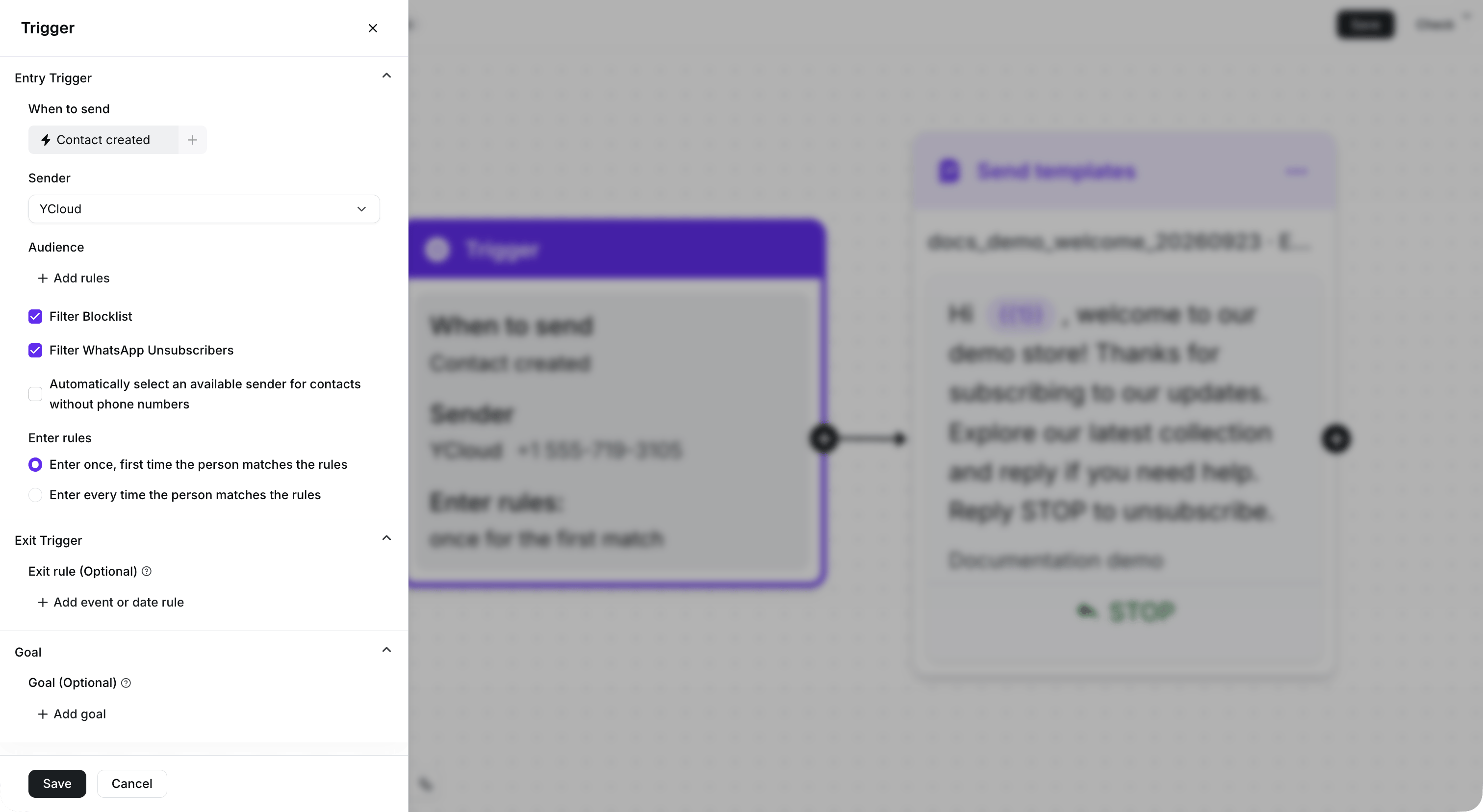
Journey 需要一个 **Trigger**（触发器）。配置准入条件，选择 **Sender**，并为您的流程选择准入规则。准入规则决定联系人是仅在首次匹配条件时进入，还是在每次匹配条件时都会进入。

<Frame caption="Configure the entry condition, Sender, and entry rule. This demonstration Journey remains inactive.">
  <img src="https://mintcdn.com/lchnan/rmZYWVwRdpR7TJaI/product-assets/english-help-context-2026-09-23/journey-trigger-context.png?fit=max&auto=format&n=rmZYWVwRdpR7TJaI&q=85&s=75e9a9dcad82fa5d870fe7185616e752" alt="包含已配置 Trigger 设置的完整 Journey 画布" width="3024" height="1656" data-path="product-assets/english-help-context-2026-09-23/journey-trigger-context.png" />
</Frame>

## 添加并配置步骤

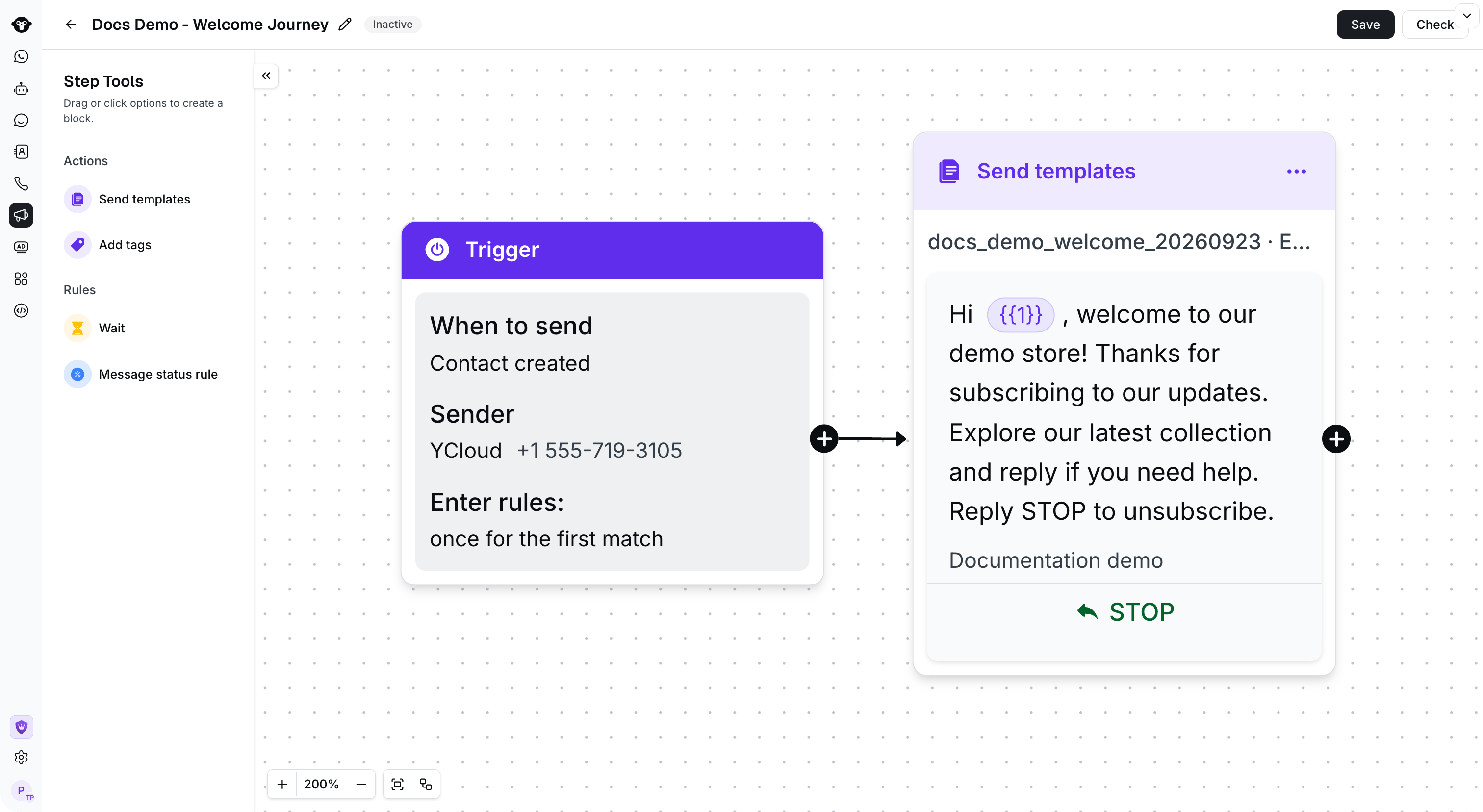
添加在触发器之后运行的步骤。例如，您可以发送模板消息、在执行下一个操作前等待、检查消息状态或添加标签。

在将每个步骤连接到下一步之前完成其配置。保持流程聚焦于单一客户目标，例如发送消息后进行跟进，或在收到回复后添加标签。

<Frame caption="Connect the configured Trigger to the next step. This example sends a welcome template when activated.">
  <img src="https://mintcdn.com/lchnan/rmZYWVwRdpR7TJaI/product-assets/english-help-context-2026-09-23/journey-connected-context.png?fit=max&auto=format&n=rmZYWVwRdpR7TJaI&q=85&s=a93dd17f45927e2e9eaa2c2813e1f8eb" alt="将联系人创建触发器连接到模板消息的未激活 Journey" width="3024" height="1656" data-path="product-assets/english-help-context-2026-09-23/journey-connected-context.png" />
</Frame>

## 检查并保存

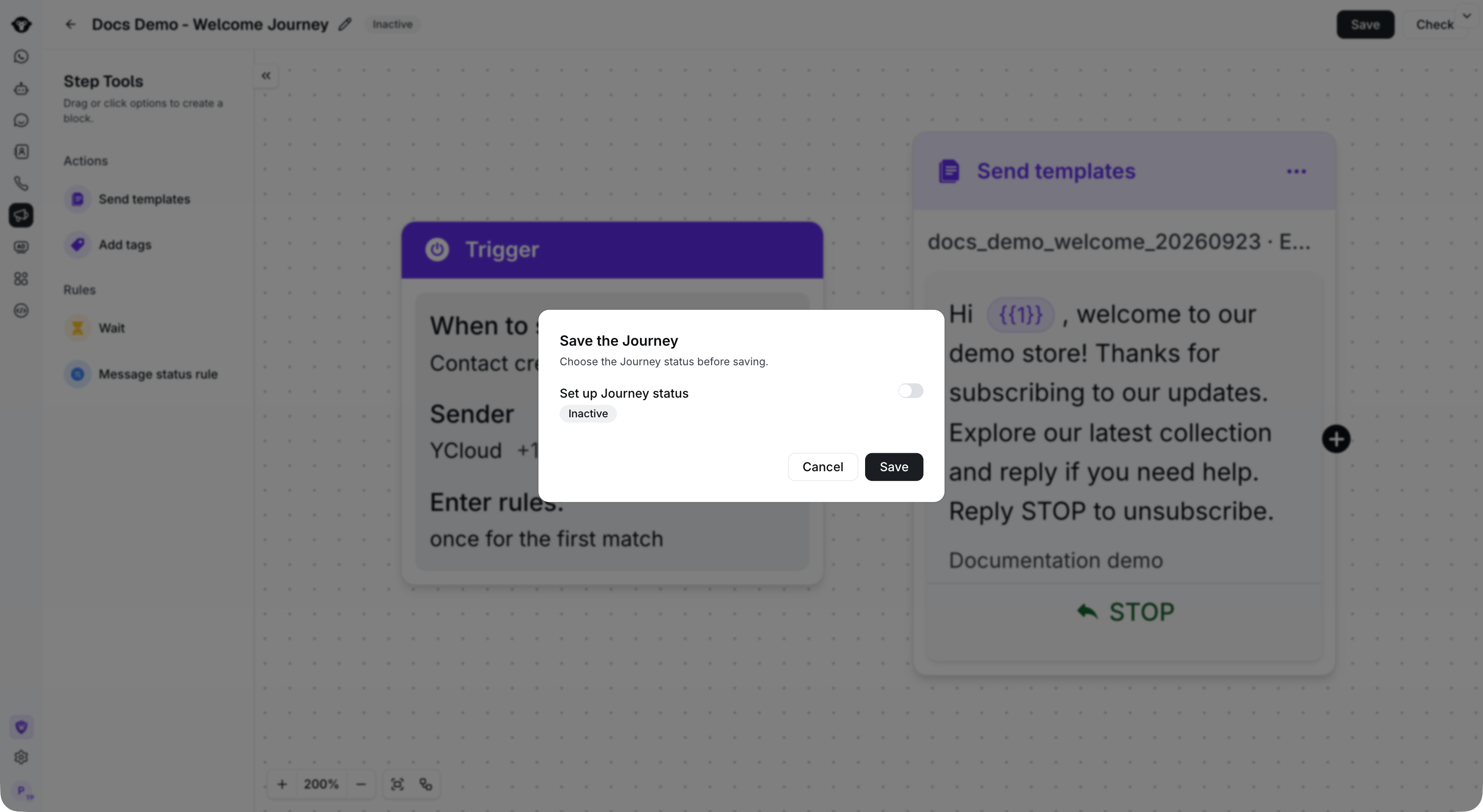
检查触发器、每个步骤以及步骤之间的连接。在将 Journey 保存为 **Active** 之前，请修正配置错误。

如果您想在激活前保存流程，请选择 **Inactive** 。流程准备好运行后，请选择 **Active** 。

<Frame caption="Choose the Journey status before saving. This example remains Inactive.">
  <img src="https://mintcdn.com/lchnan/rmZYWVwRdpR7TJaI/product-assets/english-help-context-2026-09-23/journey-save-context.png?fit=max&auto=format&n=rmZYWVwRdpR7TJaI&q=85&s=6732f34404fc28a9c42af5adc591fe6b" alt="完整 Journey 画布上方的保存 Journey 对话框。" width="3024" height="1656" data-path="product-assets/english-help-context-2026-09-23/journey-save-context.png" />
</Frame>

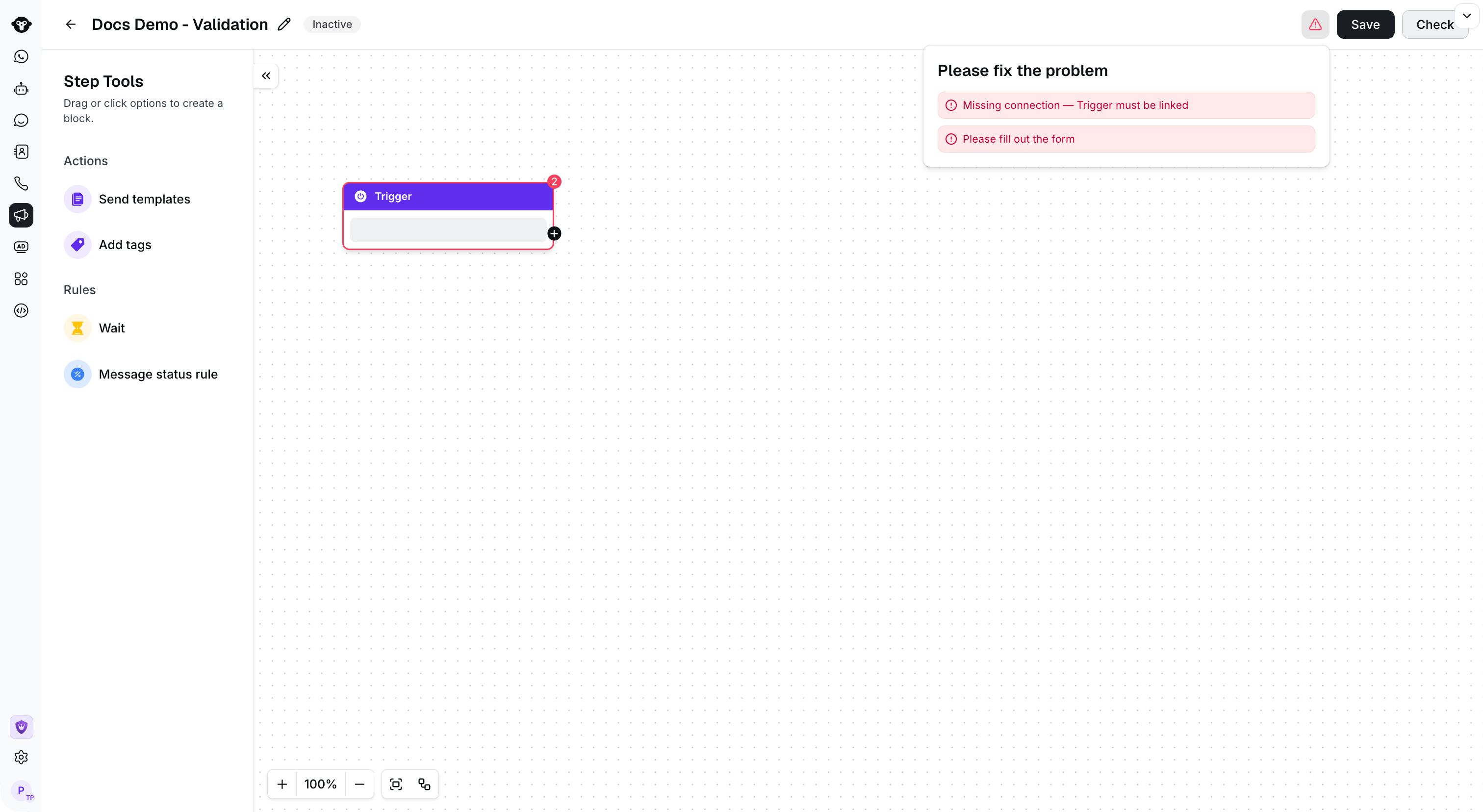
如果某个步骤存在配置错误，请在激活 Journey 之前予以修正。

<Frame caption="Select Check to find incomplete fields and missing connections before activating the Journey.">
  <img src="https://mintcdn.com/lchnan/rmZYWVwRdpR7TJaI/product-assets/english-help-context-2026-09-23/journey-canvas-errors-context.png?fit=max&auto=format&n=rmZYWVwRdpR7TJaI&q=85&s=136f4236819b964e758c0908154ef059" alt="显示未配置触发器和校验错误的完整 Journey 构建器。" width="3024" height="1656" data-path="product-assets/english-help-context-2026-09-23/journey-canvas-errors-context.png" />
</Frame>

## 后续步骤

在 [Journey components](/zh/documentation/journey/components-and-features-introduction/index) 中了解如何配置各个选项。


This documentation is built and hosted on [Mintlify](https://mintlify.com), a developer documentation platform.