> ## Documentation Index
> Fetch the complete documentation index at: https://docs.ycloud.com/llms.txt
> Use this file to discover all available pages before exploring further.
# 设置账单通知
> 配置余额不足预警和每日账单通知。
# 设置账单通知
账单通知可帮助您实时掌握钱包余额和近期账单动态。当您需要充值提醒时,可配置余额不足预警;当您希望定期通过邮件接收汇总时,可配置每日账单通知。
## 打开通知设置
1. 在 YCloud 控制台中,前往 **Settings** > **General**。
2. 选择 **Notifications**。
3. 选择 **Low balance alert** 或每日账单通知设置。
账单通知在 **Settings** > **General** > **Notifications** 中配置,而不是在 Billing 菜单中。
 ## 设置余额不足预警
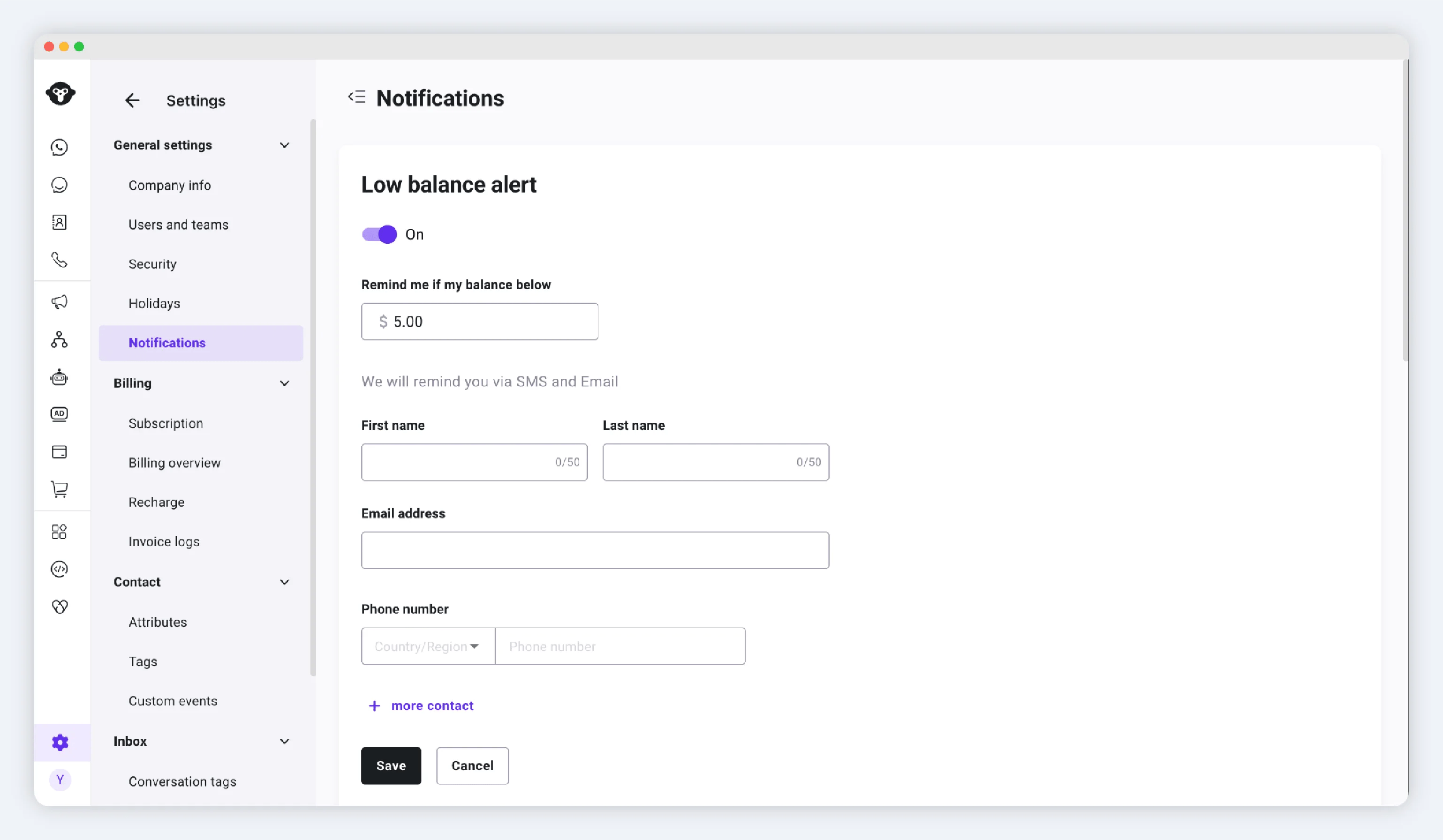
当钱包余额低于您设定的阈值时,余额不足预警会通知您的联系人。
1. 打开 **Low balance alert**。
2. 开启预警。
3. 设置余额阈值。
4. 添加需要接收预警的联系人。
5. 保存更改。
您最多可以添加 5 位联系人。YCloud 会通过 SMS 和邮件向您配置的联系人发送预警。
## 设置余额不足预警
当钱包余额低于您设定的阈值时,余额不足预警会通知您的联系人。
1. 打开 **Low balance alert**。
2. 开启预警。
3. 设置余额阈值。
4. 添加需要接收预警的联系人。
5. 保存更改。
您最多可以添加 5 位联系人。YCloud 会通过 SMS 和邮件向您配置的联系人发送预警。
 收到预警后,可在 [Billing and Recharge](/zh/documentation/pricing-and-billing/billing-and-recharge) 中查看钱包。您也可以在 [Billing overview](/zh/documentation/pricing-and-billing/billing-overview) 中查看相关记录。
## 设置每日账单通知
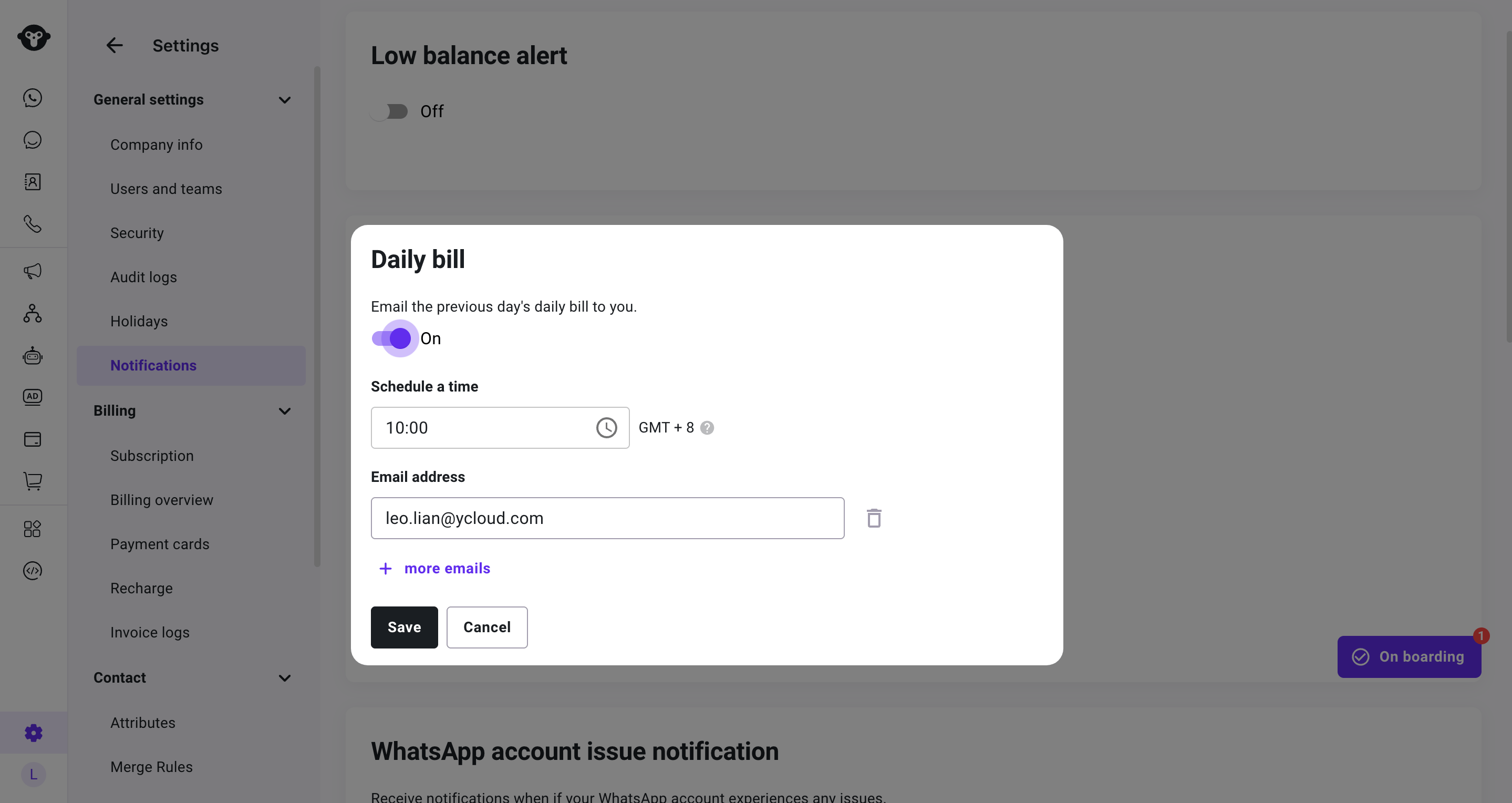
每日账单通知会发送前一天的账单活动汇总。
1. 打开每日账单通知设置。
2. 开启通知。
3. 选择介于 **09:00** 至 **21:00** 之间的发送时间。
4. 添加一个或多个有效的邮箱地址。每个地址必须唯一。
5. 保存更改。
每日账单通知采用 GMT+8 时区,并报告前一天的账单活动。通知开启期间,请确保收件人列表中至少保留一个有效邮箱地址。
收到预警后,可在 [Billing and Recharge](/zh/documentation/pricing-and-billing/billing-and-recharge) 中查看钱包。您也可以在 [Billing overview](/zh/documentation/pricing-and-billing/billing-overview) 中查看相关记录。
## 设置每日账单通知
每日账单通知会发送前一天的账单活动汇总。
1. 打开每日账单通知设置。
2. 开启通知。
3. 选择介于 **09:00** 至 **21:00** 之间的发送时间。
4. 添加一个或多个有效的邮箱地址。每个地址必须唯一。
5. 保存更改。
每日账单通知采用 GMT+8 时区,并报告前一天的账单活动。通知开启期间,请确保收件人列表中至少保留一个有效邮箱地址。
 ## 更新或关闭通知
每当需要更改余额阈值、更换联系人、更改发送时间、更新收件人或关闭通知时,请返回 **Settings** > **General** > **Notifications** 。
如果每日账单通知提示您查看某项扣费,请使用 [Billing overview](/zh/documentation/pricing-and-billing/billing-overview) 筛选相关日期和账单记录。
## 常见问题
您最多可以添加 5 位联系人。
它涵盖前一天的账单活动,并采用 GMT+8 时区。
This documentation is built and hosted on [Mintlify](https://mintlify.com), a developer documentation platform.
## 更新或关闭通知
每当需要更改余额阈值、更换联系人、更改发送时间、更新收件人或关闭通知时,请返回 **Settings** > **General** > **Notifications** 。
如果每日账单通知提示您查看某项扣费,请使用 [Billing overview](/zh/documentation/pricing-and-billing/billing-overview) 筛选相关日期和账单记录。
## 常见问题
您最多可以添加 5 位联系人。
它涵盖前一天的账单活动,并采用 GMT+8 时区。
This documentation is built and hosted on [Mintlify](https://mintlify.com), a developer documentation platform.