> ## Documentation Index
> Fetch the complete documentation index at: https://docs.ycloud.com/llms.txt
> Use this file to discover all available pages before exploring further.
# 目录模板
> 通过营销模板打开已连接的产品目录。
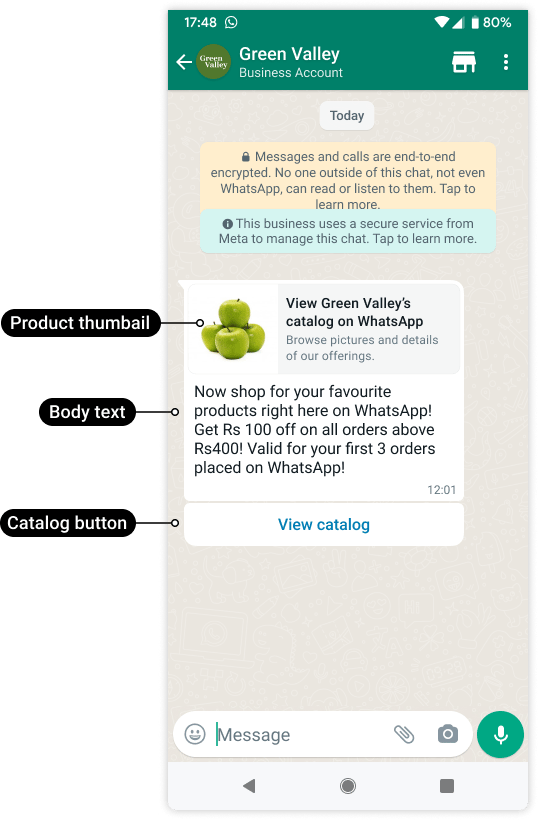
使用目录模板让客户浏览已连接的目录。
来源:[Meta 官方示例](https://developers.facebook.com/documentation/business-messaging/whatsapp/catalogs/catalog-template-messages/)。
客户选择 **View catalog** 即可在 WhatsApp 内打开目录。
 来源:[Meta 官方示例](https://developers.facebook.com/documentation/business-messaging/whatsapp/catalogs/catalog-template-messages/)。
## 审慎选择该格式
| 目标 | 更适合的格式 |
| - | - |
| 邀请客户浏览全部商品 | 目录模板。 |
| 展示精选商品组合 | [多产品模板](/zh/documentation/whatsapp-business-platform/messaging/message-templates/multi-product-templates)。 |
| 对比多个带外部链接的视觉方案 | [媒体轮播](/zh/documentation/whatsapp-business-platform/messaging/message-templates/carousel-templates)。 |
| 回复活跃的产品咨询 | 支持的交互式产品或目录[服务消息](/zh/documentation/whatsapp-business-platform/messaging/service-messages)。 |
目录模板遵循营销模板的要求。即使产品本身已获批准,客户也必须符合接收该营销消息的条件。
## 准备资产
创建模板前:
1. 确定 WABA 和发送号码。
2. 确认目标 Meta 目录已连接到相关的 WhatsApp 资产。
3. 检查目录中是否有可售且符合政策的商品。
4. 记录准确的产品零售商 ID(在 Commerce Manager 中显示为 **Content ID** )。
5. 为消息缩略图选择合适的产品图片。
6. 确认由谁来处理购物车提交和订单咨询。
内部库存系统 ID 不一定就是目录的零售商 ID。请匹配实际值;产品名称不能作为标识符。
## 创建与发送
现有的 YCloud 指南使用 API 来创建和发送此格式。请勿假定每个控制台模板编辑器或营销活动编写器都会提供该功能。
创建营销模板,包含正文、审核示例以及支持的 `CATALOG` 按钮。获批后,发送时请引用准确的模板名称和语言。
发送时的按钮子类型为 `catalog`。其操作可以包含 `thumbnail_product_retailer_id`,用于选择在消息中显示其图片的目录商品。这只会更改缩略图,而不会将目录变为单产品选择。
YCloud 的规范中记录了省略相关参数时回退使用第一件目录商品图片的机制。为确保营销活动效果符合预期,请明确选择有效的缩略图并测试结果,而不要依赖目录排序。
完整请求请参见[管理模板](/zh/api-reference/guides/whatsapp-platform/manage-whatsapp-templates)和[发送 WhatsApp 消息](/zh/api-reference/guides/whatsapp-platform/send-whatsapp-message)。
## 验证客户旅程
发送受控测试并检查:
* 缩略图能代表所提供的优惠。
* **View catalog** 可以打开目标目录。
* 产品的图片、价格、供货状态和币种为最新状态。
* 接收者可以进行支持的商品选择。
* 您的团队或集成系统能够收到产生的咨询或订单请求。
* 支付和履约由其他流程单独处理。
目录商品变更时,模板可能仍保持获批状态。在每次开展营销活动前,请重新核对线上目录。
## 问题排查
如果目录无法打开,请检查发送者的目录关联关系和当前商业设置。如果仅单个图片或产品出现问题,请检查其零售商 ID、供货状态以及目录记录。
已提交的购物车仅代表客户意向,不能作为库存预留或付款的凭证。在承诺履约前,请按照[目录与商业](/zh/documentation/whatsapp-business-platform/more-whatsapp-features/catalogs-and-commerce)验证交易。
This documentation is built and hosted on [Mintlify](https://mintlify.com), a developer documentation platform.
来源:[Meta 官方示例](https://developers.facebook.com/documentation/business-messaging/whatsapp/catalogs/catalog-template-messages/)。
## 审慎选择该格式
| 目标 | 更适合的格式 |
| - | - |
| 邀请客户浏览全部商品 | 目录模板。 |
| 展示精选商品组合 | [多产品模板](/zh/documentation/whatsapp-business-platform/messaging/message-templates/multi-product-templates)。 |
| 对比多个带外部链接的视觉方案 | [媒体轮播](/zh/documentation/whatsapp-business-platform/messaging/message-templates/carousel-templates)。 |
| 回复活跃的产品咨询 | 支持的交互式产品或目录[服务消息](/zh/documentation/whatsapp-business-platform/messaging/service-messages)。 |
目录模板遵循营销模板的要求。即使产品本身已获批准,客户也必须符合接收该营销消息的条件。
## 准备资产
创建模板前:
1. 确定 WABA 和发送号码。
2. 确认目标 Meta 目录已连接到相关的 WhatsApp 资产。
3. 检查目录中是否有可售且符合政策的商品。
4. 记录准确的产品零售商 ID(在 Commerce Manager 中显示为 **Content ID** )。
5. 为消息缩略图选择合适的产品图片。
6. 确认由谁来处理购物车提交和订单咨询。
内部库存系统 ID 不一定就是目录的零售商 ID。请匹配实际值;产品名称不能作为标识符。
## 创建与发送
现有的 YCloud 指南使用 API 来创建和发送此格式。请勿假定每个控制台模板编辑器或营销活动编写器都会提供该功能。
创建营销模板,包含正文、审核示例以及支持的 `CATALOG` 按钮。获批后,发送时请引用准确的模板名称和语言。
发送时的按钮子类型为 `catalog`。其操作可以包含 `thumbnail_product_retailer_id`,用于选择在消息中显示其图片的目录商品。这只会更改缩略图,而不会将目录变为单产品选择。
YCloud 的规范中记录了省略相关参数时回退使用第一件目录商品图片的机制。为确保营销活动效果符合预期,请明确选择有效的缩略图并测试结果,而不要依赖目录排序。
完整请求请参见[管理模板](/zh/api-reference/guides/whatsapp-platform/manage-whatsapp-templates)和[发送 WhatsApp 消息](/zh/api-reference/guides/whatsapp-platform/send-whatsapp-message)。
## 验证客户旅程
发送受控测试并检查:
* 缩略图能代表所提供的优惠。
* **View catalog** 可以打开目标目录。
* 产品的图片、价格、供货状态和币种为最新状态。
* 接收者可以进行支持的商品选择。
* 您的团队或集成系统能够收到产生的咨询或订单请求。
* 支付和履约由其他流程单独处理。
目录商品变更时,模板可能仍保持获批状态。在每次开展营销活动前,请重新核对线上目录。
## 问题排查
如果目录无法打开,请检查发送者的目录关联关系和当前商业设置。如果仅单个图片或产品出现问题,请检查其零售商 ID、供货状态以及目录记录。
已提交的购物车仅代表客户意向,不能作为库存预留或付款的凭证。在承诺履约前,请按照[目录与商业](/zh/documentation/whatsapp-business-platform/more-whatsapp-features/catalogs-and-commerce)验证交易。
This documentation is built and hosted on [Mintlify](https://mintlify.com), a developer documentation platform.