> ## Documentation Index
> Fetch the complete documentation index at: https://docs.ycloud.com/llms.txt
> Use this file to discover all available pages before exploring further.
# 优惠码模板
> 让客户可以从营销消息中复制优惠码。
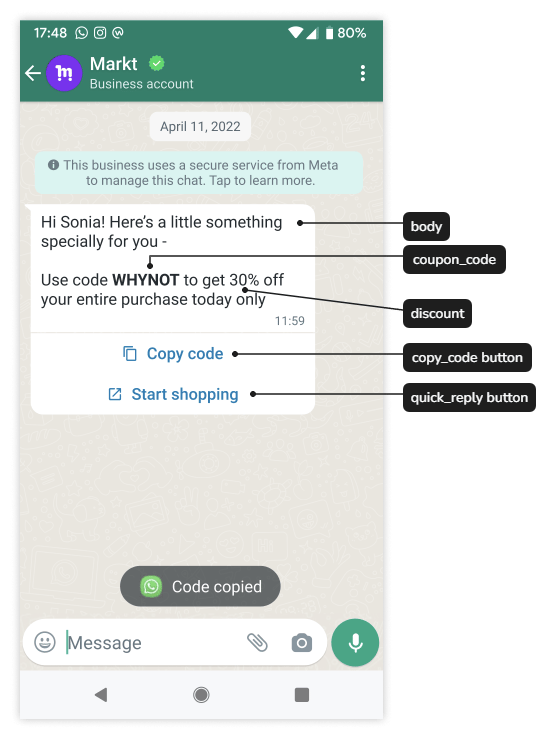
优惠码模板是一种营销消息,带有可将促销代码复制到客户剪贴板的按钮。
来源:[Meta 官方示例](https://developers.facebook.com/documentation/business-messaging/whatsapp/templates/marketing-templates/coupon-templates/)。
## 确保优惠内容清晰易懂
说明优惠权益、优惠码的使用位置以及重要限制条件。例如:
> 使用代码 TRAVEL15 购买指定旅行包可享 85 折优惠。有效期至 9 月 30 日,适用于满 \$50 的订单。请在我们的优惠活动页面查看适用商品和完整条款。
此文案仅作说明之用,并非声明每项促销或产品都符合条件。
确定优惠码是通用共享、一次性使用还是客户专享。最低订单金额、适用商品、兑换次数限制和有效期由您的促销系统执行,而非 WhatsApp。
## 配置模板
1. 选择目标 WABA 和 **Marketing** 模板。
2. 编写正文并为变量提供真实的示例。
3. 添加支持的复制代码按钮。
4. 添加跳转目标或使用说明,解释在哪里兑换优惠。
5. 提交并等待审核通过。
模板用于定义按钮和审核示例。发送请求时提供实际的促销代码。如果正文中也显示了该代码,请在两处提供相同的值。
通过 API 发送时,该按钮使用子类型 `copy_code`,参数类型为 `coupon_code`。这与身份验证模板的特殊 OTP 按钮发送行为不同。
**仅发送时按钮组件**的示例:
```json theme={"theme":{"light":"github-light","dark":"github-dark"}}
{
"type": "button",
"sub_type": "copy_code",
"index": 0,
"parameters": [
{ "type": "coupon_code", "coupon_code": "TRAVEL15" }
]
}
```
使用按钮从 0 开始的实际位置;`0` 表示第一个按钮。此代码片段不包含必需的消息封套或任何正文参数。
## 限制和客户端行为
Meta 当前的优惠码模板文档规定了 1 个复制代码按钮、系统控制的按钮标签以及示例代码最多 20 个字符。YCloud OpenAPI 字段未声明其自有的代码长度上限;如果您的编辑器采用了更低的限制,请遵循支持的限制并在发送前确认所有差异。
Meta 还指出 WhatsApp 网页版客户端不支持此格式。请在手机端测试实际体验;不要仅根据桌面端的对话效果批准设计。
使用简短明确的代码。避免将账户凭据、身份验证验证码或个人信息用作促销代码。
## 测试兑换流程,而不仅是复制操作
检查复制的值是否与正文匹配、优惠页面是否能正常接收、符合与不符合条件的购物车是否行为正确,以及过期或已使用的代码是否被正确拒绝。
分别监控消息送达情况和实际兑换情况。点击复制按钮并不代表已完成购买。
继续阅读 [营销模板](/zh/documentation/whatsapp-business-platform/messaging/message-templates/marketing-templates)、[管理模板](/zh/api-reference/guides/whatsapp-platform/manage-whatsapp-templates) 以及 [发送 WhatsApp 消息](/zh/api-reference/guides/whatsapp-platform/send-whatsapp-message)。
来源:[Meta 优惠码模板](https://developers.facebook.com/docs/whatsapp/business-management-api/message-templates/coupon-templates/)。
This documentation is built and hosted on [Mintlify](https://mintlify.com), a developer documentation platform.