> ## Documentation Index
> Fetch the complete documentation index at: https://docs.ycloud.com/llms.txt
> Use this file to discover all available pages before exploring further.
# 效用模板
> 编写与客户请求、交易、账户或符合条件的关键信息相关的非促销性更新。
使用效用模板提供针对客户请求、交易、账户或服务的非促销性更新,或提供符合 Meta 关键信息标准的内容。
## 从触发消息的事件开始
在编写模板之前,请先明确客户操作或业务事件。
| 事件 | 适宜重点 | 应避免添加的内容 |
| - | - | - |
| 订单发货 | 订单参考号、配送更新和物流追踪。 | 用于下次购买的优惠券。 |
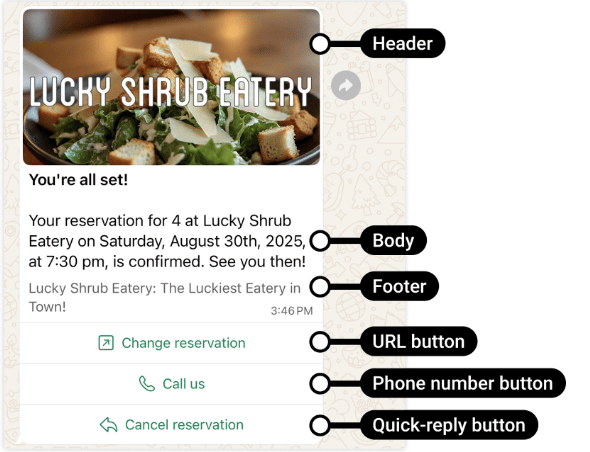
| 预约变更 | 现有预约及具体变更内容。 | 购买无关服务的邀请。 |
| 申请的退款已完成 | 退款参考号、金额和相关后续步骤。 | 引导消费该退款的促销活动。 |
| 客户请求更新账户 | 所请求的更新以及需要执行的操作。 | 常规产品推荐。 |
Meta 的[效用分类标准](https://developers.facebook.com/docs/whatsapp/updates-to-pricing/new-template-guidelines/)也涵盖符合条件的关键或重要信息。请勿假定所有通知都适用该例外情况。
## 明确展示上下文背景
包含足够的信息,以便客户和审核人员理解发送该消息的原因。
示例模板:
```text theme={"theme":{"light":"github-light","dark":"github-dark"}}
Your appointment {{1}} has been moved to {{2}}.
Use the button below to review the updated details.
```
提交时请提供具有代表性的示例值。切勿将业务目的隐藏在变量中。
该示例并非已获批准的模板。审核结果取决于完整的消息内容和实际使用场景。
## 对比具体草稿
| 草稿 | 评估 |
| - | - |
| `Your refund for order {{1}} was processed on {{2}}. The amount is {{3}}.` | 当插入的值与真实退款匹配时,属于清晰的特定交易更新。 |
| `Your appointment {{1}} is tomorrow at {{2}}. Reply if you need to reschedule.` | 专注于现有预约,不含无关促销。 |
| `Your order {{1}} has shipped. Save 15% on your next order.` | 混合了交易与促销:请使用营销类别。 |
| `We have an important update for you. Tap below.` | 可见上下文太少,无法确立具体的效用目的。请说明发生了什么变更以及为何对该客户至关重要。 |
| `Here is your login code: {{1}}.` | 用于身份验证的 OTP:请使用身份验证类别,而非效用。 |
这些示例仅用于说明分类逻辑,不构成过审保证。Meta 会评估完整的模板及其实际使用场景。
### 定义触发条件与终止条件
效用通知应同时具备以下两点:
* **触发条件:** 特定的状态变更,例如订单`PACKED → SHIPPED`。
* **终止条件:** 更新不再有用或已被取代,例如包裹已送达。
对于发货通知,请保存订单参考号、收件人、事件版本以及所使用的模板变体。如果您的订单系统重复发出同一事件,请在发送前进行去重。如果配送失败,请在重试前检查最新的订单状态。
支付成功后,请勿再发送已过期的支付失败警告。模板审核通过并不代表会验证消息中的业务真实性。
## 将效用与营销区分开
如果您添加了促销、追加销售、交叉销售或购买激励,即使消息中同时包含真实的交易更新,也可能会被归类为营销。
切勿将促销语句分散在变量中,也不要使用效用模板的按钮来提供无关优惠。当实际目的是营销时,请选择[营销模板](/zh/documentation/whatsapp-business-platform/messaging/message-templates/marketing-templates)。
用于身份验证的一次性验证码属于[身份验证模板](/zh/documentation/whatsapp-business-platform/messaging/message-templates/authentication-message-templates/index)。
来源:[Meta 官方示例](https://developers.facebook.com/documentation/business-messaging/whatsapp/templates/utility-templates/utility-templates)。
## 选择模板还是服务回复
对于在客户服务窗口之外由事件驱动的通知,请使用已批准的模板。在开启的服务窗口内,您可以回复合适的自由格式服务消息,也可以使用效用模板。
这种区别对发送资格和定价都至关重要。在开启的服务窗口内发送的效用模板享有 Meta 免费额度豁免;而在窗口之外,通常适用相应的效用费率。有关完整规则,请参阅 [WhatsApp 定价](/zh/documentation/whatsapp-business-platform/pricing-limits-and-quality/whatsapp-pricing)。
## 在发送时检查消息
已批准的模板不会验证您插入的交易数据。发送前请:
* 验证该事件是否属于目标客户。
* 使用最新的日期、金额和状态。
* 再次处理相同事件时,避免发送重复通知。
* 检查客户同意情况和沟通偏好设置。
* 切勿暴露不必要的敏感信息。
* 妥善处理发送失败,切勿重复发送已过期的更新。
例如,在包裹已经送达后,不要再重发运输延迟通知。
## 在 YCloud 中继续
[创建模板](/zh/documentation/channels/whatsapp-accounts-management/template-management/create-template/index),然后将其连接到负责该业务事件的工作流。
如果 Meta 拒绝或重新归类模板,请使用[模板审核和生命周期](/zh/documentation/whatsapp-business-platform/messaging/message-templates/template-review-and-lifecycle);使用[消息发送状态](/zh/documentation/whatsapp-business-platform/messaging/message-delivery-statuses)来跟踪各条通知。
This documentation is built and hosted on [Mintlify](https://mintlify.com), a developer documentation platform.