> ## Documentation Index
> Fetch the complete documentation index at: https://docs.ycloud.com/llms.txt
> Use this file to discover all available pages before exploring further.
# 概述
> 了解 WhatsApp Business Platform、所需的资产以及如何开始使用 YCloud。
WhatsApp Business Platform 可将企业电话号码连接到处理客户对话、通知、营销和一次性验证码的软件。您的客户使用 WhatsApp;您的团队则在 YCloud、已连接的系统或 API 集成中开展工作。
## 比较三款 WhatsApp 产品
**YCloud 主要帮助企业接入 WhatsApp Business Platform。** 客户继续使用他们熟悉的 WhatsApp 应用程序;您的团队则通过 YCloud 或已连接的系统管理业务端。
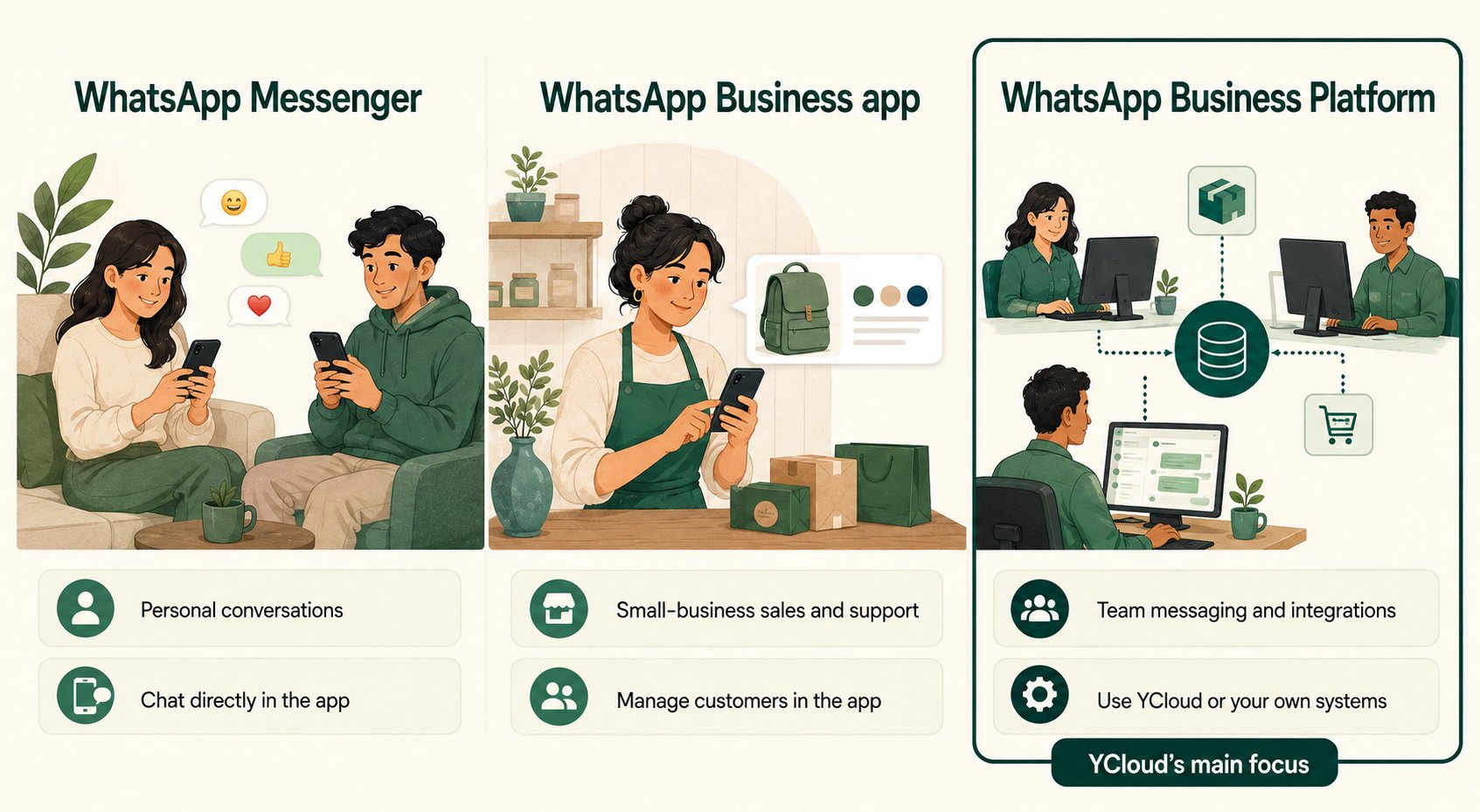 * **WhatsApp Messenger:** 与朋友、家人和企业进行个人沟通。
* **WhatsApp Business 应用程序:** 适合企业主或小型团队的开箱即用型应用,具备商业资料、目录、标签、快捷回复、问候语和离开消息等功能。
* **WhatsApp Business Platform:** 基于 API 的商业消息收发服务,可连接到 YCloud 收件箱、群发、自动化旅程、CRM 或您的后端系统。
### 结合 YCloud 使用 Platform
借助 YCloud,您可以将 WhatsApp 连接到您的业务工作流程中。例如:
* 客户咨询订单问题;支持人员在 **YCloud 收件箱** 中回复。
* 订单系统通过已审核的消息模板触发发货更新。
* **自动化旅程** 响应客户操作,并在需要时将对话转接给人工客服。
* 登录系统请求发送身份验证消息并在您的应用程序中验证该验证码。
## 将号码连接到 Platform
您号码当前的注册状态决定了连接路径:新号码、其他服务商处现有的 Platform 号码,或是您希望完全迁移到 Platform 的应用端号码。
请参考 [商业电话号码](/zh/documentation/whatsapp-business-platform/accounts-and-business-identity/business-phone-numbers#choose-how-to-connect-your-number) 选择正确的路径,并了解对现有账户的影响。
## 首次发送前请了解相关规则
| 问题 | 需理解的规则 | 示例 |
| - | - | - |
| 我们可以给此人发消息吗? | 您需要具备适当的权限和预期的目的。仅数据库中存有电话号码本身是不够的。 | 索取订单收据并不代表给予了发送无关促销信息的全面许可。 |
| 我们可以发送任何消息吗? | 自由格式的服务消息取决于是否处于打开的客户服务窗口期内。若在窗口期外,必须使用符合条件的已批准模板。 | 客服在次日重新跟进对话时可能需要使用模板。 |
| 模板审核通过是否代表永久获得发送权限? | 模板审核、收件人许可和当前的发送可用性是独立的检查项。 | 即使是已批准的优惠信息,也不应发送给已取消订阅的联系人。 |
| 发送是否等同于送达? | 接收仅代表开始处理,并不能证明客户已收到消息。 | 在评估营销活动覆盖面之前,应跟踪送达和失败的结果。 |
| 每次回复都要收费吗? | 定价取决于消息类别、送达情况以及适用的免费窗口。 | 自由格式的服务消息不会产生 Meta 消息收发费用。 |
建议先从 [消息收发工作原理](/zh/documentation/whatsapp-business-platform/messaging/how-messaging-works) 开始,然后阅读 [消息模板](/zh/documentation/whatsapp-business-platform/messaging/message-templates/index) 和 [服务消息](/zh/documentation/whatsapp-business-platform/messaging/service-messages)。
## Meta 与 YCloud:各自的职责是什么?
Meta 负责运营平台、制定政策、审核企业身份与模板,并执行平台限制。YCloud 则提供用于管理消息收发的连接途径和工具。
## 选择学习路径
| 您的当前目标 | 建议阅读顺序 |
| - | - |
| 首次接入企业 | [账户架构](/zh/documentation/whatsapp-business-platform/accounts-and-business-identity/account-structure-and-wabas) → [商业电话号码](/zh/documentation/whatsapp-business-platform/accounts-and-business-identity/business-phone-numbers) → [将 WhatsApp 连接到 YCloud](/zh/documentation/channels/whatsapp-accounts-management/business-accounts/create-waba-via-embedded-sign-up)。 |
| 开展支持或出站消息发送 | [消息收发](/zh/documentation/whatsapp-business-platform/messaging/how-messaging-works) → [模板](/zh/documentation/whatsapp-business-platform/messaging/message-templates/index) → [服务消息](/zh/documentation/whatsapp-business-platform/messaging/service-messages) → [送达状态](/zh/documentation/whatsapp-business-platform/messaging/message-delivery-statuses)。 |
| 规划合规的消息方案 | [选择加入(Opt-in)](/zh/documentation/whatsapp-business-platform/consent-policies-and-account-health/customer-opt-in) → [定价](/zh/documentation/whatsapp-business-platform/pricing-limits-and-quality/whatsapp-pricing) → [限制](/zh/documentation/whatsapp-business-platform/pricing-limits-and-quality/messaging-limits-and-throughput) → [质量](/zh/documentation/whatsapp-business-platform/pricing-limits-and-quality/quality-and-delivery-controls)。 |
| 增加更丰富的体验 | [Flows](/zh/documentation/whatsapp-business-platform/more-whatsapp-features/whatsapp-flows/index)、[通话](/zh/documentation/whatsapp-business-platform/more-whatsapp-features/whatsapp-calling)、[群组](/zh/documentation/whatsapp-business-platform/more-whatsapp-features/whatsapp-groups) 或 [商品目录与商务](/zh/documentation/whatsapp-business-platform/more-whatsapp-features/catalogs-and-commerce)。 |
| 获取新对话 | [Click-to-WhatsApp 广告](/zh/documentation/whatsapp-business-platform/more-whatsapp-features/click-to-whatsapp-ads),随后遵循上述消息传递和同意规则。 |
产品参考:[WhatsApp Business 应用功能](https://whatsappbusiness.com/products/business-app-features/) 和 [WhatsApp Business Platform](https://whatsappbusiness.com/products/business-platform/)。
This documentation is built and hosted on [Mintlify](https://mintlify.com), a developer documentation platform.
* **WhatsApp Messenger:** 与朋友、家人和企业进行个人沟通。
* **WhatsApp Business 应用程序:** 适合企业主或小型团队的开箱即用型应用,具备商业资料、目录、标签、快捷回复、问候语和离开消息等功能。
* **WhatsApp Business Platform:** 基于 API 的商业消息收发服务,可连接到 YCloud 收件箱、群发、自动化旅程、CRM 或您的后端系统。
### 结合 YCloud 使用 Platform
借助 YCloud,您可以将 WhatsApp 连接到您的业务工作流程中。例如:
* 客户咨询订单问题;支持人员在 **YCloud 收件箱** 中回复。
* 订单系统通过已审核的消息模板触发发货更新。
* **自动化旅程** 响应客户操作,并在需要时将对话转接给人工客服。
* 登录系统请求发送身份验证消息并在您的应用程序中验证该验证码。
## 将号码连接到 Platform
您号码当前的注册状态决定了连接路径:新号码、其他服务商处现有的 Platform 号码,或是您希望完全迁移到 Platform 的应用端号码。
请参考 [商业电话号码](/zh/documentation/whatsapp-business-platform/accounts-and-business-identity/business-phone-numbers#choose-how-to-connect-your-number) 选择正确的路径,并了解对现有账户的影响。
## 首次发送前请了解相关规则
| 问题 | 需理解的规则 | 示例 |
| - | - | - |
| 我们可以给此人发消息吗? | 您需要具备适当的权限和预期的目的。仅数据库中存有电话号码本身是不够的。 | 索取订单收据并不代表给予了发送无关促销信息的全面许可。 |
| 我们可以发送任何消息吗? | 自由格式的服务消息取决于是否处于打开的客户服务窗口期内。若在窗口期外,必须使用符合条件的已批准模板。 | 客服在次日重新跟进对话时可能需要使用模板。 |
| 模板审核通过是否代表永久获得发送权限? | 模板审核、收件人许可和当前的发送可用性是独立的检查项。 | 即使是已批准的优惠信息,也不应发送给已取消订阅的联系人。 |
| 发送是否等同于送达? | 接收仅代表开始处理,并不能证明客户已收到消息。 | 在评估营销活动覆盖面之前,应跟踪送达和失败的结果。 |
| 每次回复都要收费吗? | 定价取决于消息类别、送达情况以及适用的免费窗口。 | 自由格式的服务消息不会产生 Meta 消息收发费用。 |
建议先从 [消息收发工作原理](/zh/documentation/whatsapp-business-platform/messaging/how-messaging-works) 开始,然后阅读 [消息模板](/zh/documentation/whatsapp-business-platform/messaging/message-templates/index) 和 [服务消息](/zh/documentation/whatsapp-business-platform/messaging/service-messages)。
## Meta 与 YCloud:各自的职责是什么?
Meta 负责运营平台、制定政策、审核企业身份与模板,并执行平台限制。YCloud 则提供用于管理消息收发的连接途径和工具。
## 选择学习路径
| 您的当前目标 | 建议阅读顺序 |
| - | - |
| 首次接入企业 | [账户架构](/zh/documentation/whatsapp-business-platform/accounts-and-business-identity/account-structure-and-wabas) → [商业电话号码](/zh/documentation/whatsapp-business-platform/accounts-and-business-identity/business-phone-numbers) → [将 WhatsApp 连接到 YCloud](/zh/documentation/channels/whatsapp-accounts-management/business-accounts/create-waba-via-embedded-sign-up)。 |
| 开展支持或出站消息发送 | [消息收发](/zh/documentation/whatsapp-business-platform/messaging/how-messaging-works) → [模板](/zh/documentation/whatsapp-business-platform/messaging/message-templates/index) → [服务消息](/zh/documentation/whatsapp-business-platform/messaging/service-messages) → [送达状态](/zh/documentation/whatsapp-business-platform/messaging/message-delivery-statuses)。 |
| 规划合规的消息方案 | [选择加入(Opt-in)](/zh/documentation/whatsapp-business-platform/consent-policies-and-account-health/customer-opt-in) → [定价](/zh/documentation/whatsapp-business-platform/pricing-limits-and-quality/whatsapp-pricing) → [限制](/zh/documentation/whatsapp-business-platform/pricing-limits-and-quality/messaging-limits-and-throughput) → [质量](/zh/documentation/whatsapp-business-platform/pricing-limits-and-quality/quality-and-delivery-controls)。 |
| 增加更丰富的体验 | [Flows](/zh/documentation/whatsapp-business-platform/more-whatsapp-features/whatsapp-flows/index)、[通话](/zh/documentation/whatsapp-business-platform/more-whatsapp-features/whatsapp-calling)、[群组](/zh/documentation/whatsapp-business-platform/more-whatsapp-features/whatsapp-groups) 或 [商品目录与商务](/zh/documentation/whatsapp-business-platform/more-whatsapp-features/catalogs-and-commerce)。 |
| 获取新对话 | [Click-to-WhatsApp 广告](/zh/documentation/whatsapp-business-platform/more-whatsapp-features/click-to-whatsapp-ads),随后遵循上述消息传递和同意规则。 |
产品参考:[WhatsApp Business 应用功能](https://whatsappbusiness.com/products/business-app-features/) 和 [WhatsApp Business Platform](https://whatsappbusiness.com/products/business-platform/)。
This documentation is built and hosted on [Mintlify](https://mintlify.com), a developer documentation platform.