> ## Documentation Index
> Fetch the complete documentation index at: https://docs.ycloud.com/llms.txt
> Use this file to discover all available pages before exploring further.
# 内嵌式注册
> 将 WhatsApp 内嵌式注册与您的 Meta 应用和合作伙伴解决方案集成。
使用您的 Meta 应用和合作伙伴解决方案,通过您的软件引导客户接入 WhatsApp。在执行这些步骤之前,请先完成[技术开发合作伙伴入驻](/zh/partner-center/technical-development-partners/technical-development-partner-onboarding)。
关于 TP Lite 集成选项,请参阅[合作伙伴直连链接](/zh/partner-center/technical-development-partners/partner-direct-link-tp-lite)。
## 步骤 1:添加允许的网域
登录 Meta 开发者 **应用控制面板** 并前往 **Facebook Login for Business > 设置 > 客户端 OAuth 设置**:
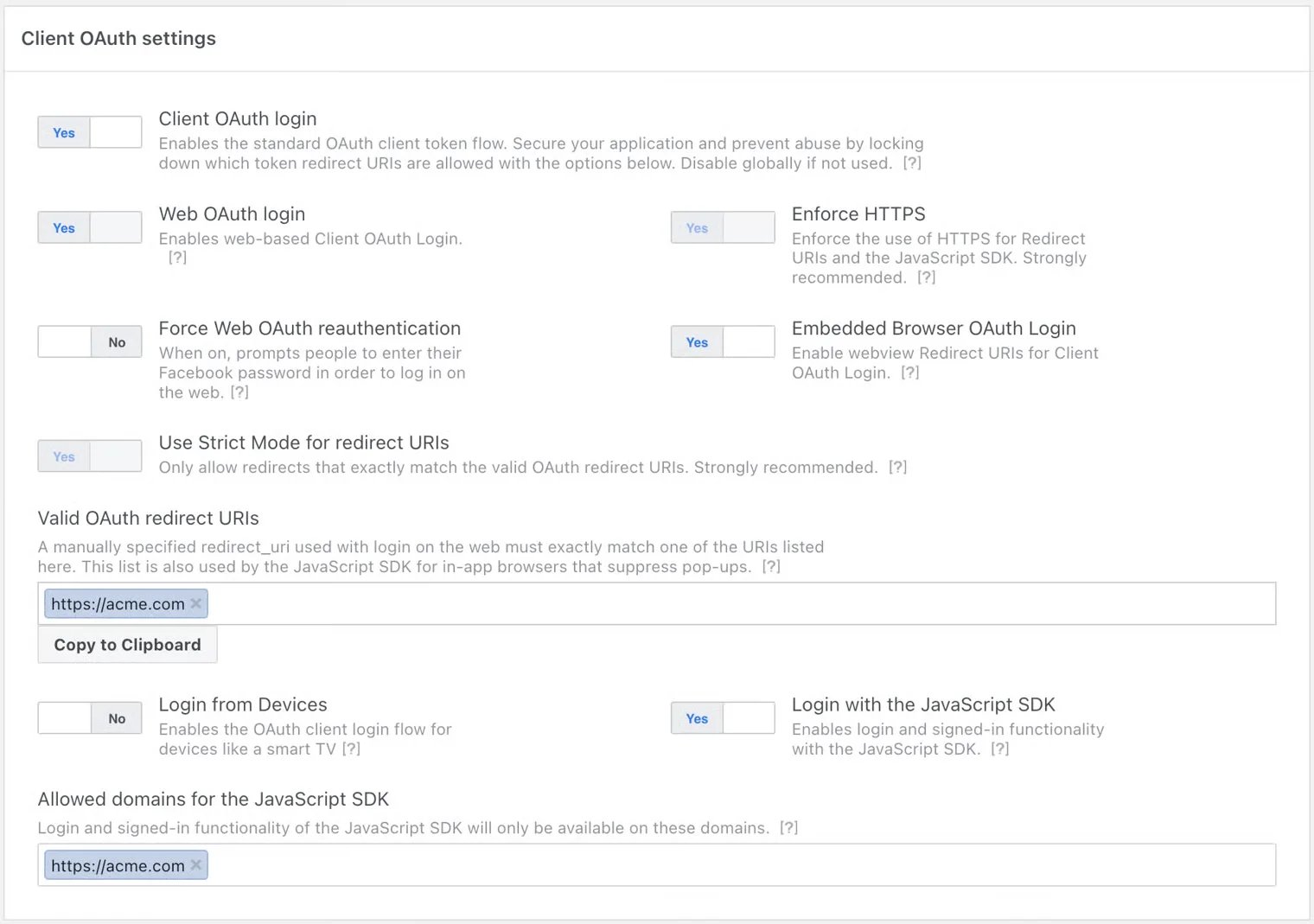 将以下开关设置为 **是**:
* 客户端 OAuth 登录
* 网页 OAuth 登录
* 强制使用 HTTPS
* 内嵌浏览器 OAuth 登录
* 对重定向 URI 使用严格模式
* 使用 JavaScript SDK 登录
⚠️ **注意事项**:
* 内嵌式注册依赖于 JavaScript SDK。
* 当企业客户完成内嵌式注册流程时,其 **WABA ID**、 **商业电话号码 ID** 以及一个 **可兑换的 Token code** 将返回给发起该流程的窗口,但前提是该页面的网域已同时添加到 **允许的网域** 和 **有效 OAuth 重定向 URI**中。
* 请添加计划部署内嵌式注册的所有网域(包括开发环境中的测试网域)。
* 仅支持启用了 HTTPS 的网域。
***
## 步骤 2:创建 Facebook Login for Business 配置 ID
Facebook Login for Business 配置用于定义在企业客户使用内嵌式注册时请求哪些权限以及收集哪些额外信息。
在控制台中,导航至 **Facebook Login for Business > 配置**。
将以下开关设置为 **是**:
* 客户端 OAuth 登录
* 网页 OAuth 登录
* 强制使用 HTTPS
* 内嵌浏览器 OAuth 登录
* 对重定向 URI 使用严格模式
* 使用 JavaScript SDK 登录
⚠️ **注意事项**:
* 内嵌式注册依赖于 JavaScript SDK。
* 当企业客户完成内嵌式注册流程时,其 **WABA ID**、 **商业电话号码 ID** 以及一个 **可兑换的 Token code** 将返回给发起该流程的窗口,但前提是该页面的网域已同时添加到 **允许的网域** 和 **有效 OAuth 重定向 URI**中。
* 请添加计划部署内嵌式注册的所有网域(包括开发环境中的测试网域)。
* 仅支持启用了 HTTPS 的网域。
***
## 步骤 2:创建 Facebook Login for Business 配置 ID
Facebook Login for Business 配置用于定义在企业客户使用内嵌式注册时请求哪些权限以及收集哪些额外信息。
在控制台中,导航至 **Facebook Login for Business > 配置**。
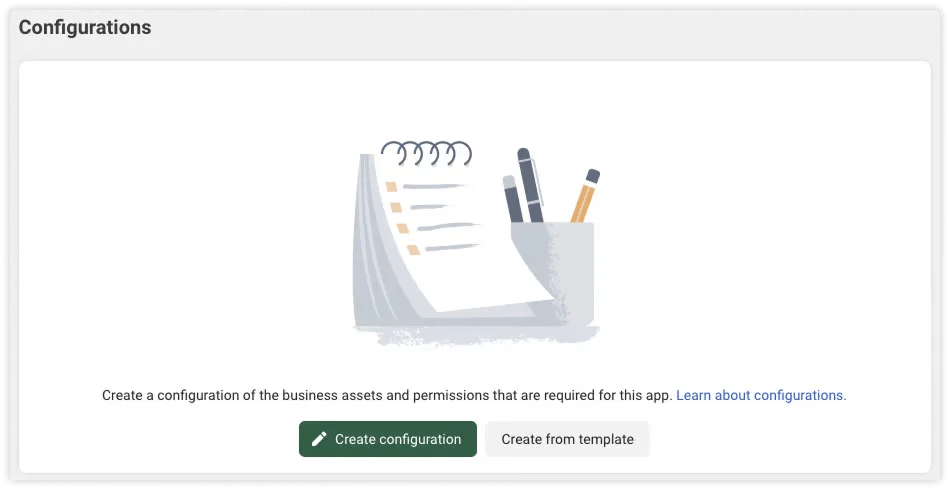 点击 **通过模板创建** 并选择 **WhatsApp Embedded Signup Configuration With 60 Expiration Token** 来创建配置。
该模板会生成一个包含最常用权限和访问级别的配置。
点击 **通过模板创建** 并选择 **WhatsApp Embedded Signup Configuration With 60 Expiration Token** 来创建配置。
该模板会生成一个包含最常用权限和访问级别的配置。
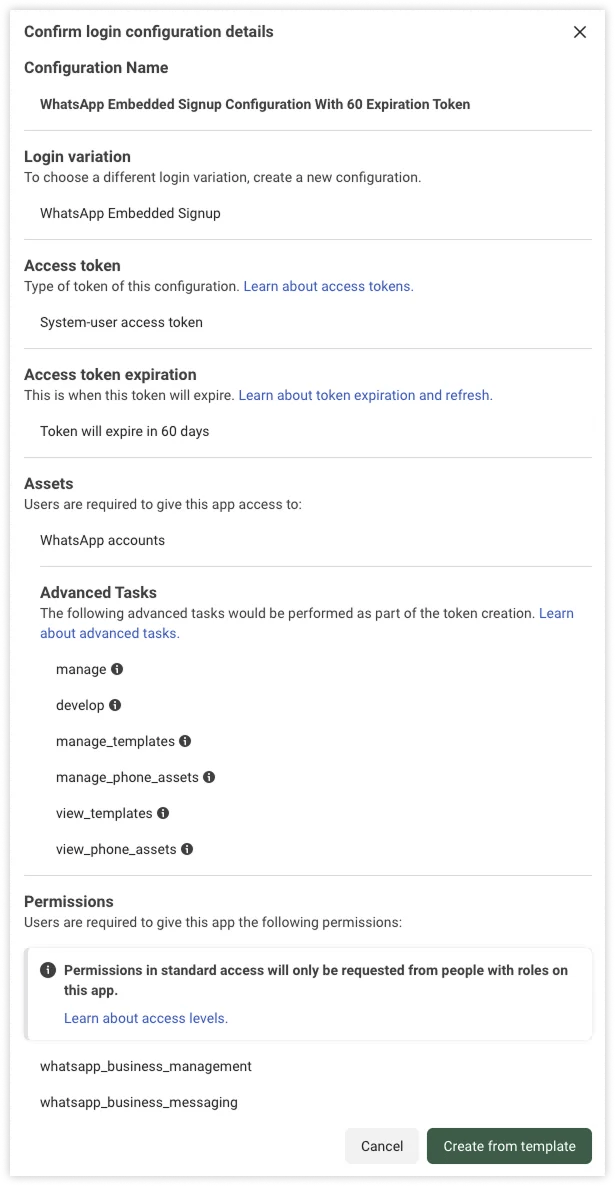 配置完成后,请记录 **Configuration ID** —— 下一步中将会用到。
***
## 步骤 3:将内嵌式注册集成到您的网站
将以下 HTML 和 JavaScript 代码添加到您的网站。这是实现内嵌式注册所需的完整代码。
我们建议根据您的解决方案或客户需求构建不同的内嵌式注册流程:
* [**创建 WhatsApp API 账户**](https://www.ycloud.com/whatsapp-business-api)
* [**WhatsApp Business App 共存**](https://www.ycloud.com/whatsapp-business-app-coexistence)
***
### 内嵌式注册 – 创建 WhatsApp API 账户
#### 1. 创建内嵌式注册按钮
```html theme={"theme":{"light":"github-light","dark":"github-dark"}}
```
⚠️ **注意事项**:
* 将 `appId`、`config_id` 和 `solutionID` 替换为真实值。
* 前端必须将 `waba_id` 和 `phone_number_id` 传递给您的后端,以获取 WABA 并注册号码(见下文)。
更多详情:[https://developers.facebook.com/docs/whatsapp/embedded-signup/implementation](https://developers.facebook.com/docs/whatsapp/embedded-signup/implementation?utm_source=chatgpt.com)
**2. 绑定 WABA 并注册号码**
客户完成内嵌式注册后,前端将获取 `waba_id` 和 `phone_number_id`,并将其传递给后端以进行后续的 API 调用。
**绑定 WABA**
调用 YCloud WABA 绑定 API,然后在系统中将其与对应的客户账户关联。
请求示例:
```
curl -X POST -H 'X-API-Key: {{YOUR_API_KEY}}' \
'https://api.ycloud.com/v2/whatsapp/businessAccounts/{wabaId}/tp/bind'
```
成功响应示例:
```
{
"id": "{{waba_id}}",
"name": "WABA name",
"accountReviewStatus": "APPROVED",
"paymentMethodAttached": true,
"currency": "AUD",
"timezoneId": "1"
}
```
**说明**:如果响应字段 `paymentMethodAttached` 为 `true`,则表明 YCloud 已成功为此 WABA 绑定支付方式。否则, **请联系 YCloud 团队以解决该问题**。
**注册电话号码**
```bash theme={"theme":{"light":"github-light","dark":"github-dark"}}
curl -XPOST 'https://api.ycloud.com/v2/whatsapp/phoneNumbers/{{waba_id}}/{{phone_number_id}}/register' \
-H 'X-API-Key: {{YOUR-API-KEY}}'
```
**响应示例**
```json theme={"theme":{"light":"github-light","dark":"github-dark"}}
{
"phoneNumber": "{{phonenumber}}",
"wabaId": "{{waba_id}}",
"verifiedName": "Phone number name",
"qualityRating": "GREEN",
"messagingLimit": "TIER_250",
"status": "CONNECTED"
}
```
***
### 内嵌式注册 – WhatsApp Business App 共存
#### 1. 创建内嵌式注册按钮
```html theme={"theme":{"light":"github-light","dark":"github-dark"}}
```
***
#### 2. 获取 WABA 并绑定至 YCloud
客户完成内嵌式注册后,您的前端将接收到 `waba_id`。将其传递给后端以进行进一步的 API 调用。
调用 YCloud **SMB 绑定 API**。成功后,在您的系统中将该 WABA 与客户的账户关联。
```bash theme={"theme":{"light":"github-light","dark":"github-dark"}}
curl 'POST /v2/whatsapp/businessAccounts/{wabaId}/smb/bind' \
-H 'X-API-Key: {{YOUR-API-KEY}}'
```
**响应示例**
```json theme={"theme":{"light":"github-light","dark":"github-dark"}}
{
"id": "{{phonenumber_id}}",
"phoneNumber": "{{phonenumber}}",
"wabaId": "{{waba_id}}",
"qualityRating": "GREEN",
"messagingLimit": "TIER_1K",
"verifiedName": "John's Cake Shop",
"codeVerificationStatus": "VERIFIED",
"isOfficialBusinessAccount": true,
"status": "PENDING",
"nameStatus": "APPROVED",
"newNameStatus": "APPROVED",
"decision": "APPROVED",
"requestedVerifiedName": "string",
"rejectionReason": "string",
"qualityUpdateEvent": "ONBOARDING"
}
```
## 常见问题
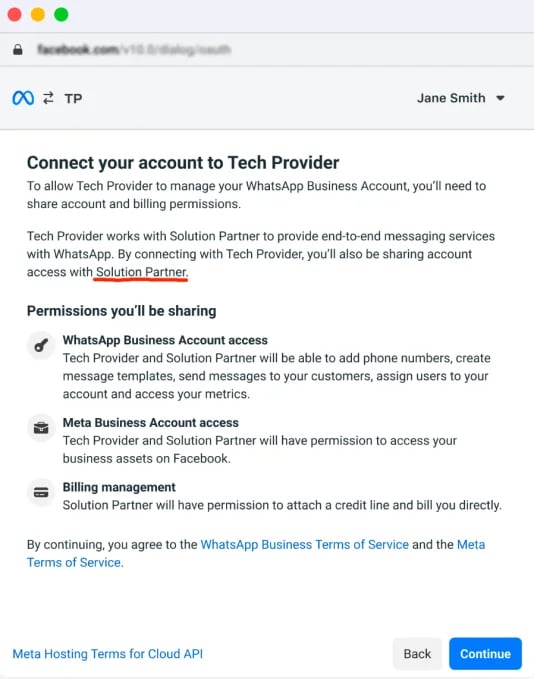
如果您正确配置了 **solutionID** ,客户在 Facebook 授权期间将看到解决方案合作伙伴的真实名称。\
如果看不到,则说明配置尚未生效。
请确保已完成 **应用审核** 。
配置完成后,请记录 **Configuration ID** —— 下一步中将会用到。
***
## 步骤 3:将内嵌式注册集成到您的网站
将以下 HTML 和 JavaScript 代码添加到您的网站。这是实现内嵌式注册所需的完整代码。
我们建议根据您的解决方案或客户需求构建不同的内嵌式注册流程:
* [**创建 WhatsApp API 账户**](https://www.ycloud.com/whatsapp-business-api)
* [**WhatsApp Business App 共存**](https://www.ycloud.com/whatsapp-business-app-coexistence)
***
### 内嵌式注册 – 创建 WhatsApp API 账户
#### 1. 创建内嵌式注册按钮
```html theme={"theme":{"light":"github-light","dark":"github-dark"}}
```
⚠️ **注意事项**:
* 将 `appId`、`config_id` 和 `solutionID` 替换为真实值。
* 前端必须将 `waba_id` 和 `phone_number_id` 传递给您的后端,以获取 WABA 并注册号码(见下文)。
更多详情:[https://developers.facebook.com/docs/whatsapp/embedded-signup/implementation](https://developers.facebook.com/docs/whatsapp/embedded-signup/implementation?utm_source=chatgpt.com)
**2. 绑定 WABA 并注册号码**
客户完成内嵌式注册后,前端将获取 `waba_id` 和 `phone_number_id`,并将其传递给后端以进行后续的 API 调用。
**绑定 WABA**
调用 YCloud WABA 绑定 API,然后在系统中将其与对应的客户账户关联。
请求示例:
```
curl -X POST -H 'X-API-Key: {{YOUR_API_KEY}}' \
'https://api.ycloud.com/v2/whatsapp/businessAccounts/{wabaId}/tp/bind'
```
成功响应示例:
```
{
"id": "{{waba_id}}",
"name": "WABA name",
"accountReviewStatus": "APPROVED",
"paymentMethodAttached": true,
"currency": "AUD",
"timezoneId": "1"
}
```
**说明**:如果响应字段 `paymentMethodAttached` 为 `true`,则表明 YCloud 已成功为此 WABA 绑定支付方式。否则, **请联系 YCloud 团队以解决该问题**。
**注册电话号码**
```bash theme={"theme":{"light":"github-light","dark":"github-dark"}}
curl -XPOST 'https://api.ycloud.com/v2/whatsapp/phoneNumbers/{{waba_id}}/{{phone_number_id}}/register' \
-H 'X-API-Key: {{YOUR-API-KEY}}'
```
**响应示例**
```json theme={"theme":{"light":"github-light","dark":"github-dark"}}
{
"phoneNumber": "{{phonenumber}}",
"wabaId": "{{waba_id}}",
"verifiedName": "Phone number name",
"qualityRating": "GREEN",
"messagingLimit": "TIER_250",
"status": "CONNECTED"
}
```
***
### 内嵌式注册 – WhatsApp Business App 共存
#### 1. 创建内嵌式注册按钮
```html theme={"theme":{"light":"github-light","dark":"github-dark"}}
```
***
#### 2. 获取 WABA 并绑定至 YCloud
客户完成内嵌式注册后,您的前端将接收到 `waba_id`。将其传递给后端以进行进一步的 API 调用。
调用 YCloud **SMB 绑定 API**。成功后,在您的系统中将该 WABA 与客户的账户关联。
```bash theme={"theme":{"light":"github-light","dark":"github-dark"}}
curl 'POST /v2/whatsapp/businessAccounts/{wabaId}/smb/bind' \
-H 'X-API-Key: {{YOUR-API-KEY}}'
```
**响应示例**
```json theme={"theme":{"light":"github-light","dark":"github-dark"}}
{
"id": "{{phonenumber_id}}",
"phoneNumber": "{{phonenumber}}",
"wabaId": "{{waba_id}}",
"qualityRating": "GREEN",
"messagingLimit": "TIER_1K",
"verifiedName": "John's Cake Shop",
"codeVerificationStatus": "VERIFIED",
"isOfficialBusinessAccount": true,
"status": "PENDING",
"nameStatus": "APPROVED",
"newNameStatus": "APPROVED",
"decision": "APPROVED",
"requestedVerifiedName": "string",
"rejectionReason": "string",
"qualityUpdateEvent": "ONBOARDING"
}
```
## 常见问题
如果您正确配置了 **solutionID** ,客户在 Facebook 授权期间将看到解决方案合作伙伴的真实名称。\
如果看不到,则说明配置尚未生效。
请确保已完成 **应用审核** 。
 如果用户选择 **现有的 WABA** 而不是创建新的 WABA,则可能会发生这种情况。\
现有的 WABA 可能已绑定尚未移除的支付方式。
打开嵌入式注册页面时,可能会出现以下提示:
**App not active**\
*This app is not currently accessible and the app developer is aware of the issue. You will be able to log in when the app is reactivated.*
出现这种情况是因为应用处于 **Development** (开发)模式,仅测试用户拥有权限(请参阅 **App Dashboard > App roles > Roles / Test Users**)。
**解决方案**:\
将应用模式切换为 **Live**(上线):在 [Meta Apps](https://developers.facebook.com/apps) 的控制面板中打开对应应用。\
或者,为当前用户进行授权。请参阅:[Assign business assets to people in your business portfolio](https://www.facebook.com/business/help/325571851329683?id=2190812977867143)。
打开嵌入式注册页面时,可能会出现以下提示:
**Feature unavailable**\
*Facebook Login is currently unavailable for this app as we are updating additional details for this app. Please try again later.*
**解决方案**:\
前往 **App Dashboard > App Review > Permissions and Features** 并申请 **public\_profile** 高级访问权限(advanced access)。
##
This documentation is built and hosted on [Mintlify](https://mintlify.com), a developer documentation platform.
如果用户选择 **现有的 WABA** 而不是创建新的 WABA,则可能会发生这种情况。\
现有的 WABA 可能已绑定尚未移除的支付方式。
打开嵌入式注册页面时,可能会出现以下提示:
**App not active**\
*This app is not currently accessible and the app developer is aware of the issue. You will be able to log in when the app is reactivated.*
出现这种情况是因为应用处于 **Development** (开发)模式,仅测试用户拥有权限(请参阅 **App Dashboard > App roles > Roles / Test Users**)。
**解决方案**:\
将应用模式切换为 **Live**(上线):在 [Meta Apps](https://developers.facebook.com/apps) 的控制面板中打开对应应用。\
或者,为当前用户进行授权。请参阅:[Assign business assets to people in your business portfolio](https://www.facebook.com/business/help/325571851329683?id=2190812977867143)。
打开嵌入式注册页面时,可能会出现以下提示:
**Feature unavailable**\
*Facebook Login is currently unavailable for this app as we are updating additional details for this app. Please try again later.*
**解决方案**:\
前往 **App Dashboard > App Review > Permissions and Features** 并申请 **public\_profile** 高级访问权限(advanced access)。
##
This documentation is built and hosted on [Mintlify](https://mintlify.com), a developer documentation platform.