

For the exhaustive schema-derived catalog, see all examples.
What it is
Handle inbound WhatsApp, Messenger, and SMS messages, plus WhatsApp marketing preferences.Before you begin
- Create a public HTTPS endpoint in your application.
- Configure a YCloud webhook endpoint for the event types you need.
- Store the endpoint signing secret securely.
- Make event processing idempotent.
How it works
YCloud sends an HTTPPOST request when the event occurs. Verify the signature, durably record the event, return a 2xx response, and process slow work asynchronously.
Request
The scenarios below show requests delivered to your webhook URL. Treat the eventid as the delivery identifier and use type to route the payload.
Response
Return a2xx status after accepting the event.
For endpoint setup, signature validation, and retry behavior, see Configure webhooks.
Inbound unsupported message
In this case, your webhook endpoint received an inbound unsupported message:typeis set tounsupported.errorsexplains why the message is unsupported or unavailable.unsupported.typeidentifies the message category, such aspoll_creation,poll_update,edit, orpin.
Request
Response
Acknowledge the delivery after durably accepting the event.Explanation
- Error
131051withMessage type unknownmeans that WhatsApp Cloud API does not support the message type. - Error
131060withThis message is currently unavailable.means that WhatsApp could not provide the message content. unsupported.typeidentifies the general category. It does not contain the original message content.- See Unsupported messages in Inbox for a readable list of message types. See Meta’s unsupported messages webhook reference for the current payload contract.
Inbound Text message
In this case, your webhook endpoint received an inbound text message:- Contains plain text that the user sent.
- Contains the mentioned message information in
context.
Request
Response
Acknowledge the delivery after durably accepting the event.Explanation
- Inbound messages are those sent from customers to your business phone numbers.
- The
context(optional) contains the mentioned message information, typically used to reply to a previous message sent by the user or your business.context.fromis the WhatsApp ID (phone number without the ’+’ prefix) of the user who sent the mentioned message.context.idis the original ID of the mentioned message on WhatsApp’s platform, starting withwamid..
Inbound Text message triggered by click to WhatsApp Ads
In this case, your webhook endpoint received an inbound text message triggered by click to WhatsApp Ads:- Contains plain.
- Contains information about the Ad.
Request
Response
Acknowledge the delivery after durably accepting the event.Explanation
- The
referralcontains information about the Ad. See also Ads that Click to WhatsApp.
Inbound Image message
In this case, your webhook endpoint received an inbound image message:- Contains an image URL.
- Contains caption to describe this image.
Request
Response
Acknowledge the delivery after durably accepting the event.Explanation
- The
image.linkcan be directly accessed in a few minutes for the convenience of the consumer, but you should always include anX-API-Keyheader to download this file within 30 days.
Inbound Video message
In this case, your webhook endpoint received an inbound video message:- Contains a video URL.
- Contains caption to describe this video.
Request
Response
Acknowledge the delivery after durably accepting the event.Explanation
- The
video.linkcan be directly accessed in a few minutes for the convenience of the consumer, but you should always include anX-API-Keyheader to download this file within 30 days.
Inbound Audio message
In this case, your webhook endpoint received an inbound audio message:- Contains an audio URL.
Request
Response
Acknowledge the delivery after durably accepting the event.Explanation
- The
audio.linkcan be directly accessed in a few minutes for the convenience of the consumer, but you should always include anX-API-Keyheader to download this file within 30 days.
Inbound Document message
In this case, your webhook endpoint received an inbound document message:- Contains a document URL.
- Contains caption to describe this document.
Request
Response
Acknowledge the delivery after durably accepting the event.Explanation
- The
document.linkcan be directly accessed in a few minutes for the convenience of the consumer, but you should always include anX-API-Keyheader to download this file within 30 days.
Inbound Sticker message
In this case, your webhook endpoint received an inbound sticker message:- Contains a sticker URL.
Request
Response
Acknowledge the delivery after durably accepting the event.Explanation
- The
sticker.linkcan be directly accessed in a few minutes for the convenience of the consumer, but you should always include anX-API-Keyheader to download this file within 30 days.
Inbound Location message
In this case, your webhook endpoint received an inbound location message:- Contains latitude and longitude of the place.
- Contains name, address, and URL of the place.
Request
Response
Acknowledge the delivery after durably accepting the event.Explanation
Route the event bytype, deduplicate it by id, and move slow or failure-prone work to an asynchronous processor.
Inbound Contacts message
In this case, your webhook endpoint received an inbound contacts message:- Contains one contact with addresses, birthday, emails, name, phones, and other contact fields.
- Contains
origin: contact_requestwhen the user shared the contact in response to a request-contact-info message.
Request
Response
Acknowledge the delivery after durably accepting the event.Explanation
Route the event bytype, deduplicate it by id, and move slow or failure-prone work to an asynchronous processor.
Inbound Reaction message
In this case, your webhook endpoint received an inbound reaction message:- Contains the message ID that the user reacts to.
- Contains the emoji.
Request
Response
Acknowledge the delivery after durably accepting the event.Explanation
- The
emojiis present when the user reacts to a message with an emoji. If not, it indicates that the user removed the emoji on a message.
Inbound Template Button message
In this case, your webhook endpoint received an inbound template button message:- Contains the button
textof the template you used when sending a template message. - Contains the button
payloadthat you provided when sending a template message. - Contains the wamid (
context.wamid) of the template message you sent.
Request
Response
Acknowledge the delivery after durably accepting the event.Explanation
Route the event bytype, deduplicate it by id, and move slow or failure-prone work to an asynchronous processor.
Inbound Interactive List Reply message
In this case, your webhook endpoint received an inbound Interactive List Reply message:- The
interactivefield contains the list reply that the user clicked on an interactive message you previously sent. - The
contextfield contains information about the interactive message you previously sent to the user.
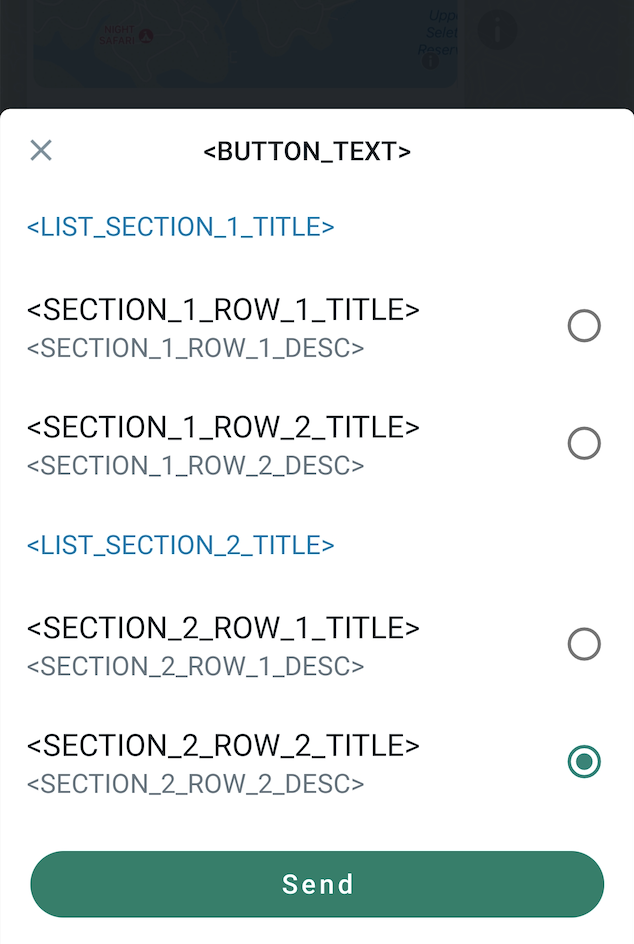 Click the button to select one item.
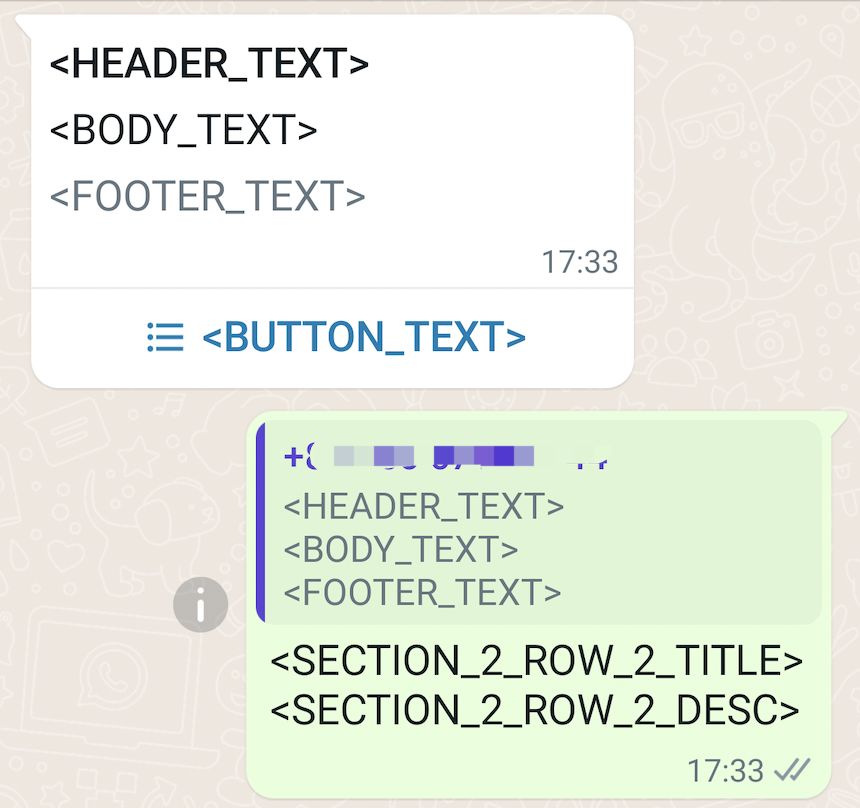 The recipient replies to your message by selecting one of the items in your previously sent interactive message.
Request
Response
Acknowledge the delivery after durably accepting the event.Explanation
- The
contextcontains information about the interactive message you previously sent.context.fromis the WhatsApp ID (phone number without the ’+’ prefix) of who sent the interactive message.context.idis the original message ID on WhatsApp’s platform, starting withwamid..
Inbound Interactive Button Reply message
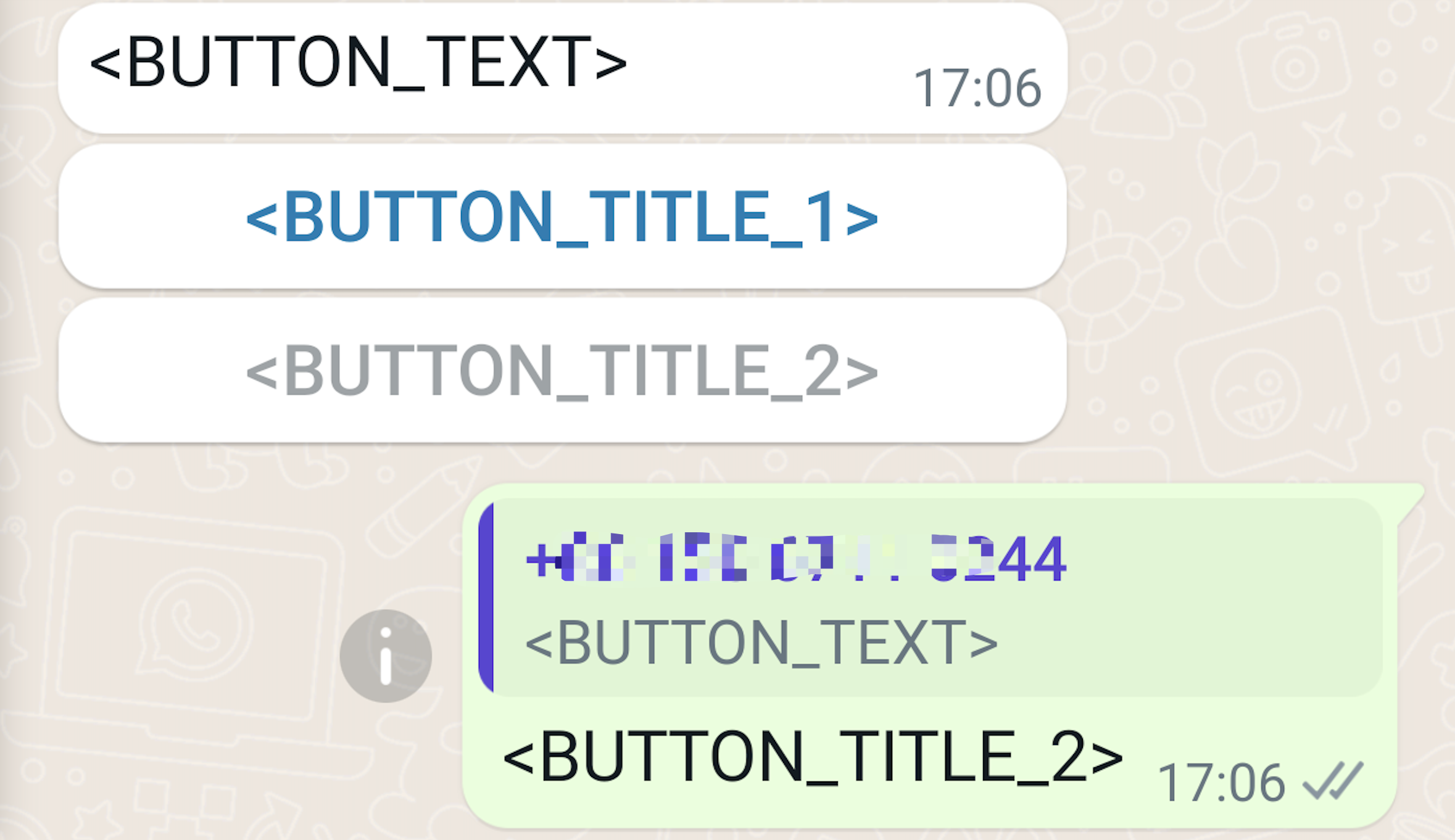
In this case, your webhook endpoint received an inbound Interactive Button Reply message:- The
interactivefield contains the button reply that the user clicked on an interactive message you previously sent. - The
contextfield contains information about the interactive message you previously sent to the user.
Request
Response
Acknowledge the delivery after durably accepting the event.Explanation
- The
contextcontains information about the interactive message you previously sent.context.fromis the WhatsApp ID (phone number without the ’+’ prefix) of who sent the interactive message.context.idis the original message ID on WhatsApp’s platform, starting withwamid..
Inbound Interactive Flow Response message
Upon flow completion a response message will be sent to the WhatsApp chat. You will receive it in the same way as you receive all other messages from the user - via message webhook.response_json field will contain flow-specific data.
Request
Response
Acknowledge the delivery after durably accepting the event.Explanation
interactive.typeis alwaysnfm_reply.interactive.nameis alwaysflow.interactive.bodyis alwaysSent.interactive.response_jsonis flow-specific data. The structure is either defined in flow JSON (see Complete action) or, if flow is using an endpoint, controlled by endpoint (see Final Response Payload in Data Exchange Request). Parse theinteractive.response_jsonJSON string to a JSON object, where its values’ data type can be various. Typically, the values are plain text, except:- When it originates from a CheckboxGroup component, the value is a list of strings.
- When it originates from an OptIn component, the value is a boolean, that is
trueorfalse. Currently, if present, the value must betruesince there will be no such key included in theresponse_jsonif the user didn’t choose opt in. - When it originates from a DatePicker component, the value is a string representing Unix timestamp in milliseconds, such as
"1725936737548"(i.e., 2024-09-10T02:52:17.548Z). Since Flow JSON version 5.0 , dates will be set in “yyyy-MM-dd” format, which makes the values unrelated to time zones.
- To send a message with a Flow, see Flow template message, and Interactive Flow message.
Inbound System message
In this case, your webhook endpoint received an inbound system message:- The
typeis set tosystem, andsystem.typeis set touser_changed_number. - A user changes their phone number on WhatsApp, and
wa_idis the new WhatsApp ID (phone number without the+prefix). user_idis the new BSUID.parent_user_idis included only when parent BSUIDs are enabled.
Request
Response
Acknowledge the delivery after durably accepting the event.Explanation
Route the event bytype, deduplicate it by id, and move slow or failure-prone work to an asynchronous processor.
Inbound Order message
In this case, your webhook endpoint received an inbound order message when a customer adds one or more products to their cart and submits an order:- Contains information about the product ordered.
Request
Response
Acknowledge the delivery after durably accepting the event.Explanation
Route the event bytype, deduplicate it by id, and move slow or failure-prone work to an asynchronous processor.
Inbound Product Inquiry message
In this case, your webhook endpoint received an inbound text message when a customer inquiries a product:- Contains information about the product.
Request
Response
Acknowledge the delivery after durably accepting the event.Explanation
- A Product Inquiry Message is received when a user is asking for more information about a specific product. These can be received in two scenarios:
- When a customer replies to Single or Multi-Product Messages.
- When a customer accesses a business’ catalog through another entry point, navigates to a Product Details Page, and clicks Message Business about this Product.
Inbound Request Welcome message
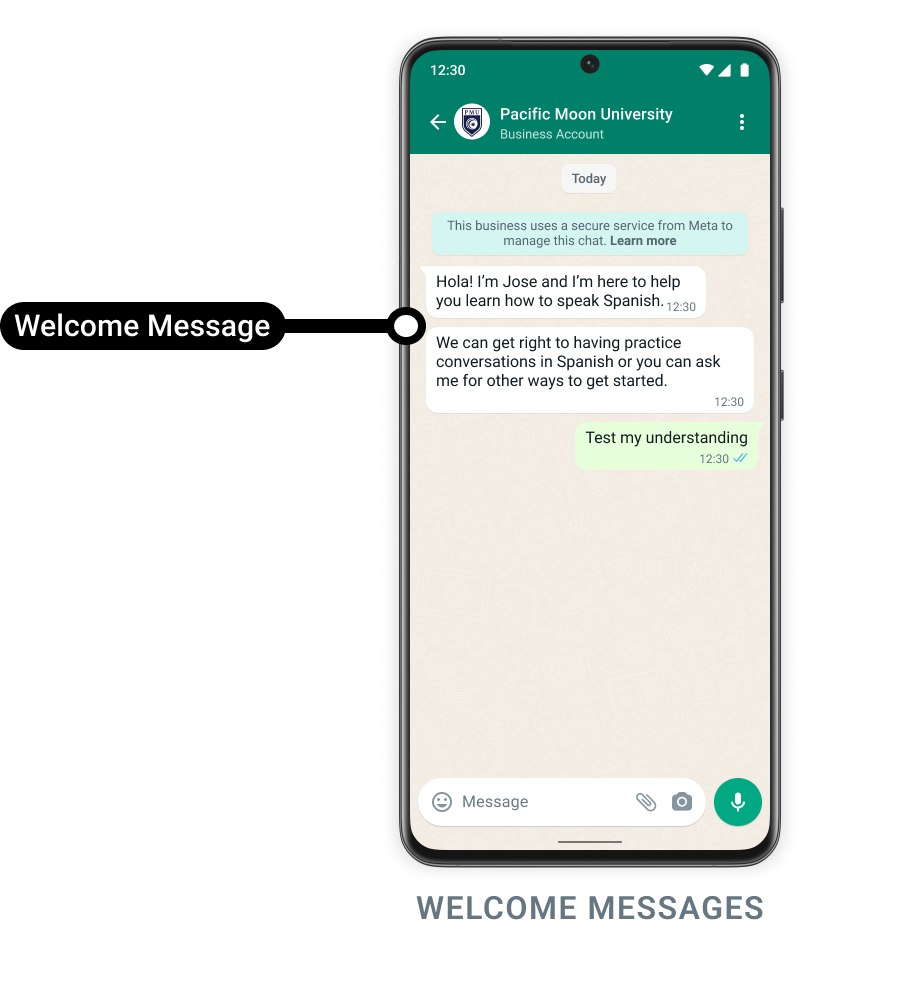
You can be notified by webhook whenever a WhatsApp user opens a chat with you for the first time. This can be useful if you want to reply to these users with a special welcome message of your own design. If you enable this feature and a user opens a chat, typically when a user taps a universal link (wa.me or api.whatsapp.com links), the WhatsApp client checks for an existing message thread between the user and your business phone number. If there is none, the client triggers arequest_welcome webhook. You can then respond to the user with your own welcome message.
Request
Response
Acknowledge the delivery after durably accepting the event.Explanation
- To enable this feature for a phone number, navigate to Meta WhatsApp Manager > Phone Numbers > Settings > Automations.
- To test
request_welcomemessage, if you already have a chat thread going with the business phone number, you must first delete the chat. - This feature only triggers an inbound
request_welcomemessage, and does not reply any message automatically. It’s up to you whether to reply a welcome message.
Inbound SMS
Usesms.inbound.received when a user replies to your SMS.
Request
Response
Acknowledge the delivery after durably accepting the event.Explanation
Read the reply fromsmsInbound.text. from is the user’s phone number, to is your registered sender ID, and sendTime is the message send time. Do not parse this event as whatsappInboundMessage.
WhatsApp marketing preference
Usewhatsapp.user.preferences when a WhatsApp user stops or resumes marketing messages.
Request
Response
Acknowledge the delivery after durably accepting the event.Explanation
Readcategory and value from whatsappUserPreference; this example records a request to stop marketing messages. Use the business identifiers and supplied customer identifiers to match the preference. parentUserId is omitted when parent BSUIDs are not enabled. Keep detail as explanatory text, and preserve the supplied timestamp. This is a dedicated preference event, not an inbound chat message or a contact.unsubscribe.created payload.
Messenger inbound text
Subscribe tomessenger.inbound_message.received for ordinary one-to-one text messages. Verify the YCloud-Signature header before accepting the event. A delivery retry retains Event.id; recreating an event from the same source fact can produce a new Event.id. Correlate repeated inbound messages by messengerInboundMessage.id.
Request
Response
Explanation
The customer PSID isfrom and the Facebook Page ID is to. Preserve the text exactly, including spaces. sendTime is the saved source event time; createTime is the local persistence time. This event carries ordinary text messages only. Repeated source delivery can create another event for the same saved message ID.
Messenger inbound text edit
Subscribe tomessenger.inbound_message.updated to receive the latest text of an existing inbound message. Verify YCloud-Signature before processing the payload.
Request
Response
Explanation
Keep the same messageid and metaMessageId when updating your record. The new text.body, cumulative editCount, and editTime describe the saved edit. Message sendTime and createTime retain their original values; event createTime is the edit time. Unedited messages omit the edit fields. Only existing inbound messages are updated; missing originals and superseded edit versions are not reconstructed. Delivery retries keep the event ID, but source reprocessing can create a new event ID. Use the message ID and edit count to handle duplicates and ordering.