

Why BSUIDs exist
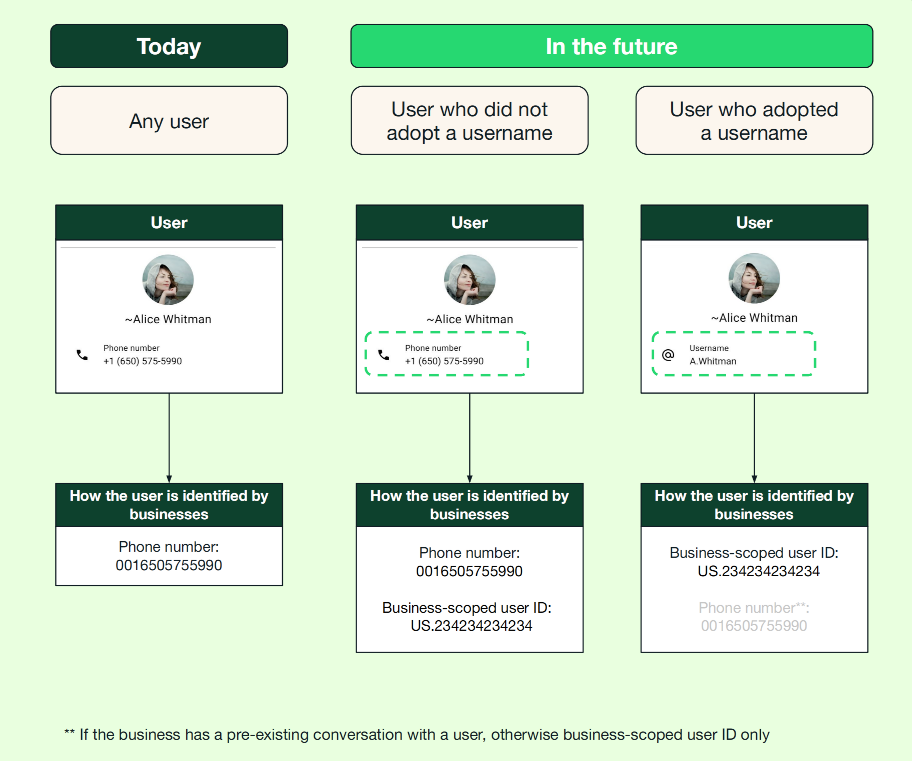
WhatsApp is rolling out optional usernames in 2026. When a user adopts a username, WhatsApp can display the username instead of the user’s phone number and may omit the phone number from webhook payloads. Each user controls whether to adopt a username, so businesses cannot rely on phone numbers as the only way to identify customers. Meta therefore requires WhatsApp Business Platform businesses and partners, as well as click-to-WhatsApp advertisers, to support BSUIDs so they can continue processing messages from users who adopt usernames. To support this change, Meta began adding business-scoped user IDs (BSUIDs) to webhook payloads in early April 2026. A BSUID is a backend identifier for one WhatsApp user within one Meta business portfolio. Meta includes it in message webhooks whether or not the user has adopted a username, and it can be used to message the user when their phone number is unavailable. Usernames and BSUIDs have different lifecycles. A user can change their username without changing their phone number or BSUID. If the user changes their phone number, Meta generates a new BSUID. Store these identifiers separately and update their association when you receive a phone-number-change system event. A phone number can still appear when the business phone number has exchanged a message or call with the user in the previous 30 days, or when Meta’s contact book contains the user. Treat phone-number and username fields as conditional, and update parsers and identity storage to accept BSUIDs alongside any other identifiers that are present. This guide covers BSUID identity rules, message and call requests, Meta’s contact book, and the webhook fields your integration needs to store.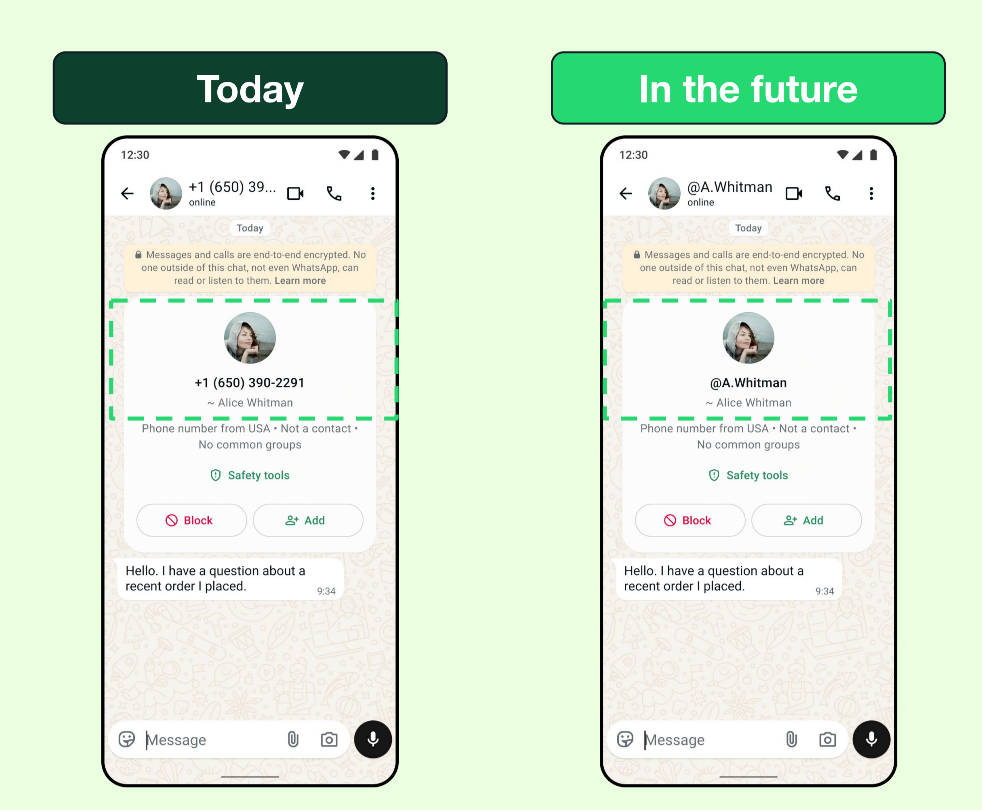
Understand the identifiers
Meta generates regular BSUIDs automatically. Each BSUID starts with the user’s
ISO 3166 alpha-2 two-letter country code, followed by a period and up to 128
alphanumeric characters. Preserve the complete value. Do not remove or change
the country prefix, period, or identifier characters.
BSUIDs have these lifecycle rules:
- A BSUID is unique to one business portfolio and user pair.
- A user’s BSUID changes when the user changes their phone number.
- A parent BSUID works across the linked portfolios for which Meta enabled it.
- A business phone number cannot use a regular BSUID scoped to another portfolio.
Before you begin
- Store your YCloud API key in
YCLOUD_API_KEY. - Use a WhatsApp business phone number owned by the same portfolio as the regular BSUID.
- Subscribe your webhook endpoint to the WhatsApp events your integration uses.
- Treat every new BSUID, parent BSUID, phone number, and username field as optional when deserializing webhooks.
- Store the regular BSUID and parent BSUID independently when both are present.
Send a message with a BSUID
Both WhatsApp message endpoints acceptrecipient:
Set
recipient to either a regular BSUID or a parent BSUID. Omit to when you
want YCloud to address the user by BSUID.
POST /whatsapp/messages to enqueue the message.
Request a user’s phone number
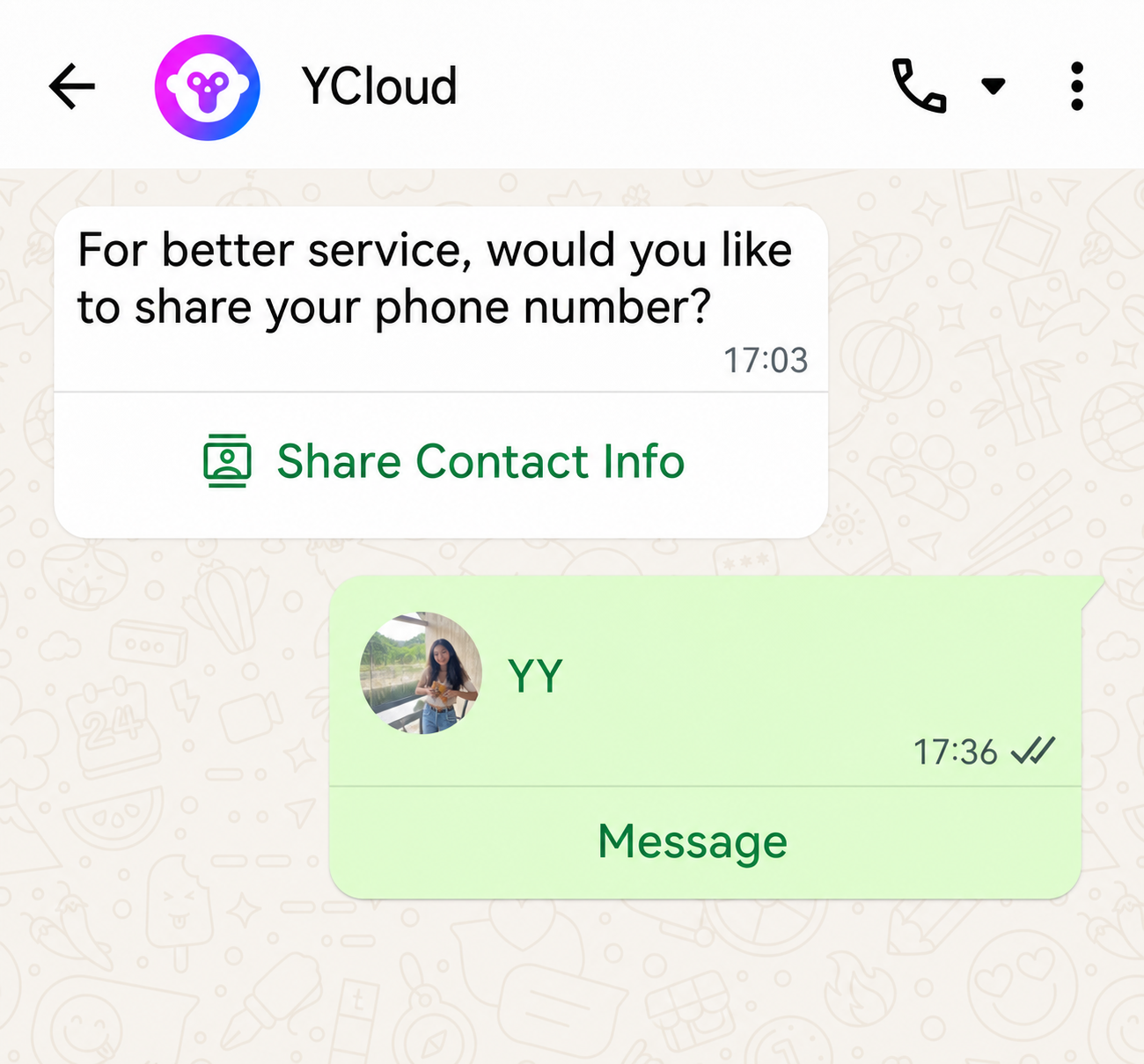
Use a request-contact-info message when your workflow needs a phone number that was not included in a webhook. The user decides whether to share it.Use a template button
Add aREQUEST_CONTACT_INFO button to a utility or marketing template. The
button text is fixed as Share Contact Info, and the button does not accept
send-time parameters.
Use an interactive message
Send an interactiverequest_contact_info message when you do not need a
template:
Handle the contact response
When the user shares contact information, YCloud sends awhatsapp.inbound_message.received event whose message type is contacts.
For a response to your request, contacts[].origin is contact_request.
2xx response, and process
the phone number asynchronously. A contact shared directly from WhatsApp can
also include a vCard.
Understand Meta’s contact book
Meta’s contact book stores the association between a user’s phone number and BSUID. With the feature enabled, sending or receiving a message or call using the user’s phone number records both identifiers. Meta can then include that association in webhooks even after the user adopts a username. Contact books belong to individual business portfolios. Linked portfolios do not share or synchronize their entries: record the association independently in each portfolio. Meta retains entries until you disable the feature or deactivate your account. You can disable it in Meta Business Suite > Business settings > Business info. Disabling the feature deletes the stored entries and stops recording new ones. Re-enabling it starts collecting new entries; it does not restore the deleted data.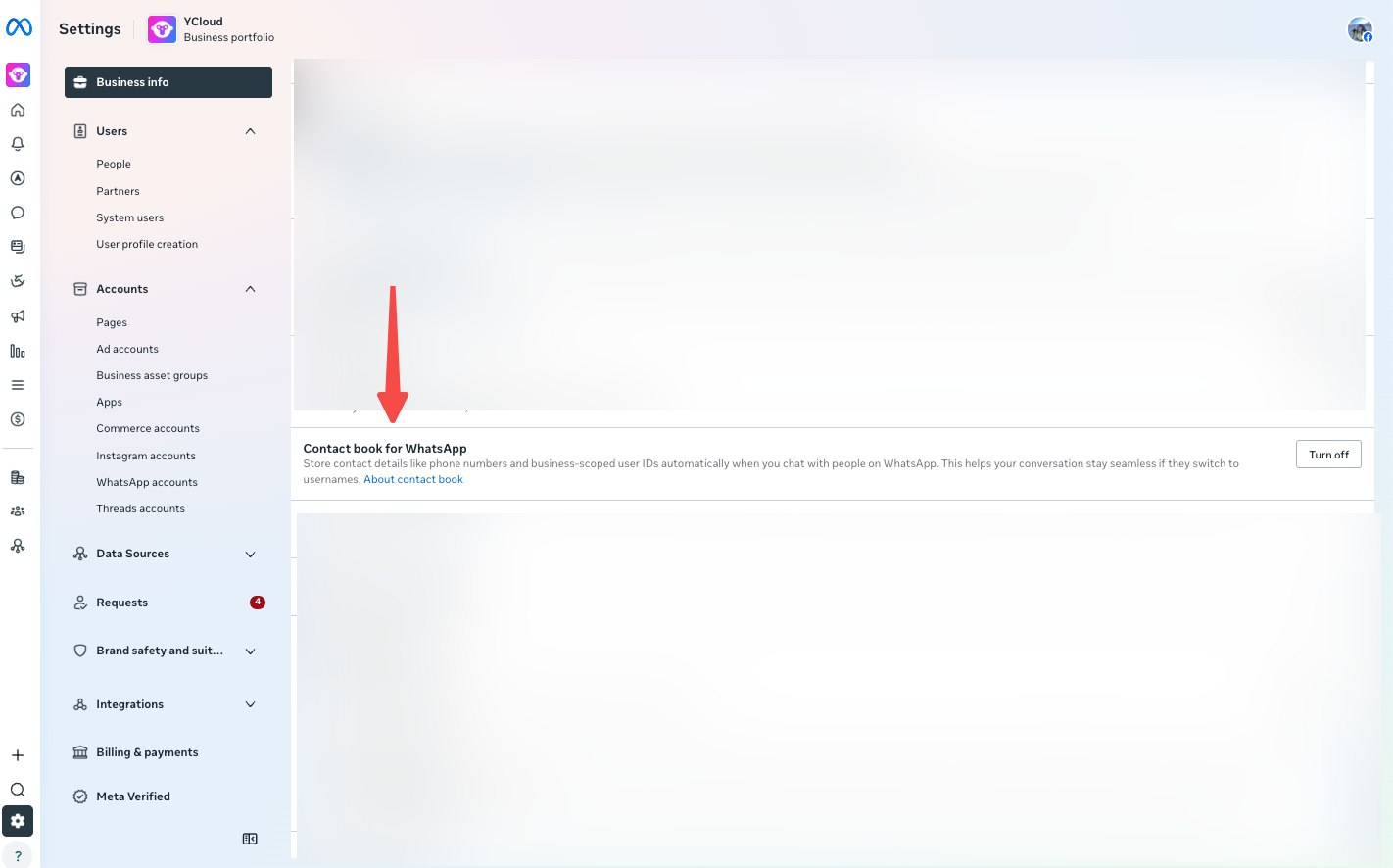
Contact requests and Local Storage
When a user shares their phone number through a request-contact-info button, Meta adds the phone number to the contact book if the feature is enabled. For businesses using Local Storage, Meta extracts the phone number from the shared vCard and stores it in the contact book on Meta data centers. Other vCard data is not retained beyond the standard retention period. Meta removed the earlier requirement to send a separate message to capture this association. See the official BSUID documentation for the current Local Storage behavior.Check a Meta contact book entry
UseGET /whatsapp/phoneNumbers/{wabaId}/{phoneNumber}/contactBook/{bsuid} to
check whether Meta has a phone number entry for a standard BSUID. This operation
does not return the phone number or modify the entry.
403.
The WABA must be available to your account, the phone number must be bound to
that WABA, and the standard BSUID must belong to the same Meta business
portfolio. Parent BSUIDs containing .ENT. are not supported. URL-encode the
phone number’s leading + as %2B when constructing the path manually.
A successful response always includes the boolean present:
200 with present: false means no matching entry exists. Invalid inputs,
permission failures, and upstream failures remain errors. An upstream HTTP
404 does not mean present: false.
Delete a Meta contact book entry
Delete a Meta contact book entry for a regular BSUID through one WhatsApp business phone number with:DELETE /whatsapp/phoneNumbers/{wabaId}/{phoneNumber}/contactBook/{bsuid}
.ENT. are
not supported. URL-encode the leading + in the phone number as %2B when you
construct the path manually.
An HTTP 200 response always contains success: true. A deleted value of
true means Meta deleted a matching entry. A value of false means Meta
processed the request but found no matching entry.
Deleting the entry does not delete YCloud contacts, messages, or BSUID business
records. After deletion, webhook events for business phone numbers in the same
Meta business portfolio no longer include the user’s phone number and BSUID
together. Meta’s 30-day cache can still supply both identifiers, and a later
interaction can create the contact book entry again.
Start a call with a BSUID
POST /whatsapp/calls/connect also accepts recipient. The same target rules
apply: provide to or recipient, and to takes precedence when both are
present.
Process BSUID webhook fields
The following YCloud webhook payloads show the fields added or changed for BSUID support. Update your parser to accept the new identifiers and handle missing customer phone numbers.
The examples include the YCloud event envelope and show where each field
appears. Optional fields follow the omission rules below. Remove the
// <ADDED> and // <CHANGED> comments before using a payload as JSON test data.
Apply these omission rules:
- A parent BSUID field is absent when parent BSUIDs are not enabled.
- A sent message or call target field can be absent when you addressed the user by phone number.
customerProfileappears onsent,delivered, andreadmessage updates, but not onfailedupdates.customerProfile.usernameis absent when the user has not enabled usernames. It is also absent fromsentstatus updates.- A phone number can be absent even when the corresponding BSUID is present.
whatsapp.message.updated
whatsapp.message.updated
The example shows a delivered message.
<CHANGED> marks to as conditional when the phone number is unavailable. The new customerProfile object is omitted for failed; its username is also omitted for sent or when the user has no username.whatsapp.inbound_message.received
whatsapp.inbound_message.received
Store the new sender identifiers alongside the existing profile name. The business recipient
to is unchanged; the customer phone number from can be omitted. See the phone-number-change example below for a system message.whatsapp.user.preferences
whatsapp.user.preferences
The preference remains under
whatsappUserPreference. Use the supplied user identifiers even when contactPhoneNumber is absent.whatsapp.call.connect
whatsapp.call.connect
For business-initiated calls, the customer identifiers are
toUserId and toParentUserId. For user-initiated calls, they are fromUserId and fromParentUserId. Only the customer phone-number field can be omitted in these examples.- BUSINESS_INITIATED
- USER_INITIATED
whatsapp.call.terminate
whatsapp.call.terminate
For business-initiated calls, the customer identifiers are
toUserId and toParentUserId. For user-initiated calls, they are fromUserId and fromParentUserId. Only the customer phone-number field can be omitted in these examples.- BUSINESS_INITIATED
- USER_INITIATED
whatsapp.call.status.updated
whatsapp.call.status.updated
The recipient identifiers are siblings of
recipientPhone under callingStatusUpdated.whatsapp.group.participants_update
whatsapp.group.participants_update
A single-participant update can carry identifiers directly under
whatsappGroup. Batch results carry them on each item in addedParticipants, removedParticipants, or failedParticipants. Process the array for the operation in the event.- added
- removed
- failed
whatsapp.smb.history
whatsapp.smb.history
Keep the event-specific wrapper: inbound history uses
whatsappInboundMessage, while outbound history uses whatsappMessage. Outbound toUserId and toParentUserId are compatibility aliases of recipientUserId and parentRecipientUserId. These examples show message-bearing events; a metadata-only history chunk can omit both message objects.- Inbound history
- Outbound history
whatsapp.smb.app.state.sync
whatsapp.smb.app.state.sync
This payload is retained from the legacy BSUID migration documentation. This event is not listed in the current public subscribable event catalog; do not add it to
enabledEvents based on this example. Use the shape below when maintaining an integration that already receives this legacy payload.whatsapp.smb.message.echoes
whatsapp.smb.message.echoes
These are messages sent from the WhatsApp Business app or a supported companion device. The legacy field names
toUserId and toParentUserId are compatibility aliases of recipientUserId and parentRecipientUserId. Keep the profile under whatsappMessage.Handle phone number and BSUID changes
WhenwhatsappInboundMessage.type is system, handle both identity-change
variants:
Use
system.user_id and any supplied system.parent_user_id for the new
identity. Use system.previous_user_id and
system.previous_parent_user_id for the previous identity when supplied.
These nested fields preserve Meta’s original snake_case names.
The following example shows a phone number change:
wa_id is a phone number without the leading + and
can be omitted; for user_changed_user_id, it can also remain unchanged.
Do not clear an existing phone number just because the event omits it. Keep
the previous and new identifiers long enough to reconcile existing
conversations and idempotently update your identity store.
See Inbound BSUID change message
for an example with no phone number.
Business usernames
A business username helps customers find your business in WhatsApp. It does not hide your business phone number. Each phone number can have one username, and a username cannot be shared by two WhatsApp phone numbers. A consumer username can change without changing the user’s BSUID. Keep the username as profile information rather than using it as your identity key. See Claim a business username for the 3–35 character format rules and the claiming and review process.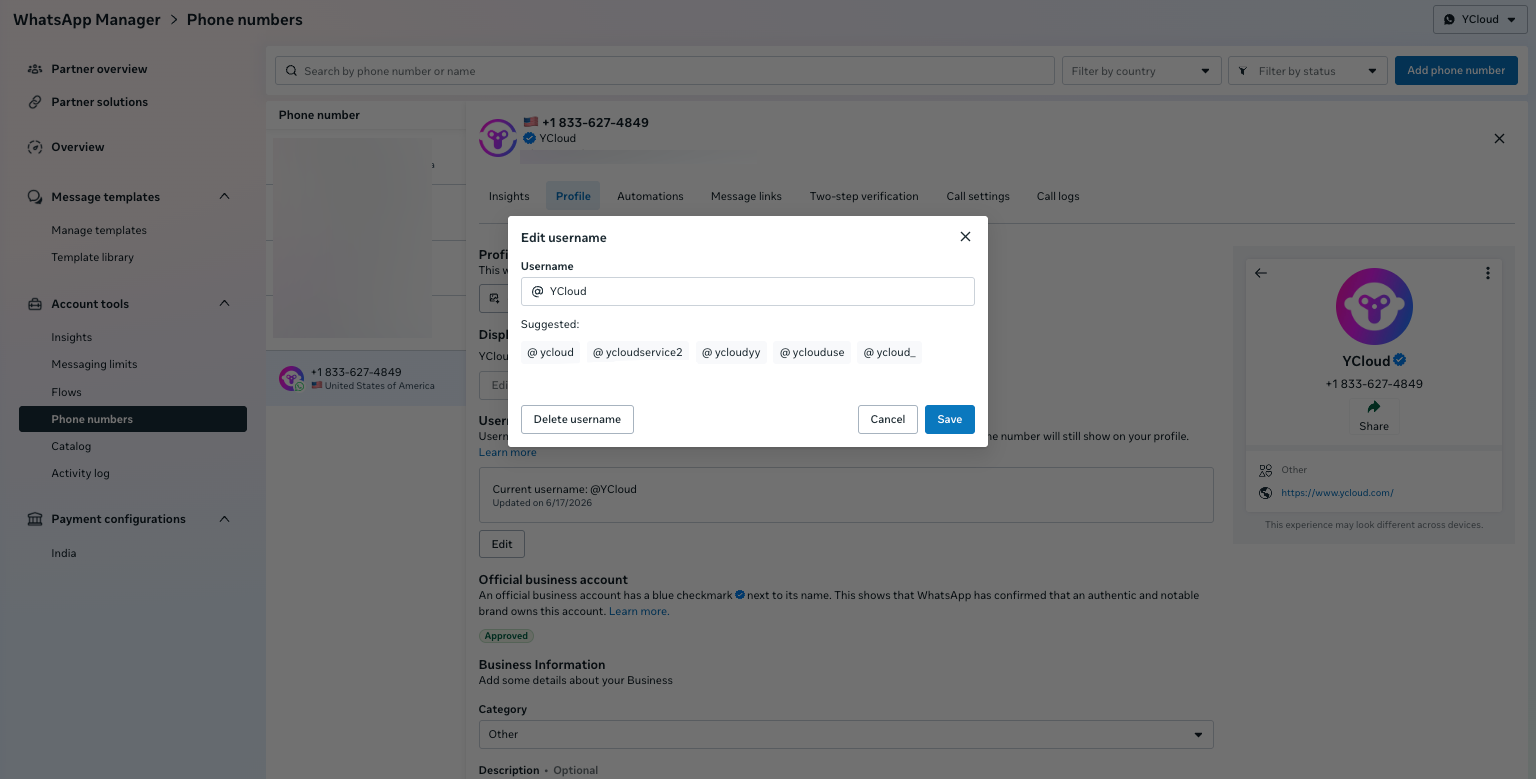
Reserved usernames
You can claim an eligible username reserved by Meta or choose another username for your brand. Use WhatsApp Manager, Meta Business Suite, or the username API. Approval does not by itself mean that a username is active for customers. If the reserved username belongs to your Facebook Page or Instagram account, link your business phone number to that Page or account before claiming it. You can link it while claiming the username in Meta Business Suite or WhatsApp Manager, or add the phone number to the Page or account. You need full control or basic partial access withmanage_phone permission.
Chat window display priority
WhatsApp displays business identity in this order:- The name saved in the customer’s contacts.
- The verified business name or Official Business Account name.
- The business username.
- The phone number.
Migration checklist
- Add every BSUID-related webhook field to your deserialization model as an optional field.
- Store regular and parent BSUIDs separately from phone numbers and usernames.
- Index customer identity by portfolio and BSUID. Do not treat a BSUID as a globally portable identifier.
- Route message and call requests through either
toorrecipient, and test thetoprecedence rule. - Test username-only users, missing phone numbers, phone-number changes, BSUID changes with an unchanged phone number, missing parent BSUIDs, duplicate webhooks, and contact book presence and re-creation.
Message status examples
Inspect sent, delivered, read, and failed message payloads.
Inbound message examples
Inspect contacts, system updates, and other inbound payloads.