

You may find more specialised integration guidance in the developer documentation: Developer Documentation - Webhook Integration Guide
What is a Webhook
A webhook is an event-driven HTTP callback mechanism. When a specific event occurs within the YCloud system, it proactively pushes the event data via an HTTPS request to a pre-configured URL (the webhook address), thereby eliminating the need for frequent interface polling.Create a Webhook
1. Add a Webhook endpoint.
Log in to the YCloud dashboard, navigate to Developer > Webhooks, and click Add Endpoints to create a webhook endpoint.
Enter your HTTPS endpoint URL, add an optional description, and choose the events before confirming.
2. Enter the endpoint address to monitor relevant events.
YCloud offers various event options for WhatsApp, SMS, Contact, Email, and more.You may find all relevant payloads for the events here: Webhook Payload

Use Search event to find the subscriptions your endpoint needs.
3. Verify the webhook signature
Always verify the signature to ensure the request originates from YCloud and has not been tampered with.
secret to verify the YCloud-Signature header. Store the secret securely on your server. See the Webhook Integration Guide for the endpoint secret and verification workflow.
Signature format:
Verification algorithm:
- Extract the timestamp (t) and signature (s) from the request header (The timestamp is a Unix timestamp in seconds) .
-
Construct the signed payload as
{timestamp}.{request_body}using the exact raw request body. Do not append a period after the body. -
Compute the signature using the HMAC-SHA256 algorithm:
- Compare the computed signature with the received signature.
4. Respond Webhook
- Return a 2xx status code (e.g. 200, 201, 204)
- Any non-2xx response will trigger a retry.
- Fast response (recommended within 6 seconds)
- Fast responses increase your webhook priority.
- Slow responses (>10 seconds) may be deprioritised.
- Asynchronous processing (recommended)
- Immediately return 200 OK.
- Process events in background jobs/queues.
Allow YCloud webhook delivery IPs
YCloud sends webhook requests from the following server IP addresses:8.219.65.7747.236.160.49
IP allowlisting is an additional network control. Continue to verify the
YCloud-Signature header for every webhook request.Check webhook delivery logs
YCloud records webhook delivery attempts so you can confirm whether an event was sent and troubleshoot delivery failures. If your system does not receive an expected webhook, check the delivery logs before escalating the issue:- In the YCloud dashboard, go to Developers > Webhooks.
-
Open the relevant webhook endpoint and view its delivery logs.
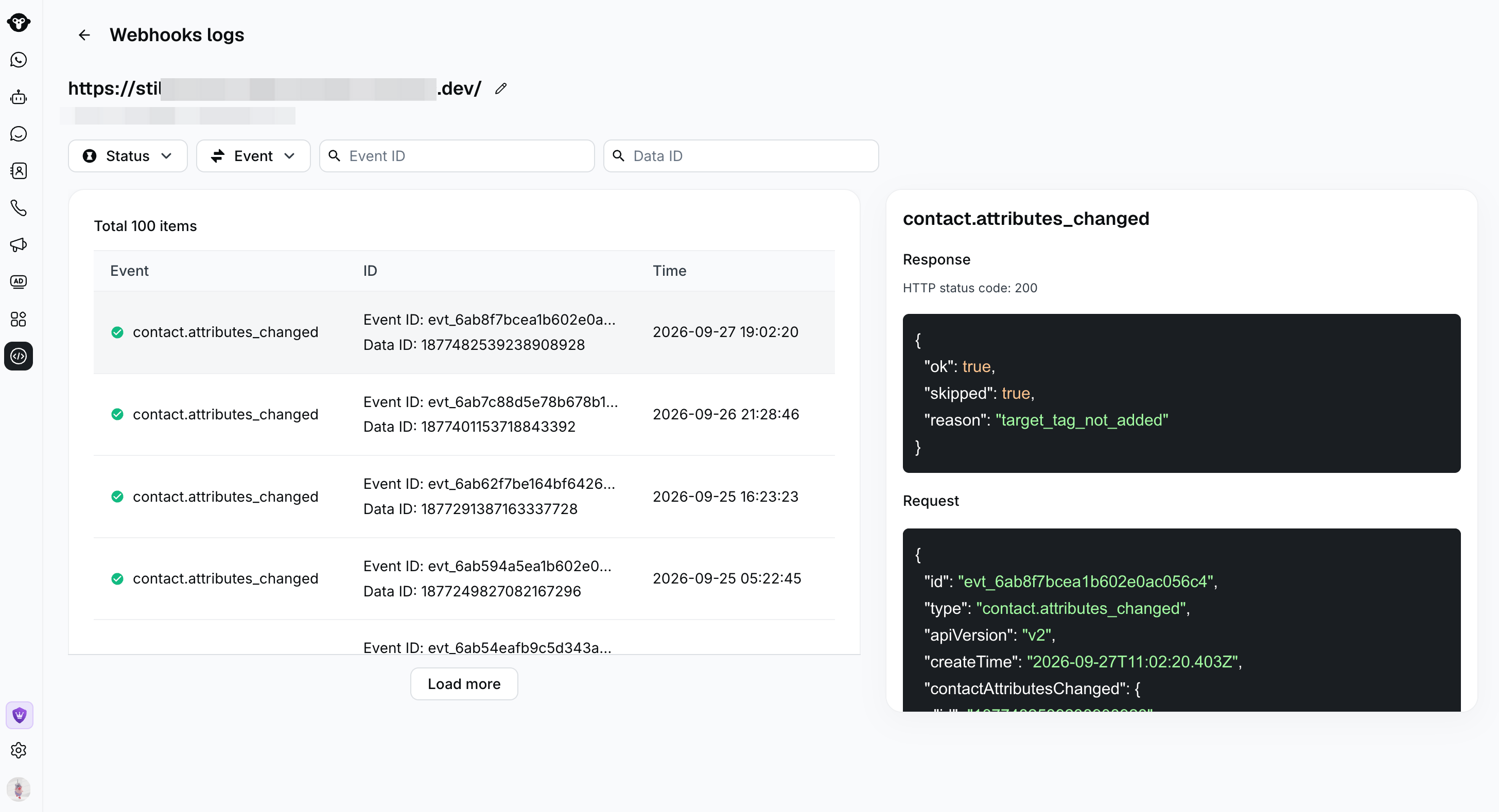
- Use one or more filters to find the delivery attempt:
- Status: Show successful or failed deliveries.
- Event: Filter by webhook event type.
- Event ID: Search for a specific YCloud event ID.
- Data ID: For message events, enter the message ID to find its delivery record.
- Select a record to review the delivery time, request payload, response body, and HTTP status code.
Frequently asked questions
If I configure multiple webhook URLs, will events from every WABA in the account be sent to all of them?
Yes. Webhook endpoints configured under Developers > Webhooks are global to the YCloud account. When an event from any WABA in the account matches the configured event subscriptions, YCloud sends it to each applicable webhook URL. If you need to route different WABAs to different webhook URLs, use custom apps. A custom app lets you assign specific WhatsApp phone numbers and configure a dedicated webhook endpoint and event subscriptions for that app.What happens if all seven webhook retry attempts fail?
If your service has not recovered after the seventh retry, YCloud automatically stops retrying that event. Your system will not receive the event automatically after retries stop. After restoring your service, contact YCloud Support to request a webhook replay. Replay availability is limited: YCloud can only resend events that remain available in the system, and older historical events may no longer be eligible for replay.Error handling
Retry mechanism:
Should your service return a non-2xx status code or fail to respond, YCloud will automatically retry:- Retry schedule: 10 seconds → 30 seconds → 5 minutes → 30 minutes → 1 hour → 2 hours → 2 hours.
- Maximum retry count: 7 times.
- After 7 failures: The event will no longer be retried.
URL suspension:
To safeguard system resources, frequently failing URLs will be temporarily suspended:- Trigger conditions: 200 failures per minute or cumulative failure time exceeding 10 minutes per minute
- Suspension duration: 3 minutes
- During suspension: No webhook requests will be sent
- After suspension: Automatic restoration